by Contributed | May 10, 2021 | Technology
This article is contributed. See the original author and article here.
Guest blog by Antoinette Davis, Training Manager & Curriculum Developer for the Technology Career Program at TechBridge, Inc.

As a nonprofit, our mission is to break the cycle of generational poverty through the innovative use of technology to transform nonprofits and community impact. Our vision is to measurably alleviate poverty within communities in the United States.
My journey to education has been an interesting one as most of my background is solely in Web Development. I have always had a passion for sharing my knowledge with others, and being a part of their journey to becoming better developers. My deep dive into education, and understanding how I can make a difference in this space, began in June 2020. During this short amount of time I have had the opportunity to lead delivering AZ 900 at TCP with a current pass rate of 85%. My work does not stop here though! I am always looking for ways to better the experience for our students.
I have to stop and say thank you to my amazing team at TechBridge and my mentor, Sheena Allen, for always pushing me to be better. Because of their leadership, I have the confidence and drive to be the instructor I need to be for my students! They expect greatness from me and I expect the same from ALL students of TCP!
TechBridge was granted access to the MSLE program via Microsoft Accelerate: Atlanta; Microsoft’s initiative to help communities close the digital skills gap. With this partnership TCP added Azure Fundamentals to our curriculum in June 2020. It has shown to be a great entry level point for most of our Cloud courses. Here is what some of my students have to say about the AZ 900 course:
“I am so grateful for my wonderful support network that I found through TechBridge, Inc. & Antoinette Davis for introducing me to cloud, as it has opened up a new world for me.” – Zenaida Johnson
“I came into the Technology Career Program with little to no knowledge about technology. Having Toni as an instructor helped blaze a path towards my first certification, Microsoft Azure Fundamentals. She was a stern but fair leader. Our feedback on her teaching style was taken into consideration, followed by immediate action. She did not allow us to come to her with surface level inquiries outside of class time. You had to show proof that you dug deep within yourself and the plethora of resources provided before asking for one on one help. She had high expectations of the class and constantly reminded us that success was the only option. Success is what my peers and I have achieved under her leadership.” Christa Davoll
“Toni was my instructor for Azure Fundamentals. During my matriculation through the Technology Careers Program Toni displayed an unrivaled knowledge of the source material which allowed her to present it in an easily digestible format. Under her tutelage I went from not understanding what exactly a “cloud” was to passing my proctored exam on the first try. Without the leadership & guidance from Toni I’m not sure I would have obtained the same results and I will forever be grateful for all that she did for our class.” – Curtis Guyton
Microsoft Learn for Educators gave me the tools and training material I needed to successfully teach our Azure Fundamentals course. Our students feel prepared to enter the job market using their certificates and knowledge gained during our cohort. Our success thus far can be attributed to:
- Up-to-date information and resources provided by MSLE
- High quality reading material and hands on labs through the Microsoft Learn platform
- Freedom to customize curriculum to meet the needs of our learners (Some programs do not allow this)
- Continuous support from the MSLE team
Breaking Barriers For Our Students
Because of the mission of our non-profit, the perfect candidate for our program does not look like your typical college or “tech” student. Their ages range from 18 – 50+ and the amount of tech experience varies in every class. Most have never dealt with a computer before. Others have never heard of the cloud. For a lot of them, TCP is the first step to getting familiar with technology, and this makes our job as instructors…. interesting. The way I would talk to one of my colleagues about how the terms Virtual Machine and a server are connected, is TOTALLY different than the way I would have to teach it to one of our students.
The first step to creating success for our students is meeting them exactly where they are. Addressing the gaps in their understanding of the basics before we dig into AZ 900 content. Our AZ 900 course is normally taught in 45 hours with the first 9 hours or so being an introduction to common tech practices and the cloud in general. When I review different resources, the first question I have to ask myself is, “What terminology do I already understand because of my years of experience in this industry?” Once I am able to answer that, I have a pretty good idea of where to start. The course is taught at a very fast pace, but everyone leaves with a good understanding of all topics.
On day one we cover what an on premise solution looks like for someone with a need for a private server. They build an on premise ( private cloud ) solution, giving them insights to building complete solutions, cost, security for assets purchased, etc. I always get really weird looks when I assign this assignment! Once the students get the assignment done, and I explain how what they built in class can be done in Azure, the light bulbs start going off. We spend the next couple of days talking about the different components of their on premise solution, then we move on to Azure content starting with basic Cloud Concepts.
Thorough content and quality labs give our students an understanding of the why and how of Azure. Simple questions like: “Why do I need a VM?” & “Now that I know why, how do I spin up that resource?” is how I recommend my students approach learning the material. The goal is employment for all, and having this mindset when it comes to learning is how we get it done.
“As a former TCP student turned instructor, understanding how to effectively solve problems was a huge part of doing well in the cohort and how I deliver content now. I cannot recall the amount of errors I’ve encountered or have been clueless about how to initially solve a problem. In talking about some of her previous experience, Toni would say “I may not know the answer now, but I know where to find the answers.” I have taken on a lot of this confidence myself and stress to others how much this attitude is important in gaining success”. – Kharee Smith
Our Plans For The Future
The courses we deliver depend on what’s needed in the job market. I am constantly meeting with my team to understand the needs of our market so I can give my input on content needs and probability of success for our students. We have interest in teaching more Administrator, Developer, DevOps, and AI courses. I am personally looking forward to learning more about the Developer and DevOps tracks. Being a student first allows me to take in the content from a different perspective. Developing a curriculum for TCP students based on my own experience allows me to make our classes a little more personable. I think our students appreciate the fact that their instructor took the course before they did. We try our best to always be open to sharing how we were able to successfully pass the exam.
Our next Cloud course will begin this summer and I am super excited to continue impacting the lives of our community. The students will be challenged to learn AZ 900 Azure Fundamentals and AZ 104 Azure Administrator in 12 weeks. The goal is an 85% pass rate on both exams and employment! Want to know how they finish up? Connect with me on LinkedIn to keep up with their journey! I encourage you to sign up for Microsoft Learn for Educators (MSLE) program here.
by Contributed | May 10, 2021 | Technology
This article is contributed. See the original author and article here.
The Azure SQL and Cloud Advocacy teams at Microsoft are interested to learn how students and faculty use and perceive database technologies such as Azure SQL. The user research surveys below were created to offer school staff and students the opportunity to provide us with relevant feedback and help shape the future of data products at Microsoft:
To learn more about Azure SQL / SQL Server, below is a set of helpful resources:
Plan and implement a high availability and disaster recovery environment
Migrate SQL workloads to Azure Managed Instances
Migrate SQL workloads to Azure SQL Databases
Explore Azure Synapse serverless SQL pools capabilities
Create metadata objects in Azure Synapse serverless SQL pools
Build data analytics solutions using Azure Synapse serverless SQL pools
Migrate on-premises MySQL databases to Azure Database for MySQL
Query data in the lake using Azure Synapse serverless SQL pools
Secure data and manage users in Azure Synapse serverless SQL pools
Migrate SQL workloads to Azure virtual machines
Configure automatic deployment for Azure SQL Database
Migrate SQL workloads to Azure
Introduction to Azure SQL Edge
Getting started on Azure SQL
Azure SQL documentation – Azure SQL | Microsoft Docs
Webinar and Virtual Events
Azure SQL Fundamentals – Episode 1 – Introduction to Azure SQL
Azure SQL Fundamentals – Episode 2 – Deploy and configure servers, instances, and…
Azure SQL Fundamentals – Episode 3 – Secure your data with Azure SQL
Azure SQL Fundamentals – Episode 4 – Deliver consistent performance with Azure SQL
Azure SQL Fundamentals – Episode 5 – Deploy highly available solutions by using Azure SQL
Azure SQL Fundamentals – Episode 6 – Putting it all together with Azure SQL
by Contributed | May 10, 2021 | Technology
This article is contributed. See the original author and article here.
IoT Hub support for Azure Active Directory (Azure AD) and Role-Based Access Control (RBAC) is now generally available for service APIs. This means you can secure your service connections to IoT Hub with much more flexibility and granularity than before.
Existing shared access policy users, including users with Owner and Contributor roles on an IoT hub, are not affected. For better security and ease of use, we encourage everyone to switch to using Azure AD whenever possible.
Granular access control to service APIs
For example, you have a service the needs read access to device identities and device twins. Before, you must give this service access to your IoT hub by using shared access policy to include both the registryRead and the serviceConnect permissions. This works fine, but your service now also has permission to send direct methods and update twin desired properties (as part of serviceConnect). The unnecessary additional privileges can be used by an attacker to mess with your devices, if the credentials are compromised.
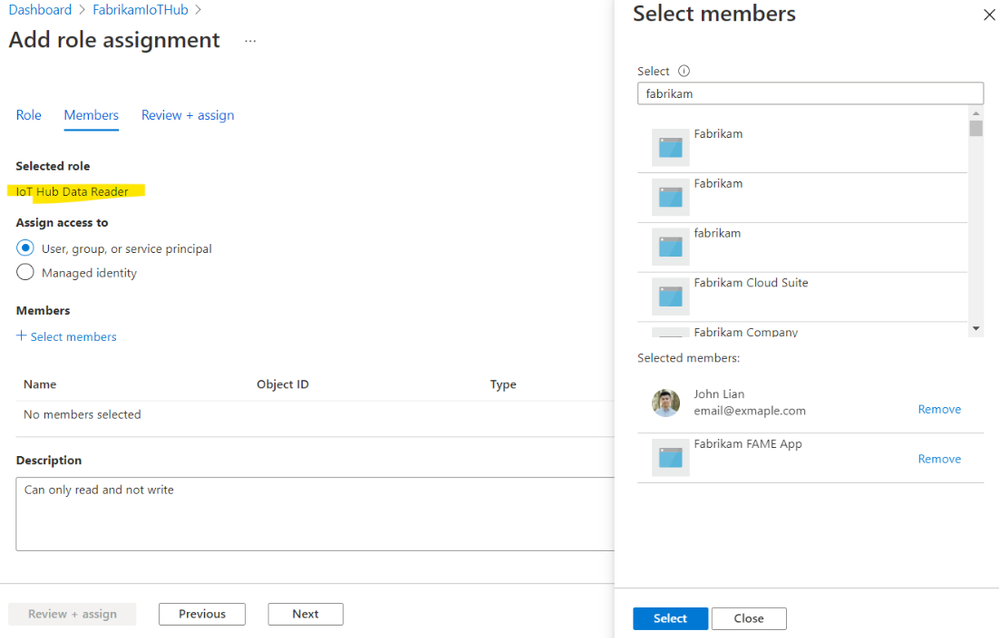
For additional security, the industry best practice is to follow the principle of least privilege. With Azure AD and RBAC support, you can grant granular permissions to achieve this. If you want your service to be able to read twins, and nothing else, assign its service principal or managed identity a role with Microsoft.Devices/IotHubs/twin/read permission. And that’s it! This service cannot update twin or send direct methods. You’ve achieved least privilege.
Getting started
To get started, grant your users, groups, service principals or managed identities roles with the new permission. The built-in roles, permissions, and links to samples are published on our documentation page Control access to IoT Hub with Azure AD.
by Contributed | May 10, 2021 | Technology
This article is contributed. See the original author and article here.
According to industry experts, threat intelligence (TI) is a key differentiator when evaluating threat protection solutions.
But IoT/OT environments have unique asset types, vulnerabilities, and indicators of compromise (IOCs). That’s why incorporating threat intelligence specifically tailored to industrial and critical infrastructure organizations is a more effective approach for proactively mitigating IoT/OT vulnerabilities and threats.
Today we’re announcing that TI updates for Azure Defender for IoT can now be automatically pushed to Azure-connected network sensors as soon as updates are released, reducing manual effort and helping to ensure continuous security[1].
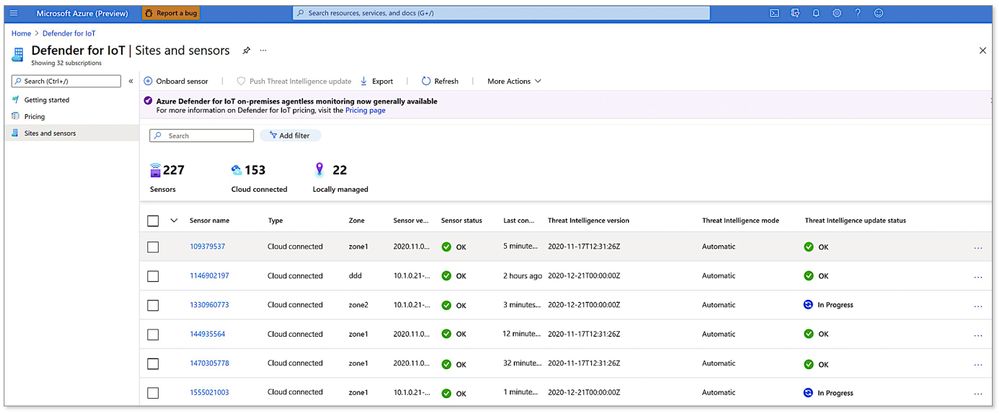
To get started, simply go to the Azure Defender for IoT portal and enable the Automatic Threat Intelligence Updates option for all your cloud-connected sensors. You can also monitor the status of updates from the “Sites and Sensors” page as shown below.
Viewing the status of network sensors and threat intelligence updates from the Azure portal
Threat intelligence curated by IoT/OT security experts
Developed and curated by Microsoft’s Section 52, the security research group for Azure Defender for IoT, our TI update packages include the latest:
- IOCs such as malware signatures, malicious DNS queries, and malicious IPs
- CVEs to update our IoT/OT vulnerability management reporting
- Asset profiles to enhance our IoT/OT asset discovery capabilities
Section 52 is comprised of IoT/OT-focused security researchers and data scientists with deep domain expertise in threat hunting, malware reverse engineering, incident response, and data analysis. For example, the team recently uncovered “BadAlloc,” a series of remote code execution (RCE) vulnerabilities covering more than 25 CVEs that adversaries could exploit to compromise IoT/OT devices.
Leveraging the power of Microsoft’s broad threat monitoring ecosystem
To help customers stay ahead of ever-evolving threats on a global basis, Azure Defender for IoT also incorporates the latest threat intelligence from Microsoft’s broad and deep threat monitoring ecosystem.
This rich source of intelligence is derived from a unique combination of world-class human expertise — from the Microsoft Threat Intelligence Center (MSTC) — plus AI informed by trillions of signals collected daily across all of Microsoft’s platforms and services, including identities, endpoints, cloud, applications, and email, as well as third-party and open sources.
Threat intelligence enriches native behavioral analytics
IOCs aren’t sufficient on their own. Enterprises regularly contend with threats that have never been seen before, including ICS supply-chain attacks such as HAVEX; zero-day ICS malware such as TRITON and INDUSTROYER; fileless malware; and living-off-the-land tactics using standard administrative tools (PowerShell, WMI, PLC programming, etc.) that are harder to spot because they blend in with legitimate day-to-day activities.
To rapidly detect unusual or unauthorized activities missed by traditional signature- and rule-based solutions, Defender for IoT incorporates patented, IoT/OT-aware behavioral analytics in its on-premises network sensor (edge sensor).
Threat intelligence complements and enriches the platform’s native analytics, enabling faster detection of IOCs such as known malware and malicious DNS requests, as shown in the threat alert examples below.
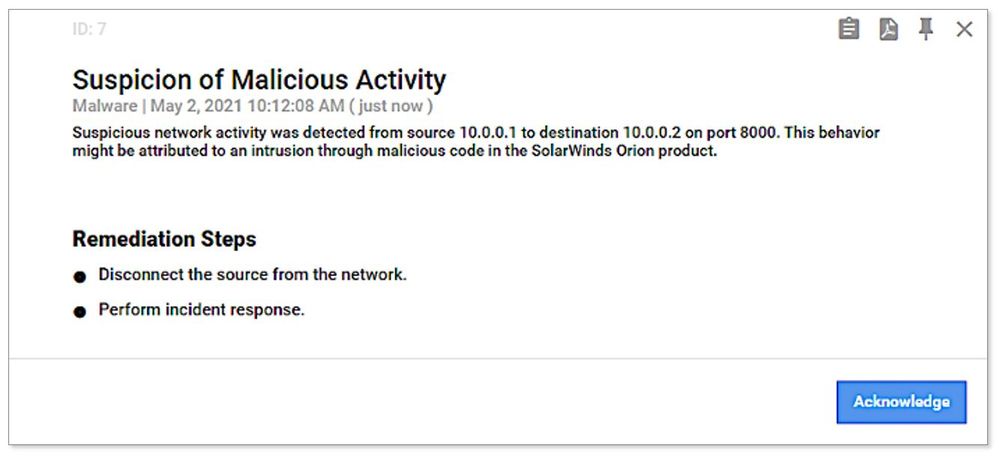 Example of SolarWinds threat alert generated from threat intelligence information
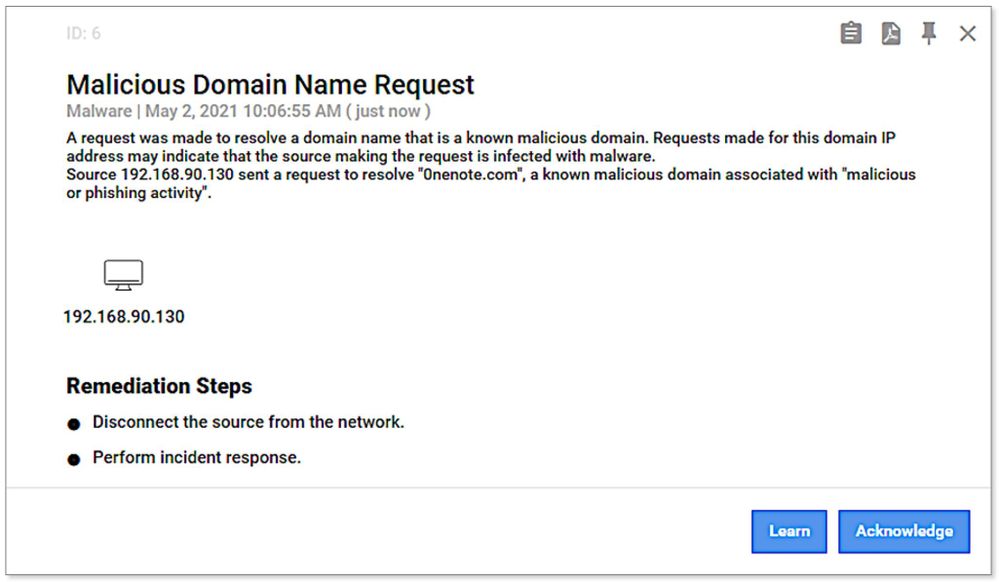 Example of malicious DNS request alert generated from threat intelligence information
Summary — Detecting Known and Unknown Threats
Effective IoT/OT threat mitigation requires detection of both known and unknown threats, using a combination of IoT/OT-aware threat intelligence and behavioral analytics.
With new cloud-connected capabilities provided with v10.3 of Azure Defender for IoT, industrial and critical infrastructure organizations can now ensure their network sensors always have the latest curated threat intelligence to continuously identify and mitigate risk in their IoT/OT environments.
Learn more
Go inside the new Azure Defender for IoT including CyberX
Update threat intelligence data – Azure Defender for IoT | Microsoft Docs
What’s new in Azure Defender for IoT – Azure Defender for IoT | Microsoft Docs
See the latest threat intelligence packages
About Azure Defender for IoT
Azure Defender for IoT offers agentless, IoT/OT-aware network detection and response (NDR) that’s rapidly deployed (typically less than a day per site); works with diverse legacy and proprietary OT equipment, including older versions of Windows that can’t easily be upgraded; and interoperates with Azure Sentinel and other SOC tools such as Splunk, IBM QRadar, and ServiceNow.
Gain full visibility into assets and vulnerabilities across your entire IoT/OT environment. Continuously monitor for threats with IoT/OT-aware behavioral analytics and threat intelligence. Strengthen IoT/OT zero trust by instantly detecting unauthorized or compromised devices. Deploy on-premises, in Azure-connected, or in hybrid environments.
[1] Of course, clients with on-premises deployments can continue to manually download packages and upload them to multiple sensors from the on-premises management console (aka Central Manager).

by Contributed | May 10, 2021 | Technology
This article is contributed. See the original author and article here.
Kahua provides project management and collaboration software focused on real estate, engineering, construction, and operations industries. Kahua’s solution helps manage project and program costs, documents, and processes from inception through implementation to improve efficiency and reduce risk.
Recently Kahua has been selected by US General Services Administration (GSA) Public Building Service for its new management information system to manage 8600+ assets, with 370 million square feet of workspace for 1.1 million federal employees and preserve 500+ historic properties.
The Challenge & Technical Requirements
Kahua needed a future-proof solution which builds on its legacy desktop application, while using C#, XAML and Azure skillsets of its developers. Kahua had a short timeline and a recurring imperative to bring new features to market quickly, on different devices – from desktop to web and mobile. In addition, Kahua’s developers wanted to reduce the time to market by maintaining a single codebase application which prevents re-implementing the same functionality for different platforms.
Due to the nature of managing access for users in high-security environments such as financial institutions and government agencies, security was a major requirement. Additionally, the solution had to enable accessibility and localization.
For users, the UI had to be modern and intuitive, providing simple onboarding and consistent, immersive experience for users on all devices.
The Solution
Kahua selected WinUI 3 – Reunion, Uno Platform and Azure to rapidly develop and deploy a multi-platform solution.
On Windows, Kahua uses WinUI 3 to deliver a delightful and modern user experience on Windows. To achieve a pure web experience, Kahua is utilizing the Uno Platform to provide a solution that is built with and runs on top of the Microsoft technology stack of Azure, .NET 5&6, and WinUI 3. To reach additional platforms such as macOS, iOS and Android, Kahua is also using Uno Platform to provide user experiences specific to mobile devices and smaller form factors.
By utilizing WinUI 3 – Reunion, Uno Platform and Azure, Kahua is meeting its requirements for security and accessibility. The Web application provides for a zero-installation experience, allowing IT departments to breathe easier and approve application updates without extensive investigation and review. Kahua can scale its operations quickly and reach users internationally.
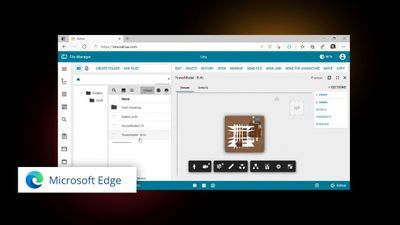
The users can access the solution on any device, be it through any modern browser or native app on the device of their choice. The user interface across devices is modern, familiar, and consistent as it is built with the same UI technology.
Code and Skill Reuse
The Kahua development team experienced 4X productivity compared to alternative solutions evaluated. New functionality is developed once, in a single codebase. The team benefited from a mature Windows developer ecosystem and skillset on hand.
The Kahua development team was able to reuse a significant amount of the code from its legacy application, as well as utilize over 45 controls from WinUI and Windows Community Toolkit as well as 3rd party controls by Syncfusion.
“By combining Microsoft WinUI 3 and Uno Platform we are able to provide our customers with features, functionality and security that is simply unachievable with any other solution” – said Colin Whitlatch, CTO of Kahua.


Recent Comments