
by Contributed | Jun 21, 2021 | Technology
This article is contributed. See the original author and article here.
Azure Maps Location and a Smart Streetlight
For those of us that live in city centers, we regularly benefit from our connected urban environment through initiatives that are making our cities “smarter”. From the Azure IoT & Maps perspective, we look at this same benefit from the other direction. What does it mean for one location in a city to be made smarter and what are the benefits we get without maybe realizing it? To illustrate this, let us look at the typical upgrade path from a traditional streetlamp to a Smart streetlamp.
|
What are the things a streetlight can do that are autonomous?
The simplest examples of this would be using a more efficient bulb and adding an ambient light sensor so that energy is not spent lighting a bulb, even an efficient LED bulb, if it is not needed. Other environmental sensors such as temperature and humidity could allow the lamp to decide not to operate if it is too hot or too moist. However smart it may seem to be, this autonomous light would still require someone to report any failures and for it to be checked on a regular basis.
|

|
What are the benefits we can realize quickly if that streetlight, with these simple sensors, is now connected?
If the bulb fails or light chooses not to function correctly, for a reason such as it is too hot or too humid, an alert can be sent to have the light serviced. If the smart streetlight loses connectivity, it can still operate autonomously but an alert can be generated at the reporting center that this smart device has stopped communicating and should be checked. A connected device can decide how often it wants to report but it can also be asked for status as needed. This bi-directional communication completely removes the need to check a device unless there is a reported reason to do so saving time, resources, and money!
|

|
What are extra benefits we can realize if that streetlight has sensors added that go beyond the function of the streetlight itself?
Some cities have chosen to add microphones and listen for abnormal sounds such as a gunshot. Based on the decibels of the sound at various smart streetlamp locations, police and ambulance resources can be sent close to where the sound originated. In higher traffic regions, a camera may also be added for extra security and information gathering.
|
In all cases, it is important to know where the lamp is located and that is where Azure Maps pulls it all together.
If you would like to dig deeper into Smart Devices, Azure IoT and Azure Maps, I have the following recommended links:
Thank you for your interest in Azure Maps. If you have any questions feel free to post them in our Q&A section, we are here to help!
by Contributed | Jun 21, 2021 | Technology
This article is contributed. See the original author and article here.
Jeremy and Paul talk with Brian T. Jackett about the Graph Connectors API.
https://www.podbean.com/player-v2/?i=ms7mb-106d50d-pb&from=pb6admin&share=0&download=0&rtl=0&fonts=Courier%20New&skin=1&btn-skin=6
Listen to the show here: Microsoft Graph Connectors with Brian T. Jackett (m365devpodcast.com)
Links from the show:
Microsoft News
Community Links
by Contributed | Jun 21, 2021 | Technology
This article is contributed. See the original author and article here.
By Per Larsen – Sr. Program Manager | Microsoft Endpoint Manager – Intune
How to manage compliance policies on HoloLens devices is one of the most common questions we get from customers as they start to manage their HoloLens fleet with Microsoft Endpoint Manager.
Compliance policies are used to mark the device compliant or non-compliant, which can be used in conjunction with Azure Active Directory (Azure AD) Conditional Access to allow or block access to corporate data.
Microsoft Intune as a capability of Endpoint Manager, uses Configuration Service Providers (CSPs) to control and verify many of the settings in the compliance policy, so those CSP’s need to be supported on the HoloLens. You can find out more about supported CSPs in the Policies in Policy CSP supported by HoloLens 2 document.
Note:
Configuration Manager Compliance is not supported with Hololens devices. The ConfigMgr agent is a Win32 app, and Win32 apps cannot run on a HoloLens device.
HoloLens 2 runs the Windows Holographic Operating System, which is not the same as Windows 10 Desktop, and therefore some capabilities (like win32 apps) do not exist in this platform.
|
The same compliance policy is used for Windows 10 desktop and HoloLens in Microsoft Intune, however some settings supported for Windows 10 are not available for HoloLens. This is similar to how BitLocker and HoloLens work.
HoloLens 2 has BitLocker Device Encryption enabled automatically on the operating system and fixed data volumes and cannot be turned off – even by IT administrators – so that the device is always protected.
Settings available for HoloLens:
|
Can you use the profile?
|
Device Health
|
|
Require BitLocker
|
Not applicable
|
Require Secure Boot to be enabled on the device
|
Not applicable
|
Require code integrity
|
Not applicable
|
Device Properties
|
|
Operating System Version
|
Yes
|
Minimum OS version
|
Yes
|
Maximum OS version
|
Yes
|
Minimum OS version for mobile devices
|
Not applicable
|
Maximum OS version for mobile devices
|
Not applicable
|
Valid operating system builds
|
Yes
|
Configuration Manager Compliance
|
|
Require device compliance from Configuration Manager
|
Not applicable
|
System Security
|
|
Password
|
|
Require a password to unlock mobile devices
|
Yes
|
Simple passwords
|
Yes
|
Password type
|
Yes
|
Minimum password length
|
Yes
|
Maximum minutes of inactivity before password is required
|
Not applicable
|
Password expiration (days)
|
Yes
|
Number of previous passwords to prevent reuse
|
Yes
|
Require password when device returns from idle state (Mobile and Holographic)
|
Yes
|
Require encryption of data storage on device.
|
Not applicable
|
Device Security
|
|
Firewall
|
*
|
Trusted Platform Module (TPM)
|
Yes
|
Antivirus
|
Not applicable
|
Antispyware
|
Not applicable
|
Defender
|
|
Microsoft Defender Antimalware
|
*
|
Microsoft Defender Antimalware minimum version
|
*
|
Microsoft Defender Antimalware security intelligence up-to-date
|
*
|
Real-time protection
|
*
|
Microsoft Defender for Endpoint
|
|
Microsoft Defender for Endpoint rules
|
|
Require the device to be at or under the machine risk score
|
*
|
Can you use the profile?
Yes = The settings will work on HoloLens
Not applicable = Will show as Not applicable in the compliance status
* = Settings are not included in the supported list of CSP for Windows Holographic for Business
How to deploy a compliance policy to HoloLens
Scenarios drive whether you deploy your compliance policy to users in user groups or devices in device groups. When a compliance policy is deployed to a user, all the user’s devices are checked for compliance.
Example Scenario 1
Let’s take a HoloLens device that is enrolled into Intune by the Windows Autopilot self-deploying mode process and automatically put in KIOSK mode. When onboarded with Autopilot the device is enrolled . In this case, we recommend deploying your compliance policy to a device group. This can be done with an Azure AD static or dynamic group. You can populate a dynamic group with HoloLens devices by using a device attribute where “Model” is “HoloLens 2” or by a Group Tag set on the Autopilot object.
Example Scenario 2
You have a group of users that use both Windows 10 Desktop devices and HoloLens 2 devices. In this case, the same Intune compliance policy will be applicable to both devices. It therefore makes sense to deploy your compliance policy to a user group. Any setting that is not applicable on the HoloLens 2 can mark the device non-complaint.
Create the compliance policy
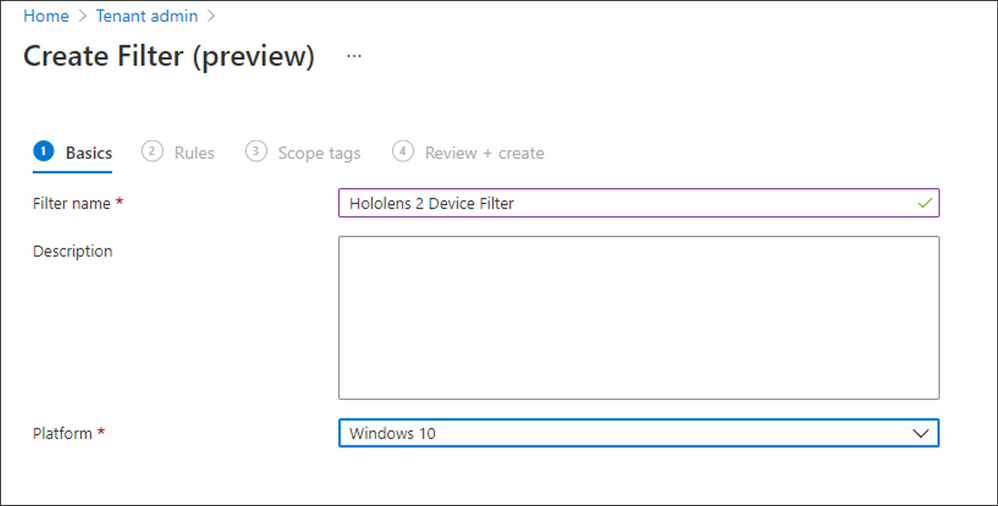
First, create a Filter to include or exclude HoloLens 2 devices when using user-based targeting:
- Navigate to Tenant admin > Filters (preview) > Create, choose a Filter name.
- From the Platform dropdown field, select “Windows 10” and click Next.
- Complete the Rules section as follows, then click Next.
- Property = Model
- Operator = Equals
- Value = HoloLens 2
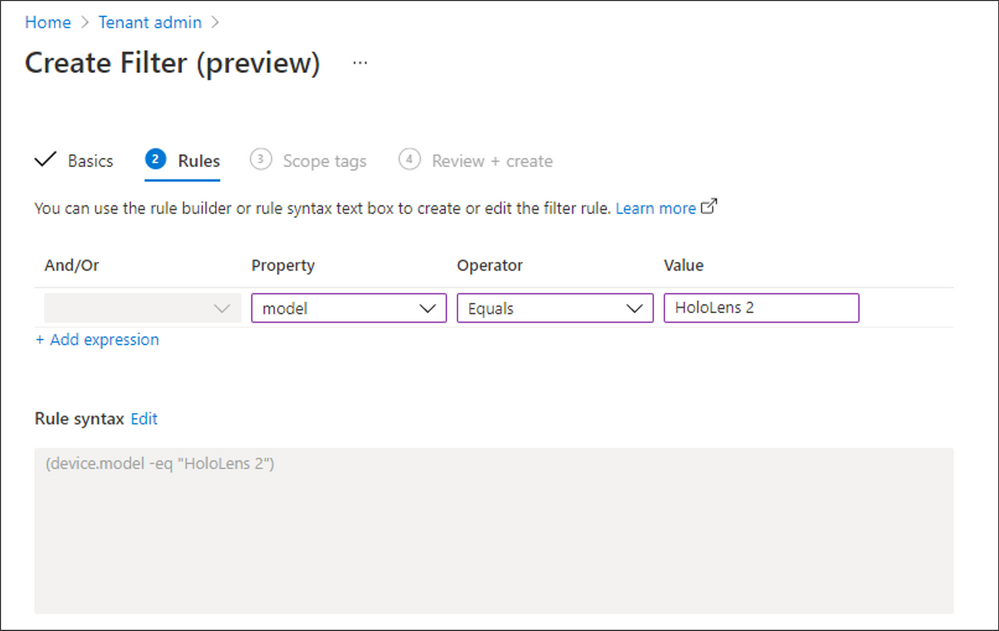
- Lastly, assign Scope tags if required, review your configuration, and then click Create.
Next, create the associated compliance policy:
- Navigate to Devices > Windows > Compliance policies and select Create Policy.
- Start by creating a simple compliance policy for your HoloLens devices, such as the following example:
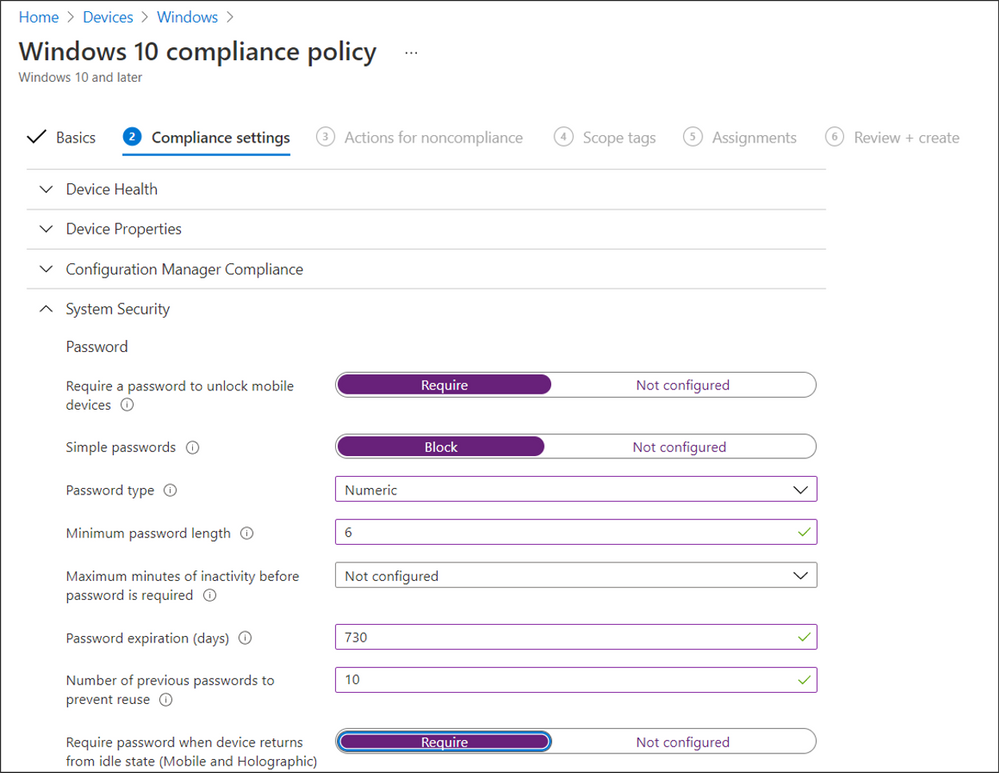
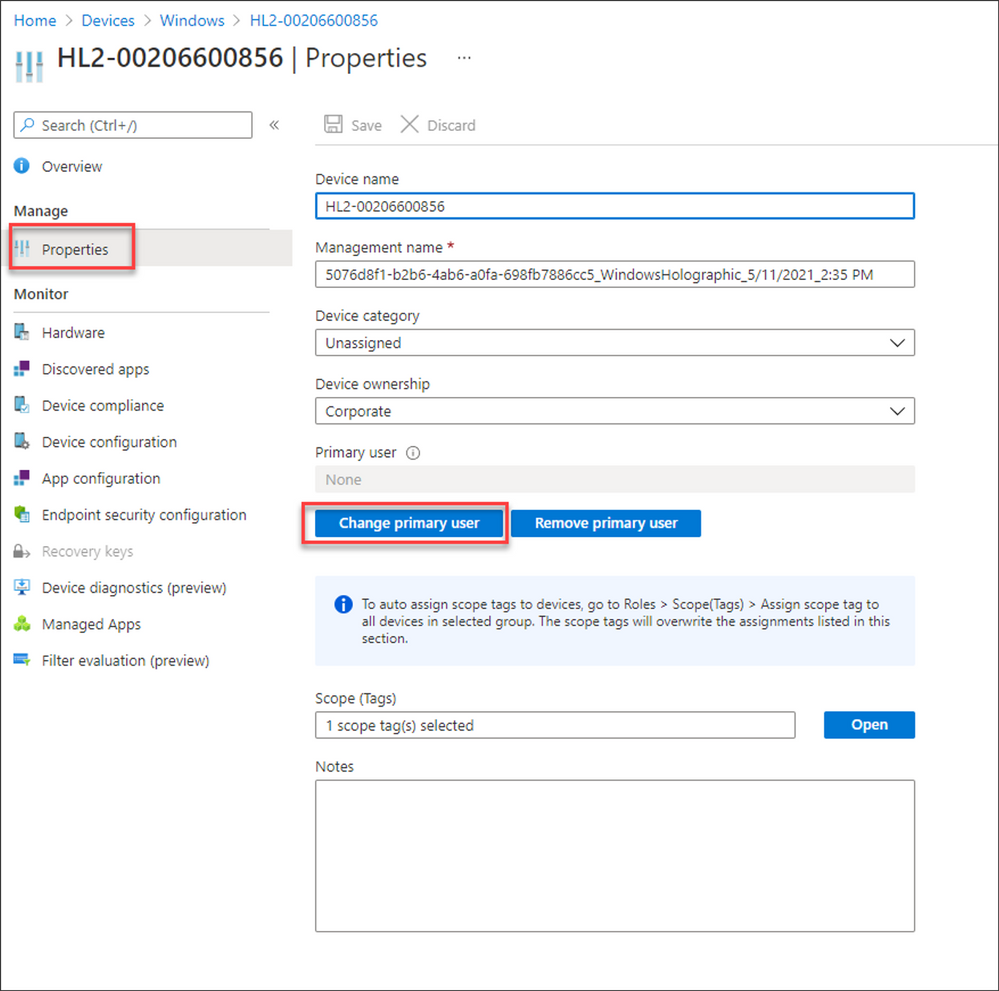
Note that there is no primary user when a HoloLens 2 device is onboarded with Autopilot for HoloLens, as shown in the following image:
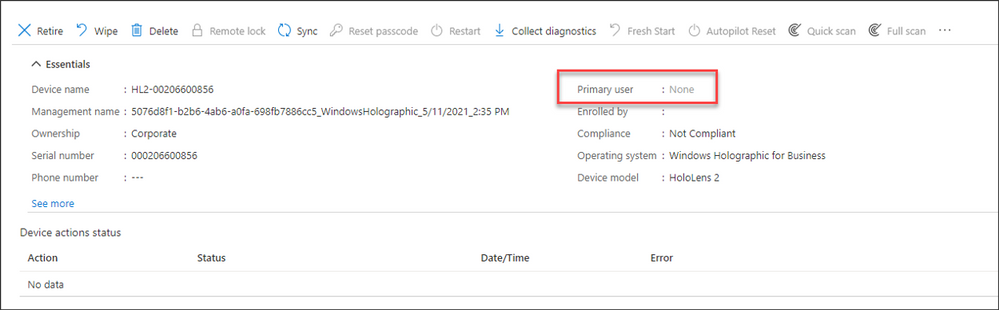
If a primary user is not identified, no one will receive an email if the compliance state of the device changes from compliant to non-compliant. You can change this by setting a primary user on the device so that Intune can send an email notification:
- Navigate Devices > Windows and find the device you want to assign a primary user to.
- Select Properties, click on Change Primary user, and then select the relevant user that will receive the non-compliant notification emails.
Conclusion
As new device types like HoloLens enter your endpoint estate, it’s critical that these devices are compliant with your corporate security policies to protect organizational data. Use these policies with Conditional Access to allow or block access to company resources for HoloLens 2 devices.
More info and feedback
For further resources on this subject, please see the links below.
Manage and use different device management features on Windows Holographic and HoloLens devices with Intune
Enroll HoloLens in MDM
Windows Autopilot for HoloLens 2
Let us know if you have any additional questions by replying to this post or reaching out to @IntuneSuppTeam on Twitter.
by Contributed | Jun 21, 2021 | Technology
This article is contributed. See the original author and article here.
While the pandemic has slowed down many aspects of life, research shows that the last 18 months has accelerated digitization and the tech employment market. By 2025, Microsoft estimates that 149 million new jobs will be added in technology industries. Leading those gains will be 98 million new software development jobs and 23 million cloud and data roles.1
To help those around the world prepare for this growth, Microsoft’s skills initiative offers free training content and discounted certifications, and has helped over 30 million people in 249 countries and territories gain access to essential digital skills. As part of our ongoing #ProudToBeCertified blog series, we’d like to introduce you to Ricardo Lessa and how he went beyond personal advancement during the COVID crisis.
Ricardo: Helping others starts with helping yourself
Ricardo Lessa has a history of resilience and self-motivation. When he came out of the datacenter, Ricardo launched his career as an entrepreneur. For about a decade, he ran his own company until the pandemic struck in 2020. When the pandemic started, “My sources of income were literally cut off,” says Ricardo. He was forced to close his business. Searching for new opportunities, a Microsoft MVP and colleague introduced him to the power of certification through Microsoft Learn.
Making the most of available resources, Ricardo was able to earn Microsoft Certifications that helped him land a job as a pre-sales engineer. And that’s just the beginning. Certification is more than a credential; it’s a personal confidence builder, as Ricardo explains, “the term ‘proud to be’ is the sense of accomplishment for getting the job done, for having completed a stage, for having progressed, for truly scoring a win. And, on a personal level, it greatly improves our focus, our discipline and, consequently, our results.”
Ricardo was inspired by how his colleague’s advice had made a real impact on his career. So, they joined forces and found a way to help others in similar circumstances. “This situation and its demands inspired us to do something new – something unique,” he says. And together, they began a new technical support community: CloudExpert, an online network of support, training, and resources for professionals designed to get members trained to progress on their career paths. The goal of this network is to help peers rekindle their dreams and get back in the job market sooner than later.
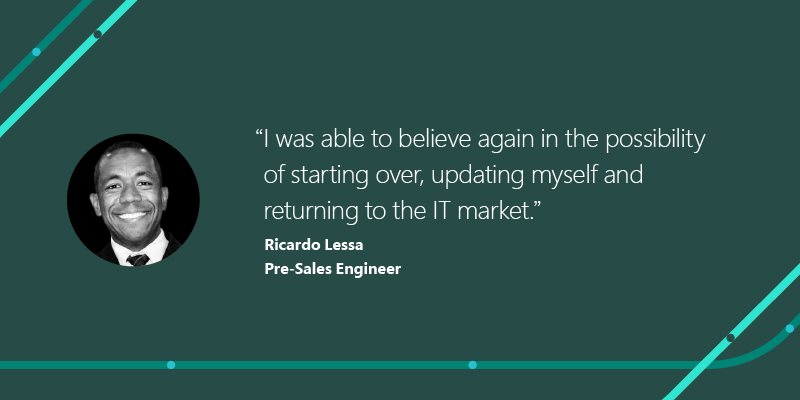
By creating this new support system for others, Ricardo discovered more about himself than he ever imagined. “I was able to believe again in the possibility of starting over,” Ricardo says, “updating myself and returning to the IT market. I dreamed that I could influence others so that they can overcome hardship and believe in a new beginning. And it happened!”
Share your #ProudToBeCertified stories and opportunities
Like Ricardo’s initiative, the Microsoft Certification community can help you and your peers move forward, no matter how the world changes around you. Keep an eye out for more stories in this #ProudToBeCertified blog series and the latest videos – where people like you are dedicating themselves to continuing education to get an edge in our competitive and changing market.
Have a Microsoft Certifications story to share? We’d love to hear how you got started on your path, where it took you, the obstacles you overcame, or the confidence you gained from earning your first or fifteenth certification. Submit your own on Twitter, LinkedIn, or your preferred platform with #ProudToBeCertified.
Related posts:
1Microsoft Data Science, utilizing LinkedIn Data. Methodology and assumptions can be found in the white paper “Methodology: Digitization Capacity of the World Economy.”
2Official Microsoft Blog, “Building a more inclusive skills-based economy: The next steps for our global skills initiative,” Brad Smith, March 30, 2021
by Contributed | Jun 21, 2021 | Technology
This article is contributed. See the original author and article here.
Most enterprises rely on a multitude of vendors, security solutions, and IT tools to combat advanced cyber-attacks. At Microsoft, we believe that when these solutions work well together, customers benefit and can build stronger defenses.
That’s why we are excited to announce the general availability of a new integration between Microsoft threat and vulnerability management and ServiceNow Vulnerability Response (VR). The integration between these two products gives customers more flexibility in managing the end- to-end workflow of their vulnerability management program and aims to:
- Optimize vulnerability prioritization
- Automate response workflows
- Speed up overall time to remediation
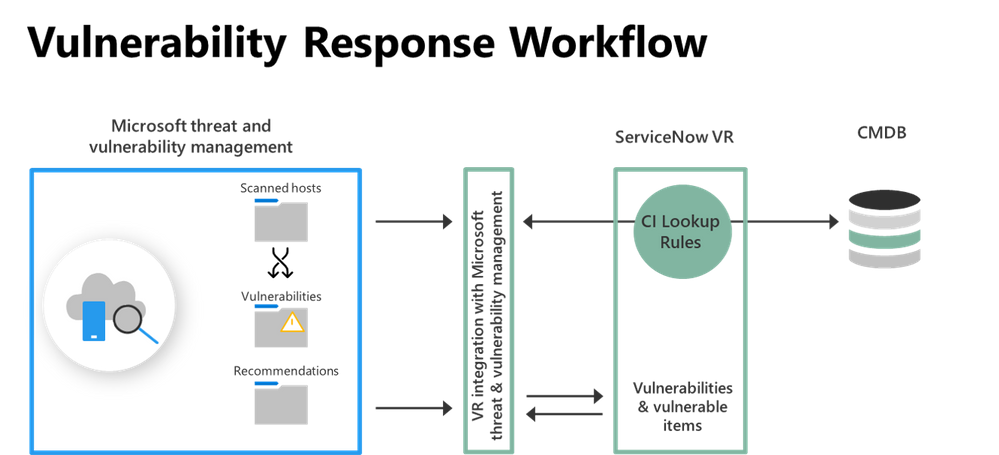
ServiceNow’s VR module ingests asset information, data of open and fixed vulnerabilities, as well as recommendations from Microsoft threat and vulnerability management. It syncs these findings into VR tables and data structures, where vulnerabilities are matched against existing assets in your CMDB or creates a new Configuration Item (CI) if no match is found. The integration leverages standard Vulnerability Response data import and CI reconciliation methods.
Image 1: Vulnerability Response Workflow Diagram
The diagram above shows the import of vulnerability assessment content from Microsoft threat and vulnerability management into ServiceNow VR to orchestrate the remediation workflow of vulnerabilities.
Once ServiceNow VR has ingested information from Microsoft threat and vulnerability management, security teams can start with a top-level view of the ingested data or dive deep using various views. Some of the available views include vulnerability groups, vulnerable items, and security recommendations taken directly from Microsoft threat and vulnerability management.
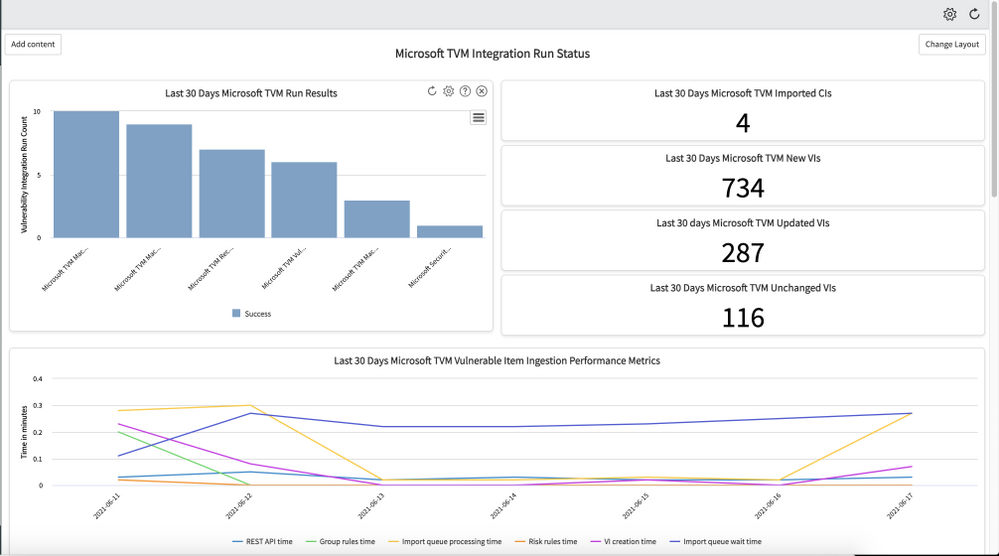 Image 2: Integration run status dashboard
Image 2 shows an all-up integration run status and details of how much data has been ingested over the last 30 days. The included timeline shows performance metrics over the same period.
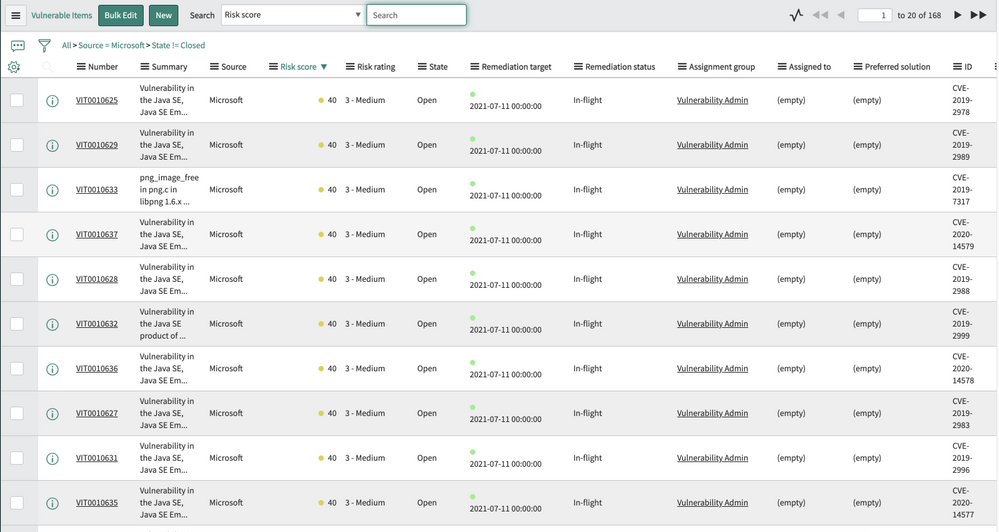 Image 3: Overview of ingested vulnerable items
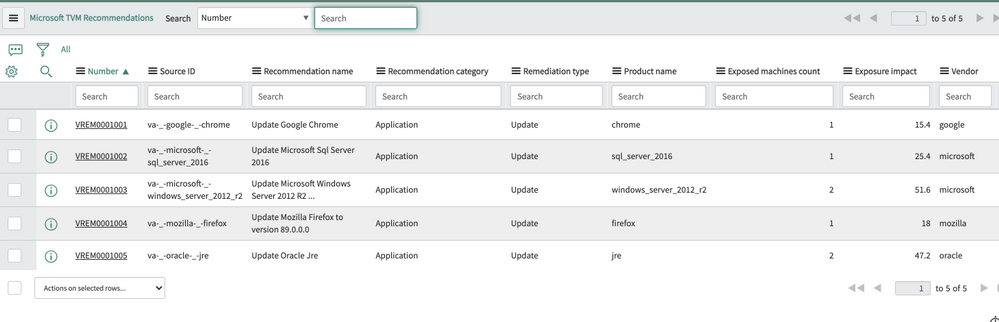 Image 4: Overview of Microsoft threat and vulnerability management security recommendations
As part of the remediation workflow, ServiceNow VR prioritizes vulnerabilities using asset and business context, along with vulnerability risk scores. The risk score and rating take the vulnerability information and configuration item into account. Security teams can customize the risk calculator based on their organization’s preferences and requirements, optimizing the prioritization of vulnerabilities.
Users can then investigate each vulnerability and associated details within the ServiceNow console.
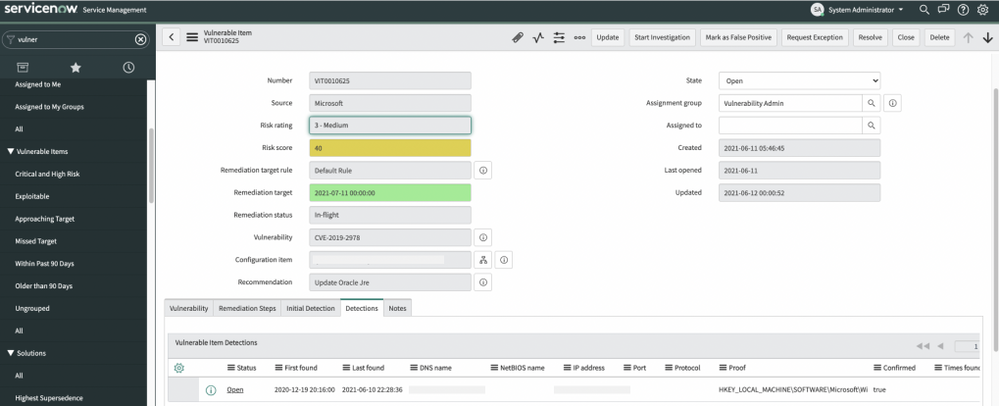 Image 5: Details view of vulnerable items
Lastly, ServiceNow VR provides a grouping of vulnerabilities based on the Microsoft recommendations and automatically assigns tickets to the relevant IT owners and sets the SLAs using predefined rules. This enables customers to use existing workflows and established processes in their organization and create an end-to-end process across the vulnerability management program.
The integration between Microsoft threat and vulnerability management and ServiceNow VR can help security teams create more automated remediation workflows and drive efficiencies with their IT counterparts.
An added focus on interoperability
Microsoft threat and vulnerability management APIs empower security teams to deliver greater value to their vulnerability management program. The set of APIs that was used to build the ServiceNow integration gives customers and partners full access to the threat and vulnerability management dataset, including:
- Vulnerability assessment
- Security configuration assessment
- Software inventory for all devices
If you want to know how to use these APIs to create custom reports, build automations, and more, check out this blog post.
As we continue to expand the depth and breadth of Microsoft’s vulnerability management capabilities, our team is focused on building a broad ecosystem of integration partners. We understand that our customers have existing investments and established processes to run their security and IT operations and we want to ensure our products support these requirements. If you would like to see additional integrations within Microsoft Defender for Endpoint, go to the Partner Application page in the Microsoft Defender Security Center, and click Recommend other partners.
More information and feedback


Recent Comments