
by Contributed | Oct 19, 2021 | Business, Microsoft 365, Technology
This article is contributed. See the original author and article here.
When the working world split between those who could work from home and those who could not, the frontline transformed beyond anyone’s expectations. Frontline workers—the associates at the forefront of your customer interactions, the clinicians delivering patient care, and those running your operations on the ground—have long been underserved by technology and are only now…
The post 3 ways to support frontline workers in a hybrid world appeared first on Microsoft 365 Blog.
Brought to you by Dr. Ware, Microsoft Office 365 Silver Partner, Charleston SC.
by Contributed | Oct 18, 2021 | Technology
This article is contributed. See the original author and article here.
Intro
Log Analytics continues it’s journey to improve and fine tune our experiences.
One of the core Log Analytics experiences is the ability to save, share and re-use queries.
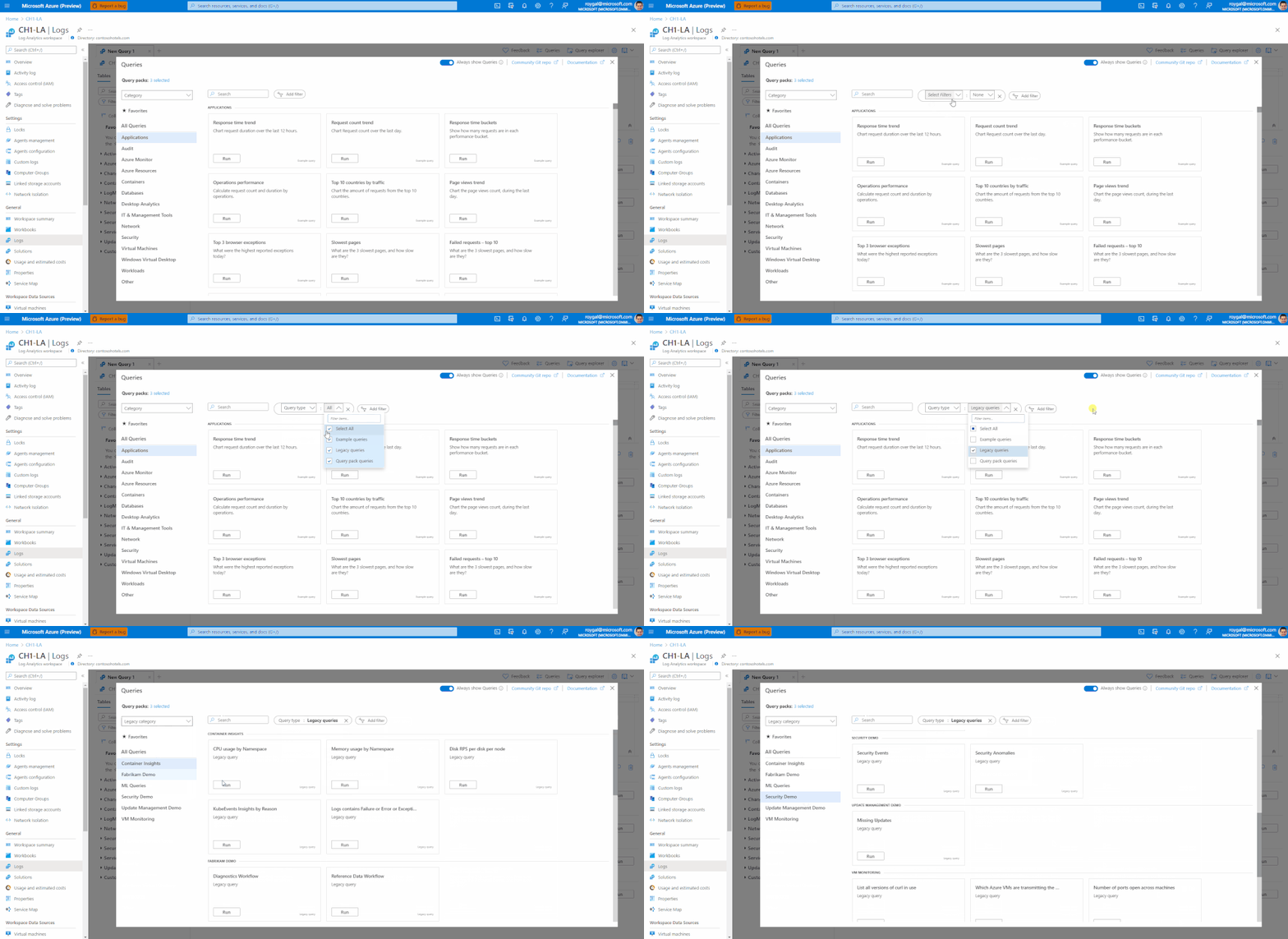
We have recently invested in updating and upgrading our query experience with a new modern UI.
Today we are happy to announce that all of our query experiences will be consolidated in the same UI – allowing a single experience for all types of queries in Logs.
Query Explorer
Query explorer’s functionality is now available in our new query experience only.
The query explorer experience is fully replaced by the new UI.
Please note, there’s no change to any of the API experiences – so everything ‘simply works’, there’s no investment nor changes needed to enable the new experiences.
The new Query Experiences
All Log Analytics experiences have been consolidated to a new, modern UI in the Logs blade.
See the following articles for additional details:
1. Log Analytics Legacy Queries in the new Query UI
2. Legacy Queries Save/Edit Experience
Query packs
Alongside supporting our Legacy Queries, the team has recently introduced a new way for saving, sharing and managing queries in Log Analytics- Query packs.
Using Query packs to save and manage your queries has a lot of advantages over using Legacy Queries. to name a few:
1. Resource centric queries – Legacy Queries only work in Log Analytics workspaces and Application insights and are attached only to one workspaces/AI component. Query packs may be used in all Log Analytics context and may be shared between different resources.
2. Rich metadata and smart filtering – Query packs queries contain rich metadata allowing more control over the queries and easier management and discovery experiences.
3. Enhanced security – Query packs are ARM objects. As such, you may manage access and security at the query pack level
4. Manage queries using code – Query packs API supports advanced deployment and management of your query packs and queries.
We recommend using query packs to manage your Log Analytics queries.
To learn more about query packs – click here.
Feedback
We appreciate your feedback! comment on this blog post and let us know what you think of the this change.
You may also use our in app feedback feature to provide us with additional feedbacks:

by Contributed | Oct 15, 2021 | Technology
This article is contributed. See the original author and article here.
In this episode of Data Exposed with Julie Koesmarno, we will give you a sneak peek of what’s new in Azure Data Studio. In this demo, Notebook view simplifies the workflow for your notebook consumers. At Microsoft, we continuously strive to come up with practical ideas that help our customers. With that, we have also been experimenting with converting a couple of highly used SQL Server docs to Notebooks.
Watch on Data Exposed
Resources:

by Contributed | Oct 15, 2021 | Technology
This article is contributed. See the original author and article here.
Microsoft Viva Topics brings knowledge to workers in the apps they use every day. We’re continuing to build new capabilities for Viva Topics. Our most recent update is integration with Yammer.
Yammer integration
Yammer is integrating with and adopting Viva Topics to make community-sourced knowledge easily accessible across an organization and support a consistent experience in Microsoft 365. Among others, this provides the following benefits for an organization:
- Topics will mean and refer to the same subject – whether in Yammer, Viva Topics, or elsewhere in Microsoft 365.
- Premium Viva Topics experiences like topic cards will show in Yammer.
- Premium Viva Topics experiences like pages and cards will include content from Yammer such as questions and answers, and conversations.
- Topics can be managed centrally.
- Permissions can be managed for who gets to create or edit topics.
Users with the appropriate licensing will see topics in Yammer enhanced with Viva Topics experiences, such as topic cards, while unlicensed users can continue to use topics in Yammer the way they are used to. Only Yammer networks in Native Mode networks are eligible for the premium Viva Topics experiences. Learn more about the Yammer Topic API changes in this article.
We’ll continue to expand Microsoft Viva’s capabilities. Keep an eye out for new blog posts or register for our newsletter to stay up to date on the latest feature releases.
by Contributed | Oct 14, 2021 | Technology
This article is contributed. See the original author and article here.
We’re happy to announce the addition of the Azure Cosmos DB Developer Specialty certification to our portfolio, to be released in mid-November 2021.
This new certification is a key step for developers who are ready to prove their expertise supporting their organization’s business goals with modern cloud apps. IT environments where application infrastructure is dated, rigorous, and specialized often cost developers valuable time and resources. Business-critical modern apps require scale, speed, and guaranteed availability, and they need to store ever-increasing volumes of data—all while delivering real-time customer access. Developers who work with Azure Cosmos DB find the tools and security they need to meet these requirements and more to meet today’s business challenges.
Is the Azure Cosmos DB Developer Specialty certification right for you?
You’re a great candidate for the Azure Cosmos DB Developer Specialty certification if you have subject matter expertise designing, implementing, and monitoring cloud-native applications that store and manage data.
Typical responsibilities for developers in this role include designing and implementing data models and data distribution, loading data into a database created with Azure Cosmos DB, and optimizing and maintaining the solution. These professionals integrate the solution with other Azure services. They also design, implement, and monitor solutions that consider security, availability, resilience, and performance requirements.
Professionals in this role have experience developing apps for Azure and working with Azure Cosmos DB database technologies. They should be proficient at developing applications by using the Core (SQL) API and SDKs, writing efficient queries and creating appropriate index policies, provisioning and managing resources in Azure, and creating server-side objects with JavaScript. They should also be able to interpret JSON, read C# or Java code, and use PowerShell.
Developers interested in earning this new certification need to pass Exam DP-420: Designing and Implementing Cloud-Native Applications Using Microsoft Azure Cosmos DB, which will be available in mid-November 2021. If you’re a skilled Azure developer who has experience with Azure Cosmos DB, we encourage you to participate in the beta. Stay tuned for the announcement.
Start preparing now for the upcoming beta exam
Even though the exam won’t be released until November 2021, you can start preparing for it now:
Unlock opportunities with Azure Cosmos DB
Are you ready to take your skills to the next level with Azure Cosmos DB? Get ready for Exam DP-420 (beta) and earn your Azure Cosmos DB Developer Specialty certification. Validate that you have what it takes to unlock business opportunities with modern cloud apps—for you, your team, and your organization.
Related posts
Finding the right Microsoft Azure certification for you


Recent Comments