by Contributed | Mar 9, 2021 | Technology
This article is contributed. See the original author and article here.
Authored with Anisha Gupta, Product Manager, Microsoft Cloud App Security
Digital transformation has been accelerated by remote work. The result is that many of our toughest security challenges have risen to the surface. Our traditional perimeter-based network and security models can’t adapt as quickly to this massive, fast shift. Many organizations are struggling to support permanent hybrid work models. For them, establishing secure access outside the corporate network is critical and remains elusive. As employees’ transition to these work models, they’re unintentionally bringing new risks and threats—for example, when accessing corporate resources from personal and unmanaged devices. It’s a challenging landscape that security teams are expected to manage.
In 2020, the Microsoft Threat Intelligence Center reported a 230% increase in password spray attacks alone, and observed over 5 billion attacker-driven sign-ins. As our cloud services evolve, threats also evolve. It’s clear that a new approach to security is required. Thankfully, security admins can leverage secure access in Microsoft Cloud App Security to remediate against this increasing threat landscape.
Your cloud access security broker (CASB) should provide secure, easy and adaptive access to your organization’s apps depending on factors like location, device and user behavior. Adaptive access affirms the security measures your organization has put into place. This brief two-minute video demonstrates the flexibility of secure access in Microsoft Cloud App Security:
will summarize Conditional Access App Control and celebrate an exciting new capability which provides continuous adaptive access.
Background: Conditional Access App Control in Microsoft Cloud App Security
Microsoft Cloud App Security enables admins to enforce real-time monitoring and controls on actions performed within a session. These controls can be configured through either a single checkbox integration with Azure AD Conditional Access or a quick set-up wizard with 3rd party identity providers. Based on access conditions, like the identity source, the device being used, or the risk level of the user, the user actions can be explicitly allowed or blocked.
Adaptive Access: step-up authentication
Today, we’re excited to introduce a powerful new administrative control: a policy action for in-session step-up authentication. The announcement of this feature shifts the paradigm from only enforcing security checks at the entrance to a session, to the adaptive enforcement of those same conditions in the session. In partnering with Azure AD, Microsoft Cloud App Security has enabled admins to configure Conditional Access authentication context and apply it to in-session activities. In-session actions, like the download of sensitive information, can now be required to pass through an additional security check, such as an MFA challenge or device compliance check, before a user can access data.
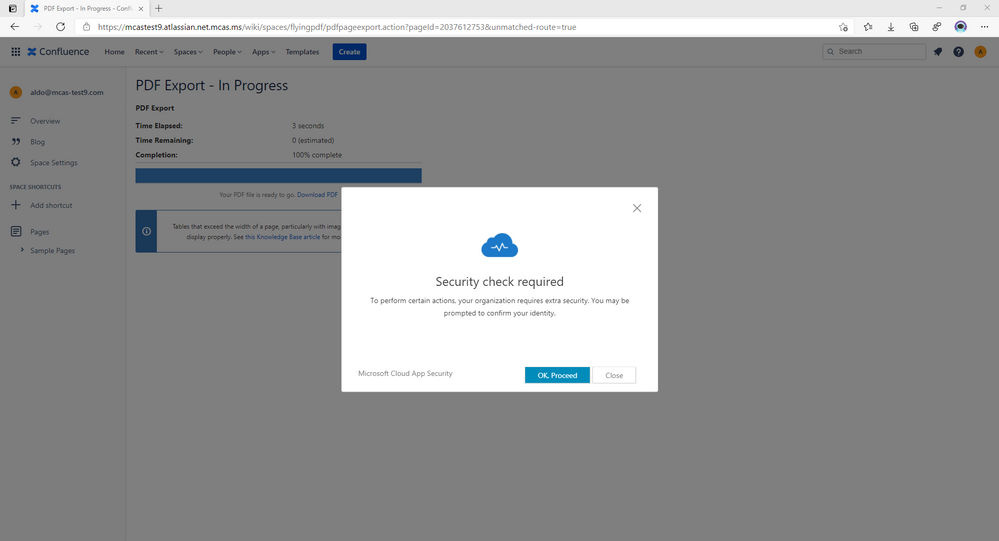
This feature re-evaluates Azure AD Conditional Access policies in real-time when a sensitive action is performed, to mitigate the risk of changing conditions and risk. In this screenshot, we can see how the new feature is expressed as a secondary security check, required as the user attempts to download a PDF from a 3rd party app on an unmanaged device:
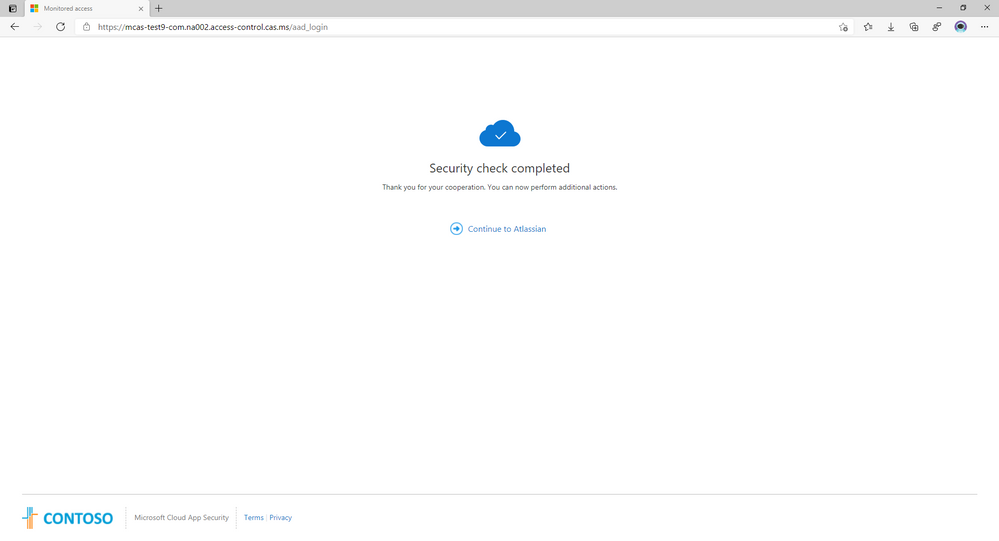
After the security check is complete, the user receives an on-screen result of the check:
What to do next
We invite you to take these scenarios and adapt them to your organizational needs. This grants visibility into your cloud environment for all your apps. For onboarded and sanctioned apps, the Cloud App Security team recommends that admins apply access and session controls. Leveraging advanced scenarios like access and session controls, Azure AD User Risk or in-session step-up authentication, in accordance with your organization’s environment security goals, is the next step toward a secure posture management of sessions. For unsanctioned apps, the recommended first step is to block the application at the endpoint with a policy, or utilize the Microsoft Cloud App Security Endpoint CASB tools. In either scenario, the two layers of cloud and identity determine the best way to deploy secure adaptive access in your environment.
Organizations can easily, flexibly block any app from access by the end user. Users can effectively use their time, unencumbered by security and compliance concerns because they are already being protected by adaptive access scenarios. An integrated set of solutions from Microsoft work in concert across your security stack.
For further training or information, view Anisha’s twenty-minute discussion on secure access in Microsoft Cloud App Security:
Feedback
We welcome your feedback or relevant use cases and requirements for this pillar of Cloud App Security by emailing CASFeedback@microsoft.com and mention Secure Access.
Learn more
For further information on how your organization can benefit from Microsoft Cloud App Security, connect with us at the links below:
To experience the benefits of full-featured CASB, sign up for a free trial—Microsoft Cloud App Security.
Follow us on LinkedIn as #CloudAppSecurity. To learn more about Microsoft Security solutions visit our website. Bookmark the Security blog to keep up with our expert coverage on security matters. Also, follow us at @MSFTSecurity on Twitter, and Microsoft Security on LinkedIn for the latest news and updates on cybersecurity.
by Contributed | Mar 9, 2021 | Technology
This article is contributed. See the original author and article here.
Host: Bhavanesh Rengarajan – Principal Program Manager, Microsoft
Guest: Atle Skjekkeland – CEO, Infotechtion
The following conversation is adapted from transcripts of Episode 3 of the Voices of Data Protection podcast. There may be slight edits in order to make this conversation easier for readers to follow along.
This podcast features the leaders, program managers from Microsoft and experts from the industry to share details about the latest solutions and processes to help you manage your data, keep it safe and stay compliant. If you prefer to listen to the audio of this podcast instead, please visit: aka.ms/voicesofdataprotection
BHAVANESH: Welcome to Voices of Data Protection. I’m your host, Bhavanesh Rengarajan, and I’m a principal program manager at Microsoft.
Hey, Atle. Thanks a lot for joining me today to talk about information governance. Why don’t you give a quick introduction about yourself?
ATLE: Thank you, Bhavi. Nice to be here. I’m the CEO for Infotechtion, which is a consulting firm specializing in information protection and governance, especially for M365 and beyond. We have offices in the U.S., UK and Europe, and our clients are usually quite global, highly regulated companies, which we held all the information in Office 365.
BHAVANESH: Oh, that’s great. Atle, as we all know, the pandemic and the work-from-home adds an extra layer of complexity for our organization who are already dealing with a lot of digital transformation with all the data explosion to manage the data. And I know they’re trying to keep it safe and stay compliant all the time. So, how do you see organizations adapt to these changes, and what have been some of the main challenges that you’ve been hearing?
ATLE: So, I think I can try to summarize this in three main challenges and priorities. The first one is quite obvious. It’s go virtual. It’s like, okay, people need to be able to work from home. We need to scale that. And that might sound easier than it really is because it means that things like VPN, do we have enough VPNs and stuff like that for on-premise solution suddenly became an issue. It was basically not only about leveraging, therefore, Teams and making it available to anybody, but also looking at can we fast track to move to the cloud to, how do you say, ensure availability and reduce dependencies on secure logins via VPN, not terminal servers. So, go virtual was one.
Second, I would say stay safe. And stay safe, it’s not only, if you especially look at the virtual organization, those people that are now working across, perhaps not only a country but across the world, how do you ensure they find the information they need to do their job, but also that sensitive information is protected so that can’t be downloaded or shared with people it shouldn’t be shared with, and to ensure that when people work remotely, the information, the assets that the company sit on still stay safe.
And the third and perhaps last one is because many companies have had their revenue impacted, so we also see a big trend of, “Okay, how can we save money? How can we be smarter? How can we get rid of some of the stuff that we perhaps don’t need?” So, we’re seeing a lot of discussion about the ways I can reduce my operational expense.
For example, “Do I have legacy IT systems that now can be replaced with Microsoft 365? And if so, can I get that benefit quite fast, because I can’t afford for a two or three-year migration program or a replacement program? I will need to see the benefit, the cost savings within 12 months at the maximum.” So, those three things about going virtual, staying safe and secure, but also looking at we need to reduce operational cost, I would say, are perhaps the top three challenges.
BHAVANESH: Ah, okay. So, when we think about reducing operational cost, people are usually thinking about information governance as something that they do to meet compliance requirements, right? But it’s, to my knowledge, I think it’s – it’s much more than that. Can you tell me how effective information protection program can be for organizations to increase the value of those programs?
ATLE: Perhaps starting on the big picture before starting to answer your question, and how we look at it is that if you look at trying to improve customer engagement or employee engagement, or ensuring operational excellence to be more efficient, that also, like compliance, requires good information management. And information governance is basically the people across technology you put in place to manage data information. So therefore, risk is just a small piece of the possibilities.
There are many models available perhaps to look at four possible benefits of improving how you manage and protect information. First, this is adding value. What’s the value of better connecting people information and the insight? For example, in M365, can we make it easier for people to find information based on country, business area, process, what type of information it is instead of just search and the list just goes on? So, narrowing down things, that’s one example of adding value.
Second is reducing costs. How can managing information better help to reduce cost? And one, of course, is to improve efficiency of making more efficient workplace. But it’s also perhaps of implementing policies to get rid of information that doesn’t have any value, which actually two benefits to that. One, it reduces your storage requirement, and especially if you have a lot of the lawyers or customers have a lot of lawyers, it can also significantly reduce your e-discovery cost.
BHAVANESH: That’s more on the lines of disposition that you’re talking about.
ATLE: Correct, absolutely. So, it’s basically ensuring that records are identified and managed and those that’s not required, can you then automatically delete that? For example, a file that hasn’t been modified for the last three years, then that’s automatically deleted. So, those two first of the four, adding value, reducing cost.
Third is minimizing risk. And of course, that’s what most people think of regarding compliance and information governance, but reducing risk, it’s not only about meeting regulations, but perhaps even more important is to meet the business standards, the business requirements, that this information has value for us for 30 years or five years. Okay, let’s ensure we retain it, then, that long.
And the last one is perhaps the fluffiest one, but it’s really about positioning them for the future. And that is, how can information help us identify new opportunities? For example, in Office 365, if you have used master data as metadata to manage the content, then you basically allow you in the future to connect the structural data with the unstructured information, which then becomes the foundation for digital transformation in the future. So, perhaps information can find you depending on what data you’re looking for, and you can see the content, which is the context of the data you’re working on.
BHAVANESH: That’s great. Based on the solution that we have rolled out in Microsoft, so can you point out some big win examples with some of the organization that you work with who’ve directly experienced from having a solid and robust, you know, compliance and governance solution in place?
ATLE: Oh, yes. The question is just how to do that in a couple of minutes. (Laughter.) So, let me try.
So, one perhaps, which we worked a lot with, they basically realized that we need to better manage information to help people find it, but also to reduce risk, especially operational risk. Compliance was further down there. This organization has a highly regulated, around 40,000 users with offices around the world. So, but it was not only those two benefits that were looking for or goals of improving access to information at reduced operational risk, but also, how can I reduce costs at the same time? So, how can I manage the information better but reduce cost at the same time?
Quite early in their journey, they actually invited in different technology providers, many of the leading information content management, record management solution. And the team that evaluated it found that Microsoft information governance was actually the preferred solution, because it was perceived to have the best user experience and the most integrated approach.
And that’s actually now live for almost those 40,000 users with the following benefits: You have the improve access to information that people can now search and find information based on business unit, process, and so on; you have the improved control. As an example, the records management is automated based on what people are doing. So, it’s not like, please remember to think of this as a record and then classify it correctly. That happens automatically based on what people are working on.
And third, again, one of the benefits they’re looking for, objectives they’re looking for was reduce cost, because that entire program has then, first phase was setting the foundation in place, and that foundation is now used to replace the legacy system. So basically, when we finished replacing the lost legacy system, you actually have a positive return of investment while you still got these other benefits.
BHAVANESH: I think a lot of information technology decision makers are aware, you know, and they want to basically upgrade their information governance strategies, as well. But they kind of fail to justify the business case to their senior management. What would your recommendation to them be?
And the second part to this question, which I really laughed at, is usually how long does it take for organizations to kind of, you know, go through the process, set all these things up and get into the stable state motion of, you know, having the right strategy in place?
ATLE: So, for the first part of your question, perhaps another four things. First is – is get the facts from the business. Are they struggling with finding information or trusting the information they find today? Have there been incidents? So, it’s really about, mostly, information availability, completeness, and trustworthiness. How does business feel that’s working today? And usually, tools like maturity assessment or service are a way to gather that.
Second, get the facts from legal and compliance. Are there regulations like GDPR or business standards, internal requirements they have to meet? How well are those being met with systems? How are the risk and possible exposure?
And three, get the facts from IT department, IT staff, especially around legacy system. Is there a hard business case there with an ROI, based on replacing legacy systems? Just as an example, a leading content management system called Documentum, we found that had 1,500 users. We found that that actually, the annual cost of that in one organization was higher than the information protection and governance add-on license for 15,000 users. So, there is a business case sometimes, very in your face that can help you, how do you say, justify that we need to prove this, in addition to all the benefits.
And based on those three things, then look at, okay, what are we trying to achieve for the organization? What’s our IT strategy goal and ensuring that your information governance and compliance goal supports that. So, in the future, you can say, why are we doing this? We’re doing this to achieve this, based on the strategic roadmap or the business objectives, because it can’t just be about risk. And it’s really sometimes about thinking outside the box to say, how do we position this and how do we show value of managing information?
And your second part of the question is like, okay, so how long will this take me? (Laughter.) I think I always wish it could be faster. Actually, we try, actually, to make it as fast as possible. So, but sometimes you have to look at this in phases. You have to first look at, okay, we need a strategy in place, and we need to decide what’s important for us. And then we need a solution blueprint, the technical blueprint in place. That’s the foundation. That can sometimes be done in two to three months.
BHAVANESH: This is always an evolving thing, right? It’s not necessarily that it’s going to be a one-way street. I mean, you’re going to keep going back.
ATLE: Yeah, scope creep is in the cloud, it’s quite common because you have a new technology of opportunities that happens while you do it. But two-to-three months, you get the foundation in place, but then you have to start looking at, okay, if I’m going to replace solutions, if you have to add governance on preexisting solutions. And that’s where you have to be really smart to make this as quick as possible.
For example, if I have a lot of network share drive, can I put that into Azure first, use the machine learning to extract learning and quickly get that out? If I have a lot of metadata on the content in the legacy system, can I map that and just do a lift and shift, or perhaps call it move and improve with metadata mapping to help people find the search for it?
The length of those things, it’s usually sometimes depending on the complexity and the volume. But first of all, of how identifying a right strategy and testing that out and verifying that this approach will work, and then stepping on the gas.
BHAVANESH: I think during these unprecedented times, it’s so difficult to manage compliance strategies. How do you manage your perfect beard and hair? (Laughter.)
ATLE: (Laughter.) So, this beard came off the working on an information management project for a client, and I was five weeks away on the road living at hotels. When I got home again, I decided I’m not going to shave for five weeks and I’m not going to wear a suit for five weeks to ensure I get balance back in life. And since then, the suit had to come back on, but the beard stays. But I’m still waiting for my wife to give me a compliment for that.
BHAVANESH: (Laughter.) I think it’s worked really well for you. Okay. So, Atle, the last part of the podcast is the quickfire round. So, before we close out the session, I’m going to shoot a few terms that you and I want to hear back from you what you think. What’s the first thing that comes to your mind when you think about these terms, right? First, information governance?
ATLE: Mature customers, because most people don’t even get what it means. It’s the people that started to realize that when you buy Software as a Service, then the vendor will own the software, that the information is what you need to manage. It’s information that will flow and you need the asset for the future, and information governance is the framework around it. But I would say information governance, it’s the mature customers, the people that really started to think about their future and the need, the value of information, they’re the one that gets it.
BHAVANESH: Remote work?
ATLE: The new normal. (Laughter.) I just believe that people have realized that the time wasted on commuting and office space for heads down work is not coming back. But heads up work, when you think, meetings and workshops, yes, you go to the office. Perhaps a different type of office, but remote work, that’s the new normal.
BHAVANESH: Records management?
ATLE: Ooh. Need for modernization. And what I mean by that is we meet way too many organizations that for records management have principles that were developed for the paper era. It all made sense. Like, if Iron Mountain, as an example, have stored a box for 10 years, let’s get the box back and open it to decide what we should do before we make a decision. But you can’t use that same principle in the digital era. You can’t do that per record in the digital era, in the volume and the increase in volume, you see.
So, records management needs new principles to allow for scaling across organization and automation. And that’s a lot of different – and a lot of the work we do is actually how to take your records management and build it into the platform, so it happens automatically.
BHAVANESH: Machine learning?
ATLE: I would say machine learning is a must-have in your plans and priorities, but you need to be very careful how fast you move forward with it to ensure that it actually provides value, and the accuracy is as good.
But I still think that any project needs to have that as part of the components because a machine might not be as smart all the time as a user, but they’re more predictable. They’re more consistent. So therefore, using machine learning to identify, capture, classify information is the way forward, more and more. It’s just not going to happen overnight.
BHAVANESH: Okay. Let me also ask you this, then. Retention leading disposition?
ATLE: Careful. You need to be careful thinking and planning this. You see a lot of organizations that want to get rid of information, but usually, it means you have to look at this in a phased approach. One, ensure that records are identified and classified so the important information gets the correct retention, and then perhaps auto-deletion at the end, because disposition review for records, it’s just, you will be wasting a lot of time on that.
Once you have a retention disposition for records, then you can set auto-policies in place for retention of non-records, information that hasn’t been changed for a while, information that hasn’t been updated for, say, the last three years, four years, and put policies in place to actually auth to delete that information.
And the benefits of that is, one, you meet, by ensuring your records are under control, you ensure that you can meet your business requirements for the information needs to be kept so long, and so on, but also compliance requirements for getting rid of information, like information about people; and two, based on then deleting information that are not records automatically after, say, three or four years, that means you can reduce your storage requirements, you can reduce the e-discovery costs and you can reduce search clutter, because when people are looking for information, the search results are not going to be cluttered by hits that are not relevant. It helps to find important information in the search results.
BHAVANESH: Well, for disposition, I think the best answer is auto-delete, based on a strategy. Yeah, okay.
ATLE: And it actually means that enough – in M365, now you have functionality to actually do more than organization actually should be doing to manage information over time. The technology is not the weak link anymore. It’s the framework and the principles they use to manage information. That’s what needs to be improved, be modernized for the digital era, because then it’s easy to actually configure and automate things in the system.
To learn more about this episode of the Voices of Data Protection podcast, visit: https://aka.ms/voicesofdataprotection.
For more on Microsoft Information Protection & Governance, click here.
To subscribe to the Microsoft Security YouTube channel, click here.
Follow Microsoft Security on Twitter and LinkedIn.
Keep in touch with Bhavanesh on LinkedIn.
Keep in touch with Atle on LinkedIn.








Recent Comments