by Contributed | Mar 23, 2021 | Technology
This article is contributed. See the original author and article here.
Last week, I shared a blog post about Azure Purview access management around common tasks your organization need to perform in Azure control plane. In this post I continue Access Management topic in Azure Purview and I will cover the following items:
- What Azure Purview roles are needed to manage Azure Purview. You will see these roles are used inside Azure Purview Studio.
- Overview of Azure Purview built-in roles.
As a reminder, Azure operations can be divided into two categories: control plane and data plane:
- You can use the control plane to manage resources in your subscription. For Azure Purview, you need to perform some operations at control plane such as deploying an Azure Purview Account or creating secrets in an Azure Key Vault resource. The common dashboard for control plane is Azure Portal. Review my previous post to learn what roles and tasks are needed in your Azure Subscription to implement an Azure Purview Account and setup access permissions.
- You can use the data plane to use capabilities exposed by your instance of a resource type, for example reading data inside an Azure Storage Account or managing data assets inside a Purview Account. The common tool to manage Azure Purview through data plane is Azure Purview Studio.
In this post we will take a look at Azure Purview roles in data plane and talk about common tasks each role can perform!
What are Azure Purview roles?
Azure Purview provides the following data plane roles:
- Purview Data Reader
- Purview Data Curator
- Purview Data Source Administrator + Data Reader
- Purview Data Source Administrator + Data Curator
Purview Data Reader
This Azure Purview role is targeted for roles such as Data officers, Data Stewards and Chief Security Officers who require read-only access to the data estate such as classifications, lineage through search options and reports that are available in Azure Purview.
Common tasks Purview Data Reader role can perform:
- View Insight Reports.
- Search and view data assets but cannot change anything.
- Access to Azure Purview Studio and read all content in Azure Purview except for scan bindings.
- Use Knowledge Center, Browse Assets, View glossary and View Insights.
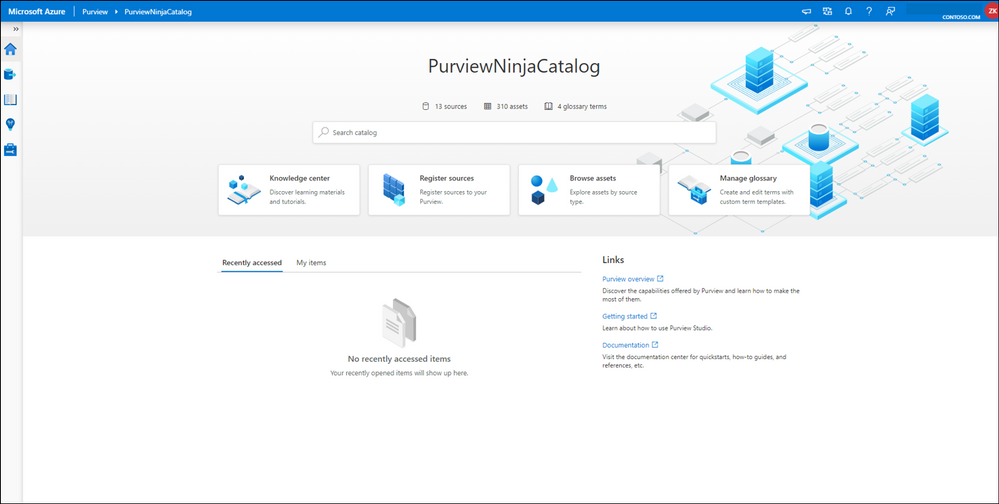
What does Purview Data Reader role see in Azure Purview Studio home page?

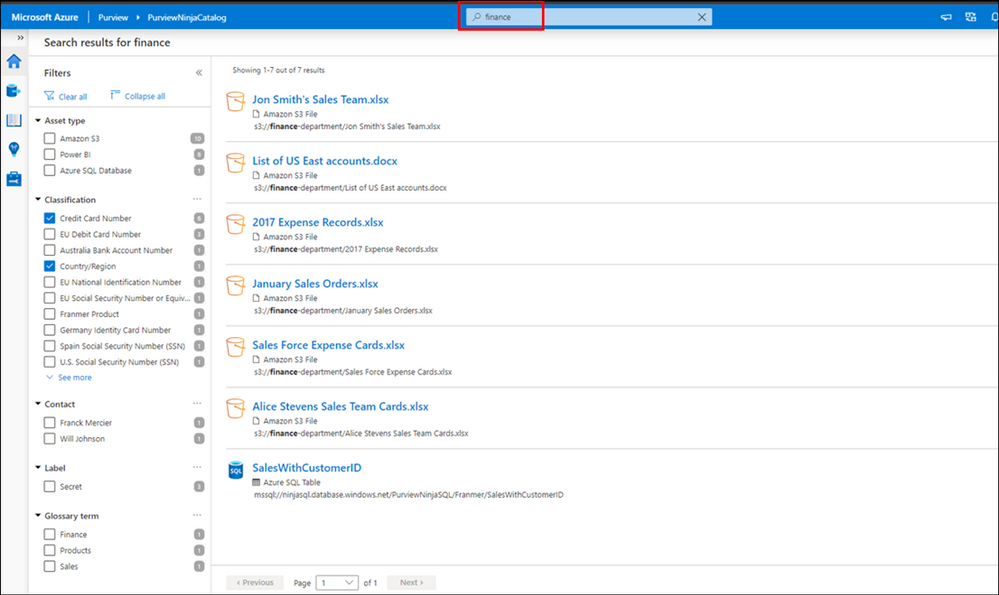
Search capability inside Azure Purview Data Catalog:
Purview Data Readers can search through the Azure Purview data catalog and apply filter like glossary terms, classifications, sensitivity labels to narrow the results. Can view the data assets but cannot modify them.
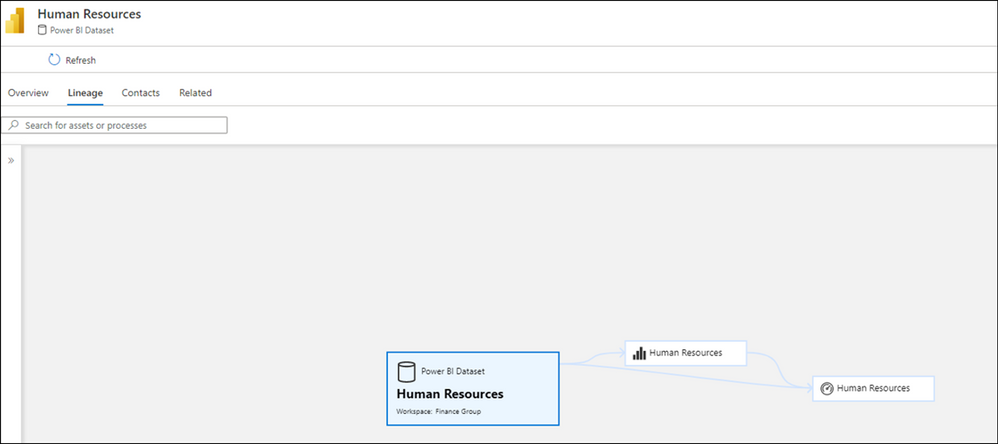
Lineage capability in Azure Purview Studio:
Can view lineage.
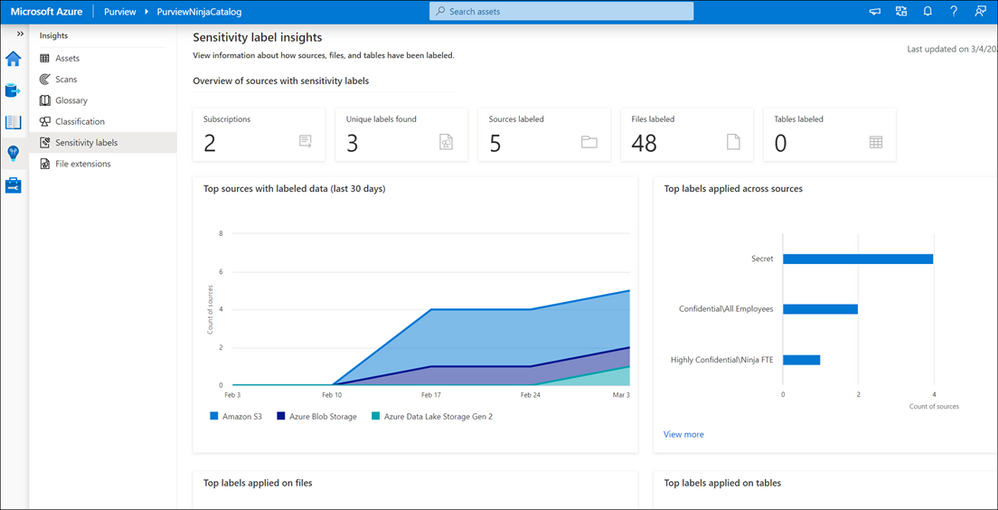
Insights Reports in Azure Purview Studio:
Can view all Insights reports.
Purview Data Curator
This role can be suitable for Data Engineers and Data Architects who may need to manage assets, configure custom classifications, setup glossary terms and additionally use the search and Insights capabilities as Data Readers.
Key tasks Purview Data Curators can perform:
- Edit classification on data assets and manage classification rules.
- Manage glossary terms.
- Apply glossary terms to assets.
- Configure Azure Purview Collection. (should be combined with Purview Data Source Administrator)
What does Purview Data Curator role see in Azure Purview Studio home page?

Management Center:
Access to Management Center in Azure Purview to configure advanced settings such as Custom Classifications.
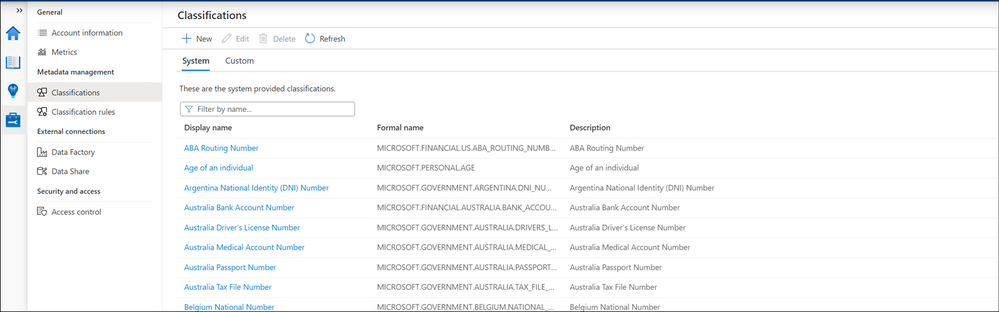
You may notice you cannot directly manage Azure Purview Roles from Management Center from Azure Purview Studio! You have to use Azure Portal or Azure Resource Manager supported methods to configure access management.
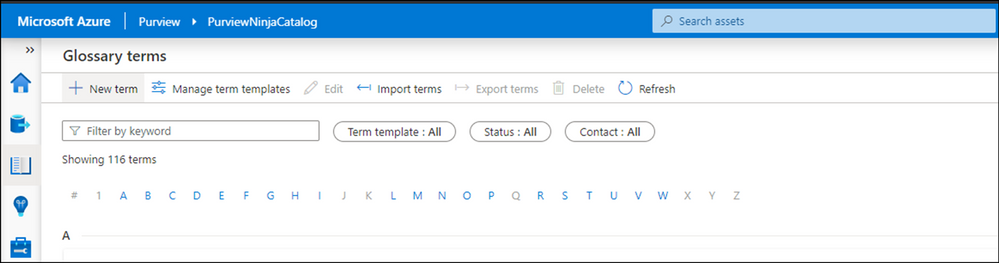
Manage Glossary:
Data Curators can manage glossary terms, manage terms templates, import new terms and modify existing ones.
Purview Data Source Administrator
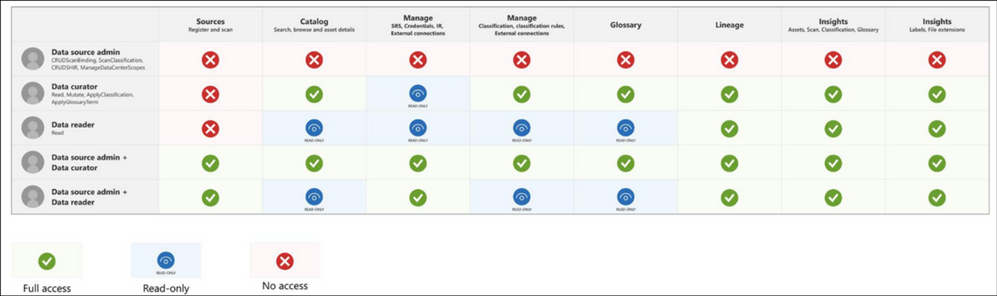
A member of Purview Data Source Administrator role alone, does not have any access in Azure Purview Studio, however, assigning this role along with either Purview Data Reader or Purview Data Curator makes the role very powerful:
- Purview Data Source Administrator + Purview Data Reader is suitable for Data Protection Officers, Data Owners.
- Purview Data Source Administrator + Purview Data Curator is suitable for Data Engineers and Data Scientists.
What does Purview Data Curator + Data Source Administrator see in Azure Purview Studio home page?

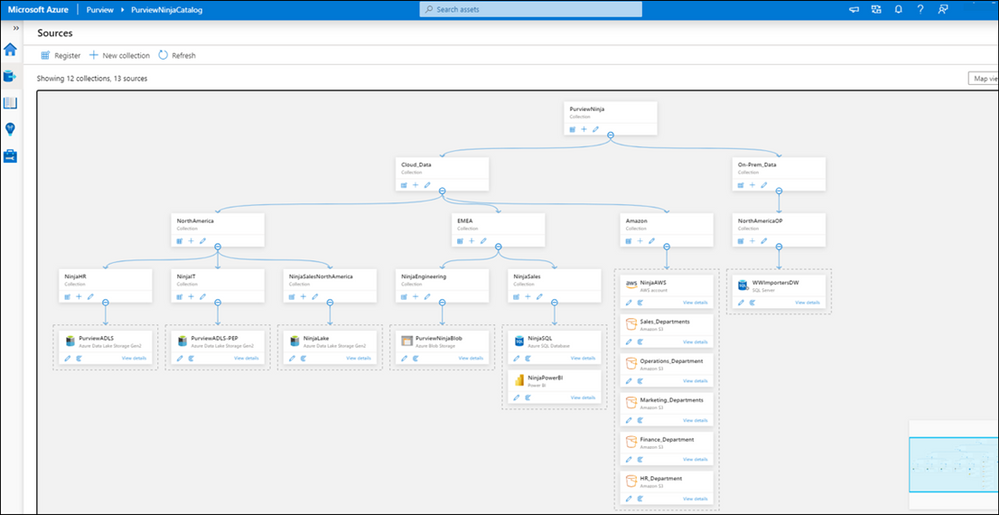
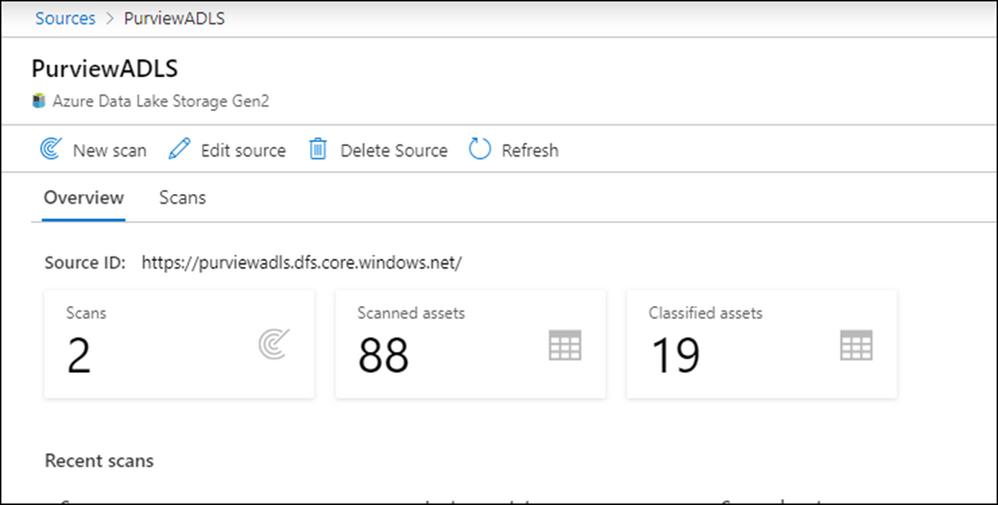
Manage Collection and register data sources:
You need these two roles to manage your collection and register new data sources in Azure Purview Studio.
Scan data sources:
View scan history and initiate new scans.
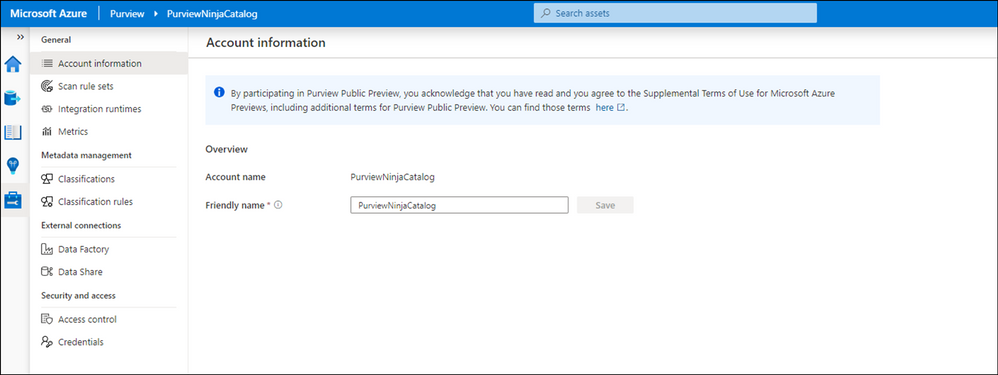
Management Center:
Data Source Administrators + Data Curator can manage Azure Purview through Management Center and then can manage classifications, setup scans rules and configure credentials
Insights Reports:
Data Source Administrators can view Insights Reports if they are also given either Data Reader or Dara Curator role.
Summary and next steps:
We discovered what roles and tasks needed to manage and use Azure Purview in data plane.
- Get started now and create your Azure Purview account!
- Define roles and responsibilities to manage and gain visibility across your data estate using Azure Purview. Learn more about Azure Purview Roles.
- We would love you hear your feedback and know how Azure Purview helped your organization Please provide us your feedback.
In my next post I will explain what roles and tasks are needed to extend your Microsoft 365 Sensitivity Labels to Azure Purview.
by Contributed | Mar 23, 2021 | Technology
This article is contributed. See the original author and article here.
Howdy folks!
As we shared earlier this year in The state of apps by Microsoft identity report, organizations have been connecting all types of apps with Azure AD to keep employees connected and secure in this era of remote work. In case you missed Microsoft Ignite earlier this month, we’ve been busy adding new capabilities to help you secure and manage your apps in the cloud and on-premises with Azure AD. Read on to learn more about new app management updates we made this month!
Increase IT efficiency with new enterprise app management capabilities
We’ve released three new enterprise app management updates to give you more ways to secure and manage apps while simplifying employees’ access to the apps they need.
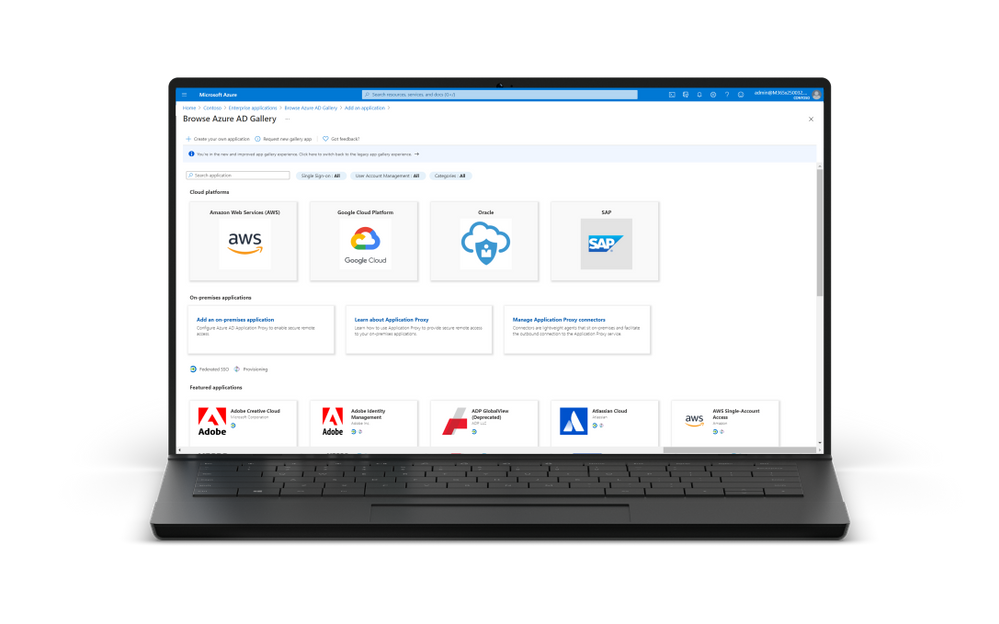
- GA of the new Azure AD app gallery experience – The Azure AD app gallery experience has a refreshed look and feel! The new app gallery experience allows you to filter for applications based on category or on the supported single sign-on type like SAML or OIDC. Additionally, the new app gallery experience includes icons to help you quickly identify which applications support federated single sign-on and provisioning.
- GA of the Application Template API – The application template API available in Microsoft Graph allows admins and developers to programmatically manage applications at scale in the Azure AD App gallery. Admins and developers can now list, search, update, or add applications from the Azure AD app gallery in their tenant via an API.
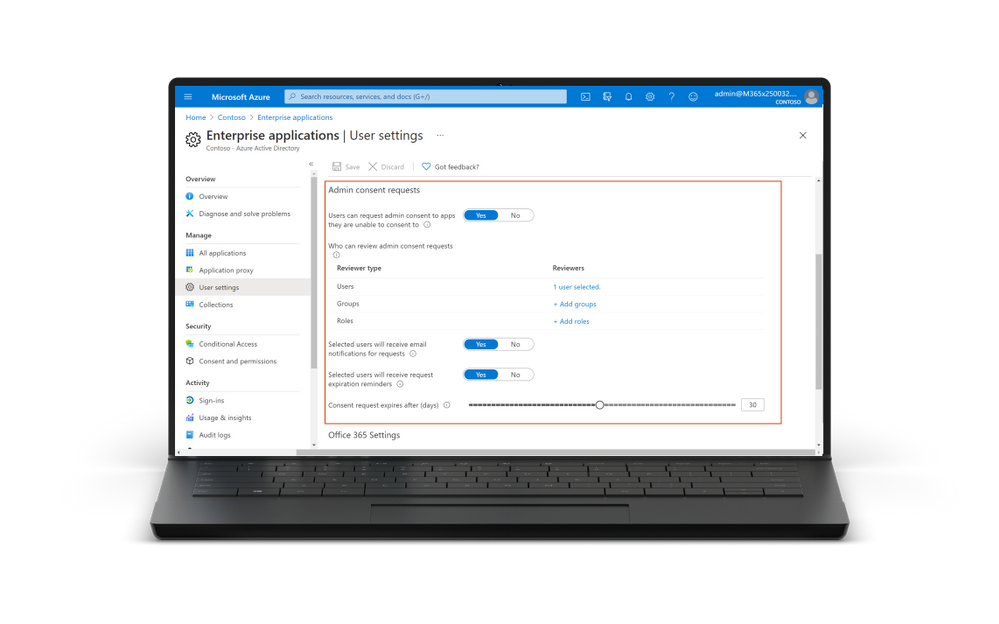
- GA of the Admin Consent Workflow – the admin consent workflow, which is rolling out in the next few days, gives users an easy way to request that an admin review the application they’re trying to use. When users try to access an application that requires consent by an admin, users can now send a request to admins during the sign-in flow. The request is sent via email to admins who have been designated as reviewers and once a reviewer takes action on the request, the user is notified whether access has been granted or denied. You can also list pending admin requests by using APIs in Microsoft Graph or PowerShell. By using our new APIs you can integrate admin consent requests into your existing processes to streamline workflows.
Modernize your app authentication from Active Directory Federation Services (AD FS) to Azure AD
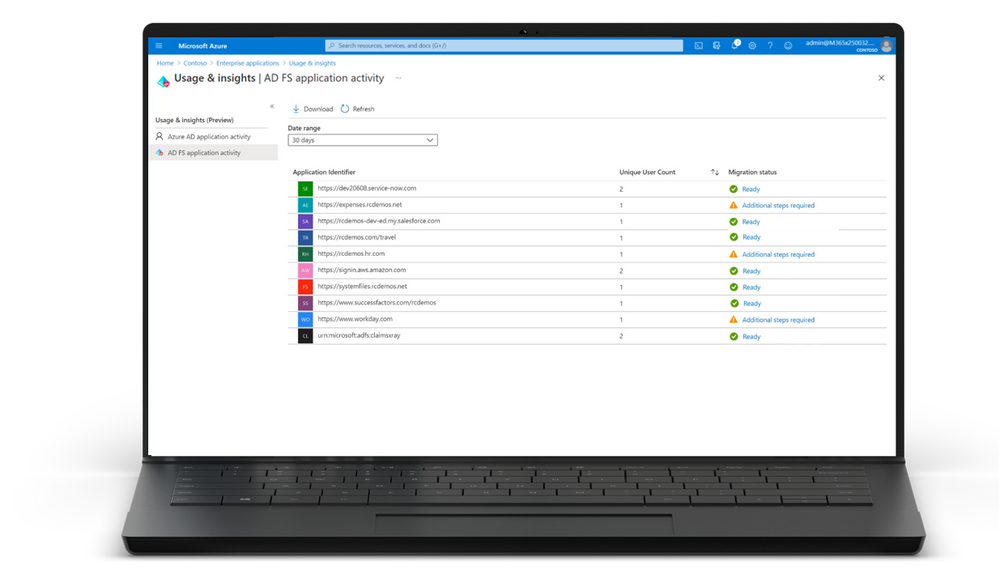
One of the best ways to secure your environment is to manage everything from the cloud—and that includes moving your application’s authentication off AD FS to Azure AD. To help upgrade your application authentication from AD FS to Azure AD, the AD FS activity and insights report is now generally available.
- GA of the AD FS activity and insights report. The AD FS activity insights report lets you quickly identify which of your applications are ready to be upgraded to Azure AD with no configuration changes. It assesses all your AD FS applications for compatibility with Azure AD, checks for any configuration differences, and gives guidance on preparing individual applications for migration to Azure AD.
Secure your on-premises apps with Azure AD application proxy
During the past 12 months, organizations have increasingly relied on Azure AD Application Proxy service to give employees remote access to their on-premises apps. To help you get even more out of Azure AD Application Proxy we’ve made the following enhancements:
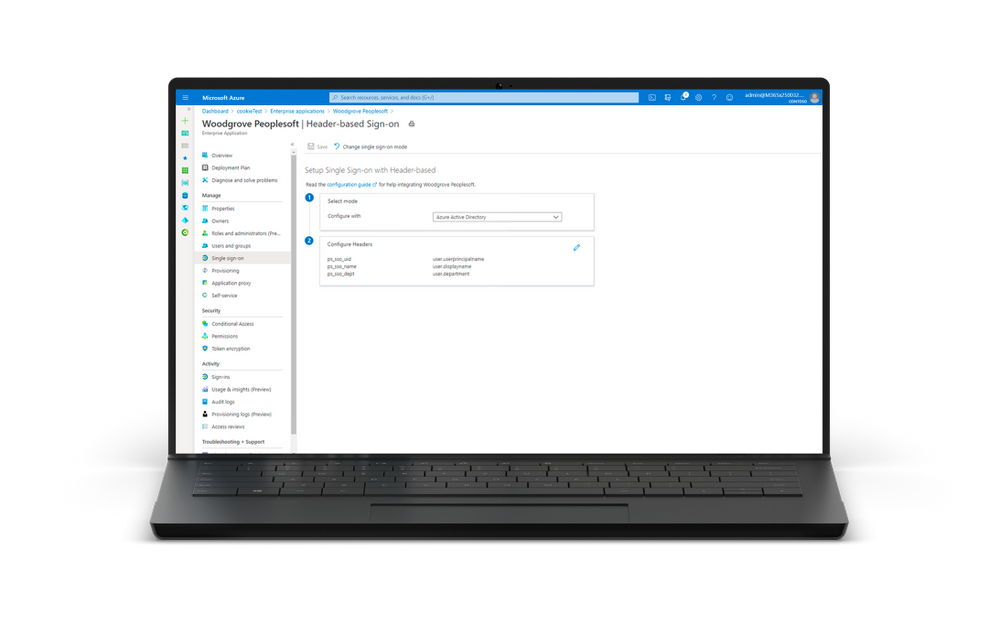
- GA of header-based authentication – Announced last year, Azure AD Application Proxy natively supports apps that use header-based authentication. You can configure a wide range of header values required by your application in Azure AD. These header values will be sent down to the application via Application Proxy. This means that all attributes and transformations available for configuring SAML or OIDC applications can be used as header values.
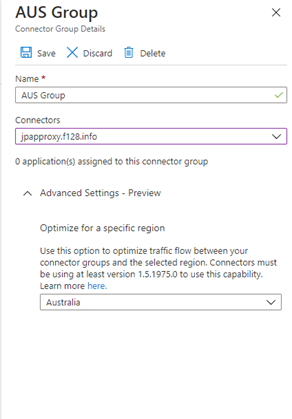
- Optimize your Application Proxy traffic in public preview: You now can now designate which region your Application Proxy service connector group should use. By choosing the closest region to your applications and connectors, you can improve performance and reduce the latency to the App Proxy service.
Tell us what you think
As always, we’d love to hear from you. Please let us know what you think in the comments below or on the Azure AD feedback forum. And be sure watch our on demand Ignite session “Prevent attacks by protecting your applications with Azure Active Directory” to learn more about these new app management capabilities.
Alex Simons (@Alex_A_Simons)
Corporate VP of Program Management
Microsoft Identity Division
by Contributed | Mar 23, 2021 | Technology
This article is contributed. See the original author and article here.
(VOICES OF DATA PROTECTION – Episode 5)
Host: Bhavanesh Rengarajan – Principal Program Manager, Microsoft
Guest: Mavi Etzyon-Grizer – Director of Information Protection, Security & Compliance Customer Experience Team, Microsoft
The following conversation is adapted from transcripts of Episode 5 of the Voices of Data Protection podcast. There may be slight edits in order to make this conversation easier for readers to follow along.
This podcast features the leaders, program managers from Microsoft and experts from the industry to share details about the latest solutions and processes to help you manage your data, keep it safe and stay compliant. If you prefer to listen to the audio of this podcast instead, please visit: aka.ms/voicesofdataprotection
BHAVANESH: Welcome to Voices of Data Protection. I’m your host, Bhavanesh Rengarajan, and I’m a Principal Program Manager at Microsoft.
So, Mavi, why don’t you give a quick introduction about yourself?
MAVI: Hey, Bhavy, super excited to be here. My name is Mavi, and I lead the Microsoft Information Protection and Security and Compliance Customer Experience team. My team helps customers deploy and use our security and compliance products, and they are spread all over the world just ready to help our customers use our products.
BHAVANESH: So, Mavi, I’ve been talking to a few of my colleagues here at Microsoft, and I hear that you’ve not done a good job at all. What you’ve done is a great job. Why don’t you talk about your program to bring our audience up to speed?
MAVI: We’re in our first-year anniversary, right now. We did private previews, we did a lot of webinars, we did a lot of community blogs. We help customers deploy. We’re doing video blogs. We’re doing so many things just to help our customers understand the benefits of our solutions, and how they can go ahead today and deploy, it in super easy steps such as one, two, three, and that’s it.
BHAVANESH: If you have to summarize your top three achievements as a team, over the last one year, and basically, I would like to issue for your first anniversary, over here, the team. So, what would those three big achievements be?
MAVI: I would say number one would be basically having the team well recognized, you know, inside and outside Microsoft as the leader in deploying our security and compliance solutions. Second thing is the technical depth and understanding that the team has. This is a huge, huge win, because you know we spent so many hours in understanding how our products work to help our customers benefit and help them deploy. And the third is everything that we’re doing to benefit the customers. We’re the voice of the customer within engineering. So, we are channeling all the feedback, back to engineering, and we help that build a better product that will both benefit Microsoft, but also our customers.
BHAVANESH: That’s good. What do you think are the things that you’ve done really well, over the last six months or so, in your team?
MAVI: Really well, are all the video blogs, webinars, and blogs that we made, all of the presentations we gave at RSA, Ignite, and other internal and external events at Microsoft. I think we did this very, very well. And also, we’re able to identify the use cases for customers and help them build a policy to match their use cases specifically.
BHAVANESH: I have also heard that you know, you do something called a Customer Learning Day. Can you talk about that a bit? I’m pretty sure a lot of our customers or partners would want to feature that.
MAVI: What a great question, Bhavi, thank you. On Customer Learning Day, we give our customers the opportunity to talk to our leadership in Microsoft, share their good, the bad, the ugly, and you know, we’re not looking for lovey-dovey conversation. It’s more of a constructive feedback on what Microsoft did well, but also, we’re interested in learning what we didn’t do very well, and what we could do to improve and help our customers deploy.
This is basically two days where customers get the perfect opportunity to talk to our leadership team and share their use cases, experiences, and also roadmap, and where they’re headed, and how we, at Microsoft, what we can do to help them.
BHAVANESH: Mavi, is there a way in which our customers can reach out to you and your team? Do you run some sort of sessions or consortiums where you can have these offline conversations and try to bubble these things up in the right engineering leaders?
MAVI: These Customer Learning Days happen twice a year, but if there’s a specific customer that we see that has a very interesting deployment story or has very constructive or focused feedback on things that we’re doing, then we will always make sure that someone from either leadership or engineering would be meeting with that customer. The case, then yeah, we’ll obviously reach out and make sure that this will happen.
BHAVANESH: Wow, that’s great. What are all the various solution that your team caters to?
MAVI: We have like four pillars in my team. One is information protection. That is all the information protection and DLP area. The other one is information governance. That’s all the records management that we’re doing. Third is discover and respond. That is the best discovery that we have in the events audit pillar. And last but not least, is the insider risk and communication compliance section, which we’re helping organizations protect their data from inside and also outside threats.
BHAVANESH: And where do you see a lot of updates across the solutions, if you want to rank and say, well, here is where I see a lot of customers interested in, what would that be?
MAVI: I can tell you that insider risk has a huge growing interest in that area, but also in our new endpoint DLP (data loss prevention) solution, and in our team DLP. So, those three areas combining obviously, with our – with our other pillars, such as information protection, all together, this has a huge interest with our customers.
BHAVANESH: And I would definitely suggest our audience to watch all your webinars. Let me ask you this tough question, Mavi. So, what do you think you and your team have done differently over the last six months?
MAVI: If I really had to think about this, I think we need to create more end-to-end stories to share with customers, so they can see the value, you know, for the whole compliance story and benefit from it. Because I think what we’re doing is we’re focusing just on information protection, or just information governance. But if we can tie the story as an end to end, that would resonate more with our customer, and this is something that I asked the team to focus on in the next few months, so customers, when they come to deploy our solutions, they will have the whole story and even understand, you know, where to start from, what to do what’s coming next, how to plan for that. This is something that I think we should have done in the last six months, but we’re going to focus it in the next six months.
BHAVANESH: And I remember one of our conversation, Mavi. This was like a few months ago, wherein you also resonated saying that having some sort of an onboarding mechanism for customers would make a lot of sense, because a lot of our customers are in different points in their journey, on be it information protection or information governance. So, we do not do a great job of tying those pieces of puzzle together. Do you want to share your thoughts?
MAVI: What we found out is customers, they say, hey, you have this great solution, but help us out, tell us where to start. They come to our Security and Compliance Center; they’re overwhelmed with the amount of data that we’re showing them. And they just want our help, learning how to onboard, what to do, what’s coming up next, and the thought that we had was helping them out in a very intuitive way. They can go ahead and just enable some policies and benefit from the products they already own.
BHAVANESH: Okay, I think the way in which I would draw similarities is very – very much in context to how we have these taxation tools, right. And we all do not understand taxes to the same extent, but then these tools really help us efficiently file our taxes every single year.
MAVI: Yes, exactly.
BHAVANESH: Yeah. Let’s now head into the quick-fire section, Mavi. So, I’m going to just ask you a few of these questions, and whatever comes to your mind. Customer?
MAVI: Obsession.
BHAVANESH: Partner?
MAVI: We’re in this together.
BHAVANESH: Roadmap?
MAVI: The way to success.
BHAVANESH: And what’s success?
MAVI: No limits.
BHAVANESH: And failure?
MAVI: Never heard that word before.
BHAVANESH: Okay, I was actually expecting you to say something like that. It’s not in my dictionary or something. I think that’s about it. Is there anything else that you want to convey to our audience now?
MAVI: Yeah. I want to encourage our audience. You know, sometimes all of our security products are so overwhelming, and they don’t know where to start or what to do. Sometimes they’re busy and want to first have all the solutions, and then start thinking about what to do. No, no. You start doing whatever you already own. Because building that first layer of security is actually the first step to ensure that your data is safe and protected.
BHAVANESH: And Mavi, is there any specific link that they can go to, to read about you and your team?
MAVI: We post all our blogs at aka.ms/mipscce/techcommunity. That’s a great place for resources, and for all our webinars that we’re doing, it’s at aka.ms/mipscce/webinars, so there they can see the previous webinars and all our future webinars.
To learn more about this episode of the Voices of Data Protection podcast, visit: https://aka.ms/voicesofdataprotection.
For more on Microsoft Information Protection & Governance, click here.
To subscribe to the Microsoft Security YouTube channel, click here.
Follow Microsoft Security on Twitter and LinkedIn.
Keep in touch with Bhavanesh on LinkedIn.
Keep in touch with Mavi on LinkedIn.


Recent Comments