by Contributed | Apr 22, 2021 | Technology
This article is contributed. See the original author and article here.
Track what matters most from the comforts of a larger touch screen device. We’re pleased to share Microsoft Lists for iOS now supports iPad. AKA, no more lists at 2x. You’ll get a beautiful native experience to track, manage and share your information. We, too, have enabled Conditional Access to Lists for iOS, and updated an important fix when a list is deleted from your iPhone or iPad.
Get Microsoft Lists for iOS today.
Let’s dive into all the updates below.
Microsoft Lists for iOS: iPad support [Roadmap ID: 70748]
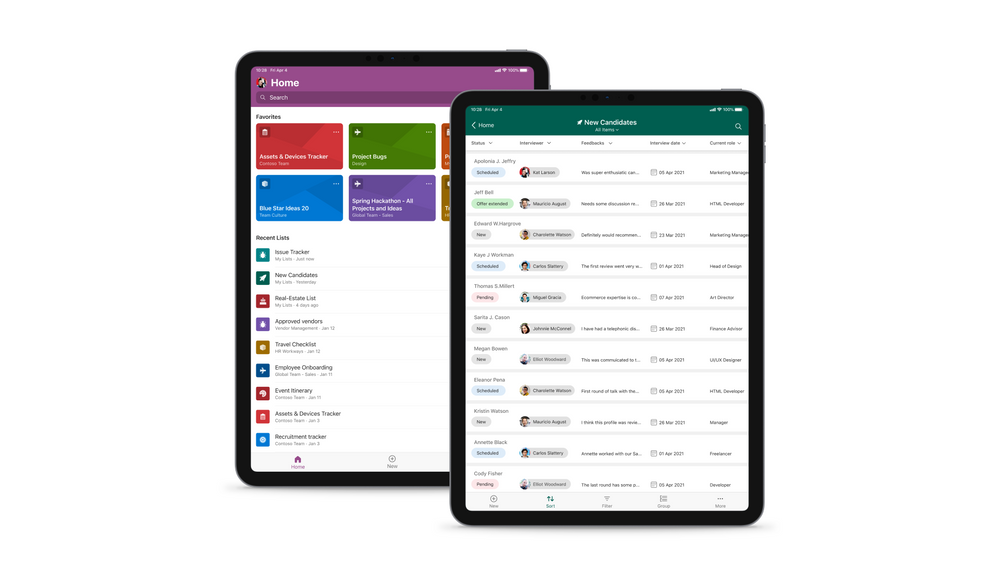
Microsoft is expanding device support on iOS to now include iPad. Microsoft Lists for iOS looks great on iPhone and iPad, scaling the user-friendly user interface to give you the best access to create, edit, and share your information from your iOS device.
Microsoft Lists for iOS on an iPad, showing the main home screen with Search, and Favorites and Recent lists (left), and working on an individual ‘New Candidates’ list (right).
With the extra screen real estate, you can easily search for lists, list items, and tap directly into your favorite and recent lists – directly from the home screen. Lists looks great in both portrait and landscape modes. And it mirrors the Lists Web experience, blended within the common design of iOS.
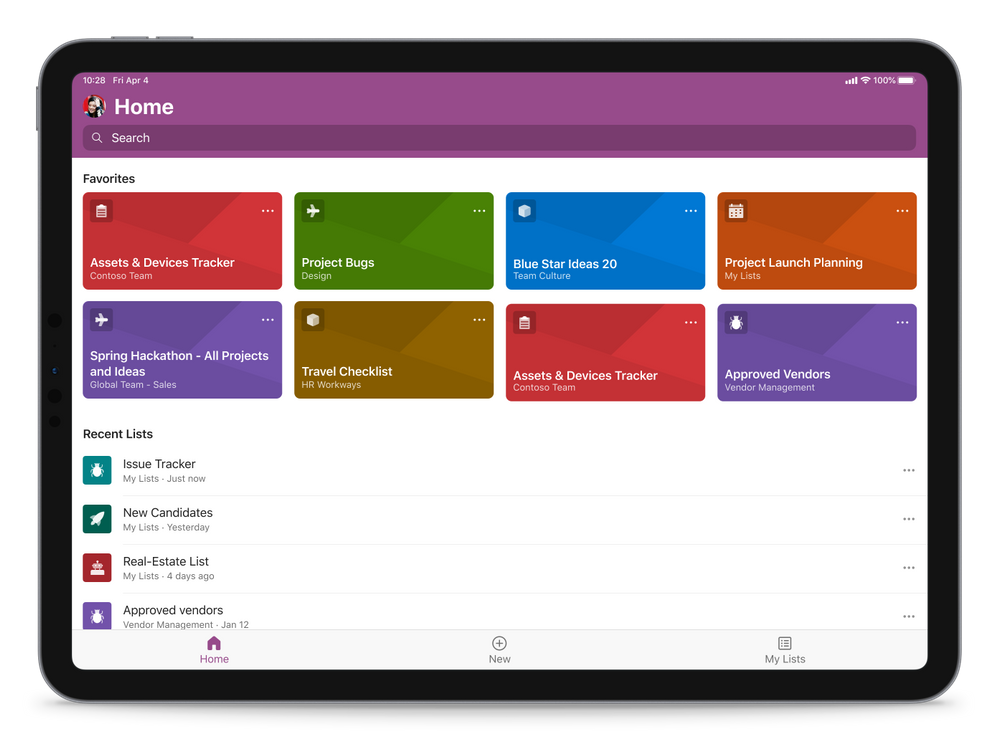 Microsoft Lists for iOS on an iPad, showing the main home screen with Search, and Favorites and Recent lists (in landscape mode)
Once in a list, you’ll swipe up and down, left to right to navigate your list. You’re able to tap into a specific list item to see it’s full view form. And you can refine the view of information using filter, group by, and tapping into individual fields to make changes to drop-down menus or enter text.
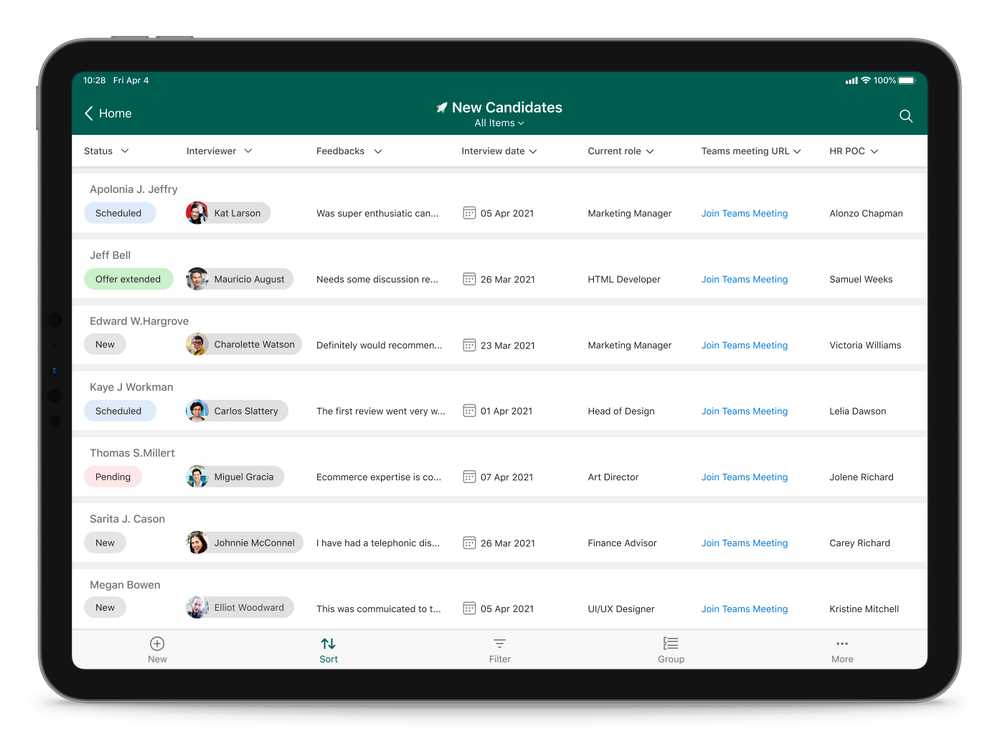 Microsoft Lists for iOS on an iPad, working on an individual ‘New Candidates’ list (in landscape mode)
Admins: Manage Microsoft Lists for iOS using InTune app protection policies (APP)
The Microsoft Lists iOS app is now configurable as a public app in Intune app protection policy (APP) through the Microsoft Endpoint Manager admin center. This allows app to be targeted to ensure that the data accessed is protected by app protection policies.
The app now also supports conditional access deployment through Azure admin portal. Please note that ‘Require app protection policy’ is supported which provides higher level of assurance. Lists app doesn’t currently support ‘Require approved client app’ grant access.
Learn more how to enable InTune app protection policies (APP) for Lists for iOS, which includes how to create and assign app protection policies (via docs.microsoft.com).
Bug fix update for lists deleted from an iPhone or iPad
Lists deleted from Lists for iOS can now be restored from the corresponding site recycle bin. We appreciate everyone who brought this to our attention, and for your patience while our development team addressed the issue.
Additional resources
To learn more about Lists throughout the year, please visit our updated Microsoft Lists resource center for blogs, demos, videos, podcasts, and more.
Get more done with Microsoft Lists on the go.
Thanks, Mark Kashman – senior product manager – Microsoft 365
by Contributed | Apr 22, 2021 | Technology
This article is contributed. See the original author and article here.
Microsoft Forms aims to help you make better decisions with data. As we improve Forms’ intelligence service, we support you in not just creating surveys and polls more easily, but also in extracting key insights from data in an understandable way. Read on to learn about three of these improvements: Estimated Time, the Insights button, and Word Clouds.
Automatically Add Estimated Response Time (Design Intelligence)
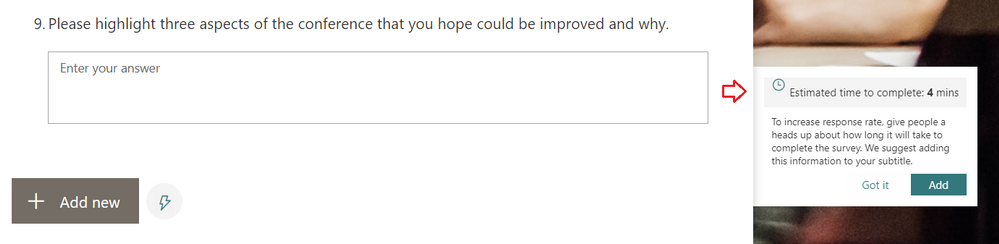
You may have noticed that while creating your surveys, Forms now provides an estimated response time for longer surveys. Our intelligence service can now predict the approximate time it will take for someone to complete the form, depending on the types and number of questions on the form. You can add this estimated response time (as seen below) in the subtitle of the form, which can help increase the form’s response rates.
Add Estimated Time to Encourage Response Completion
Engage in a New Experience for Forms Data Insights
In the past, after collecting a few dozen responses in your survey, you may have noticed the “Ideas” button appear at the top of the Responses tab of your Forms design page. By clicking on “Ideas,” you would have seen intelligence-based data insights on your responses.
From now on, you might instead see an “Insights” button under a particular question. If the Forms service can provide insights on the responses to that question—which is dependent on the number of responses and the data itself—you will see this “Insights” button. With this change, you can more clearly interpret the insights Forms provides for a specific question.
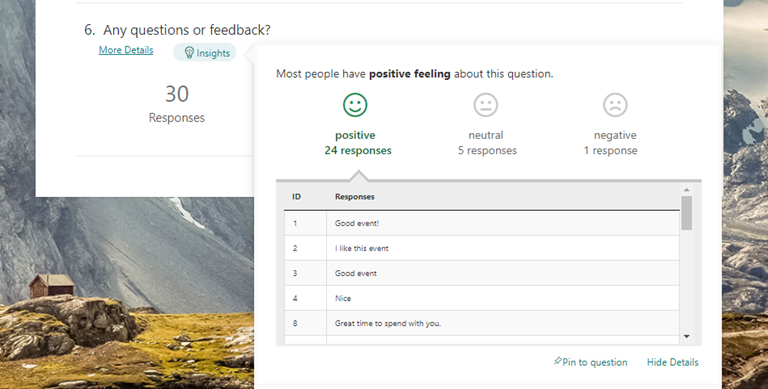 Click the Insights button to uncover analysis of your responses
As some of you are already familiar, these insights include sentiment analysis on open-response questions, score distribution for ratings questions, and association rule analysis, which notices patterns in responses across multiple choice questions. These insights are presented in easy-to-read data visualizations, which you can pin for quick future reference.
Visualize Open-Text Responses with Word Clouds (Insights)
We are excited to introduce a new intelligence-based data insight type: word clouds for open-text questions in Forms. The key phrases from the response to that question will be extracted and be visualized in a word cloud, offering you a quick view on the top text phrases among the responses.
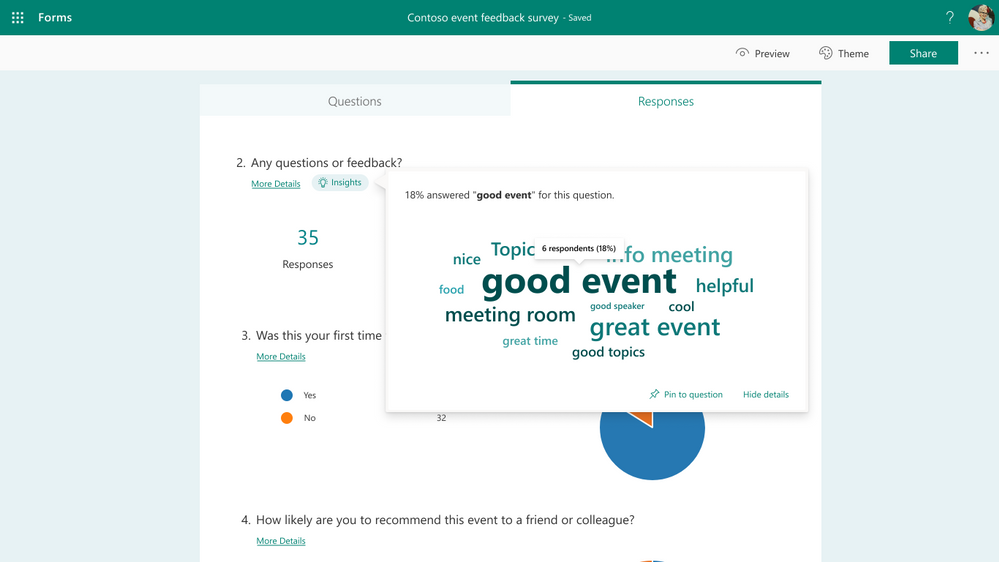 View open-text responses in word clouds
As seen above, when you click any key phrase in the word cloud, you can find statistics on how many respondents and what percentage of respondents mentioned this phrase in their response.
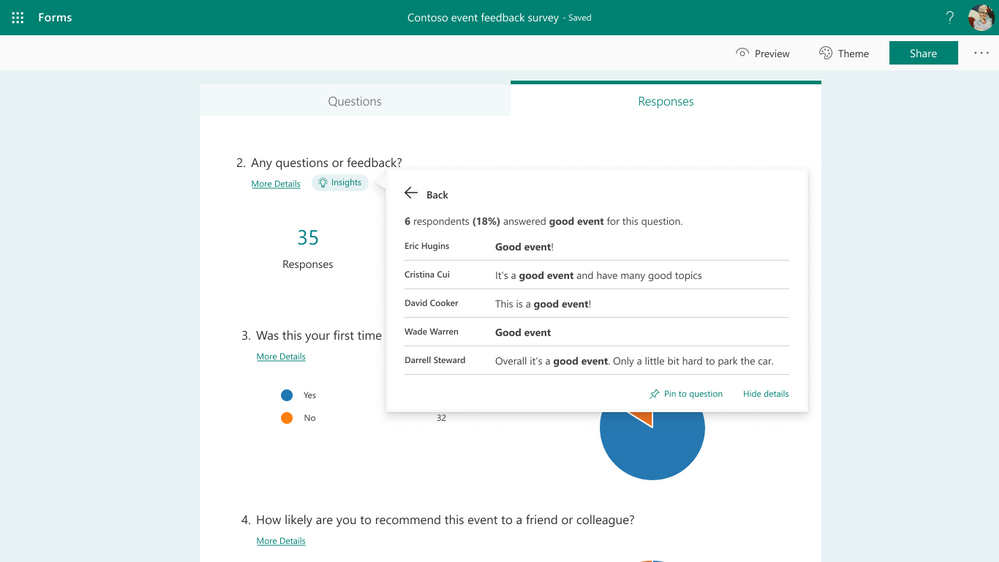 Click the word cloud to see exact responses
Additional FAQ:
When will this become available?
We will begin roll out of word clouds to open-text questions in regular forms at the end of April. Meanwhile, as Open-Text Polls for Microsoft Teams meetings start rollout at the end of May or early June, word clouds for these polls will become available as well.
Which languages are supported?
Word clouds will support English and Chinese text in our first stage of this work. We will expand to additional languages in the near future—please stay tuned.
Will I always get a word cloud for my open-text questions?
No, not always—this is because the Forms service may not have found any meaningful results to show, especially if you have only received a small number of total responses. You can come back to check for a word cloud after collecting more responses.
Next Steps
We hope you explore these latest updates as they become available to you. If you have additional questions on Forms surveys, quizzes, or polls, please visit our Support page. You can also join discussions in the Microsoft Forms Tech Community and follow the Forms Blog to stay updated in the future. Thank you.

by Contributed | Apr 22, 2021 | Technology
This article is contributed. See the original author and article here.
Join @Karuana Gatimu, @Josh Leporati , @Matt Wolodarsky, and @Ryan McKinney for this month’s community call where we will continue with our every 4th Tuesday of the month schedule, occurring on April 27th! Join us at either 8:00 AM or 5:00 PM PT.
We will be covering topics around the Viva platform and new resources for the Hybird Workplace like SharePoint templates and end user training modules.
If you have not yet joined our champion community, signup here to get the resource links that contain access to the call calendar, invites, program assets, and previous calls!
http://aka.ms/m365champions
We look forward to seeing you there!
/Josh
by Contributed | Apr 22, 2021 | Technology
This article is contributed. See the original author and article here.
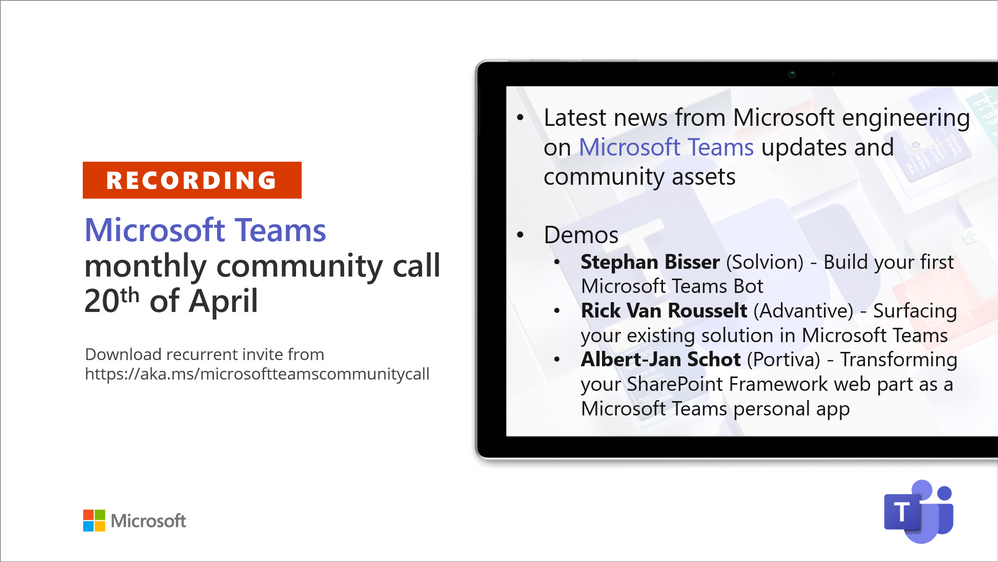
Recording of the Microsoft Teams monthly community call from April 20, 2021.
Call Summary
Latest news from Microsoft engineering on Microsoft Teams updates and community assets.
Visit the Microsoft Teams samples gallery to get started with Microsoft Teams development, hear and see the new Microsoft 365 Extensibility look book gallery co-developed by Microsoft Teams and Sharepoint engineering. Quick demo of the Extensibility look book at Microsoft Adoption site >> Solutions>>Extensibility look book. Select a Product, Type of app or Scenario. To see the Microsoft 365 extensibility options for your selection. Download showcase apps, samples and documentation. Register now for April trainings on Sharing-is-caring. Give us feedback, the Microsoft 365 developer community survey is now open. Download articles 1 and 2 of a 3-part series of articles called: “Build quality Microsoft Teams apps with these best practices.” Get the Microsoft Teams Toolkit (Controls) – “Designing your Microsoft Teams app” with layout guidance and reusable assets. The host of this call was Vesa Juvonen (Microsoft) | @vesajuvonen. Q&A takes place in chat throughout the call.
Actions:
- Complete the Microsoft 365 Developer Community Survey – https://aka.ms/m365pnp/survey
- Register for Sharing is Caring Events:
- First Time Contributor Session – April 27th (EMEA, APAC & US friendly times available)
- Community Docs Session – April
- PnP – SPFx Developer Workstation Setup – April 29th
- PnP SPFx Samples – Solving SPFx version differences using Node Version Manager – May TBD
- AMA (Ask Me Anything) – May 2021 – Tech Community – May 11th
- First Time Presenter – May TBD
- More than Code with VSCode – April 28th
- Maturity Model Practitioners – May TBD
- PnP Office Hours – 1:1 session – Register
- Download the recurrent invite for this call – https://aka.ms/microsoftteamscommunitycall
- Call attention to your great work by using the #PnPWeekly on Twitter.
Microsoft Teams Development Samples: (https://aka.ms/TeamsSampleBrowser)

It’s all about Community – Hello Microsoft Teams community!
Demos delivered in this session
Build your first Microsoft Teams Bot – Bots are used for Chat, Messaging Extensions, Task Modules, and more. 3 options for building Bots – Bot Framework SDK, Bot Framework Composer, and Power Virtual Agents. Same technology behind scenes, just matter of abstraction and options for extensibility. The recommended low code and very extensible option with templates containing triggers and dialogs for Microsoft Teams is Composer. Tour latest capabilities, install and configure.
Surfacing your existing solution in Microsoft Teams – if you have web-based apps, they can be surfaced in Microsoft Teams tab (iFrame). Security options – protection built into your app and external access control by Teams. Add apps on Personal (static) or Group (Teams aware static) tabs after adding app to App Studio. Build tips: Make your app Teams aware, use different contentUrl and websiteUrl, use responsive apps, use simple app navigation.
Transforming your SharePoint Framework web part as a Microsoft Teams personal app – easily extend Teams by embedding client-side SPFx web parts or personal applications (not Teams applications) in Teams tabs. Requires running SPFx v1.8 or later and execution is in the context of the SPO site behind the Team. No coding, no hosting, no Azure registration, just package and deploy. Step through app creation using SharePoint generator, create a Teams tab, add it to a Team.
Thank you for your work. Samples are often showcased in Demos.
Topics covered in this call
- Tour the Microsoft 365 Extensibility look book gallery – 5:20
- Latest News – Vesa Juvonen (Microsoft) | @vesajuvonen – 9:07
- Demo: Build your first Microsoft Teams Bot – Stephan Bisser (Solvion) | @stephanbisser – 11:53
Demo: Surfacing your existing solution in Microsoft Teams – Rick Van Rousselt (Advantive) | @RickVanRousselt – 27:48
Demo: Transforming your SharePoint Framework web part as a Microsoft Teams personal app – Albert-Jan Schot (Portiva) | @appieschot – 43:20
Resources:
Additional resources around the covered topics and links from the slides.
General resources:
Upcoming Calls | Recurrent Invites:
Microsoft Teams monthly community calls are targeted at anyone who’s interested in Microsoft Teams development topics. This includes Microsoft Teams, Bots, App templates, Samples, and more. Details on the Microsoft 365 community from http://aka.ms/m365pnp. We also welcome community demos, if you are interested in doing a live demo in these calls!
You can download recurrent invite from https://aka.ms/microsoftteamscommunitycall. Welcome and join in the discussion. If you have any questions, comments, or feedback, feel free to provide your input as comments to this post as well. More details on the Microsoft 365 community and options to get involved are available from http://aka.ms/m365pnp.
“Sharing is caring”
Microsoft 365 PnP team, Microsoft – 21st of April 2021

by Contributed | Apr 22, 2021 | Technology
This article is contributed. See the original author and article here.
What’s a capstone project?
University College London (UCL) created the UCL Industry Exchange Network (UCL IXN), which partner their students with organizations worldwide. Organizations define a project, and the student picks something that they can relate to and are passionate about.
The goal of those capstone projects is to provide real-world experience to acquired academic knowledge. Through experience, students learn about the industry. They learn about best practices and how to work on a project with deliverables.
Learn more about the UCL Industry Exchange Network by visiting the UCL IXN website.
What’s Project 15 and how it works?
Project 15, on the other hand, is an effort to accelerate conservation and ecosystem sustainability projects with the latest Internet Of Things (IoT) technologies. This is done through an Open Source Software platform.
The platform is made to take you 80% of the way. In comparison, the student only provides the remaining 20% — no need to design a cloud architecture from scratch when all the components are already linked together. We can get started faster and achieve our preservation goals just as quickly.
Learn more about Project 15 by visiting their website.
Get the code that power Project 15 now on GitHub.
Student Capstone Projects
There were many projects this year, but two of them kept our attention. The first project helped us keep track of elephants through Machine Learning Computer Vision. Tracking where the elephants are, where they are going, and how they are doing is vital to ensure that they are kept away from poachers.
The second project is about tracking red pandas through the jungle to ensure their wellbeing. To help preserve their ecosystem, they use Azure Custom Vision to help identify the red pandas in an area and ensure their health.
If you love elephants, we have a bonus for you. The Elephant Edge challenge in which we participated this year also helps in conserving elephants through GPS tracking, GPS fence, visual and sound monitoring.
The amount of work that was done through student projects is incredible. If you want to know more, you need to watch our upcoming events.
Upcoming events
You can watch a Livestream with details and demos of all those projects! You can Register Now, or you can catch the Livestream on Learn TV at 8am PDT (UTC-7).
While we are talking about events and sustainability, do not miss the Microsoft IoT Hack for Sustainability. We have up to $10,000 in prizes, and it’s worth registering. The deadline to participate is May 24th, 2021, at 5pm EDT.
Training Resources
If you want to make a difference, you can start by using the Learn modules the students used while building those projects. Among the modules that will inspire you is Classify Endangered Bird Species with Custom Vision.
Do not forget to get started with Project 15 by retrieving the code from GitHub!.


Recent Comments