by Contributed | Apr 22, 2021 | Technology
This article is contributed. See the original author and article here.
We are excited to announce Azure Storage Day, a free digital event on April 29, 2021, where you can explore cloud storage solutions for all your enterprise workloads. Join us to:
- Understand cloud storage trends and innovations—and plan for the future.
- Map Azure Storage solutions to your different enterprise workloads.
- See demos of Azure disk, object, and file storage services.
- Learn how to optimize your migration with best practices.
- Find out how real customers are accelerating their cloud adoption with Azure Storage.
- Get answers to your storage questions from product experts.
This digital event is your opportunity to engage with the cloud storage community, see Azure Storage solutions in action, and discover how to build a foundation for all of your enterprise workloads at every stage of your digital transformation.
The need for reliable cloud storage has never been greater. More companies are investing in digital transformation to become more resilient and agile in order to better serve their customers. The rapid pace of digital transformation has resulted in exponential data growth, driving up demand for dependable and scalable cloud data storage services.
Register here.
Hope to see you there!
– Azure Storage Marketing Team
by Contributed | Apr 22, 2021 | Technology
This article is contributed. See the original author and article here.
ConfigMgr admins love extending hardware inventory and collecting data from Windows devices.
Did you know Intune can do the same?!
The answer is Intune PowerShell scripts! Also known as SideCar… IME… Intune Management Extensions…
Well, IME is just another channel that runs parallel to MDM that sort of acts like the ConfigMgr client. We deliver different features over this channel: PowerShell scripts, Win32 apps, Proactive Remediation scripts, Win32 app log collection…
Can you give us an example?
Maybe you are interested to know more about Win32_BIOS.
Run the following PowerShell one-liner on a device
Get-WmiObject -Class Win32_BIOS |
select CurrentLanguage,
Description,
EmbeddedControllerMajorVersion,
EmbeddedControllerMinorVersion,
Manufacturer,
ReleaseDate,
SerialNumber | ConvertTo-Json -Compress
Script outputs the following:

Beautified:
{
"CurrentLanguage": "en-US",
"Description": "N2EET43W (1.25 )",
"EmbeddedControllerMajorVersion": 1,
"EmbeddedControllerMinorVersion": 13,
"Manufacturer": "LENOVO",
"ReleaseDate": "20191028000000.000000+000",
"SerialNumber": "12345678"
}
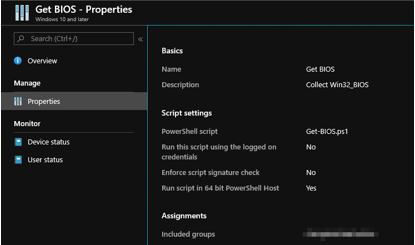
Let’s create an Intune PowerShell script and deploy it to some users/devices to demonstrate Win32_BIOS data as an example.
Tip: <scriptId> is stored in the URL

You can access the data via the following Graph endpoint in graph explorer
https://graph.microsoft.com/beta/deviceManagement/deviceManagementScripts/<scriptID>/deviceRunStates?$expand=managedDevice
It turns out that we store the above-mentioned script output in a property on the service side. If you are familiar with Graph Explorer, then you can take a look at the results
In the property “resultMessage”:

How do I see the data from all devices?
Prerequisites:
Install-Module -Name Microsoft.Graph.Intune
You need one more script to retrieve your results from Graph…
Update-MSGraphEnvironment -SchemaVersion 'beta'
Connect-MSGraph

$result = Invoke-MSGraphRequest -HttpMethod GET -Url 'deviceManagement/deviceManagementScripts/b113448a-528a-4beb-b7d5-381a117d5184/deviceRunStates?$expand=managedDevice' | Get-MSGraphAllPages
$success = $result| Where-Object -Property errorCode -EQ 0
$resultMessage = $success.resultMessage
$objResultMessage = $resultMessage | ConvertFrom-Json
$objResultMessage | Out-GridView
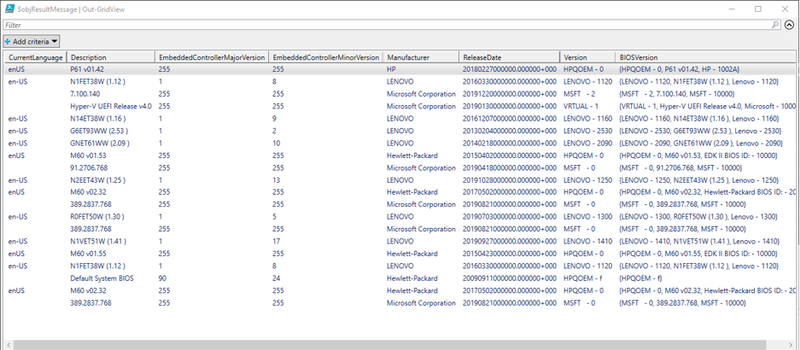
You can store the data in Log Analytics, SQL etc and visualize the way you want.
Enjoy!
by Contributed | Apr 22, 2021 | Technology
This article is contributed. See the original author and article here.
Hopefully, you have read my previous blog posts about Azure Purview access management Part 1 and Part 2 to find about Azure Purview control plane and data plane roles and tasks. In this post, I will cover the following topic:
- Overview of dashboards and roles required to extend your M365 Sensitivity Labels to Azure Purview.
By extending M365 Sensitivity Labels to Azure Purview you can automatically assign labels to files and database columns in Azure Purview.
In order to bring Sensitivity Labels from M365 to Azure Purview, you may need to work with other teams in your organization. The following table summarizes tasks, required to extend the labels to Azure Purview including dashboards and roles required to perform each step:
Task
|
What portal to use
|
Who can perform this task
|
Verify if you have at least one M365 E5 License in your Azure AD tenant
|
Azure Portal (https://portal.azure.com/) OR
M365 Admin Center (https://admin.microsoft.com/AdminPortal/)
|
Any Azure AD role (e.g. Global Reader)
|
Consent “Extend labeling to assets in Azure Purview”
|
Microsoft 365 Security and Compliance Center (http://compliance.microsoft.com/)
|
Azure AD Roles:
Compliance Administrator
OR
Global Administrator
|
Create and update Sensitivity Labels in M365
|
Microsoft 365 Security and Compliance Center
|
Azure AD Roles:
Azure Information Protection Administrator
OR
Global Administrator
|
Register Data Sources in Azure Purview
|
Azure Purview Studio
(https://web.purview.azure.com/)
|
Azure Purview Roles (data plane:(
Purview Data Source Administrator + Purview Data Curator
AND
Azure Roles (control plane)
Reader (on data sources)
|
Scan Data Sources in Azure Purview
|
Azure Purview Studio
|
Azure Purview Roles (data plane):
Purview Data Source Administrator + Purview Data Curator
OR
Purview Data Source Administrator + Purview Data Reader
|
Search Catalog and filter assets based on Sensitivity Labels
|
Azure Purview Studio
|
Azure Purview Roles (data plane):
Purview Data Reader
OR
Purview Data Curator
|
View Sensitivity Labels Insights reports
|
Azure Purview Studio
|
Purview Data Reader
OR
Purview Data Curator
|
Verify if you have at least one M365 E5 License in your Azure AD tenant
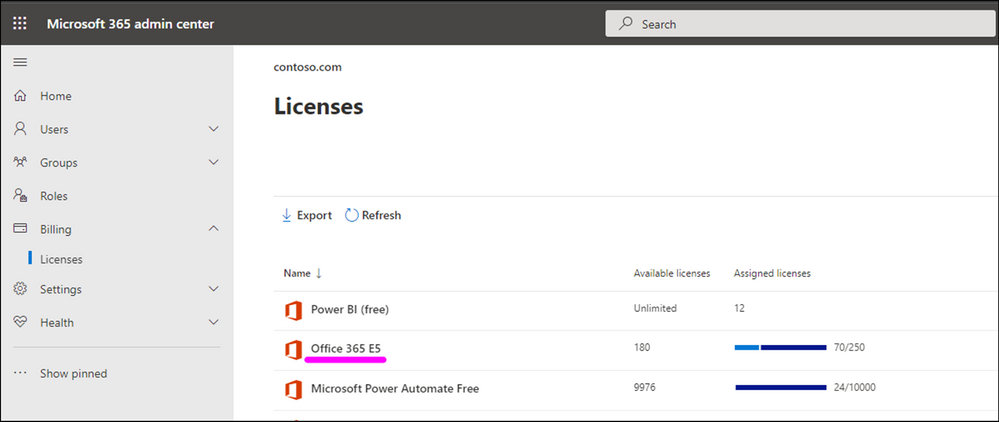
Use your M365 Admin center to check if you already have M365 E5 Licenses in your tenant:
If you do not have this license in place, please work with your finance team to obtain the required licenses. Microsoft 365 E5 | Microsoft 365 Enterprise.
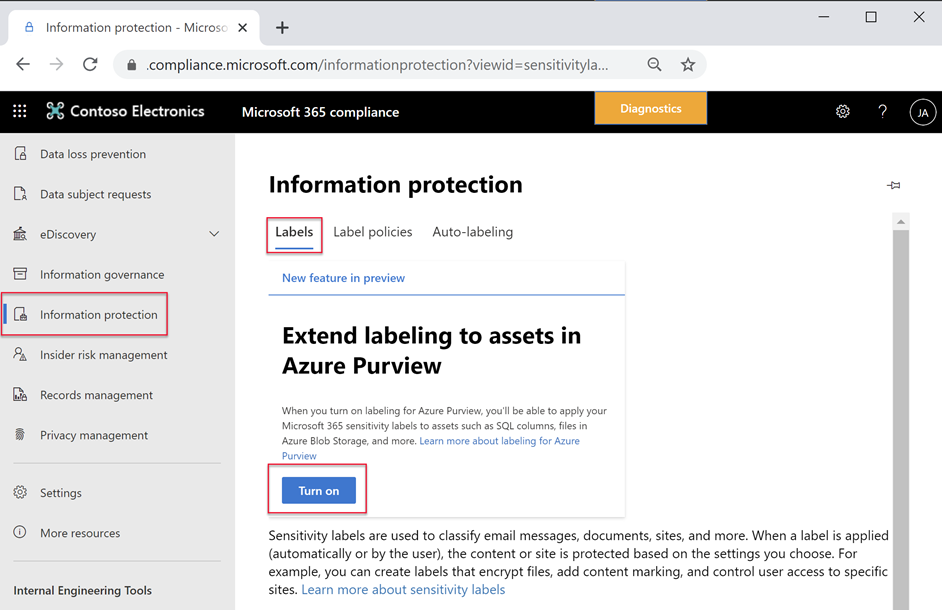
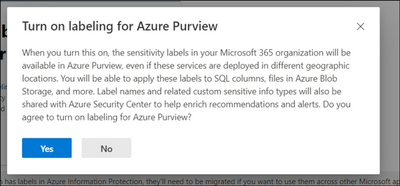
Consent “Extend labeling to assets in Azure Purview”.
By default, Sensitivity Labels are only available for assets in M365. With this one-time operation at your Azure AD tenant level, you will allow M365 Sensitivity Labels to be extended to assets in Azure Purview. Use Microsoft 365 Security and Compliance Center to consent.
Create or update M365 Auto-labeling Rules
It is important to identify which team in your organization is responsible for defining Sensitivity Labels in Microsoft 365.
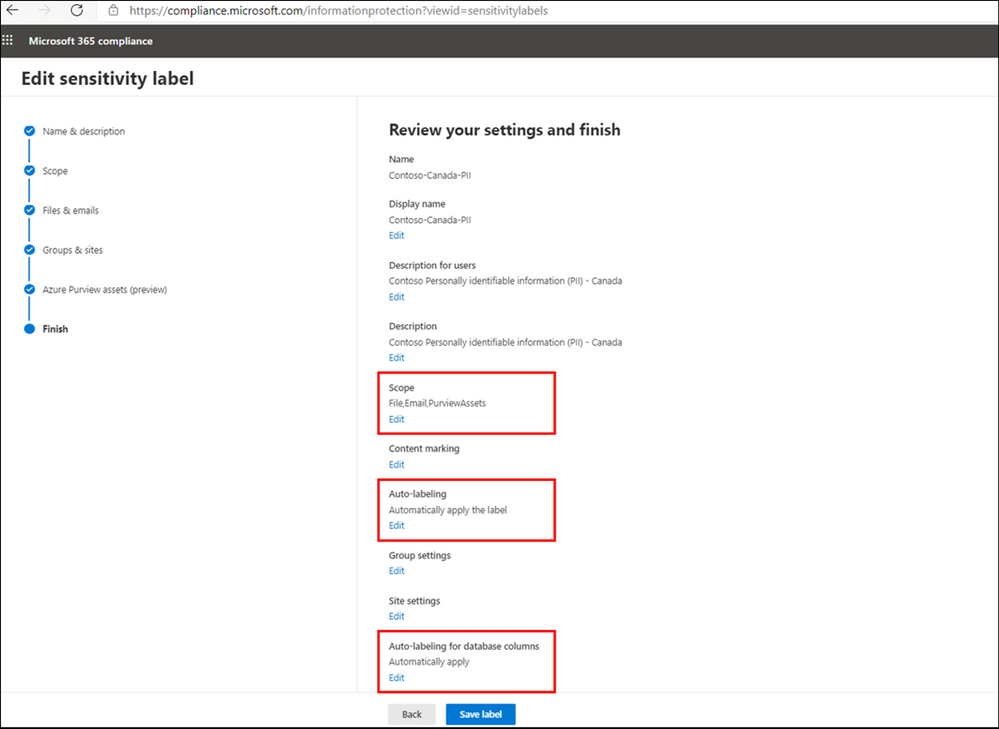
To extend a label to Azure Purview, you can create a new M365 Sensitivity Label or update an existing one in Microsoft 365 Security and Compliance Center, by configuring the following settings:
- From Define the scope for this label enable Azure Purview Assets.
- Add Auto-labeling rule
- From Auto-labeling for database columns enable Auto-labeling for database columns.
Information Protection Administrator or Global Administrator roles can be used to create or update Sensitivity Labels.
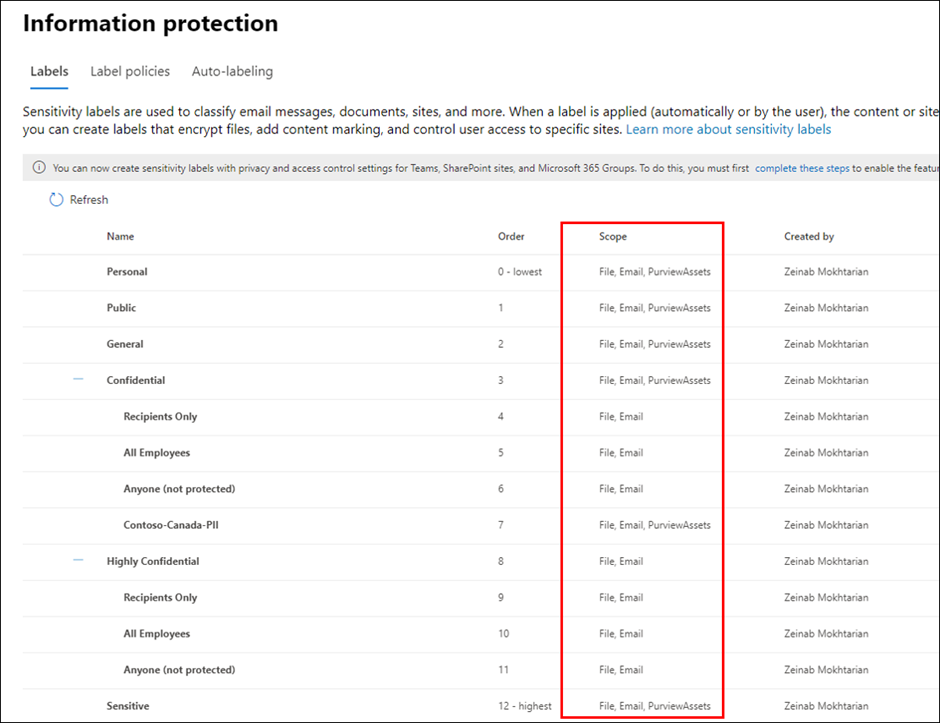
If you are looking to expand visibility of your M365 Sensitivity Labels to other teams, you can provide them with Read-only access to view of M365 Sensitivity Labels in your tenant, you can assign the user with Security Reader role in Azure AD or more specifically assign them with Sensitivity Label Reader in Microsoft 365 Security and Compliance Center.
Register and Scan data sources in Azure Purview
Use Azure Purview Studio to register data sources such as Azure SQL Servers or Blob Storage. Once you scan your data sources, Sensitivity Labels are automatically assigned based on auto-labeling rules and then you will be search, browse and filter assets based on Sensitivity Labels or view Insights Reports. View my past blog post to read more about setting up and exploring assets by Sensitivity Labels in Azure Purview.
Purview Data Curator + Data Source Administrator or Purview Data Reader + Data Source Administrator roles can be used to scan data in Azure Purview. To search assets and view reports, you can use at least Purview Data Reader role.
Summary and Call to Action
Through close integration with Microsoft Information Protection offered in Microsoft 365 Azure Purview enables direct ways to extend visibility into your data estate, and classify and label your data.
We would love you hear your feedback and know how Azure Purview helped tracking your sensitive data estate using automatic labeling.
- Create an Azure Purview account now and extend your M365 Sensitivity Labels across your files and database columns in Azure Purview.
- Use Sensitivity Labels Insights to get a bird’s eye view of your data estate by the sensitivity labels.
- Learn more about Azure Purview Autolabeling and Sensitivity Label Insights.
- Provide your feedback.
by Contributed | Apr 22, 2021 | Technology
This article is contributed. See the original author and article here.
Avtex, a Microsoft Gold Partner, knows well the value of training and how it helps build loyalty—both with its clients and among its employees. We recently spoke with Steven Jacobowitz, Avtex Director of Capabilities, about how the company maintains its technical expertise and Gold Partner status with a dedicated program of workforce training.
“We made an investment in our people, and they appreciate that,” Jacobowitz explains. “It makes a difference in how our clients trust our expertise. The training has also been a real morale booster for our teams.”
Staying Gold in an ever-changing digital world
Since the 1970s, Avtex has helped its clients build and retain their customers with marketing and communications solutions. These days, Avtex guides its clients through digital transformation initiatives using cloud solutions powered by Microsoft Dynamics 365, Azure, and Microsoft 365. The company also partners with Genesys, one of the largest call center applications in use today.
As a Microsoft Gold Partner, Avtex hires highly skilled technicians and consultants who must stay up to date on the Microsoft technologies that support its clients. Avtex team members have passed hundreds of exams and assessments on technical competencies and have earned hundreds of Microsoft Certifications—all of which give its clients a deep pool of talent to depend on.
To maintain Gold Partner status, Avtex supports ongoing training and certifications. To achieve and retain this level of partnership requires a huge learning commitment.
Before Jacobowitz came to Avtex, the training process was informal. “Part of my job is to work with our technicians’ careers and make sure that they’re upskilling all the time,” he says. “Before, everybody was scrambling at the end of the year to get to those certifications so we could remain Gold.”
Jacobowitz himself holds more than 40 Microsoft Certifications, including every available Dynamics 365 certification and some legacy Dynamics certifications. He’s a big believer in the value of certifications, which have helped him earn promotions and bigger salaries over the years. Now, he reports, “I’m at a point in my career where I can do that for others.”
Jacobowitz initiated a more methodical approach to tracking the progress of his team members against their learning goals and to publicly celebrating their achievements. These efforts are part of his drive to enhance the culture of learning that Avtex promotes.
“It’s just so important to be more educated in the technologies that we’re supporting,” he notes. “I want everybody to know that our people are passing exams and getting certified.”
Advocating for training and advancing team skills
Training has become a key part of the employee review process at Avtex, where Jacobowitz maintains a skills matrix of the training and certification achievements for his team of technicians. He built the skills matrix using Microsoft Power Platform as a way to assess skill gaps while also boosting his knowledge of the low-code app building platform.
“I’m already planning, based on each one of my technician’s abilities, what they should be focusing on,” he explains. “Then I try to gently push them into the right direction. So far, it’s been working.”
For example, Jacobowitz wants to build more Microsoft Power Platform competency inside of Avtex this year. Some of his technicians are ramping up on the technology by training and studying for Exam PL-100: Microsoft Power Platform App Maker to earn the Microsoft Certified: Power Platform App Maker Associate certification.
More advanced technicians are aiming for the coveted “architect” title and preparing for Exam PL-600: Microsoft Power Platform Solution Architect, currently in beta, to earn the Microsoft Certified: Power Platform Solution Architect Expert certification. Still others are working on the requirements for Exam MB-230: Microsoft Dynamics 365 Customer Service for the Microsoft Certified: Dynamics 365 Customer Service Functional Consultant Associate certification. You can explore these Dynamics certifications and more on our website.
Tracking progress helps to keep people focused on their goals, Jacobowitz reports. Microsoft also recognizes the benefits and recently launched a learning management system called Microsoft Learn Organizational Reporting. This valuable service offers enterprise customers, partners, and academic institutions the ability to view and report on Microsoft Learn training progress and achievements for individuals within their organization’s tenant.
For Jacobowitz, helping his people learn has become job one. “I get to help them grow their own careers, which is really important. I get more thrill out of that than anything else I could possibly do at this point.”
The value of working with Microsoft Learning Partners
Last year, Jacobowitz initiated an effort at Avtex to roll out a new approach to training, starting with key technical people in the organization. Training is delivered through authorized Microsoft Learning Partners, which provide all the resources and course materials based on Microsoft Official Courseware (MOC).
Jacobowitz chose Learning Partners based on unusual but practical criteria. “I clicked on their websites to see whose was fastest. I didn’t want anything to hinder class sign-ups!”
Learning Partners help companies like Avtex meet their specific training and certification goals. In addition to delivering content, instructor-led trainings, and other material and logistical support, Learning Partners can help with assessing skill gaps and tracking progress, although that’s Jacobowitz’s role at Avtex.
Microsoft even commissioned a study by global research corporation IDC to find out more about the value that Learning Partners bring to organizations. For details, see Leveraging Microsoft Learning Partners for Innovation and Impact.[1]
Avtex is working with two Microsoft Learning Partners—Global Knowledge and Learning Tree—that take care of the details for the approximately 50 employees going through the new training program. This support frees Jacobowitz to focus on building his team’s skills.
“I have a philosophy of never leaving anybody behind,” he explains. “I get to focus on mentoring my people.”
‘I didn’t know Microsoft can do that!’
A culture of learning takes time to build. For the consultants who say they don’t have time for certifications, Jacobowitz has prepared a motivating response. “I say to them, ‘Look, if you’re not willing to invest in your own career, how do you think you’re ever going to get ahead in this industry?’”
Jacobowitz believes so firmly in the value of training that he convinced his executive team to set aside a week during which each consultant and technician in the program can focus on training and prepare for exams. It’s a big investment, as he notes.
“From our point of view, it isn’t just the cost of the training per employee, but it’s a week’s worth of missed billings that we’re also investing in. So it’s really a true partnership between Avtex and Microsoft.”
Participants in the training program are surveyed about their experience. Their feedback has included comments like, “I didn’t know Microsoft can do that!” and, “Wow, this is really better than I thought it was.”
Jacobowitz adds that as more Avtex technicians earn their certifications, they can better represent Microsoft products. More certifications also mean that the company can better serve its customers, and Avtex retains its Gold Partner status.
As Jacobowitz says, “Everybody wins in this situation.”
[1] Source: IDC white paper, sponsored by Microsoft, Leveraging Microsoft Learning Partners for Innovation and Impact, #US47225021, January 2021.
Learn more
Microsoft Certifications
Microsoft Learning Partners
Microsoft Learn Organizational Reporting


Recent Comments