
Microsegmentation with Azure Stack HCI
This article is contributed. See the original author and article here.
Have you deployed multiple applications in your HCI cluster? Do you have application workloads in your cluster that need access to the Internet? Do you have remote users accessing application workloads in your HCI cluster? If the answer to any of these questions is yes, please read on to find out how you can protect your workloads from unauthorized access and cyber-attacks (Internal or External).
Problem: Need for network security and issues with traditional approaches
Network security is a top concern for organizations today. We are faced with increasing breaches, threats, and cyber risk. Cyber criminals are targeting high business impact data with sophisticated attacks designed to bypass perimeter controls. Once inside the company network, attackers are free to move from one system to another, in search of sensitive or personally identifiable information. These breaches can go unnoticed for a long time.
Network segmentation has been around for a long time to isolate high value data and systems. In traditional networks, security is set at the edge, where North-south communication takes place (interactions that are travelling in and out of the datacenter). This secures intranet from outside world. But offers little protection in the modern hybrid cloud world, where the perimeter has all but evaporated and a large portion of the traffic flows east-west, or server to server, between applications.
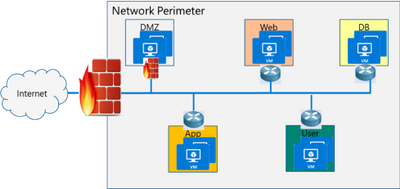
If you look at the topology below, end points can communicate with each other freely within VLANs or subnets behind a firewall. Infections on one of these servers are not contained and can easily spread to other servers.
Organizations may use physical firewalls to protect east west traffic. But that has its own drawbacks. Significant network resource utilization bottlenecks are created by sending east-west communication through a physical firewall. If firewall capacity is exhausted, security can be scaled by replacing with larger firewall or adding additional physical firewall, which is cumbersome and expensive.
Moreover, the use of physical firewalls can also create additional latency for certain applications. All traffic must traverse a physical firewall to be segmented, even when residing on the same physical server.
Solution: Microsegmentation in Azure Stack HCI
The ideal solution to complete protection is to protect every traffic flow inside the data center with a firewall, allowing only the flows required for applications to function. This is the Zero Trust Model.
Microsegmentation is the concept of creating granular network policies between applications and services. This essentially reduces the security perimeter to a fence around each application or virtual machine. The fence can permit only necessary communication between application tiers or other logical boundaries, thus making it exceedingly difficult for cyber threats to spread laterally from one system to another. Logical boundaries can be completely custom. They can be your different environments: Dev, Test, Production. Or different types of applications, or different tiers within an application. This securely isolates networks from each other and reduces the total attack surface of a network security incident.
With Azure Stack HCI, you can define granular segmentation for your applications and workloads and protect them from both external and internal attacks. This is achieved through a distributed firewall, enabling administrators to define access control lists to restrict access for workloads attached to traditional VLAN networks and overlay networks. This is a network layer firewall, allowing or restricting access based on source and destination IP addresses, source and destination ports and network protocol. You can read more about this here.
IMPORTANT: The microsegmentation policies can be applied to all Azure Stack HCI workloads attached to traditional VLAN networks.
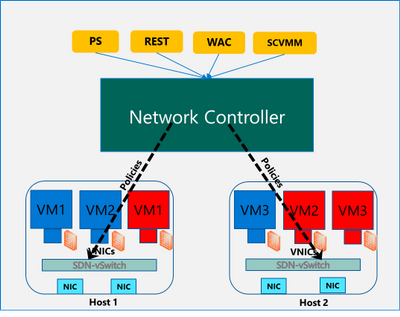
The firewall policies are configured through the management plane. You have multiple options here – standard REST interface, Powershell, Windows Admin Center (WAC) and System Center Virtual Machine Manager (SCVMM). The management plane sends the policies to a centralized control plane, Network Controller. This ships as a Server role in Azure Stack HCI OS. Network Controller pushes the policies to all the applicable Hyper-V hosts, and the policies are plumbed at the vSwitch port of virtual machines. Network Controller also ensures that the policies stay in sync, and any drift is remediated.
Configure and manage microsegmentation in Azure Stack HCI
There are two high level steps to configure microsegmentation for HCI. First, you need to setup the Network Controller and then, configure microsegmentation policies.
Setup Network Controller
Network Controller can be setup using SDN Express Powershell scripts or the Windows Admin Center (WAC) or through System Center Virtual Machine Manager (SCVMM).
Windows Admin Center
If you are deploying HCI for the first time, you can use the Windows Admin Center deployment wizard to setup Network Controller. SDN deployment is Step 5 of the wizard. This deploys the Network Controller component of SDN. Detailed instructions for launching this wizard, setting up the HCI cluster and setting up Network Controller is provided here. In the default case, you need to provide only two pieces of input:
- Path to the Azure Stack HCI OS vhdx file. This is used to deploy the Network Controller VMs.
- Credentials to join the Network Controller VMs to the domain and local admin credentials.
If you do not have DHCP configured on your management network, you will need to provide static IP addresses for the Network Controller VMs. A demo of the SDN setup is provided below:
SDN Express Scripts
If you already have an existing HCI cluster, you cannot deploy SDN through Windows Admin Center today. This support is coming soon.
In this case, you can deploy Network Controller (NC) component of SDN using SDN Express scripts. The scripts are available in the official Microsoft SDN github repository. The scripts need to be downloaded and executed on a machine which has access to the HCI cluster management network. Detailed instructions for executing the script are provided here.
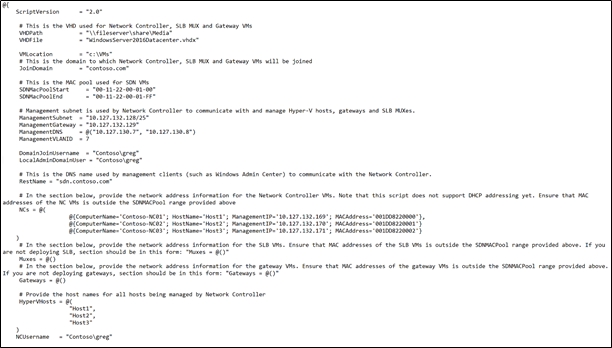
The script takes a configuration file as input. Template file can be found in the github repository here. You will need the provide/change the following parameters to setup Network Controller for microsegmentation on traditional HCI VLAN networks:
- VHDPath: VHDX file path used by NC VMs. Script must have access to this file path.
- VHDFile: VHDX file name used by NC VMs.
- JoinDomain: domain to which NC VMs are joined.
- Management network details (ManagementSubnet, ManagementGateway, ManagementDNS, ManagementVLANID): This is the management network of the HCI cluster.
- DomainJoinUsername: Username to join NC VMs to the domain
- LocalAdminDomainUser: Domain user for NC VMs who is also local admin on the NC VMs
- RestName: DNS name used by management clients (such as Windows Admin Center) to communicate with NC
- Details of NC VMs (ComputerName, HostName, ManagementIP, MACAddress): Name of NC VMs, Host name of Server where NC VMs are located, management network IP Address of NC VMs, MAC address of NC VMs
- HyperVhosts: Host server names in the HCI cluster
- NCUserName: NC Administrator account. Should have permission to do everything needed by someone administering the NC (primarily configuration and remoting). Usually, this can be same as LocalAdminDomainUser account.
Some other important points:
- The parameters VMLocation, SDNMacPoolStart, SDNMacPoolEnd can use default values.
- The following sections should be blank: Muxes, Gateways (Muxes = @())
- If you are deploying microsegmentation for VLAN networks, you should keep the PA network details section blank. Otherwise, if you are deploying overlay networks, please fill in that section.
- Rest of the parameters below the PA network section can be commented out.
A sample file is shown below:
Configure Microsegmentation Policies
Once Network Controller is setup, you can go ahead and deploy your microsegmentation policies.
- The first step is to create a logical network for your workloads hosted on VLAN networks. This is documented here.
- Next, you need to create the security ACL rules that you want to apply to your workloads. This is documented here.
- Once the ACL rules have been created, you can apply them to the network or a network interface.
- For applying ACLs to a traditional VLAN network, see instructions here.
- For applying ACLs to a virtual network, see instructions here.
- For applying ACLs to a network interface, see instructions here.
After the ACL rules have been applied to the network, all virtual machines in that network will get the policies and will have restricted access based on the rules. If the ACL rule has been applied to a network interface, the network interface will get the policies and will have restricted access based on the rules.
So, as you can see, with microsegmentation, you can protect every traffic flow in your HCI cluster, allowing only the flows required for your applications to function. Please try this out and give us feedback at sdn_feedback@microsoft.com. Feel free to reach out for any questions as well.






Recent Comments