by Contributed | May 18, 2021 | Technology
This article is contributed. See the original author and article here.
Cloud migration projects can be complex, and it can be hard to know where to start the migration journey. Migration assessments are crucial to execute successful migrations as they help you build a high-confidence migration plan. Microsoft is committed to support your migration needs with discovery, assessment, and migration capabilities for all your key workloads. In this blog post, we will take a look at how Azure Migrate’s preview of unified, at-scale discovery and assessment for SQL server instances and databases can help you plan and migrate your data estate to Azure.
With Azure Migrate, you can now create a unified view of your entire datacenter, across Windows, Linux and SQL Server running in your VMware environment. This makes Azure Migrate a one-stop-shop for all your discovery, assessment, and migration needs, across a breadth of infrastructure, application, and database scenarios. It has already helped thousands of customers in their cloud migration journey, and you can use it for free with your Azure subscription. With Azure Migrate’s integrated discovery and assessment capabilities, you can:
- Discover your infrastructure (Windows, Linux, and SQL ServerPREVIEW) at-scale.
- Identify installed applications running in your servers.
- Perform agentless dependency mapping to identify dependencies between your servers.
- Create assessments for migration to Azure VM, Azure VMware Solution and Azure SQLPREVIEW.
With this preview of unified discovery and assessment of SQL Server, you get a more comprehensive assessment of your on-premises datacenter. It lets you understand the following with respect to your SQL Server instances and databases running in VMware environments:
- Readiness for migrating to Azure SQL.
- Microsoft-recommended deployment type in Azure – Azure SQL Database, Azure SQL Managed Instance, or SQL Server on Azure VMs.
- Migration issues and mitigation steps.
- Right-sized Azure SQL Tier-SKUs that can meet the performance requirements of your databases, and the corresponding cost estimates.
How to get started?
You will first need to set up an Azure Migrate project. Once you have created a project, you will have to deploy and configure the Azure Migrate appliance. This appliance enables you to perform discovery and assessment of your SQL Servers. After the assessment, you can review the reports which include Azure SQL readiness details, Microsoft recommendations, and monthly estimates.
- Create an Azure Migrate project from the Azure Portal, and download the Azure Migrate appliance for VMware. Customers who already have an active Azure Migrate project can upgrade their project to enable this preview.
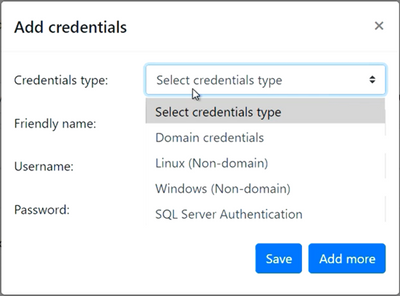
- Deploy a new Azure Migrate appliance for VMware or upgrade your existing VMware appliances to discover on-premises servers, installed applications, SQL Server instances and databases, and application dependencies. To enable you to discover your datacenter easily, the appliance lets you enter multiple credentials – Windows authentication (both Domain and non-Domain) and SQL Server authentication. The Azure Migrate appliance will automatically map each server to the appropriate credential when multiple credentials are specified.
These credentials are encrypted and stored on the deployed appliance locally and are never sent to Microsoft.
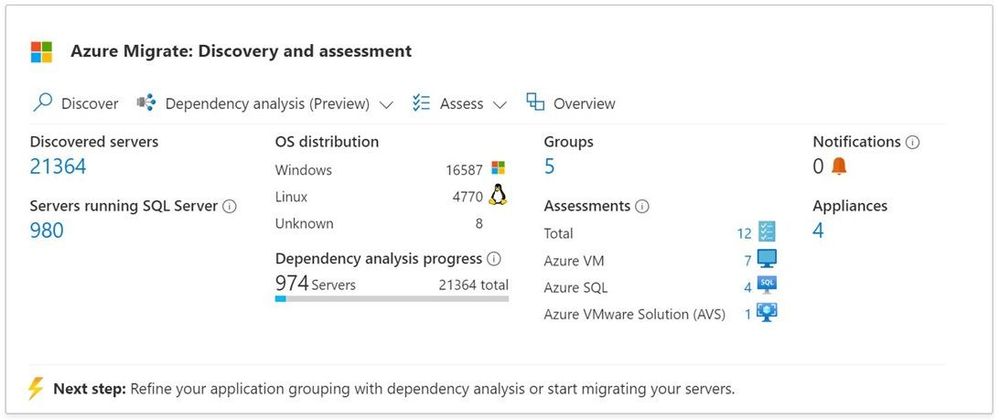
- View the summary of the discovered IT estate from your Azure Migrate project
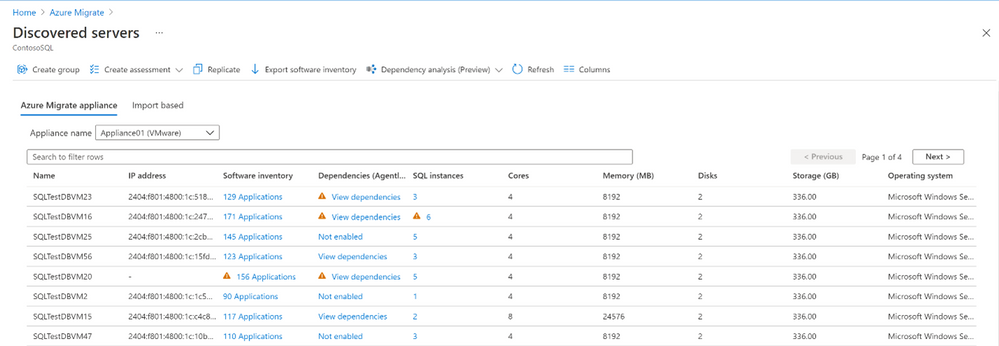
a. You can view details of the discovered servers such as their configurations, software inventory (installed apps), dependencies, count of SQL instances, etc.
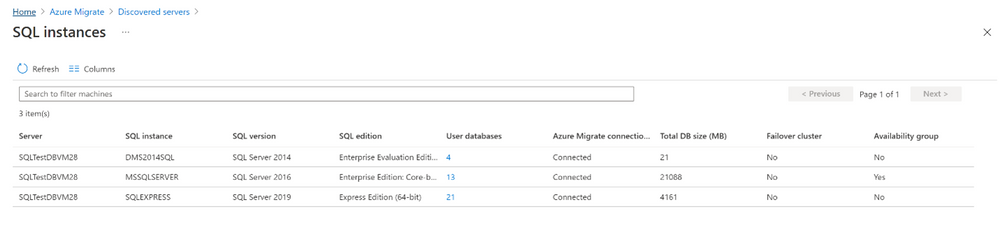
b. You can delve deeper into a server to view the SQL Server instances running on it and their properties such as version, edition, allocated memory, features enabled, etc.
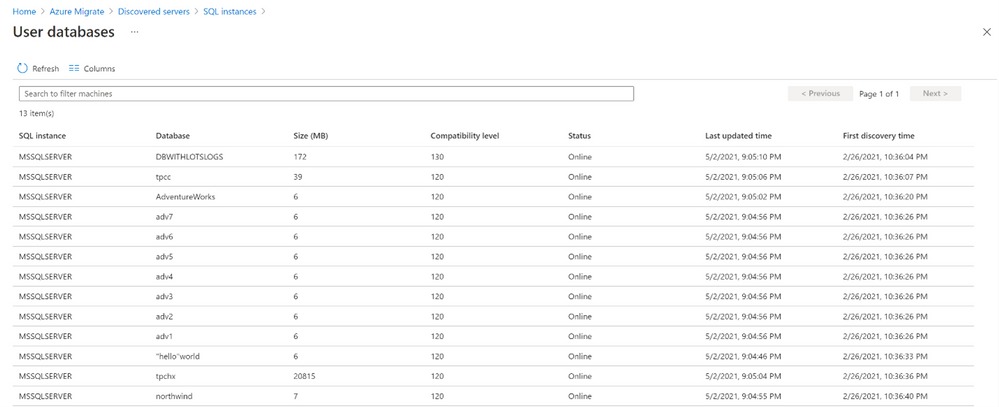
 c. You can further dive deeper into each instance to view the databases running on it and their properties such as status, compatibility level, etc.
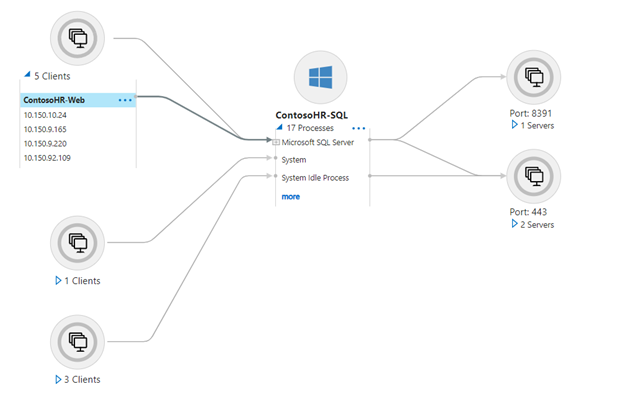
- Use the agentless dependency mapping feature to identify application tiers or interdependent workloads.
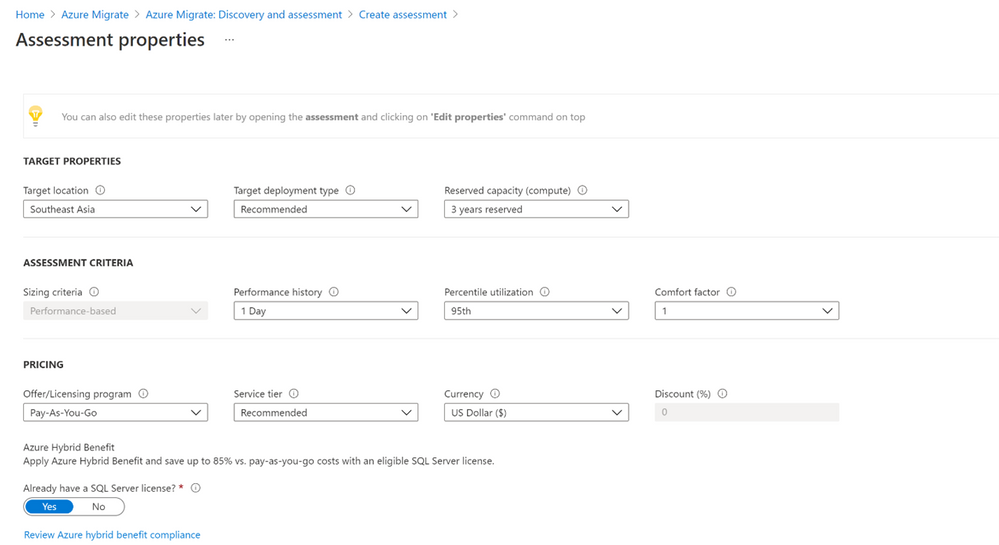
5. Create an assessment for Azure SQL by specifying key properties such as the target Azure region, Azure SQL deployment type, reserved capacity, service tier, performance history, etc.
- View the assessment report to identify suitable Azure SQL deployment options, right-sized SKUs that can provide the same or superior performance as your on-premises SQL deployments, and recommended migration tools.
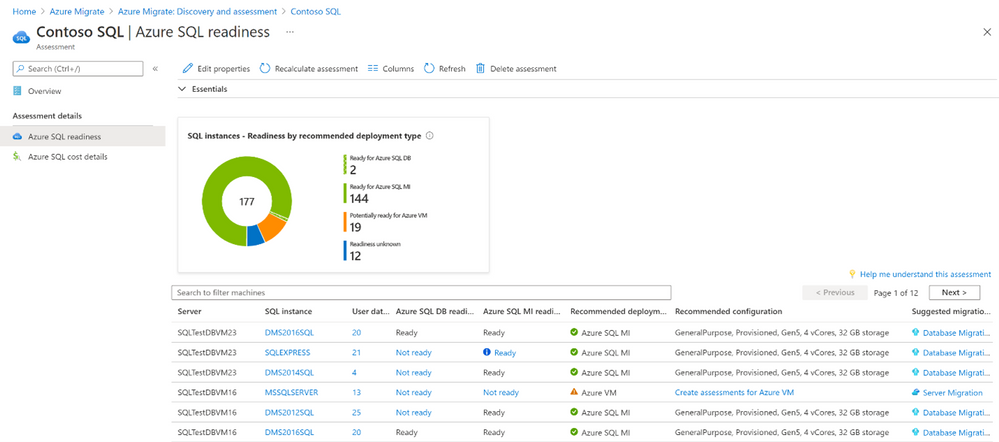 a. You can further drill-down to a SQL Server instance and subsequently to its databases, in order to understand its readiness for Azure SQL, specific migration issues that prevent migration to a specific Azure SQL deployment option, etc.
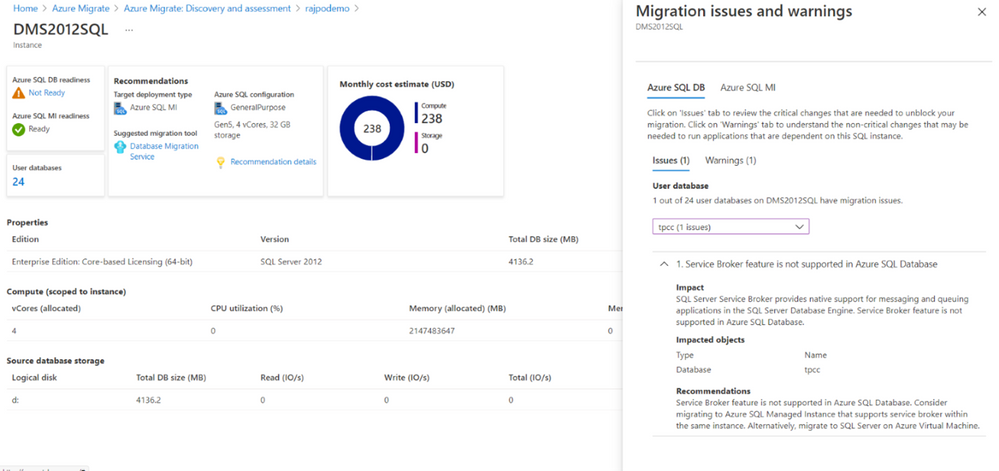
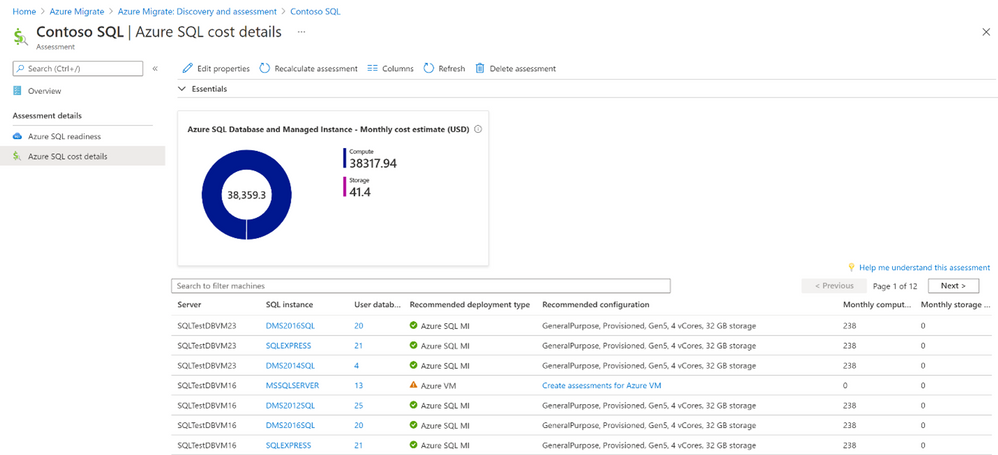
b. You can also understand the estimated cost of running your on-premises SQL deployments in Azure SQL.
Workflow and architecture
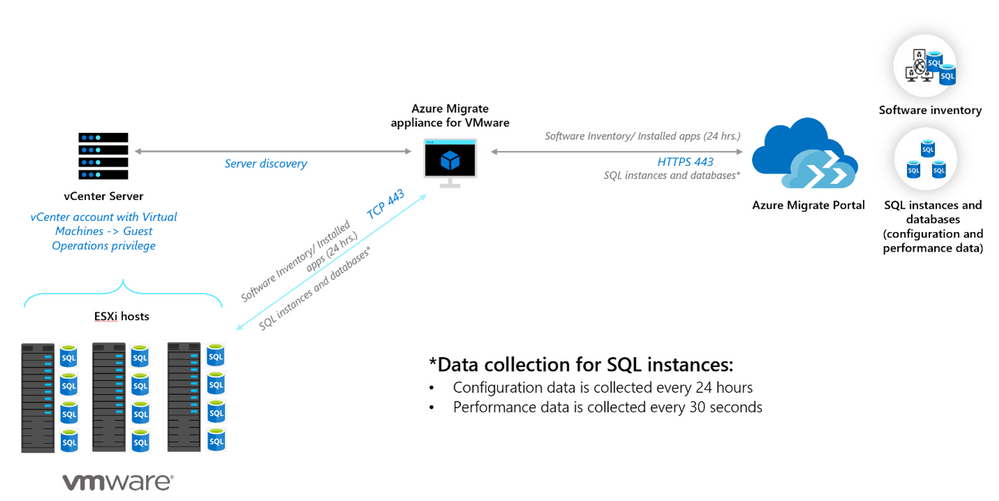
The architecture diagram below, outlines the flow of data once the Azure Migrate appliance is deployed, and credentials are entered. The appliance:
- Uses the vCenter credentials to connect to the vCenter Server to discover the configuration and performance (resource utilization) data of the Windows and Linux servers it manages.
- Collects software inventory (installed apps) and dependency (netstat) information from servers that were discovered and identifies the SQL Server instances running on them.
- Connects to the discovered SQL Server instances and collects configuration and performance data of the SQL estate. The configuration data is used to identify migration blockers, and the performance data (IOPS, latency, CPU utilization etc.) is used to right-size the SQL instances and databases for migration to Azure SQL.
Scale and support
You can discover up to 6000 databases (or 300 instances) with a single appliance, and you can scale discovery further by deploying more appliances. The preview supports discovery of SQL instances and databases running on SQL Server 2008 through SQL Server 2019. All SQL editions – Developer, Enterprise, Express, and Web are supported. Additionally, as indicated in the diagram, discovery of configuration and performance data is a continuous process ie the discovered inventory is refreshed periodically, thereby enabling you to visualize the most updated details of your environment.
Conclusion
Once you have completed your SQL Server assessment and identified the desired targets in Azure, you can leverage Server Migration tool from Azure Migrate to migrate to Azure VMs, or Azure Database Migration Service to migrate to Azure SQL Managed Server or Azure SQL Database.
Migrating to Azure can help you realize substantial cost savings and operational efficiencies. Azure enables you to move efficiently and with high confidence through a mix of services like Azure Migrate, best practice guides, and programs. Once in the cloud, you can scale on-demand to meet your business needs.
Get started today
by Contributed | May 18, 2021 | Technology
This article is contributed. See the original author and article here.
In this article I will show how to build the ActiveMQ trigger using the service provider capability in the new logic app, the project was inspired from Praveen article Azure Logic Apps Running Anywhere: Built-in connector extensibility – Microsoft Tech Community
 This project is only a POC and it is not fully tested This project is only a POC and it is not fully tested |
The ServiceProvider is serving two consumers
The logic app designer and the logic app run time.
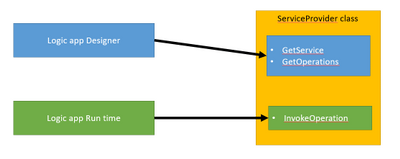
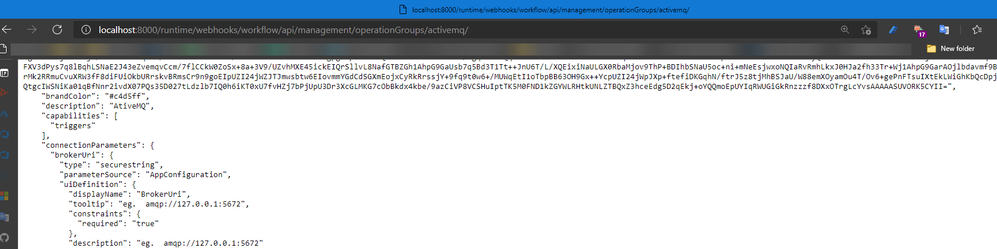
The Designer can be the VS code or the portal where requests will be done to get the skeleton/Swager of the trigger by calling REST API hosted on function app runtime like below
Run time will read the Logic app Json definition and execute the invoke operation.
the developed trigger work based on polling mechanism so the Logic app run time will call the invokeoperation based on the time interval configured in the trigger request.
"triggers": {
            "Receive_Messages": {
                "type": "ServiceProvider",
                "kind": "Polling",
                "inputs": {
                    "parameters": {
                        "queue": "TransactionQueue",
                        "MaximumNo": 44
                    },
                    "serviceProviderConfiguration": {
                        "connectionName": "activemq",
                        "operationId": "ActiveMQ : ReceiveMessages",
                        "serviceProviderId": "/serviceProviders/activemq"
                    }
                },
                "recurrence": {
                    "frequency": "Second",
                    "interval": 15
                }
            }
        },
this can be specified first by specifying the Recurrence Setting to be basic so the designer can know that is a polling trigger
Recurrence = new RecurrenceSetting
              {
                   Type = RecurrenceType.Basic,
              },
Then the designer will add the keyword kind = Polling
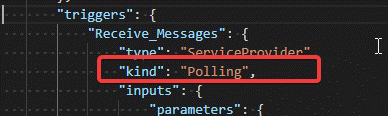
If the kind keyword is not added, then add it manually.
InvokeOperation operation steps
The operation is doing the following.
Read the connection properties as well as the trigger request properties.
If there are no messages in the queue then the response will be System.Net.HttpStatusCode.Accepted which will be understood by the Logic app run engine as a skipped trigger
public Task<ServiceOperationResponse> InvokeOperation(string operationId, InsensitiveDictionary<JToken> connectionParameters,
        ServiceOperationRequest serviceOperationRequest)
{
    //System.IO.File.AppendAllText("c:templalogdll2.txt", $"rn({DateTime.Now}) start InvokeOperation ");
    string Error = "";
    try
    {

        ServiceOpertionsProviderValidation.OperationId(operationId);
        triggerPramsDto _triggerPramsDto = new triggerPramsDto(connectionParameters, serviceOperationRequest);

        var connectionFactory = new NmsConnectionFactory(_triggerPramsDto.UserName, _triggerPramsDto.Password, _triggerPramsDto.BrokerUri);
        using (var connection = connectionFactory.CreateConnection())
        {
            connection.ClientId = _triggerPramsDto.ClientId;
            using (var session = connection.CreateSession(AcknowledgementMode.Transactional))
            {
                using (var queue = session.GetQueue(_triggerPramsDto.QueueName))
                {
                    using (var consumer = session.CreateConsumer(queue))
                    {
                        connection.Start();
                        List<JObject> receiveMessages = new List<JObject>();
                        for (int i = 0; i < _triggerPramsDto.MaximumNo; i++)
                        {
                            var message = consumer.Receive(new TimeSpan(0,0,0,1)) as ITextMessage;
                            //System.IO.File.AppendAllText("c:templalogdll2.txt", $"rn({DateTime.Now}) message != null {(message != null).ToString()} ");
                            if (message != null)
                            {
                                receiveMessages.Add(new JObject
                            {
                                { "contentData", message.Text },
                                { "Properties",new JObject{ { "NMSMessageId", message.NMSMessageId } } },
                            });
                            }
                            else
                            {
                                //the we will exit the loop if there are no message
                                break;
                            }
                        }
                        session.Commit();
                        session.Close();
                        connection.Close();
                        if (receiveMessages.Count == 0)
                        {
                            //System.IO.File.AppendAllText("c:templalogdll2.txt", $"rn({DateTime.Now}) Skip  { JObject.FromObject(new { message = "No messages"} ) }");
                            return Task.FromResult((ServiceOperationResponse)new ActiveMQTriggerResponse(JObject.FromObject(new { message = "No messages" }), System.Net.HttpStatusCode.Accepted));
                        }
                        else
                        {
                        //System.IO.File.AppendAllText("c:templalogdll2.txt", $"rn({DateTime.Now}) Ok  {JArray.FromObject(receiveMessages)}");
                        return Task.FromResult((ServiceOperationResponse)new ActiveMQTriggerResponse(JArray.FromObject(receiveMessages), System.Net.HttpStatusCode.OK));

                        }
                         }
                }
            }
        }
    }
    catch (Exception e)
    {
        Error = e.Message;
        //System.IO.File.AppendAllText("c:templalogdll2.txt", $"rn({DateTime.Now}) error {e.Message}");
    }
    return Task.FromResult((ServiceOperationResponse)new ActiveMQTriggerResponse(JObject.FromObject(new { message = Error }), System.Net.HttpStatusCode.InternalServerError));
}
Development environment
To let the designer recognized the new serviceprovider, the information for the Dll should be added to the extensions.json
Which can be found in the below path
C:Users....azure-functions-core-toolsFunctionsExtensionBundlesMicrosoft.Azure.Functions.ExtensionBundle.Workflows1.1.7binextensions.json
Also we need to copy dll and it is dependencies to the bin folder next to the extensions.json file , this is done by using powershell script that run after the build
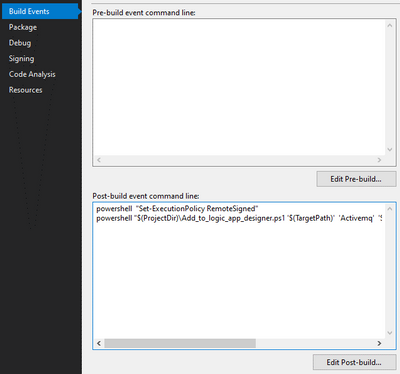
the powershell script can be found in the C# project folder
After building the ServiceProvider project you can switch to vs code that have the logic app designer installed more information can be found on Azure Logic Apps (Preview) – Visual Studio Marketplace
To add the service provider package to the logic app
First convert the logic app project to nuget as described here Create Logic Apps Preview workflows in Visual Studio Code – Azure Logic Apps | Microsoft Docs
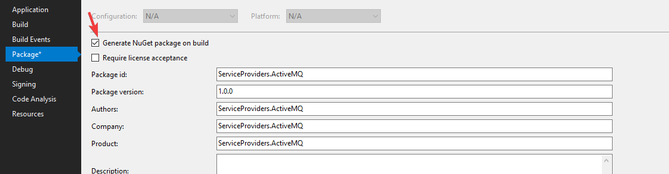
Then to get the nupkg file you can enable the below checkbox
Then to add the package you can run the powershell file Common/tools/add-extension.ps1
1- run Import-Module C:path to the fileadd-extension.ps1
2- add-extension Path “ActiveMQ”
You may face difficulty regarding the Nueget package cache ,So keep in mind that you may need manually delete the package file form the cache
Setup the ActiveMQ server
I used the docker image rmohr/activemq (docker.com)
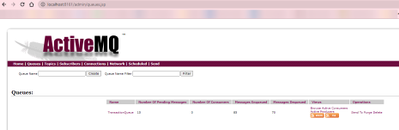
Then create messages using the management page http://localhost:8161/
The source code is available on GitHub
https://github.com/Azure/logicapps-connector-extensions
by Contributed | May 18, 2021 | Technology
This article is contributed. See the original author and article here.
Serverless Synapse SQL pools enable you to read Parquet/CSV files or Cosmos DB collections and return their content as a set of rows. In some scenarios, you would need to ensure that a reader cannot access some rows in the underlying data source. This way, you are limiting the result set that will be returned to the users based on some security rules. In this scenario, called Row-level security, you would like to return a subset of data depending on the reader’s identity or role.
Row-level security is supported in dedicated SQL pools, but it is not supported in serverless pools (you can propose this feature in Azure feedback site). In some cases, you can implement your own custom row-level security rules using standard T-SQL code.
In this post you will see how to implement RLS by specifying the security rules in the WHERE clause or by using inline table-value function (iTVF).
Scenario
Let’s imagine that we have a view or external table created on top of the COVID data set placed in the Azure Data Lake storage:
create or alter view dbo.covid as
select *
from openrowset(
    bulk 'https://pandemicdatalake.blob.core.windows.net/public/curated/covid-19/ecdc_cases/latest/ecdc_cases.parquet',
    format = 'parquet') as rows
The readers will get all COVID cases that are written in the Parquet file. Let’s imagine that the requirement is to restrict the user access and allow them to see just a subset of data based on the following rules:
- Azure AD user jovan@adventureworks.com can see only the COVID cases reported in Serbia.
- The users in ‘AfricaAnalyst’ role can see only the COVID cases reported in Africa.
We can represent these security rules using the following predicate (this is T-SQL pseudo-syntax):
( USER_NAME = 'jovan@adventureworks.com' AND geo_id = 'RS' )
OR
( USER IS IN ROLE 'AfricaAnalyst' AND continent_exp = 'Africa' )
You can use the system functions like SUSER_SNAME() or IS_ROLEMEMBER() to identify the caller and easily check should you return some rows to the current user. We just need to express this condition in T-SQL and add it as a filtering condition in the view.
In this post you will see two methods for filtering the rows based on security rules:
- Filtering rows directly in the WHERE condition.
- Applying security predicated coded in iTVF.
As a prerequisite, you should setup a database role that should have limited access to the underlying data set.
CREATE ROLE AfricaAnalyst;

CREATE USER [jovan@contoso.com] FROM EXTERNAL PROVIDER
CREATE USER [petar@contoso.com] FROM EXTERNAL PROVIDER
CREATE USER [petar@contoso.com] FROM EXTERNAL PROVIDER

ALTER ROLE AfricaAnalyst ADD MEMBER [jovan@contoso.com];
ALTER ROLE AfricaAnalyst ADD MEMBER [petar@contoso.com];
ALTER ROLE AfricaAnalyst ADD MEMBER [nikola@contoso.com];
In this code we have added a role and added three users to this role.
Filtering rows based on security rule
The easiest way to implement row-level security is to directly embed security predicates in the WHERE condition of the view:
create or alter view dbo.covid as
select *
from openrowset(
    bulk 'https://pandemicdatalake.blob.core.windows.net/public/curated/covid-19/ecdc_cases/latest/ecdc_cases.parquet',
    format = 'parquet') as rows
WHERE
( SUSER_SNAME() = 'jovan@adventureworks.com' AND geo_id = 'RS')
OR
( IS_ROLEMEMBER('AfricaAnalyst', SUSER_SNAME()) = 1 AND continent_exp = 'Africa')
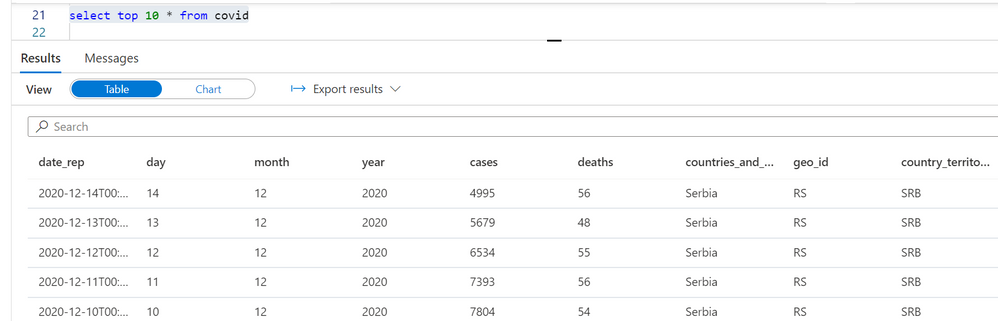
The Azure AD principal jovan@adventureworks.com will see only the COVID cases reported in Serbia:
Azure AD principals that belong to ‘AfricaAnalysts’ role will see the cases reported in Africa when running the same query:

Without any change in the query, the readers will be able to access only the rows that they are allowed to see based on their identity.
Operationalizing row-level-security with iTVF
In some cases, it would be hard to maintain security rules if you put them directly in the view definition. The security rules might change, and you don’t want to track all possible views to update them. The WHERE condition in the view may contain other predicates, and some bug in AND/OR logic might change or disable the security rules.
The better idea would be to put the security predicates in a separate function and just apply the function on the views that should return limited data.
We can create a separate schema called secure, and put the security rules in the inline table value function (iTVF):
create schema secure
go

create or alter function secure.geo_predicate(@geo_id varchar(20),
                                              @continent_exp varchar(20))
returns table
return (
    select condition = 1
    WHERE
    (SUSER_SNAME() = 'jovanpop@adventureworks.com' AND @Geo_id = 'RS')
    OR
    (IS_ROLEMEMBER('AfricaAnalyst', SUSER_SNAME())=1 AND continent_exp='Africa')
)
This predicate is very similar to the predicates used in native row-level security in the T-SQL language. This predicate evaluates a security rule based on geo_id and continent_exp values. These values are provided as the function parameters. The function will internally use SUSER_SNAME() and IS_ROLEMEMBER() functions and evaluate security rules based on geo_id and continent_exp values. If the current user can see a row with the provided values, the function fill return value 1. Otherwise, it will not return any value.
Instead of modifying every view by adding new conditions in the WHERE clause, we can create the secure wrapper views where we will apply this predicate. In the following example, I’m creating a view secure.covid where I will apply the predicate and pass the columns that will be used in the predicate to evaluate should this row be returned or not:
create or alter view secure.covid
as
select *
from dbo.covid
    cross apply security.geo_predicate(geo_id, continent_exp)
go
Note that in this case the view dbo.covid will not have the WHERE clause that contains the security rule. Security rules are filtering rows by applying security.geo_predicate() iTVF on the original view. For every row in the dbo.covid view. The query will provide the values of geo_id and continent_exp columns to the iTVF predicate. The predicate will remove the row from the output if these values do not satisfy criterion.
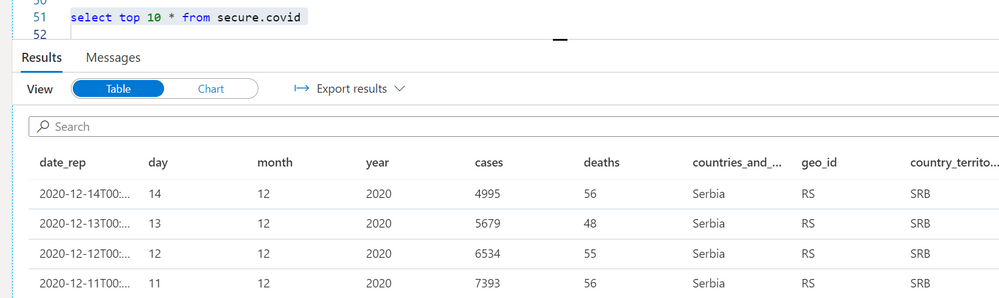
A user jovanpop@adventureworks.com will see the filtered results based on his context:
Placing the security rules in a separate iTVFs and creating the secure wrapper views will make your code more maintainable.
Conclusion
Although native row-level-security is not available in serverless SQL pool, you can easily implement the similar security rules using the standard T-SQL functionalities.
You just need to ensure that a reader cannot bypass the security rules.
- You need to ensure that the readers cannot directly query the files or collections in the underlying data source using the OPENROWSET function or the views/external tables. Make sure that you restrict access to the OPENROWSET/credentials and DENY SELECT on the base views and external tables that read original un-filtered data.
- You need to ensure that users cannot directly access the underlying data source and bypass serverless SQL pool. You would need to make sure that underlying storage is protected from random access using private endpoints.
- Make sure that the readers cannot use some other tool like other Synapse workspace, Apache Spark, or other application or service to directly access the data that you secured on your workspace.
This method uses the core T-SQL functionalities and will not introduce additional overhead compared to the native row-level security. If this workaround doesn’t work in your scenario, you can propose this feature in Azure feedback site.

by Contributed | May 18, 2021 | Technology
This article is contributed. See the original author and article here.
We continue to expand the Azure Marketplace ecosystem. For this volume, 69 new offers successfully met the onboarding criteria and went live. See details of the new offers below:
|
Applications
|
|
AI Art Authentication Engine: Art Recognition’s intelligent software detects art forgery. The AI is trained to learn the characteristics of different artists by using a database containing more than 100,000 images. Upload a photo of a painting via a protected web app and receive an encrypted certificate of AI analysis within seven days.
|
 |
Anomali Match for Azure Sentinel: Anomali Match continuously correlates all security event and log data from Microsoft Azure Sentinel and other sources against millions of globally observed indicators of compromise (IOCs) to expose previously unknown adversaries that have penetrated your network.
|
 |
Blindspot ARIS: Blindspot’s ARIS uses natural language processing to classify incoming messages, prepare responses, and perform actions automatically. Organize your customers’ queries and reduce your customer-support load.
|
 |
Blindspot OptiFit: Blindspot’s OptiFit, an intelligent software solution built on top of the Optimus 4.0 platform, searches through millions of loading plans to maximize loaded volume while considering cargo weight, dimensions, stackability, and safety constraints.
|
 |
Blindspot Optimus 4.0: Blindspot’s Optimus 4.0 is an algorithm-based engine that helps optimize a wide range of processes for large operations. Components include OptiRoute for transportation, OptiFit for cargo loading, and OptiPlan for workforce service.
|
 |
Blindspot OptiPlan: Blindspot’s OptiPlan is an automated planning and scheduling system for workforce allocation. Sudden changes to production targets are processed within minutes when the new optimized schedule is recalculated with the Optimus 4.0 platform.
|
 |
Blindspot OptiRoute: Blindspot’s OptiRoute system for transportation and logistics creates an optimized schedule within minutes while eliminating spreadsheets and manual work. Plot optimal routes for vehicle loading and unloading and efficient cargo handling.
|
 |
CentOS Server 8.3: This image designed by Ntegral provides a CentOS Server 8.3 distribution optimized for production environments on Microsoft Azure. Use it for workloads that include Node.js, web applications, or various database platforms.
|
 |
CipherTrust Cloud Key Manager v1.9.0: CipherTrust Cloud Key Manager reduces key management complexity and operational costs by giving customers lifecycle control of encryption keys with centralized management and visibility.
|
 |
Confluent platform – full-scale event streaming: This virtual machine offered by Linnovate Technologies provides Confluent Platform. Confluent Platform simplifies connecting data sources to Apache Kafka, building streaming applications, and securing, monitoring, and managing Kafka infrastructure.
|
 |
Data Literacy as a Service: Data Literacy as a Service from Decision Inc. is a scalable training platform to accelerate data literacy across your organization. Learning sessions are geared toward technology upskilling to drive usage and option.
|
 |
Freshdesk-JIRA Connector: Use this app from IntegrateCloud to connect Freshdesk with JIRA. This will allow you to link Freshdesk tickets to JIRA issues and notify the JIRA team by sending comments through the Freshdesk ticketing system.
|
 |
Healthcare Quality Gap Exchange: Value-based programs continue to expand as incentives move away from fee-for-service reimbursement. This transition requires healthcare providers to manage quality metrics. Gap Exchange assists providers with the task of identifying and providing recommendations for quality gaps in care.
|
 |
IN-D.ai Facial identification and match: IN-D.ai Face Match uses artificial intelligence-based models combined with computer vision principles to generate confidence scores (match percentages) of facial images. The solution can also tokenize images of faces and match them for payment processing.
|
 |
IN-D.ai Signature detection and matching: IN-D.ai Signature Verification uses AI and computer vision to accurately detect signatures in documents and images, and it cross-matches two or more signatures. Use it as a standalone solution through an API or as part of a digital onboarding and know-your-customer solution.
|
 |
Infosys One Click API for Azure: The One Click API automation solution provides a standardized, governed platform for teams to implement APIs. The solution works with Microsoft Azure API Management and several other products, including Apigee, Kong, and Mulesoft.
|
 |
inVision System: inVision System from Intelligent Wellhead Systems connects services, digitizes workflows, and adds engineered controls for the well completions industry. Use its intelligent workflows and automation to identify efficiencies in operations and streamline administrative tasks.
|
 |
Jenkins: Open-source automation server: This image offered by Linnovate Technologies provides Jenkins, an open-source automation server that can be used to automate tasks related to building, testing, and deploying software.
|
 |
JFrog Enterprise, Xray, and Pipelines: JFrog Enterprise (SaaS) with Xray & Pipelines is a universal binary repository manager solution that empowers DevOps teams to improve their productivity, increase velocity, and deliver trusted releases from code to production.
|
 |
Kinetica Managed App Bootstrap Ubuntu VM: This virtual machine offered by Kinetica provides Ubuntu 18.04 as a base operating system with the necessary binaries to bootstrap a Microsoft Azure Kubernetes Service cluster provisioned during a managed app deployment.
|
 |
Medical Chart / Natural Language Understanding: This platform from Healthpointe Solutions gathers and normalizes structured and unstructured data throughout the healthcare ecosystem, providing a clinically enriched summary of key findings.
|
 |
Meister OperateX: Made for factories and plant facility management, Meister OperateX is equipped with an asset-integrated data platform that visualizes device data and manages power usage to improve energy efficiency. This app is available only in Japanese.
|
 |
Oracle Linux 8.3.0 Minimal: This image, designed by Ntegral and optimized for production environments on Microsoft Azure, provides Oracle Linux 8.3.0 Minimal. Oracle Linux is application binary-compatible with Red Hat Enterprise Linux.
|
 |
Phoenix: The Phoenix RISE student management system provides a complete curricula-agnostic solution for any K-12 school, with robust features in academics, administration, operations, and more.
|
 |
pnop OS Apr.1,21 Joke edition: This image from pnop provides a lightweight EFI boot application intended to give your team a laugh. If you deploy this image, you can show joke messages from pnop in diagnostics after boot.
|
 |
Predica Managed Cloud Optimizer: Are you sure you’re not overspending on your Microsoft Azure resources? Cloud Optimizer by Predica can help you quickly lower your cloud costs. You’ll receive a monthly report with actionable steps to save money.
|
 |
storm Cloud Contact Center Teams Integration: storm Teams Integration from Content Guru enables storm cloud contact center users to transfer phone calls to back-office subject matter experts on Microsoft Teams. Users can dial external numbers directly through Teams via a SIP trunk, an affordable and easy to-use mechanism to make calls.
|
 |
Therefore Online: Therefore Online, a cloud-based information management system, helps companies of all sizes streamline operations and boost productivity by automating core business procedures. Features include a digital repository, workflow automation, and business analytics capabilities.
|
 |
Ubuntu Desktop 20.04 LTS (DaaS): This image offered by Ntegral provides a fully managed Ubuntu virtual desktop environment hosted on Microsoft Azure to support your development activities and business applications. The image comes with LibreOffice, Visual Studio Code, Firefox, Node.js, and Git.
|
 |
Value Based Care: HealthPointe Solutions’ Value Based Care provides cognitive AI-supported analytics, alerting, and workflow integration, helping practices manage value-based care programs. The solution offers prospective modeling capabilities across cost and utilization, risk adjustment, patient safety, and more.
|
 |
Wendocs Service Platform: Wendocs Service Platform from Beijing Huawen Yundao Technology Co. Ltd. helps companies speed up document production with data tools, document-processing APIs, and a template designer add-in for Microsoft Word.
|
 |
Windows Server 2019 with Moodle Learning System: This ready-to-run image offered by Virtual Pulse provides Windows Server 2019 with Moodle. Moodle is a free and open-source learning management system for teachers, students, and administrators.
|
 |
Workspee: Workspee is designed to improve office communication and collaboration by connecting teams. Its perks and recognition feature spotlights employee achievement and offers discounts and freebies with participating businesses.
|
 |
Zendesk-JIRA Connector: Use this app from IntegrateCloud to connect Zendesk with JIRA. This will allow you to link Zendesk tickets to JIRA issues and notify the JIRA team by sending comments through the Zendesk Support ticketing system.
|
Consulting services
|
 |
App Migration: 2-Week Assessment: Are you considering modernizing or migrating your legacy application to the cloud? In this engagement, Intellinet will assess a key application to understand migration viability and determine a path to Microsoft Azure.
|
 |
Application Modernization Services: Modernize legacy and on-premises applications with CloudMoyo Application Modernization Services. Tap into the latest technology and frameworks for improved performance, scalability, and maintenance.
|
 |
Arbala Security – Managed Azure Sentinel: Arbala Security provides ongoing management and monitoring for your Microsoft Azure Sentinel security information and event management (SIEM) solution, responding to attacks against your business.
|
 |
Azure Architect as a Service: 4-Week Assessment: Covenant’s architect as a service adds value to your team with the expert knowledge, resources, and structure you need to meet your business intelligence goals while saving your IT budget.
|
 |
Azure Cloud Foundation: 10-Day Workshop: DexMach offers knowledge transfer and hands-on experience with running Microsoft Azure workloads using the Microsoft Cloud Adoption Framework for Azure and the Microsoft Azure Well-Architected Framework.
|
 |
Azure Data Pipelines: 3-Day Assessment: Maintaining the infrastructure required to ingest, manipulate, and visualize big data is a challenging task. Emumba can show you how the Microsoft Azure data platform can help you drive powerful business insights.
|
 |
Azure DevOps Accelerator: 6-Week Implementation: Accelerate digital transformation through DevOps. delaware will introduce Microsoft Azure DevOps as a supporting tool for multicompetent teams creating applications.
|
 |
Azure Economic Assessment: 4 Weeks: The 3Cloud assessment delivers data-driven insights for Microsoft Azure migration, including an analysis, application prioritization, and reference architecture.
|
 |
Azure Migration Workshop (CAF): 5 Days: Xencia Technology Solutions’ Microsoft Azure migration program is aligned with the Microsoft Cloud Adoption Framework for Azure, enabling you to understand the various phases of your cloud adoption.
|
 |
Azure Sentinel Scope Assessment Workshop: 1 Day: Atos’ workshop for IT and cybersecurity managers and administrators will provide a scope assessment for Microsoft Azure Sentinel, a cloud-native security information and event management (SIEM) solution. |
 |
Azure SQL Managed Instance: 10-Day Implementation: Reliance Infosystems will migrate your on-premises SQL Server instances or SQL Server on Azure Virtual Machines to Azure SQL Managed Instance without re-engineering legacy applications.
|
 |
BizTalk 2020 or Logic Apps: 1-Day Assessment: EnkayTech will provide guidance on whether to use BizTalk Server 2020 on Microsoft Azure, migrate your existing BizTalk implementation to Azure Logic Apps, or implement your solution using Azure Logic Apps.
|
 |
CheckBot Image Recognition: 8-Week Implementation: Programmer will implement its application to automate and scale data extraction using Microsoft Azure Data Factory, Azure Storage, Azure Queue, Azure Blob Storage, and Azure App Service. This offer is available only in Brazilian Portuguese.
|
 |
Cloud Discovery Workshop: ThoughtSol’s workshop follows a defined and repeatable process, building on the Microsoft Cloud Adoption Framework for Azure, Microsoft best practices approach to cloud adoption.
|
 |
CloudMoyo Agile Application Engineering: CloudMoyo’s application engineering services bring end-to-end technology and expertise to your business to accelerate application development, project delivery, and modernization of legacy applications.
|
 |
CloudMoyo Agile Data Engineering: Empowering you through your enterprise data transformation journey, CloudMoyo’s data engineering services help build data models to provide timely visibility into business-critical data with data management.
|
 |
CloudMoyo AI and ML solutions: Make informed decisions and gain a competitive advantage in the market with intelligence, predictive analytics, prescription, and recommendation capabilities through AI and machine learning solutions from CloudMoyo.
|
 |
CloudMoyo Platform-Driven App Engineering: CloudMoyo’s platform-driven app engineering services apply a platform and product mindset for engineering business applications. The CloudMoyo cloud-native apps are quick to deploy, and easier to manage and upgrade.
|
 |
Cloud Transformation: 3-Day Assessment: This cloud transformation assessment from Quadra Nubis is aligned with the Microsoft Cloud Assessment Framework for Azure to help you assess workloads, check the compatibility, evaluate costs, and deploy tooling. |
 |
Database Migration to Azure: 5-Day Implementation: Reliance Infosystems offers migration of on-premises SQL Server to Azure SQL Database or SQL Server on Azure Virtual Machines at a very low risk, without re-engineering legacy applications.
|
 |
Human360: 1-Day Implementation: Reliance Infosystems will implement its human resource management application for organizations of all sizes. Human360 uses Microsoft Azure App Service and Azure SQL Database to deliver speed, scale, efficiency, and 99.9 percent uptime.
|
 |
Machine Learning Proof of Concept: 5 days: Verne will identify data sources, define business problems to predict, identify variables, and execute a deployment in Azure Machine Learning Studio with a base algorithm. This service is available only in Spanish.
|
 |
Mainframe Modernization to Azure: 3-Week to 6-Week Assessment: Mphasis will assess your company’s current mainframe landscape and provide a modernization plan to migrate to Microsoft Azure with proprietary tools as well as Azure ecosystem services.
|
 |
Microsoft Identity: 3-Day Workshop: To bring the Microsoft 365 security and Azure Active Directory vision to life, Avaleris will develop a strategic plan to protect identities while giving users the freedom to collaborate.
|
 |
Mphasis – Azure Data Platform 10-Week Assessment: Mphasis will provide a blueprint for a data platform on Microsoft Azure, deploying such tools as Azure Data Factory, Azure Databricks, Azure Stream Analytics, Azure Synapse Analytics, and Azure Data Lake.
|
 |
Mphasis – Azure DevSecOps: 10-Week Implementation: Mphasis will build your end-to-end enterprise-scale DevSecOps foundation with deep automation, including process, frameworks and Microsoft Azure automation.
|
 |
Mphasis – Hybrid Managed Service: 10-Week Implementation: Mphasis will provide you with a consistent, integrated, intelligent, and unified cloud operations experience to run enterprise transformation programs at scale.
|
 |
Mphasis – XaaP: 8-Week Assessment: As part of the everything as a platform (XaaP) assessment, Mphasis will evaluate your cloud economics, inventory analysis, operational models, and business value streams to accelerate your organization’s journey to Microsoft Azure.
|
 |
Product Engineering services: CloudMoyo will help you build viable, scalable, and high-performance products, providing technical skills in product engineering, and addressing technology-disruptive competitors and tight deadlines.
|
 |
SAP on Azure: 2-Day Assessment: If you are running SAP workloads, Atmosera can provide you with a complete SAP environment assessment and and detailed plans to deploy, run, and manage your SAP environment on Microsoft Azure. This will help you optimize workload performance.
|
 |
Security and Threat Check: 3-Day Workshop: Bringing the Microsoft 365 and Microsoft Azure security vision to life, Avaleris will develop a long-term strategic plan for cloud security and provide visibility into immediate threats across email, identity, and data.
|
 |
TIS Azure Vmware Solution Integration: 10-Week Implementation: TIS Co’s services will extend your VMware foundation to Microsoft Azure, helping you take advantage of VMware’s application compatibility and Azure’s scalability. This service is available only in Japanese.
|
 |
TradeOffice: 10-Week Implementation: Reliance Infosystems’ TradeOffice platform provides a unique trading experience for capital market operators using Microsoft Azure App Service and Azure SQL Database.
|
 |
Virtual App & Desktop: 1-Week Implementation: Upper-Link will help deploy your virtual desktop infrastructure (VDI) or remote desktop service (RDS) with Windows Virtual Desktop to enable you to quickly respond to the needs of remote employees in a secure environment.
|
 |
Windows Virtual Desktop Readiness Proof of Concept: eVri, a partnership between Shiftz and 2commit, offers you the opportunity to try out Windows Virtual Desktop for one month, which will provide centralized application management for your IT department and mobility for your employees.
|
|
by Contributed | May 18, 2021 | Technology
This article is contributed. See the original author and article here.
Live Security and Compliance Ask Me Anything (AMA) with Microsoft Product Experts
Register Now: Tuesday, June 1, 2021, 11:00 AM – 11:45 AM CDT
Microsoft Security and Compliance thought leaders Matthew Littleton / @Matthew Littleton (CYBERSECURITY) (Microsoft Global Advanced Compliance Specialist, and Retired Navy Captain) and Matt Soseman / @Matt Soseman (Microsoft Senior Security Architect) will offer unique insights and a depth of knowledge around the Microsoft Security product suite during this 45 minute open forum Q&A.
These leaders will bring nearly 25 years at Microsoft to bear while answering questions pertaining to product capabilities and updates, feature availability, and applications for federal cybersecurity mandates such as the Cybersecurity Maturity Model Certification (CMMC) and DFARS 7012. Questions may cover the following and much more:
- Data Loss Prevention
- Microsoft Intune
- Azure Active Directory and Conditional Access
- Microsoft Cloud App Security
- Microsoft 365 GCC & GCC High
In this Ask Me Anything (AMA) style session, Matt and Matt will address audience members and their respective scenarios deploying in the Microsoft Government Cloud to better prepare teams looking to protect corporate and US Government Data.
The goal of this session is to address contractors questions in light of the recent Cloud Security and Compliance Series event where both Matt and Matt have addressed topics such as “CMMC Compliance in the Microsoft Sovereign Cloud” and “Meeting CMMC Level 3 with Microsoft Intune / Meeting CMMC with Microsoft Information Protection (MIP)”.
Register for live event here.


Recent Comments