by Contributed | May 18, 2021 | Technology
This article is contributed. See the original author and article here.
Today we’re posting a known issue in the message center as a follow-up to a service health dashboard post. We will keep this blog post (it’s what’s referred to in the message center post) updated as needed!
Follow-up to IT256796 – Users unable to view passcode setup screen when enrolling devices through ADE
We recently posted IT256796 on your service health dashboard. Customers enrolling devices through Apple Device Enrollment (ADE) discovered that they couldn’t view the passcode screen and therefore setup a passcode during enrollment. Upon investigation with Apple, this is a known issue in the iOS/iPadOS release 14.5 and 14.5.1. There is a workaround, described below.
How this will affect your organization:
This will only affect you if you use ADE and configure an iOS/iPadOS ADE setup assistant profile to use the Show Passcode screen as part of the enrollment process.
What you need to do to prepare:
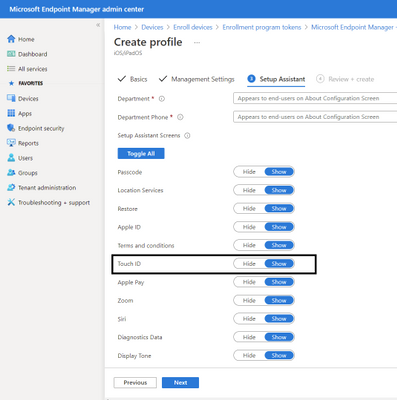
You can allow/show biometrics such as TouchID (which also enables FaceID) which will then present the passcode prompt. We will post this message to the Intune Customer Success blog (that’s this post!) as well and will keep the blog updated with the latest from Apple or if there’s any additional workaround Intune can implement.
BTW – here’s where you configure TouchID for your setup assistant profile in the Microsoft Endpoint Manager console:
Create an ADE profile and show Touch ID
by Contributed | May 18, 2021 | Technology
This article is contributed. See the original author and article here.
Microsoft Build, our free digital event, starts next week and runs from May 25-27, 2021. We thought you might be interested to learn ways you can plan to experience the latest set of developer tools, platforms, and services helping you build amazing things on your terms, anywhere, with Microsoft and Azure. You’ll also have a chance to speak with Microsoft experts and have the opportunity to continue your technical learning journey.
Register to gain full access to all Microsoft Build has to offer—it’s easy and at no-cost to you.
Create the perfect event schedule
Explore the session catalog to find expert speakers, interactive sessions, and more. After registering, get started on your journey using the Build session catalogue.
Below are a set of featured Technical Sessions kicking off the key themes of Build 2021, with deeper related Breakout Sessions—all of which you won’t want to miss:
Increase Developer Velocity with Microsoft’s end-to-end developer platform:
Deliver new intelligent cloud-native applications by harnessing the power of Data and AI:
Build cloud-native applications your way and run them anywhere:
Follow #MSBuild
Explore the latest event news, trending topics, and share your point of view in real time with your community. Join us on Twitter and LinkedIn by using #MSBuild.
Join us on social >
Connection Zone
Only at #MSBuild can you strengthen your network with local connections and meet with Microsoft product teams to help influence the future of products and services.
Connect today>
Learning Zone
The Learning Zone is the center for training, development, and certification with Microsoft. Whatever your style of learning happens to be, you can find content and interactive opportunities to boost and diversify your cloud skills.
Explore trainings >
One-on-one consultation
Schedule your 45-minute, one-on-one consultation with a Microsoft engineer to architect, design, implement or migrate your solutions.
Schedule today >
Continue your learning journey
Discover more in-depth learning paths, training options, communities, and certification details across all Microsoft cloud solutions from one place.
Explore trainings >
by Contributed | May 18, 2021 | Technology
This article is contributed. See the original author and article here.
We are pleased to announce the final release of the Windows 10, version 21H1 (a.k.a. May 2021 Update) security baseline package!
Please download the content from the Microsoft Security Compliance Toolkit, test the recommended configurations, and customize / implement as appropriate.
This Windows 10 feature update brings very few new policy settings. At this point, no new 21H1 policy settings meet the criteria for inclusion in the security baseline. We are, however, refreshing the package to ensure the latest content is available to you. The refresh contains an updated administrative template for SecGuide.admx/l (that we released with Microsoft 365 Apps for Enterprise baseline), new spreadsheets, .PolicyRules file, along with a script change (commented out the Windows Server options in the Baseline-LocalInstall.ps1 script)
Windows 10, version 21H1 is a client only release. Windows Server, version 20H2 is the current Windows Server Semi-Annual Channel release and per our lifecycle policy is supported until May 10, 2022.
As a reminder, our security baselines for the endpoint also include Microsoft 365 Apps for Enterprise, which we recently released, as well as Microsoft Edge and Windows Update.
Please let us know your thoughts by commenting on this post or via the Security Baseline Community.
by Contributed | May 18, 2021 | Technology
This article is contributed. See the original author and article here.
Windows 10, version 21H1 is now available through Windows Server Update Services (WSUS) and Windows Update for Business, and can be downloaded today from Visual Studio Subscriptions, the Software Download Center (via Update Assistant or the Media Creation Tool), and the Volume Licensing Service Center[1]. Today also marks the start of the 18-month servicing timeline for this H1 (first half of the calendar year) Semi-Annual Channel release.
Windows 10, version 21H1 (also referred to as the Windows 10 May 2021 Update) offers a scoped set of improvements in the areas of security, remote access, and quality to ensure that your organization and your end users stay protected and productive. Just as we did for devices updating from Windows 10, version 2004 to version 20H2, we will be delivering Windows 10, version 21H1 via an enablement package to devices running version 2004 or version 20H2—resulting in a fast installation experience for users of those devices. For those updating to Windows 10, version 21H1 from Windows 10, version 1909 and earlier, the process will be similar to previous updates.
Jump to: What is an enablement package? | Tools | Resources | Features to explore | Deployment recommendations | Office hours
What is an enablement package?
Simply put, an enablement package is a great option for installing a scoped feature update like Windows 10, version 21H1 as it enables devices to update with a single restart, reducing downtime. This works because Windows 10, version 21H1 shares a common core operating system with an identical set of system files with versions 2004 and 20H2. As a result, the scoped set of features in version 21H1 were included in the May 2021 monthly quality updates for version 2004 and version 20H2, but were delivered in a disabled/dormant state. These features remain dormant until they are turned on with the Windows 10, version 21H1 enablement package—a small, quick to install “switch” that activates these features. Using an enablement package, installing the Windows 10, version 21H1 update should take approximately the same amount of time as a monthly quality update.
Note: If you are connected to WSUS and running Windows 10, version 2004 or version 20H2, but have not installed the May 2021 updates (or later), you will not see the version 21H1 enablement package offered to your device. Devices running version 2004 or version 20H2 connecting directly to Windows Update will be able to install the enablement package, but will also install the Latest Cumulative Update (LCU) at the same time (if needed), which may increase the overall installation time slightly.
|
Which tools are being updated for version 21H1?
To support the release of Windows 10, version 21H1, we have released updated versions of the following tools:
What about other tools?
As Windows 10, version 21H1 shares a common core and an identical set of system files with version 2004 and 20H2, the following tools do not need to be updated to work with version 21H1:
- Windows Assessment and Deployment Kit (Windows ADK) for Windows 10, version 2004 –Customize Windows images for large-scale deployment or test the quality and performance of your system, added components, and applications with tools like the User State Migration Tool, Windows Performance Analyzer, Windows Performance Recorder, Window System Image Manager (SIM), and the Windows Assessment Toolkit.
- Windows PE add-on for the Windows ADK, version 2004 – Small operating system used to install, deploy, and repair Windows 10 for desktop editions (Home, Pro, Enterprise, and Education). (Note: Prior to Windows 10, version 1809, WinPE was included in the ADK. Starting with Windows 10, version 1809, WinPE is an add-on. Install the ADK first, then install the WinPE add-ons to start working with WinPE.)
Any resources being updated?
To support Windows 10, version 21H1, we are updating the key resources you rely on to effectively manage and deploy updates in your organization, including:
- Windows release health hub – The quickest way to stay up to date on update-related news, announcements, and best practices; important lifecycle reminders, and the status of known issues and safeguard holds.
- Windows 10 release information – A list of current Windows 10 versions by servicing option along with release dates, build numbers, end of service dates, and release history.
- Windows 10, version 21H1 update history – A list of all updates (monthly and out-of-band) released for Windows 10, version 21H1 sorted in reverse chronological order.
New features to explore
As noted above, Windows 10, version 21H1 offers a scoped set of features focused on the core experiences that you rely on the most as you support both in person and remote workforces. Here are the highlights for commercial organizations:
- Windows Hello multi-camera support. For devices with a built-in camera and an external camera, Windows Hello would previously use the built-in camera to authenticate the user, while apps such as Microsoft Teams were set to use the external camera. In Windows 10, version 21H1, Windows Hello and Windows Hello for Business now default to the external camera when both built-in and external Windows Hello-capable cameras are present on the device. When multiple cameras are available on the same device, Windows Hello will prioritize as follows:
- SecureBio camera
- External FrameServer camera with IR + Color sensors
- Internal FrameServer camera with IR + Color sensors
- External camera with IR only sensor
- Internal camera with IR only sensor
- Sensor Data Service or other old cameras
- Microsoft Defender Application Guard enhancements. With Windows 10, version 21H1, end users can now open files faster while Application Guard checks for possible security concerns.
- Security updates. Windows 10, version 21H1 provides security updates for Windows App Platform and Frameworks, Windows Apps, Windows Input and Composition, Windows Office Media, Windows Fundamentals, Windows Cryptography, the Windows AI Platform, Windows Kernel, Windows Virtualization, Internet Explorer, and Windows Media.
- Windows Management Instrumentation (WMI) Group Policy Service (GPSVC) updating performance improvements to support remote work scenarios. When an administrator would make changes to user or computer group membership, these changes would propagate slowly. Although the access token eventually updates, the changes would not be reflected in a troubleshooting scenario when the gpresult /r or gpresult /h commands were executed. This was especially experienced in remote work scenarios and has been addressed.
What else have we been up to?
Aside from Windows 10, version 21H1, we’ve been busy with other new, exciting features and solutions that you may have heard about! (Note that some of these may require additional licensing or services.) Check out the links for details:
- Passwordless authentication – Speaking of Windows Hello for Business, I wanted to make sure you didn’t miss our March announcement that passwordless authentication is now generally available for hybrid environments! This is a huge milestone in our zero-trust strategy, helping users and organizations stay secure with features like Temporary Access Pass.
- Windows Update for Business deployment service – Approve and schedule content approvals directly through a service-to-service architecture. Use Microsoft Graph APIs to gain rich control over the approval, scheduling, and protection of content delivered from Windows Update.
- Expedite updates – Expediting a security update overrides Windows Update for Business deferral policies so that the update is installed as quickly as possible. This can be useful when critical security events arise and you need to deploy an update more rapidly than normal.
- Known Issue Rollback – Quickly return an impacted device back to productive use if an issue arises during a Windows update. Known Issue Rollback supports non-security bug fixes, enabling us to quickly revert a single, targeted fix to a previously released behavior if a critical regression is discovered.
- News and interests – For devices running Windows 10, version 1909 or later, news and interests in the taskbar enables users to easily see local weather and traffic as well as favorite stocks and the latest news on topics related to professional or personal interests. To learn how to manage news and interests via Group Policy or Microsoft Endpoint Manager, see Manage news and interests on the taskbar with policy,
- Universal Print – Now generally available, Universal Print is ready for your business! Universal Print is the premier cloud-based printing solution, run entirely in Microsoft Azure, and requires no on-premises print infrastructure.
- …and so much more! Follow the Windows IT Pro Blog (and @MSWindowsITPro on Twitter) to keep up-to-date on Windows announcements and new feature releases, and the Microsoft Endpoint Manager Blog (and @MSIntune on Twitter) for announcements and features new to Intune and Configuration Manager.
Deployment recommendations
With today’s release, you can begin targeted deployments of Windows 10, version 21H1 to validate that the apps, devices, and infrastructure used by your organization work as expected with the new features. If you will be updating devices used in remote or hybrid work scenarios, I recommend reading or revisiting Deploying a new version of Windows 10 in a remote world. For insight into our broader rollout strategy for this release, see John Cable’s post, How to get the Windows 10 May 2021 Update.
If you need a refresher on Windows update fundamentals, see:
For step-by-step online learning to help you optimize your update strategy and deploy updates more quickly across your device estate, see:
To get an early peek at some of the new features before we release them, join the Windows Insider Program for Business! Insiders can test new deployment, management, and security features, and provide feedback before they become generally available. Learn about managing the installation of Windows 10 Insider builds across multiple devices and get started today!
Join us for Office Hours
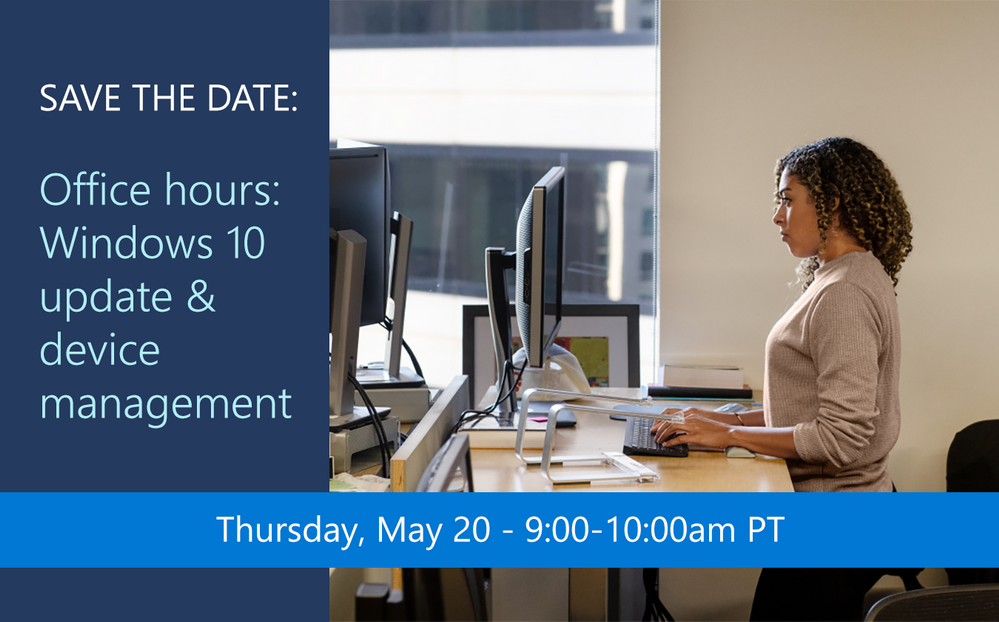
And finally, make sure you join our monthly Windows Office Hours, where you can ask your deployment, servicing, and updating questions and get answers, support, and help from our broad team of experts. Submit questions live during the monthly one-hour event or post them in advance if that schedule does not work for your time zone. Our next event is Thursday, May 20, 2021 so add it to your calendar and join us!
[1] It may take a day for downloads to be fully available in the VLSC across all products, markets, and languages.

by Contributed | May 18, 2021 | Technology
This article is contributed. See the original author and article here.
Azure Databricks is trusted by organizations such as the U.S. Department of Veterans Affairs (VA), Centers for Medicare and Medicaid Services (CMS), Department of Transportation (DOT), DC Water, Unilever, Daimler, Credit Suisse, Starbucks, AstraZeneca, McKesson, ExxonMobil, ABN AMRO, Humana and T-Mobile for mission-critical data and AI use cases.
Security and compliance using Azure Databricks
Databricks maintains the highest level of data security by incorporating industry leading best practices into our cloud computing security program. Azure Government general availability provides customers the assurance that Azure Databricks is designed to meet United States Government security and compliance requirements to support sensitive analytics and data science use cases. Azure Government is a gold standard among public sector organizations and their partners who are modernizing their approach to information security and privacy.
FedRAMP High authorization provides customers the assurance that Azure Databricks meets U.S. Government security and compliance requirements to support their sensitive analytics and data science use cases. Azure Databricks has also received a Provisional Authorization (PA) by the Defense Information Systems Agency (DISA) at Impact Level 5 (IL5). The authorization further validates Azure Databricks security and compliance for higher sensitivity Controlled Unclassified Information (CUI), mission-critical information and national security systems across a wide variety of data analytics and AI use cases.
Cloud-native security
In addition to core Databricks security features, Azure Databricks provides native integration with Azure security features to safeguard your most sensitive data and enhance compliance. Azure Databricks provides Azure Active Directory (Azure AD) integration, role-based access controls and service-level agreements (SLAs) that protect your data and your business. Azure AD native integration enables customers to provide a secure, zero-touch experience from the moment an Azure Databricks workspace is deployed. Azure AD authentication enables customers to securely and seamlessly connect to other services from Azure Databricks using their Azure AD account, dramatically reducing the time to deploy a solution.
Learn more about Azure Databricks security
Join us at Data + AI Summit for a technical deep-dive on security best practices to help you deploy, manage and operate a secure analytics and AI environment using Azure Databricks. Visit the new Azure Databricks Security and Compliance page for additional resources to help you implement security best practices and attend an Azure Databricks Quickstart Lab to get hands on experience.


Recent Comments