
by Contributed | May 26, 2021 | Technology
This article is contributed. See the original author and article here.
We’re glad to announce the release of Log Analytics Workspace Insights (preview) – a new experience providing comprehensive monitoring of your Log Analytics Workspace, through a central view of the workspace usage, performance, health, agents, run queries, and change log.
Accessing Log Analytics Workspace Insights
- Overview at scale – You can launch Log Analytics Workspace Insights through Azure Monitor’s list of insights, which shows an overview of your workspace across the globe: or from the Workspace itself. Opening LA Workspace Insights through Azure Monitor, first shows an overview of all your workspaces, across the globe:
Overview at scale
Select a workspace from the list to reach the more detailed workspace-specific view.
- Workspace-specific insights – open a Log Analytics Workspace and select Insights from its menu. This opens a multi-tabbed view, where you can deep dive into different aspects of your workspace. Below, we review in detail what insights this view provides.
Workspace Overview
The Overview section surfaces main workspace settings and statistics, such as the total monthly ingestion volume, the data retention period, or a set daily cap and how much of was it used already.
It also shows which are the top 5 most used tables, and information on them – how much data was ingested, what’s the daily pattern and anomalies – if found.
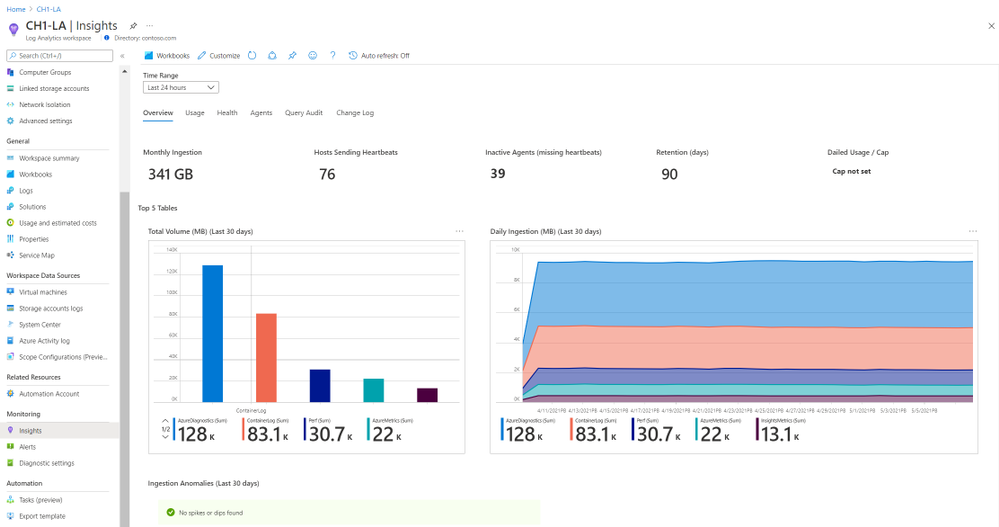 Workspace overview
Workspace Usage
Here you can explore in detail the usage of each table of the workspace. Click a row in the top grid to see table-specific information – how much data was ingested to the table, the percentage of it from the total workspace volume, which resources sent most data, and latency data, charted by time, and split to agent and pipeline latency.
Additionally, you can switch from the Dashboard to the Additional Queries tab to run queries and learn which resources, subscriptions and resource groups ingested most data – across the workspace. That information could help you identify “spamming” resources and save costs.
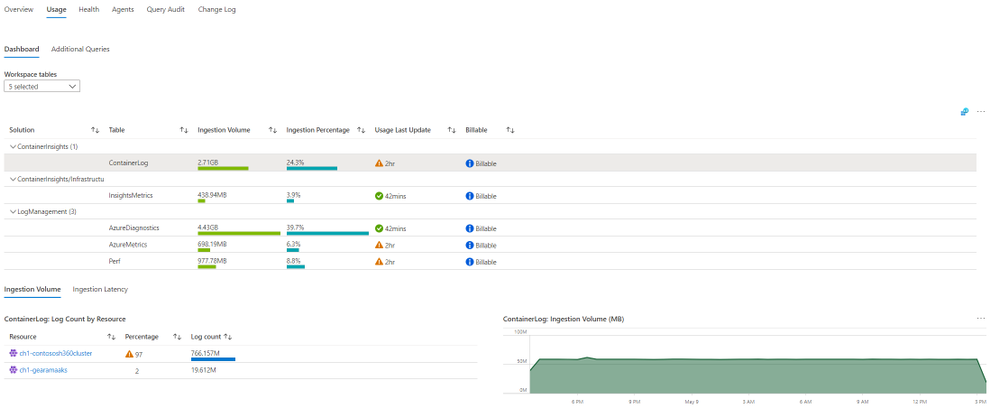 Workspace Usage
Workspace Health
The Health section shows the workspace health state, and known operational errors and warnings you should take note of. The table of operational events is based on the _LogOperation table.
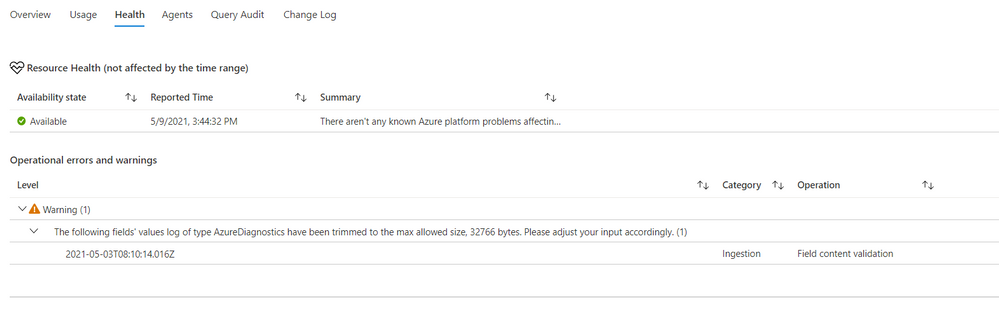 Workspace health
Workspace Agents
The top area of this page shows -operational errors and warnings related to your agents. The events are grouped by their description, but you can expand each type of event to see which resources were affected, and at which times.
Below it, you can review your agents in more detail – agent types, count, health and connectivity to the workspace over time.
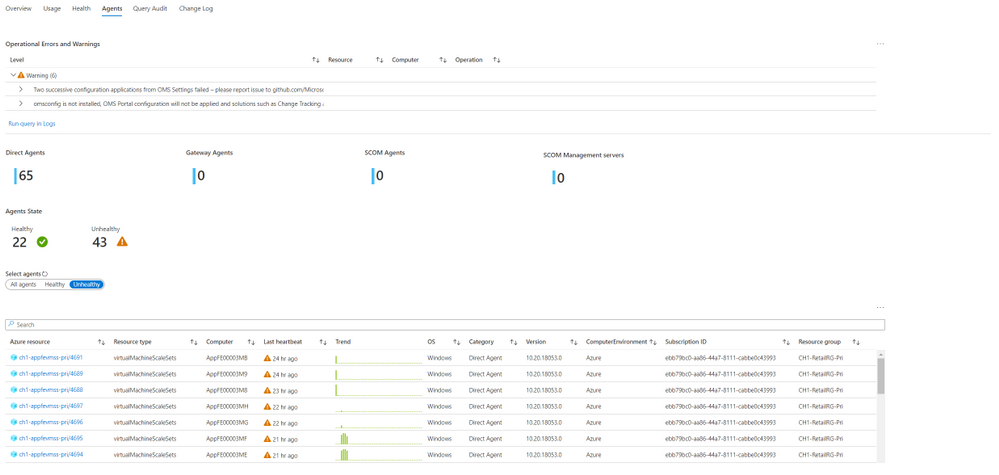 Workspace agents
Workspace Query Audit
The insights regarding workspace queries rely on query auditing logs. If query auditing is enabled on your workspace, this data could help you understand and improve query performance, and load, identify the most inefficient queries and which users query most, or experience query throttling. To enable query auditing on your workspace or learn more about it, see Audit queries in Azure Monitor Logs.
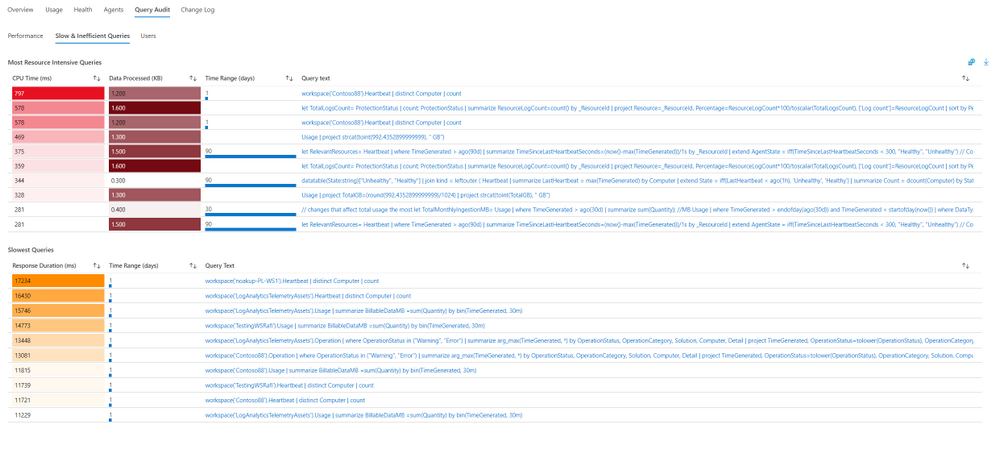 Workspace query audit
Workspace Change Log
This tab shows configuration changes made on the workspace during the last 90 days (regardless of the time range selected), and who performed them, to help you monitor who changes important workspace settings, such as data capping or workspace license.
Feedback
We appreciate your feedback! comment on this blog post and let us know what you think of the this feature.
by Contributed | May 26, 2021 | Technology
This article is contributed. See the original author and article here.
In this month’s edition of the What’s New blog, we’re excited to share news regarding the availability of Microsoft Office Long Term Servicing Channel (LTSC), OneDrive Admin Sync Reports (ADR), and updated Configuration Manager ADRs. We also point you to the latest admin-focused Microsoft Docs articles for Microsoft 365, as well as Amesh Mansukhani’s appearance on two new videos on the Office Deployment Insider’s YouTube channel and an interview on the Practical 365 Podcast!
Faster at-a-glance views with OneDrive Sync Admin Reports
In April, we announced the public preview for OneDrive Sync Admin Reports. Available in the Microsoft 365 Apps admin center, these reports give you an at-a-glance view of everything happening with OneDrive Sync across the organization, including visibility into who is running the OneDrive Sync client and any errors they might be experiencing. Insights like these can help you proactively reach out to educate people and resolve common issues quickly to improve user experience and increase OneDrive adoption.
Easier targeting for Microsoft 365 Apps updates with updated Configuration Manager ADRs
Coming in June, we’re releasing an update to Automatic Deployment Rules (ADR) for Microsoft 365 Apps in Microsoft Endpoint Configuration Manager that adds release type to the Title property in the update catalog. You will be able to use the Title property within the search criteria of your ADR definition to easily target the necessary updates for your environment. In addition, you’ll no longer need to continually update your search criteria with each new release. The version number and architecture values will also trade places.
Amesh Mansukhani talks about the Microsoft 365 Apps Admin Center on Practical 365 Podcast
At the end of April, Amesh Mansukhani, Office Deployment Insiders lead at Microsoft, joined the Practical 365 Podcast to talk about the Microsoft 365 Apps Admin Center. Listen to hear Amesh talk about the importance of keeping your Microsoft 365 Apps up to date and how you can benefit from using the Admin Center to help ensure your users and devices are getting access to the latest updates and to gain better visibility and control over application health. You can watch the video podcast on the Practical 365’s YouTube channel or listen to the audio-only version to learn more.
We’re excited to bring you two brand new videos on the Office Deployment Insiders YouTube Channel!
Get the most out of Microsoft OneDrive with brand new insight capabilities into your overall OneDrive deployment. Explore these new features with Amesh as he dives into fresh ways to analyze OneDrive client reports, sync issues, known folders to leverage KFM’s, and much more.
Introducing Microsoft 365 Apps Inventory, the Apps Inventory service recently added to the Microsoft 365 Apps Admin Center. Join Amesh as he shows how Inventory can help you gain deep insights and a real-time view of Office Apps in your organization.
Commercial Preview of Microsoft Office LTSC
Recently, we announced the Commercial Preview of Microsoft Office LTSC, which is built specifically for organizations running regulated devices that cannot accept feature updates for long periods, devices that are not connected to the internet, and specialty systems that must stay locked in time and require a long-term servicing channel.
Catching up: New Microsoft Docs articles for April
You can catch up on some of the latest Microsoft 365 Apps best practices from the field in these articles:
Network guidance for deploying and servicing Microsoft 365 Apps – This article covers topics such as available options for managing Microsoft 365 apps for remote workers or employees in the office, split tunneling for workforces that frequently connect using VPN, deploying Microsoft 365 Apps using Intune, using Servicing Profiles to manage monthly app updates, and optimizing your network via Configuration Manager. You can also read further guidance on deploying Microsoft 365 Apps.
Build dynamic collections for Microsoft 365 Apps with Configuration Manager – This article shares best practices for using Microsoft Endpoint Configuration Manager’s dynamic collections to simplify management. This month we added a new best practice for setting up a collection that captures all devices running outdated builds, so you can quickly identify devices that lack updates or must be updated to a certain minimum build.
Continue the conversation by joining us in the Microsoft 365 Tech Community! Whether you have product questions or just want to stay informed with the latest updates on new releases, tools, and blogs, Microsoft 365 Tech Community is your go-to resource to stay connected!
by Contributed | May 26, 2021 | Technology
This article is contributed. See the original author and article here.
Sync Up is your monthly podcast hosted by the OneDrive team taking you behind the scenes of OneDrive, shedding light on how OneDrive connects you to all your files in Microsoft 365 so you can share and work together from anywhere. You will hear from experts behind the design and development of OneDrive, as well as customers and Microsoft MVPs. Each episode will also give you news and announcements, special topics of discussion, and best practices for your OneDrive experience.
So, get your ears ready and Subscribe to Sync up podcast!
Our guest today is Chenying Yang, a senior Program Manager on OneDrive focusing on making OneDrive Sync great across consumer and enterprise. OneDrive Sync Admin Reports empowers IT admins with actionable insights about the adoption and health of the sync client. These reports give visibility into who in your company is running the OneDrive Sync app, how is Known Folder Move rollout going, as well as surfacing any errors that end users might be experiencing so you can proactively address them. You’ll also learn the team’s favorite go-to beverages to wind up or wind down.
Tune in!
Meet your show hosts and guests for the episode:
Jason Moore is the Principal Group Program Manager for OneDrive and the Microsoft 365 files experience. He loves files, folders, and metadata. Twitter: @jasmo
Ankita Kirti is a Product Manager on the Microsoft 365 product marketing team responsible for OneDrive for Business. Twitter: @Ankita_Kirti21
Chenying Yang is a senior Program Manager on OneDrive focusing on making OneDrive Sync great across consumer and enterprise
Twitter: @CYatSeattle
Quick links to the podcast
Links to resources mentioned in the show:
Be sure to visit our show page to hear all the episodes, access the show notes, and get bonus content. And stay connected to the OneDrive community blog where we’ll share more information per episode, guest insights, and take any questions from our listeners and OneDrive users. We, too, welcome your ideas for future episodes topics and segments. Keep the discussion going in comments below.
As you can see, we continue to evolve OneDrive as a place to access, share, and collaborate on all your files in Office 365, keeping them protected and readily accessible on all your devices, anywhere. We, at OneDrive, will shine a recurring light on the importance of you, the user. We will continue working to make OneDrive and related apps more approachable. The OneDrive team wants you to unleash your creativity. And we will do this, together, one episode at a time.
Thanks for your time reading and listening to all things OneDrive,
Ankita Kirti – OneDrive | Microsoft
by Contributed | May 26, 2021 | Technology
This article is contributed. See the original author and article here.
This week at Microsoft’s annual Build conference, we made two announcements related to Azure Durable Functions: Two new backend storage providers, and the General Availability of Durable Functions for PowerShell. In this post, we’ll go into more details about the new capabilities that Durable Functions brings to PowerShell developers.
Stateful workflows with Durable Functions
Durable Functions is an extension to Azure Functions that lets you write stateful workflows in a serverless compute environment.
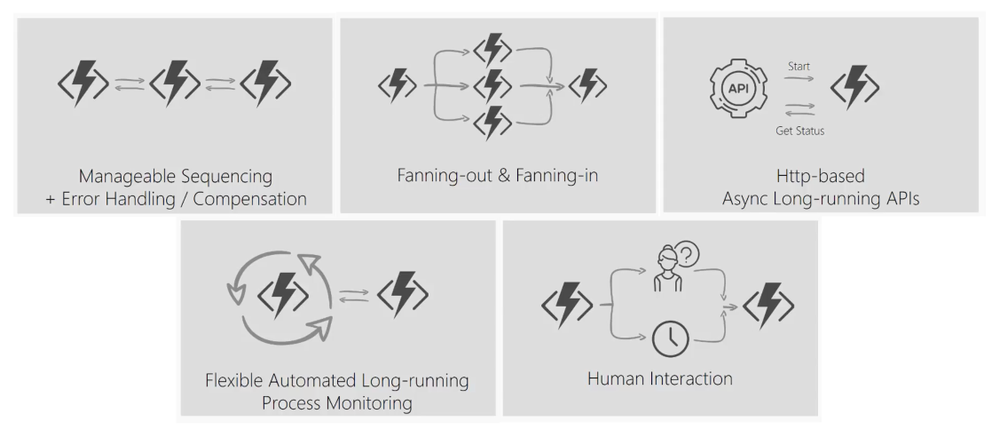
Using a special type of function called an orchestrator function, you can write PowerShell code to describe a stateful workflow that orchestrates other PowerShell Azure Functions that perform activities in the workflow. Using familiar PowerShell language constructs such as loops and conditionals, your orchestrator function can execute complex workflows that consist of activity functions running in sequence and/or concurrently. An orchestration can be started by any Azure Functions trigger. Additionally, it can wait for timers or external input and handle errors using try/catch statements.
Some patterns supported by Durable Functions
Uses for Durable Functions in PowerShell
With a large ecosystem of modules, PowerShell Azure Functions are extremely popular in automation workloads. Many modules integrate with managed identity—making PowerShell Azure Functions especially useful for managing Azure resources and calling the Microsoft Graph. Durable Functions allows you to extend Azure Functions’ capabilities by composing multiple PowerShell Azure Functions together to perform complex automation workflow scenarios.
Here are some examples of what you can achieve with Durable Functions and PowerShell.
Automate resource provisioning and application deployment
PowerShell Azure Functions are commonly used to perform automation of Azure resources. This can include provisioning and populating resources like Storage accounts and starting and stopping virtual machines. Often, these operations can extend beyond the 10-minute maximum duration supported by Azure Functions in the Consumption plan.
Using Durable Functions, you can decompose your sequential workflow into a Durable Functions orchestration that consists of multiple shorter functions. The orchestration can last for hours or longer, and you write it in PowerShell. It can include logic for retries and custom error handling. In addition, Durable Functions automatically checkpoints your progress so if your orchestration is interrupted for any reason, it can automatically restart and pick up where it left off.
param($Context)

$Group = Invoke-ActivityFunction -FunctionName 'CreateResourceGroup'
$VM = Invoke-ActivityFunction -FunctionName 'CreateVirtualMachine' -Input $Group

do {
    $ExpiryTime = New-TimeSpan -Seconds 10
    $TimerTask = Start-DurableTimer -Duration $ExpiryTime
    $VMStatus = Invoke-ActivityFunction -FunctionName 'CreateVirtualMachine' -Input $VM
}
until ($VMStatus -eq 'started')

Invoke-ActivityFunction -FunctionName 'DeployApplication' -Input $VM
Invoke-ActivityFunction -FunctionName 'RunJob' -Input $VM
Invoke-ActivityFunction -FunctionName 'DeleteResourceGroup' -Input $Group
Orchestrate parallel processing
Durable Functions makes it simple to implement fan-out/fan-in. Many workflows have steps that can be run concurrently. You can write an orchestration that fans out processing to many activity functions. Using the power of the Cloud, Durable Functions automatically schedules the functions to run on many different machines in parallel, and it allows your orchestrator to wait for all the functions to complete and access their results.
param($Context)

# Get a list of work items to process in parallel.
$WorkBatch = Invoke-ActivityFunction -FunctionName 'GetWorkItems'

# Fan out
$ParallelTasks =
    foreach ($WorkItem in $WorkBatch) {
        Invoke-ActivityFunction -FunctionName 'ProcessItem' -Input $WorkItem -NoWait
    }
$Outputs = Wait-ActivityFunction -Task $ParallelTasks

# Fan in
Invoke-ActivityFunction -FunctionName 'AggregateResults' -Input $Outputs
Audit Azure resource security
Any of Azure Functions’ triggers can start Durable Functions orchestrations. Many events that can occur in an Azure subscription, such as the creation of resource groups and Azure resources, are published to Azure Event Grid. Using the Event Grid trigger, you can listen for resource creation events and kick off a Durable Functions orchestration to perform checks to ensure permissions are correctly set on each created resource and automatically apply role assignments, add tags, and send notifications.
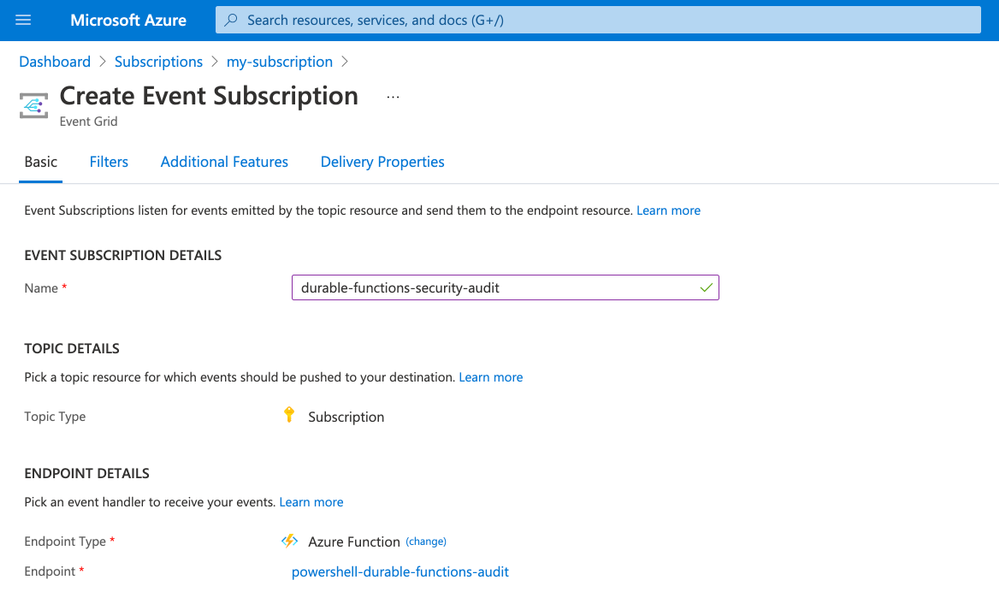 Create an Azure Event Grid subscription that invokes a PowerShell Durable Function
Try PowerShell Durable Functions
PowerShell Durable Functions are generally available and you can learn more about them by reading the documentation or by trying the quickstart.
by Contributed | May 26, 2021 | Technology
This article is contributed. See the original author and article here.
This week at Microsoft’s annual Build conference we made two announcements related to Azure Durable Functions: Two new backend storage providers, and the GA of Durable Functions for PowerShell. In this post, we’ll go into more details about the new storage providers and what they mean for Durable Functions developers.
New Storage Providers
Azure Durable Functions now supports two new backend storage providers for storing durable runtime state, “Netherite” and Microsoft SQL Server (including full support for Azure SQL Database). These new storage options allow you to run at higher scale, with greater price-performance efficiency, and more portability compared to the default Azure Storage configuration. Any of these three storage providers can now be configured without making any code changes to your existing apps.
To learn more, read the Durable Functions storage providers documentation, which also contains a side-by-side comparison of all three supported storage providers.
Durable Functions enables you to write long-running, reliable, event-driven, and stateful logic on the serverless Azure Functions platform using every day imperative code. Since its GA release in 2018, the Durable Functions extension transparently saved execution state into an Azure Storage account, ensuring that functions could recover automatically from any infrastructure failure. The convenience and ubiquity of Azure Storage accounts made it easy to get up-and-running in production with Durable Functions apps in a matter of minutes.
Limitations of the Azure Storage provider
Azure Storage is and will continue to be the default storage provider for Durable Functions. It uses queues, tables, and blobs to persist orchestration and entity state. It also uses blobs and blob leases to manage partitions across a distributed set of nodes. While the Azure Storage provider is the most convenient and lowest-cost option for persisting runtime state, it also has some notable limitations that may prevent it from being usable in certain scenarios.
- Azure Storage has limits on the number of transactions per second for a storage account, limiting the maximum scalability of a Durable Function app.
- Azure Storage has strict data size limits for queue messages and Azure Table entities, requiring slow and expensive workarounds when handling large payloads.
- Azure Storage costs can be hard to predict since they are per-transaction and have very limited support for batching.
- Azure Storage can’t easily support certain enterprise business continuity requirements, such as backup/restore and disaster recovery without data loss.
- Azure Storage can’t be used outside of the Azure cloud.
After speaking with customers who were impacted by some of these limitations, it became clear to us that we needed to invest in alternative storage providers to ensure the needs of all Durable Functions customers could be met.
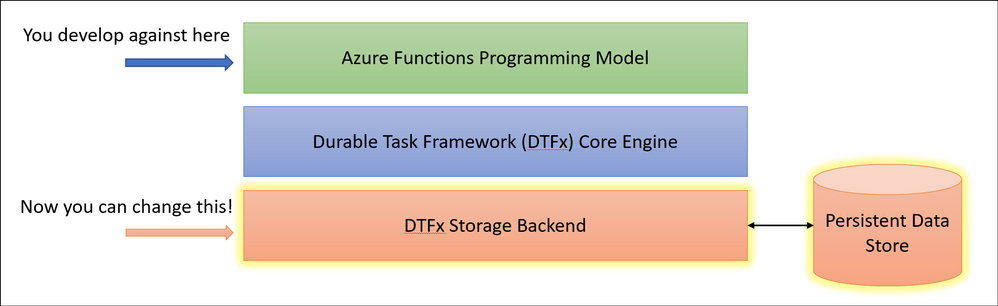
Fortunately, the architecture of Durable Functions and the underlying Durable Task Framework made it simple for us to enable swapping out backend storage providers without requiring customers to make any code changes. Starting in Durable Functions v2.4.3, we allow you to swap providers by adding a new extension and making a simple configuration change in your host.json file.
Introducing “Netherite” for maximum orchestration throughput
If you’re a fan of Minecraft, you’ll recognize that “Netherite” is the name of a rare material that is more durable than diamond, can float in lava, and cannot burn. The Netherite storage provider aspires to have similar qualities, but in the context of Durable Functions. It was designed and developed in collaboration with Microsoft Research. It combines the high-throughput messaging capabilities of Azure Event Hubs with the FASTER database technology on top of Azure Page Blobs. The design of Netherite enables significantly higher-throughput processing of orchestrations and entities compared to other Durable storage providers. In some benchmark scenarios, throughput was shown to increase by more than an order of magnitude when compared to the default Azure Storage provider!
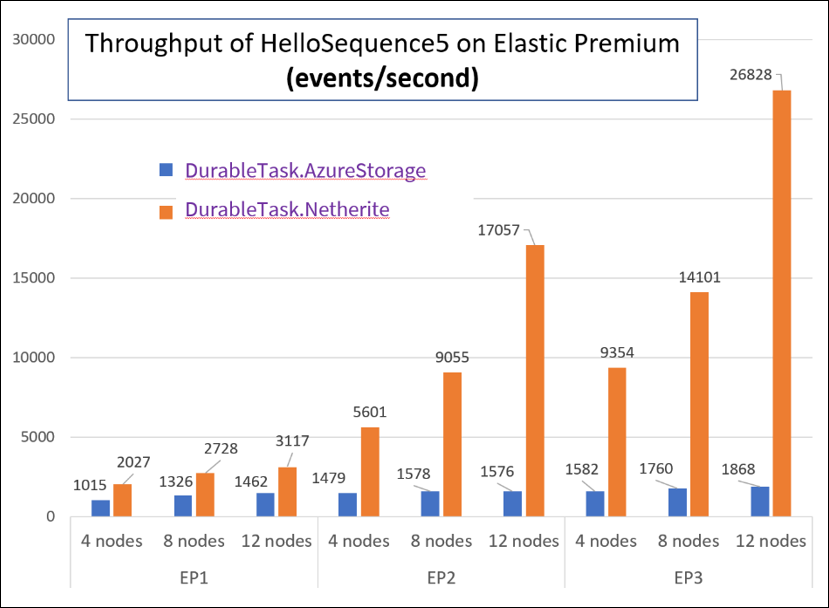
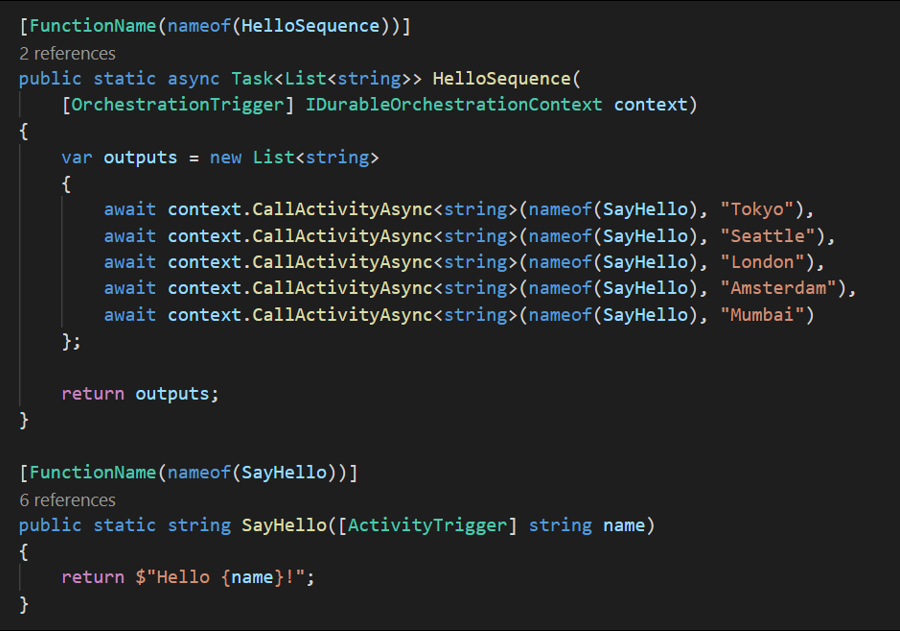
The orchestrator used in the above test is a simple function-chaining sample with 5 activity calls running on the Azure Functions Elastic Premium plan:
The significant increase in throughput shown in the above chart can be achieved using a single Azure Event Hubs throughput unit (1 TU), costing approximately $22/month USD (~€18) on the Standard plan (at the time of writing). Much of this performance gain can be attributed to advanced techniques, such as asynchronous snapshotting and speculative communication, as described in the Serverless Workflows with Durable Functions and Netherite research paper.
For more information and getting-started instructions for the Netherite provider, see the Netherite documentation.
Microsoft SQL for maximum control and portability
While the Netherite provider was designed for maximum throughput, the Microsoft SQL (MSSQL) provider for Durable Functions was designed for the needs of the enterprise, including the ability to decouple from the Azure cloud.
Microsoft SQL can run anywhere, including on-premises servers, Edge devices, Linux Docker containers, on the Azure SQL Database serverless tier, and even on competitor cloud providers like AWS and GCP. This means you can run Durable Functions anywhere that Azure Functions can run, including your own Azure Arc-enabled Kubernetes clusters. In fact, the Azure Functions Core Tools and the Azure Arc App Service extension have been updated to support automatically configuring Durable Function apps on a Kubernetes cluster with the MSSQL KEDA scaler for elastic scale-out.
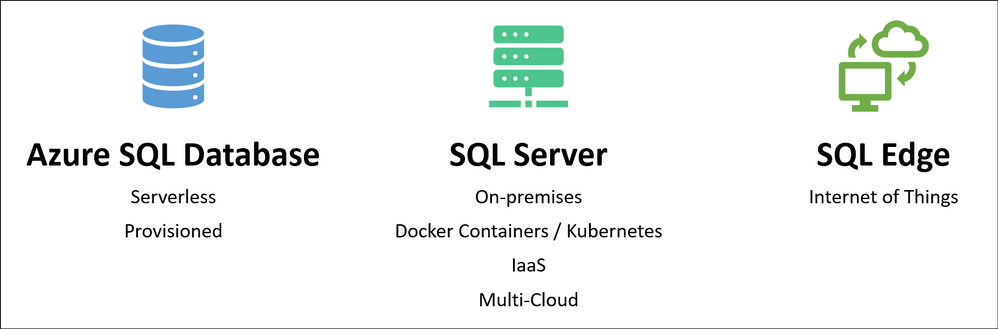
In addition to portability, you also get many other benefits of using Azure SQL database or Microsoft SQL for storing runtime state, including its long-established support for backup/restore, business continuity (high availability and disaster recovery), and data encryption.
The design of the Microsoft SQL storage provider for Durable Functions also makes it easy to integrate with existing SQL-based applications. When your function app starts up, it automatically provisions a set of tables, SQL functions, and stored procedures in the target database within a “dt” schema (“dt” stands for Durable Tasks). You can easily monitor your orchestrations and entities by running SELECT queries against these tables. You can also start new orchestrations using T-SQL and invoking the dt.CreateInstance stored procedure. This is especially useful if you want to extend an existing line-of-business application that already use SQL Server or Azure SQL Database by incorporating database triggers.
For more information and getting-started instructions for the Microsoft SQL provider, see the Durable Task SQL Provider documentation.
Concluding thoughts
We’re really excited about the new possibilities for customers building solutions using Durable Functions. With the availability of the two new storage backends, we hope to see new types of serverless apps get built which may not have been possible before. To be clear, the default Azure Storage provider option isn’t going anywhere, and we’ll continue to promote it as the easiest and lowest cost option for Durable Functions. Customers simply have new options which weren’t previously available.
So which one should you choose? I made a simple graphic to help you decide.
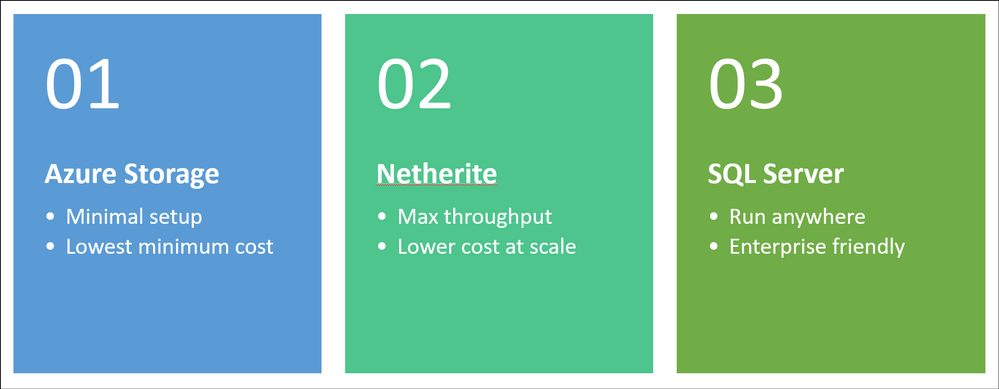
You can find a more comprehensive comparison of the three storage providers here.
As always, the development for Durable Functions happens in the open on GitHub and the new backends are no exception. You can find the Netherite provider at microsoft/durabletask-netherite and the Microsoft SQL provider at microsoft/durabletask-mssql. We encourage you to open issues in these repos and contribute PRs if you have ideas for how we can make them better (we’ve already accepted a few external contributions). Also, don’t forget to give us a :glowing_star: and subscribe for notifications of new releases using the “Watch” button.


Recent Comments