by Contributed | Jun 9, 2021 | Technology
This article is contributed. See the original author and article here.
I am part of the team that is working on Digital transformation of Microsoft campuses across the globe. The idea is to provide experiences like Room Occupancy, People count, Thermal comfort, etc. to all our employees. To power these experiences, we deal with real estate like Buildings, IoT Devices and Sensors installed in the buildings and of course Employees. Our system ingests data from all kinds of IoT Devices and Sensors, processes and stores them in Azure Digital Twin (or ADT in short).
Since we are dealing with Microsoft buildings across the globe which results in a lot of data, customers often ask us about using ADT at scale – the challenges we faced and how we overcame them.
In this article, we will be sharing how we worked with ADT at scale. We will touch upon some of the areas that we focused on:
- Our approach to
- handle Model, Twins and Relationships Limits that impact Schema and Data.
- handle transaction limits like DT API, DT Query API, etc. that deal with continuous workload
- Scale Testing ADT under load.
- Design Optimizations.
- Monitoring and Alerting for a running ADT instance.
So, let’s begin our journey at scale .
.
ADT Limits
Before we get into understanding how to deal with scale, let’s understand the limits that ADT puts. ADT has various limits categorized under Functional Limits and Rate Limits.
Functional limits refer to the limits on the number of objects that can be created like Models, Twins, and Relationships to name a few. These primarily deal with the schema and amount of data that can be created within ADT.
Rate limits refer to the limits that are put on ADT transactions. These are the transactional limitations that every developer should be aware of, as the code we write will directly lead to consumption of these rates.
Many of the limits defined by ADT are “Adjustable”, which means ADT team is open to changing these limits based on your requirements via a support ticket.
For further details and a full list of limitations, please refer to Service limits – Azure Digital Twins | Microsoft Docs.
Functional Limits (Model, Twin and Relationships)
The first step in dealing with scale is to figure out if ADT will be able to hold the entire dataset that we want it to or not. This starts with the schema first followed by data.
Schema
This first step, as with any system, is to define the schema, which is the structure needed to hold the data. Schema in case of ADT is defined in terms of Models. Once Models were defined, it was straightforward to see that the number of Models were within the ADT limits.
While the initial set of Models may be within the limit, it is also important to ensure that there is enough capacity left for future enhancements like new models or different versions of existing models.
One learning that we had during this exercise was to ensure regular cleanup of old Model or old versions after they are decommissioned to free up capacity.
Data
Once the schema was taken care of, came the check for amount of data that we wanted to store. For this, we looked at the number of Twins and Relationships needed for each Twin. There are limits for incoming and outgoing relationships, so we needed to assess their impact as well.
During the data check, we ran into a challenge where for a twin, we had lot of incoming relationships which was beyond the allowed ADT limits. This meant that we had to go back and modify the original schema. We restructured our schema by removing the incoming relationship and instead created a property to flatten the schema.
To elaborate more on our scenario – we were trying to create a relationship to link Employees with a Building where they sit and work. For some bigger buildings, the number of employees in that building, were beyond the supported ADT limits for incoming relationships, hence we added a direct property in Employee model to refer to Building directly instead of relationship.
With that out of our way, we moved on to checking the number of Twins. Keep in mind that Twin limit applies to all kind of twins including incoming and outgoing relationships. Looking at number of twins that we will have in our system was easier as we knew the number of buildings and other related data that would flow into the system.
As in the case of Models, we also looked at our future growth to ensure we have enough buffer to cater to new buildings for future.
Pro Tip: We wrote a tool to simulate creation of twins and relationship as per our requirements, to test out the limits. The tool was also of great help in benchmarking our needs. Don’t forget to cleanup.
Rate Limits (Twin APIs / Query APIs / Query Units /…)
Now that we know ADT can handle the data we are going to store, the next step was to check the rate limits. Most ADT rate limits are handled per second e.g., Twin API operations RPS limit, Query Units consumed per seconds, etc.
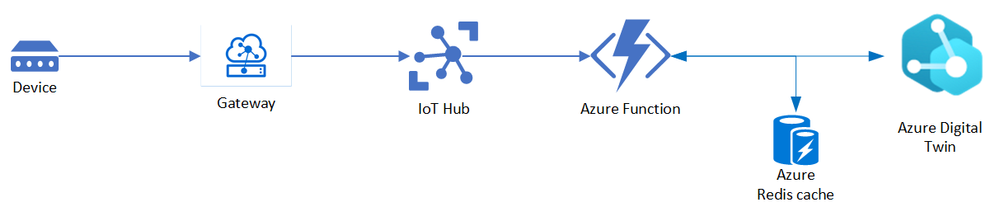
Before we get into details about Rate limits, here’s a simplistic view of our main sensor reading processing pipeline, which is where the bulk of processing happens and thus contributes to the load. The main component that does the processing here is implemented as Azure Function that sits between IoT Hub and ADT and works on ingesting the sensor readings to ADT.
This is pretty similar to the approach suggested by ADT team for ingesting IoT Hub telemetry. Please refer to Ingest telemetry from IoT Hub – Azure Digital Twins | Microsoft Docs for more information on the approach and few implementation details regarding this.
To identify the load which our Azure Function will be processing continuously, we looked at the sensor readings that will be ingested across the buildings. We also looked at the frequency at which a sensor sends a reading thus resulting into a specific load for the hour / day.
With this we identified our daily load which resulted into identifying a per second load or RPS as we call it. We were expected to process around 100 sensor readings per second. Our load was mostly consistent throughout as we process data from buildings all over the world.
Load (RPS)
|
100
|
Load (per day)
|
~8.5 million readings
|
Once the load data was available, we needed to convert load into the total number of ADT operations. So, we identified the number of ADT operations we will perform for every sensor reading that is ingested. For each reading, we identified below items:
- Operation type i.e., Twin API vs Query API operation
- Number of ADT operations required to process every reading.
- Query charge (or query unit consumption) for Query operations. This is available as part of the response header in the ADT client method.
This is the table we got after doing all the stuff mentioned above.
Twin API operation per reading
|
2
|
Query API operation per reading
|
2
|
Avg Query Unit Consumed per query
|
30
|
Multiplying the above numbers by the load gave us the expected ADT operations per second.
Apart from the sensor reading processing, we also had few other components like background jobs, APIs for querying data, etc. We also added the ADT usage from these components on top of our regular processing number calculations above, to get final numbers.
Armed with these numbers, we put up a calculation to get the actual ADT consumption we are going to hit when we go live. Since these numbers were within the ADT Rate limits, we were good.
Again, as with Models and Twins, we must ensure some buffer is there otherwise future growth will be restricted.
Additionally, when a service limit is reached, ADT will throttle the requests. For more suggestions on working with limits by ADT team, please refer to Service limits – Azure Digital Twins | Microsoft Docs
Scale
For future scale requirements, the first thing we did was to figure out our future load projections. We were expected to grow up to twice the current rate in next 2 years. So, we just doubled up all the numbers that we got above and got the future scale needs as well.
ADT team provides a template (sample below) that helps in organizing all this information at one place.
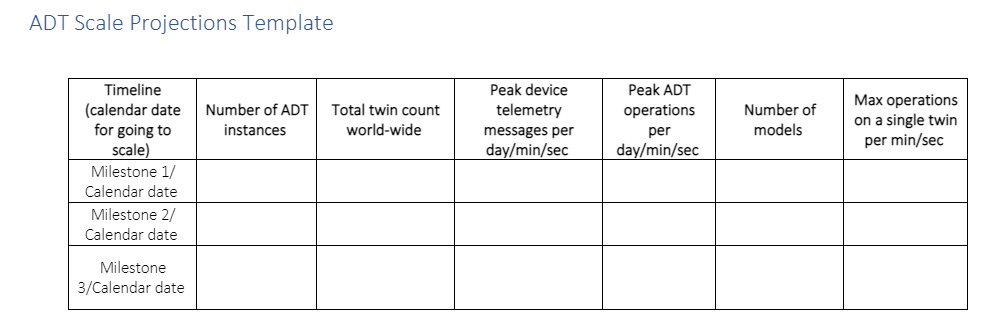
Once the load numbers and future projections were available, we worked with ADT team on the adjustable limits / getting the green light for the Scale numbers.
Performance Test
Based on the above numbers and after getting the green light from ADT team – to validate & verify the scale and ADT limits, we did performance test for our system. We used AKS based clusters to simulate ingestion of sensor readings, while also running all our other background jobs at the same time.
We ran multiple rounds of perf runs for different loads like X and 2X and gathered metrics around ADT performance. We also ran some endurance tests, where we ran varying loads continuously for a day or two to measure the performance.
Design Optimization (Cache / Edge Processing)
Typically, sensors send lot of unchanged readings. For example, a motion will come as false for a long duration and once it changes to true it will most likely stick to being true for some time before going back to false. As such, we don’t need to process each reading and such “no change” readings can be filtered out.
With this principle in mind, we added a Cache component in our processing pipeline which helped in reducing the load on ADT. Using Cache, we were able to reduce our ADT operations by around 50%. This helped us achieve a support for higher load with added advantage of faster processing.
Another change we did to optimize our sensor traffic was to add edge processing. We introduced an Edge module which acted as the Gateway between Device where the readings are generated and IoT Hub which acts as a storage.
The Gateway module processes the data closer to the actual physical devices and helped us in filtering out certain readings based on the rules defined e.g., filtering out health readings from telemetry readings. We also used this module to enrich our sensor readings being sent to IoT Hub which helped in reducing overall processing time.
Pro-active Monitoring and Alerts
All said and done, we have tested everything at scale and things look good. But does that mean we will never run into a problem or never reach a limit? Answer is “No”. Since there is no guarantee, we need to prepare ourselves for such eventuality.
ADT provides various Out of the Box (OOB) metrics that helps in tracking the Twin Count, RPS for Twin API or Query API operation. We can always write our own code to track more metrics if required, but in our case, we didn’t need to, as the OOB metrics were fulfilling our requirements.
To proactively monitor the system behavior, we created a dashboard in our Application Insights for monitoring ADT where we added widgets to track the consumptions for each of the important ADT limits. Here’s how the widget we have look like:
Query API Operations RPS
|
|
Twin API Operations RPS
|
Min
|
Avg
|
Max
|
|
Min
|
Avg
|
Max
|
50
|
80
|
400
|
|
100
|
200
|
500
|
Twin and Model Count
|
Model
|
Model Consumption %
|
Twin Count
|
Twin Consumption %
|
100
|
10%
|
80 K
|
40%
|
For being notified of any discrepancy in system – we have alerts configured to raise a flag in case we consistently hit the ADT limits over a period. As an example, we have alerts defined at various levels for Twin count say raise warning at 80%, critical error at 95% capacity, for folks to act.
An example of how it helped us – once due to some bug (or was it a feature J), a piece of code kept on adding unwanted Twins overnight. In morning we started getting alerts about Twin capacity crossing 80% limit and thus helped us getting notified of the issue and eventually fixing and cleaning up.
Summary
I would leave you with a simple summary – while dealing with ADT at Scale, work within the various limits by ADT and design your system keeping them in mind. Plan to test / performance test your system to catch issues early and incorporate changes as required. Setup regular monitoring and alerting, so that you can track system behavior regularly.
Last but not the least, keep in mind dealing with Scale is not a one-time thing, but rather a continuous work where you need to be constantly evolving, testing, and optimizing your system as the system itself evolves and grows and you add more features to it.
by Contributed | Jun 9, 2021 | Technology
This article is contributed. See the original author and article here.
We are excited to participate in SAP SapphireNOW this year building on the momentum we have created with our expanded partnership with SAP announced earlier this year with new Microsoft Azure and Microsoft Teams integrations. At Microsoft Ignite last year, we shared a migration framework to help customers achieve a secure, reliable, and simplified path to the cloud. The expanded partnership with SAP and the migration framework are key components of our broader vision to build the best platform for mission-critical SAP applications for both customers and partners. As a Gold sponsor at SapphireNOW, we are participating in several sessions, including one in which Matt Ordish covers how customers can unlock value from their SAP data on Azure, and another in which Scott Guthrie joins SAP’s Thomas Saueressig in the Supply Chain keynote to discuss why supply chain resilience and agility are paramount to ensuring continual business operations and customer satisfaction.
Our platform continues to run some of the biggest SAP landscapes in the cloud across industries. Achmea, a leading insurer based in the Netherlands, is building a cloud strategy that aims to deliver flexibility, scalability, and speed across the business, with less intensive lifecycle management requirements for its IT team. With close collaboration between Microsoft and SUSE, Achmea has successfully moved some of its biggest SAP systems to Azure. Walgreens recently completed the 9,100 store roll out of their SAP S/4 Hana Retail system in the United States. The new solution enables Walgreens’ ambition for a digital and enhanced customer experience and replaces the legacy Retail, Supply Chain and Business Services back-end of the business with modern solutions and business processes.
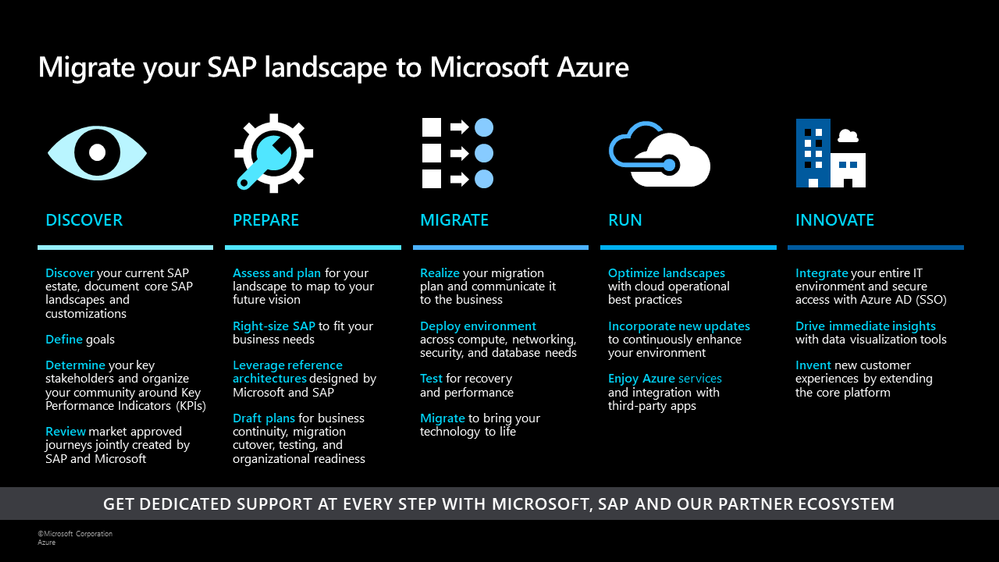
SAP on Azure Migration Framework
We have continued our strong pace of innovation across our key product areas building on the updates we announced in our SAP TechEd blog last year. Across the migration framework, we have several new product updates to further simplify running SAP solutions on Microsoft Azure. Below is a summary of some of the key product updates:
- Lower TCO and improve dynamic handling of bursts in workloads We have added new SAP-certified compute and storage options and capabilities to help you right-size your infrastructure during the PREPARE phase of your migration.
- Cloud-native solutions for efficient and agile operations during the MIGRATE and RUN phases The new release of our deployment automation framework lays the foundation for repeatable SAP software install, OS and other configurations. We have added key improvements to Azure Monitor for SAP Solutions (AMS) and Azure Backup for HANA.
- Deeper integration with our partners to simplify customer journey to Azure: We are building our platform from the ground up for better integration with our managed services providers (MSP) and ISV partners. We are proud to share updates on the work we have done with Scheer GmbH and our preferred partnership announcements with SNP and Protera.
Let’s walk through these updates in more detail.
New SAP-certified Msv2 Medium Memory VM sizes will deliver a 20% increase in CPU performance, increased flexibility with local disks, and a new intermediate scale up-option
In response to customer feedback, we announced the Preview of new M-series VMs for memory-optimized workloads at Ignite. Today we are happy to announce the GA of these VMs with SAP certification. These new Msv2 medium memory VMs:
- Run on Intel® Xeon® Platinum 8280 (Cascade Lake) processor offering a 20% performance increase compared to the previous version.
- Are available in both disk and diskless offerings allowing customers the flexibility to choose the option that best meets their workload needs.
- Provide new isolated VM sizes with more CPU and memory that go up to 192 vCPU with 4TiB of memory, so customers have an intermediate option to scale up before going to a 416 vCPU VM size.
For more details on specs, regional availability, and pricing, read the blog announcement.
Lower TCO, consolidate complex HA/DR landscapes, and achieve faster database restart times with SAP-certified SAP HANA Large Instances (HLI) with Intel Optane
We are excited to announce 12 new SAP certifications of SAP HLI with Intel Optane following the recent record benchmark on the massive S896om instance. SAP HLI with Intel Optane helps customers reduce costs, simplify complex HA/DR landscapes, and achieve 22x faster database restart times, significantly reducing planned and unplanned downtimes. These new certified instances enable customers to:
- Reduce the cost of the SAP HLI Optane instances by 15%
- Take advantage of the SAP HLI Optane high memory density offerings for OLTP and OLAP workloads to reduce platform complexity for scale-up and scale-out scenarios.
- The SAP benchmark on 16 socket 24TB S896om HLI instance, is the first of its kind on a hyperscaler platform and also the highest recorded for Optane system. This is a testament to our commitment to deliver a high degree of performant, reliable, and innovative infrastructure for customers running mission-critical SAP workloads in Azure.
Please see, SAP HANA hardware directory for recent HLI certified Optane instances in Azure.
New Azure storage capabilities in public preview to simplify handling dynamic workloads
We have added several capabilities to Azure premium storage to improve operations and offer customers more flexibility in handling the dynamic nature of their workloads.
- For phases of increased I/O workload, we released the possibility of changing the premium storage performance tier of a disk last year. Building on that, we now have a public preview to change the performance tier for a disk online to a higher tier. This addresses scenarios in which you need higher IOPS or I/O throughput due to time-consuming operational tasks or seasonal workloads.
- For short I/O workload bursts we released public preview of on-demand bursting for premium storage disks larger than 5132GiB. The on-demand bursting allows bursting of up to 30K IOPS and 1GB/sec throughput per disk. This addresses short-time bursts of I/O workload in regular or irregular intervals and avoids short-term throttling of I/O activity.
- For several Azure VM families that are SAP-certified, we released VM-level disk bursting. In smaller VM sizes such as the ones used in the SAP application layer, I/O peaks can easily reach the VM quota limits assigned for storage traffic. With the VM-level disk bursting functionality, VMs can handle such peaks without destabilizing the workload.
- Price reduction of Azure Ultra disk : As of April 1st, 2021, we reduced the price for the I/O throughput component of the Azure Ultra disk by 65%. This price reduction leads to better economics, especially with SAP workload triggered I/O load on the DBMS backend.
Accelerate deployment with the SAP on Azure Deployment Automation Framework
To help our customers effectively deploy SAP solutions on Azure, we offer the SAP Automation deployment framework, which includes Infrastructure as Code, and Configuration as Code, as open-source that is built on Terraform and Ansible. We are excited to have released the next version of the framework. In this release, we introduce capabilities to simplify the initial setup required to begin the deployment process for SAP systems. Other capabilities in this release include support for subnets as part of the Workload Zone, an Azure Firewall for outbound internet connectivity in isolated environments, and support for encryption using customer-managed keys. A detailed list of capabilities is in the Release Note.
A new feature becoming available in Private Preview at the end of June is the SAP Installation Framework. This feature will provide customers with a repeatable and consistent process to install an SAP product. To register for the Private Preview, please fill out the SAP Deployment Automation – private preview request form.
Seamlessly monitor SAP NetWeaver metrics with Azure Monitor for SAP Solutions (AMS)
Customers can now use AMS to monitor SAP NetWeaver systems in the Azure portal. In addition, customers can use the existing capabilities in AMS to monitor SAP HANA, Microsoft SQL Server, High-availability (pacemaker) Clusters, and Linux Operating System. The SAP BASIS and infrastructure teams within an organization can use AMS to collect, visualize and perform end-to-end SAP technical monitoring in one place within the Azure portal. Customers can get started with AMS without any license fee (consumption charges are applicable) in the following regions: US East, US East 2, US West 2, North Europe, and West Europe.
Speed up backups with the latest updates to Azure Backup for SAP HANA
Now SAP HANA users can protect larger SAP HANA databases with a faster backup solution (up to 8 TB of full backup size and ~420 MBps speeds during backup and restore). Support for incremental backup is now generally available, enabling customers to assign cost-optimal backup policies such as weekly and daily incrementals. Customers can also secure their backups with HANA native keys or customer-managed keys in key vault for backup data at rest, and protect against regional outages by restoring to secondary paired region on-demand using the cross-region restore functionality. Customers can also monitor their entire Azure backup estate using Backup center, which is now generally available.
Strategic collaborations and product integrations with our partners will accelerate moving SAP solutions to Microsoft Azure
As we invest in building solutions that simplify the migration of SAP solutions to Azure, we closely collaborate with our global partners right from the design stage. One such design partner is Scheer GmbH. Scheer GmbH specializes in providing SAP consulting and managed services for customers in the EU region and has been one of our earliest design partners in the development process for products such as SAP automation deployment framework (available as open-source), Azure Monitor for SAP Solutions, and SAP HANA Backup solutions. Robert Mueller, Managing Director, Cloud Managed Services group Scheer says “With Microsoft Azure, we can offer our SAP customers the best and most secure cloud platform for their digital transformation ever. Through our partnership, we were able to incorporate our years of experience from operating SAP systems as well as the requirements of our customers into the Azure services. The Microsoft engineering team is an excellent and reliable partner who understands the needs of MSPs as well as their customers on an equal footing and implements them in an agile fashion. We look forward to continuing this partnership in the future and learn more from each other to create the best cloud to run SAP and business processes!”
Customers with complex SAP migration requirements can leverage our preferred partnership with SNP. SNPs BLUEFIELD™ approach helps customers migrate and upgrade to S/4 HANA in a single, non-disruptive go live. SNP’s Cloud Move for Azure provides rapid assessments, Azure target solutioning, and pricing. SNP’s CrystalBridge® offers automated migration capabilities in a cost-effective and secure fashion. Customers can also take advantage of data transformation capabilities of CrystalBridge® for selective data migration, mergers, and acquisitions.
We are happy to announce that we have also established a preferred partnership with Protera. Protera’s FlexBridge® helps customers accelerate SAP migrations to Azure by providing automated assessments, intelligent provisioning, and automated migrations. FlexBridge® also offers SAP management solutions on Azure providing a dashboard of operational metrics, service desk integration, cost analysis, and SAP maintenance optimization such as patching, system copies, and environment snoozing.
In addition to these updates, stay tuned for several exciting product announcements in the next few months. As we wrap this year, I also wanted to share why thousands of customers, including SAP, trust Azure to run their SAP solutions. We look forward to seeing you virtually at our sessions at SapphireNOW.
by Contributed | Jun 9, 2021 | Technology
This article is contributed. See the original author and article here.
We are excited to announce the public preview of change data capture (CDC) in Azure SQL Databases, a feature that has been requested by multiple customers.
What is change data capture?
Change data capture (CDC) provides historical change information for a user table by capturing both the fact that Data Manipulation Language (DML) changes (insert / update / delete) were made and the changed data. Changes are captured by using a capture process that reads changes from the transaction log and places them in corresponding change tables. These change tables provide a historical view of the changes made over time to source tables. CDC functions enable the change data to be consumed easily and systematically.
Learn more here: About CDC.
Why use change data capture?
CDC is a widely used feature by enterprise customers for a variety of purposes:
- Tracking data changes for audit purposes
- Propagate changes to downstream subscribers, which is backend of other system in the organization
- Perform analytics on change data
- Execute ETL operations to move all the data changes in the OLTP system to data lake or data warehouse
- Event based programing that provides instantaneous responses based on data change (E.g.: Dynamic Product pricing)
Change data capture in Azure SQL Database (Preview)
CDC is now available in public preview in Azure SQL, enabling customers to track data changes on their Azure SQL Database tables in near real-time. Now in public preview, CDC in PaaS offers a similar functionality to SQL Server and Azure SQL Managed Instance CDC, providing a scheduler which automatically runs change capture and cleanup processes on the change tables. These capture and cleanup processes used to be run as SQL Server Agent jobs on SQL Server on premises and on Azure SQL Managed Instance, but now they are run automatically throughout the scheduler in Azure SQL Databases.
Enabling Change data capture on an Azure SQL Database
Customers will be able to use CDC on Azure SQL databases higher than the S3 (Standard 3) tier.
Enabling CDC on an Azure SQL database is similar to enabling CDC on SQL Server or Azure SQL Managed Instance. Learn more here: Enable CDC.
Sending CDC Change Data to Other Destinations
Multiple Microsoft technologies such as Azure Data Factory can be used to move CDC change data to other destinations (e.g. other databases, data warehouses). Other 3rd party services also offer streaming capabilities for change data from CDC. For instance, Striim and Qlik offer integration, processing, delivery, analysis, or visualization capabilities for CDC changes.
“Real-time information is vital to the health of the enterprises,” says Codin Pora, VP of Technology and partnership at Striim. “Striim is excited to support the new change data capture (CDC) capabilities of Azure SQL Database and help companies drive their digital transformation by bringing together data, people, and processes. Striim, through its Azure SQL Database CDC pipelines, provides real-time data for analytics and intelligence workloads, operational reporting, ML/AI implementations and many other use cases, creating value as well as competitive advantage in a digital-first world. Striim builds continuous streaming data pipelines with minimal overhead on the source Azure SQL Database systems, while moving database operations (inserts, updates, and deletes) in real time with security, reliability, and transactional integrity.”
“Joint customers are excited about the potential of leveraging Qlik Data Integration alongside CDC in Azure SQL DB and CDC for SQL MI to securely access more of their valuable data for analytics in the cloud,” said Kathy Hickey, Vice President, Product Management at Qlik. “We are happy to announce that in addition to support for Azure SQL MI as a source, the newly available MS-CDC capabilities will also allow us to support Azure SQL DB sources via our Early Access Program. We look forward to partnering with Microsoft on helping customers leverage these capabilities to confidently create new insights from their Azure managed data sources.”
Stay up to date with the change data capture blog series
We are happy to start a bi-weekly blog series for customers who’d like to learn more about enabling CDC in their Azure SQL Databases! This series will explore different features/services that can be integrated with CDC to enhance change data functionality.
Some of the upcoming CDC blog series:
- Deep Dive into Change Data Capture in Azure SQL Databases
- Using Azure Data Factory to send Change Data Capture Data to Other Destinations

by Contributed | Jun 9, 2021 | Technology
This article is contributed. See the original author and article here.
This series highlights Microsoft Learn Student Ambassadors who achieved the Gold milestone and have recently graduated from university. Each blog features a different student and highlights their accomplishments, their experience with the Student Ambassadors community, and what they’re up to now.
Today we’d like to introduce Daniel Gomez Jaramillo, who is from Colombia and just completed his Systems Engineering studies at the University of Cuenca in Ecuador.
Responses have been edited for clarity and length.
When you became a Student Ambassador in 2018, did you have any specific goals you wanted to reach, like attain a skill or work on a particular quality? What were they, and did being a Student Ambassador help you achieve them? How has being in the community impacted you in general?
I had no clear goals at the time, however, I decided to apply to become a Student Ambassador with the aim of acquiring new knowledge and being able to share it with my local community. I also wanted to meet other members so that I could learn from them because back then I was and always will remain passionate about technology. I was accepted into this wonderful community, and from that moment on, my life changed radically in every way, at the student, professional, and personal levels.
The program has helped me a lot in different ways. I was able to acquire new knowledge about Microsoft Azure and web application development with .NET. As time went on, I was able to share that acquired knowledge with others through tutorial articles, online sessions, in-person workshops, and at special events of Microsoft and Student Ambassadors as well.
Thanks to the events, I have been able to improve my skills when making a presentation, and the quality of my writing. In the professional field, this has helped me a lot, as I have received job offers as a result of being in the program. One was to work in the field of software development and content dissemination at RIGANTI, a company in the Czech Republic responsible for providing a framework on .NET for web application development. To this day, I am still working with them as a part-time employee.
I was able to meet amazing people from all over the world and have been able to form strong friendships that I am sure will be for life.
What were some of the accomplishments that you’re proudest of and why?
Talking about a single achievement within the program is impossible. Microsoft Learn Student Ambassadors has been like my second career, full of learning and amazing experiences. Anyway, here I can mention those I will never forget:
I organized the Virtual Summit of the Microsoft Communities of Ecuador in 2020 with other Student Ambassadors, Microsoft Most Valuable Professionals (MVPs), and others, including Pablo Veramendi, the Student Ambassador Global Program Director. Around 2000 people from all over Latin America participated in the event, where we were able to exchange knowledge about Microsoft’s different technologies through 37 hours of live streaming spread over 3 days. There were 43 virtual sessions in total, and I was able to present several technology sessions about Azure and .NET.
In 2021, I organized HackLatam 2021, a virtual hackathon, again with Student Ambassadors, Microsoft employees, and MVPs from all over Latin America. About 350 students from different countries were able to generate projects with Microsoft technology solutions to contribute to the education sector.
An additional event that I will mention is Microsoft Ignite of 2020, where I was invited as a Student Ambassador to present a session to around 350 people in my native language for Spanish speakers.
What do you have planned after graduation? What’s next for you?
In addition to my work with Riganti, I am working at a medical specialty center in Ecuador as a Software Engineer managing the system that supports the place.
In about a year, I plan to study my masters’ degree, as I’m also very passionate about the research area. Finally, in the middle future, I would love to form a space or a kind of foundation so that people from vulnerable sectors can acquire new knowledge and generate technological solutions.
If you could redo your time in the Student Ambassador community, is there anything you would have done differently?
I don’t think I’d change anything. Everything I have lived through–the experiences, the process of self-discovery, learning and sharing with others, has allowed me to be the person I am today. I am very grateful to Microsoft for everything they have done for me as a Student Ambassador, and I will be grateful forever, as they allowed me to achieve amazing things, develop my potential, and above all, allow me to meet amazing people whom I consider my true friends.
If you were to describe the community to a student who is considering joining, what would you say to convince them to join?
Do you want your life to change radically in all aspects? The Microsoft Learn Student Ambassadors program is for you! In addition to having the opportunity to be associated with one of the most important technology companies on the planet, you can acquire new knowledge with a myriad of benefits, participate as a community according to your interests, and meet wonderful people from all over the world.
And what advice would you give to new Student Ambassadors?
You all have the ability to accomplish amazing things, and thanks to your passion for technology, today you are part of this wonderful program. When you start, it’s normal to have doubts or want to know more about something in particular, so you can always ask another Student Ambassador for help for whatever you need, or you can also contact the Community Program Managers. Take advantage of all the opportunities that come your way. At first it can be a little scary to meet many people, but this community is amazing, and everyone is willing to help others. Feel free to propose initiatives, and events. Other Student Ambassadors will help you on your way.
Also, discover the things that you are passionate about within the community and develop your potential. Connect with others, and we’ll achieve amazing things among all. All the energy you share will always come back to you. Student Ambassadors for life!
Do you have a motto in life, a guiding principle that drives you?
Do what you love! For me, success is doing what you want to do, with the people you want to be with. I was able to learn this as a Student Ambassador, and I will apply it forever.
Lastly, on a lighter note, can you share a random fun fact about yourself that few people are aware of?
I use PowerPoint for everything–to make posters, rollup banners, image editing, video materials, and much more.
Thank you, Daniel, and good luck to you in all your future endeavors!
by Contributed | Jun 9, 2021 | Technology
This article is contributed. See the original author and article here.
Customers using the cloud today are experiencing new challenges, such as rapidly changing workloads and insecure configurations, increasingly sophisticated attacks, and limited visibility into security and compliance. Rapidly changing workloads are both a strength and a challenge of the cloud. On the one hand, end-users are empowered to do more. On the other, how do you ensure that the ever-changing services people are using and creating are up to your security standards and follow security best practices? On top of this, no matter where you run your workloads, attacks are getting more sophisticated. making end-to-end visibility into your security and compliance and staying up to date with the latest threats more important than ever. Given the shortage of security professionals, organizations are consistently doing more with fewer resources, which is increasingly complicated as resources become specialized and focus on different aspects of the threat protection story. Microsoft works to empower all security professional with the right tools to act quickly and efficiently.
Given the dynamic nature of the cloud and the constantly evolving threat landscape, we need intelligent, automated, integrated security to close the gaps, providing visibility and proactive response across the organization.
Microsoft provides SIEM and extended detection and response (XDR) tools that emphasize integration to help your security teams stay ahead of attacks. Microsoft Defender, our XDR, manifests itself in two tailored experiences: Azure Defender and M365 Defender.
Azure Defender, part of Azure Security Center, provides advanced threat protection across many resource types, including Servers, Kubernetes, Key Vault, and more.
Azure Sentinel, our cloud native SIEM, is deeply integrated with our XDR and provides security information event management and security orchestration automated response.
As a starting point, refresh your understanding of Azure Security Center, Azure Defender, and Azure Sentinel by checking out this article: What’s the difference between Azure Security Center, Azure Defender and Azure Sentinel? – Microsoft Tech Community
Many customers are currently using Azure Security Center and Azure Sentinel but are looking to get the most out of both products to enhance protection and visibility across their enterprise.
Azure Security Center continuously scans your hybrid cloud environment and provides recommendations to help you harden your attack surface against threats. When Azure Defender does detect attempts to compromise your system, it will surface an alert in Azure Defender. You can conduct investigation and remediation from the Azure Defender blade all from the same pane of glass. You can review the alert and understand what resources were affected, what severity the alert is, and more. Directly from the Azure Defender alert, you can also mitigate the threat or prevent future attacks by resolving relative ASC recommendations. To reduce the burden on your security team, you can also set up workflow automation, triggering an automated response for similar future alerts. By setting up a logic app to respond to similar alerts in the future, you can react faster and focus more time on remediating alerts.
Cloud workload owners who manage a cloud workload and its related resources are responsible for implementing and maintaining protections by the organization’s security policies. These personas find value in ASC’s recommendations based on out-of-the-box security initiatives and the Azure Security Benchmark. These initatives are customized through features like secure score exemption or adding custom policies. Cloud workload owners are typically not focused on alerts, as this is the responsibility of the Security Operations team, who monitor and respond to security alerts. The Cloud Workload owners concentrate on securing the infrastructure while the SecOps team responds to threats where they do occur. As such, these teams leverage different tools in support of their missions.
Cloud Workload owners will frequently leverage ASC’s recommendations blade to reduce the attack surface and harden against threats. SecOps teams will focus on monitoring alerts that do come in and working toward expedient remediation. This integration is where the Azure Security Center and Azure Sentinel better together story begins. Azure Sentinel comes with several connectors for Microsoft solutions, available out of the box and providing real-time integration. With Azure Sentinel’s built-in connector for Azure Security Center, you can stream Azure Defender alerts to Sentinel in just a few clicks. You can even stream information around security recommendations, secure score, and regulatory compliance through continuous export. Streaming updates will send information about changes in one of these categories, such as an increase in your secure score or a change in your compliance posture relative to a regulatory compliance metric.
But what if your SecOps team is interested in evaluating other sources of threats beyond Azure Defender? Beyond connectors to Microsoft solutions, Azure Sentinel has built-in connectors to the broader security ecosystem for non-Microsoft solutions.
By aggregating seemingly disparate alerts into a centralized source, Sentinel connects these alerts and builds a story. Once the data flows to Sentinel, we leverage a feature called fusion to employ scalable machine learning algorithms to correlate many low-fidelity alerts and events across multiple products into high-fidelity, actionable incidents. When we think about cloud security challenges, this feature provides the needed visibility and allows your security team to prioritize their time.
Note for our customers in Azure Government: Fusion is now available in Azure Government!
Once we have onboarded alerts to Sentinel through our connectors, SecOps teams can use playbooks, automation rules, and Kusto queries for further investigation, threat hunting, and automation. Graphical and AI-based analysis will reduce the time it takes to understand the full scope and its impact. You can visualize the attack and take quick actions in the same dashboard.
Automation rules help you triage incidents in Azure Sentinel. You can use them to automatically assign incidents to the right personnel, close noisy incidents or known false positives, change their severity, and add tags. They are also the mechanism by which you can run playbooks in response to incidents.
Playbooks are collections of procedures triggered from Azure Sentinel in response to an alert or incident. A playbook can help automate and orchestrate your response and are configured to run automatically when specific alerts or incidents are generated by being attached to an analytics rule or an automation rule, respectively.
Write Kusto Query Language (KQL) statements to query log data to perform detections, analysis, and reporting in Azure Sentinel. Simple actions like querying the log data allow Sentinel to bring value and turn the multiple data sources into meaningful, actionable information. These intelligent response and automation methods enable your team to quickly and efficiently address alerts and allow you to focus your time on high-priority items, which is increasingly important as we continue to do more with fewer resources in this space.
When we couple these two great products is an integrated end-to-end detection, investigation, and response platform for protecting cloud workloads. With Azure Security Center, we can gain visibility into our cloud environment and address recs to help us harden our attack surface. Azure Defender provides visibility where we do see threats or attempts to compromise our system. From here, we can stream these alerts to Sentinel for further investigation and threat hunting. Automated responses in Sentinel facilitate risk mitigation and focus on what’s important.
Integrating these tools also allows the different personas focused on defending workloads in an organization to have visibility into what matters to them. For example, even if a Cloud Workload owner suppresses an alert, it will still create an incident in Sentinel which surfaces in a dismissed state. This process facilitates focus on various aspects of the threat protection story. This integrations enables security analysts to receive actionable information reducing time to action and enabling decision-making.
Check out this video for more: Video | Better together for US government: Azure Security Center + Azure Sentinel | Azure Government (microsoft.com)
https://www.youtube-nocookie.com/embed/gADITMKYuSA
Get Started with Azure Security Center and Azure Sentinel and Learn More About Security with Microsoft
Below are additional resources for learning more about security with Microsoft. Bookmark the Security blog to keep up with our expert coverage on security matters and follow us at @MSFTSecurity or visit our website for the latest news and cybersecurity updates.


Recent Comments