Applications
|
 |
C3 AI Ex Machina: C3 AI Ex Machina is a no-code AI product that enables individuals, teams, and enterprises to build AI models and prep petabytes of disparate data with prebuilt connectors such as Snowflake, S3, Microsoft Azure Data Lake Storage, and Databricks.
|
 |
Capassa Digital CFO: Capassa gathers and analyzes data from your small business’s accounting and finance departments, then presents the numbers visually to give you a better overview. Capassa will help you understand what’s working and what needs to be improved.
|
 |
CBRE Host: With a high level of uncertainty around office environments due to COVID-19, CBRE’s Host empowers employees to choose where they want to work, emphasizes socially distanced desk options, provides digital entry passes, and helps employers manage building occupancy.
|
 |
CDP 7.2.x Runtimes: This offer from Cloudera provides images for setting up a Cloudera Data Platform (CDP) Public Cloud environment with Data Lake and Data Hub. CDP Public Cloud makes it easier to achieve high-value analytics from the edge to AI in a familiar cluster model in the cloud.
|
 |
CDP Public Cloud images: This offer from Cloudera provides images for setting up a Cloudera Data Platform (CDP) Public Cloud environment with FreeIPA and Data Lake. CDP Public Cloud makes it easier to achieve high-value analytics from the edge to AI in a familiar cluster model in the cloud.
|
 |
Cegeka Capacity Smart Parking: Cegeka’s Capacity platform enables facility managers and parking asset owners to better utilize their parking spaces. The platform offers central management for access control, capacity monitoring, customer assistance, and more.
|
 |
CentOS 8.3 Minimal: This image offered by Ntegral provides CentOS 8.3 Minimal, a minimal Linux distribution optimized for production environments. CentOS is an excellent virtual machine platform for workloads that include Node.js, web applications, and various database platforms.
|
 |
CloudSphere Cloud Migration Planning: CloudSphere’s Cloud Migration Planning can discover and map the entire topology of your IT estate, databases, and operating systems, uncovering any unknown connections and dependencies that could complicate your migration.
|
 |
Debian 10 Server: This offer from Cloud Infrastructure Services provides Debian 10 Server. Many popular Linux distributions, including Ubuntu, Knoppix, PureOS, SteamOS, and Tails, choose Debian as a base for their software.
|
 |
Desktop360: Citrix on Azure Managed Service: Desktop360 from Entisys360 is a managed, ready-to-use Windows 10 virtual desktop deployed in a customer’s Microsoft Azure resource group and delivered by the customer’s Citrix cloud.
|
 |
distriBind for MGAs: Designed for managing general agents and insurance agents, distriBind’s back-office software automates premium reconciliation and carrier reporting. If you use digital distribution, distriBind can deliver real-time operations and allow you to report without bordereaux.
|
 |
Epsilon Smart: Fostering digital transformation for Greek businesses and their taxes, Epsilon Smart offers a web invoicing app for freelancers and small to medium-sized businesses. This app is compliant with the AADE myDATA platform and is available in Greek and English.
|
 |
FHIRBlocks Consent4Health: Consent4Health uses FHIR, blockchain, cryptography, fine-grained consent management, and a decentralized identity framework to free data custodians from the risk of managing electronic health information on behalf of patients.
|
 |
GORDIC GINIS: GINIS is a comprehensive solution for public administration organizations. It features economics, file service, human resources, and payroll systems. This app is available in Czech.
|
 |
ioMoVoR: Part of the ioMoVo cloud storage solution, ioMoVoR lets users move their data within ioMoVo and also across any platform of their choice.
|
 |
IoT Device Management: IoT Device Management is a stand-alone part of eSoftLink, LACROIX Group’s end-to-end IoT platform. Connect, drive, and monitor your industrial IoT solution with this platform-agnostic product that can be deployed on-premises or as a software as a service.
|
 |
Mavis: AI-Based Pharma Insights: Graphene’s AI engine, Mavis, analyzes and aggregates information to present complex insights to pharmaceutical companies. Mavis is trained by medical and pharmaceutical experts to identify, group, and present insights by country. |
 |
MongoDB Server on CentOS: This offer from Cloud Infrastructure Services provides MongoDB Server 4.4 Community Edition on CentOS 8.3. MongoDB is a powerful distributed document database with high availability, horizontal scaling, and geographic distribution.
|
 |
MongoDB Server on Ubuntu: This offer from Cloud Infrastructure Services provides MongoDB Server 4.4 Community Edition on Ubuntu 20.04. MongoDB is a powerful distributed document database with high availability, horizontal scaling, and geographic distribution.
|
 |
Nomidio IDP: Nomidio IDP is a password-free multifactor authentication solution certified under the OpenID Connect standard and SAML 2.0. It allows enterprises to biometrically authenticate users at scale without significant up-front or ongoing costs.
|
 |
Nuuka Connect: Nuuka Connect connects commercial or public buildings to IoT solutions, sensors, energy meters, and more in the cloud. Nuuka Connect provides a unified data format and open APIs to access building information and optimize building systems.
|
 |
Nuuka Optimize: Nuuka Optimize is software for HVAC processes that can be connected to any building and allow operators to flexibly adjust energy consumption. This enables lower costs and a reduction of CO2 emissions.
|
 |
OptScale: Hystax’s OptScale provides visibility to help companies optimize IT costs and control Kubernetes, Microsoft Azure, and Amazon Web Services workloads. The solution offers dozens of cost optimization scenarios, resource lifecycle management, and more.
|
 |
Proge Learning Insights: Proge Learning Insights from Proge-Software supports universities and other educational institutions with their distance-learning initiatives. Proge Learning Insights features an advanced analytics dashboard based on Microsoft Power BI.
|
 |
Rail-Inspector: Rail-Inspector accurately processes and analyzes imagery captured during drone surveys. Rail-Inspector identifies and measures railway features, classifying anomalies and reporting areas of concern to railroad decision-makers.
|
 |
Redis Server on CentOS: This offer from Cloud Infrastructure Services provides Redis Server on CentOS 8.3. Redis is an open-source in-memory data structure store used as a database, cache, and message broker.
|
 |
Redis Server on Ubuntu: This offer from Cloud Infrastructure Services provides Redis Server on Ubuntu 20.04. Redis is an open-source in-memory data structure store used as a database, cache, and message broker.
|
 |
Retency Privacy Engine: Retency Privacy Engine’s de-identification technology provides database protection and personal data privacy. It’s commonly used in insurance and banking (for fraud prediction and risk assessment), marketing (for ad optimization), and city planning (for public transportation optimization).
|
 |
Riverbed Cloud Accelerator: Riverbed Cloud Accelerator simplifies cloud adoption and accelerates performance for application users and developers by removing network inhibitors, such as bandwidth constraints and unpredictable latency.
|
 |
SafetyAware: At-Risk and Lone Worker Safety: Running on Aware360’s PeopleIoT platform, SafetyAware provides instant communication and robust response that supports at-risk and lone workers wherever they are. Key elements of the solution include wearable devices and satellite connectivity.
|
 |
SendGuard for Outlook: SendGuard from Standss (South Pacific) Ltd. is a compliance and information security add-in for Microsoft 365. SendGuard can scan emails for profanity and guard against security breaches, warning users with a pop-up before they send them.
|
 |
SSIMPLUS VOD Monitor: SSIMPLUS VOD Monitor adds an intelligence layer to your video workflow so you can detect issues and quickly solve them. Track video-on-demand asset quality at scale from source to viewer and meet your customers’ high expectations.
|
 |
SynerScope Ixivault: SynerScope’s Ixivault visualizes linked data from traditional sources, like spreadsheets and databases, as well as from images, video, IoT data, and documents. Ixivault helps users rapidly categorize, label, and clean large data sets.
|
 |
Tom Sawyer Graph Database Browser: Tom Sawyer Graph Database Browser provides fast and easy visualization and analysis for graph databases. Users of all skill levels can view five graph layouts and run social network and link analysis, clustering, pathfinding, and more analytics using toolbar and menu options.
|
 |
Vitro Digital Record Platform: Vitro Software, formerly known as Slainte Healthcare, brings a “show value, then grow value” approach to digital transformation in hospitals and healthcare settings. Its digital record platform offers operational efficiencies and easy navigation.
|
 |
Work From Anywhere: Built on Microsoft Defender, Microsoft 365, and Microsoft Azure, BMIT’s Work From Anywhere bespoke solutions enable employees to work remotely while securely accessing data. BMIT can design and deploy tools to make your business run smoother.
|
 |
Workplace Automation Self Help & First Fix: First Fix from Workplace Automation contains scripts to efficiently complete common administrative tasks faced by IT service desks. Improve your service desk productivity with automation, self-help features, and a device support report.
|
 |
Work Securely: Built on Microsoft Defender and Microsoft Azure, BMIT Work Securely bespoke solutions protect employee devices, guard against possible data loss, reduce the risk of identity theft, and perform risk analysis on your business data and security posture.
|
Consulting services
|
 |
App Dev with Azure CosmosDB: 1-Day Briefing: This briefing from white duck GmbH will demonstrate ways to implement modern cloud applications with NoSQL database storage using Azure CosmosDB. Design a modern, scalable solution architecture for your apps.
|
 |
Automize CSP subscription management: Automize will provide Azure CSP support and managed services for your chosen subscription. Automize will assist with onboarding, activation, billing, service requests, and more. |
 |
Automize Landing Zone: 3-Day implementation: Create the framework for your organization’s cloud adoption strategy in this three-day implementation by Automize. This service is aligned with the Microsoft Cloud Adoption Framework and ensures a smooth migration to Microsoft Azure.
|
 |
Azure Cloud Migration: 5-Day Evaluation: Izertis will develop a plan to migrate your digital identity management services to the cloud or hybrid environment using Microsoft Azure. Improve your processes of authentication, security, and identity management. This offer is available only in Spanish.
|
 |
Azure DevOps & GitHub: 1-Day Assessment: white duck GmbH will audit your current infrastructure and offer a roadmap to a modern DevOps-driven agile development process based on platforms like Microsoft Azure DevOps or GitHub.
|
 |
Azure Fundamentals for ISVs: 1-Day Workshop: This workshop by white duck GmbH will provide an overview of Microsoft Azure from a developer’s perspective along with an introduction to architectural concepts for cloud solutions and the basics of modern DevOps methods. Help your team learn the fundamentals of cloud computing.
|
 |
Azure Kubernetes Service: 10-Day Proof of Concept: This PoC from white duck GmbH will help your organization ship faster, operate with ease, and scale confidently. Learn how to use end-to-end prototyping in application development based on Microsoft Azure Kubernetes Service.
|
 |
Azure Kubernetes Service Health Check: 1-Day Assessment: In this assessment, experts from BoxBoat Technologies will assess the stability, security, and configuration of your Microsoft Azure Kubernetes Service cluster. Ensure peace of mind by making your Kubernetes platform safe, compliant, performant, and cost-effective.
|
 |
Azure Performance Management: 1-Day Workshop: In this workshop, diva-e Platforms GmbH will analyze the performance of your digital applications and existing Microsoft Azure infrastructure and make recommendations to optimize operations. This offer is available only in German.
|
 |
Azure Sentinel Accelerator: 2-Week Implementation: ANS Group’s implementation will deliver a fully functional production-grade Microsoft Azure Sentinel environment across multi-cloud and hybrid platforms. This will help your organization with efficient incident detection, analysis, and response.
|
 |
Azure Sentinel Managed Service: 3-Day Implementation: Insight Technology Solutions will help clients implement Microsoft Azure Sentinel while providing end-to-end services, including a team of analysts to manage round-the-clock security operations.
|
 |
Azure Well-Architected Framework: 3-Day Assessment: Objectivity’s assessment will validate your organization’s existing solution against Microsoft Azure best practices. Get an accurate understanding of your cloud architecture and ensure it is reliable, scalable, secure, and cost-efficient.
|
 |
Cloud Adoption: 8-Week Assessment: Trace3 will help your organization assess, design, and build a foundation of your cloud adoption strategy that is secure, easily configurable, and ready to deploy workloads in Microsoft Azure.
|
 |
Cloud Cost Management: This service by myCloudDoor will help you monitor and manage the cost and resources associated with your company’s consumption of Microsoft Azure. Keep track of the administrative tasks and continuously optimize your consumption and cost forecasts.
|
 |
Cloud Migration Services: CloudMoyo will make your organization’s migration to Microsoft Azure seamless through rearchitecting, refactoring, rehosting, and rebuilding. Create a roadmap for a digital future through this risk-free migration to the cloud.
|
 |
Cloud Migration Strategy: 8-Week Assessment: Trace3 will help you understand your migration options and recommend the right approach to meet your business needs. Establish a scalable process to assess, migrate, optimize, secure, and manage your workloads in Microsoft Azure.
|
 |
CloudMoyo Integration Services: Scale your company’s growth and empower end users with CloudMoyo’s integration services. CloudMoyo will help connect your on-site applications, systems, repositories, and IT environment to Microsoft Azure. |
 |
CloudMoyo Snowflake on Azure implementation: In this implementation, CloudMoyo will run the Snowflake Data Warehouse on Microsoft Azure to offer a unified view of enterprise data and business performance, along with improved data security and self-service analytics capabilities. |
 |
Cloud-Native Application on Kubernetes: 10-Week Implementation: This implementation by Objectivity offers an innovative minimum viable product created with Microsoft Azure, Kubernetes, and AI. Containerization will allow organizations to better control application deployment, scaling, and management. |
 |
Cloud Security SIEM Managed Services: 2-Week Implementation: PT Mitra Integrasi Informatika’s implementation will provide Azure Sentinel, the next-generation security information and event management (SIEM) solution from Microsoft, so your organization can detect and eliminate cybersecurity threats with ease.
|
 |
CloudSphere Cloud Migration Planning: CloudSphere’s automated assessment will map out the topology of your current IT infrastructure and help discover dependencies or issues that might complicate your migration to Microsoft Azure.
|
 |
Data Integration Platform on Azure: 4-Week Proof of Concept: Objectivity’s proof of concept will help design an optimal integration process for all your data scattered across disparate sources. This will harness the power of Microsoft Azure Data Lake and Microsoft Power BI solutions and help your organization become more data-driven.
|
 |
Data Integration Platform on Azure: 10-Week Implementation: Objectivity will implement an optimal integration process for all your data scattered across disparate sources. Harness the power of Microsoft Azure Data Lake and Microsoft Power BI solutions and help your organization become more data-driven.
|
 |
Data Platform Implementation: 10 Weeks: Motifworks’ 10-week implementation brings Microsoft Azure and big data analytics competency to help your organization with end-to-end data platform modernization. This will help reduce total cost of ownership and improve your operation margins.
|
 |
Data Platform Modernization: Link Development’s data platform modernization can help boost your organization’s digital productivity by using Microsoft Azure data services. Reduce administrative costs and make better data-driven decisions.
|
 |
Data Platform Modernization: 8-Week Implementation: Trace3’s data platform modernization uses Microsoft Azure tools to help organizations achieve the agility and elasticity necessary to run an intelligence-driven business. The implementation incorporates tools like ADF, ADLS, Databricks, and Azure Synapse to drive outcomes.
|
 |
Integration Center of Excellence: 9-Week Implementation: Using the Microsoft Azure platform, Synegrate will implement an enterprise integration with a strong focus on people, processes, and policies. This will result in high-quality integrations, greater ROI, and improved total cost of ownership.
|
 |
IoT Envisioning: 4-Day Workshop: Insight Canada’s workshop will help build a foundational understanding of how IoT and Microsoft Azure services can drive transformational change in your organization by enabling data-driven intelligence and integration.
|
 |
Managed Azure Landing Zone: 1-Hour Briefing: KCOM Group’s briefing provides an overview of how your organization can get started with Microsoft Azure without having to design, build, manage, and support the Azure infrastructure. Harness the performance, scalability, and innovation of Azure by deploying this landing zone.
|
 |
Managed Detection and Response Service: This managed service from Venzo A/S uses the capability of Microsoft security products combined with features of Azure Lighthouse to gain visibility into your organization’s data sources via delegated access management. Identify and mitigate cybersecurity risks before they become a threat.
|
 |
Modern Data Platform on Azure: 4-Week Proof of Concept: Objectivity’s proof of concept will provide a custom architecture design for a modern data platform on Microsoft Azure. This will help your organization manage its cloud migration easily and efficiently.
|
 |
Modern Data Platform on Azure: 5-Day Assessment: Objectivity’s offering is designed to identify and assess the current state of your data solution and the feasibility and ROI of migrating one or more applications to Microsoft Azure. It includes a roadmap for a seamless migration process.
|
 |
Modern Data Platform on Azure: 10-Week Implementation: In this implementation, Objectivity will help your company take data processing to a new level with Microsoft Azure. You’ll receive a custom-fit, end-to-end data solution that can still be easily expanded in the future.
|
 |
Modern Desktop Deployment & Management: intellecom GmbH will supply modern desktop provisioning and management based on your Microsoft 365 subscription and
desktop deployment. This offer is available in German and English.
|
 |
Modernize Data Warehouse on Azure: 2-Day Assessment: In this engagement, UXLI will help you assess, design, and deploy modern data services for your cloud adoption, thus increasing the agility, scalability, and reliability of your data. A high-level strategy to include Microsoft Azure analytics will be included. |
 |
Modernize .NET Apps: 3-Week Assessment: This offer by Lightstream is geared toward customers who have chosen to modernize their .NET applications with Microsoft Azure. Benefits include a proven and repeatable process that creates a complete modernization plan with speed, security, and efficiency.
|
 |
Modernize your application with the cloud: 5-week implementation: CLOUDFIELD will help you modernize and speed up application development using Microsoft Azure Kubernetes Service and other Azure services. Easily navigate business-critical requirements to improve your end customers’ experience.
|
 |
Vision Workshop: 2-Week Assessment: Sparkhound’s workshop will help you determine what’s most valuable for your business based on empirical data from Microsoft Azure analytics services. Learn how to prioritize budgeting and resources for your business, technology, and sustainability.
|
 |
Windows Virtual Desktop: 2-Day Workshop: In this workshop, Cluster Reply will administer a fully functioning Windows Virtual Desktop proof of concept. This will enable your organization to envision secure, work-from-anywhere scenarios and their positive business implications.
|
 |
Windows Virtual Desktop: 2-Week Proof of Concept: Simplify your remote modern workplace with a proof of concept of Windows Virtual Desktop delivered by OBVUS. Learn how you can eliminate hardware constraints and increase your organization’s agility and performance.
|

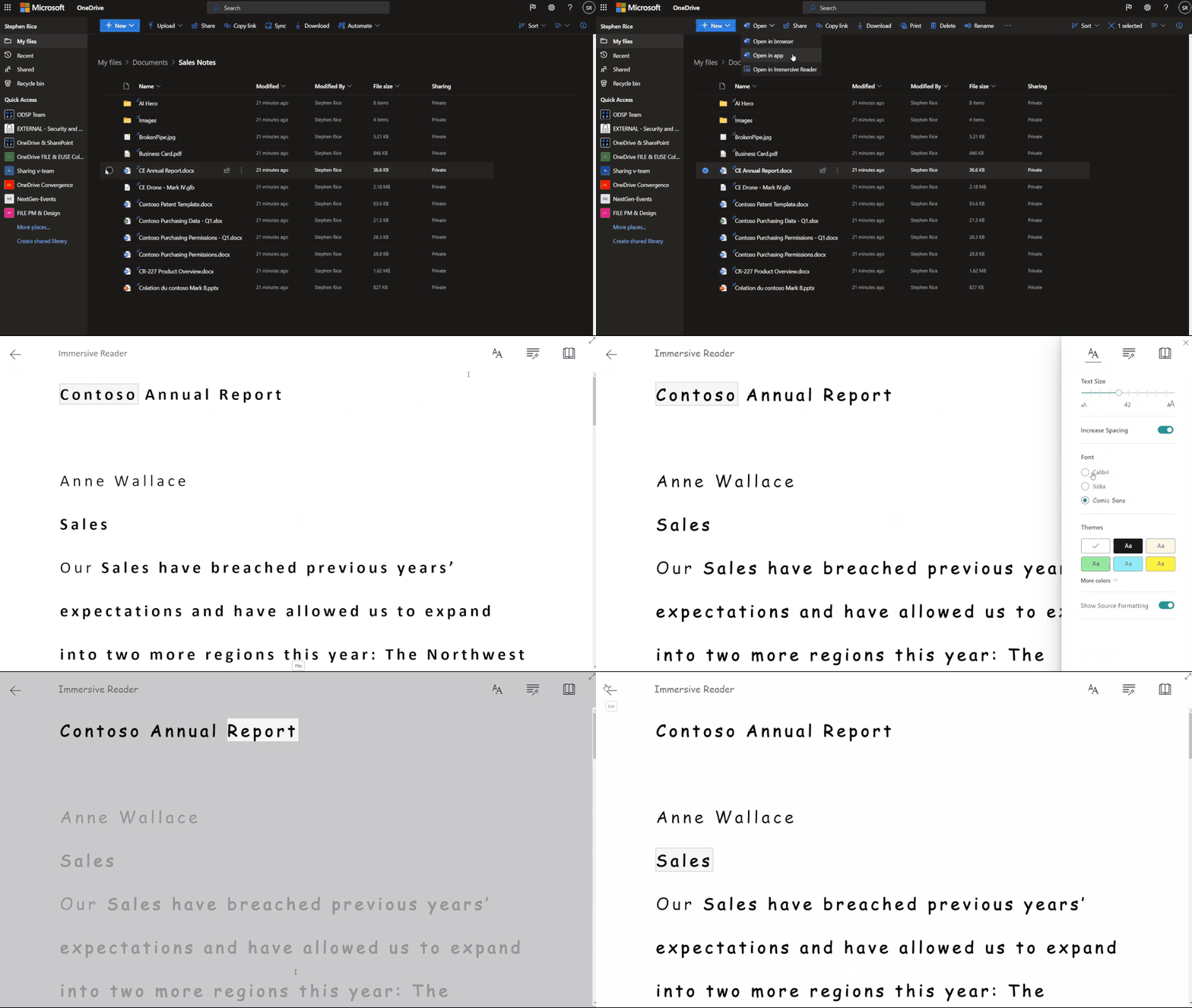 Open Word files directly into Immersive Reader from inside OneDrive and SharePoint.
 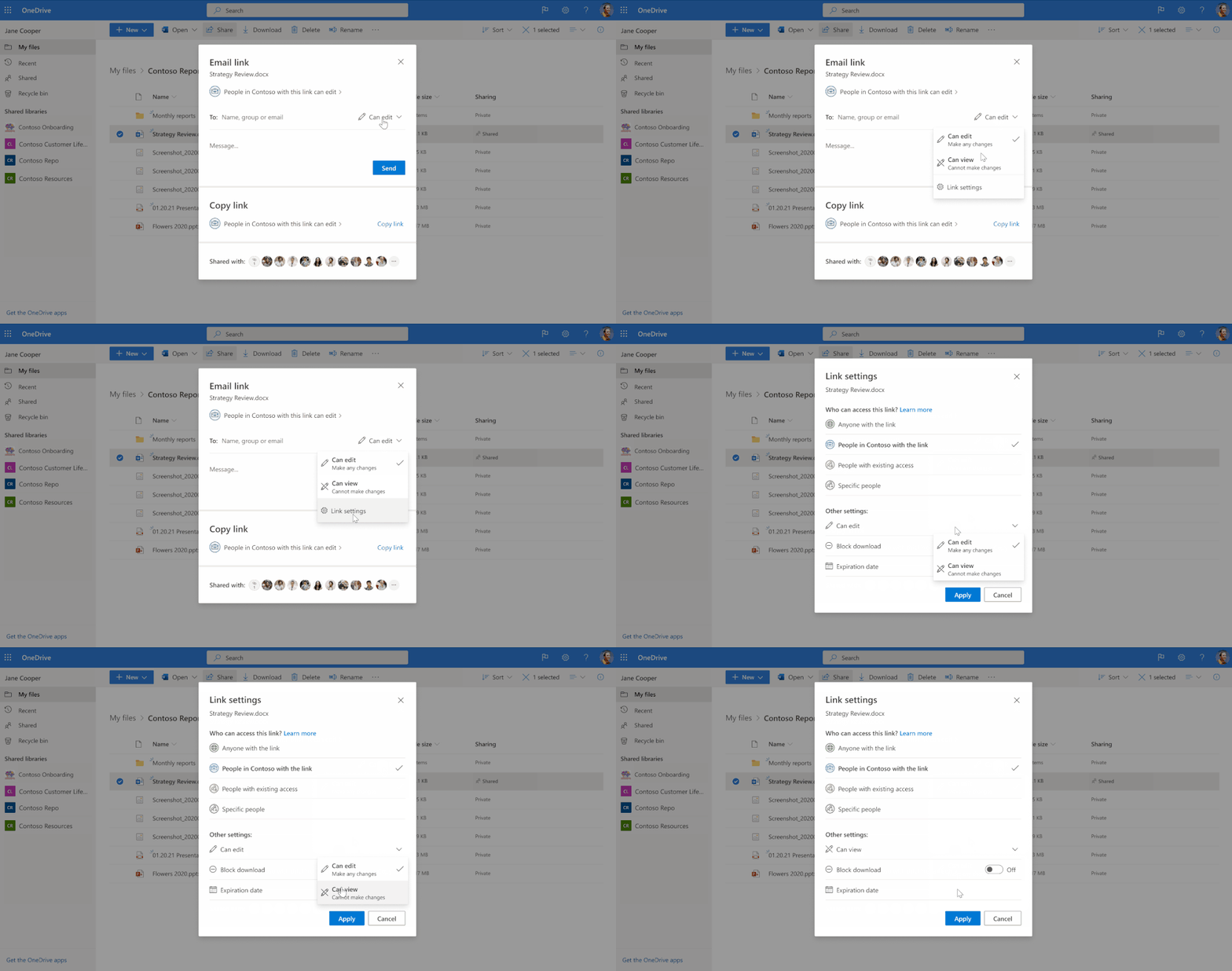 Intuitive access to link settings for updating sharing permissions.
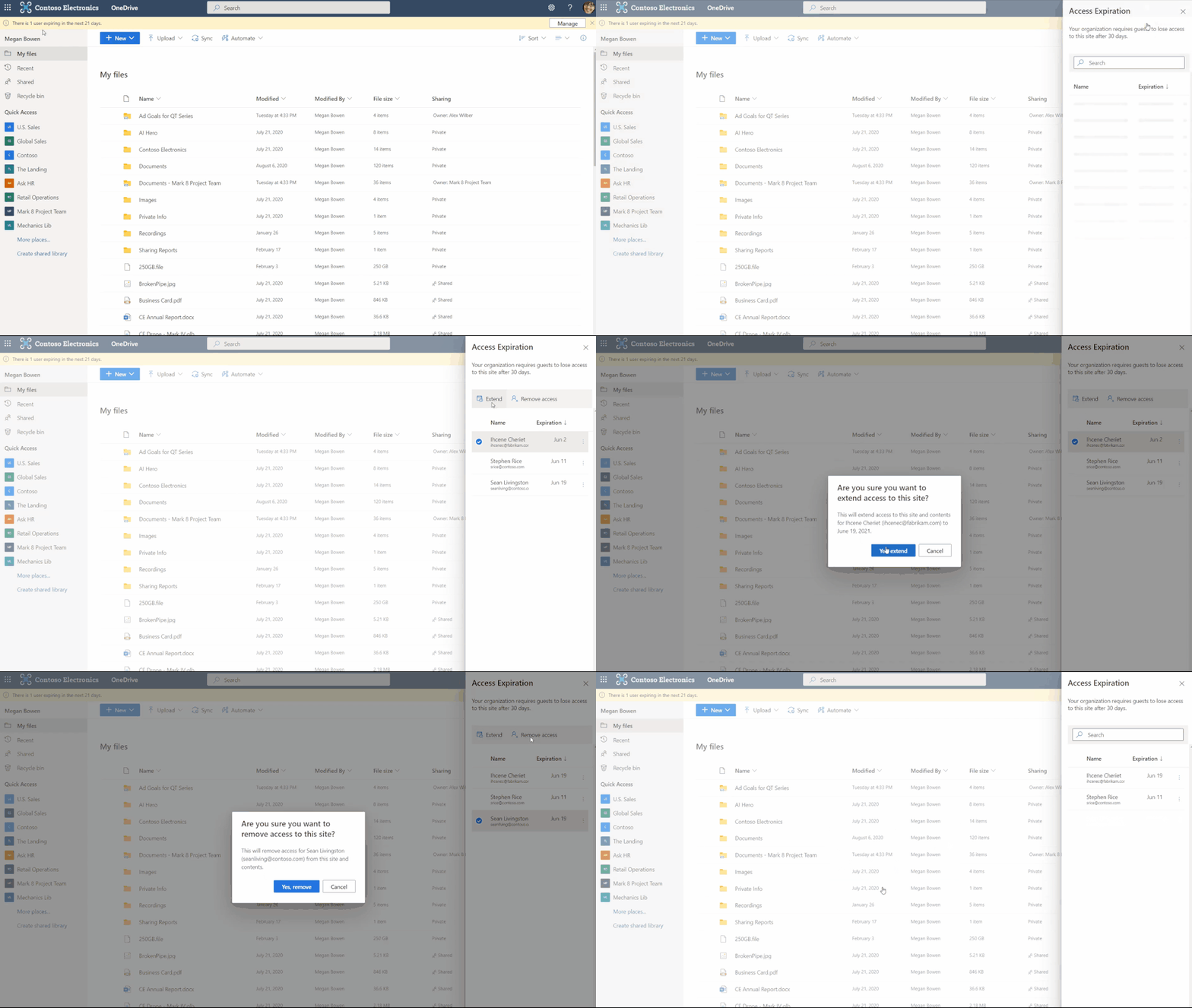 Admins and end users can expire shares to external users
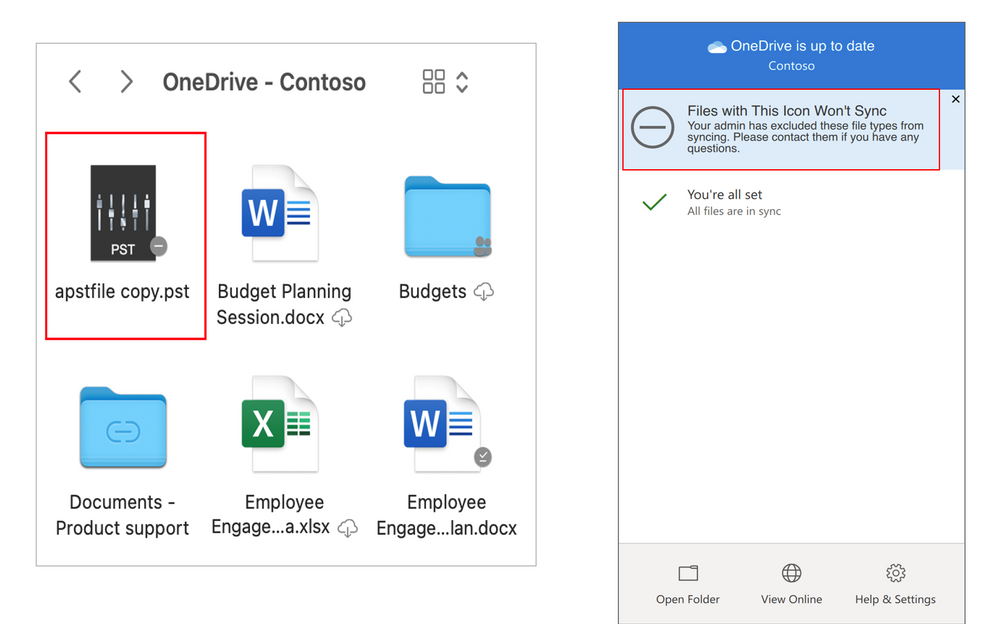 Exclude files notification in Finder and Activity center.
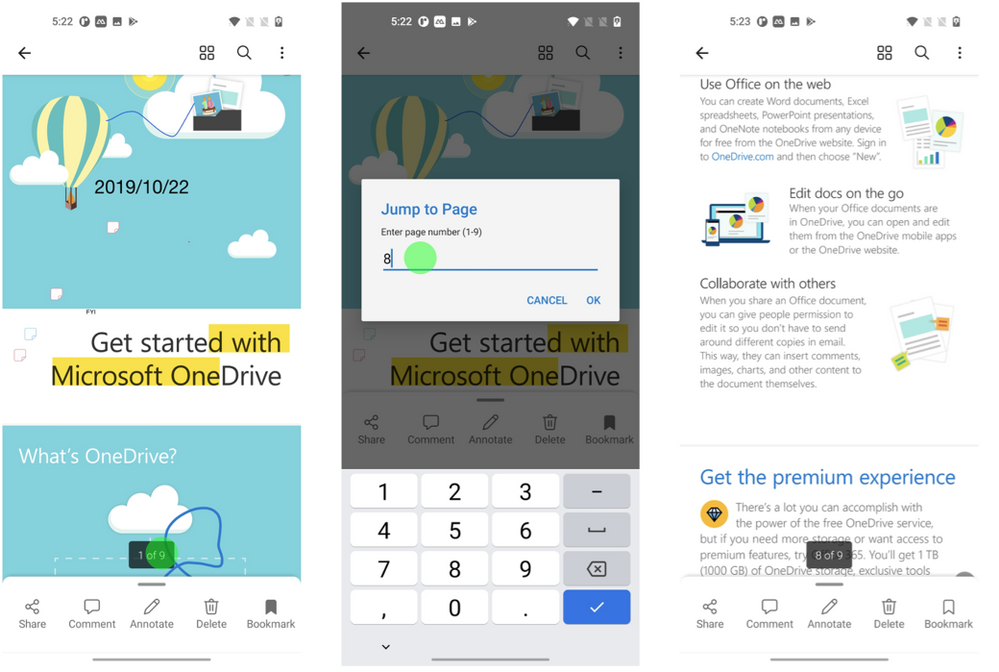 Jump flow on iOS.
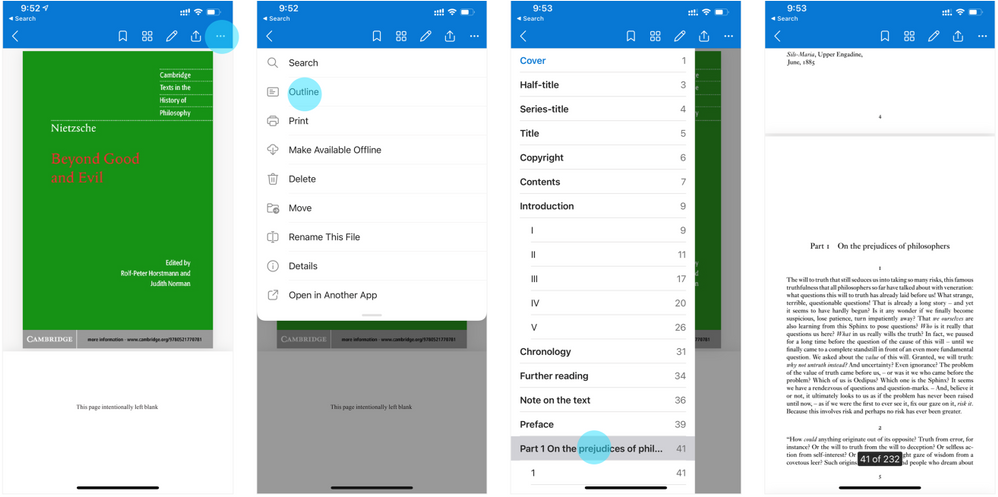 Outline flow in iOS
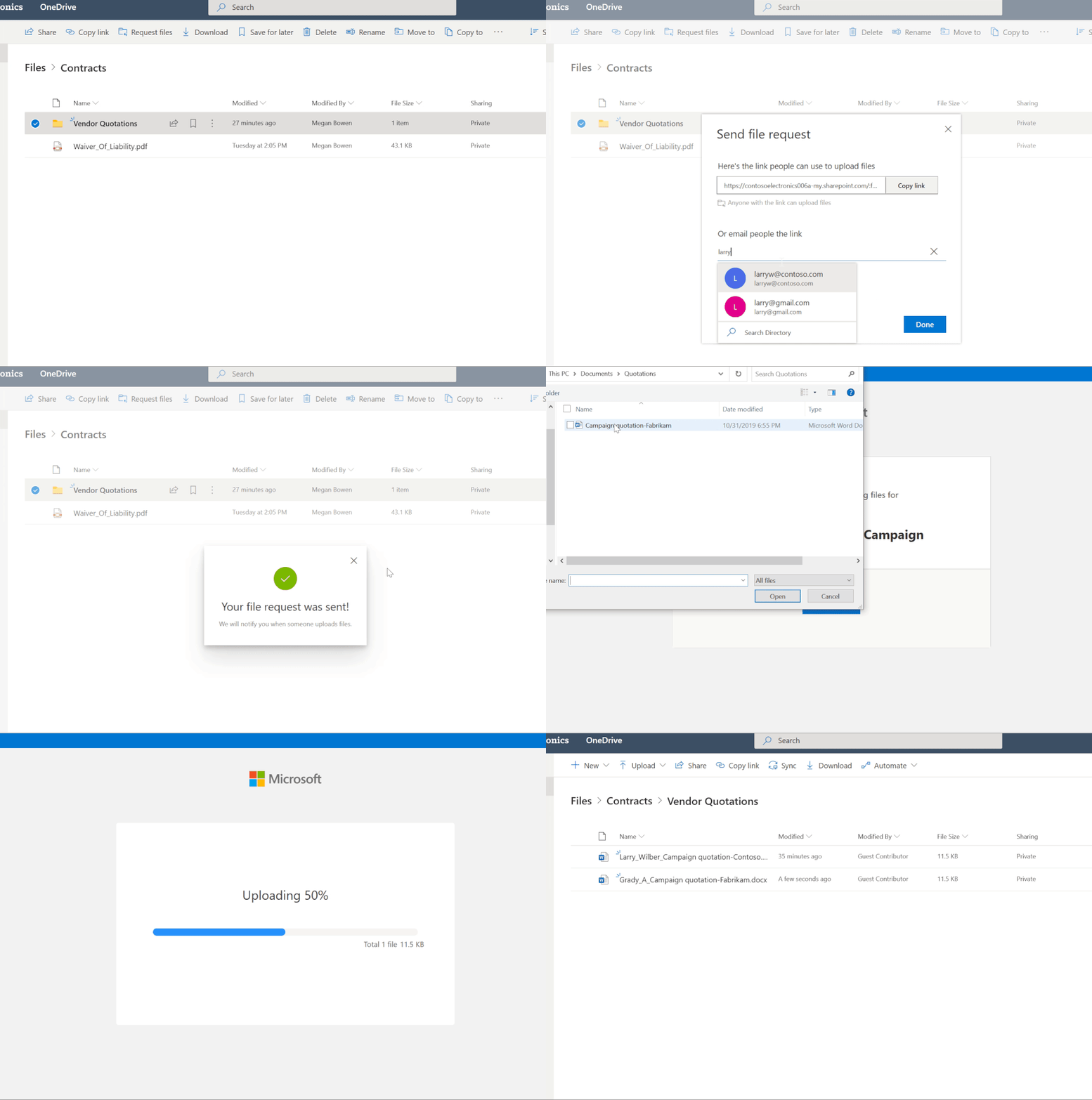 Request files via upload only link


Recent Comments