by Contributed | Jun 17, 2021 | Technology
This article is contributed. See the original author and article here.
Simulation Automations
The modern enterprise, of any size, faces a challenge that the logistics involved in planning a phishing simulation exercise are often laborious and time-consuming to implement. So to help address this we are pleased to announce some extra functionality in Attack Simulation Training that we feel will bring some added benefits in this space by:
- Helping move away from the traditional approach of running quarterly or annual simulations, to a more always on ‘educating’ model, by scheduling simulations to launch at a higher frequency (being mindful of simulation and training fatigue of course).
- Letting you schedule simulations up to a year in advance, so you decide the parameters of your simulations once in advance then you are good to go.
- Introducing some randomization elements around send times and dates to help combat the crowdsource effect that can occur when running large simulation exercises.
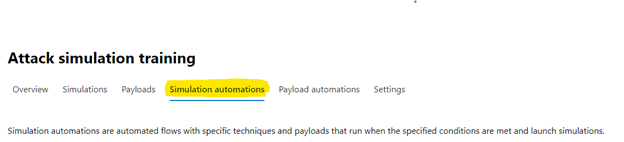
You can access the new functionality by selecting the “Simulation automations” tab within the main experience.
When you create a simulation automation, the experience walks you through a wizard experience just like creating a manual simulation, with the addition of a few new steps.
- Payload selection – Here we allow you to manually select what payloads you would like to be in scope for the simulations, or alternatively you can opt to randomize, where we will take a random payload from the available library and use that.
- Simulation schedule – Here, you get to decide if you would like a randomized schedule or a more predictable fixed schedule. What is the difference?
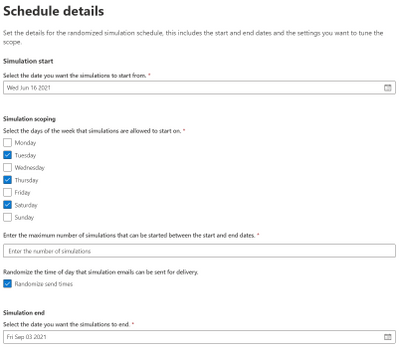
A randomized schedule lets you select a start date and end date, the days of the week you would like to be in scope for delivery and after how many simulation launches would you like the automation to stop.
Once the automation is enabled, the simulations will be launched on random days between the dates you have specified. You can also choose to randomize the send times (to negate the water cooler effect of users receiving simulation messages at the same time and chatting about it).
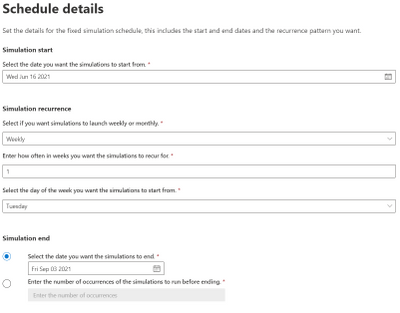
A fixed schedule allows you to run automations in a more controlled manner. We take the same approach – you specify a start date and end date – however this time you are prompted to enter the cadence, either weekly or monthly and the parameters of how often you would like them to launch.
For example, you can schedule an automation to run once a week for a period of 7 weeks starting every Monday, or you can also opt to end the simulations by a particular date or after a specific number of occurrences that you define.
Government Cloud and Regional Availability Updates
Attack Simulation Training is now live in GCC:
Starting 15 June 2021, Attack Simulation Training will be generally available in our Government Community Cloud. If your organization has Office 365 G5 GCC or Microsoft Defender for Office 365 (Plan 2) for Government, you can use Attack Simulation Training in Microsoft 365 Defender to run realistic attack scenarios in your organization as described here. Please note that the service is not yet available in GCC-High or DoD environments and this is part of our future roadmap.
Attack Simulation Training is now live in new regions:
Starting 16 June 2021, Attack Simulation Training will be generally available to tenants in Latin America, Brazil, and Switzerland that have Microsoft 365 E5 or Microsoft Defender for Office 365 Plan 2. For any guidance on running simulations, please start here. For frequently asked questions, please refer to our FAQ page.
We hope you find the enhancements useful as you continue your journey of end-user education and behavior change. If you have any comments or feedback be sure to let us know.
by Contributed | Jun 17, 2021 | Technology
This article is contributed. See the original author and article here.
Call Summary:
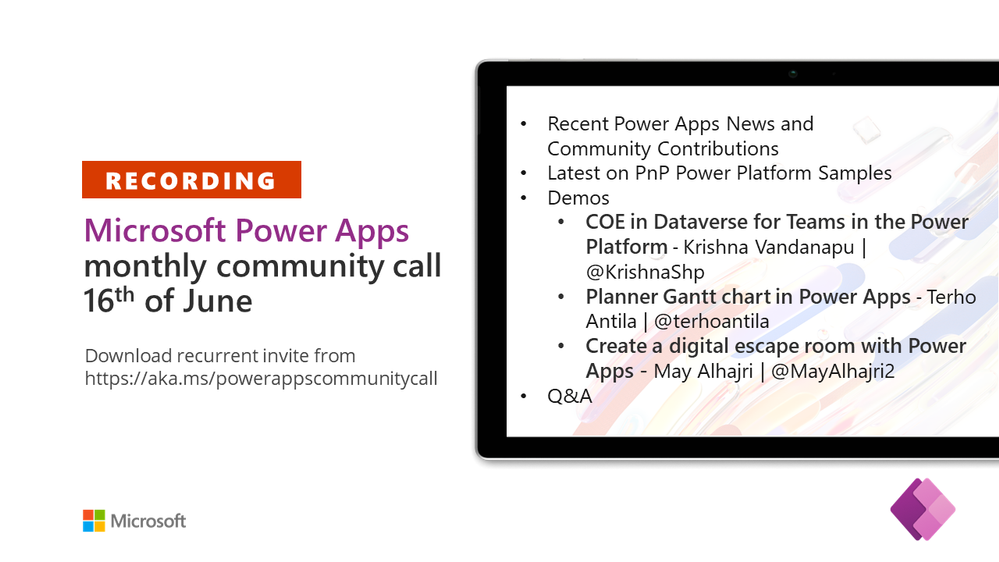
Topics covered in this month’s community call include 3 demos – COE in Dataverse for Teams in the Power Platform, Planner Gantt chart in Power Apps, and Create a digital escape room with Power Apps. Also, Recent Power Apps News and Community Contributions and Latest on PnP Power Platform Samples Contributions. Demo Extravaganza 2021. Entries accepted now, Finalist voting starts – June 1st, Finalist voting ends – June 30th, Finals / Winner(s) to be Announced – July 21, 2021 at 08:00 PT. This session included Q&A in chat. The call was hosted by Todd Baginski (Canviz). Demo presenters are Krishna Vandanapu, Terho Antila and May Alhajri. This call was recorded on June 16, 2021. Thank for attending the call or viewing it on demand.
Demos:
COE in Dataverse for Teams in the Power Platform – tips on configuring and using the Center of Excellence (CoE) Management/Governance tool that runs on top of Dataverse for Teams and is used for maintaining and supporting the Power Platform. Hear about and see the 5 major components in CoE Dataverse for Teams followed by the presenter’s favorite apps & flows and the advantages and limitations of the tool.
Planner Gantt chart in Power Apps – a Power Apps canvas app that builds a Gantt chart out of the tasks stored in Microsoft Planner. Use in Microsoft 365 environment with Planner connectors and no premium licensing required. Hear about lessons learned in development and capabilities yet to implement. UI display’s all Planner Plans available to it, multiple plans may be viewed on Gantt chart at one time.
Create a digital escape room with Power Apps – the user experience: Participants need to solve problems cast about the digital room to get out of the room – open the door. Presenter defines process for app design – create story, clues, images (build the room), locks, and then build app. Experience the app then go behind scenes to step through components used (button, label, pop up message, collections) for the app.
Recent News & Cool Stuff:
Actions:
Call Agenda:
Referenced in this session:
Learn more:
Stay connected:
by Contributed | Jun 17, 2021 | Technology
This article is contributed. See the original author and article here.
At the annual Microsoft Build 2021 Developer Conference, we announced two new products that are based on blockchain technology. Azure Confidential Ledger, now in preview, offers a fully managed service for customers who need to store sensitive data with high integrity and confidentiality. Azure SQL Database ledger, also in preview, enables storage of sensitive relational data in a tamper-evident way.
In this blog post, we’ll introduce you to both of these new products as well as help you understand when it makes sense to use them individually, together, and even with an existing blockchain system.
Azure Confidential Ledger
Enterprises running sensitive workloads need a secure way to store their logs and important metadata while collaborating with other parties. The Confidential Consortium Framework (CCF) is a Microsoft-created open framework for building confidential permissioned blockchain services. By running a confidential blockchain network of nodes in secure enclaves, data remains append-only with immutability guarantees and the data from the client goes straight to the ledger’s enclaves.
Building on the CCF framework, Azure Confidential Ledger (preview) provides the ability to store sensitive data records with integrity and confidentiality guarantees, all in a highly available and performant manner. Stored data remains immutable and tamper-proof in the append-only ledger with the benefits of a fully managed solution that provides infrastructure and operations so customers can get started quickly. The service provides these assurances by harnessing the power of Confidential Computing‘s secure enclaves when setting up the decentralized blockchain network. Microsoft’s access is limited to setting up and managing the network, and this specialized design means that only the customer has access to transaction data in the Confidential Ledger.
Asking yourself the following questions can help you decide if Azure Confidential Ledger is right for you:
- Do you need to store unstructured data (i.e. files, digests) that must remain intact for recordkeeping purposes?
- Are you working with sensitive workflows where confidentiality must be maintained?
- Are you in need of a service that has high integrity and security with a minimalistic trusted computing base?
- Are you working with parties that need irrefutable evidence that tampering did not occur to the stored data?
If you said yes to one or more of these, Azure Confidential Ledger is right for you. Customers have been using Azure Confidential Ledger in various ways. Novaworks, an e-parliamentary software solution, is using Azure Confidential Ledger to securely log votes in a tamper-proof ledger for a high-fidelity voting process.
Azure SQL Database ledger
Azure SQL Database ledger (preview) is a tamper-evident solution for your databases that provides cryptographic proof of your database’s integrity. Using a blockchain data structure implemented as system tables in your database, the ledger feature ensures that any transaction which modifies relational data in your database can be tracked, and any potential tampering detected and easily remediated. Providing proof that your data has not been tampered with is as simple as running a stored procedure that compares the calculated cryptographic hashes in your database against a database digest, which is published automatically in a secure location, such as Azure Confidential Ledger.
Ledger is a feature of Azure SQL Database, meaning there is no additional cost to add tamper-evidence capabilities. You don’t have to migrate data from your existing SQL databases to add tamper-evidence capabilities and no changes are needed to your applications as ledger is an extension of existing SQL table functionality.
Asking yourself the following questions can help you decide if Azure SQL Database ledger is right for you.
- Do you have business-critical data in Azure SQL Database where you must ensure data integrity is intact?
- Can 3rd parties who interact with your data accept a “trust, but verify” model rather than each party having a copy of the ledger?
- Do you need to prove to auditors or regulators that your data has not been tampered with?
- Do you have a need for queryability and strong data management capabilities, such as streaming data from a blockchain to an off-chain store while maintaining integrity from on-chain to off-chain?
If you can answer “yes” to any of these questions, then Azure SQL Database ledger is right for you. Customers like RTGS.global, who provide a global liquidity network for banks, are already using this capability to provide a ledger of transactions to regulators to prove that global banking transactions have not been tampered. Read our blog to learn more.
Putting it all together
Trust is foundational in any business process that spans organizational boundaries. Microsoft goes beyond traditional blockchains, using the building blocks of this technology as the underpinning for the distributed ledger of Azure Confidential Ledger and the consolidated data store of Azure SQL Database ledger. These solutions empower our customers to apply the power of blockchain to sensitive data, simplifying solution development, reducing cost and providing a new level of digital trust to transactions.
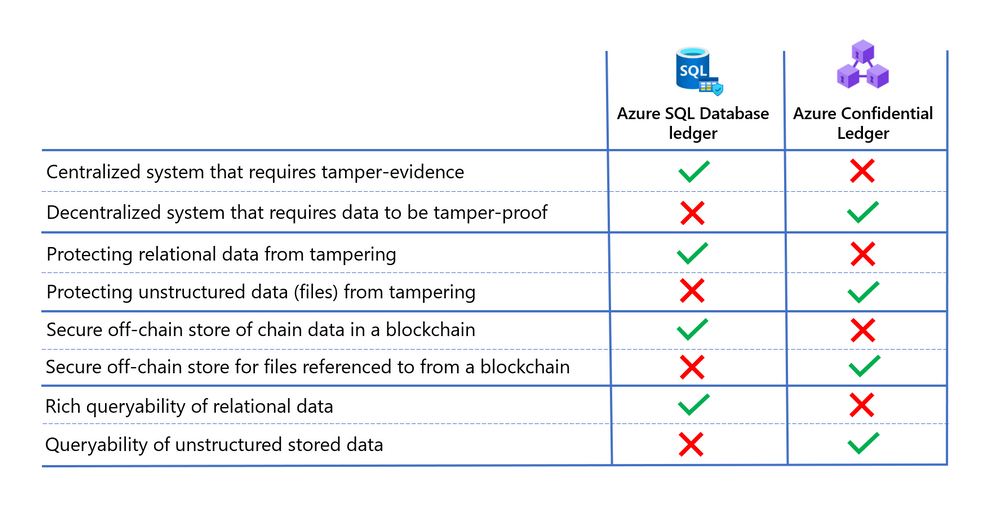
Deciding which technology is best for your needs ultimately depends on the level of trust between parties transacting with the data, and the type of data being protected. In addition to the points mentioned above, consider the following when deciding whether Azure SQL Database ledger or Azure Confidential Ledger is right for you.
Learn more
- Read the Azure Confidential Ledger announcement blog and documentation to learn more about how this new service is empowering our customers and securing their work.
- Read the Azure SQL Database ledger documentation and whitepaper to learn more about how the ledger feature works and how to use it with your Azure SQL Database.


Recent Comments