by Contributed | Jun 21, 2021 | Technology
This article is contributed. See the original author and article here.
This has been a tough year as we’ve been isolated and away from other people more than most would like. In an effort to intentionally reconnect – even if it means virtually in the short term – we are committed to finding every possible way of engaging with you, the HPC community, in every practical way. While we are hopeful in-person events will restart in the near future, we do not want to wait on that to re-engage with the incredible community of engineers, scientists, and developers who live and breathe HPC + AI. There has never been a greater need to rebuild personal connections and engage socially, and the technology space is no exception. Our vision is to enable fruitful informal connections between people from across the community, including Microsoft experts, through a healthy, supportive atmosphere of knowledge exchange, idea iteration, industry topic debate, and architecture comparison that improves the universal experience for everyone’s benefit.
Open Community Social Launch Event
To get the ball rolling here, we’re going to host a virtual 60-minute event during the upcoming ISC21 Conference as an inaugural ‘open community social’. There is a not-so-planned panel agenda for this event where we will discuss various topics covering HPC + AI. We have multiple topics we can banter back and forth, but that is secondary to engaging with YOUR direct questions or discussing topics that YOU suggest. Our moderator will kick-off the event and be on the lookout for your questions / comments that we’ll ask our panel of experts to respond to. While we know this does not replace in-person relationship building, we do hope you can carve out some time from your busy schedule to connect with us and each other.
Join the Azure HPC Community
We are launching an Azure HPC Discord group where you can engage with Microsoft Azure HPC subject matter experts and with one another to exchange ideas or just enjoy community interactions! Please consider joining the group prior to our ISC21 Off Hour Social Event so you can connect with us directly after the virtual event ends.
You can join the Azure HPC Discord group here.
Azure HPC Community Calendar
Below is a list of future community events that are tentatively scheduled through the end of 2021. Also, be on the lookout for more informal meetup events to be added to the schedule below. Event updates will be posted to the Discord channel.
Month
|
Event Title
|
Type
|
Description
|
June
|
HPC Community Launch
|
Virtual
|
Open Q&A Social alongside the ISC21 Conference
|
August
|
SIGGRAPH Meetup
|
Virtual
|
HPC Community social gathering at SIGGRAPH
|
September
|
HPC LIVE!
|
Virtual
|
Major community social gathering hosted by Azure HPC SMEs
|
October
|
NVIDIA GTC Meetup
|
Virtual
|
HPC + AI Social gathering
|
November
|
SC21 Meetup
|
In Person
|
HPC Community social gathering at Supercomputing
|
December
|
Design Automation Conference Meetup
|
In Person
|
HPC Community social gathering at DAC
|
While so many of the corporate investments and programs for HPC are centered around technologies, capabilities, speed, and costs, this one is refreshingly simple…it is about connecting through community.
We really hope you can join us for the launch and other events this year!
by Contributed | Jun 21, 2021 | Technology
This article is contributed. See the original author and article here.
Event Agenda
Calling all web developers! We’re so excited to announce Static Web Apps – Code to Scale, a special live event to celebrate the official release of Azure Static Web Apps! Join our team for a free live event on June 30 @ 9am PT (4pm GMT) and learn how to deploy Azure Static Web Apps on your Azure for Student subscription.
Join us at 9:00 AM PDT / 16:00 UTC 30th June
by Contributed | Jun 21, 2021 | Technology
This article is contributed. See the original author and article here.
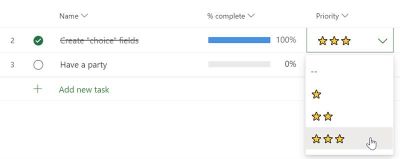
You can create a type of custom field that allows you to quickly choose from several options. Choice custom fields are great for scenarios such as having a Risk column with “High”, “Medium”, and “Low” values. Also, try using them for rough planning of tasks such as “This week”, “Next Week”, and “Later”. Like other custom fields, you can use them in the Grid, in the Board view, and in the task details card. Try them out!
Getting Started
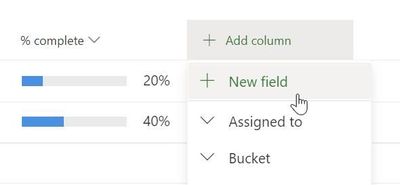
Like other custom fields, click the “Add column” button and choose the “New field” option.
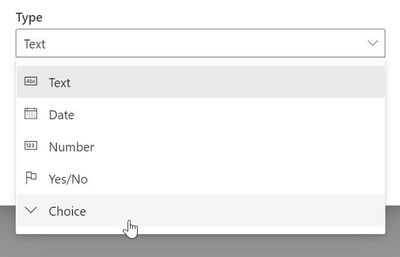
Then, select the “Choice” field type.
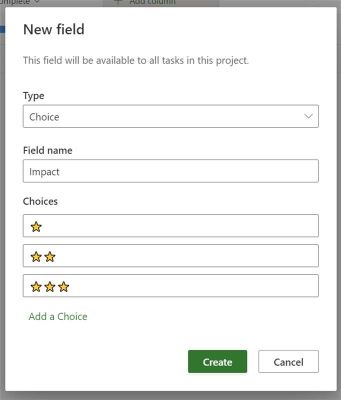
Now give your field a name and a set of options. Press the delete icon next to a choice and the Add a Choice button at the bottom to manage the number of choices you would like to have. You can use the handle on the left side to reorder the choices. You can also use Ctrl + Up/Down on Windows, or Command + Up/Down on Mac to reorder choices with your keyboard.
Frequently Asked Questions
How many choices can I make?
20 for now. We will support 25 soon. Let us know if you need more!
How can I use emojis in my fields?
Windows and Mac both include an emoji menu. Press Win + ; (Windows key plus semicolon) to open it. On Mac, press Control + Command+ Space.
Are choice fields included when I make copies of a project?
Yes! Both the fields and the values are included when you copy a project.
Where can I go to learn about the other types of custom fields?
Head over to our support site to learn more about the types of custom fields available in Project for the web.
Are these “enterprise” fields? Can I build reports using them?
No. Like the other types of custom fields, this field type is only visible in Project for the web.
by Contributed | Jun 21, 2021 | Technology
This article is contributed. See the original author and article here.
This video series shows how you can adopt a Zero Trust approach for security and benefit from the core ways in which Microsoft can help. In the past, your defenses may have been focused on protecting network access with on-premises firewalls and VPNs, assuming everything inside the network was safe. But as corporate data footprints have expanded to sit outside your corporate network, to live in the Cloud or a hybrid across both, the Zero Trust security model has evolved to address a more holistic set of attack vectors.
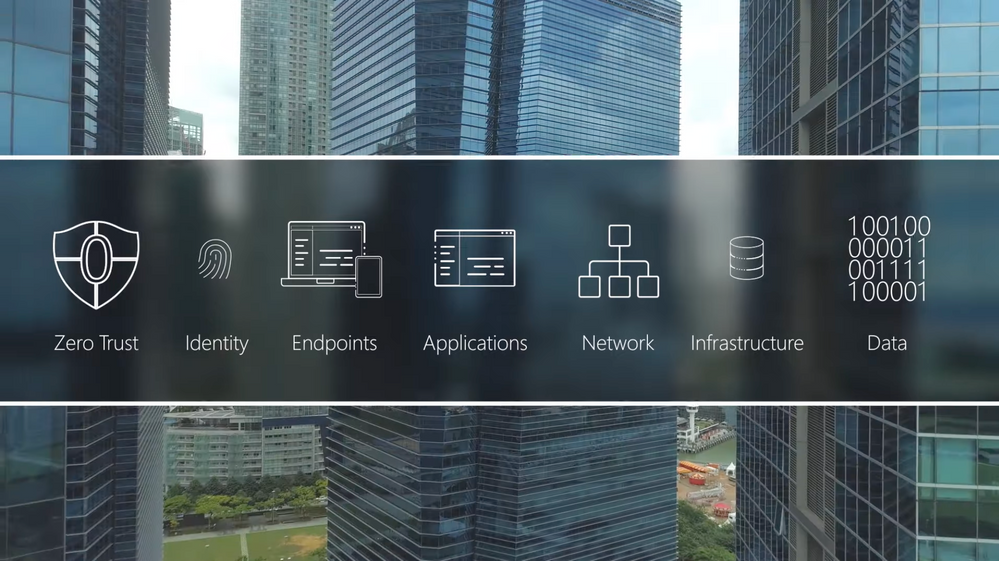
Based on the principles of “verify explicitly”, “apply least privileged access” and “always assume breach”, Zero Trust establishes a comprehensive control plane across multiple layers of defense:
- Identity
- Endpoints
- Applications
- Network
- Infrastructure
- Data
Introduction to Zero Trust
Identity:
Join our host, Jeremy Chapman, as he unpacks the foundational layer of the model with identity. As the primary control plane for Zero Trust, it acts as the front door for people, service accounts, and devices as each requests access to resources. Identity is at the core of the Zero Trust concepts of never trust, always verify and grant the appropriate level of access through the principle of least privilege.
Zero Trust | Identity
Endpoints & Applications:
See how you can apply Zero Trust principles and policies to your endpoints and apps; the conduits for users to access your data, network, and resources. For Zero Trust, endpoints refer to the devices people use every day — both corporate or personally owned computers and mobile devices. The prevalence of remote work means devices can be connected from anywhere and the controls you apply should be correlated to the level of risk at those endpoints.
For corporate managed endpoints that run within your firewall or your VPN, you will still want to use principles of Zero Trust: Verify explicitly, apply least privileged access, and assume breach.Jeremy Chapman walks through your options, controls, and recent updates to implement the Zero Trust security model.
Zero Trust | Endpoints & Applications
by Contributed | Jun 21, 2021 | Technology
This article is contributed. See the original author and article here.
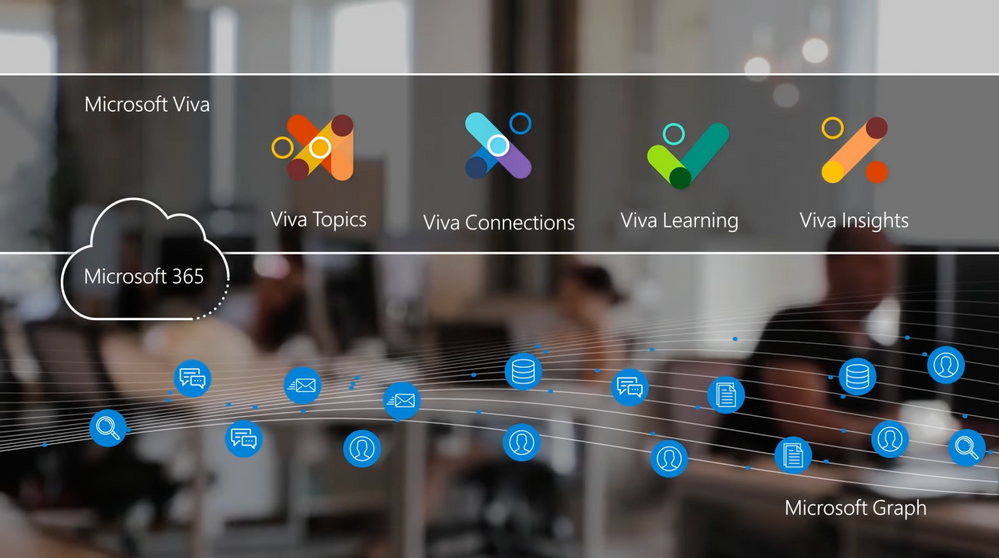
This series of videos shows team leaders and admin the underlying tech and options for enabling and configuring the four core modules of Microsoft Viva. Viva is the new employee experience platform that connects learning, insights, resources, and communication. It has a unique set of curated and AI-enriched experiences built on top of and integrated with the foundational services of Microsoft 365.
Introduction to Microsoft Viva
Microsoft Viva’s 4 core modules:
- Viva Topics — builds a knowledge system for your organization
- Viva Connections — boosts employee engagement
- Viva Learning — creates a central hub to discover learning content and build new skills
- Viva Insights — recommends actions to help improve productivity and wellbeing
Microsoft Viva Topics:
Viva Topics builds a system that transforms information into knowledge and actively delivers it to you in the context of your work. As many of us are working remotely or in more hybrid office environments, it can be harder to stay informed. With Topics, we connect you to the knowledge and the people closest to it. CJ Tan, Lead Program Manager, joins host Jeremy Chapman to cover the overall experience for users, knowledge managers, and admins.
Microsoft Viva Topics
Microsoft Viva Connections:
Viva Connections is specifically about boosting employee engagement. This spans everyone in your organization, from everyday users, specific groups in departments, to frontline workers. It expands on your SharePoint home site and newsfeed and is designed to offer a destination that delivers personalized news, conversations, and commonly used resources. Adam Harmetz, lead engineer, joins host Jeremy Chapman to walk through the user experience, how to set it up, and options for personalizing information sharing by role.
Microsoft Viva Connections
Microsoft Viva Learning:
With Viva Learning, you have a center for personalized skill development that offers a unique social experience where learning content is available in the flow of work. It recommends and manages the progress of key trainings all from one place and is built on top of SharePoint, Microsoft Search, Microsoft Teams, Microsoft Graph, and Substrate. Swati Jhawar, Principal Program Manager for Microsoft Viva, joins Jeremy Chapman to share options for setup, learning content curation, and integration with your existing learning management system.
Microsoft Viva Learning
Microsoft Viva Insights:
With hybrid work at home and in the office as the new normal, Viva Insights gives individuals, managers, and leaders the insight to develop healthier work habits and a better work environment. It is an intelligent experience designed to leverage MyAnalytics, Workplace Analytics, and Exchange Online to deliver insights that recommend actions to help prioritize well-being and productivity. Engineering leader, Kamal Janardhan, joins Jeremy Chapman for a deep dive and a view of your options for configuration.
Microsoft Viva Insights


Recent Comments