by Contributed | Jun 25, 2021 | Technology
This article is contributed. See the original author and article here.
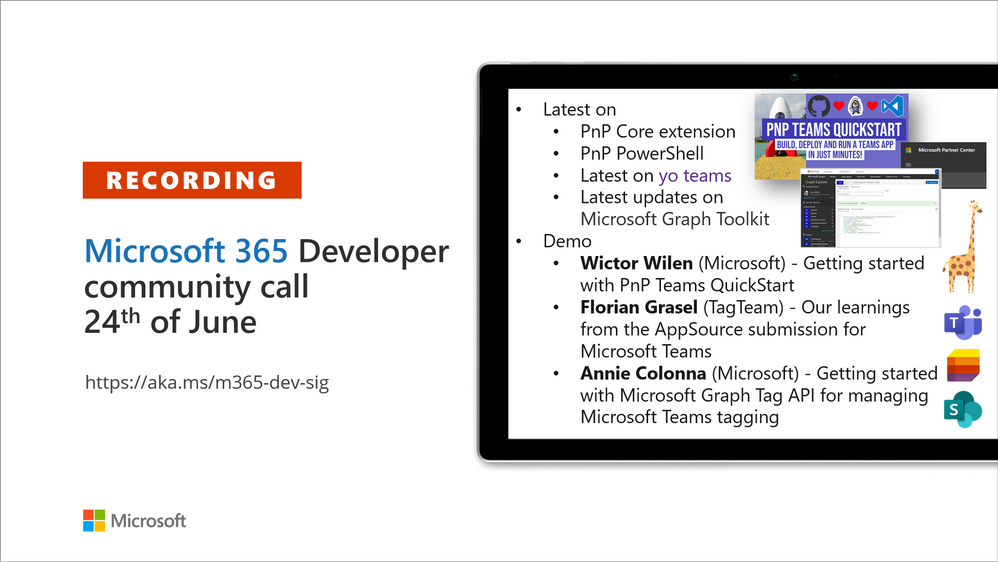
Recording of the Microsoft 365 – General M365 development Special Interest Group (SIG) community call from June 24, 2021.
Call Summary
Summer break and community call schedule updates reviewed. Preview the new Microsoft 365 Extensibility look book gallery. Looking to get started with Microsoft Teams development? Don’t miss out on our Teams samples gallery (updated sample browser in June), and the new Microsoft 365 tenant – script samples gallery – scripts for PowerShell and CLIs. Sign up and attend one of a growing list of events hosted by Sharing is Caring this month. Announced PnP Recognition Program. Check out the new PnP Teams Quickstart. Latest updates on PnP projects covered off. Added Teams SSO Provider, sample and other components to Microsoft Graph Toolkit (MGT) v.2.2.0 GA.
Open-source project status: (Bold indicates new this call)
Project |
Current Version |
Release/Status |
PnP .NET Libraries – PnP Framework |
v1.5.0 GA |
Version 1.6.0 – Summer 2021 |
PnP .NET Libraries – PnP Core SDK |
v1.2.0 GA |
Version 1.3.0 – Summer 2021 |
PnP PowerShell |
v1.6.0 GA |
|
Yo teams – generator-teams |
v3.2.0 GA |
v3.3.0 Preview soon |
Yo teams – yoteams-build-core |
v1.2.0 GA, v1.2.1 Preview |
|
Yo teams – yoteams-deploy |
v1.1.0 GA |
|
Yo teams – msteams-react-base-component |
v3.1.0 |
|
Microsoft Graph Toolkit (MGT) |
v2.2.0 GA |
Added Teams SSO Provider in Preview |
Additionally, 1 new Teams samples were delivered in the last 2 weeks. Great work! The host of this call was David Warner II (Catapult Systems) | @DavidWarnerII. Q&A takes place in chat throughout the call.
Actions:
- Register for Sharing is Caring Events:
- First Time Contributor Session – June 29th (EMEA, APAC & US friendly times available)
- Community Docs Session – TBD
- PnP – SPFx Developer Workstation Setup – TBD
- PnP SPFx Samples – Solving SPFx version differences using Node Version Manager – June 24th
- Ask Me Anything – Teams Dev – July 13th
- First Time Presenter – June 30th
- More than Code with VSCode – TBD
- Maturity Model Practitioners – 3rd Tuesday of month, 7:00am PT
- PnP Office Hours – 1:1 session – Register
- PnP Buddy System – Request a Buddy
- Download the recurrent invite for this call – http://aka.ms/m365-dev-sig
- Call attention to your great work by using the #PnPWeekly on Twitter.
Microsoft Teams Development Samples: (https://aka.ms/TeamsSampleBrowser)

Thank you for joining for today’s PnP Community call. It’s a full house!
Demos delivered in this session
Getting started with PnP Teams QuickStart – create a Teams SSO tab in 15 minutes using browser-based Codespaces currently in preview. Follow presenter as he creates a new Teams tab, registers it in Azure AD, accesses Graph for presence courtesy of Microsoft/Teamsfx js library, deploys app in App Store, and deletes app when done. PnP Teams Quick Start is based on GitHub Codespaces = your virtual machine in the cloud.
Our learnings from the AppSource submission for Microsoft Teams – a first timer documents the journey – a 7-step process going from idea to app in AppSource. Solid tips beyond the process that every product team should consider ranging from extension opportunities and testing to devices and post publishing maintenance. Prepare to fail gracefully and learn openly as the journey includes working closely with a Microsoft submissions team that’s completely interested in your success.
Getting started with Microsoft Graph Tag API for managing Microsoft Teams tagging – this presentation focuses on people centric tags used in Teams to categorize, to @mention and to start a chat. Teams makes it nearly effortless to create, manage and use tags to connect people and groups. New Beta APIs, available week of June 28th, address many tag management challenges – permissions, membership updates, tapping data that exists outside immediate org. Glimpse at what’s next.
Thank you for your work. Samples are often showcased in Demos.
Topics covered in this call
Resources:
Additional resources around the covered topics and links from the slides.
General resources:
Upcoming Calls | Recurrent Invites:
General Microsoft 365 Dev Special Interest Group bi-weekly calls are targeted at anyone who’s interested in the general Microsoft 365 development topics. This includes Microsoft Teams, Bots, Microsoft Graph, CSOM, REST, site provisioning, PnP PowerShell, PnP Sites Core, Site Designs, Microsoft Flow, PowerApps, Column Formatting, list formatting, etc. topics. More details on the Microsoft 365 community from http://aka.ms/m365pnp. We also welcome community demos, if you are interested in doing a live demo in these calls!
You can download recurrent invite from http://aka.ms/m365-dev-sig. Welcome and join in the discussion. If you have any questions, comments, or feedback, feel free to provide your input as comments to this post as well. More details on the Microsoft 365 community and options to get involved are available from http://aka.ms/m365pnp.
“Sharing is caring”
Microsoft 365 PnP team, Microsoft – 25th of June 2021

by Contributed | Jun 25, 2021 | Technology
This article is contributed. See the original author and article here.
Many security announcements were shared this week including Azure Key Vault Managed Hardware Security Module was made generally available, general data scientist roles added to RBAC capabilities in Azure Machine Learning, eliminating data silos with large-scale NFS workloads in Azure Blog Storage, Microsoft Defender unmanaged device protection capabilities and a security focused Microsoft Learn Module of the week.
Azure Key Vault Managed Hardware Security Module (HSM) reaches general availablity
Managed HSM offers a fully managed, highly available, single-tenant, high-throughput, standards-compliant cloud service to safeguard cryptographic keys for your cloud applications, using FIPS 140-2 Level 3 validated HSMs.
Key features and benefits:
- Fully managed, highly available, single-tenant, high-throughput HSM as a service: No need to provision, configure, patch, and maintain HSMs for key management. Each HSM cluster uses a separate customer-specific security domain that cryptographically isolates your HSM cluster.
- Access control, enhanced data protection, and compliance: Centralize key management and set permissions at key level granularity. Managed HSM uses FIPS 140-2 Level 3 validated HSMs to help you meet compliance requirements. Use private endpoints to connect securely and privately from your applications.
- Integrated with Azure services: Encrypt data at rest with a customer managed key in Managed HSM for Azure Storage, Azure SQL, and Azure Information Protection. Get complete logs of all activity via Azure Monitor and use Log Analytics for analytics and alerts. Some third party solutions are also integrated with Managed HSM.
- Uses the same API as Key Vault: Managed HSM allows you to store and manage HSM-keys for your cloud applications using the same Key Vault APIs, which means migrating from vaults to managed HSM pools is very simple.
Azure Key Vault Managed HSM is another service that is built on Azure’s confidential computing platform. Azure confidential computing protects the confidentiality and integrity of your data and code while it’s processed in the public cloud.
Learn more.
Azure Machine Learning public preview announcements for June 2021
The RBAC capabilities in Azure Machine Learning now offers a new pre-built role defined for the general data scientist user. When assigned, this role will allow a user to perform all actions within a workspace, except for creating/deleting the compute and any workspace level operations.
Text Classification labeling capability in Azure Machine Learning studio allows our users to create text labeling projects and assign labels to their text documents. It supports text classification either multi-label or multi-class project types.
Environments in the Azure Machine Learning studio allows you to create and edit environments through the UI. You can also view both custom and curated environments in your workspace as well as details around properties, dependencies, and image build logs.
How to assign built-in roles.
How to create labeling projects.
Learn more about environments UI.
Modernize large-scale NFS workloads and eliminate data silos with Azure Blob Storage
Azure Blob Storage, Microsoft’s object storage platform for storing large-scale data, recieves Network File System (NFS) 3.0 protocol support for Azure Blob Storage now generally available. Many organizations from various industries such as manufacturing, media, life science, financial services, and automotive have embraced this feature during our preview and are deploying their workloads in production and have been using NFS 3.0 for a wide array of workloads such as high-performance computing (HPC), analytics, and backup.
To get started, check out this video on introducing NFS 3.0 support for Azure Blob Storage and read more about the NFS 3.0 protocol support in Azure Blob Storage.
Microsoft Defender for Endpoint Unmanaged device protection capabilities are now generally available
Microsoft recently announced the general availablilty of a new set of capabilities that gives Microsoft Defender for Endpoint customers visibility over unmanaged devices running on their networks addressing some of the greatest risks to an organization’s cybersecurity posture. This release delivers the following set of new capabilities:
- Discovery of unmanaged workstations, servers, and mobile endpoints (Windows, Linux, macOS, iOS, and Android) that haven’t been onboarded and secured. Additionally, network devices (e.g.: switches, routers, firewalls, WLAN controllers, VPN gateways and others) can be discovered and added to the device inventory using periodic authenticated scans of preconfigured network devices.
- Onboard discovered, unmanaged endpoint and network devices connected to your networks to Defender for Endpoint. Integrated new workflows and new security recommendations in the threat and vulnerability management experience make it easy to onboard and secure these devices.
- Review assessments and address threats and vulnerabilities on newly discovered devices to create security recommendations that can be used to address issues on devices helping to reduce an organization’s threat and risk exposure.
To read more about our new device discovery and assessment capabilities, check out:
Community Events
- Patch and Switch – It has been a fortnight and Patch and Switch are back to share the stories they have amassed over the past two weeks.
MS Learn Module of the Week
Protect against threats with Microsoft Defender for Endpoint
Learn how Microsoft Defender for Endpoint can help your organization stay secure.

In this module, you will learn how to:
- Define the capabilities of Microsoft Defender for Endpoint.
- Understand how to hunt threats within your network.
- Explain how Microsoft Defender for Endpoint can remediate risks in your environment.
Learn more here: Protect against threats with Microsoft Defender for Endpoint

Let us know in the comments below if there are any news items you would like to see covered in the next show. Be sure to catch the next AzUpdate episode and join us in the live chat.
by Contributed | Jun 25, 2021 | Technology
This article is contributed. See the original author and article here.
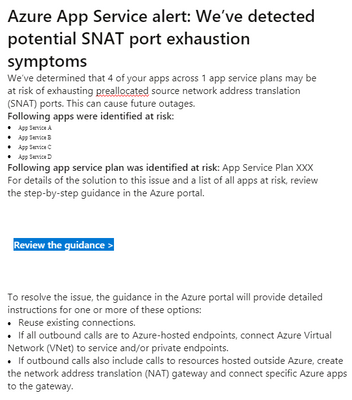
Recently Azure App Service users might receive email alert on potential SNAT Port Exhaustion risk of services. Here is a sample email.
This post is about looking at this alert rationally.
This alert alone does not mean there is a drop in availability or performance of our app services.
If we suspect the availability or performance of our app services degraded and SNAT Port Exhaustion is a possible reason for that, we can have a quick check if there were below symptoms correlated with the alert.
- Slow response times on all or some of the instances in a service plan.
- Intermittent 5xx or Bad Gateway errors
- Timeout error messages
- Could not connect to external endpoints (like SQLDB, Service Fabric, other App services etc.)
Because SNAT Port is consumed only when there are outbound connections from App Service Plan instances to public endpoints. If port exhausted, there must be delay or failure in those outbound calls. Above symptoms will help justify if we are on the right track looking into SNAT Port Exhaustion.
If we did observe slowness or failure in outbound calls that correlated with the email alert, we may refer to the guidance section mentioned in alert email and this document Troubleshooting intermittent outbound connection errors in Azure App Service – Azure App Service | Microsoft Docs for further troubleshooting.
by Contributed | Jun 24, 2021 | Technology
This article is contributed. See the original author and article here.
For years, a successful actuarial services company relied on a vital financial application that ran on Alpha hardware—a server well past its end-of-life date. To modernize its infrastructure with as little risk as possible, the company turned to Stromasys Inc., experts in cross-platform server virtualization solutions. In a matter of days, the company was running its mission-critical application on Azure. Soon after, it began to offer the software as a service (SaaS) to other companies, turning the formerly high-maintenance legacy software into a growing profit center.
The challenge of the not-so-modern mainframe
Aging servers are vulnerable servers. Stromasys was founded in 1998 with a mission to help companies running core applications on servers from an earlier generation, such as SPARC, VAX, Alpha, and HP 3000. With headquarters in Raleigh, North Carolina, Stromasys is a wholly owned subsidiary of Stromasys SA in Geneva, Switzerland. Its virtualization solutions are used by top organizations worldwide.
Stromasys developed a niche in the computer industry by recognizing the need for specialized virtualization environments that could replace servers nearing their end of life. Stromasys solutions can host applications designed for Solaris, VMS, Tru64 UNIX, and MPE/iX operating systems. By rehosting applications on Azure using emulation software—known as a lift-and-shift migration—organizations can safely phase out legacy hardware in a matter of days and immediately begin taking advantage of the scalability and flexibility of cloud computing.
The financial services industry has been among the first to adopt Stromasys server emulation solutions. A lift-and-shift approach is a quick, safe way to move legacy workloads to the cloud. Actuarial services are all about risk assessment, and the Stromasys customer knew it needed to reduce the risk associated with running mission-critical software on a decades-old Alpha system.
The legendary Digital Equipment Corporation (DEC) introduced the AlphaServer in 1994. Even after the system was officially retired in 2007, organizations around the world continued to trust the Alpha’s underlying OpenVMS and Tru64 UNIX operating systems for their proven stability. Stromasys saw an opportunity, and in 2006, it began offering an Alpha hardware emulation solution, Charon-AXP. Today, HP recognizes Charon-AXP as a valid Alpha replacement platform to run OpenVMS or Tru64.
The actuarial services company had kept its AlphaServer running through the years with help from user groups that located vintage hardware components. However, parts can be hard to find for any classic machine—from cars to computers.
“Our business had exclusively involved on-premises solutions,” explains Thomas Netherland, global head of Alliances & Channels at Stromasys. “So we were surprised and intrigued when the customer opted for the cloud. They simply did not want to be in the IT infrastructure business.”
The actuarial services company wanted to take advantage of the scalability, security, and other benefits that come with Azure. This is when Stromasys decided as a company to get serious about offering cloud-ready solutions.
“Stromasys solutions on Azure extend the lives of mission-critical legacy applications.”
– Thomas Netherland: global head of Alliances & Channels, Stromasys Inc.
Hardware emulation in a virtual environment
Stromasys and Microsoft worked together to find a solution for the actuarial services customer. Stromasys proposed using Charon-AXP, one of a family of legacy system cross-platform hypervisors. With this emulator, the customer could phase out its aging and increasingly expensive hardware and replace it quickly and safely with an enterprise-grade, virtual Alpha environment on Azure that uses an industry-standard x86 platform.
According to Dave Clements, a systems engineer at Stromasys, Charon means no risky migration projects. “There are no changes to the original software, operating system, or layered products—so no need for source code and no application recompile,” he says. In addition, the actuarial services company didn’t have to worry about recertifying its application, because the legacy code is untouched.
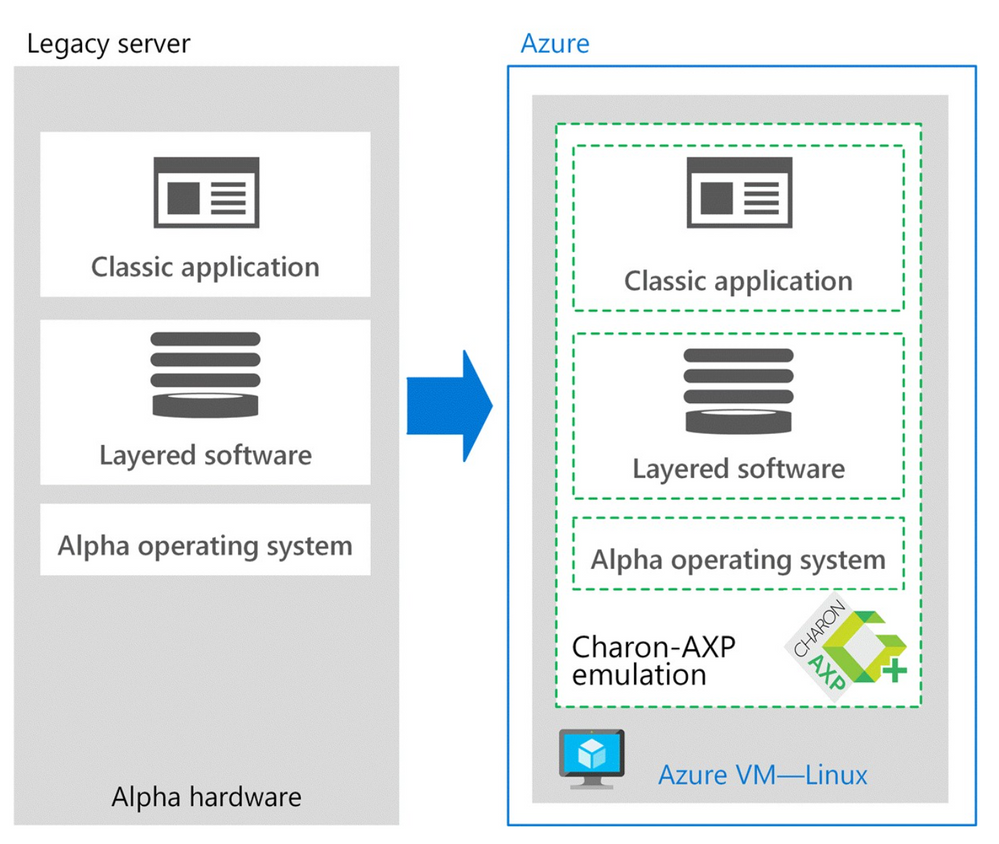
Charon-AXP creates a virtual Alpha environment on an Azure virtual machine (VM), which is used to isolate and manage the resources for a specific application on a single instance. Charon-AXP presents an Alpha hardware interface to the original Alpha software, which cannot detect a difference. After the user programs and data are copied to the VM, the legacy application continues to run unchanged.
The engineers didn’t know how well Charon-AXP would perform in the cloud, so they set up a proof-of-solution test. “We wanted to ensure that the Azure infrastructure processor speed was enough to compensate for the additional CPU overhead introduced by Charon,” says Netherland. Turns out, it wasn’t a problem. The clock speed of most legacy systems is on the order of hundreds of megahertz (MHz), as opposed to the several gigahertz (GHz) offered by VMs on Azure. Performance was the same or better.
The entire migration process, including the proof of solution test, took only two weeks.
The following image demonstrates the architectural differences:
“We like Azure because of the high processor speeds that are available and for the support available from Microsoft
and our reseller community.”
– Dave Clements: systems engineer, Stromasys Inc.
Architecture on Azure
The original application ran on a DEC Alpha ES40 server with four CPUs (1 GHz), 16 GB of RAM, and 400 GB of storage. The new architecture on Azure includes Charon-AXP for Windows on a VM with eight CPUs (3 GHz), 32 GB of RAM, and 500 GB of storage.
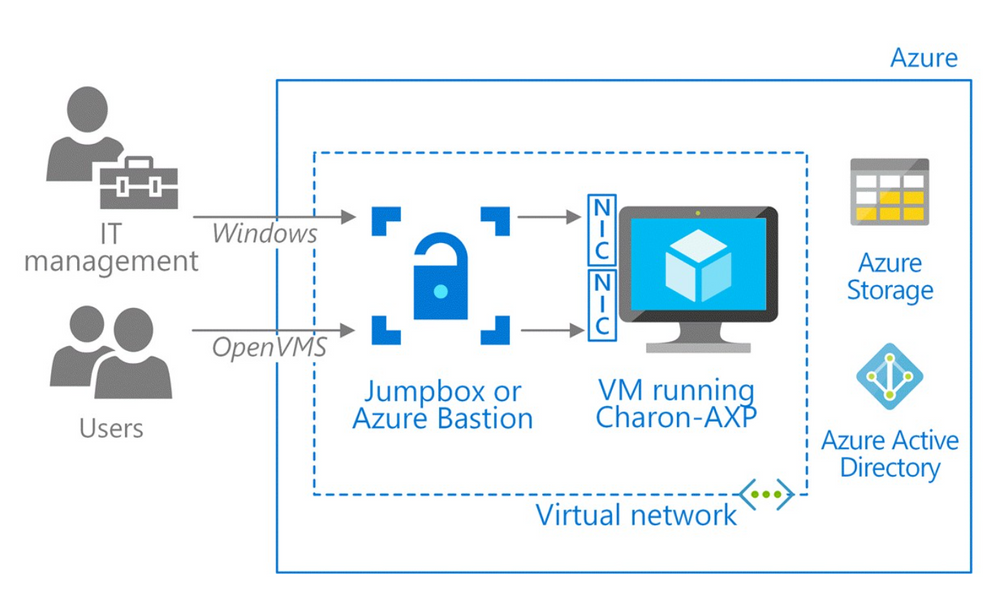
During proof-of-solution testing, Stromasys engineers created multiple virtual network interfaces to provide separate networks paths, depending on the type of user. One path is provisioned for Windows only, to give IT managers access for host configuration and management tasks. The other network path provides OpenVMS users and administrators access to the OpenVMS operating system and applications. This gives users access to their applications through their organization’s preferred type of connection—for example, Secure Shell (SSH), a virtual private network (VPN), or a public IP address.
“Two network interfaces keep the connections separate, which is our preference for security and ease of use,” explains Sandra Levitt, an engineer at Stromasys. “It lets users connect the way they’re used to.” A best practice is to configure the VM running Charon behind a jumpbox or a service, such as Azure Bastion, which uses Secure Sockets Layer (SSL) to provide access without any exposure through public IP addresses.
For this customer, the engineers set up a VPN to accelerate communications between the legacy operating system running in the company’s datacenter and Charon on Azure. Users connect to the VM running the application using remote desktop protocol (RDP).
The new architecture also improves the company’s business continuity. Azure Backup backs up the VMs, and the internal OpenVMS backup agents protect the application.
The following image demonstrates the Azure architecture:
“Our relationship with Microsoft started with this customer, and now we work closely with the Azure migration services team.
This partnership has really helped us succeed with our customers.”
– Dave Clements: systems engineer, Stromasys Inc.
A legacy is reinvented as SaaS
Before working with this customer, Stromasys hadn’t ventured far into the cloud. Running Charon-AXP on Azure showed Stromasys and the customer how a lift-and-shift migration can transform a legacy application. Azure provides a modern platform for security with storage that can expand and contract as the company’s usage varies, while the pay-as-you-go pricing makes Azure cost effective.
After the legacy application was running in a Charon-AXP emulator on Azure, the actuarial services company began offering its solution as a service to other financial companies. In effect, the company reinvented its mainframe application as a SaaS option. Two major insurance companies immediately signed up for this service.
“Their focus shifted from managing the hardware and software to just managing their real business,” says Clements. “All that without touching the legacy code.”
“Azure allows our customers to take full advantage of the benefits of a modern infrastructure.”
– Dave Clements: systems engineer, Stromasys Inc.


Recent Comments