by Contributed | Jul 8, 2021 | Technology
This article is contributed. See the original author and article here.
When using Microsoft Graph Toolkit with Azure AD single-tenant Azure AD apps, you need to adjust MSAL Provider initiation for your app to work. Here is how.
Microsoft Graph Toolkit – the easiest way to connect to Microsoft 365
Microsoft Graph Toolkit (MGT) is a set of web components that abstract away the plumbing behind connecting to Microsoft Graph and allow you to focus on your application instead.
Microsoft Graph Toolkit is available as a generic set of web components distributed through the @microsoft/mgt npm package. If you’re building apps with React, you can use the @microsoft/mgt-react package which wraps MGT web component in React components making it easier to pass complex data and hook the components up to events.
Before you begin, connect to Azure AD
Microsoft Graph Toolkit allows you to connect your app to Microsoft 365 through Microsoft Graph. To do that, it needs to authenticate the user working with your web app against their tenant.
If you build applications using SharePoint Framework, you can reuse the existing authentication context. But if you build a standalone web app, you need to register an application in Azure Active Directory and use it with MGT’s MSAL Provider, like:
import { MsalProvider } from ‘@microsoft/mgt-msal-provider‘;
Providers.globalProvider = new MsalProvider({

  clientId: ‘ab9533b2-4e1e-4aaf-8412-8f02cfb9484c‘

});
In some cases though, this setup is not enough.
Single- vs. multi-tenant Azure AD apps
When you create an Azure AD app, you choose whether you want the application to be single- or multi-tenant. In other words, whether users from any directory should be allowed to use the app or only users from the same directory where the app is registered.
If your organization uses a single directory, registering your Azure AD app as single-tenant allows you to create an additional security measure preventing your app from unintended use.
The side-effect is though, that if you want to use a single-tenant Azure AD app with Microsoft Graph Toolkit, you need to instruct it where your Azure AD app is registered.
Use single-tenant Azure AD apps with Microsoft Graph Toolkit
If you try to use a single-tenant Azure AD with Microsoft Graph Toolkit using the default MSAL Provider setup with just the clientId, when you try to login to your app, you won’t be able to.
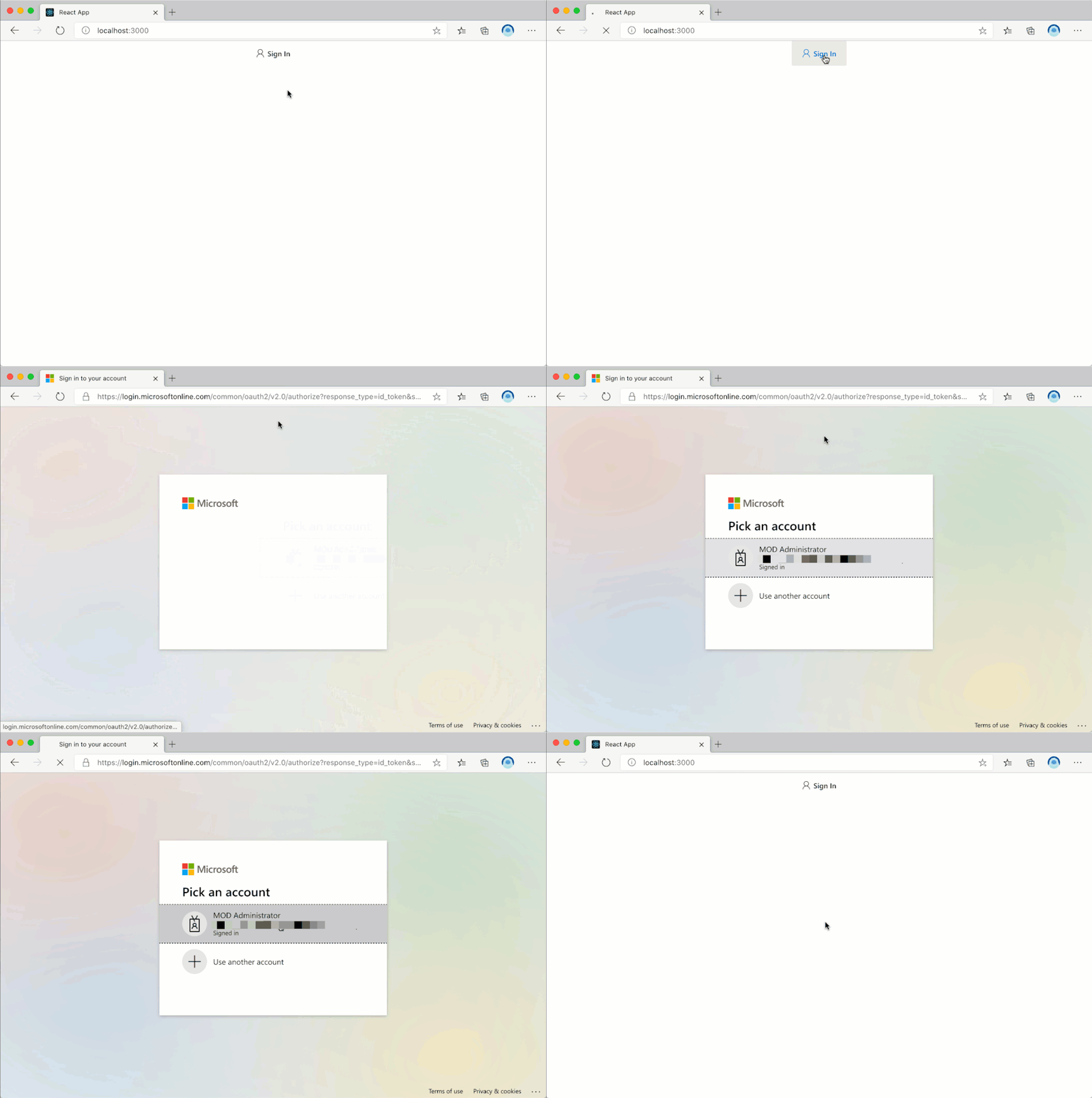
While you won’t see any error in the UI, if you open developer tools in your browser and take a look at requests, you will see a GET request to https://login.microsoftonline.com/common/reprocess followed by a 302 response with the error message in the query string:
http://localhost:3000/#error=invalid_request&error_description=AADSTS50194%3a+Application+%27ab9533b2-4e1e-4aaf-8412-8f02cfb9484c%27(My+M365+app)+is+not+configured+as+a+multi-tenant+application.+Usage+of+the+%2fcommon+endpoint+is+not+supported+for+such+applications+created+after+%2710%2f15%2f2018%27.+Use+a+tenant-specific+endpoint+or+configure+the+application+to+be+multi-tenant.%0d%0aTrace+ID%3a+79cfbca0-d484-461e-9d56-f3a4b4a30f00%0d%0aCorrelation+ID%3a+ffbed0df-da84-4076-a52b-9d3037c28ff9%0d%0aTimestamp%3a+2021-01-04+12%3a10%3a38Z&state=eyJpZCI6ImQyNGZjY2YxLTk2OTk…
For readability, here is the exact error message:
AADSTS50194: Application ‘ab9533b2-4e1e-4aaf-8412-8f02cfb9484c'(My M365 app) is not configured as a multi-tenant application. Usage of the /common endpoint is not supported for such applications created after ’10/15/2018’. Use a tenant-specific endpoint or configure the application to be multi-tenant
For you to be able to use a single-tenant Azure AD app with Microsoft Graph Toolkit, you need to extend the MsalProvider initialization with authority:
import { MsalProvider } from ‘@microsoft/mgt-msal-provider‘;
Providers.globalProvider = new MsalProvider({

  clientId: ‘ab9533b2-4e1e-4aaf-8412-8f02cfb9484c‘,

  authority: ‘https://login.microsoftonline.com/f7322380-f203-42ff-93e8-66e266f6d2e4‘

});
The GUID in the authority (f7322380-f203-42ff-93e8-66e266f6d2e4), is the ID of the Azure Active Directory where you have registered your application.
After this change, you will be able to use your app with Microsoft Graph Toolkit just as you’d expect.
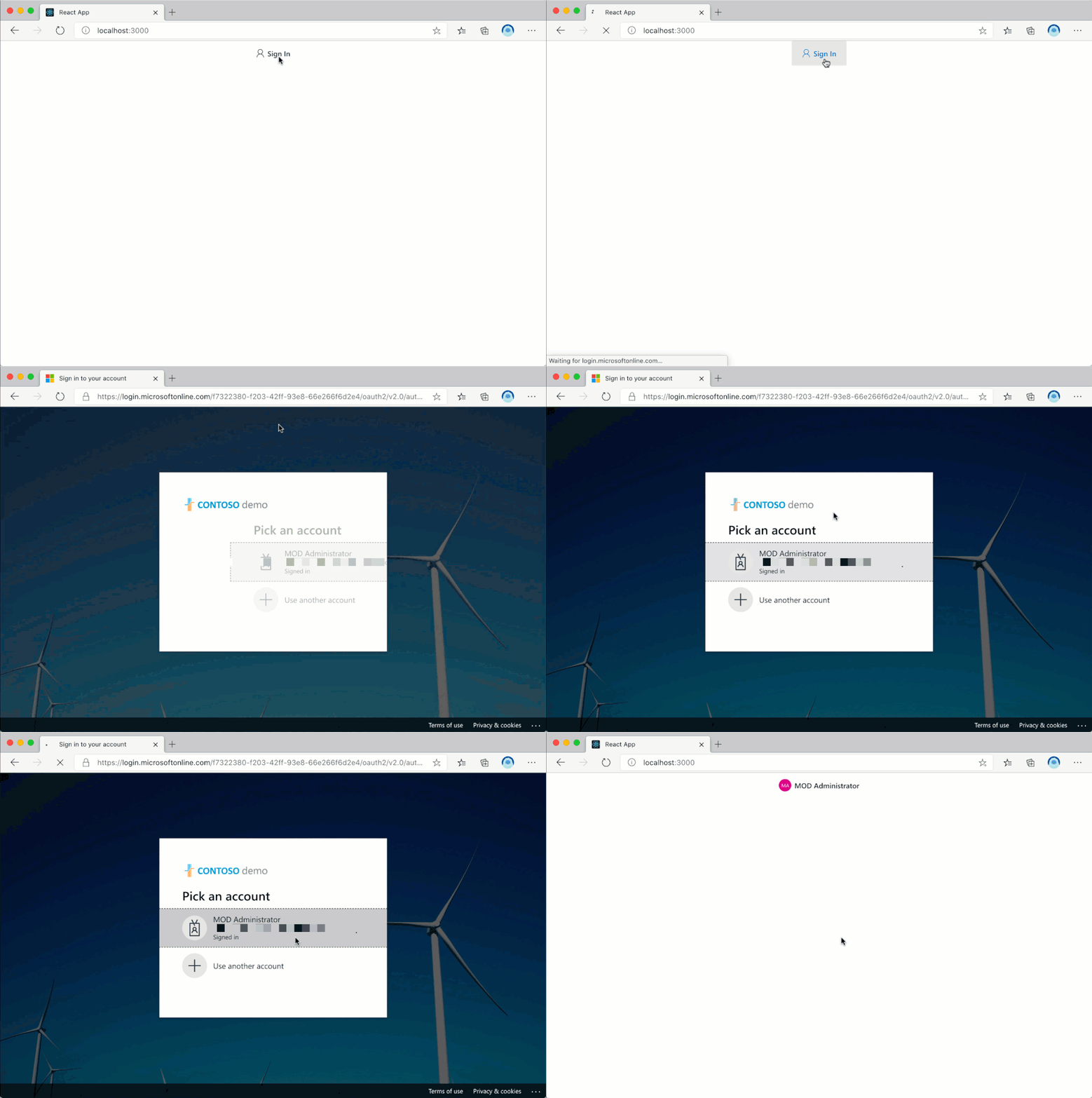
When you use multi-tenant Azure AD apps with Microsoft Graph Toolkit, instantiating the MSAL Provider with just the clientId is sufficient. But when you use a single-tenant Azure AD app, you also need to specify the authority to instruct Azure AD where the app is registered.
by Contributed | Jul 8, 2021 | Technology
This article is contributed. See the original author and article here.
COVID-19 has a created an inflection point that is accelerating the use of AI in healthcare. More data was created in the last two years than in the previous 5,000 years of humanity. Alongside this trend, we see an acceleration of decision support applications that are based on extracting clinical insights and analytics from data. AI and Machine Learning play an important role in our ability to understand big data and learn from it.
Today we are announcing Text Analytics for Health as generally available with Text Analytics in Azure Cognitive Services. The service allows developers to process and extract insights from unstructured biomedical text, including various types of clinical notes, medical publications, electronic health records, clinical trial protocols, and more, expediting the ability to learn from this data and leverage it for secondary use.
The service has been in preview since July 2020 supports enhanced information extraction capabilities, as follows:
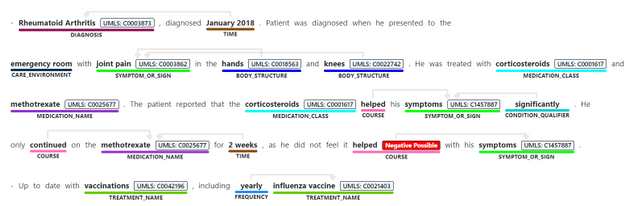
- Identifying medical concepts in text, determining boundaries and classification into domain-specific entities. Concepts include Diagnosis, Symptoms, Examination, Medications, and more. Recent additions to the GA service include expanding the Genomics category to enable extracting mutation types and expression in addition to identifying genes and variants. The current version of the service we are releasing as generally available contains 31 different entity types, and we will be increasing this in the future.
- Associating medical entities with common ontology concepts from standard clinical coding systems, such as UMLS, SNOMED-CT, ICD9 and 10 etc.
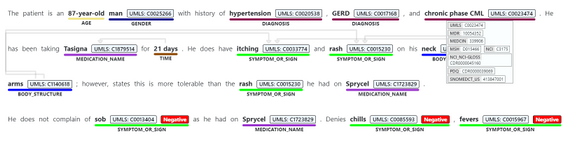
- Identifying and extracting semantic relationships and dependencies between different entities to provide deeper understanding of the text, like Dosage of Medication or Variant or Gene. Recent additions made to the service toward its general availability include expanding the types of relationships, and the service now supports 35 different types.
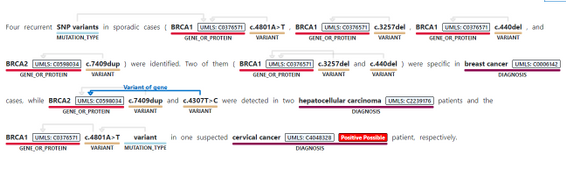
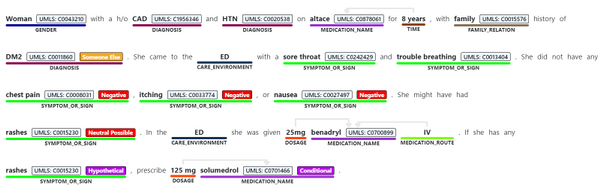
- Assertion detection, to support better understanding of the context in which the entity appears in the text. The Assertions help you detect whether an entity appears in negated form, as possible, likely, unlikely (for example, “patients with possible NHL”)
- Whether the mention is conditional, or mentioned in a hypothetical way (for example, “if patient has rashes (hypothetical), prescribe Solumedrol (conditional)”, or whether something is mentioned in the context of someone else (for example, “patient’s mother had history of breast cancer” does not mean the patient has breast cancer).
The service can be used synchronously and asynchronously and is available in most Azure regions, currently in English. The service can be used via a hosted endpoint or by downloading a container, to meet your specific security and data governance requirements. Either way, the service does not store the data it processes and is covered under the Azure compliance .
During the last year, the service was available under a gated preview program. With today’s announcement on general availability, we are removing the gating off the service.
Get started today,
Review Text Analytics for health documentation
Learn more about Microsoft Cloud for Healthcare
by Contributed | Jul 8, 2021 | Technology
This article is contributed. See the original author and article here.
We need you to help us level the playing field in higher education

We are a MSc student consulting team from Imperial College Business School London working on a project for Microsoft’s Open Sourced auto-assessment Python Library, PyBryt.
We consist of 5 team members, Yaw Kusi Arthur, Rohit Kumar Lalwani, Karlan Cortese, Milan Patel, Stepan Cherkasov and we’re interested in learning about educators in higher education’s perspective on auto-assessment tools. With your help, we aim to gain insights that would better PyBryt and, in the process, level the playfield of education!
PyBryt is a free, Open-Source auto-assessment Python library for teaching and learning that offers meaningful feedback to learners, analysis of complexity within learner solutions, plagiarism detection and easy integration into existing organizational infrastructure.
Find out more about PyBryt here With you help we can empower you as an educator. Click on the survey above now!
Click below to access the survey:
Educator Survey (5min)
by Contributed | Jul 8, 2021 | Technology
This article is contributed. See the original author and article here.
Application deployment
Let’s deploy a demo app to verify that the app gateway and the AKS cluster have been successfully integrated.
kubectl apply -f deployment_aspnet.yaml
Let’s deploy the application.
kubectl get po -o wide
NAME                                    READY   STATUS    RESTARTS   AGE    IP            NODE                                NOMINATED NODE   READINESS GATES
aad-pod-identity-mic-787c5958fd-kmx9b   1/1     Running   0          177m   10.240.0.33   aks-nodepool1-94448771-vmss000000   <none>           <none>
aad-pod-identity-mic-787c5958fd-nkpv4   1/1     Running   0          177m   10.240.0.63   aks-nodepool1-94448771-vmss000001   <none>           <none>
aad-pod-identity-nmi-mhp86              1/1     Running   0          177m   10.240.0.4    aks-nodepool1-94448771-vmss000000   <none>           <none>
aad-pod-identity-nmi-sjpvw              1/1     Running   0          177m   10.240.0.35   aks-nodepool1-94448771-vmss000001   <none>           <none>
aad-pod-identity-nmi-xnfxh              1/1     Running   0          177m   10.240.0.66   aks-nodepool1-94448771-vmss000002   <none>           <none>
agic-ingress-azure-84967fc5b6-cqcn4     1/1     Running   0          111m   10.240.0.79   aks-nodepool1-94448771-vmss000002   <none>           <none>
aspnetapp-68784d6544-j99qg              1/1     Running   0          96    10.240.0.75   aks-nodepool1-94448771-vmss000002   <none>           <none>
aspnetapp-68784d6544-v9449              1/1     Running   0          96    10.240.0.13   aks-nodepool1-94448771-vmss000000   <none>           <none>
aspnetapp-68784d6544-ztbd9              1/1     Running   0          96    10.240.0.50   aks-nodepool1-94448771-vmss000001   <none>           <none>
We can see that the pods of the app are working correctly. Note that their IPs are 10.240.0.13, 10.240.0.50, and 10.240.0.75.
The app gateway backend can be seen as the IP above.
az network application-gateway show-backend-health
 -g $RESOURCE_GROUP
 -n $APP_GATEWAY
 --query backendAddressPools[].backendHttpSettingsCollection[].servers[][address,health]
[
  [
    "10.240.0.13",
    "Healthy"
  ],
  [
    "10.240.0.50",
    "Healthy"
  ],
  [
    "10.240.0.75",
    "Healthy"
  ]
]
Check the I P address on the front end.
az network public-ip show -g $RESOURCE_GROUP -n $APPGW_IP --query ipAddress -o tsv
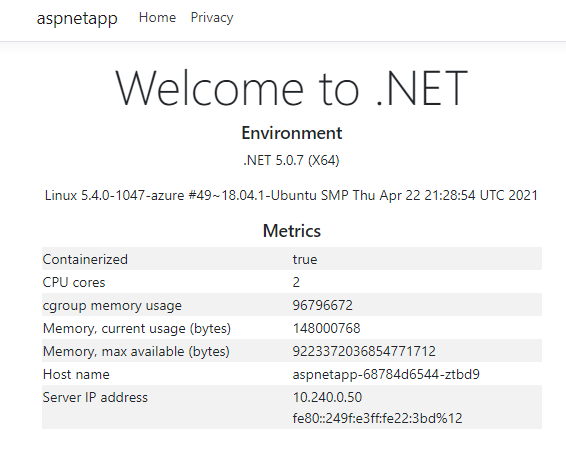
Then access this IP with a browser and you’ll see it.
Refresh a few more times, and Host name and Server IP address display 3 host names and IPs in turns, which are the 3 pod names and intranet IPs of the pods we deployed earlier. This shows that pods integration in the application gateway and AKS has been successfully implemented.
Deploy a new cluster of AKS
Create a new version of the AKS cluster
Let’s create a new AKS clusters in the subnet where the existing AKS is located. Our previous version of AKS uses the current default version of1.19.11. The new AKS cluster uses 1.20.7, and all the other parameters remain unchanged.
AKS_NEW=new
az aks create -n $AKS_NEW
-g $RESOURCE_GROUP
-l $AZ_REGION
--generate-ssh-keys
--network-plugin azure
--enable-managed-identity
--vnet-subnet-id $AKS_SUBNET_ID
--kubernetes-version 1.20.7
We also installs application-gateway-kubernetes-ingress in the new AKS cluster with Helm.
Install Pod Identify in the new version of the AKS cluster
Connect to the AKS cluster.
az aks get-credentials --resource-group $RESOURCE_GROUP --name $AKS_NEW
Install AAD Pod Identify
kubectl create serviceaccount --namespace kube-system tiller-sa
kubectl create clusterrolebinding tiller-cluster-rule --clusterrole=cluster-admin --serviceaccount=kube-system:tiller-sa
helm repo add aad-pod-identity https://raw.githubusercontent.com/Azure/aad-pod-identity/master/charts
helm install aad-pod-identity aad-pod-identity/aad-pod-identity
Install Application Gateway Ingress Controller with helm.
helm repo add application-gateway-kubernetes-ingress https://appgwingress.blob.core.windows.net/ingress-azure-helm-package/
helm repo update
Deploy apps on the new version of the AKS cluster
We install the same app in the new AKS cluster.
kubectl apply -f deployment_aspnet.yaml
Once the app is deployed, list Pod.
kubectl get po -o=custom-columns=NAME:.metadata.name,
podIP:.status.podIP,NODE:.spec.nodeName,
READY-true:.status.containerStatuses[*].ready

NAME                                    podIP          NODE                                READY-true
aad-pod-identity-mic-787c5958fd-flzgv   10.240.0.189   aks-nodepool1-20247409-vmss000002   true
aad-pod-identity-mic-787c5958fd-rv2ql   10.240.0.103   aks-nodepool1-20247409-vmss000000   true
aad-pod-identity-nmi-79sz7              10.240.0.159   aks-nodepool1-20247409-vmss000002   true
aad-pod-identity-nmi-8wjnj              10.240.0.97    aks-nodepool1-20247409-vmss000000   true
aad-pod-identity-nmi-qnrh9              10.240.0.128   aks-nodepool1-20247409-vmss000001   true
aspnetapp-68784d6544-8pd8c              10.240.0.130   aks-nodepool1-20247409-vmss000001   true
aspnetapp-68784d6544-8r2hr              10.240.0.172   aks-nodepool1-20247409-vmss000002   true
aspnetapp-68784d6544-9ftvm              10.240.0.107   aks-nodepool1-20247409-vmss000000   true
In the actual production operations process, after deploying a good app, we do not associate to the existing application gateway directly. Instead, we remotely log on and test through private network access.
kubectl run -it --rm aks-ssh --image=mcr.microsoft.com/aks/fundamental/base-ubuntu:v0.0.11
Once the container is started, it goes straight into the container, and we visit the three intranet IPs mentioned above –10.240.0.107, 10.240.0.130, 10.240.0.172. For example,
root@aks-ssh:/# curl http://10.240.0.107
root@aks-ssh:/# curl http://10.240.0.130
root@aks-ssh:/# curl http://10.240.0.172
We see that all can return content normally. This can used to simulate the new environment has been tested and passed, and finally the new AKS cluster is associated with the existing application gateway.
Switching the app gateway to integrate with the new version of AKS
Install the AGIC with the following command.
helm install agic application-gateway-kubernetes-ingress/ingress-azure -f helm_agic.yaml
Wait a few seconds
kubectl get po -o=custom-columns=NAME:. metadata.name,podIP:.status.podIP,NODE:.spec.nodeName,READY-true:.status.containerStatuses[*].ready
NAME                                    podIP          NODE                                READY-true
aad-pod-identity-mic-787c5958fd-flzgv   10.240.0.189   aks-nodepool1-20247409-vmss000002   true
aad-pod-identity-mic-787c5958fd-rv2ql   10.240.0.103   aks-nodepool1-20247409-vmss000000   true
aad-pod-identity-nmi-79sz7              10.240.0.159   aks-nodepool1-20247409-vmss000002   true
aad-pod-identity-nmi-8wjnj              10.240.0.97    aks-nodepool1-20247409-vmss000000   true
aad-pod-identity-nmi-qnrh9              10.240.0.128   aks-nodepool1-20247409-vmss000001   true
agic-ingress-azure-84967fc5b6-9rvzn     10.240.0.152   aks-nodepool1-20247409-vmss000001   true
aspnetapp-68784d6544-8pd8c              10.240.0.130   aks-nodepool1-20247409-vmss000001   true
aspnetapp-68784d6544-8r2hr              10.240.0.172   aks-nodepool1-20247409-vmss000002   true
aspnetapp-68784d6544-9ftvm              10.240.0.107   aks-nodepool1-20247409-vmss000000   true
We can see that the pod for agic-ingress-azure-*** is up and running.
First look at the back end of the app gateway from the command line and it’s updated to the new pods.
az network application-gateway show-backend-health
-g $RESOURCE_GROUP
-n $APP_GATEWAY
--query backendAddressPools[].backendHttpSettingsCollection[].servers[][address,health]
[
  [
    "10.240.0.107",
    "Healthy"
  ],
  [
    "10.240.0.130",
    "Healthy"
  ],
  [
    "10.240.0.172",
    "Healthy"
  ]
]
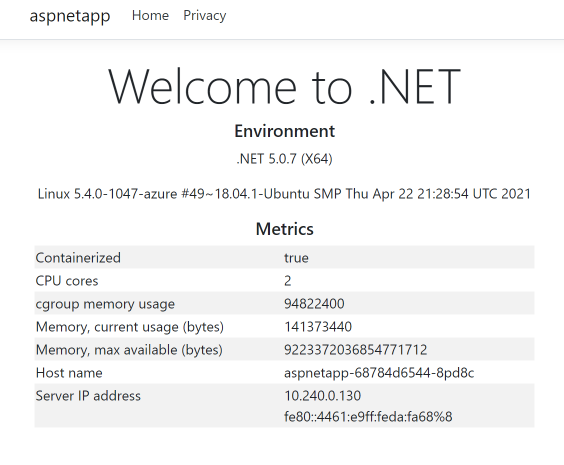
Let’s go back to the browser to refresh the public network IP of the app gateway and see that the Host name and IP display have switched to the new backend.
If the new AKS cluster fails, we can switch back to the old AKS cluster. Just connect to the old AKS cluster first.
az aks get-credentials --resource-group $RESOURCE_GROUP --name $AKS_OLD
Run the commands to install AGIC again.
helm uninstall agic
helm install agic application-gateway-kubernetes-ingress/ingress-azure -f helm_agic.yaml
We can see that the pod for AGIC is already running.
kubectl get po -o wide
NAME                                    READY   STATUS    RESTARTS   AGE    IP            NODE                                NOMINATED NODE   READINESS GATES
aad-pod-identity-mic-787c5958fd-kmx9b   1/1     Running   0          2d1h   10.240.0.33   aks-nodepool1-94448771-vmss000000   <none>           <none>
aad-pod-identity-mic-787c5958fd-nkpv4   1/1     Running   1          2d1h   10.240.0.63   aks-nodepool1-94448771-vmss000001   <none>           <none>
aad-pod-identity-nmi-mhp86              1/1     Running   0          2d1h   10.240.0.4    aks-nodepool1-94448771-vmss000000   <none>           <none>
aad-pod-identity-nmi-sjpvw              1/1     Running   0          2d1h   10.240.0.35   aks-nodepool1-94448771-vmss000001   <none>           <none>
aad-pod-identity-nmi-xnfxh              1/1     Running   0          2d1h   10.240.0.66   aks-nodepool1-94448771-vmss000002   <none>           <none>
agic-ingress-azure-84967fc5b6-nwbh4     1/1     Running   0          8s     10.240.0.70   aks-nodepool1-94448771-vmss000002   <none>           <none>
aspnetapp-68784d6544-j99qg              1/1     Running   0          2d     10.240.0.75   aks-nodepool1-94448771-vmss000002   <none>           <none>
aspnetapp-68784d6544-v9449              1/1     Running   0          2d     10.240.0.13   aks-nodepool1-94448771-vmss000000   <none>           <none>
aspnetapp-68784d6544-ztbd9              1/1     Running   0          2d     10.240.0.50   aks-nodepool1-94448771-vmss000001   <none>           <none>
Then look at the app gateway backend
az network application-gateway show-backend-health
 -g $RESOURCE_GROUP
 -n $APP_GATEWAY
 --query backendAddressPools[].backendHttpSettingsCollection[].servers[][address,health]
[
  [
    "10.240.0.13",
    "Healthy"
  ],
  [
    "10.240.0.50",
    "Healthy"
  ],
  [
    "10.240.0.75",
    "Healthy"
  ]
]
We can see that the same app gateway backend has been restored to the IPs of the old AKS cluster.
During the process to uninstall and reinstall the AGIC, neither the app gateway nor the app’s pods are being operated. Therefore, there is not any interruption to front-end access. With this, it is possible to finally implement the old and new AKS clusters that are retained at the same time and can be switched in real time.
summary
The above is an example of a common Web application that demonstrates a new AKS cluster can be securely upgraded with a blue-green deployment. In addition to Web apps, applications of all types and scenarios can be referenced to switch between AKS clusters and upstream integrations for real-time switching and rollback.
by Contributed | Jul 8, 2021 | Technology
This article is contributed. See the original author and article here.
Azure Kubernetes Services (AKS) is a managed Kubernetes service on Microsoft Cloud Azure that can be used to rapidly deploy Kubernetes clusters, integrate with other Azure services and features to achieve simple operations and elastic business applications. The Kubernetes community is booming, and version upgrades are frequent. AKS manages version upgrade so that AKS clusters can be upgraded at the click of a button, rolling through the working nodes within a cluster. This makes it easy to upgrade AKS for small or non-mission-critical clusters. However, the in-place upgrade method is not very suitable for large-scale clusters or mission-critical applications, because it has a long overall upgrade time and the possibility of upgrade failure. And the failure cannot be rolled back. The safest approach is to create a new AKS cluster, switch upgrades using blue-green deployments. This approach can switch in seconds, and roll back the backup cluster at any time, which is faster and safer. Correspondingly, the architecture and operation of this approach is more complex. This article leads you to gradually build such an architecture scheme. This time we’re using a scenario for a classic Web application, which can be expanded into other scenarios.
Architecture overview
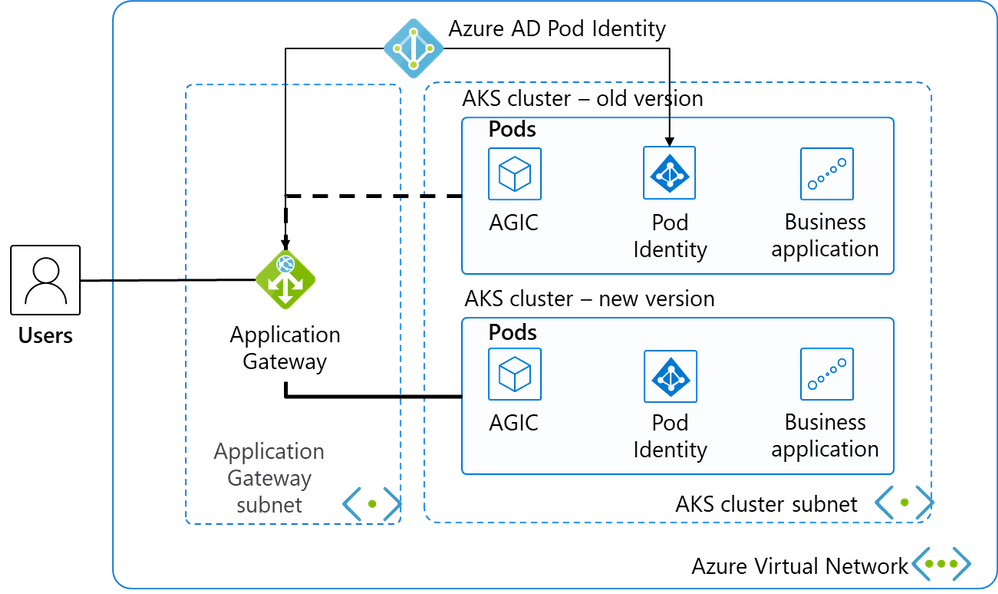
This is a classic Web application architecture diagram, and we’ve selected the most streamlined resources to keep the demonstration and instructions as concise as possible.
Place 2 subnets in a virtual network, and place the application gateway in the first subnet as a load balancer for external services.
The second subnet has only 1 AKS cluster daily and deploys the business system. The AKS cluster uses advanced network CNI to simplify network patterns and facilitate application gateway communication with them.
Deploy Pod Identity is deployed in the AKS cluster to authorize pods in AKS to manage the application gateway through Azure AD’s Pod Identity.
AGIC, known as Application Gateway Ingress Controller, not only distributes network traffic from the app gateway to the appropriate Pod, but also monitors changes in some Kubernetes resources, automatically updates the back-end pool of the app gateway as AKS scales, and updates the back-end pool of the app gateway synchronously as the AKS cluster switches. The core idea for our blue-green deployment is dynamically updating the back end of the app gateway with AGIC.
Resources Deployment
Basic resources such as the network
We quickly create the underlying resources of the current environment with CLI. Resource group:
AZ_REGION=ChinaNorth2
RESOURCE_GROUP=AKS_Upgrade
az group create -n $RESOURCE_GROUP -l $AZ_REGION
Create VNET and subnets.
VNET_NAME=AksVnet
APPGW_SUBNET=AppGwSubnet
AKS_SUBNET=AksSubnet

network  vnet  create on $VNET_NAME
-g $RESOURCE_GROUP
-l $AZ_REGION
--address-prefix 10.0.0.0/8
--subnet-name $APPGW_SUBNET --subnet-prefix 10.1.0.0/16

az network vnet subnet create
-g $RESOURCE_GROUP
-n $AKS_SUBNET
--address-prefixes 10.240.0.0/16
--vnet-name $VNET_NAME
The current AKS cluster
Create a public IP.
APPGW_IP=AppGatewayIp
az network public-ip create -n $APPGW_IP
-g $RESOURCE_GROUP
--allocation-method Static
--sku Standard
Create an app gateway.
APP_GATEWAY=AppGateway
az network application-gateway create -n $APP_GATEWAY
 -g $RESOURCE_GROUP
 -l $AZ_REGION
 --vnet-name $VNET_NAME
 --subnet $APPGW_SUBNET
 --sku Standard_v2
 --public-ip-address $APPGW_IP
Create an old AKS cluster with the current default mainstream AKS version. Get the subnet ID of the AKS cluster we created earlier.
AKS_SUBNET_ID=$(az network vnet subnet show -g $RESOURCE_GROUP --vnet-name $VNET_NAME --name $AKS_SUBNET --query id -o tsv)
Create the old AKS cluster.
AKS_OLD=old
az aks create -n $AKS_OLD
-g $RESOURCE_GROUP
-l $AZ_REGION
--generate-ssh-keys
--network-plugin azure
--enable-managed-identity
--vnet-subnet-id $AKS_SUBNET_ID
At the time of writing, the mainstream AKS version is 1.19.11.
The app gateway integrates with the current version of AKS
We use the Azure service principal to authorize the AKS cluster to manage the configuration of the application gateway.
Connect to the AKS cluster
az aks get-credentials --resource-group $RESOURCE_GROUP --name $AKS_OLD
We can then manage the AKS cluster with the familiar kubectl.
Install Helm and run the following command to add the application-gateway-kubernetes-ingress Helms package. Our AKS cluster has enabled Kubernetes RBAC, so use the following command.
kubectl create serviceaccount --namespace kube-system tiller-sa
kubectl create clusterrolebinding tiller-cluster-rule --clusterrole=cluster-admin --serviceaccount=kube-system:tiller-sa
helm repo add aad-pod-identity https://raw.githubusercontent.com/Azure/aad-pod-identity/master/charts
helm install aad-pod-identity aad-pod-identity/aad-pod-identity
The command will return:
NAME: aad-pod-identity
LAST DEPLOYED: Tue Jun 29 08:14:30 2021
NAMESPACE: default
STATUS: deployed
REVISION: 1
TEST SUITE: None
NOTES:
You have successfully installed AAD Pod Identity in your Kubernetes cluster!
…
Wait a minute or two and use
kubectl get po -o wide
NAME                                    READY   STATUS    RESTARTS   AGE   IP            NODE                                NOMINATED NODE   READINESS GATES
aad-pod-identity-mic-787c5958fd-kmx9b   1/1     Running   0          71s   10.240.0.33   aks-nodepool1-94448771-vmss000000   <none>           <none>
aad-pod-identity-mic-787c5958fd-nkpv4   1/1     Running   0          72s   10.240.0.63   aks-nodepool1-94448771-vmss000001   <none>           <none>
aad-pod-identity-nmi-mhp86              1/1     Running   0          72s   10.240.0.4    aks-nodepool1-94448771-vmss000000   <none>           <none>
aad-pod-identity-nmi-sjpvw              1/1     Running   0          72s   10.240.0.35   aks-nodepool1-94448771-vmss000001   <none>           <none>
aad-pod-identity-nmi-xnfxh              1/1     Running   0          72s   10.240.0.66   aks-nodepool1-94448771-vmss000002   <none>           <none>
See that several of the related pods are already running.
Install Application Gateway Ingress Controller with helm.
helm repo add application-gateway-kubernetes-ingress https://appgwingress.blob.core.windows.net/ingress-azure-helm-package/
helm repo update
Copy the following YAML file and save it as helm_agic.yaml to configure AGIC.
# This file contains the essential configs for the ingress controller helm chart
# Verbosity level of the App Gateway Ingress Controller
verbosityLevel: 3


# Specify which application gateway the ingress controller will manage
#
appgw:
    subscriptionId: <subscriptionId>
    resourceGroup: <resourceGroupName>
    name: <applicationGatewayName>
    environment: AzureChinaCloud

    # Setting appgw.shared to "true" will create an AzureIngressProhibitedTarget CRD.
    # This prohibits AGIC from applying config for any host/path.
    # Use "kubectl get AzureIngressProhibitedTargets" to view and change this.
    shared: false


# Specify which kubernetes namespace the ingress controller will watch
# Default value is "default"
# Leaving this variable out or setting it to blank or empty string would
# result in Ingress Controller observing all acessible namespaces.
#
# kubernetes:
#   watchNamespace: <namespace>


# Specify the authentication with Azure Resource Manager
#
# Two authentication methods are available:
# - Option 1: AAD-Pod-Identity (https://github.com/Azure/aad-pod-identity)
# armAuth:
#    type: aadPodIdentity
#    identityResourceID: <identityResourceId>
#    identityClientID:  <identityClientId>

## Alternatively you can use Service Principal credentials
armAuth:
    type: servicePrincipal
    secretJSON: <<Generate value with: "az ad sp create-for-rbac --sdk-auth | base64 -w0">>


# Specify if the cluster is RBAC enabled or not
rbac:
    enabled: true # true/false
Let’s fill in the parameter values in the above profiles one by one.
<subscriptionId>
Use command az account show –query id -o tsv to get.
<resourceGroupName>
Use the value of $RESOURCE_GROUP environment variable.
<applicationGatewayName>
Use the value of $APP_GATEWAY environment variable.
The value of secretJSON is obtained using the az ad sp create-for-rbac–sdk-auth | base64 -w0 command, which is a long string of more than 800 bytes encoded by base64.
Because our AKS cluster has RBAC enabled, the last configuration rbac is set to true.
Finally, run the following command.
helm install agic application-gateway-kubernetes-ingress/ingress-azure -f helm_agic.yaml
returns
W0629 08:16:47.733467   16087 warnings.go:70] apiextensions.k8s.io/v1beta1 CustomResourceDefinition is deprecated in v1.16+, unavailable in v1.22+; use apiextensions.k8s.io/v1 CustomResourceDefinition
NAME: agic
LAST DEPLOYED: Tue Jun 29 08:16:48 2021
NAMESPACE: default
STATUS: deployed
REVISION: 1
TEST SUITE: None
NOTES:
Thank you for installing ingress-azure:1.4.0.

Your release is named agic.
The controller is deployed in deployment agic-ingress-azure.

Configuration Details:
----------------------
 * AzureRM Authentication Method:
    - Use AAD-Pod-Identity
 * Application Gateway:
    - Subscription ID : 3d07553f-f6a8-455f-9de6-876fbcc00bb4
    - Resource Group  : AKS_Upgrade
    - Application Gateway Name : AppGateway
 * Kubernetes Ingress Controller:
    - Watching All Namespaces
    - Verbosity level: 3
And then
kubectl get po -o wide
NAME                                    READY   STATUS    RESTARTS   AGE     IP            NODE                                NOMINATED NODE   READINESS GATES
aad-pod-identity-mic-787c5958fd-kmx9b   1/1     Running   0          4m54s   10.240.0.33   aks-nodepool1-94448771-vmss000000   <none>           <none>
aad-pod-identity-mic-787c5958fd-nkpv4   1/1     Running   0          4m55s   10.240.0.63   aks-nodepool1-94448771-vmss000001   <none>           <none>
aad-pod-identity-nmi-mhp86              1/1     Running   0          4m55s   10.240.0.4    aks-nodepool1-94448771-vmss000000   <none>           <none>
aad-pod-identity-nmi-sjpvw              1/1     Running   0          4m55s   10.240.0.35   aks-nodepool1-94448771-vmss000001   <none>           <none>
aad-pod-identity-nmi-xnfxh              1/1     Running   0          4m55s   10.240.0.66   aks-nodepool1-94448771-vmss000002   <none>           <none>
agic-ingress-azure-8d9d85dd9-z8dwh      1/1     Running   0          2m37s   10.240.0.70   aks-nodepool1-94448771-vmss000002   <none>           <none>
We can see that the new agic-ingress-azure pod is also working.


Recent Comments