
Help us shape Kusto data exploration experience
This article is contributed. See the original author and article here.
Please take this short survey (8 questions, 4 mins) ADX short survey to help us shape ADX data exploration experiences.

This article is contributed. See the original author and article here.
Please take this short survey (8 questions, 4 mins) ADX short survey to help us shape ADX data exploration experiences.
This article is contributed. See the original author and article here.
| Before implementing data extraction from SAP systems please always verify your licensing agreement. |
Over the last five episodes, we’ve built quite a complex Synapse Pipeline that allows extracting SAP data using OData protocol. Starting from a single activity in the pipeline, the solution grew, and it now allows to process multiple services on a single execution. We’ve implemented client-side caching to optimize the extraction runtime and eliminate short dumps at SAP. But that’s definitely not the end of the journey!
Today we will continue to optimize the performance of the data extraction. Just because the Sales Order OData service exposes 40 or 50 properties, it doesn’t mean you need all of them. One of the first things I always mention to customers, with who I have a pleasure working, is to carefully analyze the use case and identify the data they actually need. The less you copy from the SAP system, the process is faster, cheaper and causes fewer troubles for SAP application servers. If you require data only for a single company code, or just a few customers – do not extract everything just because you can. Focus on what you need and filter out any unnecessary information.
Fortunately, OData services provide capabilities to limit the amount of extracted data. You can filter out unnecessary data based on the property value, and you can only extract data from selected columns containing meaningful data.
Today I’ll show you how to implement two query parameters: $filter and $select to reduce the amount of data to extract. Knowing how to use them in the pipeline is essential for the next episode when I explain how to process only new and changed data from the OData service.
ODATA FILTERING AND SELECTION
There is a GitHub repository with source code for each episode. Learn more: https://github.com/BJarkowski/synapse-pipelines-sap-odata-public |
To filter extracted data based on the field content, you can use the $filter query parameter. Using logical operators, you can build selection rules, for example, to extract only data for a single company code or a sold-to party. Such a query could look like this:
/API_SALES_ORDER_SRV/A_SalesOrder?$filter=SoldToParty eq 'AZ001'
The above query will only return records where the field SoldToParty equals AZ001. You can expand it with logical operators ‘and’ and ‘or’ to build complex selection rules. Below I’m using the ‘or’ operator to display data for two Sold-To Parties:
/API_SALES_ORDER_SRV/A_SalesOrder/?$filter=SoldToParty eq 'AZ001' or SoldToParty eq 'AZ002'
You can mix and match fields we’re interested in. Let’s say we would like to see orders for customers AZ001 and AZ002 but only where the total net amount of the order is lower than 10000. Again, it’s quite simple to write a query to filter out data we’re not interested in:
/API_SALES_ORDER_SRV/A_SalesOrder?$filter=(SoldToParty eq 'AZ001' or SoldToParty eq 'AZ002') and TotalNetAmount le 10000.00
Let’s be honest, filtering data out is simple. Now, using the same logic, you can select only specific fields. This time, instead of the $filter query parameter, we will use the $select one. To get data only from SalesOrder, SoldToParty and TotalNetAmount fields, you can use the following query:
/API_SALES_ORDER_SRV/A_SalesOrder?$select=SalesOrder,SoldToParty,TotalNetAmount
There is nothing stopping you from mixing $select and $filter parameters in a single query. Let’s combine both above examples:
/API_SALES_ORDER_SRV/A_SalesOrder?$select=SalesOrder,SoldToParty,TotalNetAmount&$filter=(SoldToParty eq 'AZ001' or SoldToParty eq 'AZ002') and TotalNetAmount le 10000.00
By applying the above logic, the OData response time reduced from 105 seconds to only 15 seconds, and its size decreased by 97 per cent. That, of course, has a direct impact on the overall performance of the extraction process.
FILTERING AND SELECTION IN THE PIPELINE
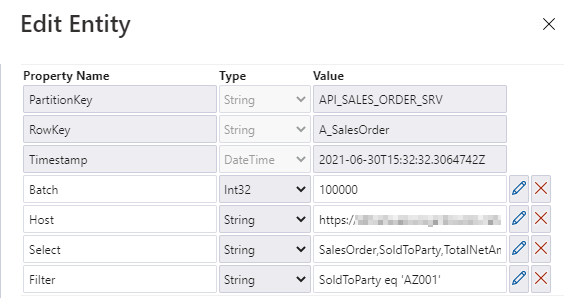
The filtering and selection options should be based on the entity level of the OData service. Each entity has a unique set of fields, and we may want to provide different filtering and selection rules. We will store the values for query parameters in the metadata store. Open it in the Storage Explorer and add two properties: filter and select.
I’m pretty sure that based on the previous episodes of the blog series, you could already implement the logic in the pipeline without my help. But there are two challenges we should be mindful of. Firstly, we should not assume that $filter and $select parameters will always contain a value. If you want to extract the whole entity, you can leave those fields empty, and we should not pass them to the SAP system. In addition, as we are using the client-side caching to chunk the requests into smaller pieces, we need to ensure that we pass the same filtering rules in the Lookup activity where we check the number of records in the OData service.
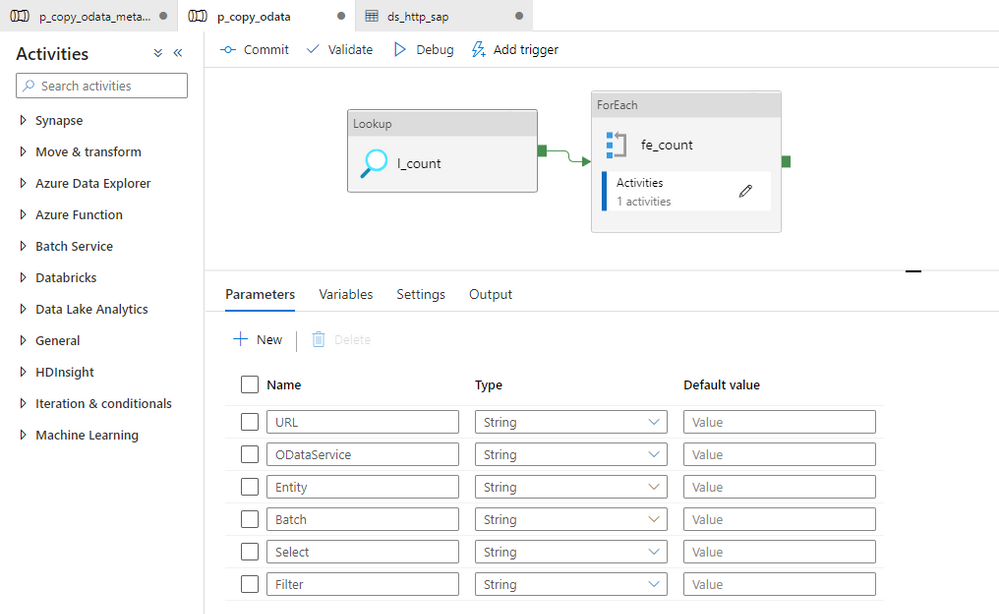
Let’s start by defining parameters in the child pipeline to pass filter and select values from the metadata table. We’ve done that already in the third episode, so you know all steps.
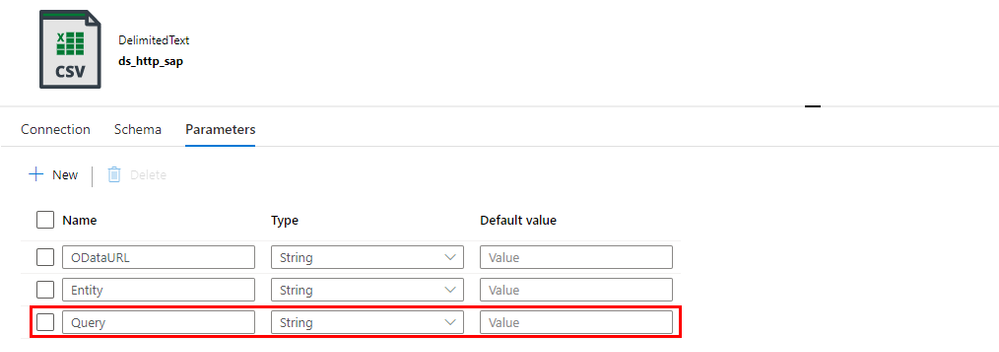
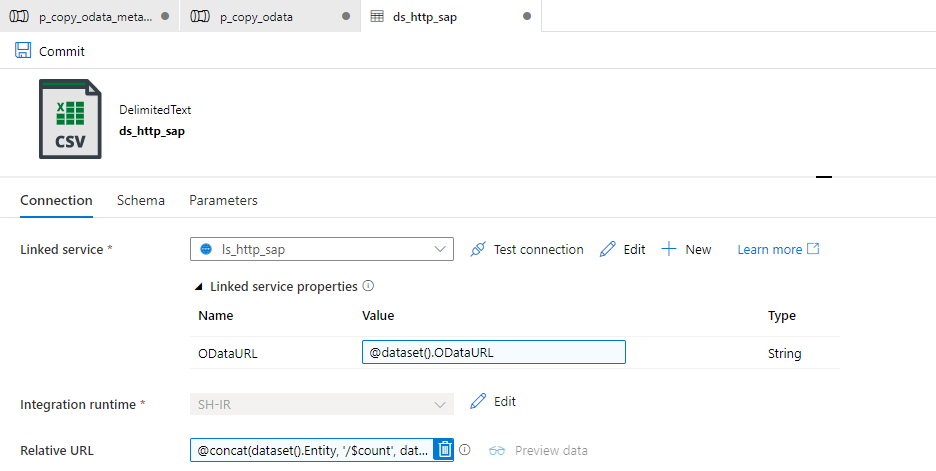
To correctly read the number of records, we have to consider how to combine these additional parameters with the OData URL in the Lookup activity. So far, the dataset accepts two dynamic fields: ODataURL and Entity. To pass the newly defined parameters, you have to add the Query one.
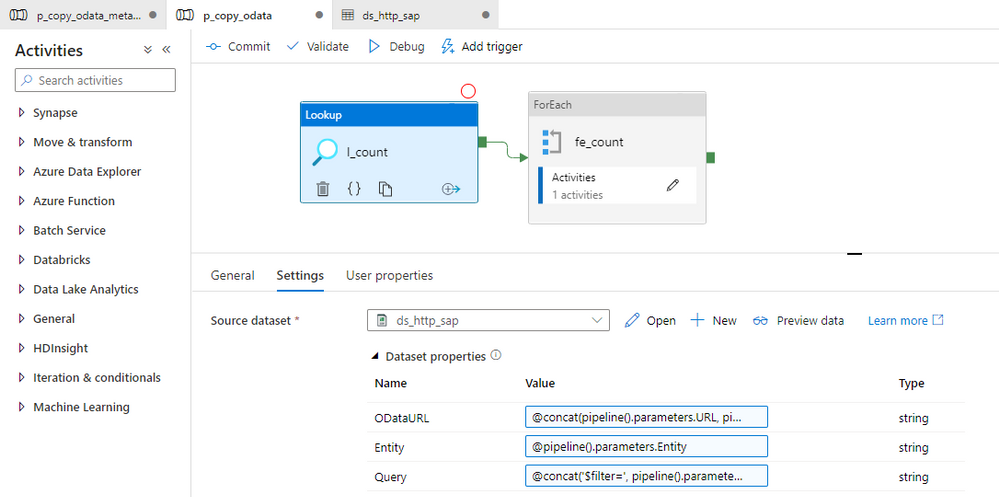
You can go back to the Lookup activity to define the expression to pass the $filter and $query values. It is very simple. I check if the Filter parameter in the metadata store contains any value. If not, then I’m passing an empty string. Otherwise, I concatenate the query parameter name with the value.
@if(empty(pipeline().parameters.Filter), '', concat('?$filter=', pipeline().parameters.Filter))
Finally, we can use the Query field in the Relative URL of the dataset. We already use that field to pass the entity name and the $count operator, so we have to slightly extend the expression.
@concat(dataset().Entity, '/$count', dataset().Query)
Changing the Copy Data activity is a bit more challenging. The Query field is already defined, but the expression we use should include the $top and $skip parameters, that we use for the client-side paging. Unlike at the Lookup activity, this time we also have to include both $select and $filter parameters and check if they contain a value. It makes the expression a bit lengthy.
@concat('$top=',pipeline().parameters.Batch, '&$skip=',string(mul(int(item()), int(pipeline().parameters.Batch))), if(empty(pipeline().parameters.Filter), '', concat('&$filter=',pipeline().parameters.Filter)), if(empty(pipeline().parameters.Select), '', concat('&$select=',pipeline().parameters.Select)))
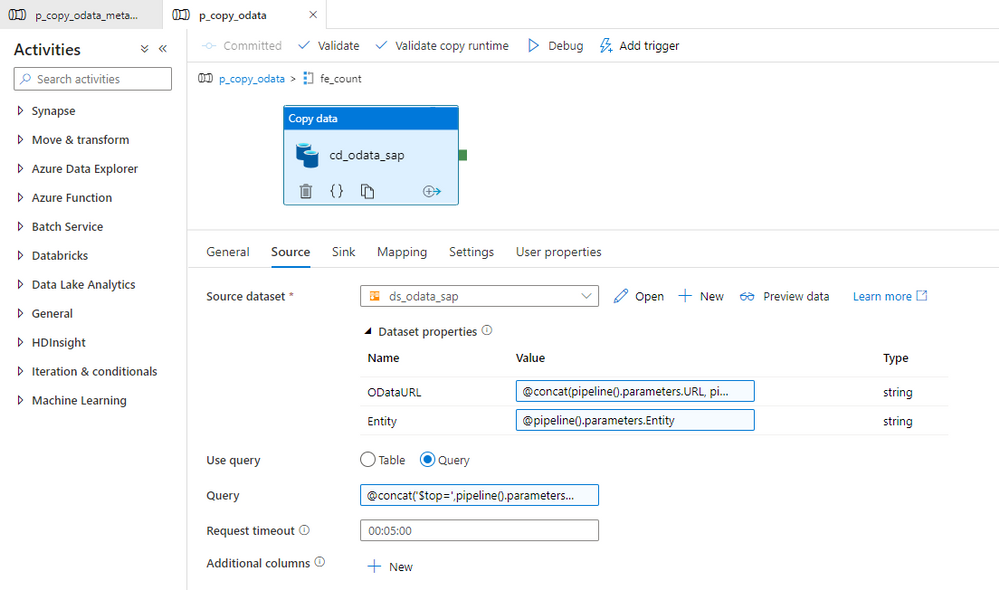
With above changes, the pipeline uses filter and select values to extract only the data you need. It reduces the amount of processed data and improves the execution runtime.
IMPROVING MONITORING
As we develop the pipeline, the number of parameters and expressions grows. Ensuring that we haven’t made any mistakes becomes quite a difficult task. By default, the Monitoring view only gives us basic information on what the pipeline passes to the target system in the Copy Data activity. At the same time, parameters influence which data we extract. Wouldn’t it be useful to get a more detailed view?
There is a way to do it! In Azure Synapse Pipelines, you can define User Properties, which are highly customizable fields that accept custom values and expressions. We will use them to verify that our pipeline works as expected.
Open the Copy Data activity and select the User Properties tab. Add three properties we want to monitor – the OData URL, entity name, and the query passed to the SAP system. Copy expression from the Copy Data activity. It ensures the property will have the same value as is passed to the SAP system.
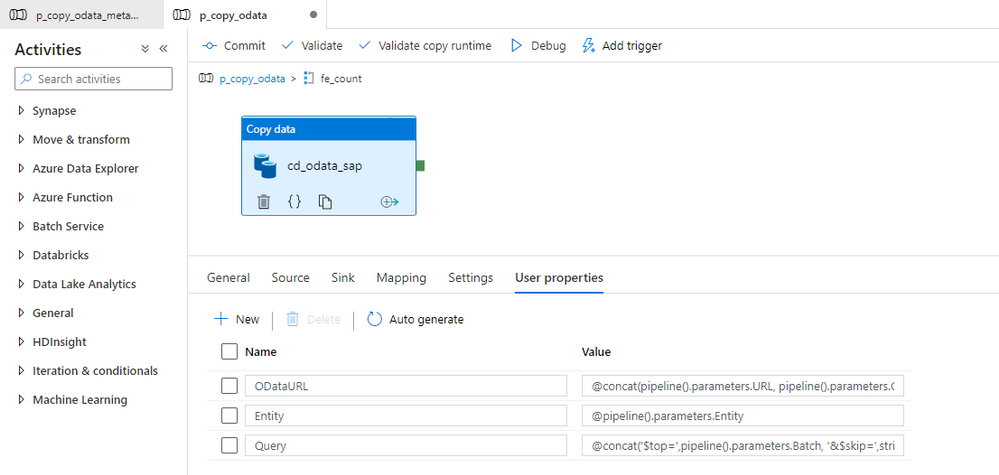
Once the user property is defined we start the extraction job.
MONITORING AND EXECUTION
Let’s start the extraction. I process two OData services, but I have defined Filter and Select parameters to only one of them.
Once the processing has finished, open the Monitoring area. To monitor all parameters that the metadata pipeline passes to child one, click on the [@] sign:
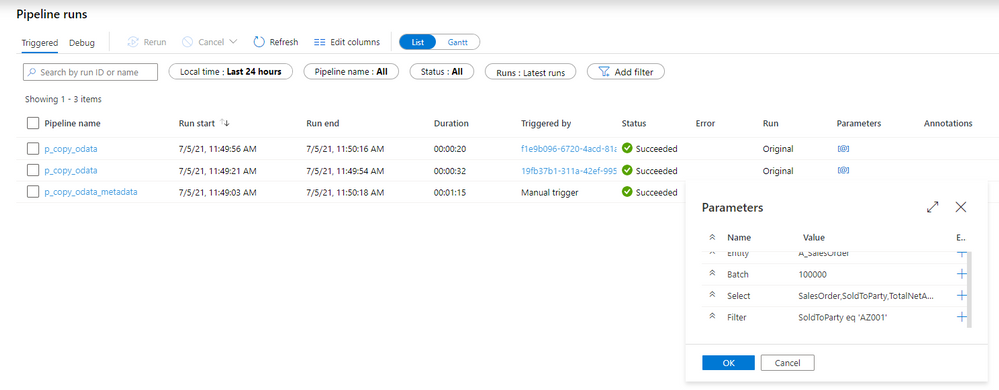
Now, enter the child pipeline to see the details of the Copy Data activity.
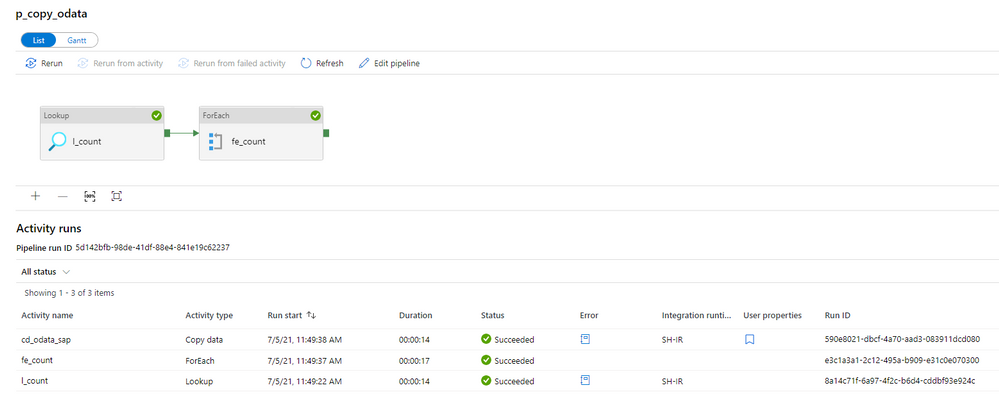
When you click on the icon in the User Properties column, you can display the defined user properties. As we use the same expressions as in the Copy Activity, we clearly see what was passed to the SAP system. In case of any problems with the data filtering, this is the first place to start the investigation.
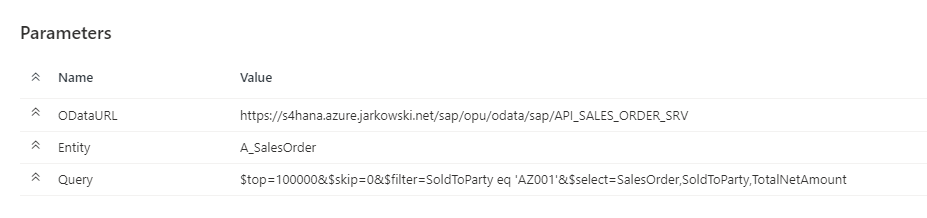
The above parameters are very useful when you need to troubleshoot the extraction process. Mainly, it shows you the full request query that is passed to the OData service – including the $top and $skip parameters that we defined in the previous episode.
The extraction was successful, so let’s have a look at the extracted data in the lake.
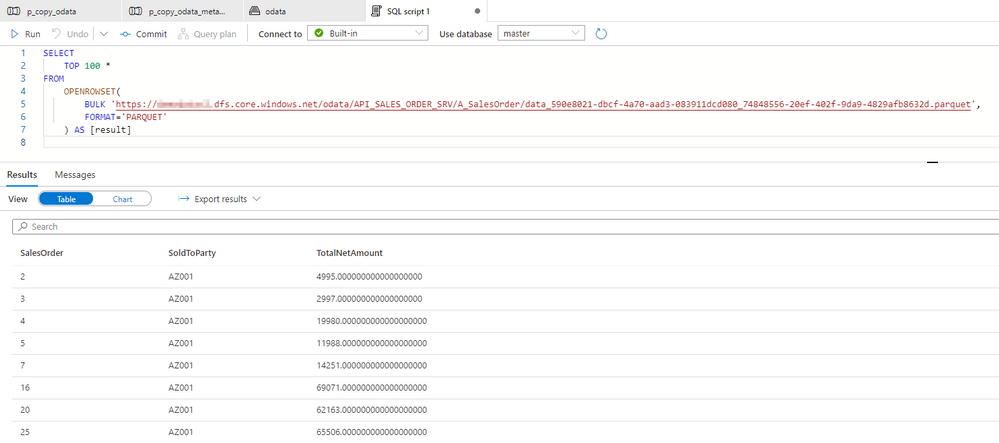
There are only three columns, which we have selected using the $select parameter. Similarly, we can only see rows with SoldToParty equals AZ001 and the TotalNetAmount above 1000. It proves the filtering works fine.
I hope you enjoyed this episode. I will publish the next one in the upcoming week, and it will show you one of the ways to implement delta extraction. A topic that many of you wait for!
This article is contributed. See the original author and article here.
The Azure PowerShell team is proud to announce a new major version of the Az PowerShell module. Following our release cadence, this is the second breaking change release for 2021. Because this release includes updates related to security and the switch to MS Graph, we recommend that you review the release notes before upgrading.
Azure PowerShell offers a set of cmdlets allowing basic management of AzureAD resources (Applications, Service Principal, Users, and Groups). Through Az 6.x, those cmdlets were using the AzureAD Graph API. Starting with Az 7, those cmdlets are now using the Microsoft Graph API. Because the AzureAD Graph API has announced its retirement, we highly recommend that you consider upgrading to Az 7 at your earliest convenience.
The parameters required depend on the API definition and so does the object returned on the response of the API. Our north star in this effort has been to minimize the breaking changes exposed by the cmdlets. Because of the behavior differences between MS Graph API and AzureAD Graph API, some breaking changes could not be avoided. For example, the MS Graph API does not allow setting the password when creating a Service Principal. We removed this parameter from the new cmdlets.
In some cases, cmdlets of a service transparently execute Azure AD operations. For example, when creating an AKS cluster, a service principal will be created if it is not provided. Az.KeyVault, Az.AKS, Az.SQL have been updated and now use Microsoft Graph for those transparent operations. Az.HDInsights, Az.StorageSync, Az.Synapse and Authorization cmdlets in Az.Resources will be updated shortly, this will be transparent.
For your convenience, we have compiled the breaking changes in the article: AzureAD to Microsoft Graph migration changes in Azure PowerShell.
Should you face issues with the Graph cmdlets, please consult our troubleshooting guide or open an issue on GitHub.
The purpose of the `Invoke-AzRestMethod` cmdlet is to offer a backup solution for when a native cmdlet does not exist for a given resource.
Our initial implementation of this cmdlet supported only management plane operations for Azure Resource Manager. With the support for MS Graph, we updated this cmdlet so it could also serve as a backup to manage MS Graph resources. From the module implementation, the MS Graph API is considered like a data plane API so we added support for MS Graph any Azure data plane.
For example, the following command will retrieve information about the current signed in user via the MS Graph API:
Invoke-AzRestMethod –Uri https://graph.microsoft.com/v1.0/me
When connecting with a service principal, we identified that the secret associated with a service principal or the certificate password would be exposed in a nested property of the object returned by `Connect-AzAccount`. We removed the properties named `ServicePrincipalSecret` and `CertificatePassword` from this object.
Since this property could be exposed in logs or debugging traces of scripts running in automation environments like ADO, we highly recommend that you consider upgrading to the most recent version of Az.Accounts or Az.
We are continuing our efforts to improve the support of container-based services. In this release, we focused on AKS and ACI.
`Invoke-AzAksRunCommand` has been added to run a shell command using kubectl or helm against an AKS cluster. The response is available as a property of the returned object. This cmdlet greatly simplifies the management of the resources in a cluster. Since the cmdlet also supports file attachment, it is possible to manage Kubernetes clusters and associated applications (for example via a helm chart) directly from PowerShell.
We have greatly improved networking support of AKS clusters. We’ve added support for the following parameters: ‘NetworkPolicy’, ‘PodCidr’, ‘ServiceCidr’, ‘DnsServiceIP’, ‘DockerBridgeCidr’, ‘NodePoolLabel’, ‘AksCustomHeader’, ‘EnableNodePublicIp’, and ‘NodePublicIPPrefixID’.
We also improved the manageability of nodes in an AKS cluster using Azure PowerShell. It is now possible to perform the following operations:
We made two additions to the ACI (Azure Container Instance) module:
We will continue to improve the PowerShell experience with services running cloud native applications.
The Azure PowerShell team is listening to your feedback on the following channels:
Thank you!
Damien,
on behalf of the Azure PowerShell team

This article is contributed. See the original author and article here.
This is the next segment of our blog series highlighting Microsoft Learn Student Ambassadors who achieved the Gold milestone and have recently graduated from university. Each blog in the series features a different student and highlights their accomplishments, their experience with the Student Ambassadors community, and what they’re up to now.
Today we meet Bethany Jepchumba, who is from Kenya and recently graduated from Jomo Kenyatta University of Agriculture and Technology with a degree in Business Innovation Technology Management.
Responses have been edited for clarity and length.
When you joined the Student Ambassador community in September of 2019, did you have specific goals you wanted to reach, such as a particular skill or quality? What were they? Did you achieve them? How has the community impacted you in general?
Coming from a non-technical background, tech communities had a profound impact on my journey in tech. I wanted to spread the technology gospel to all and have more learners join in, so I joined the Student Ambassador community,
As a Student Ambassador, what was the biggest accomplishment that you’re the proudest of and why?
I managed a Data Science and Artificial Intelligence community in Kenya with a co-lead in 2020 where we conducted 10+ events created to skill up beginners. We had over 500 learners in three months during the COVID-19 pandemic.
Additionally, I was an organizer of the first Microsoft Student Summit Africa in 2020. The event was a collaboration between Student Ambassadors from Kenya and Nigeria and received a total of 3,000+ RSVPs. There were 3 different tracks: Artificial Intelligence, Power Platform, Web Development. My main role was leading the team in designing the conference, moderating sessions, and preparing the speakers. I also stepped in to do an Introduction to DevOps session without any prior preparation when our speaker could not join the call.
I also led a team of five to win a five-week Game of Learners hackathon that had 60 participants. Winners were awarded one-on-one mentorship sessions with different industry professionals, including one with Microsoft’s Donovan Brown. I also delivered a workshop to 100+ on Manipulating and Cleaning Data to the Microsoft Reactor Community.
What are you doing now that you’ve graduated?
My journey in the Student Ambassador community pushed me to empower the next generation of techies. Currently, I am a Program Coordinator Associate at Andela, a unicorn that matches global companies to remote talent in Africa. I enable the skilling of over 50,000 learners through partnerships with global companies such as Microsoft, Google, Salesforce, and Facebook.
If you could redo your time as a Student Ambassador, is there anything you would have done differently?
In the program, I did my best, and I gave my best. If I could go back, I would do more of what I was able to accomplish, and I’d collaborate and speak up more.
If you were to describe the community to a student who is interested in joining, what would you say about it to convince them to join?
There is a lot of swag, free azure credits, and certification vouchers for Student Ambassadors. You will get to make long-time friends and have access to Microsoft Cloud Advocates. The opportunities in the program are limitless, and you get to craft your own experience.
What advice would you give to new Student Ambassadors?
Collaborate. There is power in working together. If you have an idea for an event or engagement you want to organize, include others–the more the merrier. Make Microsoft Teams your friend, learn how to navigate it, and you will not miss any important collaborations. Lastly, ensure you have at least one Student Ambassador engagement per month. Whether it is publishing a blog, speaking at an event, hosting your own sessions, or doing a certification. Ensure that you constantly take advantage of the program and all it offers. Remember, all the efforts you put in the program will be rewarded in equal measure.
Do you have a motto in life, a guiding principle that drives you?
“Do what you love, love what you do, and with all your heart give yourself to it.”
– Roy T. Bennett
What is one random fact few people know about you?
One thing in my bucket list is to visit an upside-down house, either in South Africa or the UK. I still cannot believe they exist.
Good luck to you in the future, Bethany!
Readers, you can keep in touch with Bethany on LinkedIn, GitHub, Instagram, Twitter, or on her blog.
This article is contributed. See the original author and article here.
Data Exposed streams live regularly to LearnTV. Every 4 weeks, we’ll do a News Update. We’ll include product updates, videos, blogs, etc. as well as upcoming events and things to look out for. We’ve included an iCal file, so you can add a reminder to tune in live to your calendar. If you missed the episode, you can find them all at https://aka.ms/AzureSQLYT.
You can read this blog to get all the updates and references mentioned in the show (including the awesome speakers we had on!). Since we did things a little differently this month, here’s the special December update which contains the year in review (i.e., all the big updates this year across Azure SQL, SQL Server, and Azure Arc):
SQL Server on Azure VMs
Featuring Ajay Jagannathan
Public Preview | General Availability |
· adutil tool for AD authentication |
Azure SQL Managed Instance
Featuring Niko Neugebauer
Azure SQL Database
Featuring Andreas Wolter
Updates across Azure SQL
Public Preview | General Availability |
Migrations
Public Preview | General Availability |
· Assess and migrate at scale from VMWare with Azure Migrate · Migrate from Azure Data Studio to VM/MI · Connect to Oracle and convert Oracle data objects to Azure SQL from ADS | o Automatic partition conversion o Improved conversions o New generation of reports o Enable load statements from file · DAMT 0.3.0 including support for DB2 o New SKU recommendations o Enable elastic model o Improved UI · aka.ms/datamigration Guides |
Azure Arc-enabled Services
Featuring Buck Woody
SQL Server
Featuring Bob Ward
Last but certainly not least, the biggest announcement in the SQL Server space was, of course, the private preview of SQL Server 2022, the most Azure-enabled SQL Server release yet. New functionality includes Synapse Link support, Link feature to Azure SQL Managed Instance for DR, and new performance enhancements (with no code changes!). Get all the details at https://aka.ms/sqlserver2022.
Anna’s Pick of the Month
My pick of the month is Data Exposed! Marisa Brasile and I are working constantly to get you the information you need when you need it from the SQL Engineering team. So, as we round out the year, Marisa came on to tell us about all the series you might’ve missed (there’s been a lot!).
Live Series:
Mini-series:
Special:
Until next time…
That’s it for now! Be sure to check back next month for the latest updates, and tune into Data Exposed Live the first (or second) Wednesday of every month at 9AM PST on LearnTV. We also release new episodes on Thursdays at 9AM PST and new #MVPTuesday episodes on the last Tuesday of every month at 9AM PST at aka.ms/DataExposedyt.
Having trouble keeping up? Be sure to follow us on twitter to get the latest updates on everything, @AzureSQL.
On a personal note — in 2021 we kicked off the News Updates series as well as Data Exposed Live. Thank you for joining us on this journey of learning, sharing, and growing. We hope you have a wonderful end of the year, and we can’t wait to see you in 2022!
We hope to see you next [YEAR], on Data Exposed :)
–Anna and Marisa

Recent Comments