by Contributed | Jan 15, 2022 | Technology
This article is contributed. See the original author and article here.
I recently learned how to work with APIs and the different methods to call them. I started with a straight forward example that’s not too complex. I used an open API (that means I don’t need authentication for my request) to get the number of the day from a website called MathTOOLS. I want this number of the day to be posted as a chat message in Microsoft Teams.
Let’s start with some theory first
Whats an API?
API is an acronym for Application Programming Interface and they allow applications to communicate with each other and exchange data. An API lists operations that it can perform and which you can use, if you know how to trigger them. Usually the operations are…
– GET (read)
– POST (write)
– PUT (update)
– PATCH (update, but only partially)
– DELETE (remove)
How to address APIs?
An API is an interface that you can call and communicate with. You can perform different operations, like getting data, writing things, and so on. But you need to know the correct language, that the API will understand, you need to know the correct direct dial and You need to know what to tell the API to make it do what you want it to do. The language you need is HTTP, which is an acronym for Hypertext Transfer Protocol.
If the browser on your computer wants to communicate with a server somewhere on the world, it sends an HTTP request (it asks politely) and when we did everything in the right way, we will get a polite answer, an HTTP response.
An HTTP request gives us the ability to communicate with an API. So much for the theory, now let’s get our hands dirty :clapping_hands: and let’s see how it looks in Power Automate.
HTTP request
As I mentioned earlier an HTTP request consists of a view things. We will need a…
– Method
– URL
– Headers
– and a body
Method
Luckily we know the methods already.
Method |
Action |
GET |
read |
PUT |
update |
POST |
write |
PATCH |
update partially |
DELETE |
remove |
In this use case we want to get the number of the day, so we choose the GET method.
URL
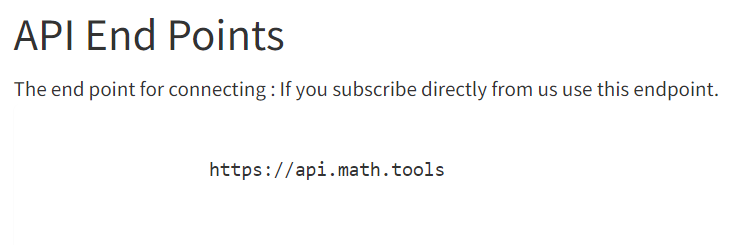
Now for the URL we need to know the URL (kind of obvious, isn’t it :beaming_face_with_smiling_eyes:) of the service we want to address. But not only that, we will also need the endpoint. This is something like the direct call, putting you to that exact point that you want. Usually an API will tell you how the endpoint looks:
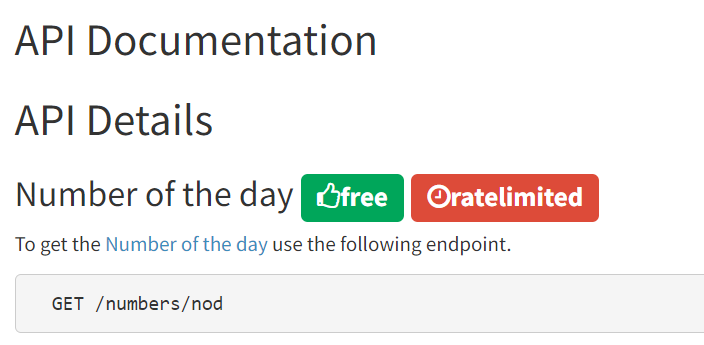
The endpoint of the website MathTOOLS is `https://api.math.tools`, but if we read carefully (I usually struggle with that :smiling_face_with_halo:), we get more details for the API of the number of the day:
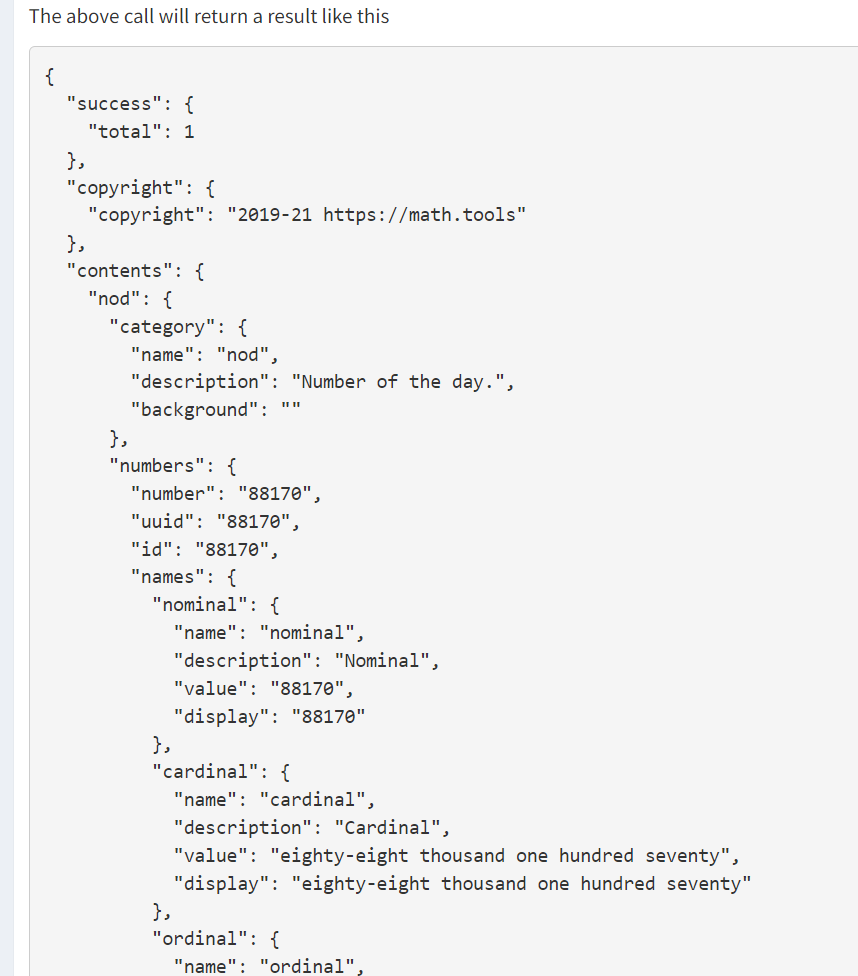
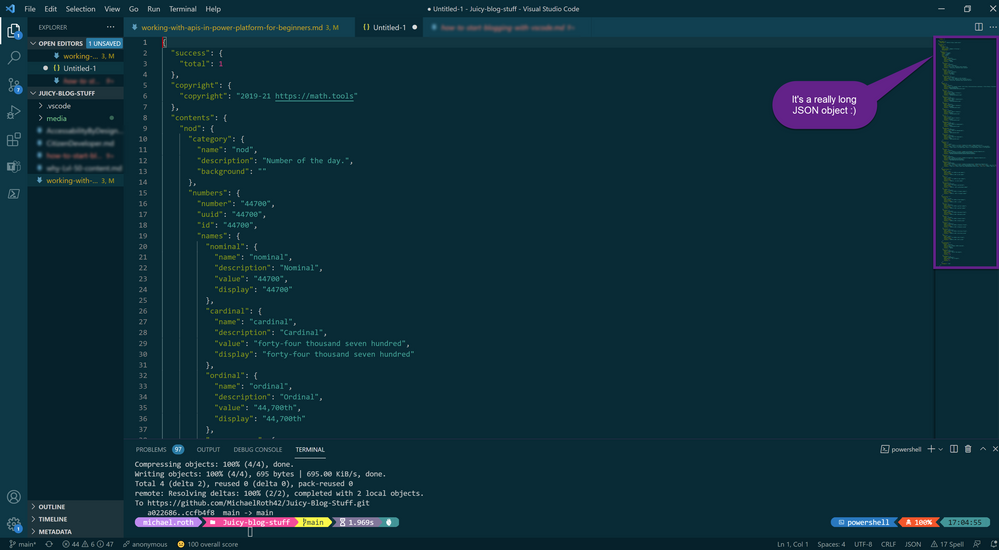
The endpoint for the number of the day is `https://api.math.tools/numbers/nod`. The API documentation even provides us with the information of how the HTTP response will look like:
It’s a very long JSON object (if you want to get started with JSON, I recommend the amazing blog from Bob German Introduction to JSON.
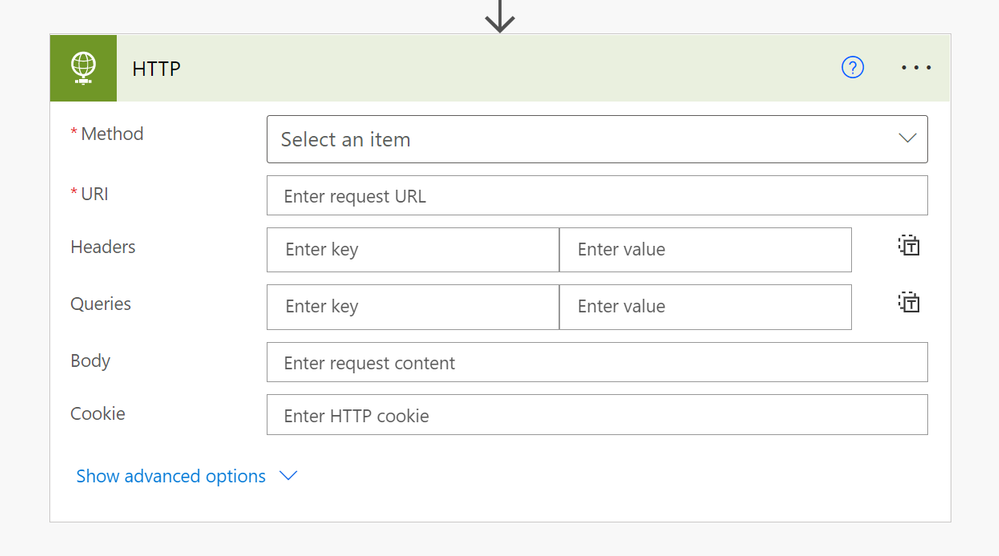
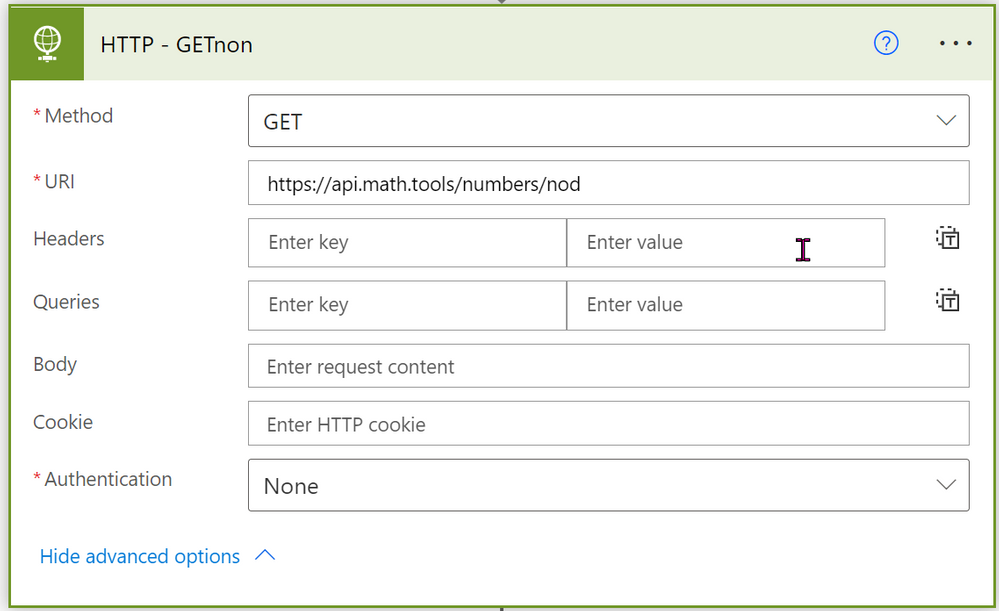
But let’s stay at our HTTP request in Power Automate. We know the Method, we know the URL and we know that we don’t need any authentication. That means we can fill out all mandatory fields in that flow action and it looks like this:
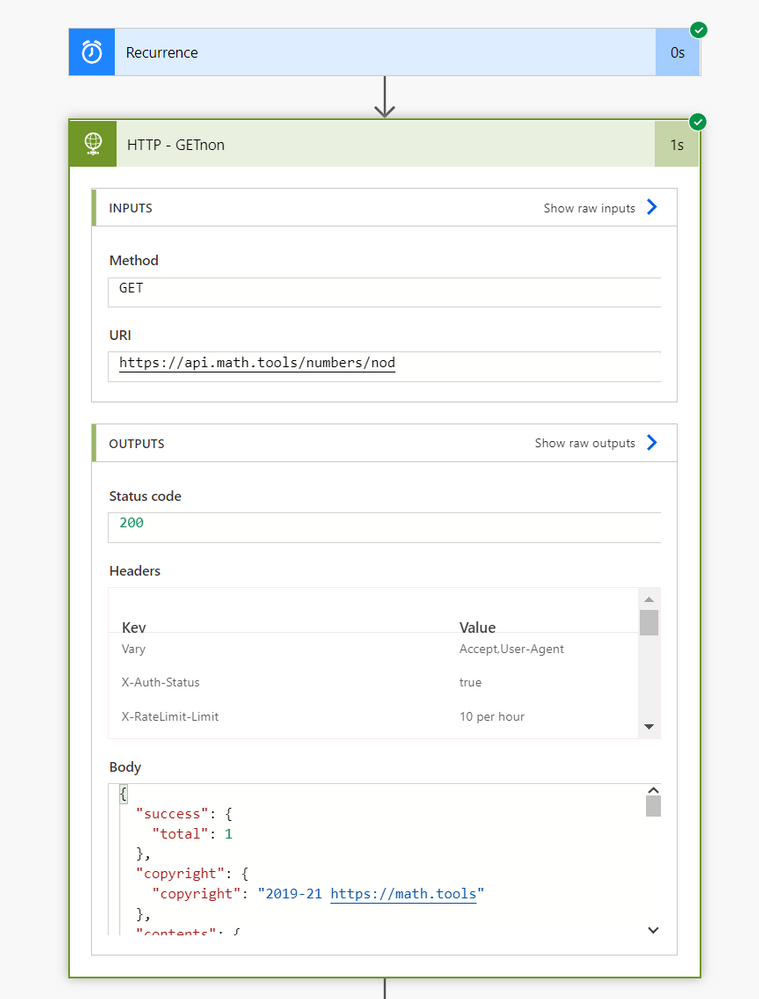
Let’s run this flow on a daily basis and see what the result looks like:
(Since you can hardly see the result, I paste the body here once again)
And that’s it, we used an HTTP request to GET information from a API. Now for the last part of this blog, we want to use some information from this result to be posted in a chat in Teams.
Use a certain information from a JSON object in a chat message
Now it would make a lot of sense, if we cover the question, how to use a certain information from that JSON object in, let’s say a chat message, right?
Let’s say, we want to post the number of the day in a daily Microsoft Teams chat. We need just two steps for that:
1. put the information of that JSON file in a variable, so it’s always up to date
2. use that variable in message in a Microsoft Teams chat
To use a certain information in a variable, you first need to initialize a variable and fill out all the information:
Name: I called mine NrOfDay
Type: We want to use a string here (a string is a sequence of characters, that can include letters or numbers, but it will be recognized as a “text”)
Value: Here we want to define the value of this variable. In our case that means that particular information from this long JSON object.
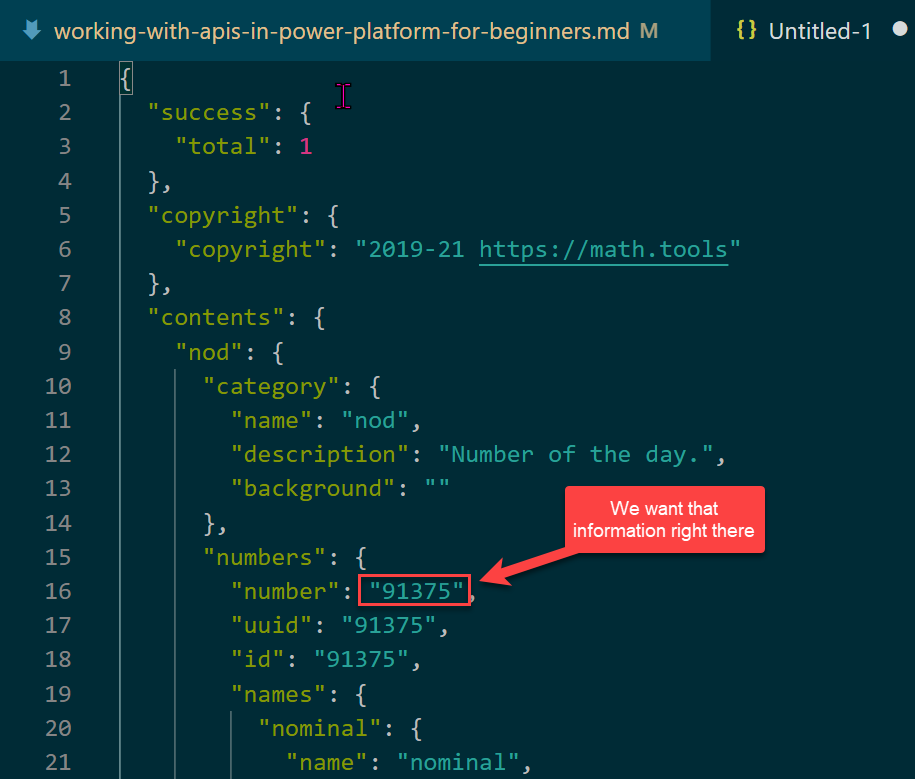
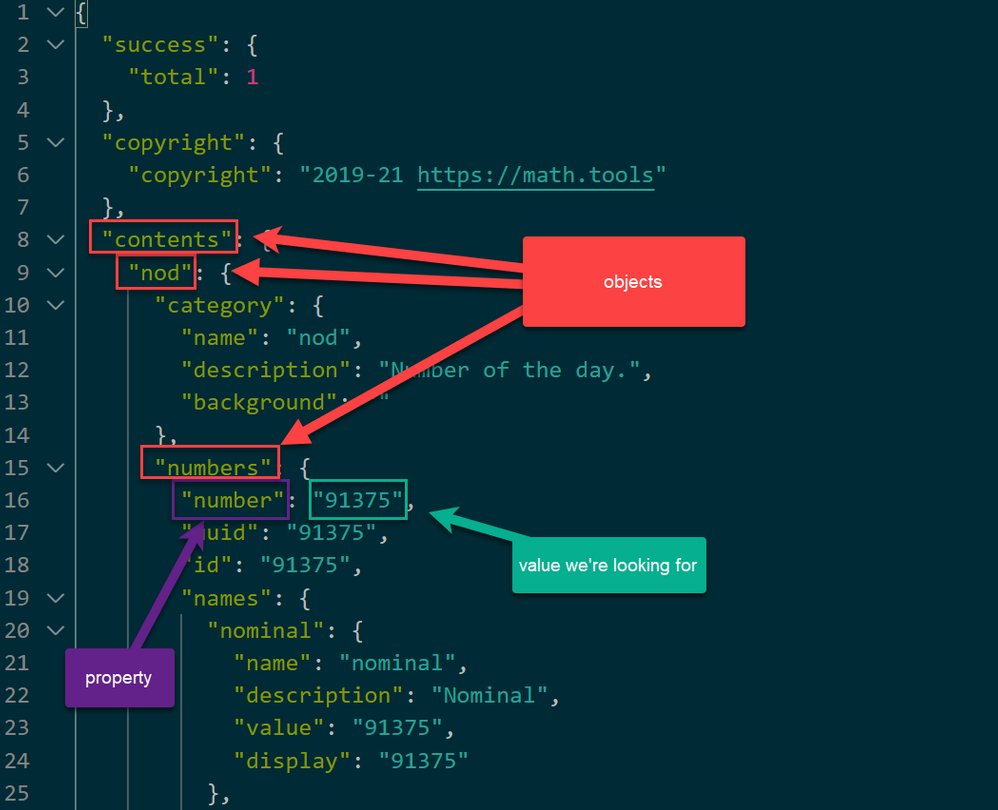
We want the value of the property “number”
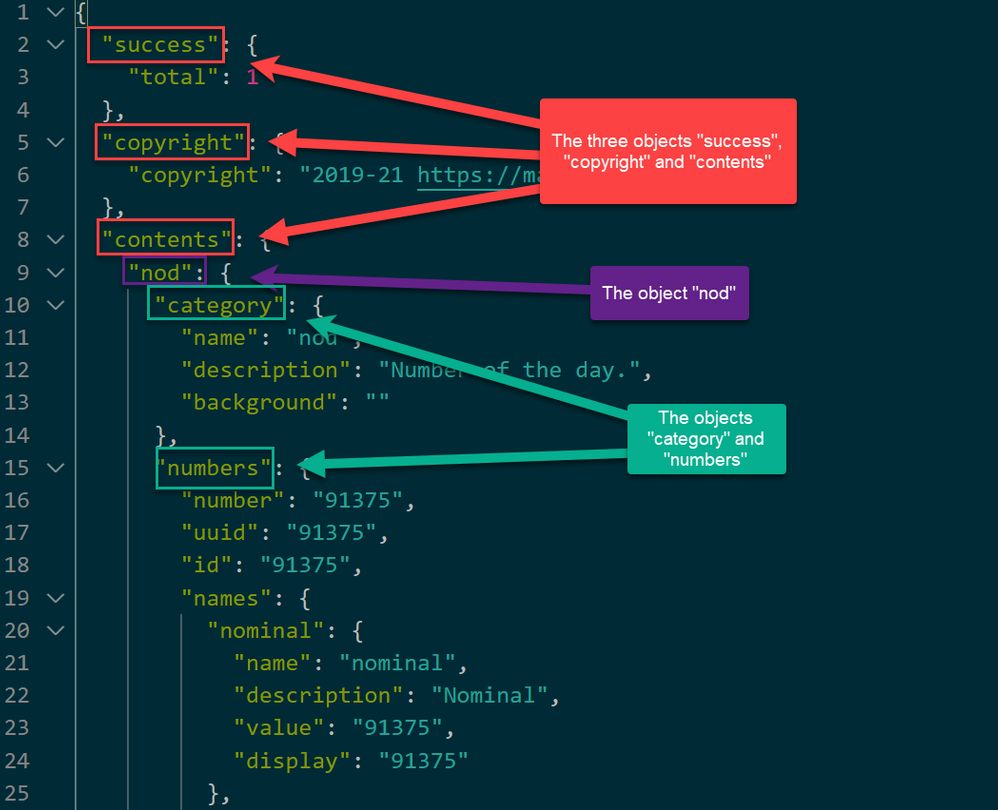
Notice, that this JSON element consists of three different objects. We have the objects “success”, “copyright” and “content”. The object “content” contains an object called “nod”, which contains two more objects called “category” and “numbers”.
As stated earlier, we want the value of the property “number”, which is located in the object “numbers” (which is part of the object “nod”, which is part of the object “content”).
Now we can tell our variable in Power Automate the exact location of the value we want to use in this variable. The expression to “navigate” to the value of this property looks like this:
`body(‘HTTP_-_GETnon’)[‘contents’][‘nod’][‘numbers’][‘number’]`
The first part (`body(‘HTTP_-_GETnon’)`) tells where we want to look, the later parts are navigating through the JSON object until we reach the exact object and the exact property. With this method you can get any value of any JSON object you like.
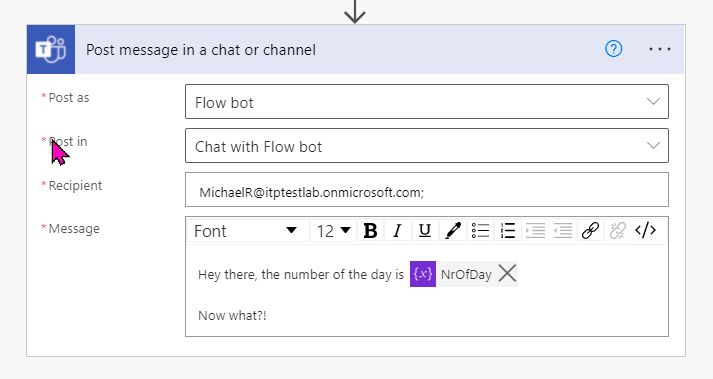
Now you can build in the variable in a “Post message in a chat or channel” action as dynamic content in Flow and it will always show the value of the property of that JSON object.
That’s it. That is how you call an API, get a JSON object back and use certain values from that object in Power Automate. I hope you liked it and it helps you. If anything is unclear, or you have questions, please feel free to reach out to me. Easiest way would be twitter :*
As I mentioned in the beginning, I will further work with APIs. If you want to learn more, here’s what I’m going to work on next. If you have specific questions, please ask me or make suggestions. I’m always eager to learn new things.
Next API topic: What’s a custom connector, where is the difference between a http request and a custom connector and when to use what.
by Contributed | Jan 14, 2022 | Technology
This article is contributed. See the original author and article here.
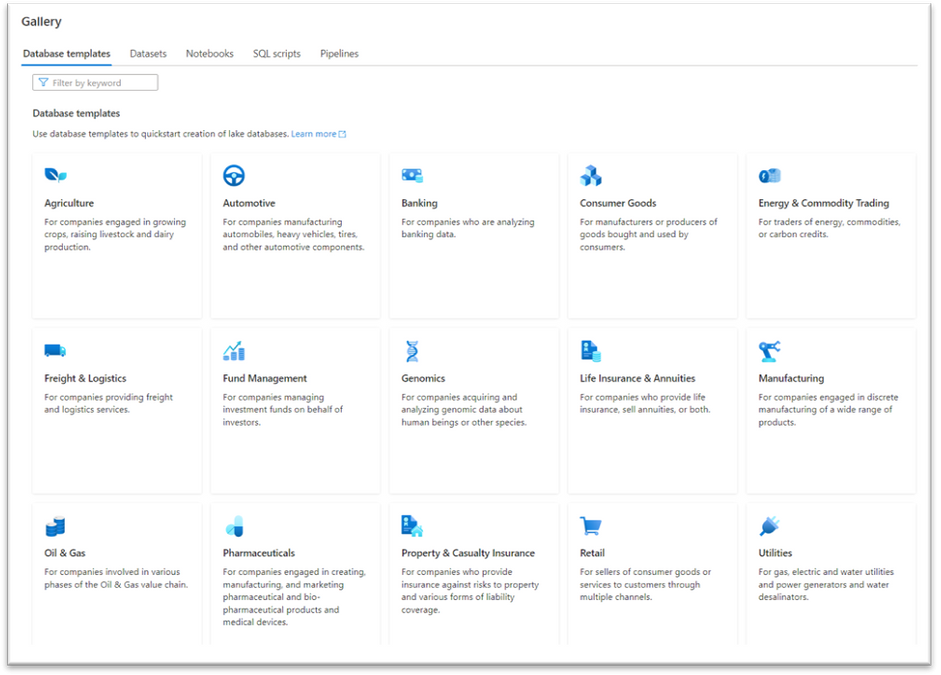
In response to the enthusiastic adoption of the eleven Synapse Database Templates for which we announced availability, in public preview, in November and December 2021, we’re pleased to announce today that we are making available, in public preview, additional Synapse Database Templates for four more industries:
- Automotive Industries
- Genomics
- Manufacturing
- Pharmaceuticals
The Synapse Database Template for Automotive Industries is a comprehensive data model that addresses the typical data requirements of organizations engaged in manufacturing automobiles, heavy vehicles, tires, and other automotive components.
The Synapse Database Template for Genomics is a comprehensive data model that addresses the typical data requirements of organizations engaged in acquiring and analyzing genomic data about human beings or other species.
The Synapse Database Template for Manufacturing is a comprehensive data model that addresses the typical data requirements of organizations engaged in either discrete or continuous manufacturing of a wide range of products. Portions of this database template are also included as part of the previously announced Consumer Goods database template and in the Automotive Industries and Pharmaceuticals database templates being announced today so companies in those industries will likely prefer to use those database templates rather than the general purpose Manufacturing industry database template as they contain additional content specific to those industries in addition to the content contained in the general Manufacturing database template.
The Synapse Database Template for Pharmaceuticals is a comprehensive data model that addresses the typical data requirements of organizations engaged in creating, manufacturing, and marketing pharmaceutical and bio-pharmaceutical products and medical devices.
Most of the Synapse database templates contain many different business areas that together comprise each of these very large industry-specific data models. For example, in addition to business areas such as Product, Inventory, and Human Resources, there is also an Emissions business area which provides support for data used to report greenhouse gas emissions (including scope 1, scope 2, and scope 3 emissions), an area of significant focus for many of our large customers.
These 4 additional database templates can be accessed now in Azure Synapse either in the gallery or by creating a new lake database from the Data tab and selecting + Table and then From template.
Learn more:

by Contributed | Jan 13, 2022 | Technology
This article is contributed. See the original author and article here.
This is the next segment of our blog series highlighting Microsoft Learn Student Ambassadors who achieved the Gold milestone and have recently graduated from university. Each blog in the series features a different student and highlights their accomplishments, their experience with the Student Ambassadors community, and what they’re up to now.
Today we meet Rogerio Rodrigues who is from Brazil and recently graduated from the Universidade Federal de São Paulo with a master’s degree in computer science.
Responses have been edited for clarity and length.
When you joined the Student Ambassador community in 2012 as an undergraduate student at Universidade Federal de São Paulo, did you have specific goals you wanted to reach?
I had some goals like learning to speak in public because I was very shy but wanted to contribute to public events in the Student Ambassador program. I also wanted to go deeper into Microsoft technologies like Azure, DevOps, and Mobile Development with Xamarin. I had a dream to work at Microsoft as an employee. The community helped me a lot with these goals. I learned public speaking and became an MBA technical training teacher. I learned a lot about Microsoft technologies, received recognition in the technical community, and became a Microsoft Most Valuable Professional (MVP). I am pleased to have been part of the community, which undoubtedly contributed the most to my professional career.
As a Student Ambassador, what were the accomplishments that you’re the proudest of and why?
In 2018 and 2019, together with other Student Ambassadors and Microsoft MVPs , we created an initiative called Natal Nerd where we collected gifts, toys, and cash as donations to help orphans and at-risk children for Christmas. Several Student Ambassador events and lectures about Microsoft technologies were held at universities with companies in São Paulo, and the entry fee was a toy to donate to Natal Nerd. We presented at 23 universities in the country and reached more than 2,500 students and professors, disseminating and sharing knowledge about Microsoft technologies and the Imagine Cup. We were able to collect gifts to improve Christmas for more than 800 children.
In 2019, another Student Ambassador and I delivered 4 talks at 11 technical events at the Microsoft Student Partners Tech Days at eight universities in Brazil with the help of MVPs [Editor’s note: Microsoft Student Partners is the former name of the Microsoft Learn Student Ambassadors program]. We delivered another four talks in countries such as Peru, Nicaragua, Colombia, and Mexico with the help of other Student Ambassadors.
In 2019 and 2020, I was chosen to go to the Microsoft Student Partner Summit and the Imagine Cup Final because of my contributions. The events in 2019 were amazing – opportunities that I will never forget because they was very valuable to me. Even though the events in 2020 were virtual, I was very happy to have received the recognition.
I also created a Student Ambassador Latam YouTube channel and Meetup group with more than 2000 subscribers.
What are you doing now that you’ve graduated?
My dream was to become a Microsoft employee. I had already tried twice and didn’t pass the interviews, but last year I became a Customer Engineer at Microsoft and was assigned to serve large public sector banking clients. I’ve also started my part-time doctorate program in computer science with a focus on environmental science and weather satellites. After completing my doctorate, I plan to do a post-doc in my line of research, continue to teach at universities, and contribute to science.
If you could redo your time as a Student Ambassador, is there anything you would have done differently?
The only thing I would have done differently would be to study more English right away when I joined in order to communicate more easily with other Student Ambassadors around the world. Learning to speak English better made a big difference for me in 2019 when I was at the Student Partner Summit for the first time because in addition to learning new technical content, I met many other Student Ambassadors from other cultures and the amazing Student Ambassador Program Team.
If you were to describe the community to a student who is interested in joining, what would you say about it to convince him or her to join?
If you desire to be a unique professional, you should apply to the Student Ambassadors program. In addition to receiving special treatment in the community, you will have access to a lot of technical information, you will have the opportunity to network with people from all over the planet, and you will have contact with Microsoft professionals where you can find excellent opportunities.
Furthermore, the community helps you have a much broader view of technology than just Microsoft technologies, as you will have contact with different areas and the opportunity to work on fantastic projects.
What advice would you give to new Student Ambassadors?
Actively participate in the community. Join other Student Ambassadors in Leagues or groups to create initiatives. It’s fantastic, and you learn a lot. Make contact with other Student Ambassadors as you will experience different cultures, practice languages, learn more technology, and perhaps share your knowledge with other Student Ambassadors. Actively contribute to your local community and promote content at your university. These actions will help you to secure further knowledge and develop new skills. The community provides a sea of opportunities.
What is your motto in life, your guiding principle?
My motto in life is “Be different. Help lift but not drop”. Helping those we can help will bring us great experiences, and we will be doing our part in making the world better.
What is one random fact about you that few people are aware of?
I’m a big fan of Star Wars. I have a big tattoo on my back that’s the design of an X-Wing spaceship with the 3 characters I like–Luke, Leia, and Rey Skywalker.
Good luck to you in the future, Rogerio!
Readers, you can reach Rogerio on Twitter, Instagram, and LinkedIn.
by Contributed | Jan 12, 2022 | Technology
This article is contributed. See the original author and article here.
By Erin Boris, Idan Basre and Yoann Mallet
One of the latest app connectors to be added to Microsoft Defender for Cloud Apps is for Smartsheet.
As we have in the past for other protected apps, we would like to share a few examples of how to use it to secure your Smartsheet deployment.
Why Connect Smartsheet?
As with other apps, connecting Smartsheet to Defender for Cloud Apps allows you to leverage some of the built-in features of your favorite CASB, such as:
How to connect Smartsheet?
Let’s start with connecting Smartsheet.
Detailed instructions are available here, and if you prefer our video, check it out below:
Leverage Microsoft Defender for Cloud Apps with Smartsheet
The best way to get quick value from Defender for Cloud Apps when protecting Smartsheet, is to use the Advanced Hunting feature in the Microsoft 365 Defender portal.
If you have not used that portal just yet, simply visit http://security.microsoft.com and you will be redirected to it.
Once there browse to advanced hunting. This will enable you to write your own KQL queries to gather relevant information from the Defender for Cloud Apps activity logs.
Here are two relevant examples:
Scenario 1: New user invited, has an external email address
Having a new user invited to Smartsheet with an external email address may be suspicious. In order to detect this, you can leverage the following KQL Query:
CloudAppEvents
| where Application == "Smartsheet"
|extend a=parse_json(RawEventData).additionalDetails
|extend email=a.emailAddress
| where ActionType == "User Accept Invite"
and email  !contains "contoso.com"
| project Timestamp,Application, AccountDisplayName, ActionType,email
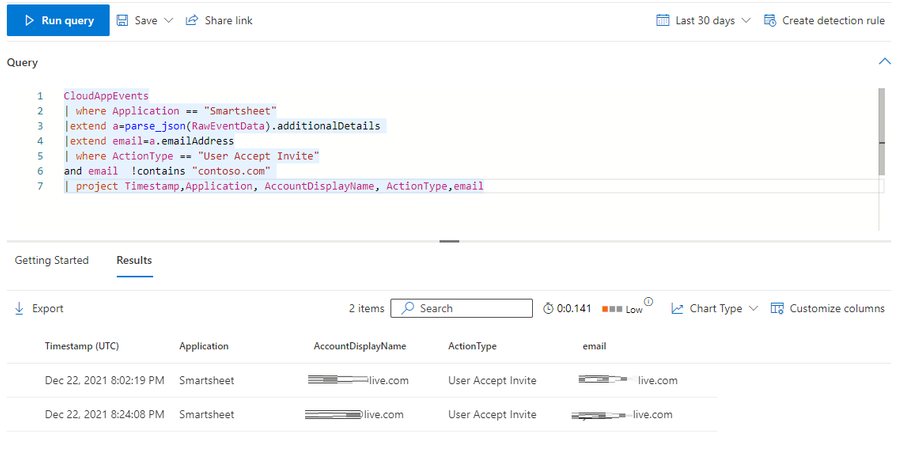
Below is an example of the result of that query in Advanced Hunting:
This can potentially help you detect any attempt to exfiltrate data or identify a malicious user enabling an external account.
Another option to view all accounts with external email addresses that currently have access to Smartsheet, is from the API connector properties in Defender for Cloud Apps.
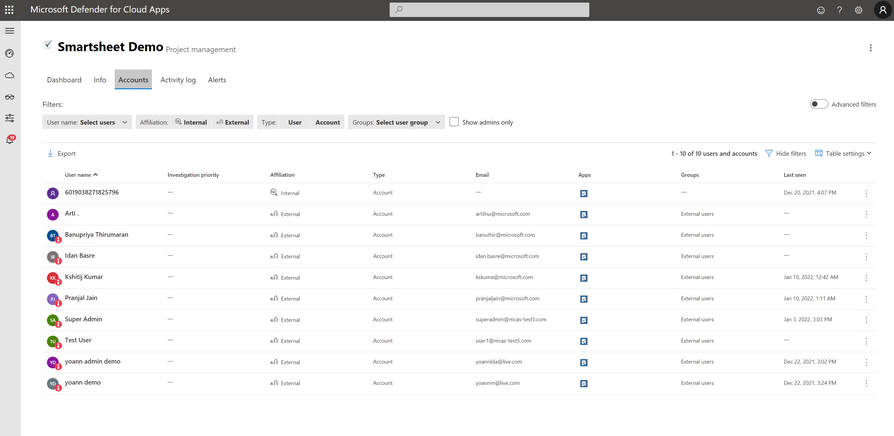
A filter can be used to see all external accounts that have accepted an invitation.
Scenario 2: File sent as attachment to external email address
When files are sent as an attachment from Smartsheet directly, to an external email address, this can be a sign of data exfiltration.
In order to identify such activities, you can leverage the following KQL Query:
CloudAppEvents
| where Application == "Smartsheet"
|extend a=parse_json(RawEventData).additionalDetails
|extend Recipient=a.recipientEmail
| where ActionType =="Sheet Send As Attachment"
and Recipient  !contains "contoso.com"
| project Timestamp,Application, AccountDisplayName, ActionType,Recipient
Creating alerts from these queries
In addition to detecting these actions, Microsoft 365 Defender also allows you to create your own custom detections, and identify when these occur in near real-time, as described here.
As you can imagine, when using such powerful queries, the sky is the limit! Feel free to share any relevant KQL query you have identified for Smartsheet in the comments below.
Resources:
For more information about the features discussed in this article, please read:
Feedback
We welcome your feedback or relevant use cases and requirements for this pillar of Cloud App Security by emailing CASFeedback@microsoft.com and mentioning the area or pillar in Cloud App Security you wish to discuss.
Learn more
For further information on how your organization can benefit from Microsoft Cloud App Security, connect with us at the links below:

by Contributed | Jan 12, 2022 | Business, Microsoft 365, Technology
This article is contributed. See the original author and article here.
The two billion frontline workers, which represent 80 percent of the world’s workforce, have weathered risk, exhaustion, and ongoing disruption throughout the pandemic. From shutdowns to new safety protocols to increased workloads and dwindling inventory, the frontline is constantly facing challenges. Today we are releasing a set of technology innovations and partnerships to reduce stress on the frontline and empower the way they work and interact.
The post 3 ways technology can help rebuild your frontline workforce appeared first on Microsoft 365 Blog.
Brought to you by Dr. Ware, Microsoft Office 365 Silver Partner, Charleston SC.


Recent Comments