Microsoft To Do app for iOS and Android launching in GCC

Microsoft To Do app for iOS and Android launching in GCC

This article is contributed. See the original author and article here.

We are excited to announce that the iOS and Android apps for Microsoft To Do (a tool for managing and sharing tasks and lists) is rolling out to GCC (Government Community Cloud) users. The rollout begins in late August, with plans to be completed by mid-September. This launch will add the mobile apps to the web and Outlook functionality that GCC accounts already have today.


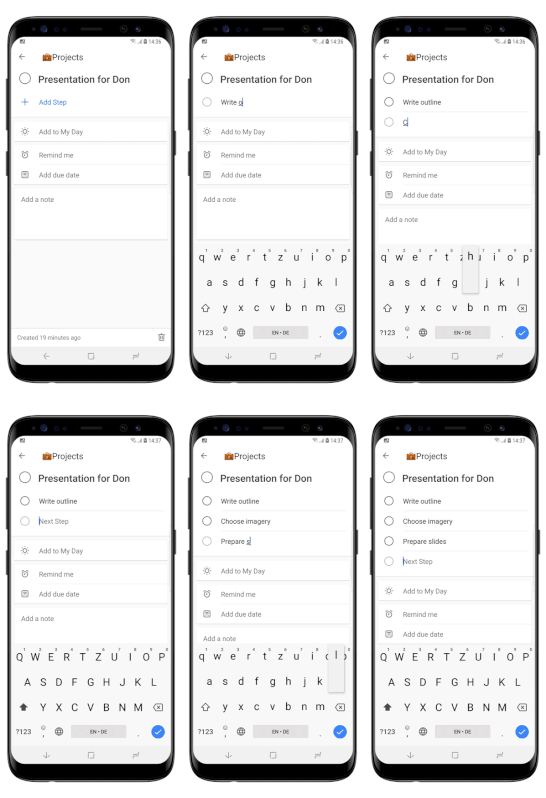
Using To Do on iOS and Android means that users can bring the power and flexibility of task list management wherever they go, with an intuitive UI closely resembling the experience users know from the web app: 


Android Steps - Samsung S8.gif


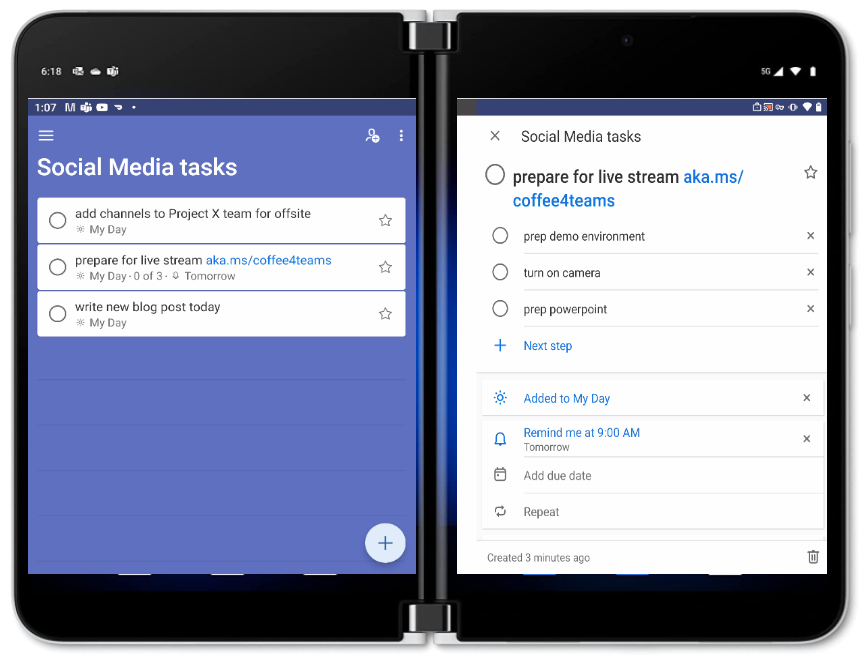
Surface Duo users will also appreciate the 2-screen experience of the Android app that allows them to view their list of tasks on 1 screen, while viewing the details of a particular task on the other:


2022-03-09_01-08-49.png


No admin action is needed to enable To Do mobile app access for GCC tenantsFeatures that remain unavailable in GCC at this time (consistent with the limitations of To Do Web) include shared list notifications, and the ability to share task lists outside your organization.  


For more information, check out the support page.   


For more info from me on collaboration & teamwork, follow me at TeamworkCowbell (blog | Twitter | YouTube) or at ricardo303SharePointCowbell, and LinkedIn.

Walking the walk of a ‘Keep Learning’ culture at Tietoevry

Walking the walk of a ‘Keep Learning’ culture at Tietoevry

This article is contributed. See the original author and article here.

Takeaways


  • Tietoevry created the Connect Academy, which reskills existing employees, including those whose current skills are based on legacy technologies.

  • Microsoft Learn content, particularly Azure instructor-led training and certifications, is at the core of the Connect Academy curriculum. Extensive resources, like hands-on labs, complement the experiential learning in the program.

  • A holistic process at Tietoevry integrates business strategy, resourcing needs, executive sponsorship, and individual career development.

  • The program plans for business needs and places employees immediately into their new roles—while still training—providing mentorship, on-the-job learning, and billable assignments.

  • Reskilling internal employees is more efficient than trying to secure new external resources with appropriate skills from the current highly competitive job market.

  • Employees are valued and retained, and they’re able to plan the next phases of their careers, including ongoing learning and certification. They join approximately 2,500 employees company-wide who have already earned 3,600 Azure certifications as part of the overall Tietoevry skilling goal.


Finnish company Tietoevry is the largest IT services provider in the Nordics, with 24,000 employees worldwide serving customers in 90 countries and regions. As the company’s customers move to the cloud, the skills required of Tietoevry teams are changing accordingly. Hiring new talent is difficult and expensive—current IT skills are in demand everywhere. At the same time, the company has a base of great employees with years of productive experience in legacy technologies.


Many organizations face similar situations, but Tietoevry created an extraordinarily holistic plan for reskilling that serves the company’s needs, valuing and retaining its employees, and building robust teams to serve its customers. To address the challenge, in 2021, Tietoevry created its Connect Academy—a comprehensive program that focuses on reskilling internal employees on Microsoft technologies, with simultaneous new job placement within the company.


Quote card_Ari Lehtovaara.jpg


A ‘Keep Learning’ culture


One of the pillars of the Tietoevry culture is “Keep Learning,” which means that the company and its employees seek to continue developing their skills—now and in the future—and to stay curious and relevant. “Our employees do value learning very highly, and that’s why we want to support them in this,” says Lelde Saleniece, Tietoevry’s People Development Consultant. “The [Connect] Academy is one great example of how we do that, how we support them—not just in upskilling but in reskilling, as well. We care for them and their knowledge, and we want them to stay here.”


The Connect Academy begins with an analysis of business needs and the resources required to meet them. After the analysis, the candidate selection phase starts and everyone can apply. Line managers nominate candidates, and then, in the “handshake” step, candidates go through a career-planning stage, join their new teams, and begin training—including job shadowing and assignments. Microsoft Learn training resources are key, notes Lelde. “Microsoft has been very helpful, and definitely, without the support and collaboration, this wouldn’t be as good a program as it is.”


Microsoft Learn resources are at the core of the experiential learning journey, reports Lead Cloud Advisor Bjørn Sigurd Hove, who is a mentor for learners in the program. The certifications that learners earn demonstrate mastery, he observes, “But in my view, the road to that certification is maybe more important.” In addition to instructor-led training, he explains, “I stressed that they should use the study guides, which have links to resources on each and every subject.” Bjørn also points learners to the Microsoft Learn labs for hands-on experience. “The certification is just the end goal of this journey, but the journey is most important.”


The training component is intense—two months of dedicated time for classwork, labs, exam preparation, and certification exams. Raja Ali, a Tietoevry employee who completed the Connect Academy, used all the offered Microsoft Learn self-study resources. “The real deal was when you were sitting down and working on Microsoft Learn,” he recalls. “The coolest thing was the sandbox experience you get in Microsoft Learn, when you’re reading something and they ask you to actually do the activity right there.”


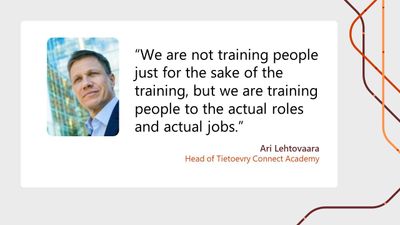
The many benefits of this process start with meeting the business needs, ensuring that “we are not training people just for the sake of the training, but we are training people to the actual roles and actual jobs,” notes Ari Lehtovaara, Head of the Connect Academy. “The main idea is to give them basic knowledge so that they can fit into the team and start working.”


Tietoevry Line Manager Niklas Klasén welcomes reskilled employees onto his team. He points out that selecting candidates for the academy is important, given how hard it is to recruit suitable talent from outside the company. Their background is important. “For me,” Niklas emphasizes, “being able to combine the skills that people already have from their long IT careers with the new cloud experience, that has been a very valuable concept for us.”


At every step of the two-month program, the Connect Academy assists employees and supports them in their new roles. They join their new teams immediately when training starts, with a line manager and mentor to help them.


Quote card_Bjørn Sigurd Hove.jpg


Partnering to build skills and careers in the cloud space


Legacy skills can be helpful to the team, Niklas explains. “Let’s say, for example, they worked with networking on-prem or in our own datacenters. They are now subject matter experts when it comes to connecting that datacenter to the cloud and are a key resource when it comes to migrating from the datacenter, as well.”


With Microsoft Learn partnering to provide technical product knowledge at core of the Connect Academy, Tietoevry has created a thoughtfully strategic way forward for the company—and, most of all, for its employees. As Bjørn points out, “That program gives our colleagues a new career in the cloud space, and I’m really proud of that.”


For more details on Tietoevry’s learning journey, check out the following Microsoft Customer Tech Talks episode.


Azure Marketplace new offers – August 17, 2022

Azure Marketplace new offers – August 17, 2022

This article is contributed. See the original author and article here.

We continue to expand the Azure Marketplace ecosystem. For this volume, 113 new offers successfully met the onboarding criteria and went live. See details of the new offers below:


Get it now in our marketplace


AskforCloud logo.png Airflow on Ubuntu Server 20.04 LTS: This offer from AskforCloud provides Airflow on Ubuntu Server 20.04 LTS. Airflow is an open-source platform for programmatically authoring, scheduling, and monitoring workflows. Airflow pipelines are defined in Python, which allows for dynamic pipeline generation.
AskforCloud logo.png

Cassandra on Ubuntu Server 18.04 LTS: This offer from AskforCloud provides Cassandra on Ubuntu Server 18.04 LTS. Apache Cassandra is an open-source NoSQL distributed database trusted by thousands of companies for scalability and high availability. Cassandra enables developers to dynamically scale their databases with no downtime.


AskforCloud logo.png

Cassandra on Ubuntu Server 20.04 LTS: This offer from AskforCloud provides Cassandra on Ubuntu Server 20.04 LTS. Apache Cassandra is an open-source NoSQL distributed database trusted by thousands of companies for scalability and high availability. Cassandra enables developers to dynamically scale their databases with no downtime.


AskforCloud logo.png

Cassandra on Ubuntu Server 22.04 LTS: This offer from AskforCloud provides Cassandra on Ubuntu Server 22.04 LTS. Apache Cassandra is an open-source NoSQL distributed database trusted by thousands of companies for scalability and high availability. Cassandra enables developers to dynamically scale their databases with no downtime.


DecisionRules.png

DecisionRules: DecisionRules, a lightweight and blazingly fast business rules engine, streamlines workflows and helps organizations digitalize their day-to-day decision-making processes. DecisionRules is available as a privately managed cloud or as an on-premises deployment.


AskforCloud logo.png

Dolphin on Ubuntu Server 18.04 LTS: This offer from AskforCloud provides Dolphin on Ubuntu Server 18.04 LTS. Dolphin, an open-source platform for building social networks, is designed to be easy to use and customize. 


AskforCloud logo.png

Dolphin on Ubuntu Server 20.04 LTS: This offer from AskforCloud provides Dolphin on Ubuntu Server 20.04 LTS. Dolphin, an open-source platform for building social networks, is designed to be easy to use and customize.


AskforCloud logo.png

Dotclear on Ubuntu Server 18.04 LTS: This offer from AskforCloud provides Dotclear on Ubuntu Server 18.04 LTS. Dotclear is an open-source web-publishing tool written in PHP. Its flexible template system allows you to customize your Dotclear demo without having PHP knowledge, and its comment system has built-in anti spam protection.


AskforCloud logo.png

Dotclear on Ubuntu Server 20.04 LTS: This offer from AskforCloud provides Dotclear on Ubuntu Server 20.04 LTS. Dotclear is an open-source web-publishing tool written in PHP. Its flexible template system allows you to customize your Dotclear demo without having PHP knowledge, and its comment system has built-in anti spam protection.


AskforCloud logo.png

Dotclear on Ubuntu Server 22.04 LTS: This offer from AskforCloud provides Dotclear on Ubuntu Server 22.04 LTS. Dotclear is an open-source web-publishing tool written in PHP. Its flexible template system allows you to customize your Dotclear demo without having PHP knowledge, and its comment system has built-in anti spam protection.


AskforCloud logo.png

e107 on Ubuntu Server 18.04 LTS: This offer from AskforCloud provides e107 on Ubuntu Server 18.04 LTS. e107 is an open-source content management system powered by PHP, MySQL, and Twitter Bootstrap. Its intuitive interface gives users complete control of their website and digital assets even if they have no knowledge of HTML or JavaScript.


AskforCloud logo.png

e107 on Ubuntu Server 20.04 LTS: This offer from AskforCloud provides e107 on Ubuntu Server 20.04 LTS. e107 is an open-source content management system powered by PHP, MySQL, and Twitter Bootstrap. Its intuitive interface gives users complete control of their website and digital assets even if they have no knowledge of HTML or JavaScript.


AskforCloud logo.png

e107 on Ubuntu Server 22.04 LTS: This offer from AskforCloud provides e107 on Ubuntu Server 22.04 LTS. e107 is an open-source content management system powered by PHP, MySQL, and Twitter Bootstrap. Its intuitive interface gives users complete control of their website and digital assets even if they have no knowledge of HTML or JavaScript.


AskforCloud logo.png

Exponent CMS on Ubuntu 18.04 LTS: This offer from AskforCloud provides Exponent CMS on Ubuntu 18.04 LTS. Exponent CMS is an open-source content management system based on PHP and the Exponent framework. With Exponent, users can easily create and manage dynamic websites without directly coding web pages or managing site navigation.


AskforCloud logo.png

Hadoop on Ubuntu Server 20.04 LTS: This offer from AskforCloud provides Hadoop on Ubuntu Server 20.04 LTS. Apache’s Hadoop framework transparently supports data motion and reliability for applications. Hadoop implements the computational paradigm MapReduce, dividing an app into fragments, each of which may be executed or re-executed on any node in a cluster.


AskforCloud logo.png

Kafka on Debian 10: This offer from AskforCloud provides Kafka on Debian 10. Apache’s Kafka, an open-source distributed event store and streaming platform, is used by thousands of companies for high-performance data pipelines, streaming analytics, data integration, and mission-critical applications.


AskforCloud logo.png

Kafka on Debian 11: This offer from AskforCloud provides Kafka on Debian 11. Apache’s Kafka, an open-source distributed event store and streaming platform, is used by thousands of companies for high-performance data pipelines, streaming analytics, data integration, and mission-critical applications.


AskforCloud logo.png

Kafka on Ubuntu Server 18.04 LTS: This offer from AskforCloud provides Kafka on Ubuntu Server 18.04 LTS. Apache’s Kafka, an open-source distributed event store and streaming platform, is used by thousands of companies for high-performance data pipelines, streaming analytics, data integration, and mission-critical applications.


AskforCloud logo.png

Kafka on Ubuntu Server 20.04 LTS: This offer from AskforCloud provides Kafka on Ubuntu Server 20.04 LTS. Apache’s Kafka, an open-source distributed event store and streaming platform, is used by thousands of companies for high-performance data pipelines, streaming analytics, data integration, and mission-critical applications.


AskforCloud logo.png

Kafka on Ubuntu Server 22.04 LTS: This offer from AskforCloud provides Kafka on Ubuntu Server 22.04 LTS. Apache’s Kafka, an open-source distributed event store and streaming platform, is used by thousands of companies for high-performance data pipelines, streaming analytics, data integration, and mission-critical applications.


Apps4Rent logo.png

Kubernetes on Ubuntu: This offer from Apps4Rent provides Kubernetes on Ubuntu. Kubernetes is a portable and extensible open-source platform for managing containerized workloads.
Kubernetes grants you a framework to resiliently run distributed systems. It offers scaling, failover, deployment patterns, and more.


Apps4Rent logo.png

LAMP on Ubuntu 20.04: This offer from Apps4Rent provides a LAMP stack on Ubuntu 20.04. The LAMP stack includes Apache HTTP Server, the MySQL relational database management system, the PHP programming language, and a Linux operating system. Engineers use the stack to develop and deploy high-performance web apps in a Linux environment.


AskforCloud logo.png

Laravel Framework on Ubuntu Server 20.04 LTS: This offer from AskforCloud provides Laravel on Ubuntu Server 20.04 LTS. Laravel is a PHP framework with expressive, elegant syntax. The framework is robust and incredibly scalable, so it can grow with your project.


AskforCloud logo.png

Laravel on Ubuntu Server 18.04 LTS: This offer from AskforCloud provides Laravel on Ubuntu Server 18.04 LTS. Laravel is a PHP framework with expressive, elegant syntax. The framework is robust and incredibly scalable, so it can grow with your project.


LightWAN.png

LightWAN vCPE: The LightWAN network access device LightWAN vCPE provides customers with cloud interconnection and access to acceleration services. LightWAN is based on SDN and WAN acceleration technology and can swiftly connect branches, datacenters, and cloud services to LightWAN POP nodes. This app is available only in Chinese.


AskforCloud logo.png

Mattermost on Ubuntu 18.04 LTS: This offer from AskforCloud provides Mattermost on Ubuntu 18.04 LTS. Mattermost is an open-source collaboration platform. Bring together team messaging, task and project management, and workflow orchestration so you can deliver high-quality software.


AskforCloud logo.png

Mattermost on Ubuntu 20.04 LTS: This offer from AskforCloud provides Mattermost on Ubuntu 20.04 LTS. Mattermost is an open-source collaboration platform. Bring together team messaging, task and project management, and workflow orchestration so you can deliver high-quality software.


AskforCloud logo.png

Mattermost on Ubuntu 22.04 LTS: This offer from AskforCloud provides Mattermost on Ubuntu 22.04 LTS. Mattermost is an open-source collaboration platform. Bring together team messaging, task and project management, and workflow orchestration so you can deliver high-quality software.


OutSystems Standard Edition.png

OutSystems Standard Edition: Quickly create and update web and mobile applications with OutSystems, a modern platform for developing, delivering, and evolving compelling apps that drive innovation at the pace that business requires. OutSystems features visual development tools and automation powered by AI.


AskforCloud logo.png

Piwigo on Ubuntu 22.04 LTS: This offer from AskforCloud provides Piwigo on Ubuntu 22.04 LTS. Piwigo is open-source photo management software designed for organizations, teams, and individuals. Easily organize and share your photos on the web with Piwigo.


AskforCloud logo.png

Pydio on Ubuntu Server 18.04 LTS: This offer from AskforCloud provides Pydio on Ubuntu Server 18.04 LTS. Pydio is open-source file-sharing and synchronization software that allows you to access and securely share large amounts of data from a central location.


AskforCloud logo.png

Pydio on Ubuntu Server 20.04 LTS: Easily access and share large amounts of data from a central location with this offer from AskforCloud, which provides Pydio on Ubuntu Server 20.04 LTS. Paris-based Pydio is a leader in the self-hosted enterprise document sharing and collaboration market.


ServicePilot SaaS.png

ServicePilot SaaS: ServicePilot allows you to collect, monitor, and analyze historical data across your on-premises and Microsoft Azure environments. Proactively identify underperforming servers and applications before they impact users and customers.


Tanium logo.png

Tanium Cloud: Turbocharge your security team’s capabilities with Tanium. Delivered as a fully managed cloud-based service, with zero infrastructure requirements, Tanium offers complete visibility over all endpoints so you can quickly manage, secure, and protect your network at scale.


Tanium logo.png

Tanium Cloud Package Management Service (TCPMS): This global service optimizes the Tanium linear-chain architecture for customers and remote workers. It creates efficiencies in software distribution across all endpoints by eliminating database bloat and connection overload across your on-premises, cloud, and hybrid environments.


UCMC NetCM.png

UCMC NetCM: GBM’s open-source configuration management platform powered by Ansible eliminates repetitive tasks by automating workflows for firewalls, endpoints, and switches, and it makes your network operations more efficient and productive.


VisionDocs.png

VisionDocs: This solution from Mint Management Technologies extracts information from PDFs, images, and scans and makes it searchable on applications like Microsoft Teams and SharePoint. Match invoices to vendors and enrich document scans or facial comparisons. 


AskforCloud logo.png ZooKeeper on Ubuntu Server 20.04 LTS: AskforCloud’s offer provides ZooKeeper on Ubuntu Server 20.04 LTS. Apache ZooKeeper is an open-source server for highly reliable distributed coordination of cloud applications.

Go further with workshops, proofs of concept, and implementations


Agile Data Engineering Sprints.png

Agile Data Engineering Sprints: 2-Week Implementation: Customer-centric experts from Appsfactory will apply the agile methodology to support the design, implementation, and testing of your data engineering tasks using Microsoft Azure Cognitive Services, Microsoft Power Platform, and custom solutions powered by Azure Machine Learning Studio.


Cognizant 1Sustainability Accelerator.png

Cognizant 1Sustainability Accelerator: 4-Week Implementation: Accelerate and automate your sustainability initiatives with solution, which Cognizant will implemented on Microsoft Azure. 1Sustainability integrates with Microsoft Cloud for Sustainability (MCfS) for seamless cross-department data collection and energy consumption management.


Customer Explorer Analytics.png

Customer Explorer Analytics: 6-Week Implementation: Learn how to drive growth and improve customer experience with Tredence’s offering. Optimize your marketing campaign build cycle with a custom web app for creating and exporting customer segments using Azure Databricks, Azure Monitor, and Azure Data Lake Storage.


Data Science Modernization.png

Data Science Modernization: 6-Week Implementation: Get useful insights and best-practice recommendations from Tallan as you prepare to modernize your legacy data science system. Tallan’s experts will help migrate your workloads to Microsoft Azure while creating a robust governance and security process.


DevOps as a Service.png

DevOps as a Service: 2-Day Workshop: The experts from Transition Technologies PSC will lay the foundation for innovation and growth by introducing you to the agile and integrated framework of Microsoft Azure DevOps. Walk away with a solid strategy to transform your ecosystem.


Disaster Recovery as a Service.png

Disaster Recovery as a Service: 10-Day Implementation: TM Systems’ offering will protect your business-critical applications and data through the design and implementation of backup and disaster recovery using Azure Site Recovery. Keep your business running and proactively resolve any outage issues.


Enterprise Modern Data Science Platform.png

Enterprise Modern Data Science Platform: 4-Month Implementation: Ensure the success of your data science projects by simplifying data engineering workloads and reducing production time with Tallan’s enterprise-scale Modern Data Science Platform (MDSP) on Microsoft Azure.


Machine Learning Operations.png

Machine Learning Operations: 2-Month Implementation: Using Microsoft Azure DevOps best practices along with automated retraining and continuous monitoring of your machine learning and statistical models, Tallan will help maximize the return on your data science investment.


Difenda logo.png

Microsoft Defender for Endpoint: 2-Week Design and Implementation: Difenda’s Microsoft-certified technical experts will tailor your Microsoft Defender for Endpoint configuration and implementation so you can maximize your security investment with a unified and robust service across your environment.


Migrate workloads to Azure.png

Migrate Workloads to Azure and SQL Server: 3-Week Implementation: Prime DB will provide a cost-effective, interactive experience for your team to safely identify risks and gaps before deploying workloads to Microsoft Azure, Microsoft SQL Server, Microsoft 365, and more. This service is available only in Portuguese.


Zero Trust Security.png Zero Trust Security: 3-Day Workshop: In this workshop, Oxford Computer Group will help your organization explore and customize a Zero Trust security solution built on Microsoft 365. Simplify security management and provide ongoing protection for your users and resources.

Contact our partners


2OS Deep No-Code (No-Code + AI)

5-2 Cloud-Native Migration and App Modernization: 2-Hour Briefing


Alepo SDM


AntWorks CMR+


Automated Teams for Educators


Azure Application Modernization: 1-Day Briefing


Azure App Modernization: 4-Week Assessment

Azure Business Insights and AI: 2-Hour Briefing


Azure Cloud-Native Design: 1-Week Assessment


Azure Foundation Workshop and Implementation


BDO Managed Compliance Services


BDO Managed Detection and Response


BDO OT/IoT Managed Services


Bell IoT Starter Kit


Bloomberg DataParser


Boomi Runtime Quickstarts


Boost 360


Canary Speech


Cloud Readiness: 2-Week Assessment


Customer Explorer Analytics SaaS Offering


Doc Reader: Intelligent Document Processing for Finance


Dopplr


eACASync


EdGraph Data Management and Analytics Platform


Environment Education 4.0


FSI Strategies: Managed Services for Microsoft 365


Fuze DataParser


Genpact Cora Intelligent Data Orchestration


Global Directory for Microsoft Teams


IBM OpenPages with Watson


letsbloom Secure Cloud PaaS


Liquid Cyber Security SOC Onboarding


LivePerson DataParser


Managed Rancher by Hossted


Minecraft Room


MishiPay Scan, Pay & Go


Optical Quality Assurance in Production: 3-Month Proof of Concept


Paradim


PwC Intelligent Risk Monitoring Tool (Subscription)


Quip DataParser


Redox Healthcare Integration


Refinitiv DataParser


Retail & Distribution Data and AI for Azure Synapse: 2-Week Assessment


Sincro Marketplace


Sincro VMS


Slack DataParser


Smart Reports


Symphony DataParser


Thomson Reuters Case Tracking


Thomson Reuters ID Risk Analytics


Ubuntu Minimal 20.04 LTS


Ubuntu Minimal 22.04 LTS


Unica Managed Detection & Response


Using Azure Synapse in Industrial and Energy Markets: 2-Week Assessment


Veeam Backup for Microsoft Azure: 2-Hour Briefing


WAMS ManagedCare


Webex DataParser


Yammer DataParser


Yubikey 5 NFC Security Key


Zapote Logistics


ZenCRM Linea Business Advanced Edition


ZenCRM Linea Business Full Edition


ZenCRM Linea Business Pro Edition


Zoom DataParser

Sysmon v14.0, AccessEnum v1.34, and Coreinfo v3.53

This article is contributed. See the original author and article here.


Sysmon v14.0


This major update to Sysmon, an advanced host monitoring tool, adds a new event type, FileBlockExecutable that prevents processes from creating executable files in specified locations. It also includes several performance improvements and bug fixes.


AccessEnum v1.34


AccessEnum, a tool for enumerating file system and registry permissions, now supports paths longer than MAX_PATH characters.


Coreinfo v3.53


This update to Coreinfo, a utility that reports system CPU, memory and cache topology and information, now handles NUMA nodes with more than 64 processors.


Azure Maps Authentication the right way

Azure Maps Authentication the right way

This article is contributed. See the original author and article here.


One of the requirements when building a business application is that only authenticated users can access it. So how do you use Azure Maps in combination with authentication and authorization? When you are reading our Azure Maps docs, you find that we support many different authentication scenarios, which makes it hard for some developers to implement. This blogpost will focus on the most requested scenario for Azure Maps: Have a .NET web application with an embedded Azure Maps web control where only authenticated users can see the website and use the map. Follow me step by step.


In this article, we make use of .NET 6.0 and the C# programming language, download, and install the latest version of .NET from https://dot.net/.


To make it easier to edit source code, we also recommend installing Visual Studio Code, which is a lightweight but powerful source code editor from Microsoft https://code.visualstudio.com/.


Before you can use Azure Maps, you need to sign up for a free Azure subscription, what you can do here https://azure.microsoft.com/free.


And as last, install the Azure Command-Line Interface (CLI) tools. Read here How to install the Azure CLI.


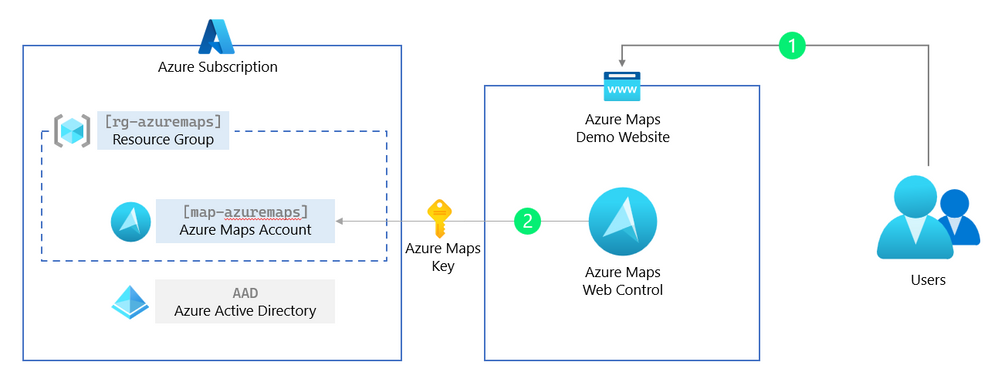
First, we start with a basic .NET web application and Azure Maps. No authentication yet, that will come in the next paragraph. This first step will use an Azure Maps Key (a ‘shared Key authentication’ or subscription key) that should not be used in production. An Azure Maps Key has complete control over your Azure Maps resource. In the next paragraph, we will remove this key and replace this with managed identities for Azure resources.


We start by creating a folder and adding a new web application to it, and we then open the newly created web application in Visual Studio Code. Start PowerShell (or any other terminal) and enter the following commands:


mkdir AzureMapsDemo
cd .AzureMapsDemo
dotnet new mvc
code .


Next, we need to add the Azure Maps web control to the Home view, open the file Views/Home/index.cshtml, and replace all the content with:


@{
    ViewData["Title"] = "Home Page";
}

<div class="text-center">
    <h1 class="display-4">Azure Maps</h1>
    <p>Learn about <a href="https://docs.microsoft.com/azure/azure-maps/">building Azure Maps apps with ASP.NET Core</a>.</p>
</div>

<div id="myMap" style="width:100%;min-width:290px;height:600px;"></div>

@section Scripts
{
    <link rel="stylesheet" href="https://atlas.microsoft.com/sdk/javascript/mapcontrol/2/atlas.min.css" />
    https://atlas.microsoft.com/sdk/javascript/mapcontrol/2/atlas.min.js

    <script>
        var map;

        // Initialize a map instance.
        map = new atlas.Map('myMap', {
            center: [-122.33, 47.6],
            zoom: 12,
            style: 'satellite_road_labels',
            view: 'Auto',

            // Add authentication details for connecting to Azure Maps.
            authOptions: {
                authType: 'subscriptionKey',
                subscriptionKey: '[YOUR_AZURE_MAPS_KEY]'
            }
        });

        // Wait until the map resources are ready.
        map.events.add('ready', function() {
            // Add your post map load code here.
        });
    </script>
}

As you can see, we need a subscription key for Azure Maps before starting the web application and using the map. In the next step, we are creating an Azure resource group and adding a new Azure Maps Account. Then we extract the Azure Maps Primary Key from this Azure Maps Account, which we use in our Home view.


1.1 Login into your Azure subscription and save the Azure subscription Id, we need this for later.


az login


1.2 (Optional) Select the subscription where you would like to create the Azure Maps Account.


az account set --subscription "<your subscription>"


1.3 Create a resource group, and change the name and the location for your needs.


az group create -l westeurope -n rg-azuremaps


1.4 Create the Azure Maps Account, and accept the terms and conditions. Save the uniqueId for later.


az maps account create -n map-azuremaps -g rg-azuremaps -s "G2" --kind "Gen2"


1.5 Now we can extract the Azure Maps Primary Key and add it to the Home view in our web application.


az maps account keys list -n map-azuremaps -g rg-azuremaps


1.6 Replace the [YOUR_AZURE_MAPS_KEY] in the file Views/Home/index.cshtml with the Azure Maps Primary Key we just listed in step 1.5.


1.7 Now we can run and test our AzureMapsDemo web application.


dotnet run​


azure_maps_key.png


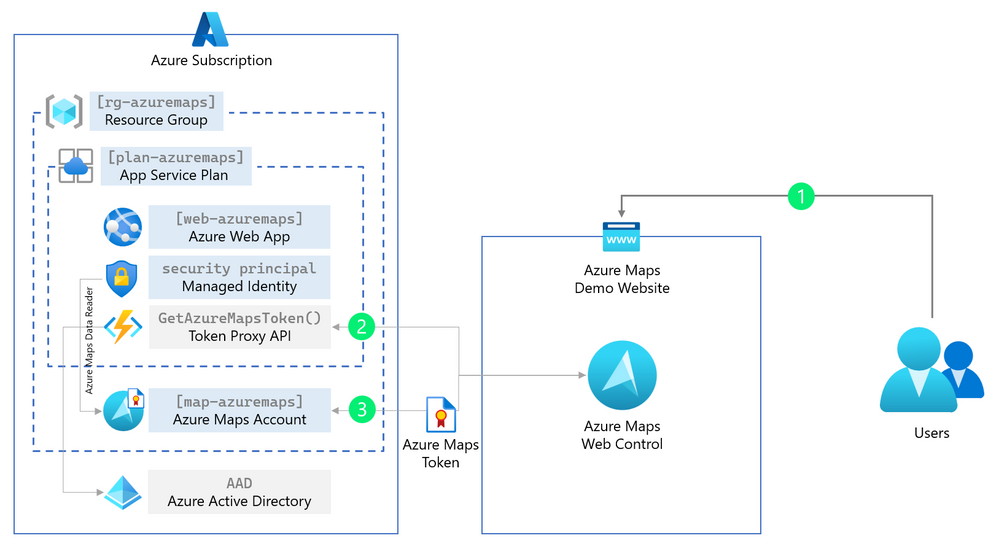
In this paragraph, we are removing the ‘shared Key authentication’ (the Azure Maps subscription key) and replacing this with a more secure and production ready managed identities for Azure Maps.


Managed identities for Azure resources provide Azure services with an automatically managed application-based security principal that can authenticate with Azure AD. With Azure role-based access control (Azure RBAC), the managed identity security principal can be authorized to access Azure Maps services.


This means that the web application can request a short-lived token to get access to Azure Maps from Azure Active Directory (AAD). Because this is managed, we do not need to know any passwords or create users. However, to get this token back to the client (the Azure Maps Web Controls runs in the users’ browser), we need to create a simple token proxy API in our web application to forward this token.


We start by creating an Azure Web App where our web application will be hosted and running. This Azure Web App then needs to have rights to get a token for Azure Maps, which we will forward using the token proxy API we create in the below steps.


2.1 Create an app service plan and web app, and change the unique name and the location for your needs.

az appservice plan create -g rg-azuremaps -n plan-azuremaps -l westeurope

az webapp create -g rg-azuremaps -p plan-azuremaps -n web-azuremaps -r "dotnet:6"


2.2 Next, we create a system-assigned identity for this web app. When finished, we are presented with the principalId, we need this in the next step. To make it simple, you can see the system-assigned identity as an account Azure manages.

az webapp identity assign -n web-azuremaps -g rg-azuremaps


2.3 Now that we have the principalId (use this in the below command) for this system-assigned identity, we can assign the role (what can this system-assigned identity do and access). In this step, we assign the role of Azure Maps Data Reader to this system-assigned identity, which means that this system-assigned identity can only read and not modify or delete data from your Azure Maps account. You already see this is way more secure than the plain Azure Maps key, which has all the rights to do everything. We also need the [YOUR_AZURE_SUBSCRIPTION_ID] from the first step.

az role assignment create --assignee "[PRINCIPAL_ID]" --role "Azure Maps Data Reader" --scope "/subscriptions/[YOUR_AZURE_SUBSCRIPTION_ID]/resourceGroups/rg-azuremaps/providers/Microsoft.Maps/accounts/map-azuremaps"


Hint to get your Azure subscription Id use the following command: az account subscription list


2.4 To get the access token from Azure Active Directory (AAD) back to the client (the web browser), we will create a simple proxy API forwarding this access token. We start by creating an API controller in our web application and adding the GetAzureMapsToken() method.


2.5 First, we must add the Azure Identity NuGet package to our web application.

dotnet add package Azure.Identity


2.6 Next, we create a new ApiController.cs file under the folder Controllers. This new ApiController.cs file will have a method GetAzureMapsToken() that is acting like a proxy for our access token. Read here more about Controllers in a MVC web application.

using Azure.Core;
using Azure.Identity;
using Microsoft.AspNetCore.Mvc;

namespace AzureMapsDemo.Controllers;

public class ApiController : Controller
{
    private static readonly DefaultAzureCredential tokenProvider = new();

    public async Task<IActionResult> GetAzureMapsToken()
    {
        var accessToken = await tokenProvider.GetTokenAsync(
            new TokenRequestContext(new[] { "https://atlas.microsoft.com/.default" })
        );

        return new OkObjectResult(accessToken.Token);
    }
}


2.7 Now that we have our token API proxy, we only need to change the authentication options for the Azure Maps Web Control. Replace in the file Views/Home/index.cshtml the authOptions with the following:


// Add authentication details for connecting to Azure Maps.
authOptions: {
    // Use Azure Active Directory authentication.
    authType: 'anonymous',
    // Your Azure Maps client id for accessing your Azure Maps account.
    clientId: '[YOUR_AZUREMAPS_CLIENT_ID]',
    getToken: function(resolve, reject, map) {
        // URL to your authentication service that retrieves
        // an Azure Active Directory Token.
        var tokenServiceUrl = "/api/GetAzureMapsToken";

        fetch(tokenServiceUrl).then(r => r.text()).then(token => resolve(token));
    }
}


managed_identity.png


2.8 We also need to update the clientId we saved when we created the Azure Maps account. (Optional) To get the Azure Maps Client Id again, use the value of uniqueId from:


az maps account show -n map-azuremaps -g rg-azuremaps


2.9 Now we can build and deploy our web application that uses managed identities for Azure Maps. We first build and create a release package.

dotnet publish --configuration Release

Compress-Archive -Path binReleasenet6.0publish* -DestinationPath release1.zip


2.10 Then we publish our release package to the Azure Web App.

az webapp deployment source config-zip -g rg-azuremaps -n web-azuremaps --src release1.zip


2.11 Open a web browser and navigate to the https://web-azuremaps.azurewebsites.net/ where the web-azuremaps subdomain is your unique name when creating the Azure Web App. The application looks like this:
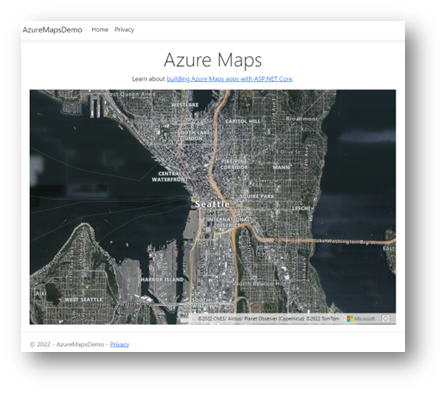


demo.png


2.12. (Optional) We can also navigate to the token proxy API https://web-azuremaps.azurewebsites.net/api/GetAzureMapsToken, copy the token, and past this in the https://jwt.ms/ tool to decode and inspect the token.


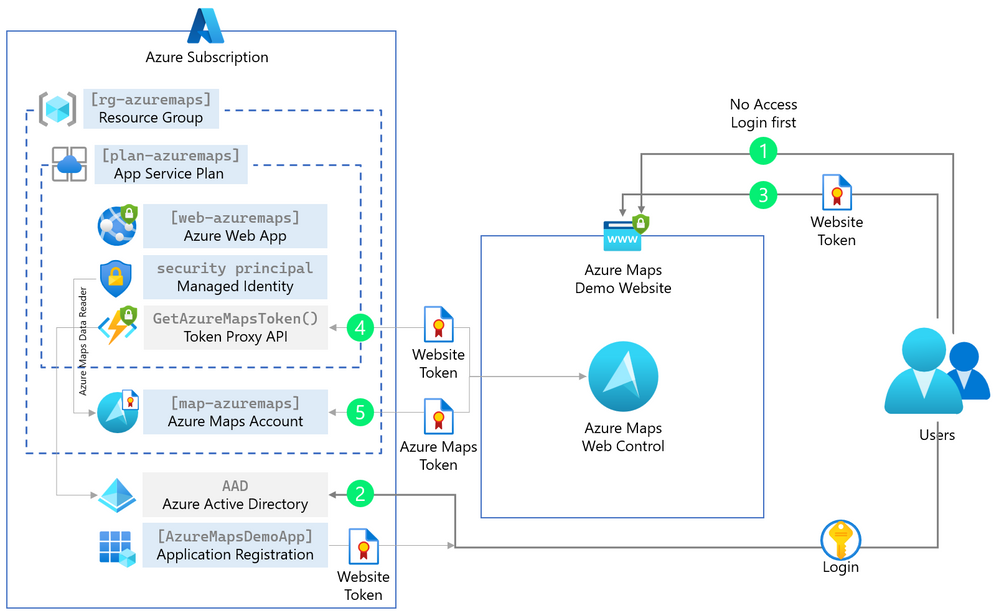
The web application we built in the last paragraph uses managed identities, and the Azure Maps Web Control uses the access token. Unfortunately, the web application and token proxy API are still accessible to everybody. Therefore, in this paragraph, we are adding the Azure Active Directory (AAD) Authentication to the web application and the token proxy API, so that only authenticated users can view the web application and use the Azure Maps Web Control in a secure way.


3.1 We start by registering an application in the Azure Active Directory, and we need this application registration later to give access to the web application and token proxy API.

az ad app create --display-name "Azure Maps Demo App" --web-redirect-uris https://web-azuremaps.azurewebsites.net/signin-oidc --enable-access-token-issuance true --enable-id-token-issuance true --sign-in-audience AzureADMyOrg


3.2 We need to add four Identity and Authentication NuGet packages to our web application.

dotnet add package Microsoft.Identity.Web
dotnet add package Microsoft.Identity.Web.UI
dotnet add package Microsoft.AspNetCore.Authentication.JwtBearer
dotnet add package Microsoft.AspNetCore.Authentication.OpenIdConnect


3.3 Next, we need to add the [Authorize] attribute to every controller in our web application. Below is our token API proxy controller as an example. Do not forget to do this also for the Home controller!

using Azure.Core;
using Azure.Identity;
using Microsoft.AspNetCore.Mvc;
using Microsoft.AspNetCore.Authorization;

namespace AzureMapsDemo.Controllers;

[Authorize]
public class ApiController : Controller
{


3.4 In the program startup file Program.cs we need to add the Authentication and Authentication logic. Replace all the default code in the Program.cs file with the following:

using Microsoft.AspNetCore.Authentication;
using Microsoft.AspNetCore.Authentication.OpenIdConnect;
using Microsoft.AspNetCore.Authorization;
using Microsoft.AspNetCore.Mvc.Authorization;
using Microsoft.Identity.Web;
using Microsoft.Identity.Web.UI;

var builder = WebApplication.CreateBuilder(args);

// Add services to the container.
builder.Services.AddAuthentication(OpenIdConnectDefaults.AuthenticationScheme)
    .AddMicrosoftIdentityWebApp(builder.Configuration.GetSection("AzureAd"));

builder.Services.AddAuthorization(options =>
{
    options.FallbackPolicy = options.DefaultPolicy;
});

builder.Services.AddControllersWithViews(options =>
{
    var policy = new AuthorizationPolicyBuilder()
        .RequireAuthenticatedUser()
        .Build();
    options.Filters.Add(new AuthorizeFilter(policy));
});
builder.Services.AddRazorPages()
    .AddMicrosoftIdentityUI();

var app = builder.Build();

// Configure the HTTP request pipeline.
if (!app.Environment.IsDevelopment())
{
    app.UseExceptionHandler("/Home/Error");
    // The default HSTS value is 30 days. You may want to change this for production scenarios, see https://aka.ms/aspnetcore-hsts.
    app.UseHsts();
}

app.UseHttpsRedirection();
app.UseStaticFiles();

app.UseRouting();

app.UseAuthentication();
app.UseAuthorization();

app.MapControllerRoute(
    name: "default",
    pattern: "{controller=Home}/{action=Index}/{id?}");
app.MapRazorPages();
app.MapControllers();

app.Run();


3.5 The last step before redeploying our secure web application is to add the details from our registered application in the Azure Active Directory into the configuration file. Open the appsettings.json file and replace this with:

{
  "AzureAd": {
    "Instance": "https://login.microsoftonline.com/",
    "Domain": "[PUBLISHER_DOMAIN]",
    "TenantId": "[AAD_TENANT_ID]",
    "ClientId": "[APP_ID]",
    "CallbackPath": "/signin-oidc"
  },
  "Logging": {
    "LogLevel": {
      "Default": "Information",
      "Microsoft.AspNetCore": "Warning"
    }
  },
  "AllowedHosts": "*"
}


azure_active_directory.png


3.6 Replace the [PUBLISHER_DOMAIN] and [APP_ID] with the values we saved in step 1 when we registered the application. Your Azure Active Directory Tenant ID [AAD_TENANT_ID], you can get with the following command:


az account tenant list


3.7 Now we can build and deploy our web application that uses Azure Active Directory to login. We first build and create a release package.

dotnet publish --configuration Release

Compress-Archive -Path binReleasenet6.0publish* -DestinationPath release2.zip


3.8 Then we publish our release package to the Azure Web App.

az webapp deployment source config-zip -g rg-azuremaps -n web-azuremaps --src release2.zip


3.9 Open a web browser and navigate to the https://web-azuremaps.azurewebsites.net/ where the web-azuremaps subdomain is your unique name when creating the Azure Web App. You are now prompted to log in with your work or school account (AAD) and give permissions.
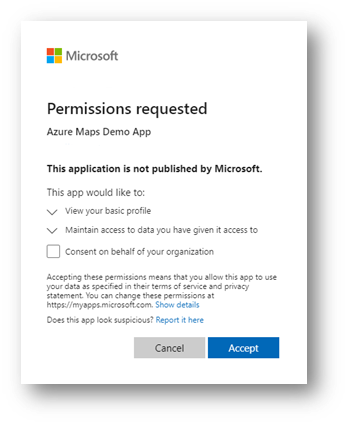

login_permissions.png


3.10 A recommended last step is to disable the use of the Azure Maps Key authentication.

az maps account update -n map-azuremaps -g rg-azuremaps --disable-local-auth true -s "G2"


When we have done all the steps in this step-by-step article, you have a protected web application in combination with Azure Maps that uses of Azure Active Directory, Azure role-based access control (Azure RBAC), and Azure Maps tokens. I recommend that you read our Authentication best practices and Azure Maps documentation. As an example, the Azure Maps Samples website uses most of the steps described in this article. Happy coding.