by Contributed | Nov 24, 2020 | Azure, Microsoft, Technology
This article is contributed. See the original author and article here.
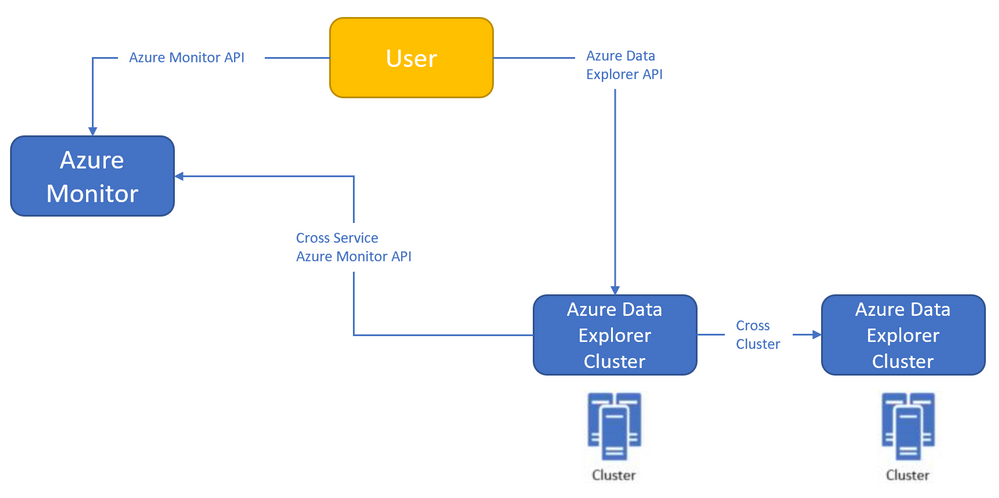
Azure Monitor<->Azure Data Explorer cross-service querying (join between LA/AI and ADX!)
This experience enables you to query Azure Data Explorer in Azure Log Analytics/Application Insights tools (See more info here),
and the ability to query Log Analytics/Application Insights from Azure Data Explorer tools to make cross resource queries. (See more info here.),
For example (querying Azure Data Explorer from Log Analytics):

Where the outer query is querying a table in the workspace, and then joining with another table in an Azure Data Explorer cluster (in this case, clustername=help, databasename=samples) by using a new “adx()” function, like how you can do the same to query another workspace from inside query text.
Both experiences are in Private Preview.
The ability to query Azure Monitor from Azure Data Explorer is open for everyone to use – no need to be allowlisted,
The ability to query Azure Data Explorer from Log Analytics/Application Insights requires to be allowlisted – We need the following to get you enrolled (you can send the info to me):
- Tenant ID
- List of the Azure Data Explorer clusters (the list is required to enable the team to modify the callout policy of that cluster, that will allow them to communicate with the proxy)
- Email address
We started a private preview program, and we are happy to add early adopters to experience the new functionality.
Please note that the product is new with limited SLA, and we estimate that we will be able to move to pubic preview with production level SLA within ~2-4 months.
by Contributed | Nov 24, 2020 | Azure, Microsoft, Technology
This article is contributed. See the original author and article here.
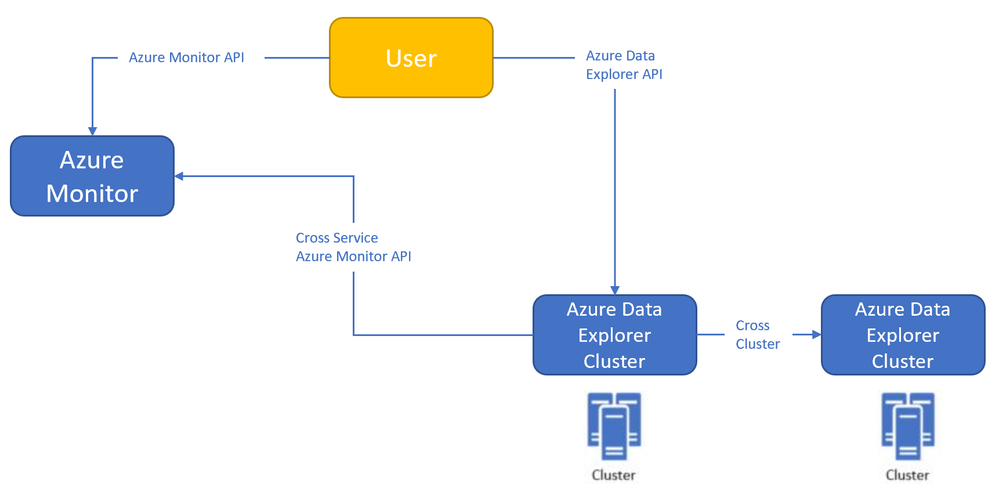
Azure Monitor<->Azure Data Explorer cross-service querying
This experience enables you to query Azure Data Explorer in Azure Log Analytics/Application Insights tools (See more info here),
and the ability to query Log Analytics/Application Insights from Azure Data Explorer tools to make cross resource queries. (See more info here.),
For example (querying Azure Data Explorer from Log Analytics):
Where the outer query is querying a table in the workspace, and then joining with another table in an Azure Data Explorer cluster (in this case, clustername=help, databasename=samples) by using a new “adx()” function, like how you can do the same to query another workspace from inside query text.
Both experiences are in Private Preview.
The ability to query Azure Monitor from Azure Data Explorer is open for everyone to use – no need to be allowlisted,
The ability to query Azure Data Explorer from Log Analytics/Application Insights requires to be allowlisted – We need the following to get you enrolled (you can send the info to me):
- Tenant ID
- List of the Azure Data Explorer clusters (the list is required to enable the team to modify the callout policy of that cluster, that will allow them to communicate with the proxy)
- Email address
We started a private preview program, and we are happy to add early adopters to experience the new functionality.
Please note that the product is new with limited SLA, and we estimate that we will be able to move to pubic preview with production level SLA within ~2-4 months.
by Contributed | Nov 23, 2020 | Azure, Microsoft, Technology
This article is contributed. See the original author and article here.
Initial Update: Monday, 23 November 2020 22:36 UTC
We are aware of issues within Log Analytics and are actively investigating. Some customers in East US may experience log data latency, data gaps and incorrect alert activation. Start time for the issue is determined to be on 11/23 at 19:28 UTC.
- Next Update: Before 11/24 03:00 UTC
We are working hard to resolve this issue and apologize for any inconvenience.
-Jayadev
by Contributed | Nov 23, 2020 | Azure, Microsoft, Technology
This article is contributed. See the original author and article here.
We saw several service request where our customer want to restore a backup taken in Azure SQL Managed Instance to SQL Server OnPremise and they are getting the following error: Msg 3169, Level 16, State 1, Line 1 The database was backed up on a server running version xx.xx.xxxx. That version is incompatible with this server, which is running version xx.xx.xxxx. Either restore the database on a server that supports the backup, or use a backup that is compatible with this server.
Msg 3013, Level 16, State 1, Line 1
RESTORE DATABASE is terminating abnormally.
That error came because Native COPY_ONLY backups taken from managed instance cannot be restored to SQL Server because managed instance has a higher database version compared to SQL Server. For more details, see Copy-only backup.
Due to this limitation, I would like to suggest to use bacpac method or if you need to have updated both environments at the same time use transactional replication.
by Contributed | Nov 23, 2020 | Azure, Microsoft, Technology
This article is contributed. See the original author and article here.
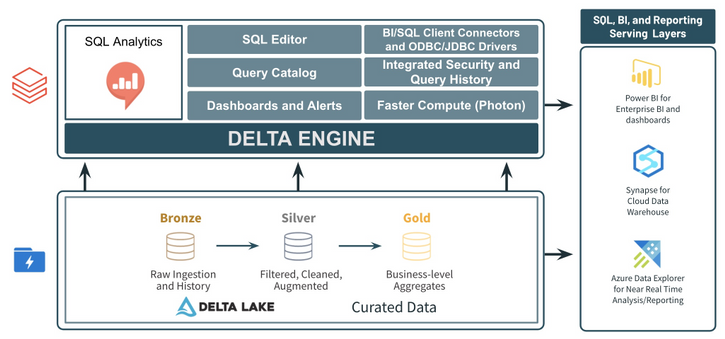
As customers continue to standardize on data lakes and the Lakehouse architecture, users expect to be able to query the data in their data lake using SQL. In fact, approximately 41% of all code executed on Azure Databricks is SQL. The SQL Analytics service in Azure Databricks was created to provide SQL users with a familiar SQL-editor experience as well as provide optimized BI connections for querying and analyzing data in the data lake.
SQL Analytics Key Features

Below are some of the key features in the SQL Analytics service in Azure Databricks:
- The first key feature to highlight is the Query Editor. This editor provides a familiar experience (vs. the traditional notebook experience in Azure Databricks) where users can explore their databases, write SQL queries with intelligent auto-complete, and view query output in either a tabular display or in a rich set of visualizations.
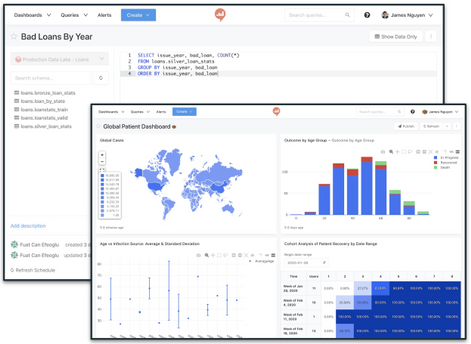
- Users can turn the queries and visualizations they create in the query editor into Dashboards. Dashboards can include content from several different queries, and also allow for basic text/markdown cells. Once created, dashboard data can be manually refreshed or refreshed on a schedule.
- In addition to dashboards, queries can be scheduled, and alerts can be created to notify users when a field in the scheduled query meets a certain threshold. Alerts can even be created for multiple columns.
- SQL Analytics also has a catalog for dashboards and queries. This catalog allows users to save their queries and dashboards and share them with other users. Users can also add tags to their saved queries and dashboards to make them easier to search, and they can even use Favorites to mark frequently used queries and dashboards.
- The SQL Endpoint in the SQL Analytics service also provides easy connectivity to other BI and SQL tools via ODBC/JDBC connections. Tools such as Power BI can connect using the native Azure Databricks connector and take advantage of faster, more efficient ODBC/JDBC drivers.
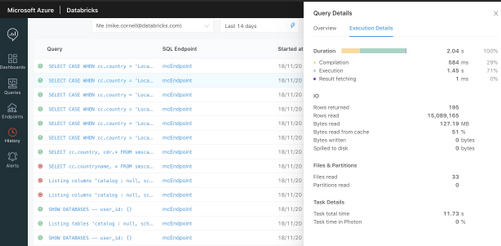
- Another exciting feature in the SQL Analytics service is the ability to see Query History details. On the History page, users and admins can see details about all the queries that have been run. This includes specifics such as the query itself, who ran the query, what endpoint did it run on, was it successful, the duration, how much time was spent compiling-executing-result-fetching, rows read/returned, files scanned, bytes read from cache, and many other details.
- The final key feature to look at in the SQL Analytics service is the compute engine. SQL Analytics uses the same Delta Engine found in the rest of Azure Databricks. This means a single, consistent set of APIs and functions across the entire workspace. The SQL Analytics service goes one step further by also making use of the Photon-powered Delta Engine. This vectorized engine was purpose built for doing SQL and data frame operations while maintaining the same single, consistent set of APIs and functions currently used across the entire workspace.
For more information about the SQL Analytics service in Azure Databricks, check out the docs page and the Databricks launch blog. The SQL Analytics service is currently in Public Preview. Contact your Azure Databricks representative to request access. Get started with Azure Databricks by joining an Azure Databricks workshop.


Recent Comments