by Scott Muniz | Jul 31, 2020 | Uncategorized
This article is contributed. See the original author and article here.
We’re very pleased to announce the availability of time-saving features in our Surface Diagnostic Toolkit for Business (SDT4B) that lets users submit support tickets directly within the tool. The new streamlined experience eliminates the need to manually enter warranty and other system information.
You can download SDT4B directly from Surface Tools for IT.
Using SDT4B
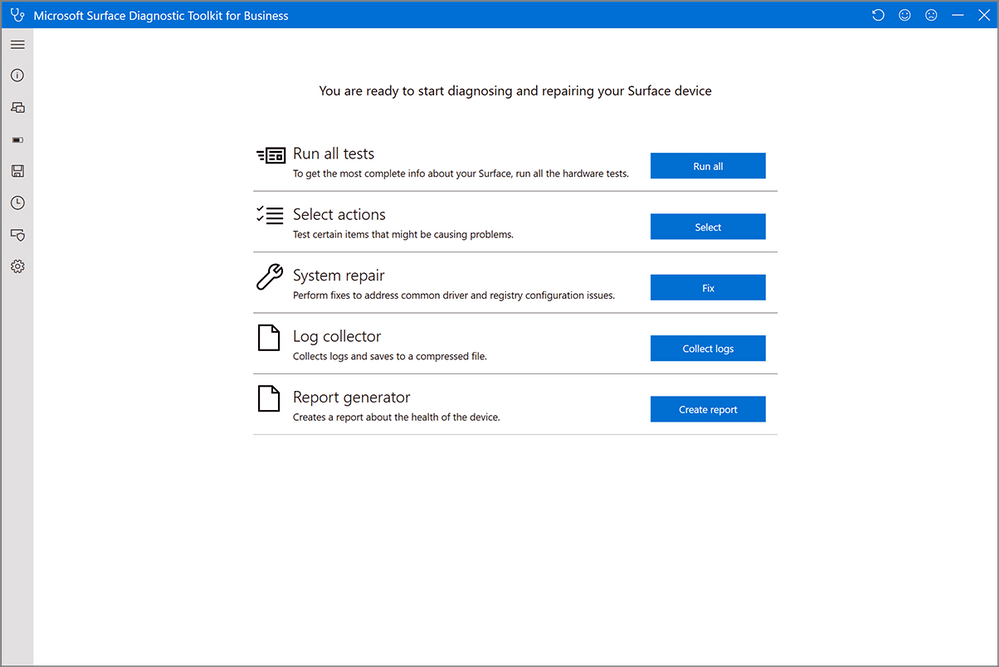
- The new tool retains the user friendly interface and first checks for the latest Surface and Windows updates. If some are missing, it proceeds to install updates automatically (subject to network policy) before continuing to the main menu:
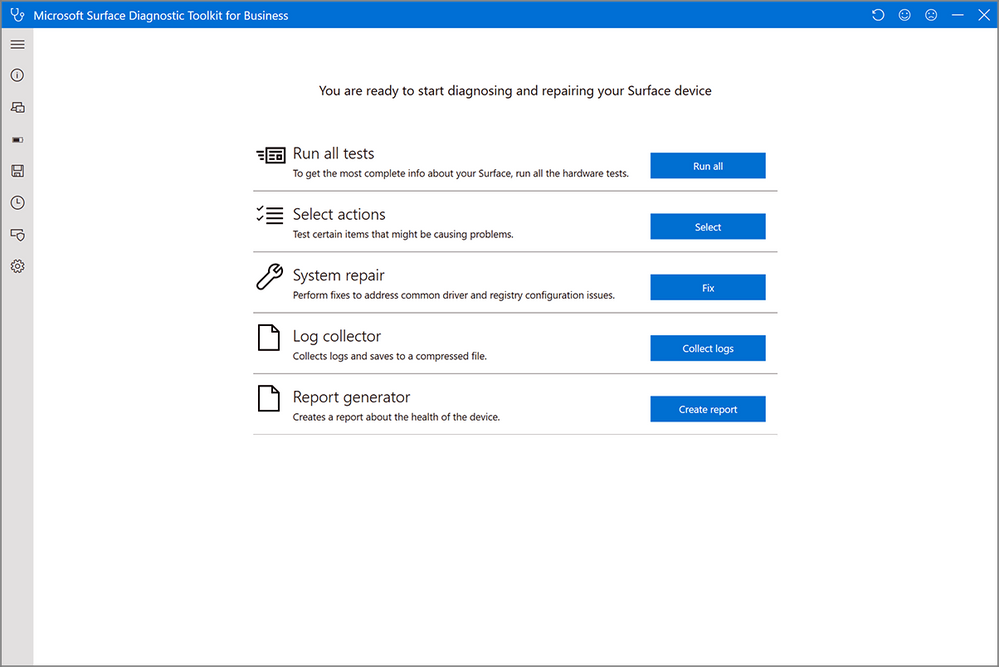
2. Run all available tests or select just the ones you need:
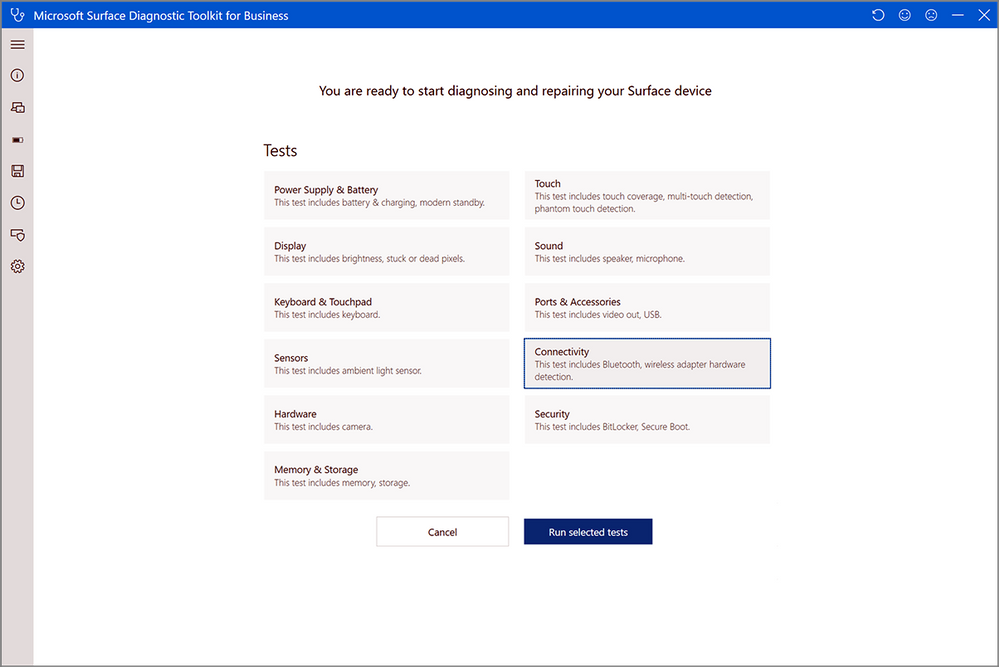
3. Running tests triggers a series of checks for detailed hardware component diagnostics. We recommend running all tests before contacting Support.
4. When all tests have finished, the tool asks you to confirm if your issue is fixed.
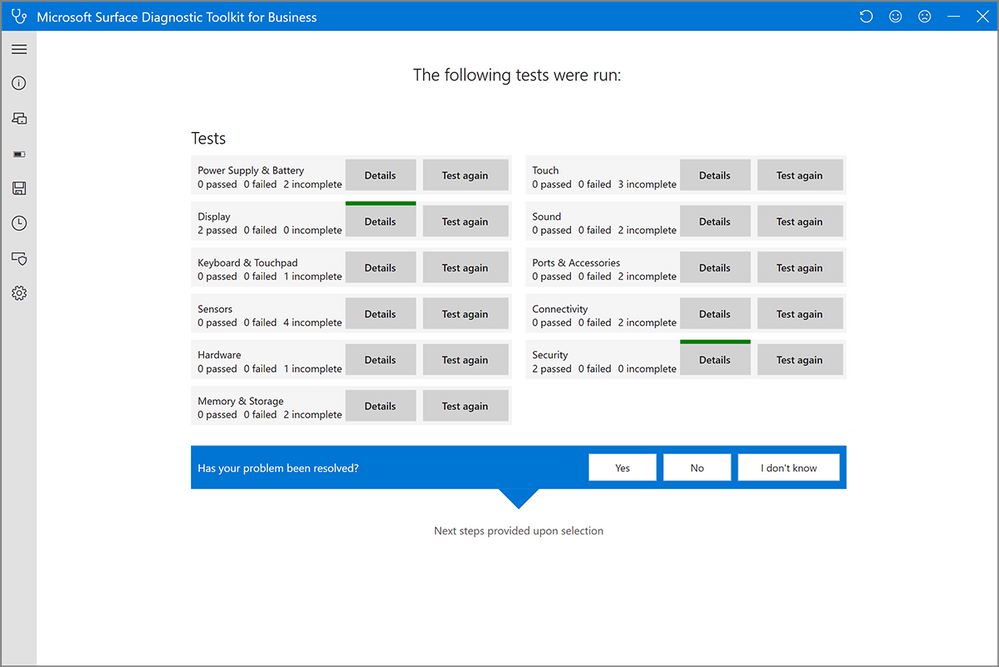
5. If the issue isn’t fixed or you don’t know, you can submit a Support ticket by selecting Contact us to Get help now.
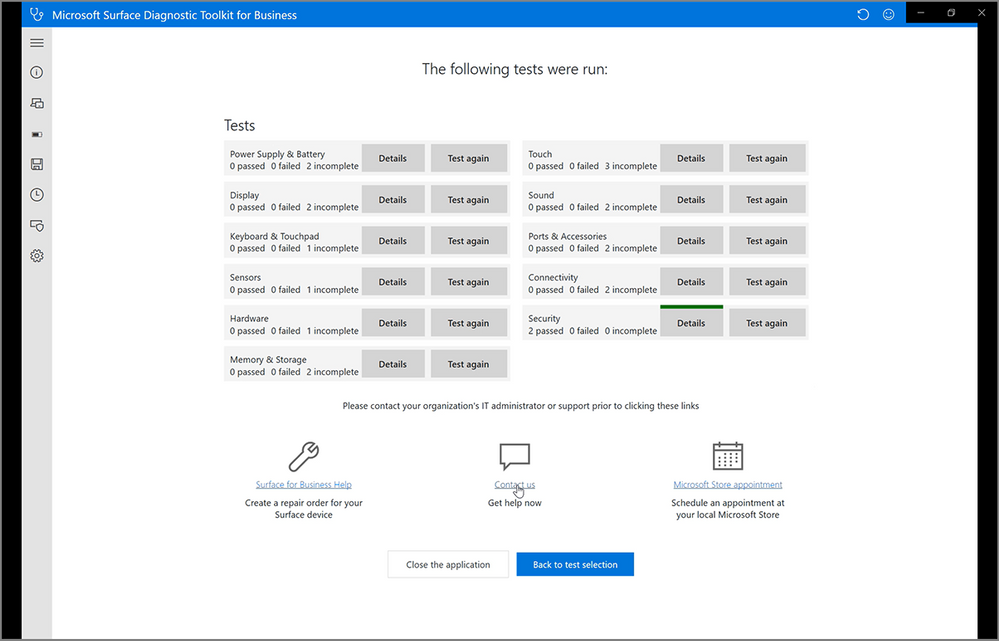
6. SDT4B then collects the appropriate diagnostic and system information about the device and pushes it into the Support ticket. This eliminates the overhead of searching for relevant files, messaging back and forth with a support engineer, having to look up warranty information, and so on.
7. The tool invites you to select from drop-down lists and briefly describe the issue. Make sure you include details of any troubleshooting steps you have tried.
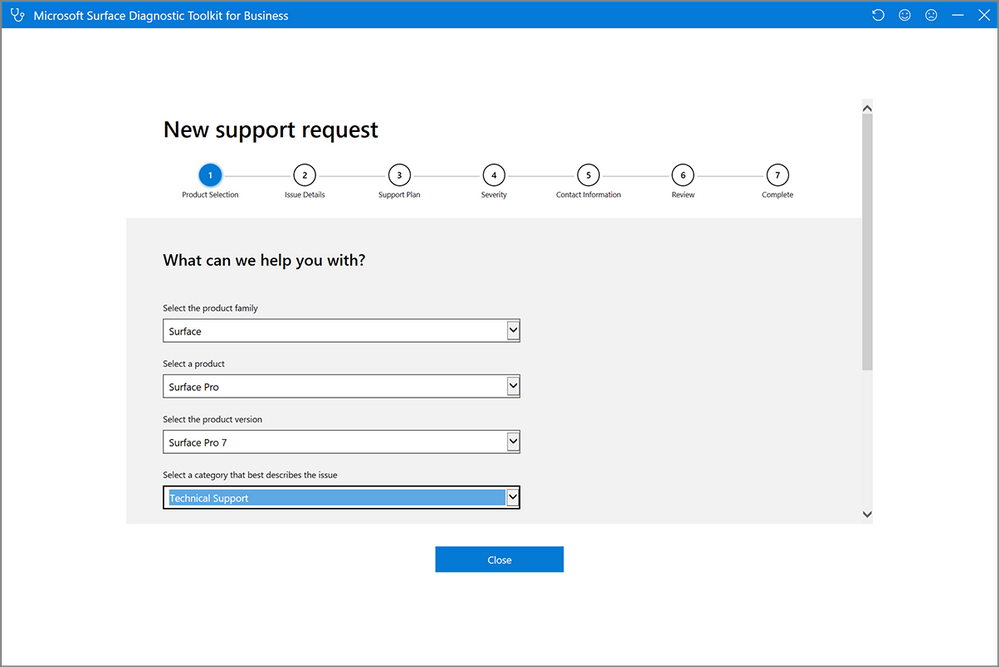
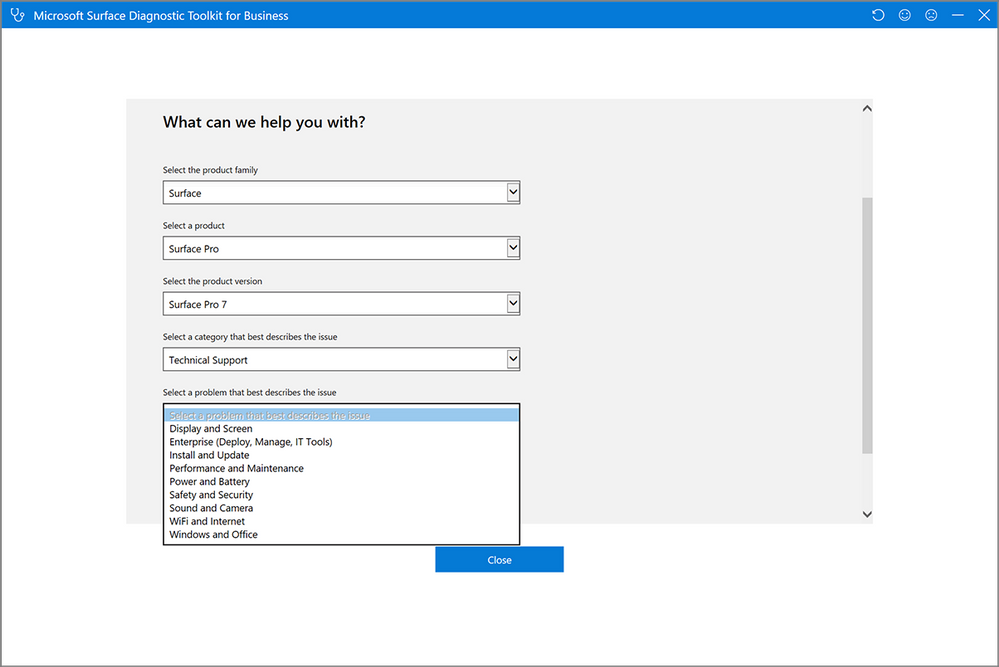
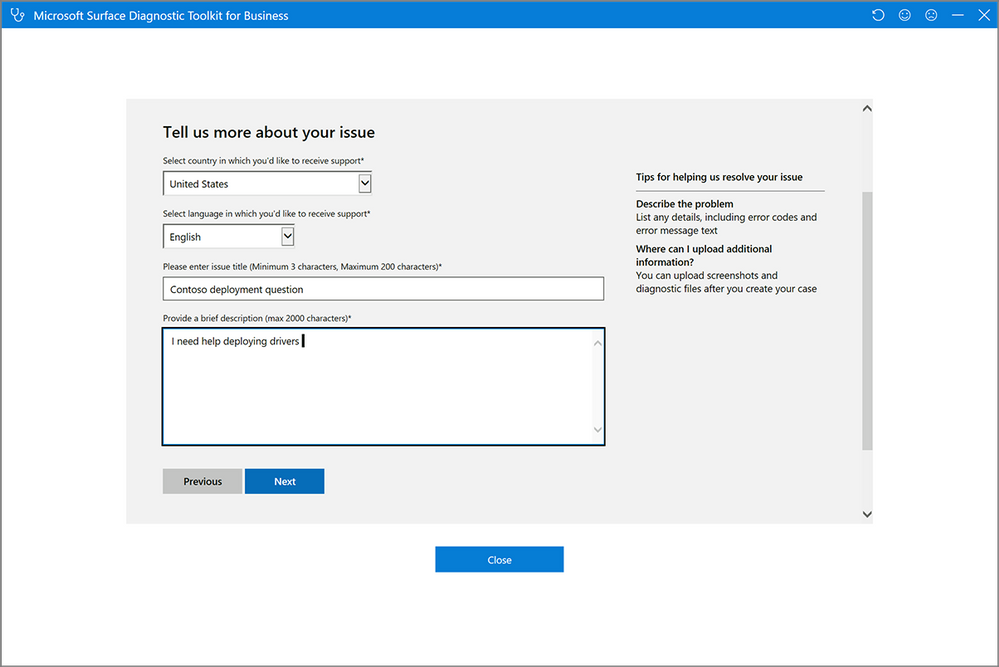
8. After entering any additional info, review the request and then select Submit.
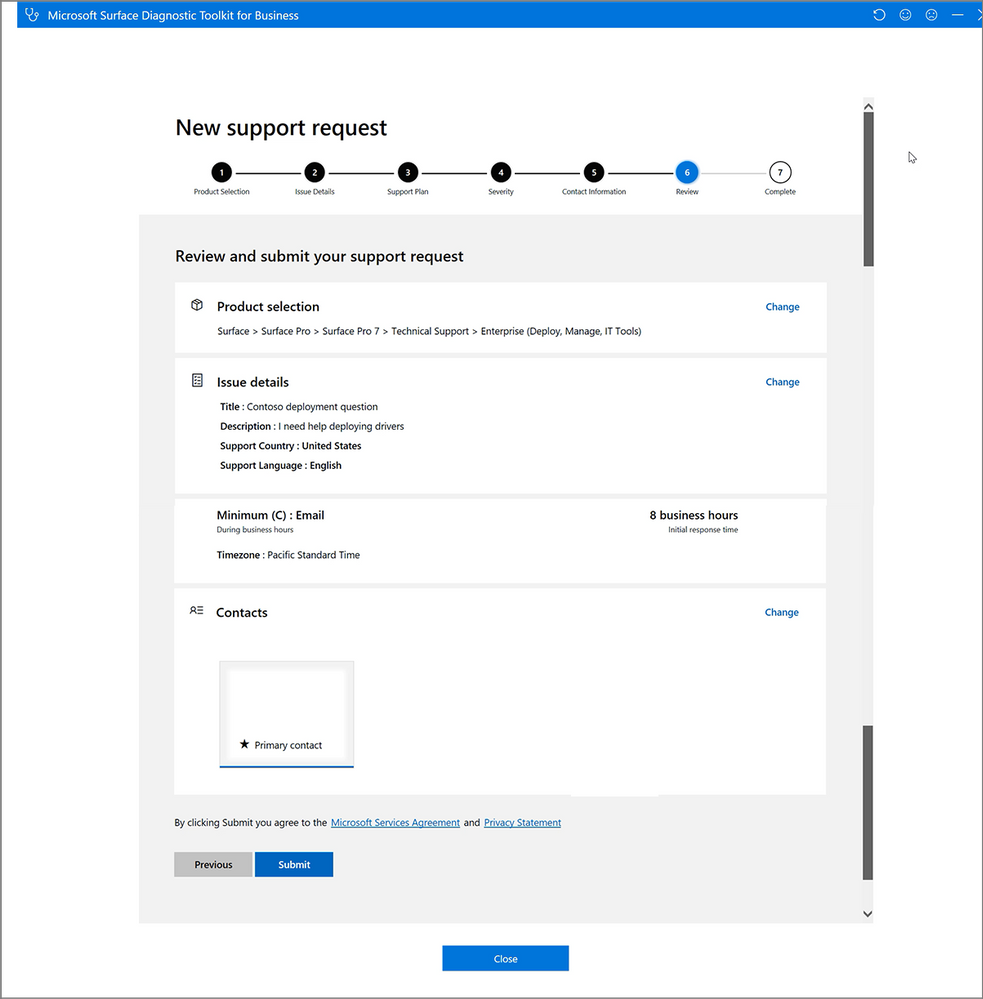
9. SDT4B collects relevant information about the device while log files are being attached.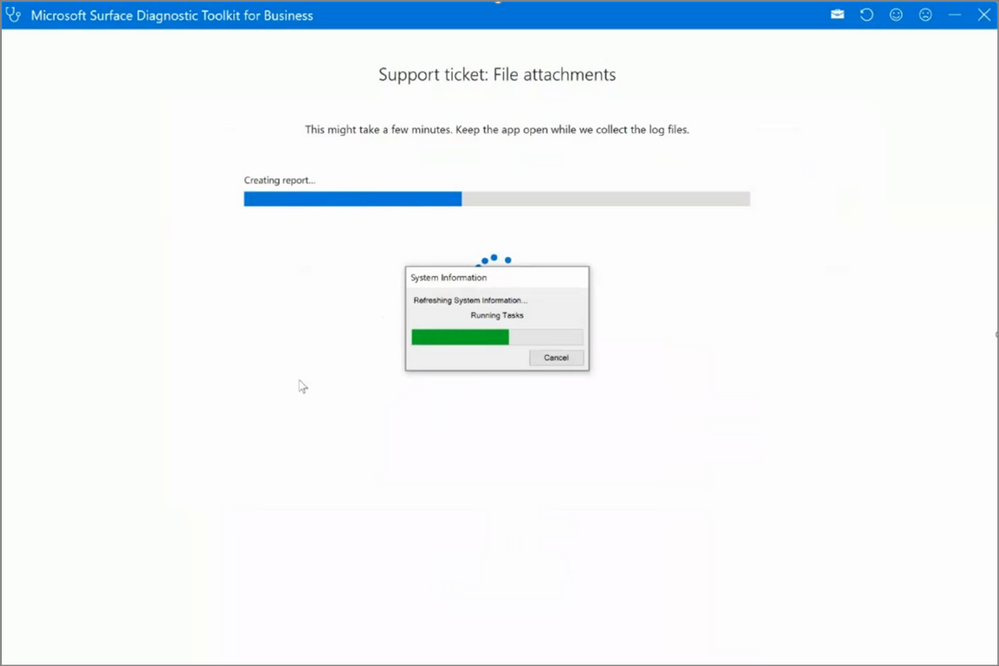
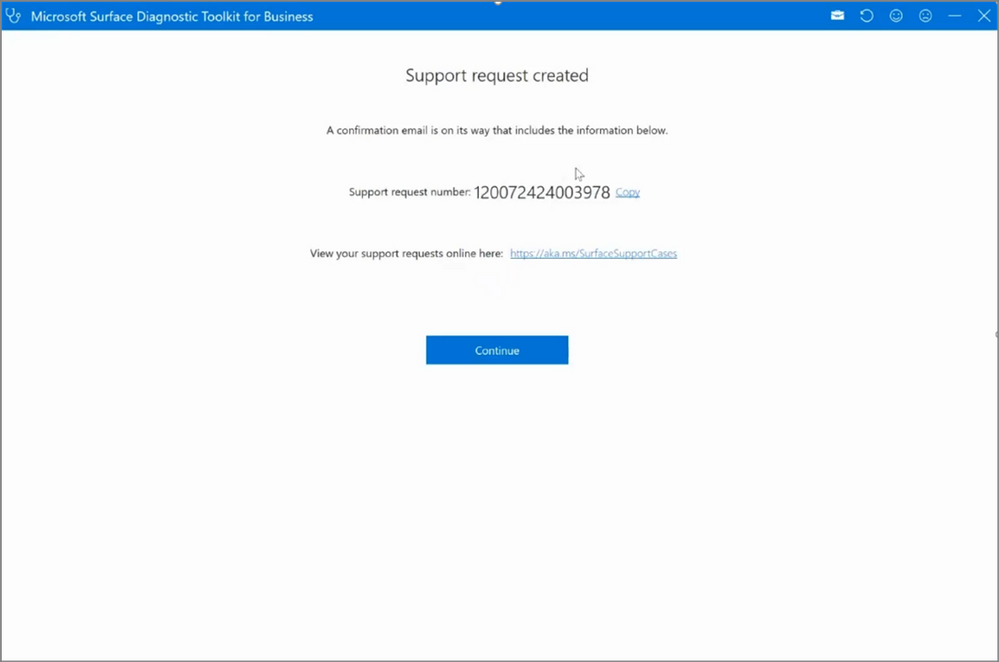
10. You can now view the support ticket and all the attached information at
https://aka.ms/SurfaceSupportCases
Note: IT admins can centrally deploy a customized version of SDT4B that includes a subset of available tests and related functionality. To learn more, see Deploy Surface Diagnostic Toolkit for Business.

by Scott Muniz | Jul 31, 2020 | Alerts, Microsoft, Technology, Uncategorized
This article is contributed. See the original author and article here.
What an action packed week with TWO great live conferences!
Create:Frontend A one of a kind live event from Microsoft about all things frontend.
.NET Conf: Focus on Microservices a free, livestream event that features speakers from the community and .NET teams that are working on designing and building microservice-based applications, tools and frameworks.
Content Round Up
How to Manage SharePoint via PowerShell – Part 1
Anthony Bartolo
In this 2-part series, we’re going to look at how we can manage SharePoint using PowerShell. This is highly focused on SharePoint Online, but if the cmdlets are available, it also applies to SharePoint on-premises. We’ll start with the basics, and then get some real-world scenarios scripts in part 2 to get you started with your daily management tasks. I’ll also you give some tips along the way to make your life easier.
How to Manage SharePoint via PowerShell – Part 2
Anthony Bartolo
In this 2-part series, we’re going to look at how we can manage SharePoint using PowerShell. This is highly focused on SharePoint Online, but if the cmdlets are available, it also applies to SharePoint on-premises. We’ll start with the basics, and then get some real-world scenarios scripts in part 2 to get you started with your daily management tasks. I’ll also you give some tips along the way to make your life easier.
ITOpsTalk: Traditional Failover Clustering in Azure
Pierre Roman
Review of announcements and their impact on running traditional Clusters in Azure
LearnTV: 92 & Pike w/ Jen Looper!
Chloe Condon
On this episode we chat with Jen Looper! 👩🏼?:school: Jen is a Cloud Advocate Lead on the Academic Team at Microsoft where she helps create curriculum, content, and experiences for educators, students, new learners looking to upskill in tech. We chat with Jen about Maya Mystery.
Abhishek Gupta
Welcome to part four of this blog series! So far, we have a Kafka single-node cluster with TLS encryption on top of which we configured different authentication modes (TLS and SASL SCRAM-SHA-512), defined users with the User Operator, connected to the cluster using CLI and Go clients and saw how easy it is to manage Kafka topics with the Topic Operator.
Using Graph Explorer Sample Data via REST
Todd Anglin
If you need a quick and easy way to access sample Graph data, you case use Graph Explorer via REST with the small “hack” discussed in this article.
React For Beginners workshop
Aaron Powell
React is a JavaScript library for creating high-performing, maintainable JavaScript applications and brings a fresh approach to thinking into the JavaScript community.
Being a declarative user interface library that is un-opinionated about the rest of your application it is easy to reason about it is simpler to learn and master the basics than a full application framework like Angular. Also thanks to the simple nature of React, the patterns and lessons you will learn are transferable to other libraries and frameworks.
A Guide to Running a Virtual Workshop
Aaron Powell
In this article I share my experience in delivering an online workshop as part of NDC Melbourne, what works (and what didn’t), the tech side of things and what is useful to know for anyone looking to run their own online workshop.
Demystifying ARM Templates – Variables
Frank Boucher
Variables are very useful in all king of scenarios to simplify things. Azure Resource Manager (ARM) templates aren’t an exception and the variable will offer great flexibility. In this chapter, we will explain how you can use variables inside your template to make them easier to read, or to use.
Learning-ARM tutorials
Frank Boucher
In this repository you will find a series of tutorial paired with videos to guide you through learning the best practice about Azure Resource manager (ARM) template.
Each video is featured in the same page as the content. The videos are part of Azure DevOps – DevOps Lab show.
How to use Azure Go SDK to manage Azure Data Explorer clusters
Abhishek Gupta
by Scott Muniz | Jul 31, 2020 | Uncategorized
This article is contributed. See the original author and article here.
This week the Azure Data Factory team is releasing the following new features in the ADF UX:
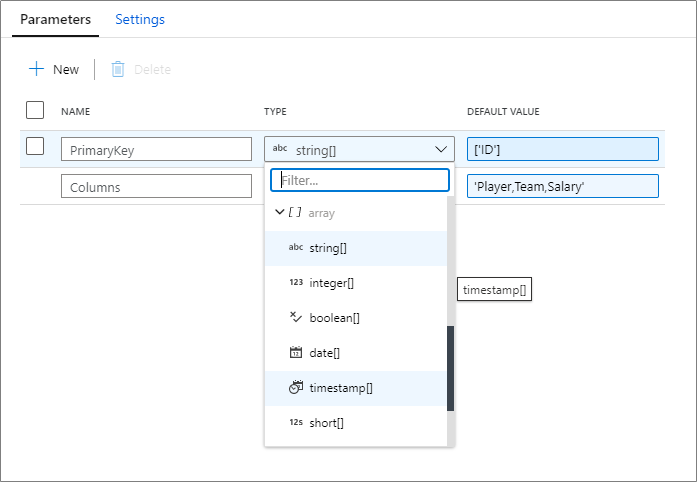
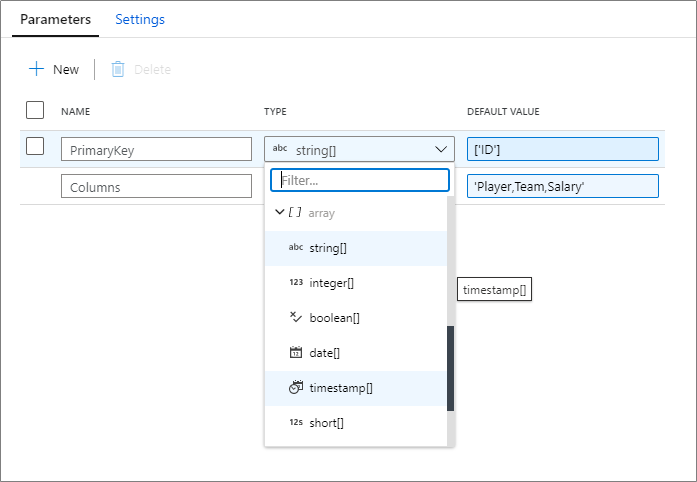
Array support for mapping data flow parameters
Array data types are now supported in mapping data flow parameters. You can pass in a list of an existing data type! Learn more on how to parameterize your mapping data flows.
Debug from job cluster
When operationializing your mapping data flows, you can now choose to run a pipeline debug run using either a running interactive debug cluster or with a just-in-time cluster using the integration runtime configuration of the activity.
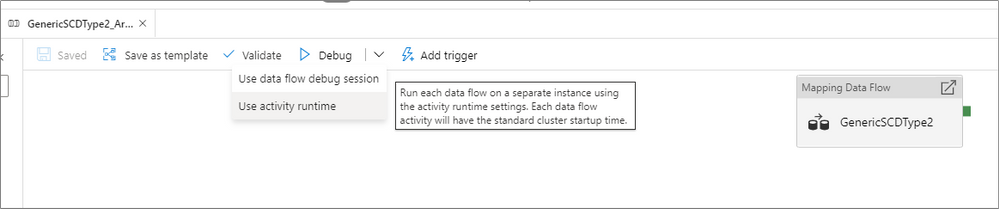
Use the data flow debug session if you are running a single data flow with a small amount of data. This allows for you to test your business logic without having to wait a few minutes for a new cluster to start up.
For more advanced pipelines that move large amounts of data or have multiple concurrent data flow that run in parallel, use the activity runtime settings to spin up a new cluster. This allows for you to test different performance tuning options before you publish or merge your changes.
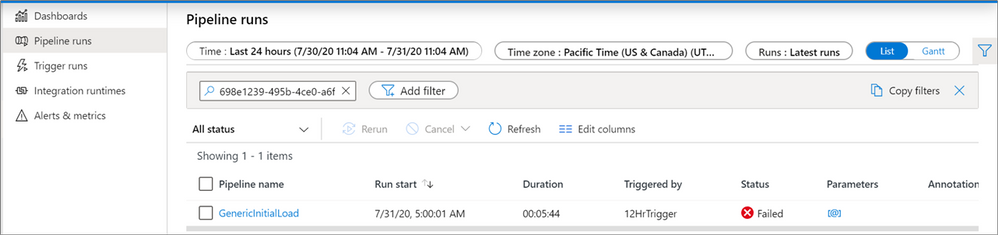
Filter by run id
When monitoring your pipelines, you can now look for an individual run by entering the run id into the filter search box. This can be useful for troubleshooting when you have many pipeline runs occurring in a factory.
Parameterize key columns
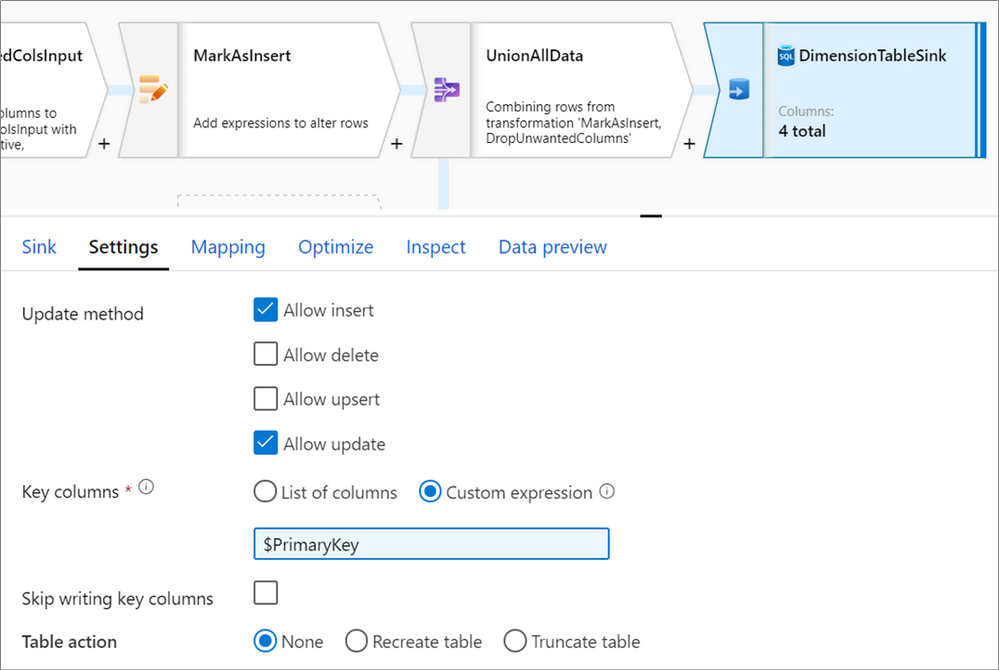
When writing to database sinks using data flows, you may have upsert, updates or deletes enabled on the destination. If so, you must specify a primary key or list of primary keys. For scenarios where the number of primary keys is dynamic, you can now enter a custom expression that takes in an array of column names at run-time. For more information, learn about the alter row transformation.
Updated feedback experience
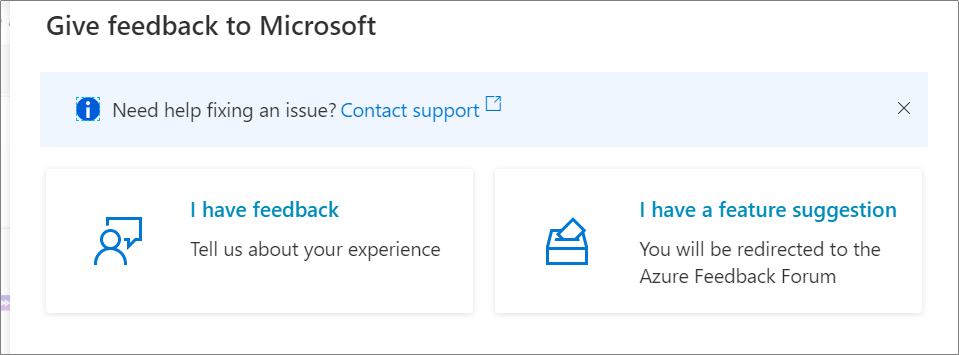
Lastly, we have updated the feedback form in the ADF UX. Feel free to let us know what you think about some of these new features!

by Scott Muniz | Jul 31, 2020 | Uncategorized
This article is contributed. See the original author and article here.
Enable Multi-Factor Authentication (MFA)
Greetings! We are publishing this blog post to continue our series for the re-vamped Azure Security Center (ASC) Secure Score, and to educate the masses on the importance of ASC and what it can offer our customers…aka YOU. The desired result is to enhance everyone’s security footprint as much as possible leveraging one of the most (if not THE most) powerful forces of compute power on the planet.
What is Multi-Factor Authentication? I won’t go into too much detail here, but it’s basically a process where a user is prompted during the sign-in process for an additional form of identification, such as to enter a code on their cellphone or to provide a fingerprint scan. It leverages something you know (like a password) and something you have (phone / hardware key) or even leverage something you are (biometrics/facial scan). To read more about what MFA is and how it works, check out this article.
Before I dive into the subject of enabling Multi-Factor Authentication for accounts, I would like to address the WHY… Time to hop on the soap box…
We all have been told identity is the perimeter for defense. But what does that mean exactly? Back in the day you could get away with deploying network boundaries and relying on them to establish a good layer of network protection. Think of a moat around a castle as an analogy. However, over the last 20 years we’ve all seen/heard the news stories about how the “moat” approach failed (and continues to fail) time and time again.
To put things into perspective, there are over 300 million fraudulent sign-in attempts to our Azure cloud services every day. Think about the impact of that number on your own Azure tenant! The reality is that “Cyberattacks aren’t slowing down, and it’s worth noting that many attacks have been successful without the use of advanced technology. All it takes is one compromised credential or one legacy application to cause a data breach. This underscores how critical it is to ensure password security and strong authentication.” Reference – here…aka the WHY.
At Ignite 2019, it was discussed that out of all the Azure tenants globally, less than 8% of them WORLD-WIDE have enabled MFA. 99.9% of attacks on accounts are prevented by MFA. Question – Where does your Azure tenant fit in to the mix?
It’s very difficult not to go on a rampage verbally right now given the number of Azure tenants we have… so I’ll climb off the soap box instead.
OK so now you should have a better understanding of why addressing the security control “Enable MFA” is critical to the overall security of your Azure tenant, and in a lot of cases…your on-premises environments can be positively impacted too.
As you learned in this blog post (blog series), recommendations are grouped in Security Controls. This one control is probably considered one of the most important if not THE most important control to activate. Afterwards, your Secure Score will elevate 10 full points! I know it doesn’t sound like a lot, but with the new version of Secure Score it’s quite a positive impact, and is the largest number equated to a security control. Depending on your own tenant, it could be an 18% adjustment!
Note: For more information on Secure Score info, read this article here, and pay particular attention on how to ensure you’re getting the maximum points you can.
Also, the security control “Enable MFA” relates specifically to Azure MFA, not a 3rd party MFA provider. If you wanted to leverage a 3rd party MFA vendor, then we’d be addressing integrating one into an on-premises instance of ADFS in a Hybrid scenario. That’s not the topic of discussion and there’s plenty of available online references for that. Either way, MFA needs to be enabled regardless of whichever direction you choose for your organization.
Pertaining to licensing requirements, you can find all pertinent information regarding that here. There is a ‘free’ option to protect your tenant admin accounts, however it still comes with a cost. In order to take advantage of ‘free’ then you’re limited to either the global administrator accounts of your tenant…OR…your tenant’s got the “security defaults” turned on.
Without going into too much detail on “security defaults,” I will mention that if they are enabled on your tenant, the setting disables regular conditional access policies, then forces all users to have MFA after 14 days (amongst a few other enforcements). So be cognizant of that. Read up and learn more about “security defaults” here.
I believe all the main bases are covered in the blog opening so let’s get to the “meat and potatoes” of the topic at hand. Prior to doing anything, it’s important to make sure the environment is staged, set, and ready to go. Make sure you follow all the planning / recommended steps (found here) to ensure the MFA rollout is successful and issues are limited.
Security Controls
Let’s get going on the actual security controls now. Each one is actually a built-in policy definition contained within the Azure Portal.

MFA should be enabled on accounts with owner permissions on your subscription.
First up is the control under “Enable MFA” section in ASC Recommendations related to OWNER permissions for the subscription. This is to help enforce the control to prevent a breach of accounts or resources.
The last thing you want to do is allow some account that has complete ownership of your subscription to login without another factor of authentication. Simply letting a user account login with a password alone begs an attacker to compromise your tenant through a variety of attacks, taking full control of ALL accounts and ALL resources within the subscription.
Please…turn this on ASAP if it’s not already!!! You want to force MFA each and every time the subscription is accessed by an account with owner permissions.
MFA should be enabled on accounts with write permissions on your subscription.
Just like the previous mentioned control, this one too prevents a breach of accounts or resources on your subscription. Same methodology applies but the differences lie within permission levels. Even being able to write against a subscription allows an attacker to make unauthorized changes to accounts and resources without being an owner.
Again, I can’t stress enough the importance of enabling MFA and ensuring these controls are met!
On the path to Enabling MFA
There are a couple of ways to enable Azure MFA against your tenant. One way is to utilize conditional access policies, and the other is simply to turn it on against your user accounts. (Don’t forget about the caveat regarding “security defaults” mentioned above.) The screenshots show the latest GUI / portal interaction (as of the time of this blog post), but of course you can leverage PowerShell if you so choose.
Let’s look at the process for owner permissions.

Under the ASC Recommendations, simply click the link to initiate the process to enable MFA on owner permissions. It’ll take you to a subscription list page, then click the link associated with your subscription. Next, it’ll display the owner(s) of the subscription on the right side like this:
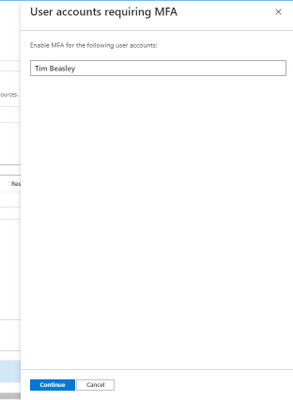
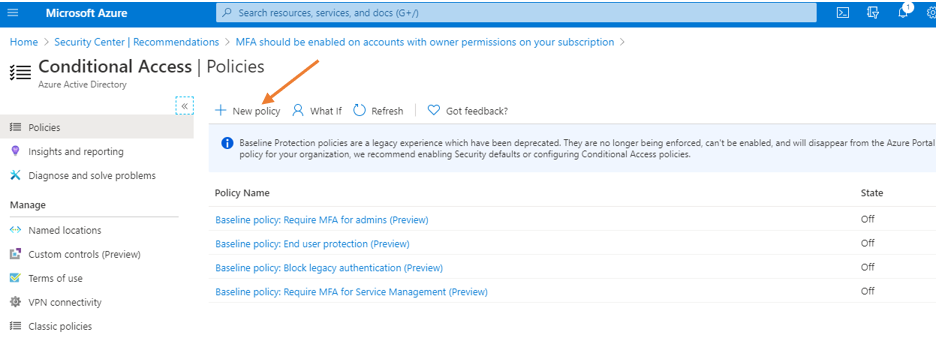
Click the continue button, and it redirects to the “conditional access policies” of the subscription.
Conditional Access Policy Method
Of the 2 methods mentioned previously, Microsoft recommends using conditional access policies (CAP) to enable MFA for users. Conditional Access policies enforce registration, requiring unregistered users to complete registration at first sign-in, an important security consideration. They give you the most flexibility and granularity when leveraging MFA in the environment. CAPs do require licensing of at least AAD P1, so keep that in mind. To begin your journey towards using CAPs and consuming gobs of relevant information, start here.
Given the flexibility and customization available for CAPs, the configurations could vary, so it’ll depend on what’s available for your tenant. Good news is that there’s “common” policy settings available for you to take advantage of that I’ll be addressing in this post. The common policies available are:
Regarding the ones with the asterisk * – if you enable all 4 that’s basically the same thing as doing the security defaults. Each link for the common policies above will take you directly to the article on how to set up and configure each one.
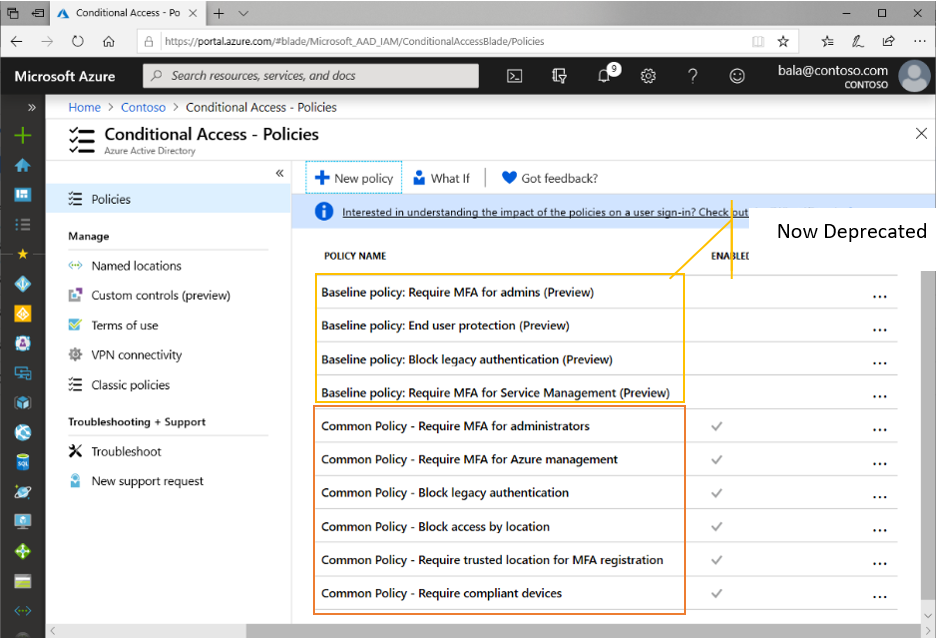
Reference Material – here.
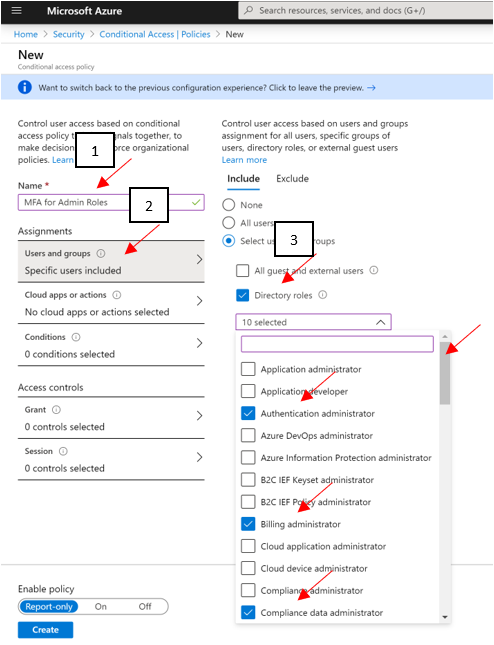
Follow the above links for guides at enabling policies. At a bare minimum, Microsoft recommends you enabling MFA across administrative roles. Here’s an example of doing exactly that using the preview features (as of 7/2020):
- Sign in to the Azure portal as a global administrator, security administrator, or Conditional Access administrator.
- Browse to Azure Active Directory > Security > Conditional Access.
- Select New policy.
- Give your policy a name. We recommend that organizations create a meaningful standard for the names of their policies.
- Under Assignments, select Users and groups
- Under Include, select Directory roles and choose the following roles at a minimum:
- Authentication Administrator
- Billing administrator
- Conditional Access administrator
- Exchange administrator
- Global administrator (OWNER)
- Helpdesk administrator
- Password administrator
- Security administrator
- SharePoint administrator
- User administrator
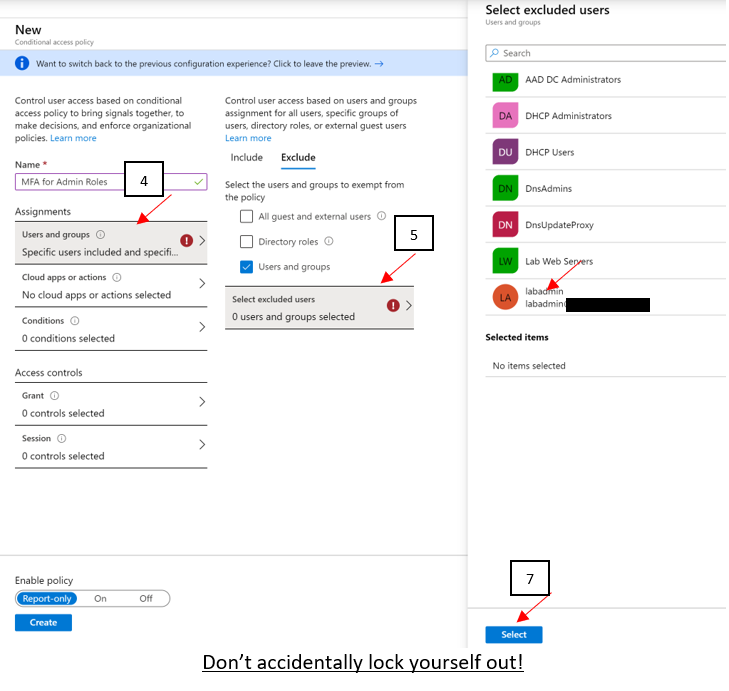
- Under Exclude, select Users and groups and choose your organization’s emergency access or break-glass accounts.
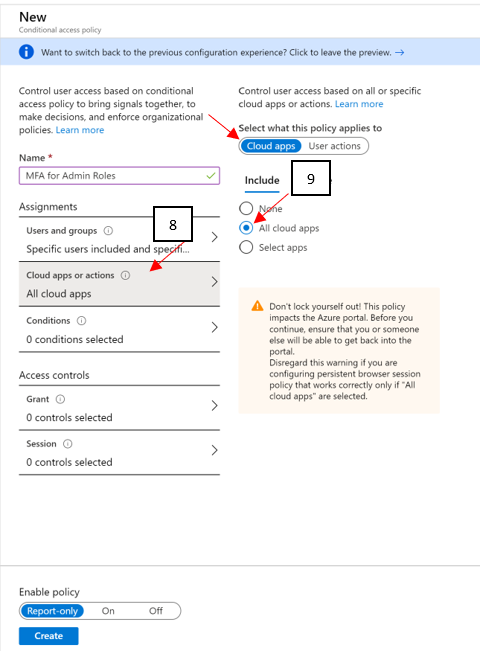
- Under Cloud apps or actions > Include, select All cloud apps.
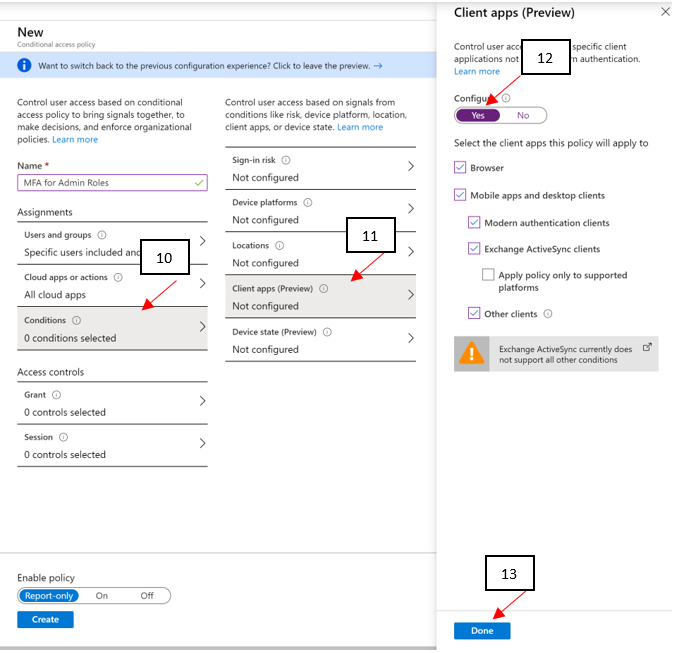
- Under Conditions > Client apps (Preview), set Configure to Yes. Click Done.
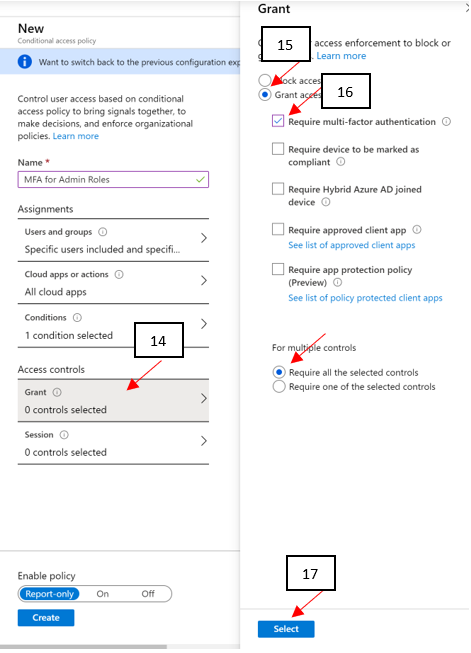
- Under Access controls > Grant, select Grant access, Require multi-factor authentication, and select Select.
- Confirm your settings and set Enable policy to On.
- Select Create to create to enable your policy. (PAY ATTENTION TO THE WARNING!)
Lastly, depending on the option selected below could impact your currently logged on account or not. Be mindful on your selection!
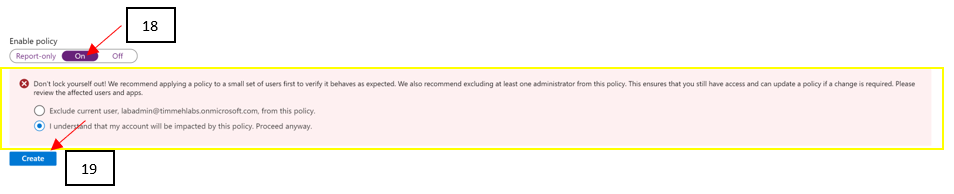
19 clicks of the mouse, and you’re done setting up MFA for administrative roles using the preview method of CAP as of 5/2020! You can see how customizable CAPs can be and just think of the flexibility you can leverage in your own environment. Just be careful you don’t accidentally lock yourself out!!
Direct User Method
If CAPs aren’t available to you at this time, then here’s a snippet of the process on simply enabling MFA against user accounts directly. Reference article.
Log into your Azure tenant (https://portal.azure.com), click Azure Active Directory, and go into Users, and then finally All Users. On the top menu bar, you’ll find “Multi-Factor Authentication.” Click it to open a new window to display the MFA user status.

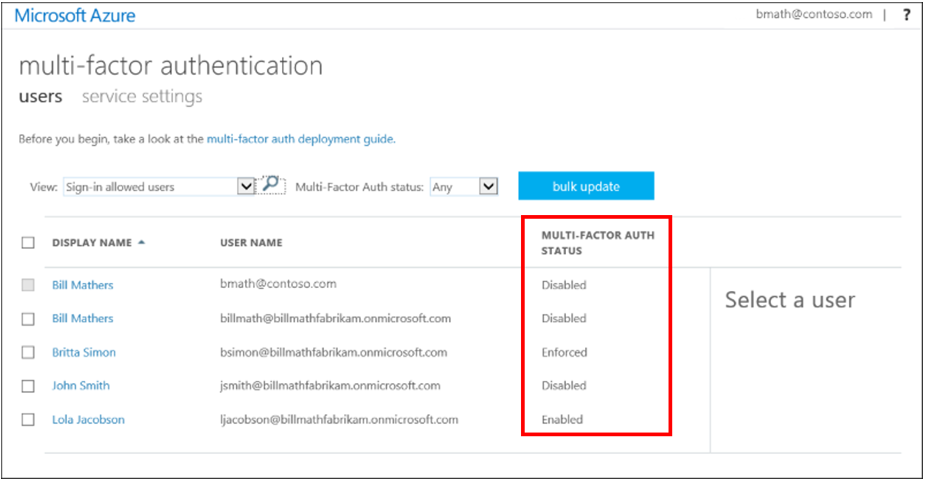
Now that you’re on the MFA page for users, you can select all users who are OWNERS or WRITERS of the subscription, and roll out MFA in one fail swoop (Doing so for ALL users in the environment isn’t really recommended, you want to do that in chunks starting with the privileged accounts) or you can select individual accounts to start enabling MFA against for testing.
PRO TIP – Don’t move users directly to the Enforced state. If you do so, non-browser-based apps stop working because the user hasn’t gone through Azure Multi-Factor Authentication registration and obtained an app password. Only set them to Enforced after they’ve gone through the entire process.
Easy!
PRO TIP – Disabling MFA. We get a lot of customer questions that involve disabling MFA and the correct method to do that. Ultimately if you disable MFA at the subscription level…YOU MUST disable it at the management group as well or it won’t work!
This is the way you SHOULD be doing things: https://techcommunity.microsoft.com/t5/azure-security-center/centralized-policy-management-in-azure-security-center-using/ba-p/1276331
Next Steps
Obviously, you should get working on getting MFA enabled! Get moving on increasing that Secure Score and preventing bad actors from taking advantage of this attack vector on your tenant! We hope to see the statics jump dramatically in the direction of more customers leveraging MFA for sure!
To wrap up this blog post, I’d like you all to keep in mind this is just a small fraction of what ASC and the Secure Score can offer our customers to drive their security posture through the roof. We’re just getting started and this basically translates into some robust steps you can leverage to increase your own comfort level in protecting your environments / assets.
I hope you enjoyed this article and learned something that will assist you in the continued fight of cyber-security. Please continue to enjoy our ASC Secure Score blog series and I look forward virtually seeing you all in the next one. Until then…
GET STARTED ON ENABLING MFA IN AZURE! :smiling_face_with_smiling_eyes:
- The main blog post to this series (here)
- The DOCs article about Secure Score (this one)
Reviewer:
Yuri Diogenes, Senior PM CxE ASC Team
by Scott Muniz | Jul 31, 2020 | Alerts, Microsoft, Technology, Uncategorized
This article is contributed. See the original author and article here.
Greetings!
We’re back with another mailbag, this time focusing on your common questions regarding Azure AD Identity Protection. Security is always top of mind and Identity Protection helps you strike a balance between the usability required for end users to be productive while protecting access to resources. We’ve got some really great questions from folks looking to improve the effectiveness of their alerts and to increase their overall security posture. We even have a sample script for you! I’ll let Sarah, Rohini and Mark take it away.
—–
Hey y’all, Mark back again for another mailbag. You’ve been asking some really great questions around Azure AD Identity Protection. So good, in fact, I’ve kept putting this off for an embarrassingly long time. Then I called in for some help from some excellent feature PMs Sarah Handler and Rohini Goyal.
Question 1: I want to bulk dismiss a lot of Users that have risk. How can I do this?
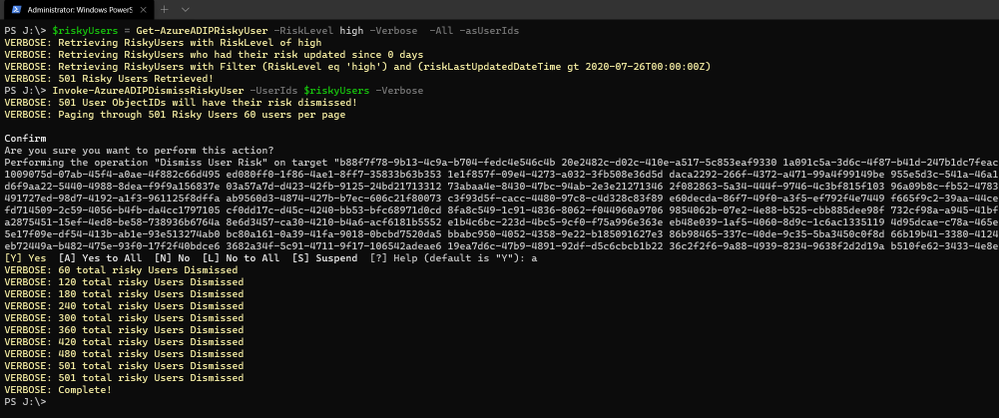
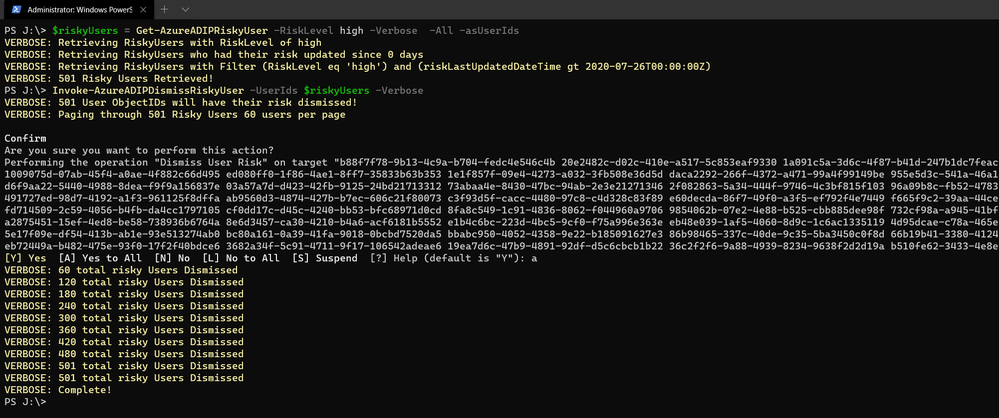
Make sure that before you bulk dismiss users, you’ve already remediated them or determined that they’re not at risk. Then we have a GraphAPI call you can make to dismiss the user risk. We’ve put together a little sample script to help you with doing bulk dismissal.
We’ve provided a sample PowerShell script and examples to enumerate risky users, filter the results, and dismiss the risk for the collection.
Question 2: How do we detect TOR or anonymous VPN? Is it based off exit node or are there ways to bypass this?
We detect anonymizers in a few ways. For Tor, we continually update the list of Tor exit nodes. For VPNs, we use various third-party intelligence to determine whether an anonymizer has been used.
Question 3: How should we handle false positives?
There are two ways to address false positives: giving feedback on false positive detections that occur and reducing the number of false positives that get generated. If while investigating risky sign-ins you find a detection to be a false positive, you should mark “confirm safe” on the risky sign-in. There are two ways to prevent false positives in Identity Protection. The first is to enable sign-in risk policies for your users. When a user is prompted for a sign-in risk policy with MFA and passes the MFA prompt, it gives feedback to the system that the legitimate user signed in and helps to familiarize the sign-in properties for future ones. The second is to mark common locations that you trust as trusted locations in Azure AD.
Question 4: What is the best practice for whitelisting known locations?
First, you want to make sure you’re putting in your public egress end points. This helps with our detection algorithms. We’ve recently increased the named locations to 195 named locations with 2,000 IP ranges per location. You can read more in our docs.
But we know that many times networking teams make changes and don’t notify the Azure AD Admins. It’s good to have a process to work through the Sign-In logs and look for IP ranges that are not part of your named locations and add those as well as remove IPs that no longer are your egress point.
Question 5: Does AAD Leaked credentials connect to Troy Hunt’s Have I been Pwned API? Do I need to supplement with other scans?
Leaked credentials detection does not connect to Troy Hunt’s “Have I been Pwned”. Troy does an excellent job with his service correlating and collecting public dumps. Leaked credentials alerts take into account those public dumps as well as non-public dumps we call out in our docs, more info here. If you want to supplement the Azure AD leaked credentials alerting with other feeds, that is entirely up to you.
Question 6: When I turn on Password Hash Sync does the leaked credential alert on existing ones or only on leaks going forward?
Leaked credentials will only detect on leaks going forward. When we find clear text username and passwords pairs, we don’t keep them. We process them through and delete them. We’ve updated our documentation to call this out and provided more info.
We hope you’ve found this post and this series to be helpful. For any questions you can reach us at AskAzureADBlog@microsoft.com , the Microsoft Forums and on Twitter @AzureAD , @MarkMorow, @Sue_Bohn, and @Alex_A_Simons
-Rohini Goyal, Sarah Handler and Mark Morowczynski

by Scott Muniz | Jul 31, 2020 | Uncategorized
This article is contributed. See the original author and article here.
See what’s next in our Office Hours series, catch up on our Microsoft Inspire announcements and sessions, hear more about Project Cortex on the Intrazone, tell us more about your expertise finding scenarios, learn about our Microsoft 365 Content Services partners and how you can join the program, and see how organizations are using Microsoft 365 to stay connected.
See what’s coming up on Office Hours
Tune in on August 12 (download invite) to learn more about the business case for Project Cortex. We’ll discuss how Project Cortex can save your organization time and lower operational costs.
Did you miss an Office Hours meeting and check the schedule? Learn more about the series and upcoming meetings, and view the recaps and recordings for all past meetings on the Project Cortex Office Hours page.
Catch up on Project Cortex at Microsoft Inspire 2020
At Microsoft Inspire 2020, we announced new taxonomy features, gave an update on Project Cortex availability, and revealed the initial set of Project Cortex launch partners.

Read the blog post, check out the July 22 Office Hours meeting recap, or watch a session below to learn more about knowledge and insights with Project Cortex at Microsoft Inspire 2020.
See what’s new
The Intrazone: Prefrontal Project Cortex
Hear more about the latest Project Cortex updates – digging into the manage metadata service (MMS), classification, and knowledge curation – to learn how you and your company will further the union between people, content, and work processes. Mark and I talk with CJ Tan and Sean Squires, principal program managers on the Project Cortex team in Microsoft 365 engineering.
Tell us more
This week we’re offering an opportunity for you to help influence one of the potential future investment areas of Project Cortex. We’re looking to better understand what expertise finding scenarios are important to customers, and more specifically, which ones Microsoft can help with by providing better tools and processes. Let us know your thoughts in this brief (3 minutes!) survey.
Say ‘hello’ to new charter partners
We’re pleased to announce the addition of several charter partners to the Microsoft 365 Content Services Partner Program for FY20 and highlight some of their recent projects. Our partners help customers worldwide realize the value of Microsoft 365 – from migrating customers off legacy platforms to helping them implement and extend the capabilities of Microsoft 365 Content Services.
Interested in joining this partner program? We’re accepting applications now through August 31 for the Microsoft 365 Content Services Partner Program. Read the announcement to learn more about the program and how to apply. We’re also hosting a program overview meeting (download meeting invite) on Tuesday, August 4 at 8am PDT, to walk partners through the program benefits, requirements, and application process.
Learn about our customers and partners
Read how Microsoft 365 Content Services partners help organizations stay connected in a changing world. Below are a few customer stories from our partners:
For more related stories, see our Case Studies library on the Microsoft Tech Community Resource Center.
Visit the Project Cortex resource center to learn more.



Recent Comments