
by Scott Muniz | Aug 3, 2020 | Uncategorized
This article is contributed. See the original author and article here.
While we recently made generally available the ability to use sensitivity labels in SharePoint Online (SPO) and the concept of container labels – i.e. the ability to apply a label to a SPO site, Teams site and O365 Group we don’t plan to stop there.
In this webinar @Sanjoyan Mustafi explains the new features we have coming up in this area.

References:
This webinar was presented on Tue July 14th, 2020, and the recording can be found here.
Attached to this post are:
- The FAQ document that summarizes the questions and answers that came up over the course of both Webinars;
- A PDF copy of the presentation; and
- Steps to setup MFA & granular CA policy for SharePoint sites Preview (referenced in the last slide of the deck).
Thanks to those of you who participated during the two sessions and if you haven’t already, don’t forget to check out our resources available on the Tech Community.
Thanks!
@Adam Bell on behalf of the MIP and Compliance CXE team
by Scott Muniz | Aug 3, 2020 | Alerts, Microsoft, Technology, Uncategorized
This article is contributed. See the original author and article here.
In the past few months, we have worked on an improved integration of Microsoft Defender ATP alerts into Azure Sentinel. After an initial evaluation period, we are now ready to gradually roll out the new solution to all customers. The new integration will replace the current integration of MDATP alerts which is now in public preview (see details below). The changes will occur automatically on 3/8/2020 and require no configuration from customers.
Improved alert details and context
The new integration has significant advantages in improved details and context, which are meant to facilitate and expedite triage and investigation of Microsoft Defender ATP incidents in Azure Sentinel. The integration will provide a more detailed view of each alert and is designed to capture changes on alert status over time. The upgrades include increased visibility into investigation and response information from MDATP as well as a link to provide an easy pivot to see the alert in the source portal. Finally, more information on entities is provided in a more concise format so analysts can have a broader picture of the involved entities.
It is important to note that the new integration does make minor changes to the structure of alerts from Microsoft Defender ATP. A summary of the changes is presented below (table 1), and a full description of the changes, together with a sample alert, can be found in the attached file. Any scheduled rules that use one of the changed fields might be affected.
A new MDATP API
The integration is based on the newly released MDATP Alerts API. Details on the new API can be found here.
Improved discoverability of the Sentinel integration in MDATP
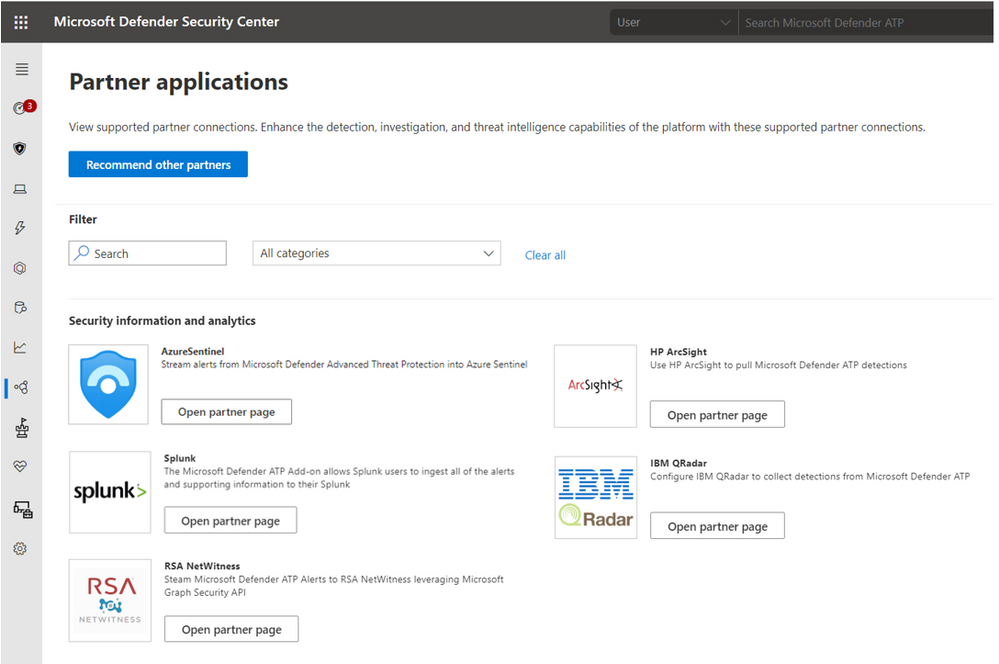
The Sentinel integration is now exposed in the Partner application section in Microsoft Defender ATP.
Additional Resources
Connecting Microsoft Defender ATP alerts to Sentinel – https://docs.microsoft.com/en-us/azure/sentinel/connect-microsoft-defender-advanced-threat-protection
https://docs.microsoft.com/en-us/windows/security/threat-protection/microsoft-defender-atp/get-alerts
Table 1 – summary of the alert schema changes
This table details the changes in the representation of MDATP alerts in the SecurityAlert table in Azure. The changes are in comparison to how MDATP alerts are now represented in Sentinel. Full description of the alert can be found in the attached file.
|
Description of Change
|
Sample Alert Data
|
|
Added: ExtendedProperties field. This field is an object containing the following details from MDATP:
– MDATP category
– Investigation ID
– Investigation state
– Incident ID
– Detection source
– Assigned to
– Determination
– Classification
– Action
|
{
“MicrosoftDefenderAtp.Category”: “SuspiciousActivity”,
“MicrosoftDefenderAtp.InvestigationId”: “10505”,
“MicrosoftDefenderAtp.InvestigationState”: “Running”,
“LastUpdated”: “05/25/2020 08:09:17”,
“IncidentId”: “135722”,
“DetectionSource”: “CustomerTI”,
“AssignedTo”: null,
“Determination”: null,
“Classification”: null,
“Action”: “zavidor was here”
}
|
|
Replaced: ExtendedLinks field – The new AlertLink column displays a link to the MDATP portal for each alert.
|
https://securitycenter.microsoft.com/alert/
da637259909307309588_-1180694960
|
|
Repurposed: AlertType field – shows the detection source (instead of a GUID of the alert in MDATP)
|
Before: 360fdb3b-18a9-471b-9ad0-ad80a4cbcb00
After: CustomerTI
|
|
Expanded: Entity field – More information on entities is surfaced.
For example, the host entity now holds the following details:
– HostName
– OSFamily
– OSVersion
– Type
– MdatpDeviceId
– FQDN
– AadDeviceId
– RiskScore
– HealthStatus
– LastSeen
– LastExternalIpAddress
– LastIpAddress
|
{
“$id”: “3”,
“HostName”: “real-e2etest-re”,
“OSFamily”: “Windows”,
“OSVersion”: “1809”,
“Type”: “host”,
“MdatpDeviceId”: “e84e634c8c5c2ca10db696cac544ea9ec41e784c”,
“FQDN”: “real-e2etest-re”,
“AadDeviceId”: null,
“RiskScore”: “Medium”,
“HealthStatus”: “ActiveDefault”,
“LastSeen”: “2020-05-
25T08:06:28.5181093Z”,
“LastExternalIpAddress”:
“20.185.104.143”,
“LastIpAddress”: “172.17.53.241”
},
|
by Scott Muniz | Aug 3, 2020 | Alerts, Microsoft, Technology, Uncategorized
This article is contributed. See the original author and article here.
In the past few months, we have worked on an improved integration of Microsoft Defender ATP alerts into Azure Sentinel. After an initial evaluation period, we are now ready to gradually roll out the new solution to all customers. The new integration will replace the current integration of MDATP alerts which is now in public preview (see details below). The changes will occur automatically on the 3rd of August and require no configuration from customers.
Improved alert details and context
The new integration has significant advantages in improved details and context, which are meant to facilitate and expedite triage and investigation of Microsoft Defender ATP incidents in Azure Sentinel. The integration will provide a more detailed view of each alert and is designed to capture changes on alert status over time. The upgrades include increased visibility into investigation and response information from MDATP as well as a link to provide an easy pivot to see the alert in the source portal. Finally, more information on entities is provided in a more concise format so analysts can have a broader picture of the involved entities.
It is important to note that the new integration does make minor changes to the structure of alerts from Microsoft Defender ATP. A summary of the changes is presented below (table 1), and a full description of the changes, together with a sample alert, can be found in the attached file. Any scheduled rules that use one of the changed fields might be affected.
A new MDATP API
The integration is based on the newly released MDATP Alerts API. Details on the new API can be found here.
Improved discoverability of the Sentinel integration in MDATP
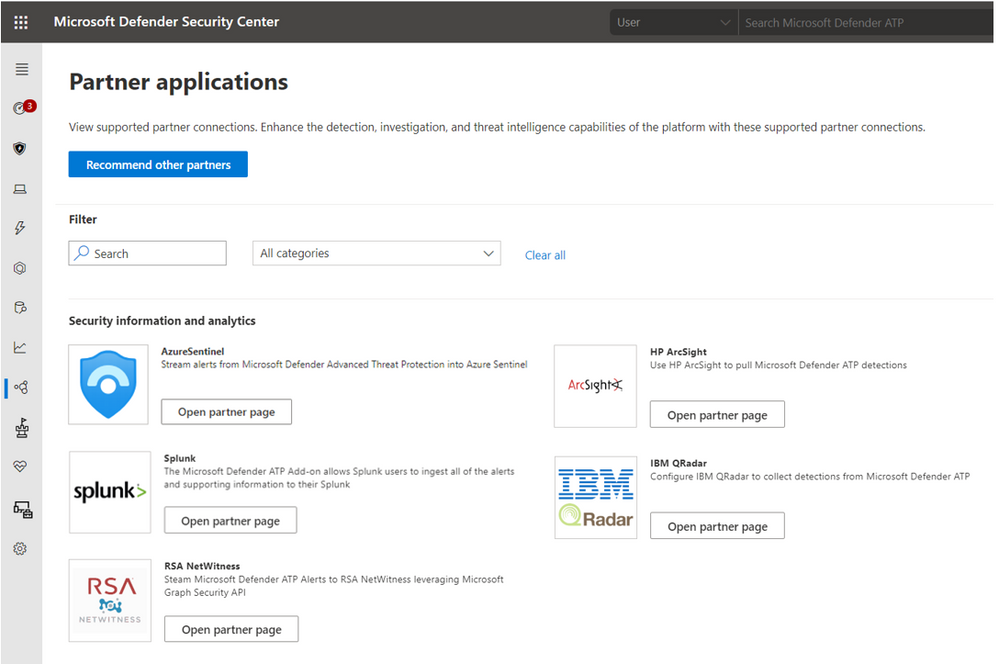
The Sentinel integration is now exposed in the Partner application section in Microsoft Defender ATP.
Additional Resources
Connecting Microsoft Defender ATP alerts to Sentinel – https://docs.microsoft.com/en-us/azure/sentinel/connect-microsoft-defender-advanced-threat-protection
MDATP API – https://docs.microsoft.com/en-us/windows/security/threat-protection/microsoft-defender-atp/get-alerts
Table 1 – summary of the alert schema changes
This table details the changes in the representation of MDATP alerts in the SecurityAlert table in Azure. The changes are in comparison to how MDATP alerts are now represented in Sentinel. Full description of the alert can be found in the attached file.
|
Description of Change
|
Sample Alert Data
|
|
Added: ExtendedProperties field. This field is an object containing the following details from MDATP:
– MDATP category
– Investigation ID
– Investigation state
– Incident ID
– Detection source
– Assigned to
– Determination
– Classification
– Action
|
{
“MicrosoftDefenderAtp.Category”: “SuspiciousActivity”,
“MicrosoftDefenderAtp.InvestigationId”: “10505”,
“MicrosoftDefenderAtp.InvestigationState”: “Running”,
“LastUpdated”: “05/25/2020 08:09:17”,
“IncidentId”: “135722”,
“DetectionSource”: “CustomerTI”,
“AssignedTo”: null,
“Determination”: null,
“Classification”: null,
“Action”: “zavidor was here”
}
|
|
Replaced: ExtendedLinks field – The new AlertLink column displays a link to the MDATP portal for each alert.
|
https://securitycenter.microsoft.com/alert/
da637259909307309588_-1180694960
|
|
Repurposed: AlertType field – shows the detection source (instead of a GUID of the alert in MDATP)
|
Before: 360fdb3b-18a9-471b-9ad0-ad80a4cbcb00
After: CustomerTI
|
|
Expanded: Entity field – More information on entities is surfaced.
For example, the host entity now holds the following details:
– HostName
– OSFamily
– OSVersion
– Type
– MdatpDeviceId
– FQDN
– AadDeviceId
– RiskScore
– HealthStatus
– LastSeen
– LastExternalIpAddress
– LastIpAddress
|
{
“$id”: “3”,
“HostName”: “real-e2etest-re”,
“OSFamily”: “Windows”,
“OSVersion”: “1809”,
“Type”: “host”,
“MdatpDeviceId”: “e84e634c8c5c2ca10db696cac544ea9ec41e784c”,
“FQDN”: “real-e2etest-re”,
“AadDeviceId”: null,
“RiskScore”: “Medium”,
“HealthStatus”: “ActiveDefault”,
“LastSeen”: “2020-05-
25T08:06:28.5181093Z”,
“LastExternalIpAddress”:
“20.185.104.143”,
“LastIpAddress”: “172.17.53.241”
},
|
by Scott Muniz | Aug 3, 2020 | Uncategorized
This article is contributed. See the original author and article here.
Is your SharePoint 2013 or 2016 farms Distributed Cache services Healthy? If not you might need to patch. One way to validate your Distributed Cache service is healthy is to pull some ULS logs from one of the Distributed cache servers in the farm.
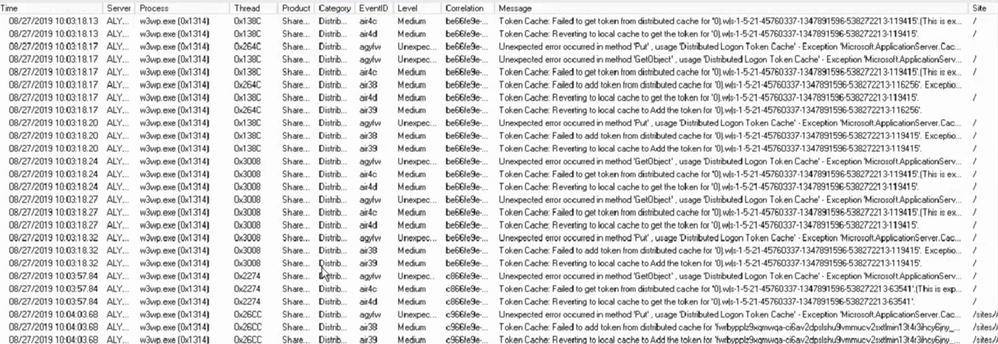
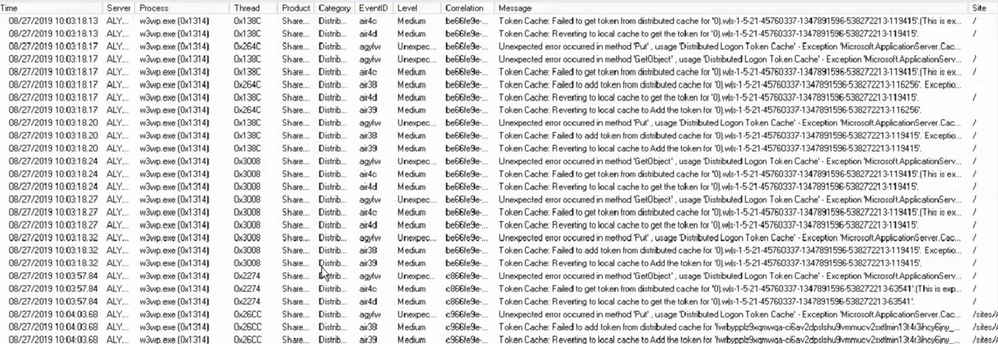
Using ULSViewer, Filter your ULS log files where Category equals DistributedCache, if you see something like the screenshot below. Then your Distributed cache is not healthy and should patch your farm using the steps in this article.
EventId Found – air4c, air4d, agyfw, air4c, air38, air39
Steps for Patching Distributed cache
Patching the distributed cache service on your SharePoint farm will cause user experience to be interrupted a bit and its recommended to be performed during a maintenance window. But It can be performed during production if its all ready down in some cases.
Step 1 – Shut down the Distributed Cache service on one of the distributed cache servers in your farm.
Run the following PowerShell command to stop the distributed cache on the server at a SharePoint command prompt.
Stop-SPDistributedCacheServiceInstance -Graceful
Step 2 – Patch AppFabric 1.1 on the one server you stopped the Distributed Cache service on. Patch the server with CU7 found in the following article where you can download it – https://support.microsoft.com/en-us/kb/3092423
Step 3 – Update the “DistributedCacheService.exe.config” file to run garbage collection process in the background on each Distributed Cache server.
File location – C:Program FilesAppFabric 1.1 for Windows ServerDistributedCacheService.exe.config
Update the file with the section below, see screen shot below – Make sure you put it in the right section or it will not work correctly.
<appSettings>
<add key=”backgroundGC” value=”true”/>
</appSettings>
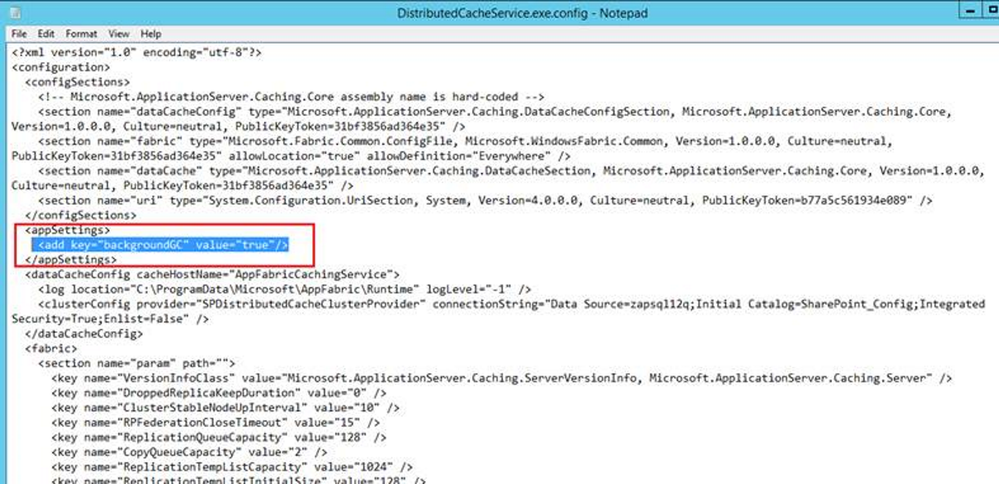
Step 4 – Repeat steps 1 through 3 on the next distributed cache sever in the farm, repeat these steps until you have patched all the Distributed cache servers using these steps. Once you have them all patched, move on to Step 5.
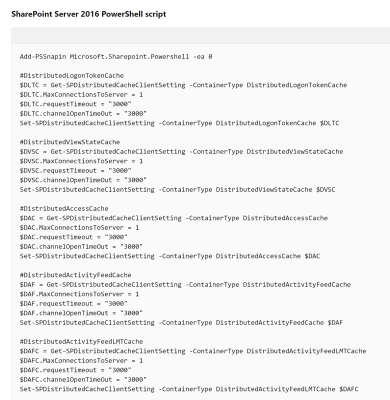
Step 5 – Fine-tune the Distributed Cache service by using a Windows PowerShell script found in this Microsoft article near the bottom in the section called:
“Fine-tune the Distributed Cache service by using a Windows PowerShell script”
https://technet.microsoft.com/en-us/library/jj219613.aspx
Run the script found in the article on one of your SharePoint servers in the farm. This only has to be done once.
Note – there is a section for SharePoint 2013 and 2016 in the Microsoft article – Use the section that matches your farm.
Step 6 – Start the Distributed cache service using the below PowerShell script in a SharePoint PowerShell command prompt on one of the Distributed cache servers.
$instanceName =”SPDistributedCacheService Name=AppFabricCachingService”
$serviceInstance = Get-SPServiceInstance | ? {($_.service.tostring()) -eq $instanceName -and ($_.server.name) -eq $env:computername}
$serviceInstance.Provision()
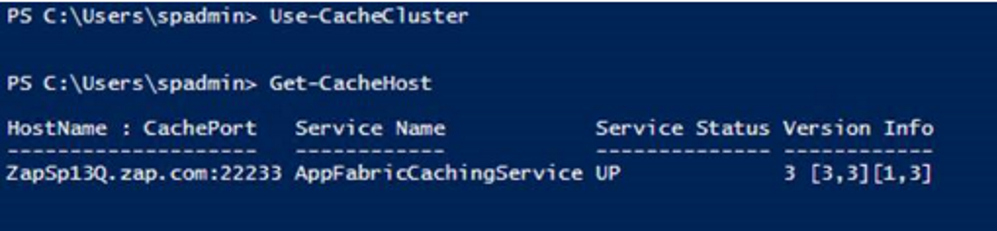
Step 7 – Verify the health of the Distributed cache server you started in Step 6 using the below PowerShell commands, Do not go to Step 8 until the server shows UP. You might have to wait a bit for it to come up, its usually slow on the first server to start up.
Use-CacheCluster
Get-CacheHost
NOTE – If you have servers listed as Down, try starting the Distributed cache service in Central admin and re-run the above commands to verify it came up.
Step 8 – Repeat Step 6 through 7 on the rest of the Distributed cache servers until they are all started.
Step 9 – Once all the servers are up, check their health one more time to make sure they are all UP.
Use-CacheCluster
Get-CacheHost
by Scott Muniz | Aug 2, 2020 | Uncategorized
This article is contributed. See the original author and article here.
Our team is focusing on some bigger features that will be released in the next few months. In the meantime, we appreciate your continuous feedback through the “Feedback” button in the product and on UserVoice for Project for the web. Your input helps us focus on developing features that are helpful and improve the experience in Project for everyone!
The new features called out below may look familiar if you follow Project on the Microsoft 365 Public Roadmap, which gives advanced notice on pending releases of larger features. Additionally, other new capabilities mentioned in both this blog and future blogs will be appearing in the monthly “What’s new in Project” article, which will list out new larger and smaller features that already have rolled out.
What’s the Latest?
- Project Operations ~ The Project team has been working with Dynamics 365 to build Microsoft Dynamics 365 Project Operations. This product aims to help teams predict, adapt, and rapidly respond to change across their projects and organizations. Announced at the end of June, the Project Operations public preview program is meant to collect feedback and ideas on this product and help us improve it before the product’s general release later this year. If you’re interested in our work with Dynamics 365, be sure to check out their blog post.
- Documentation ~ The materials to help you leverage Project for the web for your team have been updated. Check out our blog post on Calendars in Project for the web. If you have feedback, feel free to leave comments, and we’ll do our best to get back with you as quickly as we can.
- Scheduling Changes ~ Our scheduling changes to effort and duration are now available to all organizations using Project for the web. New projects should be scheduled with these changes. We’re working on converting old projects to this new scheme for the next month.
What’s coming next?
- Teams Integration for Project and Roadmap ~ The native application to add Projects and Roadmaps in Teams is being developed. Keep an eye out for more information on this new feature!
- Custom Fields at the Task level ~ Create custom fields in Project for the web to allow you to store custom information about your projects!
-
Answers to top questions:
Q: Any chance of an export feature coming up?
A: A new feature that allows users with an Office 365 license to view a project in read-only mode was rolled out last month. Additionally, we are planning on improving our export capabilities soon. You can follow that development, and let us know what you think here.
by Scott Muniz | Aug 2, 2020 | Uncategorized
This article is contributed. See the original author and article here.
Final Update: Sunday, 02 August 2020 15:37 UTC
We’ve confirmed that all systems are back to normal with no customer impact as of 07/31, 00:24 UTC. Our logs show the incident started on 07/30, 20:40 UTC and that during the ~4 hours that it took to resolve the issue some customers in USGov experienced failure in triggering Activity Log alerts.
-
Root Cause: The failure was due to incorrect deployment.
-
Incident Timeline: 4 Hours – M/D, 07/30, 20:40 UTC through 07/31, 00:24 UTC
We understand that customers rely on Activity Log Alerts as a critical service and apologize for any impact this incident caused.
-Anupama


Recent Comments