by Scott Muniz | Aug 7, 2020 | Uncategorized
This article is contributed. See the original author and article here.
Azure Synapse Analytics is a limitless data analytics service that enables you to analyze data on Azure Data Lake storage. It provides managed Apache Spark and T-SQL engines (provisioned and serverless) for analyzing data.
In this article, you will see how you can find the countries with highest weekly increase of COVID cases by analyzing data from the parquet files stored on Azure storage using Synapse SQL endpoint in Synapse Analytics. Synapse SQL engine is the perfect choice for ad-hoc data analytics for the data analysts with T-SQL skills.
Prerequisite
To try this sample, you need to have Azure Synapse Analytics workspace. If you don’t have one you can easily deploy it using Azure portal or this Deployment template. Workspace automatically deploys one serverless Synapse SQL endpoint that is everything we need for this kind of analysis. With the workspace you are also getting easy-to-use Web UI called Synapse Studio that enables you to start analyzing the files directly from your browser.
NOTE: You need Synapse SQL serverless (on-demand) query endpoint to execute the code in this article. The functionalities used in this article are still not available in provisioned endpoint.
COVID data set
In this sample is used the latest available public data on geographic distribution of COVID-19 cases worldwide from the European Center for Disease Prevention and Control (ECDC). Each row/entry contains the number of new cases reported per day and per country. For more information about this dataset, see here. Data set is updated on daily basis and placed as a part of Azure Open Dataset.
Data exploration with OPENROWSET function
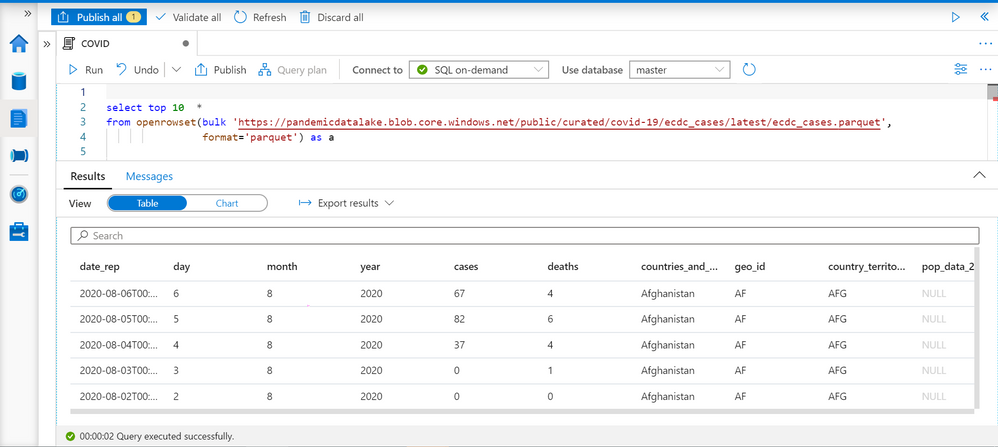
Synapse SQL endpoint in Synapse Analytics enables you to use OPENROWSET T-SQL function to analyze data in Azure Data Lake storage. This is easy to use function where you just need to provide URL of some file on Azure storage and you will get the content of the file. Example of OPENROWSET function that reads the content of a parquet file placed on Azure storage is shown in the following example:
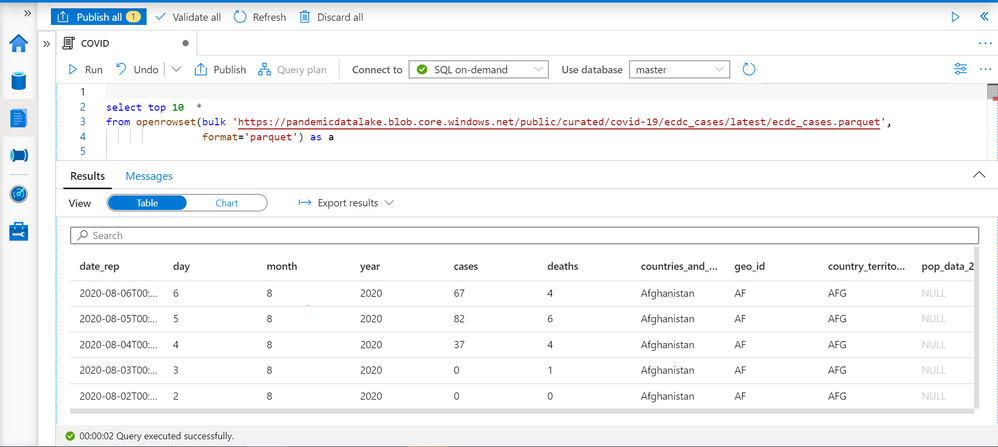
If you provide a file URL after the bulk keyword and specify that you are using parquet format, you will get the content of that parquet file. In this result set we can see some interesting columns:
- date_rep – date when the COVID cases are reported.
- countries_and_territories/geo_id identifies the country where the COVID cases are reported.
- cases – number of reported cases in the country on a date_rep
Current and past week cases per country
We can easily get the number of cases reported for each country on a given day. TSQL LAG function enables us to get the number of cases reported 7 days ago:
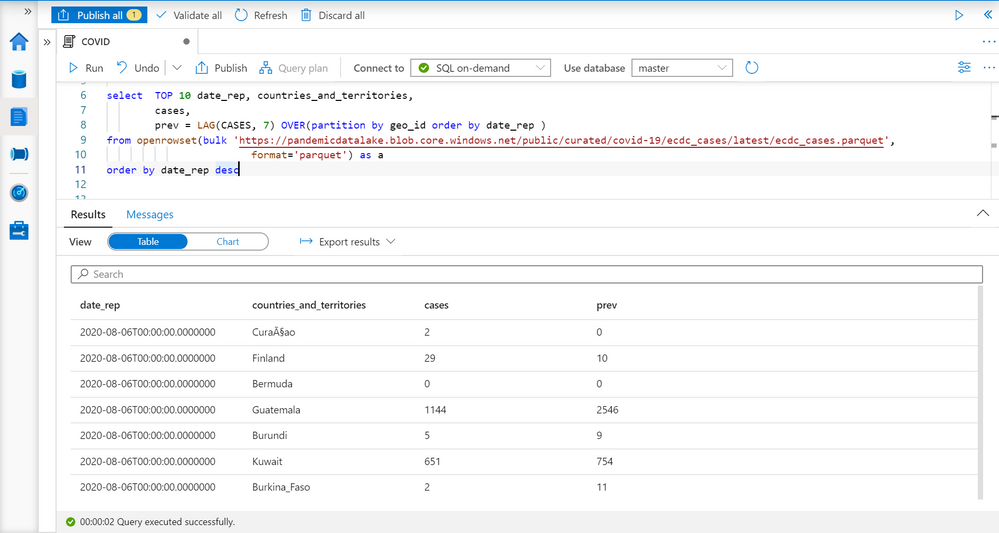
LAG function will return a value of COVID cases reported in the record with the same geo_id (see PARTITION BY geo_id in OVER clause) column, and return 7th previous record ordered by date_rep (see ORDER BY date_rep in OVER clause). This is the number of cases reported seven days ago in the country.
As you can see on the picture above in Finland is reported 29 cases on 6th august, and 10 cases seven days before. This is exactly what we need to have to compare currently reported number of cases with the number of cases reported seven days ago to calculate the increase per each year.
Average weekly cases
Number of COVID cases might vary if we look at daily values. In some cases, you can see daily variations like 10, 23, 9, 17 that might provide misleading conclusions especially if the variation is close to actual value.
More reliable metric would be to calculate average number of reported cases per week (or any 7-day time window). We can use windowing extension of AVG function for this purpose:
AVG(<value>)
       OVER(partition by <paritition value>
            order by <sort value>
            ROWS BETWEEN <start> AND <end>  )
For each record this window function will get the records that have the same <partition value> (for example country id since we are finding average value within the country), order them by <sort value> (for example date when the cases are reported), and get the records between <start> and <end> in this. Then it will calculate average value (for example cases in our case).
You can find more information about window function in the article Advanced analytics of COVID data using Synapse SQL endpoint.
The following query returns average number of reported cases in past seven days and the average number of cases in previous 7-day period:
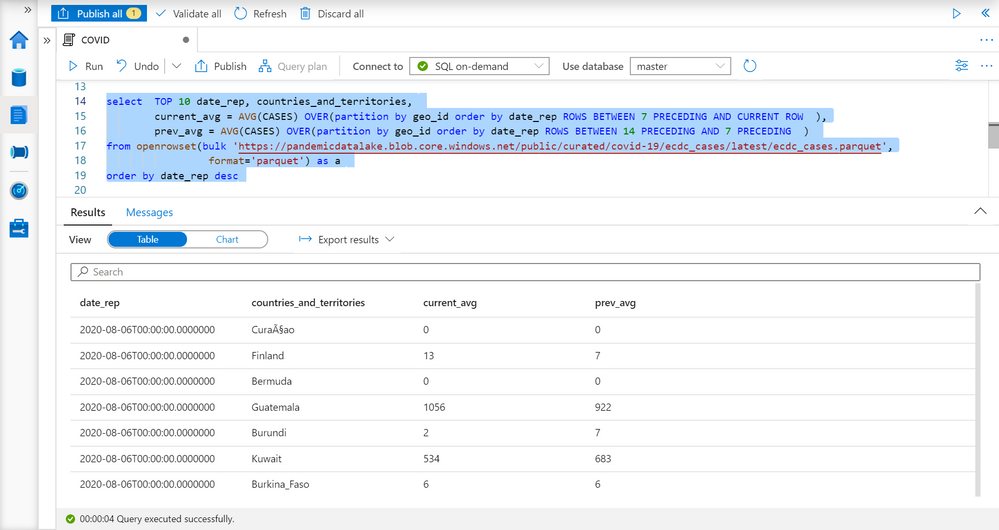
Now we have reports with the data like the previous case, but more reliable metric.
The countries with the highest increase of COVID cases
We have information about the countries, number of reported cases this week, and number of reported cases a week ago, so we are ready to compare these values and find the countries with the highest increase of COVID cases.
I will put the query that returns average weekly cases as CTE named query, and do analyze data on the result of this named query:
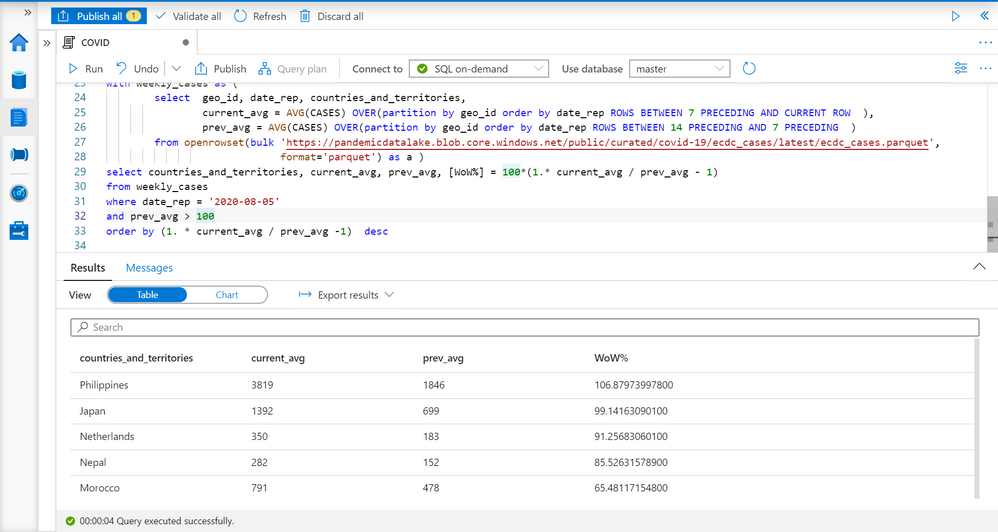
I’m filtering results on some specific date (5th August), ignoring countries with less than 100 cases, and ordering by percentage of increase. You can see the results with the countries where the number of COVID cases is increased. You can easily modify that report to change time periods or get the report for some point in time in the past.
Conclusion
Synapse SQL endpoint and Synapse Studio in Azure Synapse Analytics are tools for easy data exploration that enable you to easily read the content of a file and do basic data exploration. In this example, we have seen how to leverage T-SQL language and charting features in Synapse Analytics to identify the countries with highest weekly increase of COVID cases. The similar analysis can be repeated on any other data set. You can find more information about querying files in Azure Data Lakes Storage in this article.
If you want to try these queries, the scripts are below:
select top 10  *
from openrowset(bulk 'https://pandemicdatalake.blob.core.windows.net/public/curated/covid-19/ecdc_cases/latest/ecdc_cases.parquet',
                format='parquet') as a;

select  TOP 10 date_rep, countries_and_territories,
        cases,
        prev = LAG(CASES, 7) OVER(partition by geo_id order by date_rep )
from openrowset(bulk 'https://pandemicdatalake.blob.core.windows.net/public/curated/covid-19/ecdc_cases/latest/ecdc_cases.parquet',
                        format='parquet') as a
order by date_rep desc;
GO

select  TOP 10 date_rep, countries_and_territories,
        current_avg = AVG(CASES) OVER(partition by geo_id order by date_rep ROWS BETWEEN 7 PRECEDING AND CURRENT ROW  ),
        prev_avg = AVG(CASES) OVER(partition by geo_id order by date_rep ROWS BETWEEN 14 PRECEDING AND 7 PRECEDING  )
from openrowset(bulk 'https://pandemicdatalake.blob.core.windows.net/public/curated/covid-19/ecdc_cases/latest/ecdc_cases.parquet',
                 format='parquet') as a
order by date_rep desc;
GO
with weekly_cases as (
        select  geo_id, date_rep, countries_and_territories,
                current_avg = AVG(CASES) OVER(partition by geo_id order by date_rep ROWS BETWEEN 7 PRECEDING AND CURRENT ROW  ),
                prev_avg = AVG(CASES) OVER(partition by geo_id order by date_rep ROWS BETWEEN 14 PRECEDING AND 7 PRECEDING  )
        from openrowset(bulk 'https://pandemicdatalake.blob.core.windows.net/public/curated/covid-19/ecdc_cases/latest/ecdc_cases.parquet',
                             format='parquet') as a )
select countries_and_territories, current_avg, prev_avg, [WoW%] = 100*(1.* current_avg / prev_avg - 1)
from weekly_cases
where date_rep = '2020-08-05'
and prev_avg > 100
order by (1. * current_avg / prev_avg -1)  desc
by Scott Muniz | Aug 7, 2020 | Alerts, Microsoft, Technology, Uncategorized
This article is contributed. See the original author and article here.
Hi all, Zoheb here publishing on behalf of a guest author, Morne Naude. So without further ado…
Hi Everyone,
Morne here again and welcome to the first blog in our series on Azure Active Directory Security where we will be sharing all details on how we helped our SMC customers reduce the attack vector by enabling Identity Protection in Azure.
If you have not read our introductory blog covering the entire background on our SMC Delivery Methodology, please do give it a read now before continuing here.
How Microsoft Mission Critical Team Helped Secure AAD
If an Electron Can Be in Two Places at Once, Why Can’t You …
Well you can’t PERIOD
We refer to this as Atypical travel “Sign in from an atypical location based on the user’s recent sign-ins.“ or Unfamiliar sign-in properties “Sign in with properties we’ve not seen recently for the given user.”
Before we get on to more details on how we helped our SMC customer, here is some background information on Identity Protection & Risky Sign ins which may help you understand the subject better.
What is Azure Active Directory Identity Protection?
Identity Protection is a tool that allows organizations to accomplish three key tasks:
- Automate the detection and remediation of identity-based risks.
- Investigate risks using data in the portal.
- Export risk detection data to third-party utilities for further analysis.
Identity Protection uses the learnings Microsoft has acquired from their position in organizations with Azure AD, the consumer space with Microsoft Accounts, and in gaming with Xbox to protect your users. Microsoft analyses 6.5 trillion signals per day to identify and protect customers from threats.
This is but a few examples of risk types Azure identity protection use in its classifications.
Risk Classification
|
Risk detection type
|
Description
|
|
Atypical travel
|
Sign in from an atypical location based on the user’s recent sign-ins.
|
|
Anonymous IP address
|
Sign in from an anonymous IP address (for example: Tor browser, anonymizer VPNs).
|
|
Unfamiliar sign-in properties
|
Sign in with properties we’ve not seen recently for the given user.
|
|
Malware linked IP address
|
Sign in from a malware linked IP address
|
|
Leaked Credentials
|
This risk detection indicates that the user’s valid credentials have been leaked
|
|
Azure AD threat intelligence
|
Microsoft’s internal and external threat intelligence sources have identified a known attack pattern
|
Coming back to our customers’ pain areas, we were detecting a high number of Risky Sign ins every day across the organization, we spotted these during the Azure AD Assessments as well as observations from the Risky Sign in logs.
Working with the Mission Critical team gives our customers the ultimate personalized support experience from a designated team that:
- Knows you and knows what your solution means to your enterprise
- Works relentlessly to find every efficiency to help you get ahead and stay ahead
- Advocates for you and helps ensure get you the precise guidance you need.
Knowing the customer well helped us understand the extent of the problem, to work closely with their Identity team and recommend improvements to them.
There were various attack trends observed from Azure AD Connect Health related to Password spray, Breach replay, Phishing etc. on Azure and it was an urgent need of the hour to get into a better security posture.
After speaking with the messaging team, we realized that few of the Risky users had strange Mailbox rules created and were spamming multiple users in the organization (more details to come in one of our following blogs).
If you are interested to read more about Forms Injection Attacks on emails please see: https://docs.microsoft.com/en-us/microsoft-365/security/office-365-security/detect-and-remediate-outlook-rules-forms-attack?view=o365-worldwide
Our customer had no policy/process configured to tackle this issue, they only had Multi Factor Authentication (MFA) in place for Global Admins.
Policies
We suggested to enable User Risk as well as Sign-in Risk policies for users deemed as “high-risk”, below are some details on how it was enabled for our customer.
Identity Protection analyses signals from each sign-in, both real-time and offline, and calculates a risk score based on the probability that the sign-in wasn’t performed by the user. Administrators can decide based on this risk score signal to enforce organizational requirements. Administrators can choose to block access, allow access, or allow access but require multi-factor authentication.
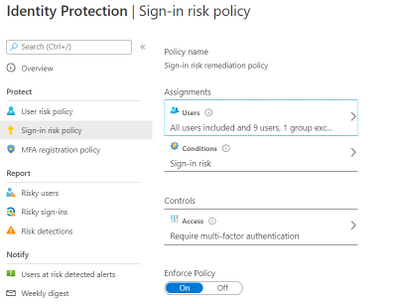
We enabled Sign in risk Policy to force “MFA” for all “High Risk” users as per configuration below.
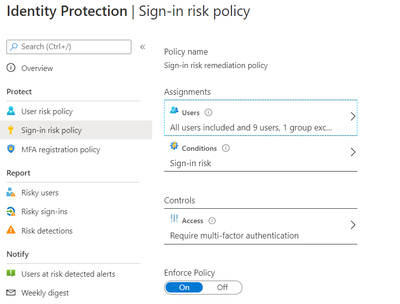
Identity Protection can calculate what it believes is normal for a user’s behaviour and use that to base decisions for their risk. User risk is a calculation of probability that an identity has been compromised. Administrators can decide based on this risk score signal to enforce organizational requirements.
Considering the circumstances, we suggested to our customer to implement below User Risk policy, this policy would ensure that if there is any “High Risk” user he will be required to change Password as per configuration below.
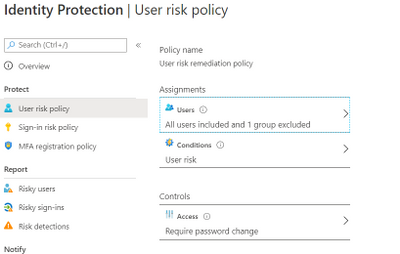
So, these two policies ensured all the Risky Sign in users are forced to use MFA and change their passwords.
Notification for Risky users
Our customer has Azure AD P2 licensing, so we could leverage the full set of Identity protection features.
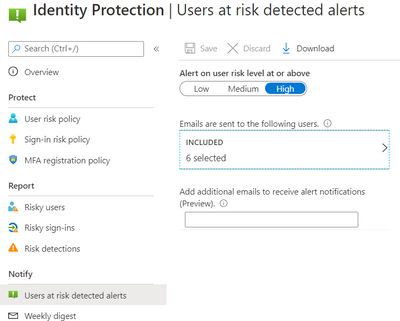
We configured the users at risk email in the Azure portal under Azure Active Directory > Security > Identity Protection > Users at risk detected alerts.
By default, recipients include all Global Admins. Global Admins can also add other Global Admins, Security Admins, Security Readers as recipients.
Optionally you can Add additional emails to receive alert notifications; this feature is a preview and users defined must have the appropriate permissions to view the linked reports in the Azure portal. We included members of the Identity and Security teams as well.
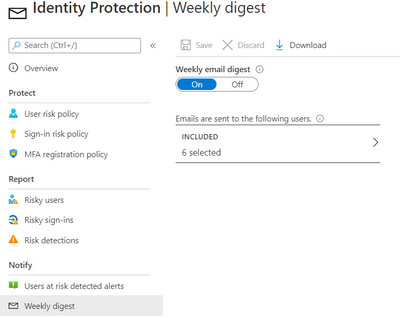
The weekly digest email contains a summary of new risk detections, such as:
- New risky users detected
- New risky sign-ins detected (in real-time)
- Links to the related reports in Identity Protection
This resulted in a drastic reduction in the number of risky users and risky sign-ins. Additionally we helped implement a process of investigation and remediation of these at- risk accounts from the service desk to the internal security department. Currently the business is in the process of including Medium based at-risk accounts into the above policies.
NOTE: The features and guidelines implemented in this case were specific to this customer’s requirements and environment, so this is not a “General” guideline to enable any of the mentioned features.
Hope this helps,
Morne
by Scott Muniz | Aug 7, 2020 | Uncategorized
This article is contributed. See the original author and article here.
A quick post about notebooks and spark. So basically a customer was running some spark jobs on synapse and the error was Livy is dead.
That is sad and also the customer was not sure, why is it dead??
So, we started through the logs available on this session of synapse studio:
https://docs.microsoft.com/en-us/azure/synapse-analytics/monitoring/apache-spark-applications
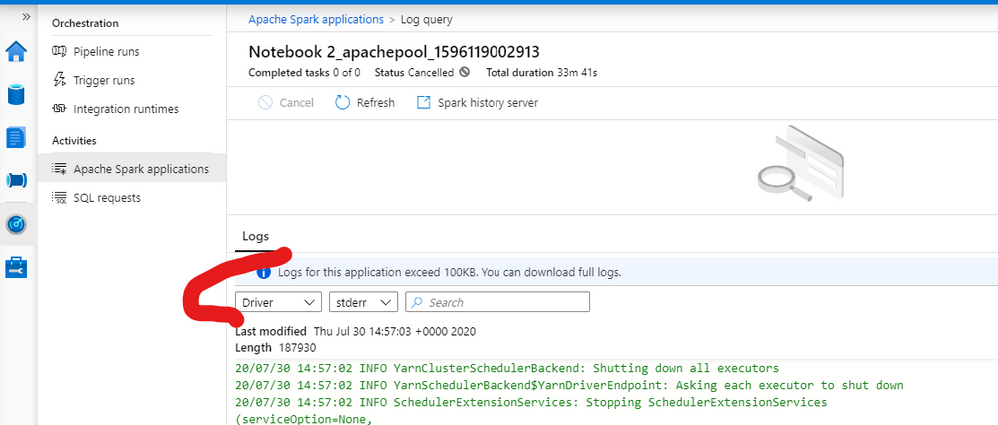
We checked the driver logs as exemplified by fig 1:
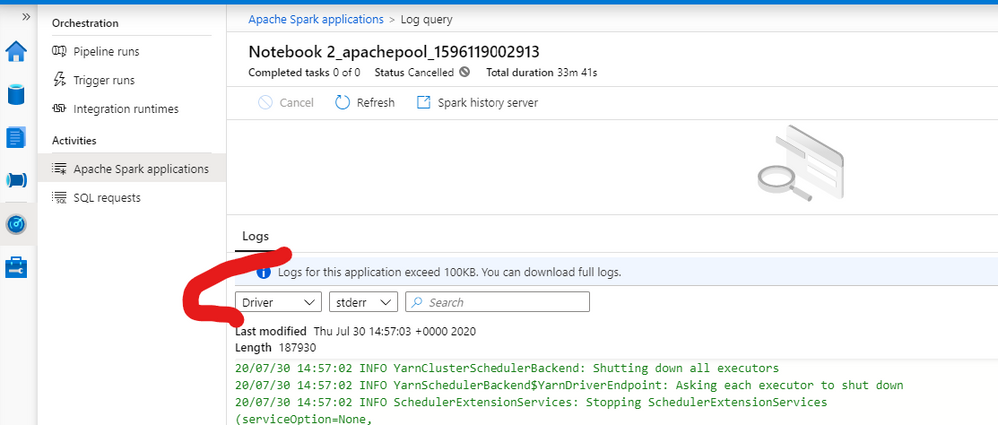
Fig 1: Driver Logs
We Spot this error ( note you have also Livy logs on this same session):
java.lang.OutOfMemoryError
The customer was running a job with a small node size with 4vCPus and 32 GB. So we basically changed the pool to give him more room in terms of memory.
You can adjust this configuration on this blade – fig 2:
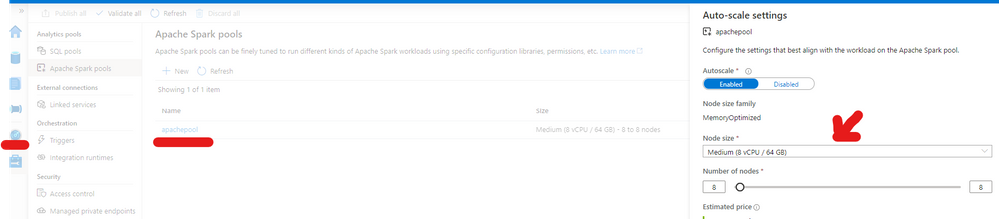
Fig 2 – Pool Settings
That is something to be defined on the creation as you can see here: https://docs.microsoft.com/en-us/azure/synapse-analytics/quickstart-create-apache-spark-pool-portal
But you can adjust afterward.
That is it!
Liliam
Uk Engineer

by Scott Muniz | Aug 7, 2020 | Uncategorized
This article is contributed. See the original author and article here.
The recent shift to remote, hybrid and on-premise work has IT professionals across every industry looking for more solutions and support for deploying Microsoft Teams. That’s why we’re excited to launch this new live webcast series. Host, Stephen Rose is back! He’ll be talking with members of the Microsoft engineering staff, community experts and real-world professionals about best practices for piloting, planning, managing, securing, and deploying Teams. He’ll be joined by surprise guests, unbox cool new hardware and share resources to help you make the most of Microsoft 365 and Microsoft Teams.
Our host, Stephen Rose is a Senior Product Manager on the Modern Workplace and Teams, Stephen has been working with and helping IT professionals with a variety of Microsoft products since 2009 including Windows, Surface, Office and OneDrive, and holds over 20 technical certifications. Stephen was an MVP for 3 years and still is a community guy at heart. You can follow him, @stephenlrose on Twitter.
 (Left to right) Host Stephen Rose. Previous Episodes with Joe Lurie on Windows Servicing, Chris Jackson on security best practices, Dan Holme on Microsoft Teams Live Events platform and Sandhya Rao demoing the new Bose Teams headphones.
Take a look at the upcoming episodes below – and add them to your calendar*. You’ll definitely want to tune in live to get the solutions and insights you need now.
Episode 1: Real work experts/real world stories
August 11, 2020 | 9:00 AM PDT | ADD TO CALENDAR
Join us as we sit down with members of our IT pro community to discuss their Teams customer stories. You’ll hear about what worked and what didn’t work so you can avoid the same pitfalls with your own rollouts.
Episode 2: Back to school and user adoption with Microsoft Teams
August 25, 2020 | 9:00 AM PDT | ADD TO CALENDAR
Learn about the latest features and functionalities to help educators make the most of Microsoft Teams and how IT pros can secure these features in a variety of environments.
Episode 3: Microsoft Teams security
September 8, 2020 | 9:00 AM PDT | ADD TO CALENDAR
Let’s talk security. The top challenge IT pros are facing right now is securing data. Join our product expert for a deep dive discussion on identity and authentication.
Episode 4: Microsoft Ignite 2020: Pre-show
September 15, 2020 | 9:00 AM PDT | ADD TO CALENDAR
In this special episode, you’ll get a preview of what’s coming up at Microsoft Ignite. Hear about upcoming sessions you don’t want to miss, as well as new resources that will help you make the most of your experience.
Episode 5: Microsoft Ignite 2020: Wrap-up part 1
September 23, 2020 | 9:00 AM PDT | ADD TO CALENDAR
Join us for a wrap-up of day 1 at Microsoft Ignite. You’ll hear all the highlights and we’ll talk about what’s coming up on day 2.
Episode 6: Microsoft Ignite 2020: Wrap-up part 2
September 25, 2020 | 9:00 AM PDT | ADD TO CALENDAR
Join us for a complete wrap-up of day 1 and 2 at Microsoft Ignite. You’ll hear all the highlights and talk with product experts.
Episode 7: The new world of virtual events
October 8, 2020 | 9:00 AM PDT | ADD TO CALENDAR
The events industry transformed overnight, and Microsoft Teams played a big part in this transition. We’ll sit down with members of the Microsoft Teams product group and learn how they are building the future of high-scale communication with Microsoft Teams.
Episode 8: New resources for Microsoft Teams admins
October 22, 2020 | 9:00 AM PDT | ADD TO CALENDAR
Learn about new Teams deep dive help videos for administrators as well as other resources to get your support teams and help desk up to speed.
Episode 9: Manage guest access in Microsoft Teams
November 5, 2020 | 9:00 AM PDT | ADD TO CALENDAR
One of the most requested episodes. We’ll feature tips, tricks and gotchas on managing guest access in Microsoft Teams.
Have a great idea for an episode? Want us to deep dive into a specific feature? Contact Stephen Rose.
*Please note that episode guests, topics and dates are subject to possible change

by Scott Muniz | Aug 7, 2020 | Uncategorized
This article is contributed. See the original author and article here.

John Naguib is an Office Servers and Services MVP. He’s also a Solution Architect and Senior Consultant, with a deep knowledge of SharePoint. In addition, he has a strong .net application development background and is knowledgable in Office 365, Azure and several Microsoft products. John is a recognized expert within the IT industry, as he’s published several gold award articles on Microsoft TechNet blogs and spoken at several events. He is based in Egypt. Follow him on Twitter @johnnaguib.

Getting started with REST API for WVD ARM (Spring) release, and sharing my GitHub examples!
Freek Berson is an Infrastructure specialist at Wortell, a system integrator company based in the Netherlands. Here he focuses on End User Computing and related technologies, mostly on the Microsoft platform. He is also a managing consultant at rdsgurus.com . He maintains his personal blog at themicrosoftplatform.net where he writes articles related to Remote Desktop Services, Azure and other Microsoft technologies. An MVP since 2011, Freek is also an active moderator on TechNet Forum and contributor to Microsoft TechNet Wiki. He speaks at conferences including BriForum, E2EVC and ExpertsLive. Join his RDS Group on Linked-In here . Follow him on Twitter @fberson

How to: integrate Power Virtual Agents with Teams using SSO and how to retrieve user information
Vesku Nopanen is a Principal Consultant in Office 365 and Modern Work and passionate about Microsoft Teams. He helps and coaches customers to find benefits and value when adopting new tools, methods, ways or working and practices into daily work-life equation. He focuses especially on Microsoft Teams and how it can change organizations’ work. He lives in Turku, Finland. Follow him on Twitter: @Vesanopanen

Teams Real Simple with Pictures: Accessing all of your Teams files through a single channel
Chris Hoard is a Microsoft Certified Trainer Regional Lead (MCT RL), Educator (MCEd) and Teams MVP. With over 10 years of cloud computing experience, he is currently building an education practice for Vuzion (Tier 2 UK CSP). His focus areas are Microsoft Teams, Microsoft 365 and entry-level Azure.
Follow Chris on Twitter at @Microsoft365Pro and check out his blog here.

Asma Khalid is an Entrepreneur, ISV, Product Manager, Full Stack .Net Expert, Community Speaker, Contributor, and Aspiring YouTuber. Asma counts more than 7 years of hands-on experience in Leading, Developing & Managing IT-related projects and products as an IT industry professional. Asma is the first woman from Pakistan to receive the MVP award three times, and the first to receive C-sharp corner online developer community MVP award four times. See her blog here.

by Scott Muniz | Aug 7, 2020 | Alerts, Microsoft, Technology, Uncategorized
This article is contributed. See the original author and article here.

August is already a week over, can you believe it? That doesn’t stop this team they’re everywhere doing great things to make the experience better for you in the docs, product and services. Have some feedback? Comment on their posts, contact them on twitter or wherever you see them engaging.
Cloud Advocates List on Microsoft Docs
Azure Cloud Adviocates Twitter List
Follow @azureadvocates on Twitter
Content Round Up
WebAssembly, your browsers sandbox
Aaron Powell
We’ve been doing web development for 30+ years and in all that time have you ever stopped to think, “This SPA needs more C++”? Well thanks to the power of WebAssembly you can finally bring C, C++, Rust, Go and other high level languages to the browser.
So does this mean that we can replace our JavaScript with these other languages? Probably not, so what is the role that WebAssembly can play in building web applications? And most importantly, what does it look like as a web developer to try and incorporate these platforms that have traditionally been on the server?
MS Dev Twitch Stream: Build a Virtual Reality Snake Game with JavaScript! – Aug 5th
Cassie Breviu
Did you know that you can create Virtual Reality (VR) websites with JavaScript using BabylonJS? In this session you will get an introduction on how to build WebVR sites! We will discuss the main concepts used in building 3D experiences. Then go step-by-step to build out a basic version of the classic snake game. By the end of this session you should have a starting point to building your first VR game!
Azure Monitor for Azure Arc enabled servers
Thomas Maurer
As you know Azure Arc for servers is currently in preview and allows you to manage your Windows and Linux machines hosted outside of Azure on your corporate network or other cloud providers, similar to how you manage native Azure virtual machines. With the new extensions which were introduced a couple of weeks ago, you can now also use Azure Monitor to not only monitor your servers in Azure but also servers running on-premises or at other cloud providers. This will provide you with cloud-native management for your Linux and Windows servers.
Docker, FROM scratch
Aaron Powell
Docker’s popularity has exploded over the last couple of years, especially in the DevOps space, but unless you’ve spent a lot of time in that area it can be a confusing technology to wrap your head around.
So let’s step back and start looking at Docker from, well, FROM scratch (and we’ll understand just what that means).
With minimal starting knowledge of Docker we’ll look into what it is, cover off all the core concepts from images to containers, volumes to networks, and how we can compose environments. We’ll also look at how to use Docker in Dev, not just DevOps and how containers can be useful tools without being something to run production infrastructure on.
HobbyHack Augmented Reality on the Web Workshop Video
Aysegul Yonet
Augmented Reality applications are becoming common user experiences on mobile devices. WebXR gives you a way to build for all mobile platforms as well as Augmented Reality headsets once. In this workshop you will learn: * The basic concepts of WebXR and 3D on the web. * Possible use cases for Augmented Reality mobile applications that solve real-world problems. * How to get started prototyping really fast.
Assess AWS VMs with Azure Migrate
Sarah Lean
Using Azure Migrate assess and understand what it would look like if you moved AWS VMs over to Azure.
ITOpsTalk Blog: Step-by-Step: Traditional Windows Cluster setup in Azure
Pierre Roman
How to deploy a windows cluster using Azure Shared Disks
Blog/ Setting-up Visual Studio Codespaces for .NET Core (EN)
Justin Yoo
Since April 2020 Visual Studio Codespaces has been generally available. In addition to that, GitHub Codespaces has been provided as a private preview. Both are very similar to each other in terms of their usage. There are differences between both, though, discussed from this post. Throughout this post, I’m going to focus on the .NET Core application development.
Add ISO DVD Drive to a Hyper-V VM using PowerShell
Thomas Maurer
Hyper-V offers the capability to add an ISO image to a virtual CD/DVD drive and you can use Hyper-V Manager to do that, or you can also use PowerShell. Here is how you can add an ISO to a Hyper-V virtual machine (VM) using PowerShell. There are two ways of doing it if you already have a virtual DVD drive attached to the VM or if you need to add a virtual DVD drive.
State of the Art in Automated Machine Learning
Francesca Lazzeri
- Automated Machine Learning (AutoML) is important because it allows data scientists to save time and resources, delivering business value faster and more efficiently
- AutoML is not likely to remove the need for a “human in the loop” for industry-specific knowledge and translating the business problem into a machine learning problem
- Some important research topics in the area are feature engineering, model transparency, and addressing bias
- There are several commercial and open-source AutoML solutions available now for automating different parts of the machine learning process
- Some limitations of AutoML are the amount of computational resources required and the needs of domain-specific applications
Building & Debugging Microservices faster using Kubernetes and Visual Studio
Shayne Boyer
Shayne walks through using Docker, Visual Studio 2019 and Kubernetes during his talk at .NET Conf 2019: Focus on Microservices. This demonstrations shows how you can take advantage of Visual Studio tools to build, debug and deploy microservices to Kubernetes faster.
Video: Assess AWS VMs with Azure Migrate
Sarah Lean
In this video Sarah Lean talks about how you can utilize Azure Migrate to assess your virtual machines hosted in AWS with a view to migrating them to Azure.
Let’s Talk About Azure AD and Microsoft Identity Platform
Matt Soucoup
Have you been following along with all the changes in Azure Active AD and the various Microsoft Identity branded things? The changes and new features are amazing … but change can be confusing. So, so many terms. And how do they all fit together? Let’s have a little chat…
Authenticate a ASP.NET Core Web App With Microsoft.Identity.Web
Matt Soucoup
So you want to authenticate your ASP.NET Core web app with Azure AD. It sounds daunting, but with a little help from the `Microsoft.Identity.Web` SDK and knowing how it fits in with the pieces of Azure AD’s Applications, it’s not too bad.
The intention of this article is straightforward. Configure Azure AD to allow users of your application to sign-in. And create an ASP.NET Core web application that signs in.


Recent Comments