
by Scott Muniz | Aug 18, 2020 | Azure, Microsoft, Technology, Uncategorized
This article is contributed. See the original author and article here.
In a historic day, Microsoft today announced it has transitioned Azure HDInsight to the Microsoft engineered distribution of Apache Hadoop and Spark, specifically built to drastically improve the performance, improved release cadence of powerful Open Source data analytics frameworks and optimized to natively run at cloud scale in Azure. This transition will further help customers by establishing a common Open Source Analytics distribution across various Azure data services such as Azure Synapse & SQL Server Big Data Clusters.
Starting this week, customers creating Azure HDInsight clusters such as Apache Spark, Hadoop, Kafka & HBase in Azure HDInsight 4.0 will be created using Microsoft distribution of Hadoop and Spark.
As part of today’s release, we are adding following new capabilities to HDInsight 4.0
SparkCruise: Queries in production workloads and interactive data analytics are often overlapping, i.e., multiple queries share parts of the computation. These redundancies increase the processing time and total cost for the users. To reuse computations, many big data processing systems support materialized views. However, it is challenging to manually select common computations in the workload given the size and evolving nature of the query workloads. In this release, we are introducing a new Spark capability called “SparkCruise” that will significantly improve the performance of Spark SQL.
SparkCruise is an automatic computation reuse system that selects the most useful common subexpressions to materialize based on the past query workload. SparkCruise materializes these subexpressions as part of query processing, so you can continue with their query processing just as before and computation reuse is automatically applied in the background — all without any modifications to the Spark code. SparkCruise has shown to improve the overall runtime of a benchmark derived from TPC-DS benchmark queries by 30%.
SparkCruise: Automatic Computation Reuse in Apache Spark
Hive View: Hive is a data warehouse infrastructure built on top of Hadoop. It provides tools to enable
data ETL, a mechanism to put structures on the data, and the capability to query and analyze large data sets that are stored in Hadoop. Hive View is designed to help you to author, optimize, and execute Hive queries. We are bringing Hive View natively to HDInsight 4.0 as part of this release.
Tez View: Tez is a framework for building high-performance batch and interactive data processing applications. When you run a job such as a Hive query Tez, you can use Tez View to track and debug the execution of that job. Tez View is now available in HDInsight 4.0
Frequently asked questions
What is Microsoft distribution of Hadoop & Spark (MDH)?
Microsoft engineered distribution of Apache Hadoop and Spark. Please read the motivation behind this step here
• Apache analytics projects built, delivered, and supported completely by Microsoft
• Apache projects enhanced with Microsoft’s years of experience with Cloud-Scale Big Data analytics
• Innovations by Microsoft offered back to the community
What can I do with HDInsight with MDH?
Easily run popular open-source frameworks—including Apache Hadoop, Spark, and Kafka—using Azure HDInsight, cost-effective, enterprise-grade service for open-source analytics. Effortlessly process massive amounts of data and get all the benefits of the broad open-source ecosystem with the global scale of Azure.
What versions of Apache frameworks available as part of MDH?
|
Component
|
HDInsight 4.0
|
|
Apache Hadoop and YARN
|
3.1.1
|
|
Apache Tez
|
0.9.1
|
|
Apache Pig
|
0.16.0
|
|
Apache Hive
|
3.1.0
|
|
Apache Ranger
|
1.1.0
|
|
Apache HBase
|
2.1.6
|
|
Apache Sqoop
|
1.4.7
|
|
Apache Oozie
|
4.3.1
|
|
Apache Zookeeper
|
3.4.6
|
|
Apache Phoenix
|
5
|
|
Apache Spark
|
2.4.4
|
|
Apache Livy
|
0.5
|
|
Apache Kafka
|
2.1.1
|
|
Apache Ambari
|
2.7.0
|
|
Apache Zeppelin
|
0.8.0
|
In which region Azure HDInsight with MDH is available?
HDInsight with MDH is available in all HDInsight supported regions
What version of HDInsight with MDH will map to?
HDInsight with MDH maps to HDInsight 4.0. We expect 100% compatibility with HDInsight 4.0
Do you support Azure Data Lake Store Gen 2? How about Azure Data Lake Store Gen 1?
Yes, we support storage services such as ADLS Gen 2, ADLS Gen1 and BLOB store
What happens to the existing running cluster created with the HDP distribution?
Existing clusters created with HDP distribution runs without any change.
How can I verify if my cluster is leveraging MDH?
You can verify the stack version (HDInsight 4.1) in Ambari (Ambari–>User–>Versions)
How do I get support?
Support mechanisms are not changing, customers continue to engage support channels such as Microsoft support
Is there a cost difference?
There is no cost or billing change with HDInsight with Microsoft supported distribution of Hadoop & Spark.
Is Microsoft trying to benefit from the open-source community without contributing back?
No. Azure customers are demanding the ability to build and operate analytics applications based on the most innovative open-source analytics projects on the state-of-the-art enterprise features in the Azure platform. Microsoft is committed to meeting the requirements of such customers in the best and fastest way possible. Microsoft is investing deeply in the most popular open-source projects and driving innovations into the same. Microsoft will work with the open-source community to contribute the relevant changes back to the Apache project itself.
Will customers who use the Microsoft distribution get locked into Azure or other Microsoft offerings?
The Microsoft distribution of Apache projects is optimized for the cloud and will be tested extensively to ensure that they work best on Azure. Where needed, the changes will be based on open or industry-standard APIs.
How will Microsoft decide which open-source projects to include in its distribution?
To start with, the Microsoft distribution contains the open-source projects supported in the latest version of Azure HDInsight. Additional projects will be included in the distribution based on feedback from customers, partners, and the open-source community.
Get started
by Scott Muniz | Aug 18, 2020 | Uncategorized
This article is contributed. See the original author and article here.
When collecting data from multiple workbooks, it’s often desirable to link directly to the data. Why? It provides a record of where the data was sourced and, if the data changes, you can easily refresh it. This has made Workbook Link support a highly requested feature for our web users. Today, we are excited to announce that Workbook Link support is beginning to roll out to Excel for the web.
This was previously only available in Excel for Windows and Excel for Mac, and is an important step on our journey to meeting one of our key goals: “Customers can use our web app for all their work and should never feel they need to fall back to the rich client”. You can read more about our web investment strategy in Brian’s recent post.
Creating a new Workbook Link
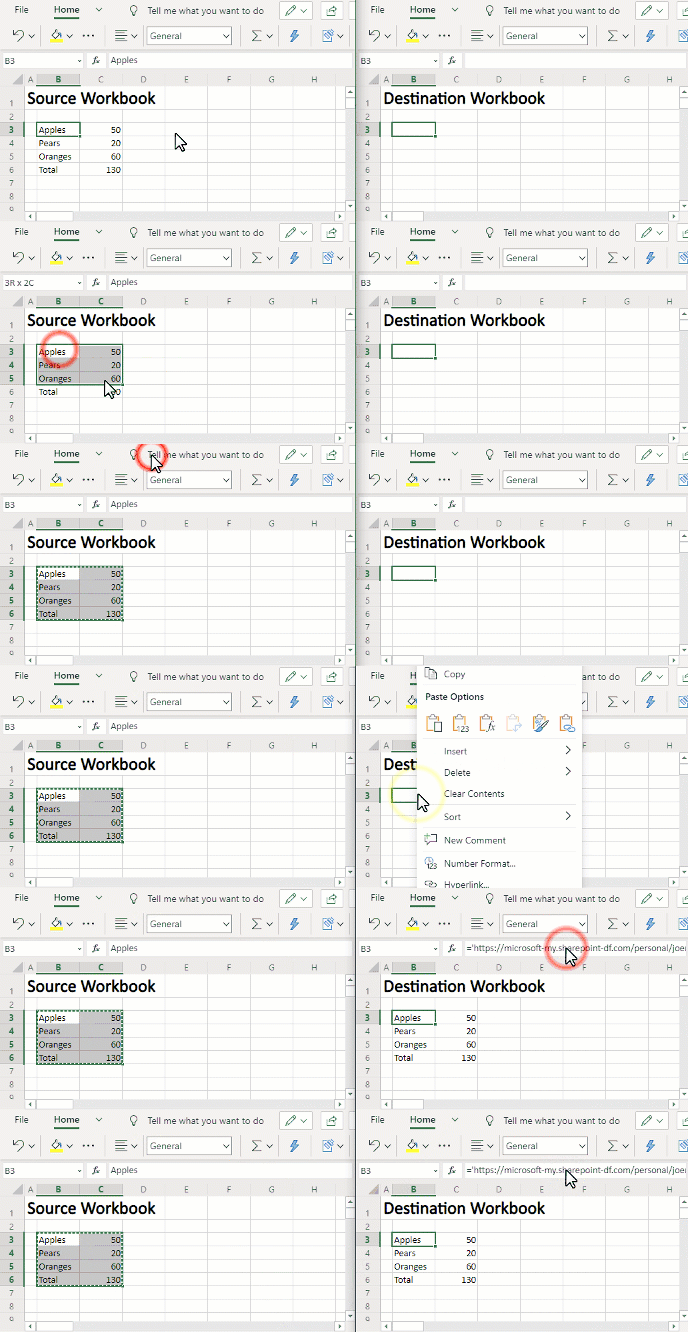
To create a new Workbook Link, follow these simple steps:
- Open two workbooks in Excel for the web. They should be stored in either OneDrive or SharePoint.
- In the source workbook, copy the range.
- In the destination workbook, “paste links” via the right click menu or via paste special on the home tab.
The gif below provides a brief demonstration.
 Creating Workbook Links
You can also explicitly reference the workbook using the following reference pattern. =’https://domain/folder/[workbookName.xlsx]sheetName’!CellOrRangeAddress
Opening a workbook that contains Workbook Links
When you open a workbook that contains Workbook Links, you will see a yellow bar notifying you that the workbook is referencing external data.
 Data Connection Warning
If you ignore or dismiss the bar, we will not update the links and instead keep the values from before. If you click the “Enable Content” button, Excel for the web will retrieve the values from all the linked workbooks.
Managing Workbook Links
To help you manage Workbook Links, we’ve added a new Workbook Links task pane. The task pane can be accessed by pressing the Workbook Links button on the Data tab or via the “Manage Workbook Links” button on the yellow bar above.
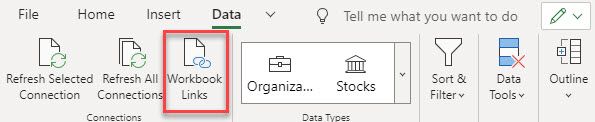 Workbook Links button on the Data tab
You can see the task pane below with its menus expanded below.
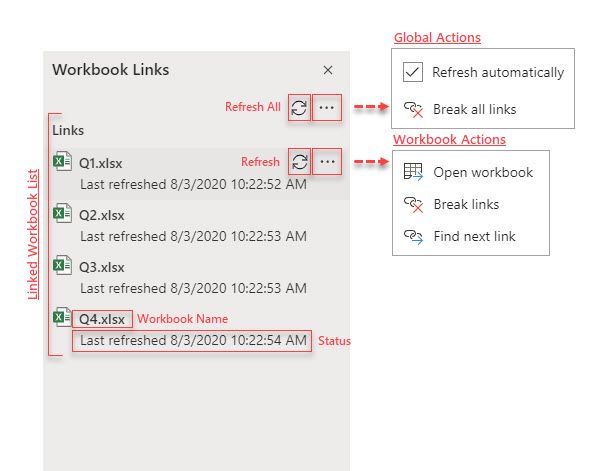 Workbook Links Taskpane
The task pane lists all your linked workbooks and provides you with information on the status of each of the linked workbooks. If the link could not be updated, the status will explain the cause. So that you can quickly spot issues, any workbook that cannot be updated will be bubbled to the top of the list.
At a global level you can take the following actions:
Refresh all: This triggers an immediate refresh of all linked workbooks.
Refresh links automatically: When enabled, this causes Excel to periodically check for updated values while you are in the workbook.
Break all links: This removes all the Workbook Links by replacing those formulas with their current values.
At a workbook level you can take the following actions:
Refresh workbook: This triggers an immediate refresh of that linked workbook.
Open workbook: This opens the linked workbook in another tab.
Break links: This removes links to that workbook by replacing those formulas with their values.
Find next link: This selects the next occurrence of a link to that linked workbook. (Great for quickly finding phantom links)
Workbook Links vs External Links
Direct links to external workbooks have historically been referred to simply as “External Links”. As we continue to add more external data sources to Excel, the term “External Links” has become ambiguous. To improve clarity going forward, we will use the term “Workbook Links” instead.
Learn More
You can find additional information about Workbook Links on our help page.
by Scott Muniz | Aug 18, 2020 | Azure, Microsoft, Technology, Uncategorized
This article is contributed. See the original author and article here.
Final Update: Tuesday, 18 August 2020 20:26 UTC
We’ve confirmed that all systems are back to normal with no customer impact as of 8/18, 19:00 UTC. Our logs show the customers would have seen intermittent data gaps when using Workspace Based Application Insights starting on 8/15, 16:45 UTC and that during the 3 days, 2 hours and 15 minutes that it took to resolve the issue, 657 customers of this public preview feature in East US, South Central US, and West US 2 regions experienced the issue.
- Root Cause: A regression in a recent deployment that has been rolled back.
- Incident Timeline: 3 Days. 2 Hours & 15 minutes – 8/15, 16:45 UTC through 8/18, 19:00 UTC
We understand that customers rely on Application Insights as a critical service and apologize for any impact this incident caused.
-Jeff

by Scott Muniz | Aug 18, 2020 | Uncategorized
This article is contributed. See the original author and article here.
Back in March 2020, the main Knowledge Base (KB) articles for Cumulative Updates (CUs) started including inline description for fixes. We call those descriptions “blurbs” and they replace many of the individual KB articles that existed for each product fix but contained only brief descriptions. In other words, the same short one or two sentence description that existed in a separate KB article before, now appears directly in the main CU KB article. For fixes that require longer explanation, provide additional information, workarounds, and troubleshooting steps, a full KB article is still created as usual.
Detail
SQL Server used the Incremental Servicing Model for a long time to deliver updates to the product. This model used consistent and predictable delivery of Cumulative Updates (CUs) and Service Packs (SPs). A couple of years ago, we announced the Modern Servicing Model to accelerate the frequency and quality of delivering the updates. This model relies heavily on CUs as the primary mechanism to release product fixes and updates, but also provides the ability to introduce new capabilities and features in CUs.
Historically, every CU comes with a KB article, and you can take a look at some of these articles in the update table available in our latest updates section of the docs. Each one of these CU main KB articles has a well-defined and consistent format: metadata information about the update, mechanisms to acquire and install the update, and a list of all the fixes (with bug IDs) and changes in the update. In some rare occasions when an issue is found after the CU is released, there might be a section that provides a heads-up to users about a known problem encountered after applying the update, and its scope.
Now imagine a CU with a payload of 50 fixes. If you want to know more about each fix, you’d have to click through 50 child KB articles (one per fix) and we received strong feedback that wasn’t a friendly experience. We all agree that frequent context switching is not efficient – be it computer processing code or human brain reading things. So how do you optimize this experience and still maintain the details provided in the shorter individual articles you used to click and read?
With the concept of “article inlining”! Yes, we borrowed the same concept we use in the SQL Database Engine (e.g. scalar UDF inlining) and computer programming in general (e.g. inline functions).
Why this change?
We will take this opportunity to explain the thought process that went into this change and what data points and decision points we use to drive this change. Besides user feedback, and because we are data-driven after all, we also looked at page views and hit rate from search engines for these individual articles compared to the main CU KB article. We found that usually the page views for the main CU KB articles is measured in the thousands, while the individual fix KB articles are read very few times.
Using blurbs
The normal format used for the individual fix KB article include: Title, Symptoms, Status, Resolution, and References. However, not all fixes are implemented the same way. For example, let us look at SQL Server 2019 CU1 article. The first fix in the table is FIX: Transaction log isn’t truncated on a single node Availability Group in SQL Server, and when you install it, the fix is simply applied and enabled.

Let us click on the link and open this article to understand more details about this fix. Here is what we see:
The only useful information you get from this lengthy article is the Symptoms section. Usually the title of the article provides a summary of the symptoms section. Now look at other sections:
- Status: of course we know this is a problem in the software – otherwise why is a fix needed?
- Resolution: this seems obvious enough – that you need to apply this cumulative update to fix this problem.
By moving the two lines from the Symptoms section in this individual fix KB article to the main CU KB article, then you can avoid extra clicks and context switches.
You can go down the list of fix articles in that KB and find many articles that fit this pattern. Our Content Management team did a study of several past CUs and found that the majority of individual fix KB articles (to the tune of 85%) follow this pattern and can be good candidates to “inlining” the symptom description in the main CU KB article table.
Criteria for creating a full KB Article
However, you can identify KB articles in that list with different patterns of information:
In such scenarios, we carefully evaluate if we can perform inlining and still manage to represent this additional information in the main CU KB article. If not, then these are good candidates to have an individual KB article. For example, FIX: SQL Writer Service fails to back up in non-component backup path in SQL Server 2016, 2017 and 2019 is very detailed, and includes error log snippets and other details that can’t be inlined.
To each their own
In SQL Server 2017 and 2019, product improvements or new capabilities (such as DMV, catalog views, or T-SQL changes) are shipped through CUs, as there are no more SPs. You will find plenty of examples about this in the CU article list we are using as reference. Being improvements or new capabilities, information belongs in the product documentation, not in support KB articles. Otherwise this will cause a disconnect when you look at product documentation. Going forward, this is the pattern you’ll see.
We have used this style of fix lists in the past with service packs. An example is SQL Server 2014 Service Pack 1 release information. Also, many modern products use release notes to convey all pertinent information about that specific update. For example: Release notes for Azure Data Studio and Update Rollup 1 for System Center Service Manager 2019
Going forward
As we mentioned, we started piloting this approach around the March 2020 timeframe. The initial releases we attempted this style for were SQL Server 2016 SP2 CU12 and SQL Server 2019 CU3. Our friends and colleagues called it the “Attack of the blurbs!”. Some folks called it the TL/DR version of KB articles. And while the reactions have been predominantly positive and encouraging, we will constantly fine tune these approaches based on user feedback. As part of this change, we are also improving the content reviews done for the CU articles to ensure they contain relevant and actionable information for users.
One important callout we would like to make sure users understand is about the quality of these fixes. When we stated in the Incremental Servicing Model (ISM) post that “(…) we now recommend ongoing, proactive installation of CU’s as they become available. You should plan to install a CU with the same level of confidence you plan to install SP’s (Service Packs) as they are released. This is because CU’s are certified and tested to the level of SP’s (…)”, we meant it, and are continuously making the process more robust. Irrespective of whether a fix has an individual KB article or an inline reference in the main CU KB article, they go through the same rigorous quality checks. In fact, KB article writing and creating documentation is the last step in the CU release cycle: only after a fix passes the quality gates and is included in the CUs, does the documentation step happen.
by Scott Muniz | Aug 18, 2020 | Azure, Microsoft, Technology, Uncategorized
This article is contributed. See the original author and article here.
Azure Sphere OS version 20.08 Update 1 is now available in the Retail Eval feed. This OS release contains a security update.
Because this change represents a critical update to the OS, the retail evaluation period will be shortened and the final 20.08 release will be published as soon as possible within the next 7 days to ensure systems stay secure. During this time, please continue verifying that your applications and devices operate properly with this retail evaluation release before it’s deployed broadly via the Retail feed. The Retail feed will continue to deliver OS version 20.07 until we publish the final 20.08 release.
For more information
For more information on Azure Sphere OS feeds and setting up an evaluation device group, see Azure Sphere OS feeds.
If you encounter problems
For self-help technical inquiries, please visit Microsoft Q&A or Stack Overflow. If you require technical support and have a support plan, please submit a support ticket in Microsoft Azure Support or work with your Microsoft Technical Account Manager. If you would like to purchase a support plan, please explore the Azure support plans.

by Scott Muniz | Aug 18, 2020 | Uncategorized
This article is contributed. See the original author and article here.
Over the past few years, there has been increasing demand for introductory coursework in artificial intelligence and machine learning. Enrollment in Introduction to Machine Learning classes at universities in the US have grown as much as 12 times in the past decade[1]. These introductory courses play a key role in educating the future of machine learning professionals.
The rest of this post is meant as a follow-up to our press release highlighting our release of DirectML on WSL, NVIDIA CUDA support, and TensorFlow with DirectML package. Learn more
DirectML for Students and Beginners
The DirectML teams wants to ensure that the Windows devices students and beginners use can fully support their coursework. Our solution starts by providing hardware accelerated training on the breadth of Windows hardware, across DirectX 12 based GPU, via DirectML. The DirectML API enables GPU accelerated training and inferencing for machine learning models.
TensorFlow + DirectML
In June 2020, we took our first step to enable future professionals to leverage their current hardware across the breadth of the Windows ecosystem by releasing a preview package of TensorFlow with a DirectML backend.
Through this package, we are meeting students and beginners where they are by providing support for the models they want in a frameworks they use, all while making the most of their existing GPU hardware.
Students and beginners can start with the TensorFlow tutorial models or our examples to start building the foundation for their future.
Engage with our Community

If you try out the TensorFlow with DirectML package and run into issues, we would love to hear your feedback on our DirectML GitHub repo.
We are looking to engage with the community of educators to better understand key scenarios for students and beginners getting into machine learning. Share your thoughts in this survey to shape investments we make with DirectML to provide GPU hardware acceleration to additional ML tools and frameworks.
[1] https://hai.stanford.edu/sites/default/files/ai_index_2019_report.pdf


Recent Comments