by Scott Muniz | Aug 19, 2020 | Azure, Microsoft, Technology, Uncategorized
This article is contributed. See the original author and article here.
This blog post continues the series about Azure Security Center threat protection for SQL IaaS VMs. As you learnt in this blog post, Azure Security Center protects SQL servers hosted on either Azure VMs, Azure Arc and on-premises. This post will focus on SQL running on-premises and how to leverage ASC threat protection for SQL in this type of scenario.
SQL Server running on-premises
If your SQL server is installed in a Windows machine, located on-premises Windows and without Azure Arc, you really have two options for connecting it to Azure:
- Deploy Azure Arc
- Connect Windows machines to Azure Security Center without Azure Arc using Log Analytics agent.
Deploying Azure Arc
You can connect any Windows machine to Security Center, however, Azure Arc provides deeper integration across all your Azure environment. If you set up Azure Arc, you will see the SQL Server – Azure Arc page in the portal and your security alerts will appear on a dedicated Security tab on that page. The first and recommended option is to set up Azure Arc on the host. Please refer to this blog post for SQL VMs hosted on Azure Arc.
Connect Windows machines to Azure Security Center without Azure Arc
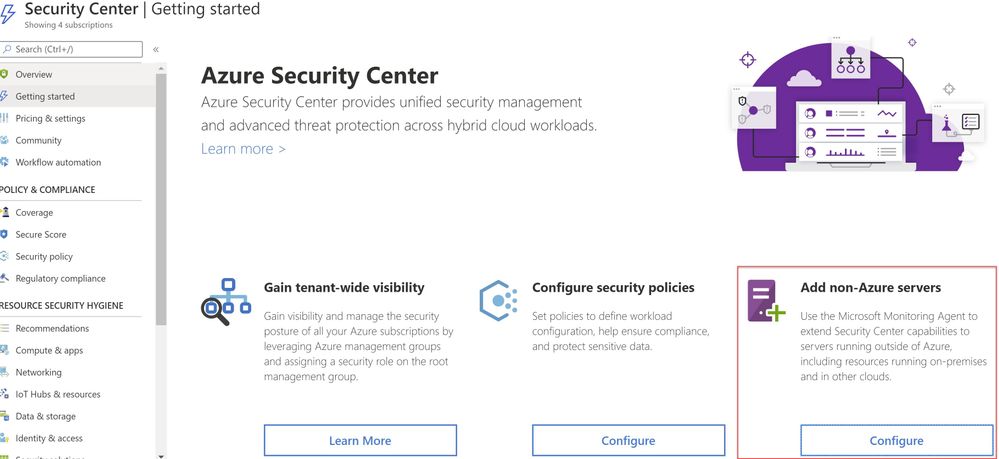
Security Center can monitor the security posture of non-Azure computers, but you need to first onboard these resources. If you choose to connect a SQL Server running on a Windows machine without using Azure Arc, you can use the option Add non-Azure servers from the Getting started blade or from the Compute blade as shown in ‘Image 1 & 2’.
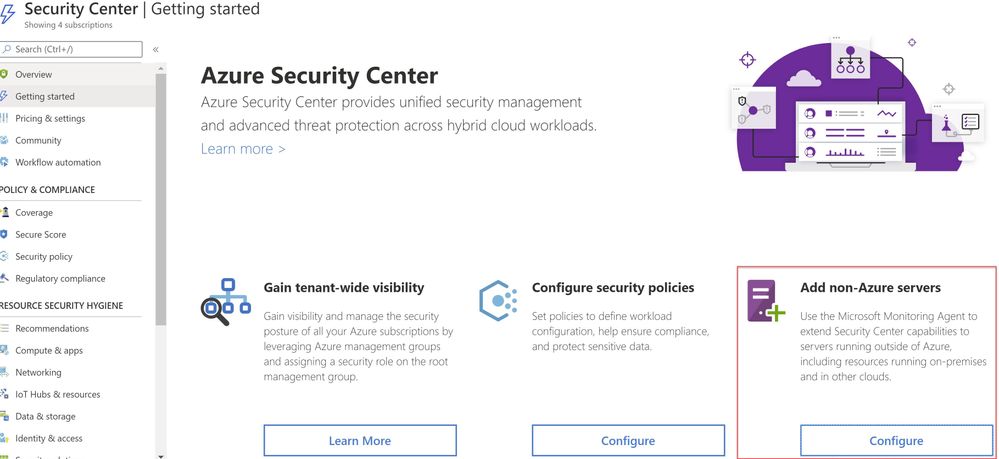 Image 1: Add Non-Azure Servers
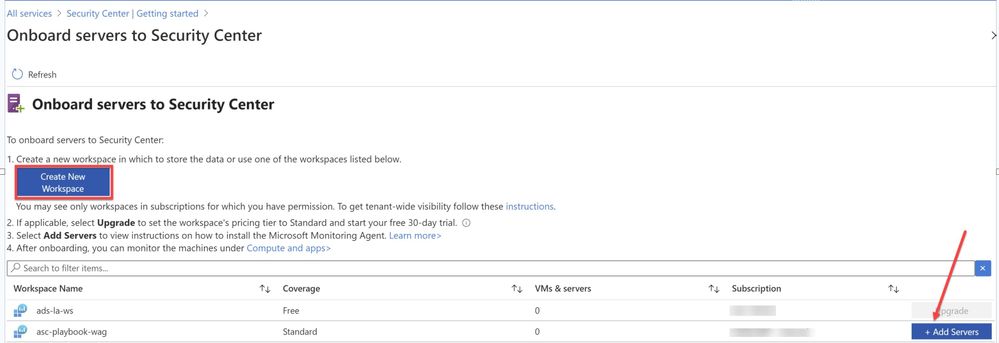 Image 2: Onboard servers to Security Center
You will be redirected to Direct Agent page from where you can install appropriate Windows Agent.
TIP: You can connect any on-premises machine to Azure Security center by manually installing Log Analytics agent to extend the Security Center capabilities to servers running outside of Azure be it in on-premises or in other clouds. Just make sure the on-premises machine (In our scenario, SQL server) is connected to the relevant log analytics workspace. You can check this by navigating to Log Analytics workspace > Advanced settings > Connected sources > Choose either Windows/Linux server, as shown in ‘Image 3’.
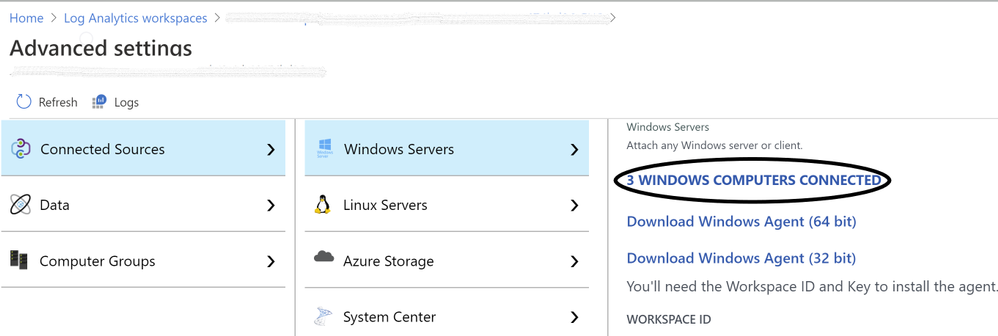 Image 3: Confirmation of Connected Sources
Once you have the Log Analytics agent installed, Azure Security Center will start scanning the machines and flag prioritized list of recommendations accordingly, if not configured according to security best practices.
Note: for Step-by-Step instructions to onboard a non-azure computer, please refer to this article.
Validating SQL threat detection
When Azure Security Center identifies the pre-attack you should be able to view the alert in the Security alerts section as shown in ‘Image 4’
Note: Make sure you have non-azure environment selected from the Filter.
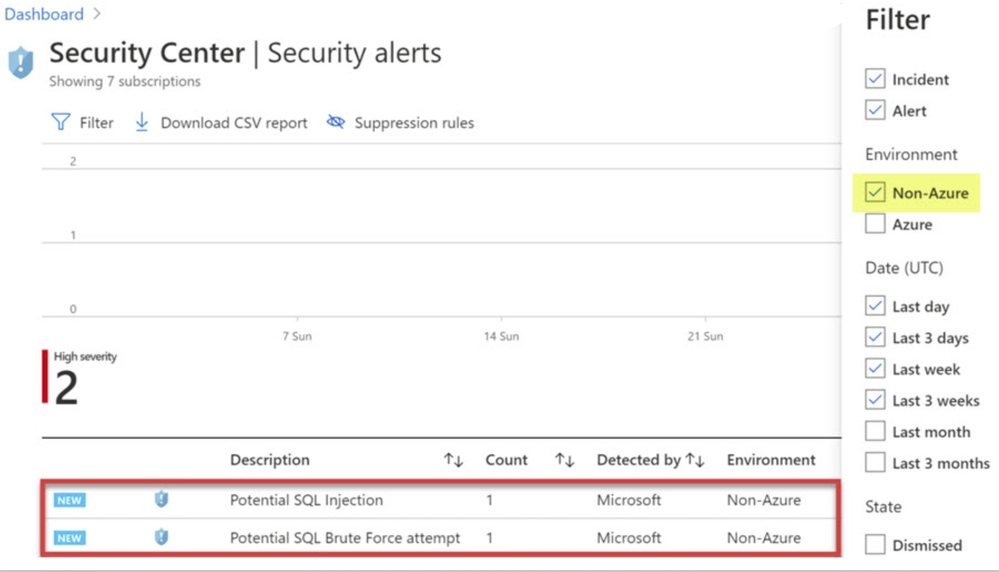 Image 4: Security Alerts snapshot
Conclusion
Alerts are designed to be self-contained, with detailed remediation steps and investigation information in each one. You can investigate further by using Azure Security Center and Azure Sentinel capabilities for a broader view:
- Enable SQL Server’s auditing feature for further investigations. If you are an Azure Sentinel user, you can upload the SQL auditing logs from the Windows Security Log events to Sentinel and enjoy a rich investigation experience. Learn more about SQL Server Auditing.
- To improve your security posture, use Security Center’s recommendations for the host machine indicated in each alert. This will reduce the risks of future attacks.
What are you waiting for? Go ahead, leverage Azure Security Center to protect your SQL IaaS VMs.
Special thanks to:
Yuri Diogenes, Senior PM, CxE Security – ASC Team for reviewing this post.
by Scott Muniz | Aug 19, 2020 | Uncategorized
This article is contributed. See the original author and article here.
Natural Language Queries is a feature in Ideas in Excel, powered by Machine Learning and Natural Language Processing that makes data analysis simpler, faster, and more approachable.
Natural Language Queries Now Generally Available
Thank you for providing valuable feedback on how to improve Natural Language Queries! We’re excited to announce that the Natural Language Queries feature introduced at Ignite last November is now generally available in Windows, Mac, and Excel for the web.
After Ignite, we have added more refreshable PivotTable answers and we have introduced answers supported by formulas. We have also made many quality improvements such as the ability to understand questions in relation to date/time columns (‘by year‘, ‘by month’).
Let’s see it in action
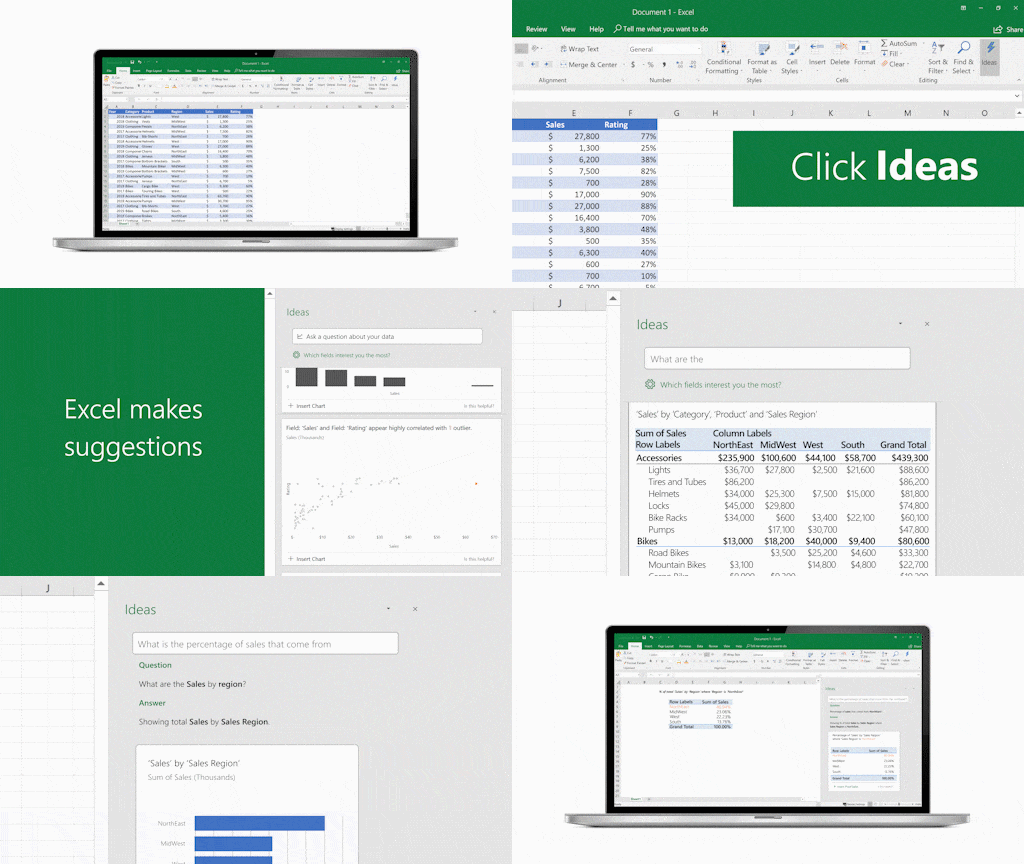
Simply click a cell in a data range, and then click the Ideas button on the Home tab. Ideas will analyze your data and provide high-level summaries, trends, and patterns.
If you are interested in more specific information, enter a question in the query box at the top of the pane, and press Enter. Ideas will provide answers that you can insert into the workbook in the form of charts, tables, PivotTables and formula answers.
For example, if you have sales data with people names, you can ask ‘Who had the highest sales in 2018?’ or ‘What products have sales higher than 20,000?’. You can also specify how you want your answer, for instance, you can ask ‘Show me sales by product as table’ or add ‘sorted by product’ to your question.
If you are interested in exploring your data, or just want to know what is possible, Ideas also provides personalized suggested questions which you can access by clicking on the query box.
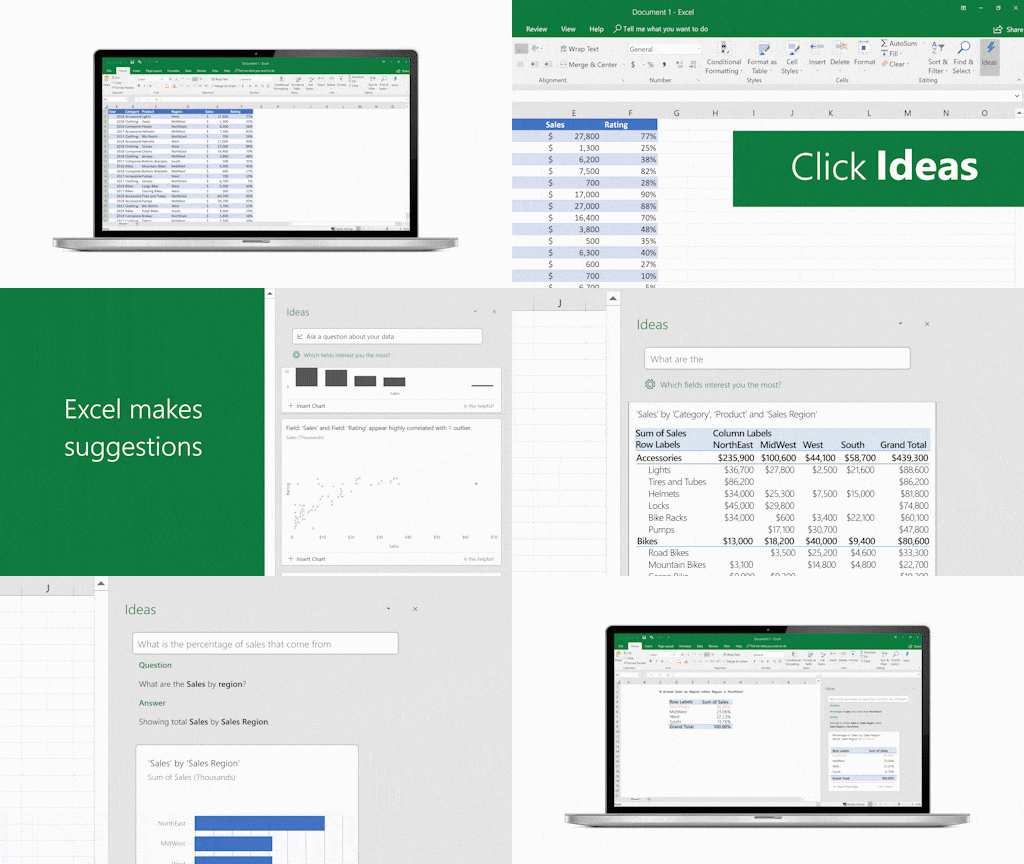 GIF showing Natural Language Queries in Ideas in Excel.
Following Microsoft’s Responsible AI principles, Ideas strikes through any words from the question that it can’t understand. It also provides a description of the answer so that you can check whether it’s exactly what you were looking for. If it isn’t, please rephrase your question… and send us feedback.
We are always improving, and you can help us get better: please try Natural Language Queries out and send us your feedback through the Help tab.
Availability Notes
Natural Language Queries in Ideas is available to Microsoft 365 subscribers in English. If you are an Microsoft 365 subscriber, make sure you have the latest version of Office. To learn more about the different update channels for Office, see: Overview of update channels for Microsoft 365 Apps.
Your Feedback Helps Us Improve Our Product:
Let us know your thoughts on Natural Language Queries! Send us ideas and suggestions via UserVoice.
To learn more,
by Scott Muniz | Aug 19, 2020 | Uncategorized
This article is contributed. See the original author and article here.
Today, we are announcing the private preview for the classification improvements and would like you to join the preview and give us your valuable feedback.
Our team has been working on an exciting new update to the M365 S+C classification. The set of upcoming features would help you improve accuracy of your policies across M365 S+C solutions and increase coverage. We have improved accuracy of the out-of-the-box Sensitive information types, introduced confidence levels to simplify policy creation and added new capabilities to customize SITs which will allow you to fine-tune your SITs to reduce False positives & False negatives. In addition, we are adding new Sensitive information types that will allow you to increase your policy coverage.
Introducing Confidence levels
We are upgrading confidence levels by replacing number-based confidence system with three discrete confidence levels – high confidence, medium confidence & low confidence. Confidence levels (high, medium, low) reflect how much supporting evidence was detected along with the primary element. The more supporting evidence an item contains, the higher the confidence that a matched item contains the sensitive info you’re looking for. For example, matches with a high confidence level will contain more supporting evidence in proximity of the primary element and would lead to lower false positives but higher false negatives. Whereas matches with a low confidence level would contain little to no supporting evidence in proximity and thus would lead to zero to low false negatives but higher false positives.
Improved Accuracy
We have made platform & definitional changes to help reduce False positives & False negatives. These improvements impact 80% of our Out-of-the-box sensitive information types. In early testing within Microsoft & with few of our design partners, we have seen a reduction in false positive rate from 30-60% to below 10% in some cases for the SIT pattern with the highest confidence level.
Copy & edit OOB SITs & other Custom SIT improvements!
We are addressing one of the top asks to allow copy & edit of out of the box sensitive type to fine-tune SITs based on your tenant needs to reduce false positives & false negatives. In addition, we have significantly improved the user experience & capabilities of creating a custom SIT. We have added two new power features to the custom SIT flow along with other improvements – Validators & additional checks. Validators will allow you to define your own regex and use validators like Luhn check. Additional checks will enable scenarios like excluding samples such as 4111111111111111 from credit card matches, define starting or ending characters, include/exclude prefix, etc. With the new set of advancements, you will be able to customize the SITs as per your requirements to further reduce False positives or false negatives.
100+ new & enhanced SITs
We have added 98 new SITs and enhanced definitions for 27 existing SITs. You can refer the list of new & enhanced SITs at the bottom of this email.
Sign up for preview program
If you are interested in start using any of the above features, you can join the preview program by filling the consent form & we’ll add you to our MIP&C Preview team on Teams.
Who can join?
These improvements will be rolling out to all M365 S+C solutions. However, in the initial preview phase, we will be enabling them for Communication compliance and DLP for SharePoint, OneDrive, Teams and Exchange. So, if you have active policies for any of these solutions, you can participate in the preview program.
Preview timelines
The preview program will start in early-September and the features will light up in a phased manner. In the first phase you will have access to all the new & enhanced SITs, Improved accuracy and Confidence levels. Soon after, in the second phase, you will have access to Copy & edit OOB SITs & other Custom SIT improvements.
What is the expectation from you?
Create policies for sensitive information types you are interested in protecting and analyze the results to calculate the False positive & false negative rates. If you are seeing a false positive rate higher than 10% for the high confidence pattern or noticing false negatives, report it to us on the Class Depth Teams channel or write us an email at ClassDepthPreview@microsoft.com. We will help you bring them down by fixing issues on our side or by proposing customizations to your SITs.
by Scott Muniz | Aug 19, 2020 | Uncategorized
This article is contributed. See the original author and article here.
This article is the fourth of a series in the Microsoft Tech Community Public Sector Blog that explores myths of deploying Microsoft Cloud Services into the *US Sovereign Cloud with Azure Government and Microsoft 365 Government (GCC High).
We will focus on the myth that Controlled Unclassified Information (CUI) does not require data sovereignty. This article is written through the lens of requirements to protect CUI in the context of the U.S. Department of Defense for national security, such as in alignment with the Defense Industrial Base (DIB) and the Cybersecurity Maturity Model Certification (CMMC).
Executive Summary
Microsoft has prescribed the *US Sovereign Cloud with Azure Government and Microsoft 365 Government (GCC High) to protect Controlled Unclassified Information (CUI) and Covered Defense Information (CDI) consistently. Our rationale is that CUI includes International Traffic in Arms Regulation (ITAR) regulated data, and the U.S. Department of Defense (DoD) requires Defense Federal Acquisition Regulation Supplement clause 252.204-7012 (DFARS 7012) to protect it. We only accommodate that contractually across Azure, Office 365, and Dynamics 365 in the US Sovereign Cloud, built in a fully isolated environment that is both physically and logically separated. All services in the US Sovereign Cloud are contained within an accreditation boundary supporting US Export Controls requiring screened US persons and data sovereignty in the Continental United States (CONUS).
*For more information on the US Sovereign Cloud, please refer to the Understanding Compliance Between Microsoft 365 Commercial, GCC, GCC-High and DoD Offerings
Preface
If only I had a quarter for every time I’ve had to explain why we have a “Maybe” for CUI and CDI in clouds other than the US Sovereign Cloud.
Our mantra is clear. I quote this from the compliance Jedi Master @Shawn_Veney:
“If you find your organization manages so many types of CUI, and is perhaps thinking of taking on new work and adding to that challenge; then sometimes it is easier to adopt a high watermark strategy to accomplish your data protection goals. This trade off recognizes that your solution may exceed requirements for a specific type of data; but provides confidence you likely have addressed your aggregate requirements. This is ideal when your internal classification and marking efforts may not be where you would like them yet.”
Throughout this article, I will explain why we have a definitive “Yes” for CUI and CDI in the US Sovereign Cloud. In what will be one of my most hotly contested articles to date, this is intended to spark a debate on how CUI data protection practices apply holistically. I intend to keep this initial argument high level, as there are a million nuances that may be deliberated indefinitely. That said, the “thesis” of this article should be debated passionately as an industry.
At the end of the day, Microsoft offers multiple clouds from Commercial to GCC to GCC High to DoD and even to Azure Government Secret. In other words, we can satisfy many risk profiles and offer you a cloud that best aligns with your organization’s risk posture. We will not police you, nor will we demand you choose one cloud over another. We will be very clear on where we provide contractual obligations. Hence why we are only confident in saying “Yes” to CUI in the US Sovereign Cloud.
Summary
The CUI Program is an ever-evolving initiative to standardize the markings and data protection practices across Federal agencies to facilitate sharing of sensitive information, transcending individual agencies. CUI includes markings that span many categories and groupings. The groupings consist of everything from Financial and Privacy data, all the way up to Export Controlled and Intelligence data. Individual agencies have their own requirements for CUI, resulting in additional rules that govern the data protection practices of CUI. For example, the DoD defines standards in the Cloud Computing (CC) Security Requirements Guide (SRG), in DFARS 7012, and in the Cybersecurity Maturity Model Certification (CMMC) to protect CUI.
CUI is defined by a program that includes all categories under a single umbrella. Not all CUI markings are protected precisely the same way. However, it can be untenable to discern the various restrictions for CUI given consolidated language used by standards and regulations. In addition, the complicated array of markings are often not applied effectively. As a result, the reduced risk data protection strategy is to opt for the highest watermark possible for protection of CUI, rather than risk it by adopting a lower control set. CUI has export-controlled data as a common high watermark, to include ITAR regulated data. ITAR has a data sovereignty requirement.
In other words, CUI effectively requires data sovereignty.
What is Controlled Unclassified Information?
If you have not read the CUI History from the National Archives and Records Administration (NARA), I highly recommend it. It’s a short read, and helpful for context.
https://www.archives.gov/cui/cui-history
To summarize, before the advent of CUI, there were a myriad of autonomous Federal agencies and departments that had each developed its own practices for protecting sensitive information. This non-conformity made it extremely difficult to share information with transparency throughout the Federal government and its stakeholders, such as the Defense Industrial Base (DIB).
The CUI program is an ever-evolving initiative to standardize the markings and data protection practices across Federal agencies to facilitate sharing of sensitive information, transcending individual agencies. Ultimately, NARA oversees the CUI Program and is primarily scoped to the Federal executive branch agencies. Major contributors to the program include the DoD, the Department of Energy (DoE), the Department of Homeland Security (DHS), the Department of State (DoS), etc. NARA defines CUI as:
“Controlled Unclassified Information (CUI) is information that requires safeguarding or dissemination controls pursuant to and consistent with applicable law, regulations, and government-wide policies but is not classified under Executive Order 13526 or the Atomic Energy Act, as amended.”
Presidential executive orders evolved to a rule published in 2016 called “32 CFR Part 2002 Controlled Unclassified Information”. You can read about it here in the Federal Register:
https://www.federalregister.gov/documents/2016/09/14/2016-21665/controlled-unclassified-information
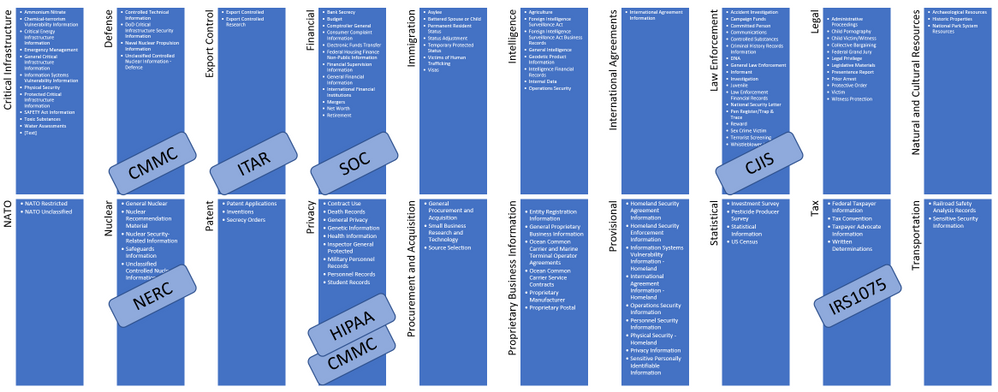
32 CFR Part 2002 prescribes the CUI Program markings that span many categories and groupings. The groupings consist of everything from Financial and Privacy data, all the way up to Export Controlled and Intelligence data. You can find the list here:
https://www.archives.gov/cui/registry/category-marking-list
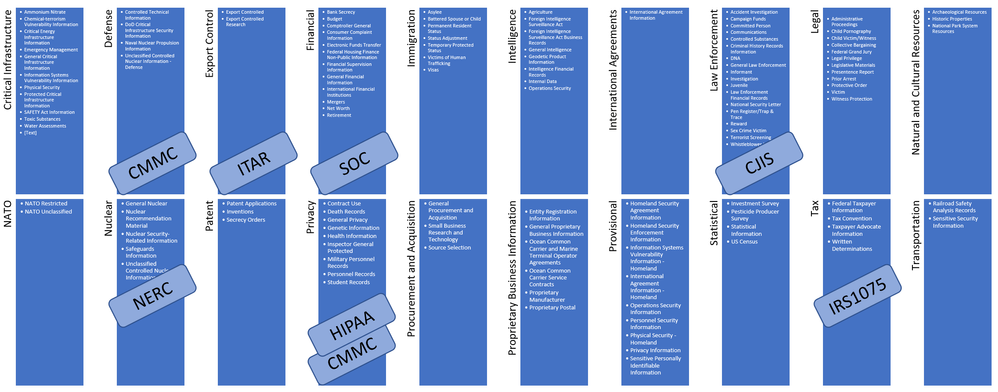
Illustration 1: Microsoft Summary CUI Registry
Is All CUI the Same?
It goes without saying that each of the Federal executive branch agencies have had their own requirements for CUI, resulting in additional rules that govern the data protection practices of CUI. For example, the DoD defines data protection standards in the DoD CC SRG, DFARS 7012, and in the CMMC to protect CUI. Thus, there does remain a level of autonomy from NARA.
For example, the DoD recently released DOD Instruction 5200.48 establishing policies, responsibilities, and procedures for CUI. It includes a “DOD CUI repository” not accessible by the public. It is intended to address inconsistent definition and marking requirements specific to the DoD expanding what is outlined in 32 CFR Part 2002. The DoD CUI Registry outlines an official list of Indexes and Categories to identify CUI, clarifying what has been a common source of confusion.
In addition, there are multiple regulations that govern specific categories of CUI. For example, export-controlled categories may be regulated by ITAR administered by the Department of State Directorate of Defense Trade Controls (DDTC), or by EAR administered by the Department of Commerce’s Bureau of Industry and Security (BIS).
In other words, while “CUI” is defined by a standardized program of markings and data protection practices, not all CUI is the same. Some CUI categories may generally fall into the bucket of Personally Identifying Information (PII), such as Privacy. Mishandling of other categories may earn you an orange jump suit, such as spilling ITAR regulated data to an unauthorized foreign state actor.
To answer the question, “Is All CUI the Same?” Conclusively No.
Is All CUI Protected the Same Way?
Since all CUI is not the same, certainly not all categories of CUI are protected precisely the same way.
Without going into analysis paralysis on topics such as CUI Basic versus CUI Specified groups, there is a statement that jumped out at me in 32 CFR Part 2002:
“We understand the concerns raised in these comments and agree that the penalties and consequences for failing to adequately protect CUI of some types may differ significantly from failure to protect CUI of other types. That being said, we cannot adjust the definition of CUI to exclude export controlled or other protected information; the Executive Order’s definition of CUI is clear and includes all unclassified information that laws, regulations, and Government-wide policies require to have safeguarding or dissemination controls.”
While we may agree that not all CUI is the same, there is a consensus that all CUI is defined by a program that includes all categories under a single umbrella. So the question is, how do you differentiate between CUI that is sensitive such as Privacy categories, versus those with damaging national security concerns, such as export-controlled data? It’s all CUI, right? Another way to ask the question is, how do you discern the various restrictions for CUI given the complicated array of markings that are not often applied effectively?
Many of you reading this, especially the compliance authorities out there, are thinking “yes, it’s all CUI” but “no, not all CUI is protected the same way”. Technically, you are right. However, I’ve talked to hundreds of organizations out there ranging from the DoD, to the DIB, the FFRDCs (Federally Funded Research and Development Centers), the UARCs (University Affiliated Research Centers), and beyond. I honestly do not hear anyone differentiating categories of CUI for purposes of maintaining compliance with individual markings. When they say “CUI”, they are aggregating all categories together in a comprehensive fashion, not unlike what is described in 32 CFR Part 2002 above. In addition, most recognize CUI markings are not applied consistently and marking efforts may not be where they would like them yet. In other words, they have not located all CUI stored in their enterprise information systems.
Here is another example from the Cybersecurity Maturity Model Certification (CMMC). CMMC defines five Levels:
- Level 1: Safeguard Federal Contract Information (FCI)
- Level 2: Serve as transition step in cybersecurity maturity progression to protect CUI
- Level 3: Protect Controlled Unclassified Information (CUI)
- Levels 4-5: Protect CUI and reduce risk of Advanced Persistent Threads (APTs)
Does anything jump out at you? It’s NOT this:
- Level 3: Protect Controlled Unclassified Information (CUI) of the non-export-controlled categories
- Levels 4-5: Protect CUI including export-controlled categories and reduce risk of Advanced Persistent Threats (APTs)
Why? CMMC Levels 3-5 are intended to protect all CUI. Period. CMMC does not attempt to differentiate CUI that is export-controlled versus CUI that is not. If you delve into the CMMC Model Appendices, you will find many references to CUI, none of which qualify what categories of CUI are in scope per Practice or Process. All categories are in scope for all Practices and Processes in CMMC Levels 3-5. In fact, if you search for “export”, you will find many references, especially in alignment with the NIST SP 800-171.
Assuming you conclude that CMMC is intended to protect CUI regardless of category, you may also conclude export-controlled data, and specifically ITAR data is a common high watermark for compliance.
This article is not about how to become CMMC compliant. This article is specifically focused on CUI. However, there is something to be said about the stated requirements for a CMMC Certified Third-Party Assessor Organization (C3PAO) that uses an external cloud service provider to store, process, or transmit CUI. This is quoted from the CMMC Accreditation Body (CMMC AB) website:
“the C3PAO shall require and ensure that the cloud service provider meets security requirements equivalent to those established by the Government for the Federal Risk and Authorization Management Program (FedRAMP) High baseline and in particular, Impact Level (IL4)”
If the cloud service provider is not DoD CC SRG IL4 authorized, it becomes the responsibility of the C3PAO to provide an independent assessment to address the gaps to become compliant. Most CSPs will not allow ad-hoc third parties to perform assessments on their data centers. Even if they did allow an assessment, it is untenable to make the commercial CSP compliant with FedRAMP and IL4 without significant engineering efforts by the CSP. Trust me, we would not have invested an extraordinary amount to build the US Sovereign Cloud if we could have simply pulled it off in Commercial with a few compensating controls.
The point is, this CMMC AB requirement for FedRAMP High and IL4 to protect CUI does not qualify what categories of CUI are in scope.
Sidebar: The language of requiring an IL4 cloud is nuanced when applied to the DIB and with C3PAOs, as IL4 only applies to Federal information systems. IL4 is not an authorization the DoD will provide to a non-Federal entity, nor is it for a CSP cloud environment not in use directly by the DoD. DFARS 7012 is what applies to non-Federal information systems. I am assuming the intent is to drive the selection of a cloud that has been authorized by the DoD, as opposed to a cloud that is only authorized with FedRAMP. For example, Microsoft Azure Government has a Provisional Authorization for DoD CC SRG IL4, with many services now at IL5.
Speaking of IL4, read this excerpt from DoD CC SRG 3.2.4 Level 4:
“CUI contains a number of categories, including, but not limited to the following: • Export Controlled–Unclassified information concerning items, commodities, technology, software, or other information whose export could reasonably be expected to adversely affect the United States national security and nonproliferation objectives.”
It goes on to define the specific requirements for ITAR. In this case, IL4 is specifically placing an emphasis on CUI to explicitly scope in export-controlled data and how to protect it.
Thesis: Not all CUI markings are protected precisely the same way. However, it can be untenable to discern the various restrictions for CUI given consolidated language used by standards and regulations. In addition, the complicated array of markings are often not applied effectively. As a result, the reduced risk data protection strategy is to opt for the highest watermark possible for protection of CUI, rather than risk it by adopting a lower control set.
Does All CUI Have a NOFORN Requirement?
Another way to describe data sovereignty, is what may be referred to as “NOFORN”. NOFORN stands for “NO FOReign Nationals”. In other words, NOFORN applies to sensitive data that is not releasable to foreign nationals, governments, nor non-US persons.
I led this article clearly stating not all CUI requires similar handling, such as a NOFORN requirement. However, is it that simple? The above conclusion is that CUI has export-controlled data as a common high watermark of data protection practices, to include ITAR regulated data. ITAR has a NOFORN requirement. Since ITAR is a high bar for compliance, it comes along with a stringent set of requirements for data sovereignty. Using that logic, CUI in aggregate does have an effective NOFORN requirement.
Allow me to pull on that string a bit. I’ve heard a very clear decree that any company certified at a CMMC Level 3 or above, is trusted for data handling of “CUI”. I have not seen any additional qualifications such as “are you CMMC Level 3 *and* ITAR compliant?” It’s implicit the company protects all categories of CUI, including ITAR export-controlled data.
Let’s assume you have two different companies. The first is a company that frequently works with export-controlled data and has a System Security Plan (SSP) in place to protect data with NOFORN requirements. They have deployed their information systems in the Microsoft US Sovereign Cloud with Azure Government and Microsoft 365 GCC High. They have the contractual amendment from Microsoft to support ITAR with NOFORN and have established a clear accreditation boundary for protection of export-controlled data natively within their information systems.
The second company does not handle export-controlled data frequently. They establish an SSP to accommodate protection of export-controlled data using special End-To-End Encryption. They have deployed their information systems in commercial clouds that are not natively compliant for ITAR regulations. However, they pass their CMMC assessment for Level 3 because they have established a human-based process for marking and specially encrypting data before it’s saved to the commercial cloud, relying on people to pre-determine export-controlled data. It’s not a problem for them though, as they rarely deal with it.
Do the two companies have equivalent risk profiles, as they both have certifications for CMMC Level 3? The short answer is definitively no. The second company has a tremendously higher risk of non-compliance and spillage relying on the human factor to protect export-controlled data.
In addition, most export-controlled data does not begin its life as such. Most begin simply as intellectual property, such as documents generated during a research and development project. It’s not until that data progresses through a lifecycle and exchange with the DoD before it gets properly marked as export-controlled (if ever – hello DoD Instruction 5200.48!). If you are saving that data in a commercial cloud unprotected (not opaque to the Cloud Service Provider), you subsequently end up with a deemed export without the fault of the original document author. As such, it is imperative to protect all intellectual property by specially encrypting virtually everything that may potentially become CUI in the future. It goes without saying that is a much easier thing to do if the information systems they use natively support ITAR and NOFORN without the additional End-To-End Encryption applied by the human element.
Here is final example. I’ve talked to many of the DIB with numerous sub-contractors. They do not personally know all their tier 3+ sub-contractors in their supply chain. They rely on a system of checks and balances throughout the tiers to ensure each sub-contractor levels deep is compliant and is obligated to protect their crown jewels. If CMMC is intended to establish a level of trust that any vendor certified at a Level 3 is compliant for data handling of CUI, they should not have to additionally qualify protection of export-controlled data. However, they absolutely do care if the vendor has an accreditation boundary that supports ITAR and NOFORN natively. These DIB may not accept the second company that is in any ole commercial cloud without native compliance. After all, they themselves would not have gone to all the trouble and expense of using the ITAR compliant cloud if it’s not that important.
Conclusion: CUI Effectively Requires Data Sovereignty
Microsoft has prescribed the US Sovereign Cloud with Azure Government and Microsoft 365 GCC High to protect CUI and CDI consistently. Our rationale is that CUI does include ITAR regulated data, and the DoD requires DFARS 7012 to protect it. We only accommodate that contractually across Azure, Office 365, and Dynamics 365 in the US Sovereign Cloud. It’s that simple. It’s true that you may demonstrate compliance for CUI in our Commercial or GCC cloud offerings, but you will not get a contractual obligation from Microsoft to protect an aggregate of CUI anywhere else other than in the US Sovereign Cloud. It will be your sole responsibility to prove and maintain compliance for it in other clouds.
Appendix
Please follow me here and on LinkedIn. You may also find me in forums under the handle wakeCooey.
Here are my additional blog articles:
by Scott Muniz | Aug 19, 2020 | Azure, Microsoft, Technology, Uncategorized
This article is contributed. See the original author and article here.
The cloud revolution solved one of the basic problems of infrastructure: ensuring scalability easily and simply. With Microsoft Azure services, you can now expand computing capacity on demand. While getting access to extra infrastructure is easier than ever before, the same cannot be said for the deployment tools that take advantage of this infrastructure. That’s where an Azure Marketplace partner like Codefresh can help software developers.
Kostis Kapelonis, Developer Advocate at Codefresh, explains how his company’s continuous integration/continuous delivery (CI/CD) solution in the Azure Marketplace helps companies stay competitive by delivering new features to production in a fully automated manner and at a steady pace. Adding new features quickly can help any company adapt and pivot to market needs, offering its customers the best service possible without lengthy delays. Especially in the case of important security updates, the speed at which a company can upgrade systems to a new version is paramount.
Codefresh CI/CD has native support for Azure and a heavy focus on cloud services such as Docker containers and Kubernetes clusters. It enables developers to take advantage of Azure services and minimize the time from feature inception to deployment.
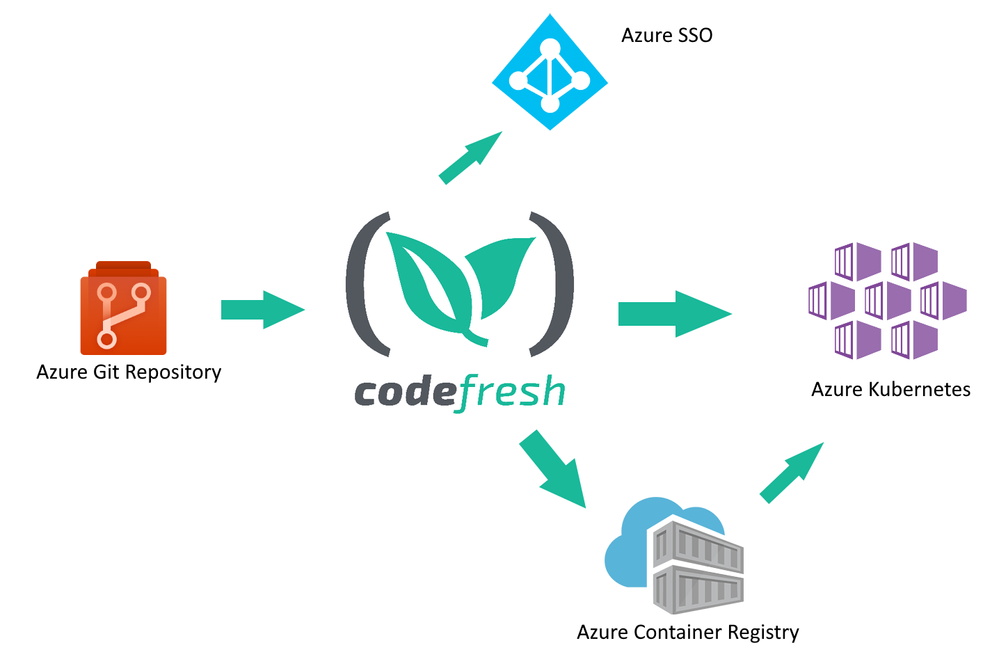
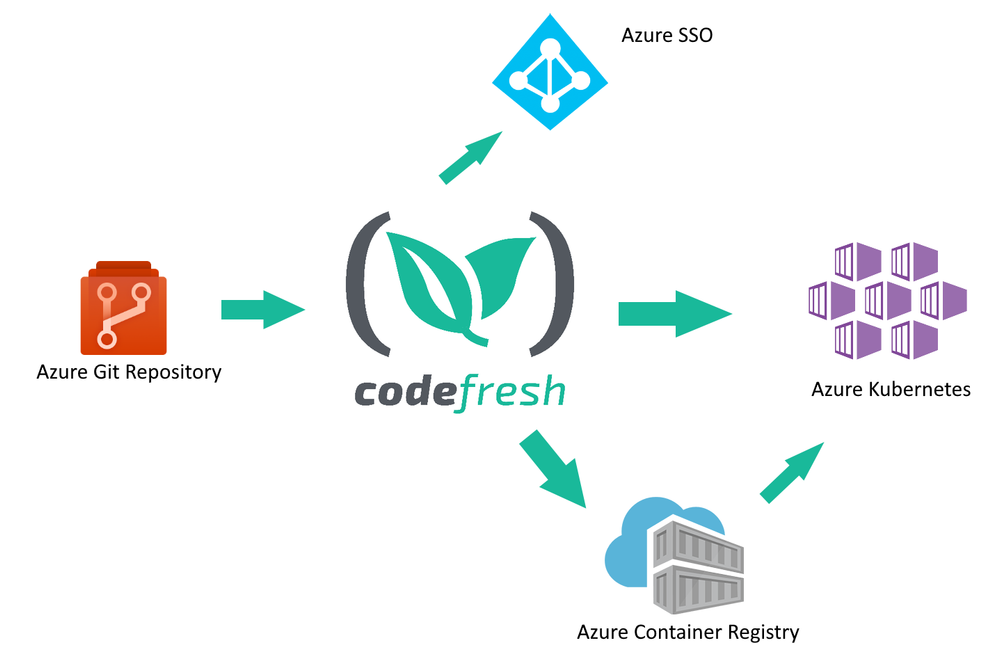
Codefresh acts as a central hub for several related Azure services:
• Developers use Azure Git repositories to create new features for their company
• Codefresh continuously builds and tests the source code from the repository
• New releases of a software product are packaged in one or more Docker containers and stored in Azure Container Registry
• The final release is deployed to Azure Kubernetes
Codefresh can also take advantage of Azure SSO/AD installations to help enterprise companies provide a unified way of credential usage among employees.
How to store Docker images in the Azure Container Registry
One of the most basic functions of a CI/CD system is the creation of software artifacts comprising a software application. Especially for cloud services, Docker images have become the de facto standard for application packaging and deployment.
Using the Azure Container Registry in Codefresh is a straightforward process. First, you connect your Azure Registry in your Codefresh account using the Integration UI screen.
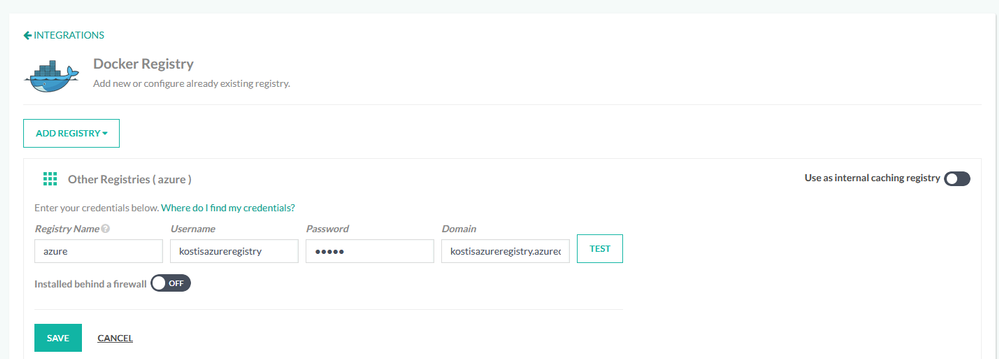
Then you can use the registry in any deployment pipeline, simply by referencing it by name. A starting workflow is one that has only two steps:
• Checking out source code from Azure Git
• Building a Docker image and storing it in the Azure Container Registry.
This can be easily accomplished in Codefresh with a pipeline of two steps (a git-clone step and a build step).
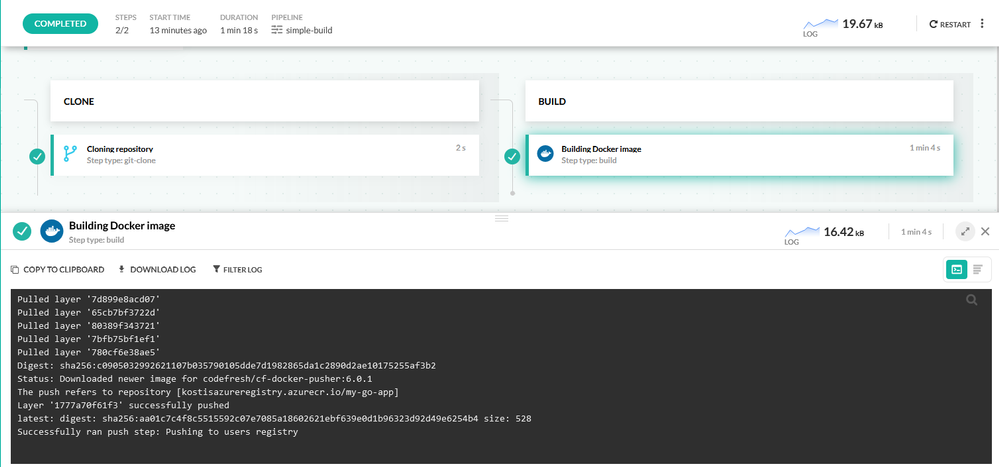
Each pipeline in Codefresh is defined with declarative YAML format. Here is the respective pipeline definition:
version: “1.0”
stages:
– “clone”
– “build”
steps:
clone:
title: “Cloning repository”
type: “git-clone”
repo: “kostis-codefresh/trivial-go-web”
revision: “master”
stage: “clone”
build:
title: “Building Docker image”
type: “build”
image_name: “my-go-app”
working_directory: “${{clone}}”
tag: “latest”
dockerfile: “Dockerfile”
registry: azure
stage: “build”
This pipeline has a clone step that checks out the source code and a build step that creates the Docker image and also pushes it to ACR.
Notice the “registry” property in the build steps that define our Azure registry as the target of the Docker push action.
After the pipeline has run, the Docker image is stored in the Azure Container Registry.
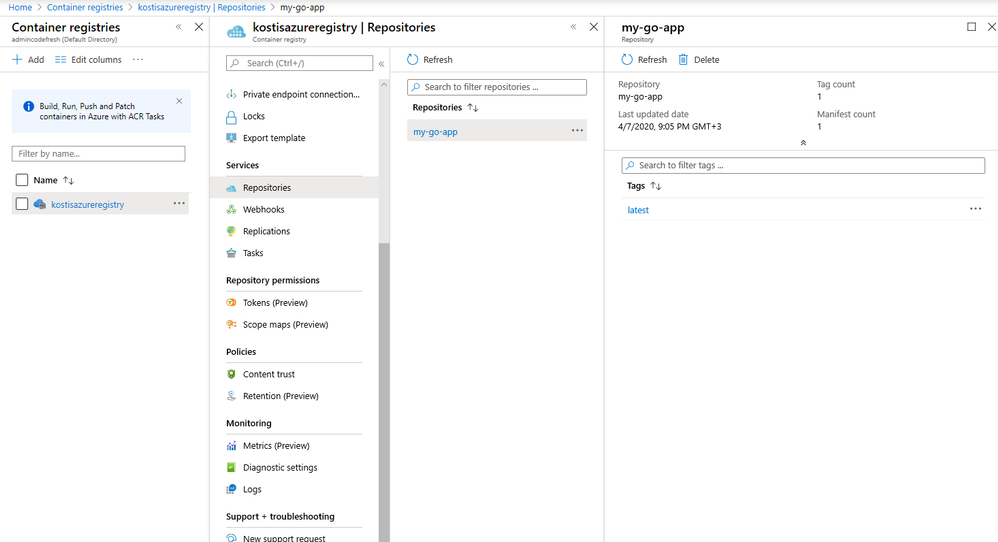
How to deploy applications to Azure in an automated manner
Creating a Docker image is only one part of the software delivery process. The other part is to deploy the image artifact into production. Codefresh also has native integration for Azure Kubernetes Service (AKS).
First, you need to connect your Azure cluster in your Codefresh account.
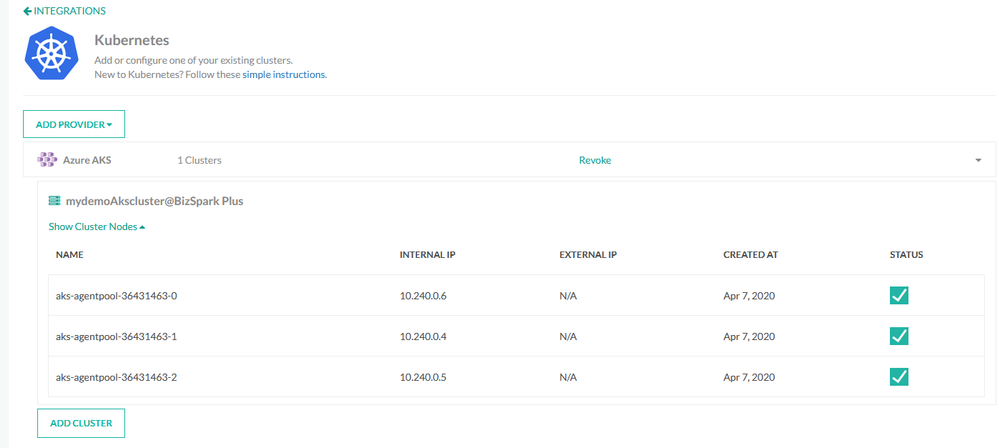
Once the cluster is connected, you can easily deploy any application in an ad hoc manner using the deployment GUI of Codefresh.
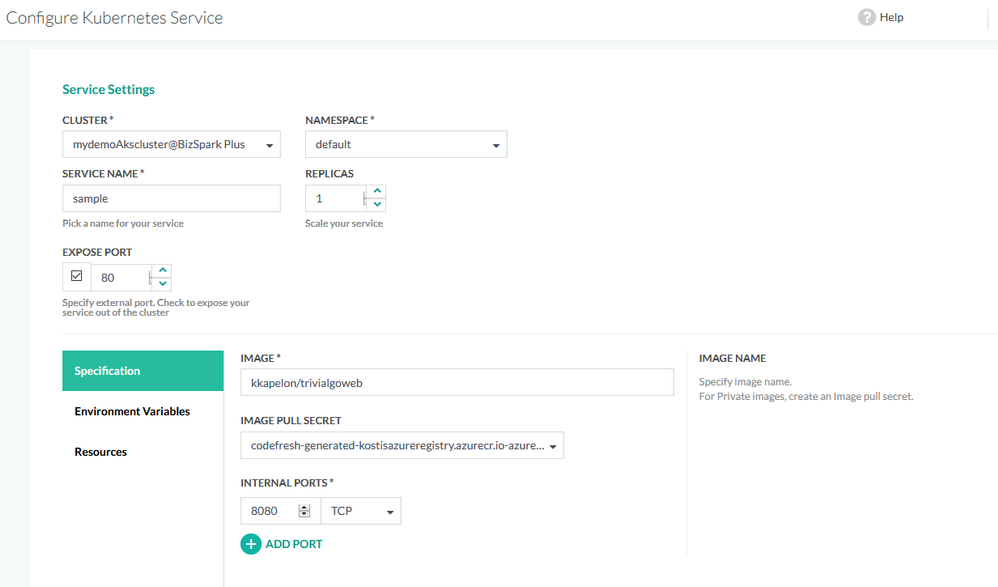
Manual application deployments are a welcome solution for test environments and quick prototypes, but for production deployments, a delivery pipeline is the better choice, as it completely automates the software delivery process.
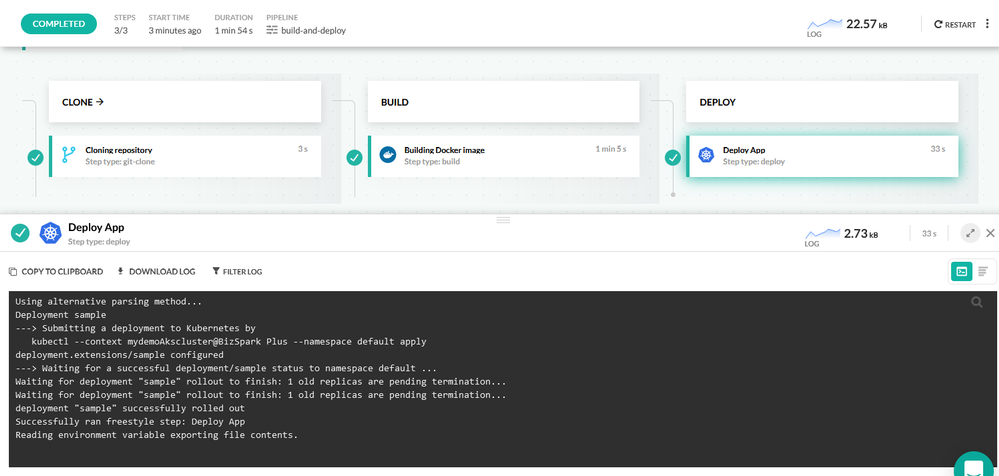
This delivery pipeline includes an extra deploy step that instructs the Azure Kubernetes cluster to pull the Docker image in the cluster and create an application deployment.
Here is the full pipeline definition:
version: “1.0”
stages:
– “clone”
– “build”
steps:
clone:
title: “Cloning repository”
type: “git-clone”
repo: “kostis-codefresh/trivial-go-web”
revision: “master”
stage: “clone”
build:
title: “Building Docker image”
type: “build”
image_name: “my-go-app”
working_directory: “${{clone}}”
tag: “latest”
dockerfile: “Dockerfile”
registry: azure
stage: “build”
deploy_to_aks:
title: Deploy App
type: deploy
stage: deploy
kind: kubernetes
cluster: ‘mydemoAkscluster@BizSpark Plus’
namespace: default
service: sample
candidate:
image: ‘${{build_image}}’
registry: azure
Again, notice the “registry” and “cluster” properties that explain how the Docker image deployed to the Azure Kubernetes cluster will also come from the Azure registry.
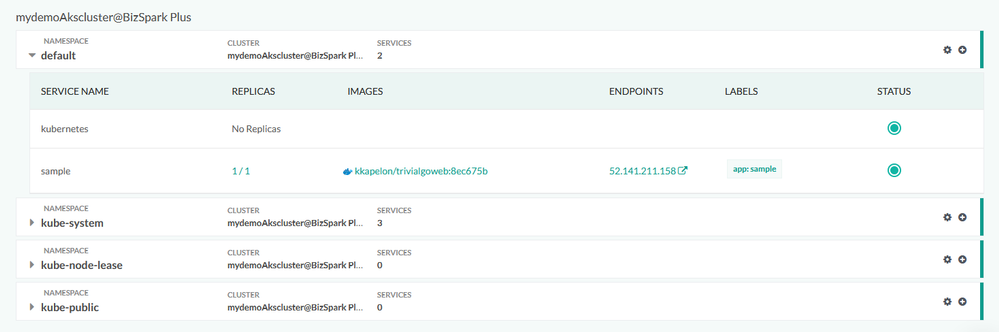
After the pipeline has finished running, you can verify the application deployment from the Codefresh Kubernetes dashboard and get more details such as health status or the number of replicas the application is using:
Conclusion
Codefresh makes the creation of Docker images and their deployment to Azure a very easy process. With built-in integration for AKS, ACR, Azure SSO, and Azure Git repositories, it is an extremely fast way for companies to take advantage of Azure scalability for any software product in any sector.
Create a free Codefresh account today and start deploying applications to Azure now.


Recent Comments