by Contributed | May 27, 2021 | Technology
This article is contributed. See the original author and article here.
We are happy to announce that Office Scripts in Excel for the web is now generally available for all eligible users!
What is Office Scripts?
Office Scripts is an automation feature-set in Excel for the web that allows users with all levels of programming experience to automate their repetitive workflows.
“Office Scripts not only enabled the workbook to be located in the cloud, it also replaced all the pre-existing manual updating and maintenance process. It became 100% fully autonomous!” – Leslie Black, Developer, Analysis Cloud Limited.
|
To get started, use the Action Recorder to record the actions you take in Excel. These actions are then translated into a script that you can run at any time. No programming experience required! Need to modify your scripts? Use the Code Editor! It’s a TypeScript-based editor directly within Excel for the web. Use it to edit your existing scripts or to create new ones using the Office Scripts API.
https://www.microsoft.com/en-us/videoplayer/embed/RWEBYs
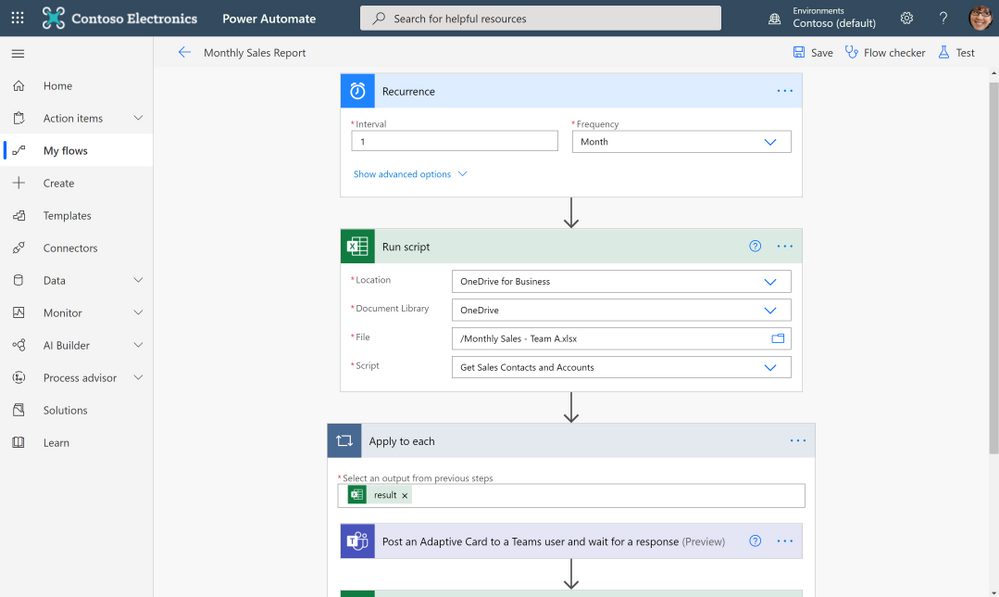
Want to run a script on a schedule? Use Power Automate and create a Flow to schedule your Office Script to run at a certain time. Or maybe you want to trigger a script to run based on the creation of a new file in a SharePoint site? Power Automate also allows you to trigger scripts based on events from other applications and services to create cross-application workflows.
“Since creating the solution and publicizing it internally, I have been asked and have implemented it for another two areas in our Intranet, so they also have an automated process. In total, it saves us around six hours effort per month and consequently we have many colleagues (IT and non-IT) starting to use Office Script to help make their work lives easier.” – Gareth Naylor, Group Wide Architect/Strategist, Uniper
|
What licenses include Office Scripts?
Office Scripts is currently available for all users that have a commercial or EDU license that gives access to the Microsoft 365 office desktop apps (e.g., Office 365 E3 and E5 licenses). If you have an eligible license, you’ll find the Office Scripts feature-set in the Automate tab in the ribbon. Please note that if you do not have the Automate tab in Excel for the web, your admin may have disabled the feature.
Learn More
Get started scripting with our numerous sample scripts based on real-world scenarios. These samples cover a wide variety of automated solutions from the fundamentals of the Office Scripts API to how to create cross-workbook and cross-application automated workflows with Power Automate.
You can also learn more about Office Scripts from these resources:
Learn from the Office Scripts community:
Next steps
Please reach out to us as you try out the Office Scripts feature! Your input is critical to make Office Scripts better.
- Ask questions on Microsoft Q&A under the ‘office-scripts-dev’ tag if you get stuck or have questions about how to automate a workflow.
- Have feedback on Office Scripts? Send us a smile or a frown. You can also send us feedback by selecting the Send Feedback button located in the overflow menu of the Code Editor.
by Scott Muniz | May 27, 2021 | Security, Technology
This article is contributed. See the original author and article here.
Drupal has released security updates to address a vulnerability affecting Drupal 8.9, 9.0, and 9.1. An attacker could exploit this vulnerability to take control of an affected system.
CISA encourages users and administrators to review Drupal Advisory SA-CORE-2021-003 and apply the necessary updates or mitigations.
by Contributed | May 26, 2021 | Technology
This article is contributed. See the original author and article here.
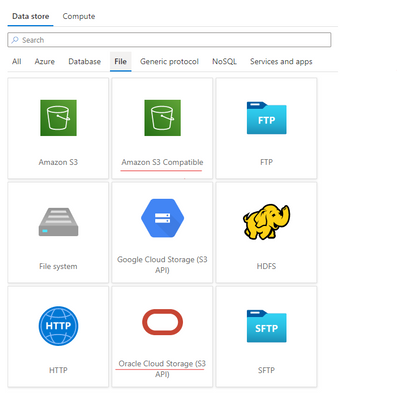
Azure Data Factory is continuously enriching the connectivity to enable you to easily integrate with diverse data stores. We recently released two new connectors: Oracle Cloud Storage; Amazon S3 Compatible Storage, with which you can seamlessly copy files as is or parsing files with the supported file formats and compression codecs from Oracle Cloud Storage or Amazon S3 Compatible Storage for downstream analysis and consumption. Both of the connectors are supported in copy activity as source. You can now find the Oracle Cloud Storage connector and Amazon S3 Compatible Storage connector from ADF connector gallery as below.
Learn more from ADF Oracle Cloud Storage connector and Amazon S3 Compatible Storage documentation. For a full list of data stores that are supported in ADF, see this connector overview article.
by Contributed | May 26, 2021 | Technology
This article is contributed. See the original author and article here.
SQL Server does not sniff for variable, it just simply uses the fixed value.
I’m going to use AdventureWorks 2019 in this post.
——————–Please run this script—————
use AdventureWorks2019
go
IF exists(select 1 from sys.tables where name=’SalesOrderDetail’ and schema_id=schema_id(‘dbo’))
drop table SalesOrderDetail
go
select * into SalesOrderDetail from [Sales].[SalesOrderDetail]
go
create statistics iProductID ON SalesOrderDetail(productid) with fullscan
go
dbcc traceon(3604,2363)—trace flag 2363 displays more detail about the selectivity
go
——————–Please run this script—————
Equality(=): all density
DECLARE @pid INT = 0
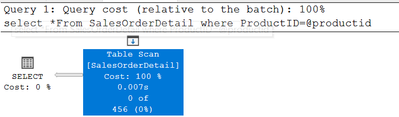
SELECT * FROM SalesOrderDetail WHERE ProductID = @pid
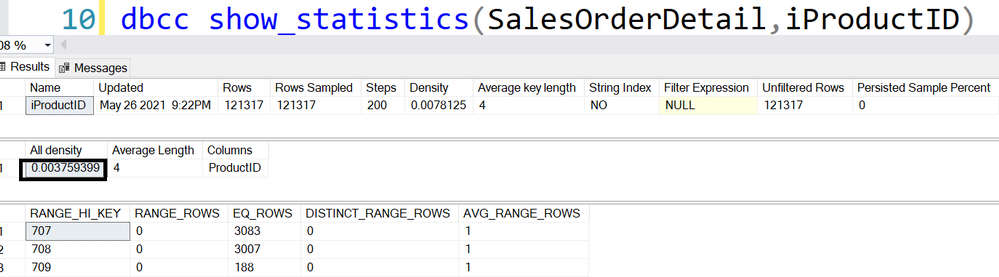
456=‘All density’*card=0.003759399*121317
DBCC execution completed. If DBCC printed error messages, contact your system administrator.
———————————-trace flag 2363 output———————————-
Begin selectivity computation
Input tree:
LogOp_Select
CStCollBaseTable(ID=1, CARD=121317 TBL: Sales.SalesOrderDetail)
ScaOp_Comp x_cmpEq
ScaOp_Identifier QCOL: [AdventureWorks2019].[Sales].[SalesOrderDetail].ProductID
ScaOp_Identifier COL: @pid
Plan for computation:
CSelCalcHistogramComparison(POINT PREDICATE)
Loaded histogram for column QCOL: [AdventureWorks2019].[Sales].[SalesOrderDetail].ProductID from stats with id 3
Selectivity: 0.0037594
Stats collection generated:
CStCollFilter(ID=2, CARD=456.079)
CStCollBaseTable(ID=1, CARD=121317 TBL: Sales.SalesOrderDetail)
End selectivity computation
———————————-trace flag 2363 output———————————-
Non-Equality(<>): 0.9
DECLARE @pid INT = 0
SELECT * FROM SalesOrderDetail WHERE ProductID <> @pid
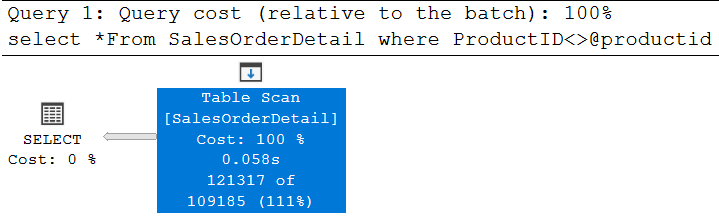
121317*0.9=109185.3, is rounded down to 109185
———————————-trace flag 2363 output———————————-
Begin selectivity computation
Input tree:
LogOp_Select
CStCollBaseTable(ID=1, CARD=121317 TBL: SalesOrderDetail)
ScaOp_Comp x_cmpNe
ScaOp_Identifier QCOL: [AdventureWorks2019].[dbo].[SalesOrderDetail].ProductI
ScaOp_Identifier COL: @productid
Plan for computation:
CSelCalcFixedFilter (0.9)
Selectivity: 0.9
Stats collection generated:
CStCollFilter(ID=2, CARD=109185)
CStCollBaseTable(ID=1, CARD=121317 TBL: SalesOrderDetail)
End selectivity computation
———————————-trace flag 2363 output———————————-
Inequality(>,>=,<,<=):0.3
declare @productid int=0
select *From SalesOrderDetail where ProductID>@productid
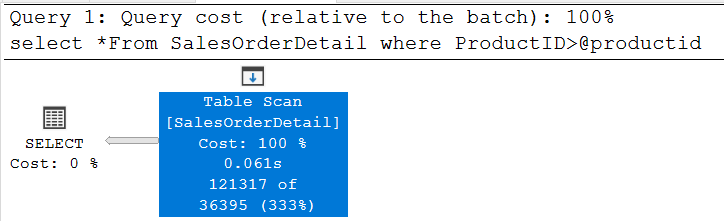
121317*0.3=36395.1, is around down to 36395
Please try >=,< and <=, they all use the same selectivity.
———————————-trace flag 2363 output———————————-
Begin selectivity computation
Input tree:
LogOp_Select
CStCollBaseTable(ID=1, CARD=121317 TBL: SalesOrderDetail)
ScaOp_Comp x_cmpGt
ScaOp_Identifier QCOL: [AdventureWorks2019].[dbo].[SalesOrderDetail].ProductID
ScaOp_Identifier COL: @productid
Plan for computation:
CSelCalcFixedFilter (0.3)
Selectivity: 0.3
Stats collection generated:
CStCollFilter(ID=2, CARD=36395.1)
CStCollBaseTable(ID=1, CARD=121317 TBL: SalesOrderDetail)
End selectivity computation
———————————-trace flag 2363 output———————————-
by Contributed | May 26, 2021 | Technology
This article is contributed. See the original author and article here.
FAQs from the field on KRBTGT reset
Hello Everyone, my name is Zoheb Shaikh and I’m a Solution Engineer working with Microsoft Mission Critical team (SfMC). Today I’ll share with you some FAQs on KRBTGT reset.
Introduction:
Recently I had couple of customers asking many questions on KRBTGT account password reset and Microsoft’s recommendations for this, in this article I will list these questions and provide my responses which will address many queries you may have.
Before we deep dive into details let’s have a brief on what’s KRBTGT and its use briefly.
KRBTGT: KRB stands for Kerberos and TGT is Ticket Granting Ticket. In simple words during Kerberos Authentication process TGTs are issued to users, services or accounts requesting access to resources, these TGT’s are encrypted by cryptographic key which is derived from the password of the Key Distribution Center’s (KDC) account (KRBTGT), this key is known only by the Kerberos service. Since this is the account which encrypts TGTs it becomes extremely important to secure and monitor (More details on How Kerberos works are here).
The KRBTGT account is a domain default account that acts as a service account for the Key Distribution Center (KDC) service. This account cannot be deleted, account name cannot be changed, and it cannot be enabled in Active Directory.
For information about name forms and addressing conventions, see RFC 4120 .
Coming back to customer queries, our customer wanted to know what Microsoft’s recommendation on resetting KRBTGT is regularly and had various queries on whether this can create an impact.
Why do organizations reset KRBTGT password?
Typically, KRBTGT resets might be performed during compromise recovery scenarios of Active Directory on recommendations from Microsoft DART team/Microsoft Compromise Recovery Team, following a set procedure after ensuring all back doors are closed.
Some organizations might reset KRBTGT password based on recommendations from 3rd party Auditors also.
It is important to remember that resetting the KRBTGT is only one part of a recovery strategy and alone will likely not prevent a previously successful attacker from obtaining unauthorized access to a compromised environment in the future. We strongly advise that customers create a comprehensive recovery plan using guidance found in the white paper of Mitigating Pass the Hash Attacks and Other Credential Theft.
What are Microsoft Recommendations on KRBTGT Reset?
There is no specific recommendation regarding password reset for the KRBTGT account.
Although you can reset it periodically even without any indicators of compromise, you should plan the interval of resets for your organization taking into considerations your backup schedules, operational procedures, security requirements, etc.
However, that is a separate discussion to have, and we are more over going to discuss what exactly happens during a KRBTGT reset and few other queries which came up when discussed this with one of our Mission Critical customers.
FAQs on KRBTGT Reset:
Note: Terms KRB1, KRB2 and KRBOLD used below is only for explanation purposes.
- Why does KRBTGT need to be reset twice?
KRBTGT keeps a password history of 2, hence we reset it twice to invalidate all tickets issued from old KRBTGT password.
- What happens when you reset KRBTGT account password once?
- After 1st reset the new KRBTGT password replicates to all the DC’s in the Domain.
- All new Tickets will use the new password (KRB1).
- Old tickets issued by old KRBTGT password (KRBOLD) should continue to work as password history is 2.
- Post old tickets expiry they should renew tickets with new KRBTGT password (KRB1).
- Present KRBTGT passwords will be KRB1 & KRBOLD.
- What happens when you reset KRBTGT account password twice?
- After second reset new KRBTGT password replicates to all the DCs in domain.
- All new tickets will use the new password (KRB2).
- Old tickets issued by old KRBTGT password (KRB1) should continue to work as password history is 2.
- Present KRBTGT passwords will be KRB1 & KRB2.
- Post old tickets expiry they should renew tickets with new KRBTGT password (KRB2).
- Old KRBTGT password (KTB Old) not valid any more as password history is of 2.
- What could be potential impact based on our experiences?
- All AD dependent applications tickets will get invalidated.
- This will make all applications reach out to DCs for re authentication.
- This may spike LSASS as all machines will reach DCs at once.
- Historically we have observed some non-Windows clients are unable to request new tickets till the expiry of the existing tickets.
- Recovery of a single DC: Will not work anymore because the KRBTGT password is different, and replication will not work (Workaround just promote a new DC).
- Any DC which was not replicating while reset is performed may experience Trust issues.
- Post second Reset which are older than the time 1st reset was performed will get invalidated.
- Is there a security benefit of doing KRBTGT resets regularly?
This is a Million$ question and unfortunately there is no clear answer to this but hopefully the below pointers might help.
- Resetting the KRBTGT is only one part of a recovery strategy and alone will likely not prevent a previously successful attacker from obtaining unauthorized access to a compromised environment in the future.
- If you are suspecting an attack on the environment, please open a support ticket with Microsoft’s Incident Response team.
- If an attacker managed to reach the DCs and successfully hold a Golden Ticket (KRBTGT Account Hash) then it’s a game over where the periodic reset only will not mitigate that as attacker can have already built different ways from controlling DCs and reach to golden ticket again easily so best practice to detect malicious behaviors, close the back doors and ensure AD Security (details in FAQ #7): How Microsoft Advanced Threat Analytics detects golden ticket attacks – Microsoft Tech Community.
- Can Microsoft Defender for Identity help detect KRBTGT compromise.
- Indeed, Microsoft Defender for Identity should be able to help detect attacks on Golden Ticket.
- There are various scenarios in this, please see the article to see more details Microsoft Defender for Identity domain dominance security alerts.
- What should I do to protect my DC’s against an attack?
This is a very broad question without having knowledge of the infrastructure but maybe a way to start this project is by doing an AD Security Assessment from Microsoft which can help find Risk and help improve AD Security. Below are some of the areas where AD Security Assessment may help.
- Review of operational processes.
- Review of the privileged accounts/groups membership as well as regular account hygiene.
- Review of the forest and domain trusts.
- Review operating system configuration, security patch, and update levels.
- Review of domain and domain controller configuration compared to Microsoft recommended guidance.
- Review of key Active Directory object permission delegation.
- Review Tier Model is in place or not.
- Recommendations on using PAW etc.
- Is there a way to reset KRBTGT account safely without having any impact on the environment?
If you maintain a gap of 10 hours or more between KRBTGT account password resets, this may minimize the impact significantly and makes the auditors happy. However this may not add any benefit from a Security prespective.
Note:
- The recommendations and impacts are based on experience/ how it should ideally work. Different environments may observe different issues.
- The responses were based on specific scenarios and queries, it might be different based on scenarios.
Special thanks to my SfMC colleague Ahmed Badr and others at CIS Tech Community for proof reading and suggestions.
Hope this helps,
Zoheb
by Contributed | May 26, 2021 | Technology
This article is contributed. See the original author and article here.
Hi there, Calendar Community!
It is with great excitement that we are announcing that we have graduated the shared calendar improvements in Outlook for Windows out of preview! This new shared calendar experience dramatically improves the reliability and sync latency for shared calendars & delegated calendars in all Outlook clients. The improvements have been released in Outlook on the web, the new Outlook for Mac, and mobile for a while now, and we’re excited that Outlook for Windows is now enabled as well.
Right now, about 10% of Outlook for Windows users in Current Channel with version 2103 have been enabled for those improvements, and we’ll keep expanding gradually throughout the spring and summer.
What exactly is changing?
In July 2019, we announced the preview in Outlook for Windows which has remained opt-in until now, as we turn this on in production. Eventually, it will be just “on”, but this is a journey and arguably the biggest change to Outlook for Windows since its initial release in 1997, so we want our every step to be cautious. With Version 2103 (March 2021 update), the new experience reached feature parity with the classic experience, so we have removed the preview label that was previously shown next to shared calendars that were enabled for the new experience. Since summer 2019, we polished the experience and fixed bugs, thanks to many customer reports. With tens of thousands of daily users on the preview, we feel confident now that the experience is going to delight calendar delegates.
What will your delegates notice?
Despite all the exciting statements above, our hope is that they don’t even notice anything changed. Why would we say that? This is one of those improvements that should be invisible because it eliminates issues but doesn’t change the core product functionality. Calendars will sync faster, and we have eliminated any reliability issues when managing a calendar. Delegates might only notice that things are smoother but no specific, obvious changes.
Please let us know if you have any suggestions or feedback on these improvements by emailing us at olk-calendar-preview[AT]microsoft.com! We cannot guarantee a response to every email, but we promise to read them all and do our very best to respond.
For more details, here are a few more articles for reference:
Outlook Calendaring Team


Recent Comments