“Visio for everyone” ? – The Intrazone podcast

“Visio for everyone” ? – The Intrazone podcast

This article is contributed. See the original author and article here.

Get ready to take your diagramming skills to the next level!


In this episode, Chris and I talk with Mukul Kumar (Senior product manager) and Nishant Kumar (Product manager) from the Visio team at Microsoft. They have some exciting news that’s ‘goodness at no cost’ to a lot of people in Microsoft 365. We’ll dig into this and all things Visio – its place in the world of productivity, use cases for beginners to experts – web to desktop, and more.


The goal after finishing this episode: to be so fluent, you diagram in your sleep.


Listen to podcast below:


https://html5-player.libsyn.com/embed/episode/id/19387808/height/90/theme/custom/thumbnail/yes/direction/backward/render-playlist/no/custom-color/247bc1/


Subscribe to The Intrazone podcast! And listen to episode 66 now + show links and more below.


Intrazone guests: Nishant Kumar (product manager | Microsoft) and Mukul Kumar (senior product manager | Microsoft).Intrazone guests: Nishant Kumar (product manager | Microsoft) and Mukul Kumar (senior product manager | Microsoft).


Links to important on-demand recordings and articles mentioned in this episode:  


Subscribe today!


Listen to the show! If you like what you hear, we’d love for you to Subscribe, Rate and Review it on iTunes or wherever you get your podcasts.


Be sure to visit our show page to hear all the episodes, access the show notes, and get bonus content. And stay connected to the SharePoint community blog where we’ll share more information per episode, guest insights, and take any questions from our listeners and SharePoint users (TheIntrazone@microsoft.com). We, too, welcome your ideas for future episodes topics and segments. Keep the discussion going in comments below; we’re hear to listen and grow.


Subscribe to The Intrazone podcast! And listen to episode 66 now.


Thanks for listening!


The SharePoint teams want you to unleash your magic, creativity, and productivity – and visualize it all. And we will do this, together, one diagram at a time.


The Intrazone links


+ Listen to other Microsoft podcasts at aka.ms/microsoft/podcasts.


Left to right [The Intrazone co-hosts]: Chris McNulty, director (SharePoint/Viva – Microsoft) and Mark Kashman, senior product manager (SharePoint – Microsoft).Left to right [The Intrazone co-hosts]: Chris McNulty, director (SharePoint/Viva – Microsoft) and Mark Kashman, senior product manager (SharePoint – Microsoft).


The Intrazone, a show about the Microsoft 365 intelligent intranet (aka.ms/TheIntrazone)The Intrazone, a show about the Microsoft 365 intelligent intranet (aka.ms/TheIntrazone)
CISA Addresses the Rise in Ransomware Targeting Operational Technology Assets

This article is contributed. See the original author and article here.

CISA has published the Rising Ransomware Threat to OT Assets fact sheet in response to the recent increase in ransomware attacks targeting operational technology (OT) assets and control systems. The guidance:

  • provides steps to prepare for, mitigate against, and respond to attacks;
  • details how the dependencies between an entity’s IT and OT systems can provide a path for attackers; and
  • explains how to reduce the risk of severe business degradation if affected by ransomware.

CISA encourages critical infrastructure (CI) owners and operators to review the Rising Ransomware Threat to OT Assets fact sheet as well as CISA’s Ransomware webpage to help them in reducing their CI entity’s vulnerability to ransomware.

Run quality assurance automatically with robotic process automation

Run quality assurance automatically with robotic process automation

This article is contributed. See the original author and article here.

Organizations have an increasing demand to automate standard business processes and provide more convenient interactions to their staff. With robotic process automation and Microsoft Power Automate, businesses gain efficiency and accuracy by using an experience to automate repetitive processes in Dynamics 365.

Read a related blog post: Enhance workplace automation with prebuilt RPA templates for Dynamics 365

Workers on the manufacturing floor use quality orders in Dynamics 365 Supply Chain Management to request quality assurance processes for selected items on manufacturing lines. Potential defects or problems are typically raised based on visual observations, abnormalities in production processes, sensor data, or AI-driven predictive analysis.

Our automation solution template for Supply Chain Management demonstrates how you can use Power Automate to automate business processes to create quality orders.

Watch a video: Utilize RPA to create quality orders in Dynamics 365 Supply Chain Management

graphical user interface, application

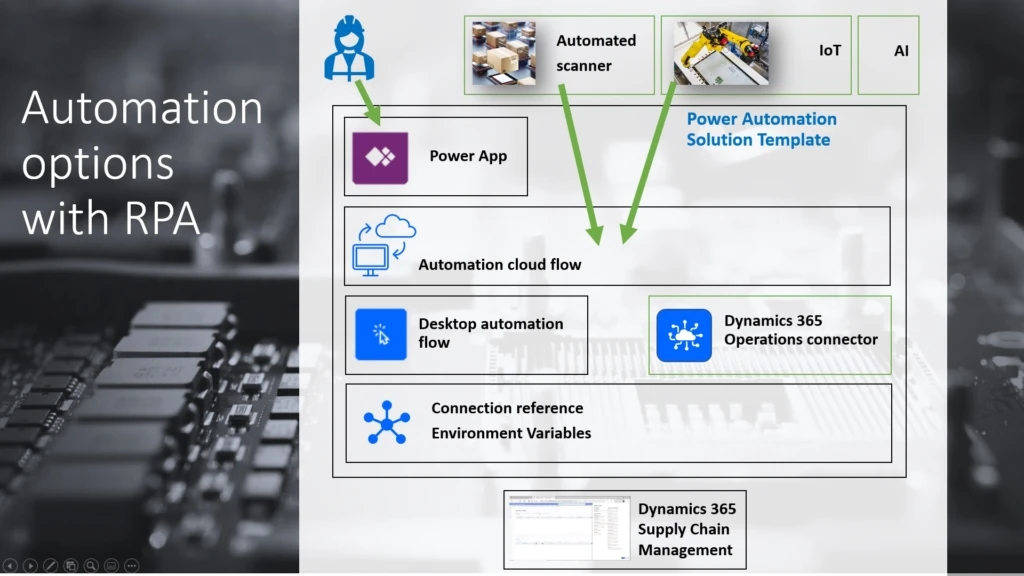
The Power Automate solution template includes a cloud automation flow and a desktop automation flow that automate the creation of quality orders in Supply Chain Management.

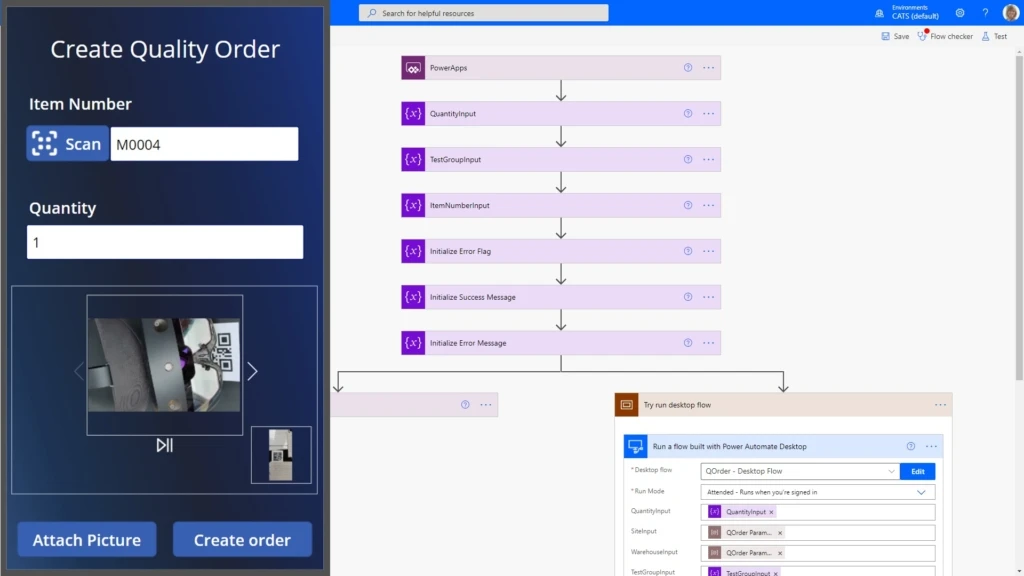
Although the automation can be started from different event sources and signals, the QOrder app is included in the solution template. It’s an example of user inputdriven automation that is typically used in visual inspections, together with scanning item QR codes, entering quantities, and attaching camera pictures.

The automation solution template also includes parameters that you can use to configure the automation for a specific use case in a production facility.

Find more information about how to use this and other automation templates

How the automation solution works

The automation solution runs in your instance of Power Automate. After you download and import the solution template into your solutions in the Power Automate portal, you first specify a set of parameters that configure quality order creation in your Supply Chain Management environment, parameters for your quality management scenario, and a connection to your desktop automation host. This host will open your Supply Chain management environment and create the quality order when requested by the automation flows.

Find more information about deployment

Download the Automation solution template

Screenshot of the QOrder application and one of the automation flows.

Solution parameters are used to provide credentials and values that are the same for all automation runs. In the preceding example, the configuration parameters are values for Site, Warehouse, and Test Group. Item numbers, quantities, and (optionally) picture attachments are entered by the initiating party for each automation. You can, of course, customize the automation solution to meet your needs.

Find more information in the installation documentation

After the solution installation and configuration are completed, you can find the assets listed in your solution. After the app has been published for your organization and shared, users can sign into Power Apps on their mobile device, open the app, and start creating quality orders.

The app will capture the input from the user and create a row in a data table called QOrder_Queue to request a new quality order. The cloud flow from the QOrder automation solution was started during the installation process and will automatically pick up the new request. It will then contact the desktop automation flow through the configured on-premises connector on the automation host. The desktop automation flow, in turn, will begin the creation of the quality order in your Supply Chain Management portal.

You can also view the history of automation runs in your solution instance. Select QOrder – Cloud Flow Monitor Queue, and review the run history.

We have also added a second cloud flow that can be used to call directly into the desktop automation of the quality order creation host. You can use this other automation flow to connect to more signals to create quality orders. The signals include signals from sensors that use IoT Central, or even AI-based predictive decision-making processes.

Note that this is the first preview version of the solution template, and some functionality is limited. In this release, a picture that is attached in the QOrder app won’t yet be attached to the quality order in Supply Chain Management. We will add this and more capabilities in iterative enhancement updates.

Next steps

For a complete step-by-step guide about how to download, install, and use the sample solution for automating quality order creation, see Automate quality order creation on Dynamics 365 Supply Chain Management with Robotic Process Automation using Power Automate Desktop

The post Run quality assurance automatically with robotic process automation appeared first on Microsoft Dynamics 365 Blog.

Brought to you by Dr. Ware, Microsoft Office 365 Silver Partner, Charleston SC.

Microsoft Releases June 2021 Security Updates

This article is contributed. See the original author and article here.

Microsoft has released updates to address multiple vulnerabilities in Microsoft software. A remote attacker can exploit some of these vulnerabilities to take control of an affected system. 

CISA encourages users and administrators to review Microsoft’s June 2021 Security Update Summary and Deployment Information and apply the necessary updates.