
by Contributed | Jun 17, 2021 | Dynamics 365, Microsoft 365, Technology
This article is contributed. See the original author and article here.
In today’s fast-evolving global economy, organizations are increasingly pressed to find ways to accelerate their time to market and unlock value to achieve a significant return of investment (ROI) on their technological investments.
Companies worldwide are fast realizing the costly consequences of not having robust business continuity plans and remote-capable tools especially in times of crisis and uncertain macroeconomic conditions such as the ongoing COVID-19 pandemic.
With enterprise-ready mixed reality solutions like Dynamics 365 Remote Assist for HoloLens 2, not only can companies survive these tough times, but many organizations spanning across a multitude of industries including biotechnology, pharmaceuticals, and manufacturing have discovered that they were able to even thrive and accelerate their time to market when they embraced mixed reality technologies that enabled teams across geographic borders to collaborate seamlessly with 3D annotations and anchor critical work resources right within their real-world work environment.
In the manufacturing industry, we are also seeing a groundswell of interest in mixed reality technologies because of the tangible benefits that can be achieved in a short amount of time. Based on the Microsoft-commissioned Forrester Total Economic Impact (TEI) report for Dynamics 365 Remote Assist, organizations have reported numerous quantified benefits gained from using mixed reality technologies to empower frontline workers on production floors.
Some of these benefits (as detailed in the report) include:
- Customers typically resolving throughput-impacted issues five days earlier, saving an estimated $20,052 per issue. For each production hour saved, the composite avoids $950 in wasted labor, $2,500 in lost operating income, and $1,563 in direct costs such as rush shipping, waste, and fees. Mixed reality technologies have helped organizations to adopt practices that are kinder to the environment by avoiding travel and improving first-time fix rates to reduce wastage and the need for additional re-work.
- Experts avoid approximately 17 trips per year, saving $53,550 in travel costs and 384 hours per expert. When remote experts can help support frontline workers in real-time with 3D annotations right in their real-world work environment, companies now have the ability to develop business continuity plans by leveraging remote collaboration tools to ensure that the right expertise is accessible anytime, anywhere.
When coupled with Dynamics 365 Field Service, organizations can transform their entire service delivery experience, right from issue ticket creation to issue resolution. While Dynamics 365 Remote Assist enables field technicians to remotely triage issues before determining whether an onsite visit is required, Dynamics 365 Field Service further supports field technicians by optimizing the service management process. It enables organizations to optimize resource management to ensure that technicians with the right expertise are dispatched in a timely manner to the customer’s site. Once onsite, field technicians can then seamlessly access relevant work order information anchored right in the context of their real-world environment to get a comprehensive understanding of the issue. They can also create, edit, and save work orders while onsite, and include relevant image assets from their field visits for future reference. This wealth of service-related information ultimately enables customers to swiftly move from reactive to proactive service, and eventually even leverage predictive capabilities powered by AI to anticipate issues even before they occur.
Companies have also found innovative uses for mixed reality technology, including using Dynamics 365 Remote Assist to conduct remote site visits of their production facilities and to conduct remote training to help onboard new employees. Read this inspiring story about EcoLab to learn how they successfully tested virtual service delivery at their pharmaceutical drug production facilitiesmore information is also available in their EcoLab press release.
Learn more
If you’re considering ways to infuse mixed reality technologies to accelerate your organization’s time to market and help build robust business continuity plans with mixed reality, learn more about Dynamics 365 Remote Assist via our free Dynamics 365 Remote Assist learning path.
Want to truly transform your customers’ end-to-end service experience? Learn more about using Dynamics 365 Remote Assist with Dynamics 365 Field Service to equip your field technicians with critical tools, resources, and access to remote experts while on the job.
Register for the Bringing Mixed Reality to BioTech webinar, available on-demand, to hear from Ian Curtinsmith, Chief Information Officer of Medlab Clinical, an ASX-listed biotechnology company to learn how mixed reality business applications has helped MedLab Clinical overcome global travel restrictions and accelerate their products’ time to market now that experts can remotely collaborate seamlessly in real-time from around the world. You can also read MedLab Clinical’s story.
Sources: The Total Economic Impact Of Microsoft Dynamics 365 Remote Assist, a commissioned study conducted by Forrester Consulting on behalf of Microsoft, June 2020
The post Accelerate time to market with Dynamics 365 Remote Assist for HoloLens 2 appeared first on Microsoft Dynamics 365 Blog.
Brought to you by Dr. Ware, Microsoft Office 365 Silver Partner, Charleston SC.
by Contributed | Jun 17, 2021 | Technology
This article is contributed. See the original author and article here.
At the annual Microsoft Build 2021 Developer Conference, we announced two new products that are based on blockchain technology. Azure Confidential Ledger, now in preview, offers a fully managed service for customers who need to store sensitive data with high integrity and confidentiality. Azure SQL Database ledger, also in preview, enables storage of sensitive relational data in a tamper-evident way.
In this blog post, we’ll introduce you to both of these new products as well as help you understand when it makes sense to use them individually, together, and even with an existing blockchain system.
Azure Confidential Ledger
Enterprises running sensitive workloads need a secure way to store their logs and important metadata while collaborating with other parties. The Confidential Consortium Framework (CCF) is a Microsoft-created open framework for building confidential permissioned blockchain services. By running a confidential blockchain network of nodes in secure enclaves, data remains append-only with immutability guarantees and the data from the client goes straight to the ledger’s enclaves.
Building on the CCF framework, Azure Confidential Ledger (preview) provides the ability to store sensitive data records with integrity and confidentiality guarantees, all in a highly available and performant manner. Stored data remains immutable and tamper-proof in the append-only ledger with the benefits of a fully managed solution that provides infrastructure and operations so customers can get started quickly. The service provides these assurances by harnessing the power of Confidential Computing‘s secure enclaves when setting up the decentralized blockchain network. Microsoft’s access is limited to setting up and managing the network, and this specialized design means that only the customer has access to transaction data in the Confidential Ledger.
Asking yourself the following questions can help you decide if Azure Confidential Ledger is right for you:
- Do you need to store unstructured data (i.e. files, digests) that must remain intact for recordkeeping purposes?
- Are you working with sensitive workflows where confidentiality must be maintained?
- Are you in need of a service that has high integrity and security with a minimalistic trusted computing base?
- Are you working with parties that need irrefutable evidence that tampering did not occur to the stored data?
If you said yes to one or more of these, Azure Confidential Ledger is right for you. Customers have been using Azure Confidential Ledger in various ways. Novaworks, an e-parliamentary software solution, is using Azure Confidential Ledger to securely log votes in a tamper-proof ledger for a high-fidelity voting process.
Azure SQL Database ledger
Azure SQL Database ledger (preview) is a tamper-evident solution for your databases that provides cryptographic proof of your database’s integrity. Using a blockchain data structure implemented as system tables in your database, the ledger feature ensures that any transaction which modifies relational data in your database can be tracked, and any potential tampering detected and easily remediated. Providing proof that your data has not been tampered with is as simple as running a stored procedure that compares the calculated cryptographic hashes in your database against a database digest, which is published automatically in a secure location, such as Azure Confidential Ledger.
Ledger is a feature of Azure SQL Database, meaning there is no additional cost to add tamper-evidence capabilities. You don’t have to migrate data from your existing SQL databases to add tamper-evidence capabilities and no changes are needed to your applications as ledger is an extension of existing SQL table functionality.
Asking yourself the following questions can help you decide if Azure SQL Database ledger is right for you.
- Do you have business-critical data in Azure SQL Database where you must ensure data integrity is intact?
- Can 3rd parties who interact with your data accept a “trust, but verify” model rather than each party having a copy of the ledger?
- Do you need to prove to auditors or regulators that your data has not been tampered with?
- Do you have a need for queryability and strong data management capabilities, such as streaming data from a blockchain to an off-chain store while maintaining integrity from on-chain to off-chain?
If you can answer “yes” to any of these questions, then Azure SQL Database ledger is right for you. Customers like RTGS.global, who provide a global liquidity network for banks, are already using this capability to provide a ledger of transactions to regulators to prove that global banking transactions have not been tampered. Read our blog to learn more.
Putting it all together
Trust is foundational in any business process that spans organizational boundaries. Microsoft goes beyond traditional blockchains, using the building blocks of this technology as the underpinning for the distributed ledger of Azure Confidential Ledger and the consolidated data store of Azure SQL Database ledger. These solutions empower our customers to apply the power of blockchain to sensitive data, simplifying solution development, reducing cost and providing a new level of digital trust to transactions.
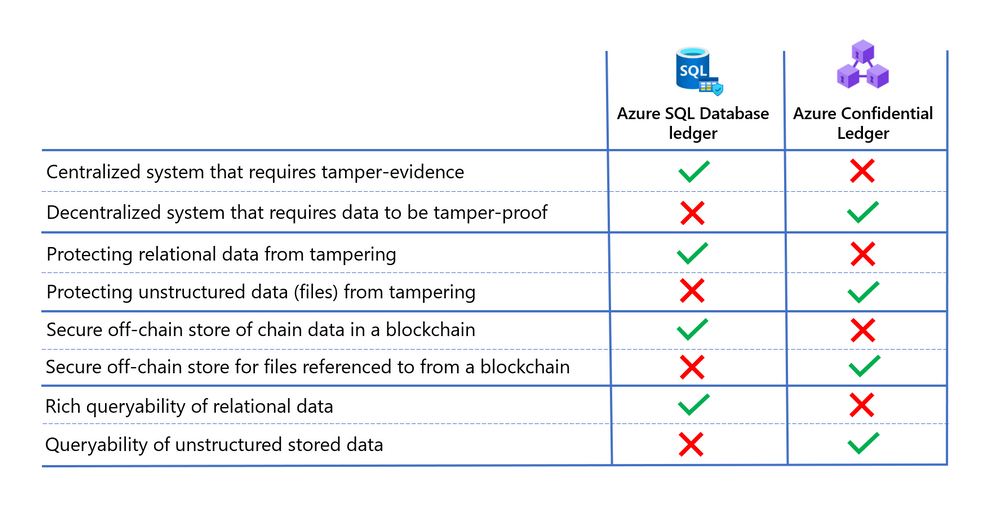
Deciding which technology is best for your needs ultimately depends on the level of trust between parties transacting with the data, and the type of data being protected. In addition to the points mentioned above, consider the following when deciding whether Azure SQL Database ledger or Azure Confidential Ledger is right for you.
Learn more
- Read the Azure Confidential Ledger announcement blog and documentation to learn more about how this new service is empowering our customers and securing their work.
- Read the Azure SQL Database ledger documentation and whitepaper to learn more about how the ledger feature works and how to use it with your Azure SQL Database.
by Contributed | Jun 17, 2021 | Technology
This article is contributed. See the original author and article here.
At the annual Microsoft Build 2021 Developer Conference, we announced two new products that are based on blockchain technology. Azure Confidential Ledger, now in preview, offers a fully managed service for customers who need to store sensitive data with high integrity and confidentiality. Azure SQL Database ledger, also in preview, enables storage of sensitive relational data in a tamper-evident way.
In this blog post, we’ll introduce you to both of these new products as well help you understand when it makes sense to use them individually, together, and even with an existing blockchain system.
Azure Confidential Ledger
Enterprises running sensitive workloads need a secure way to store their logs and important metadata while collaborating with other parties. The Confidential Consortium Framework is a Microsoft-created open SDK framework for building confidential permissioned blockchain services. By running a confidential blockchain network of nodes in secure enclaves, data remains append-only and the data from the client goes straight to the ledger’s enclaves.
Building on that framework, Azure Confidential Ledger (preview) provides the ability to store sensitive data records with integrity and confidentiality guarantees, all in a highly available and performant manner. Stored data remains immutable and tamper-proof in the append-only ledger with the benefits of a fully-managed solution that provides infrastructure and operations so customers can get started quickly. The service provides these assurances by harnessing the power of Confidential Computing‘s secure enclaves when setting up the decentralized blockchain network. Microsoft’s access is limited to setting up and managing the network, and this specialized design means that only the customer has access to transaction data in the Confidential Ledger.
Asking yourself the following questions can help you decide if Azure Confidential Ledger is right for you:
- Do you need to store unstructured data (i.e. files, digests) that must remain intact for recordkeeping purposes?
- Are you working with sensitive workflows where confidentiality must be maintained?
- Are you in need of a service that has high integrity and security with a minimalistic trusted computing base?
- Are you working with parties that need irrefutable evidence that tampering did not occur to the stored data?
If you said yes to one or more of these, Azure Confidential Ledger is right for you. Customers have been using Azure Confidential Ledger in various ways. Novaworks, an e-parliamentary software solution, is using Azure Confidential Ledger to securely log votes in a tamper-proof ledger for a high fidelity voting process.
Azure SQL Database ledger
Azure SQL Database ledger (preview) is a tamper-evident solution for your databases that provides cryptographic proof of your database’s integrity. Using a blockchain data structure implemented as system tables in your database, the ledger feature ensures that any transaction which modifies relational data in your database can be tracked, and any potential tampering detected and easily remediated. Providing proof that your data has not been tampered with is as simple as running a stored procedure that compares the calculated cryptographic hashes in your database against a database digest, which is published automatically in a secure location, such as Azure Confidential Ledger.
Ledger is a feature of Azure SQL Database, meaning there is no additional cost to add tamper-evidence capabilities. You don’t have to migrate data from your existing SQL databases to add tamper-evidence capabilities and no changes are needed to your applications as ledger is an extension of existing SQL table functionality.
Asking yourself the following questions can help you decide if Azure SQL Database ledger is right for you.
- Do you have business-critical data in Azure SQL Database where you must ensure data integrity is intact?
- Can 3rd parties who interact with your data accept a “trust, but verify” model rather than each party having a copy of the ledger?
- Do you need to prove to auditors or regulators that your data has not been tampered with?
- Do you have a need for queryability and strong data management capabilities, such as streaming data from a blockchain to an off-chain store while maintaining integrity from on-chain to off-chain?
If you can answer “yes” to any of these questions, then Azure SQL Database ledger is right for you. Customers like RTGS.global, who provide a global liquidity network for banks, are already using this capability to provide a ledger of transactions to regulators to prove that global banking transactions have not been tampered. Read our blog to learn more.
Putting it all together
Trust is foundational in any business process that spans organizational boundaries. Microsoft goes beyond traditional blockchains, using the building blocks of this technology as the underpinning for the distributed ledger of Azure Confidential Ledger and the consolidated data store of Azure SQL Database ledger. These solutions empower our customers to apply the power of blockchain to sensitive data, simplifying solution development, reducing cost and providing a new level of digital trust to transactions.
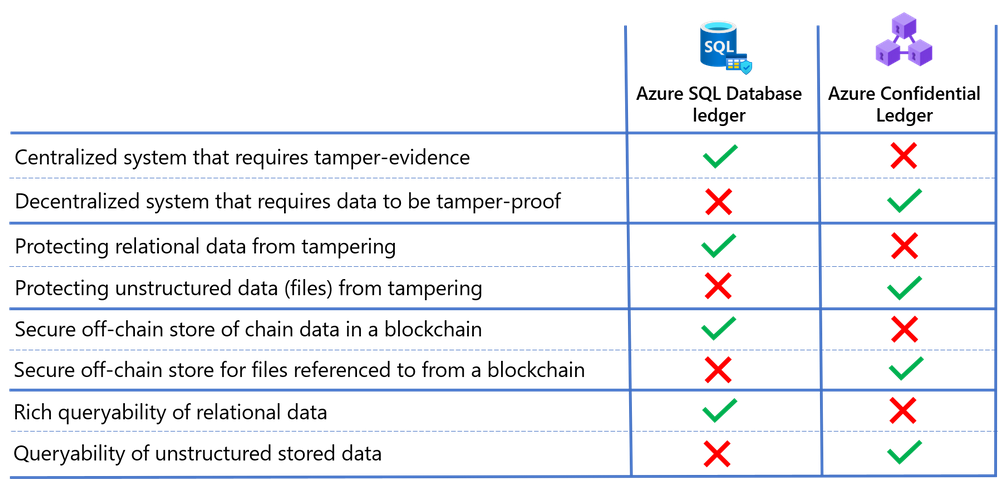
Deciding which technology is best for your needs ultimately depends on the level of trust between parties transacting with the data, and the type of data being protected. In addition to the points mentioned above, consider the following when deciding whether Azure SQL Database ledger or Azure Confidential Ledger is right for you.
Learn more
- Read the Azure Confidential Ledger announcement blog and documentation to learn more about how this new service is empowering our customers and securing their work.
- Read the Azure SQL Database ledger documentation and whitepaper to learn more about how the ledger feature works and how to use it with your Azure SQL Database.
by Contributed | Jun 17, 2021 | Technology
This article is contributed. See the original author and article here.
As a critical mass of companies and organizations embrace some form of a hybrid work environment, many customers are looking for the best technology to build or maintain their competitive position. That’s why I’m pleased to announce the latest Surface Hub innovations to help customers thrive in this new “boundaryless” workspace — from new Microsoft Teams features and a new Edge browser experience to improved management and admin capabilities.
Microsoft Teams Rooms on Surface Hub
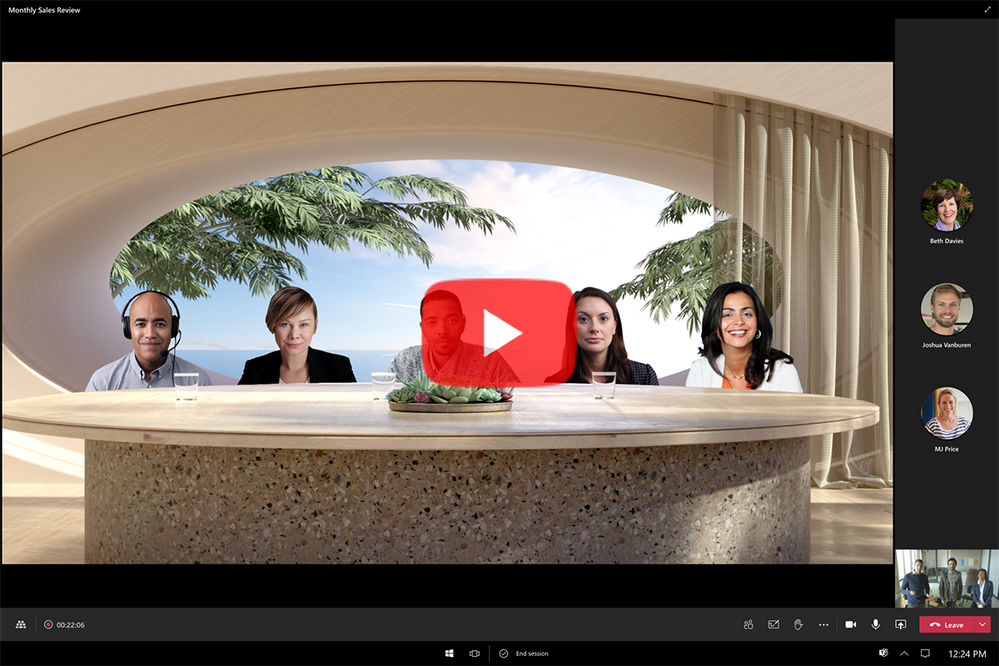
Coming soon to the Windows Insider Program: The new Microsoft Teams Rooms on Surface Hub experience, designed to enable boundaryless collaboration on a device purpose-built for teams to meet and co-create, wherever they work. For a sneak peek and how to join the Windows Insider program, check out this video:
This next generation of Teams on Surface Hub has been redesigned to bring your favorite features from the desktop and Microsoft Teams Rooms into the meeting space. With a new meeting stage, a robust set of meeting controls, and popular features including Together Mode scenes, background noise suppression, chat bubbles, and live reactions, Teams Rooms on Surface Hub enriches collaboration for the hybrid workplace. You can easily access your Microsoft 365 files and confidently present using features like PowerPoint Live in Teams, letting you see slides, notes, and your audience all in one view.
Simply put, Teams is evolving to provide more “presence” so instead of just looking at a wall of faces, you can create personal spaces like a dining room table or a coffee shop.
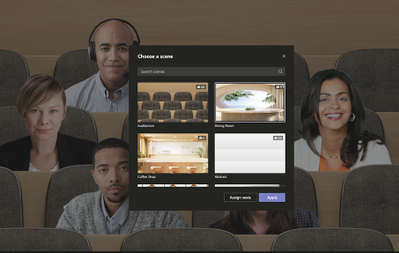 This public preview will be available starting next week via the Windows Insider Program for Surface Hub, and we will add exciting features like Coordinated Meeting and Proximity based meeting joins over the course of the preview.
If you’re not already familiar with the Windows Insider program, when the public preview concludes later this year, these features will become available to all Surface Hubs. For terms and conditions, refer to the Microsoft Windows Insider Program Agreement.
Coming soon
New Microsoft Edge experience on Surface Hub
With the Surface Hub Windows 10 Team 2020 Update, we provided a way for our customers to experience the new Microsoft Edge on Surface Hub. Also coming with this Insiders update, we’re making the new Microsoft Edge the default browser. on Surface Hub. With this, you can now experience the same desktop Microsoft Edge Chromium browser that our customers love on the Surface Hub.
IT management of Surface Hub
Later this year we will also integrate Surface Hub into the Microsoft Managed Service and into Microsoft Teams Admin Center to make it even simpler to deploy and manage your devices on scale.
Productivity in the hybrid workplace
Building Surface Hub 85″
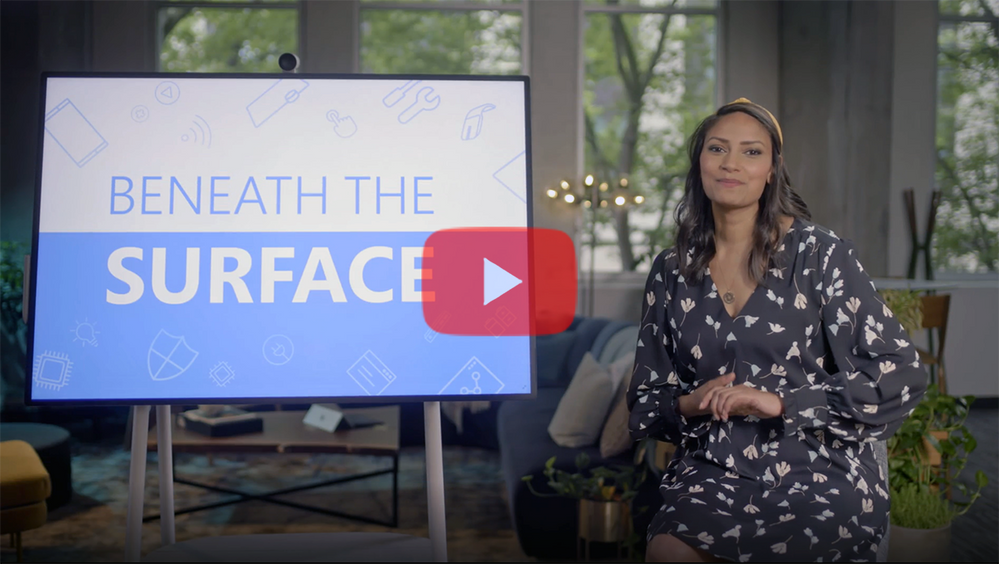
When we set out to build our our biggest Surface device ever, we could no longer rely on side by side, in person processes. To learn how we approached this challenge of retooling our processes for the remote and hybrid environment, check out the latest episode of Beneath the Surface.
Learn more
by Contributed | Jun 17, 2021 | Technology
This article is contributed. See the original author and article here.
Azure Static Web Apps is a serverless web app hosting service offering streamlined full-stack development, with many built-in features designed to make your life easier. Because it’s always hard to get started with any new technology, we created a series of practical, short videos with all the tips and tricks you need to get your apps up and running in a blink.
We choose to cover all the basics you need to get started, and then focus on specific use-cases that may be useful in most situations. With these videos, you’ll get all the essential knowledge to move your project forward with Azure Static Web Apps!
The full video series is available for free here:
This series is made of 16 videos, organized in 4 modules each with a different focus. You can either follow all of them as a full course or pick some as you need to complete your skill set.
Azure Static Web Apps essentials
If you’ve never heard of Static Web Apps or if you’re just being curious, this is the place to start. You’ll discover the basics about it, install all the tools to work efficiently and see how fast you can get your website online. Then you’ll set up a full CI/CD pipeline and see how to use pre-production environments, and finally create your own personal blog with Gatsby.
Videos:
Building a shopping app
Now that you’re ready to code, we’ll cover the use case of building a shopping app progressively, configuring the routing, adding an API and securing your app with built-in authentication and authorization. And because as web developers we love to have nice looking URLs, we’ll also see how to configure your custom domain step by step.
Videos:
Using C# and Blazor to create full-stack web apps
With Blazor and Web Assembly you can use C# all the way to create full-stack web apps. This especially great if your’re well versed in C#, and want to use your skills to create a comple serverless web app and API entirely written in C# with .Net. You’ll start your journey here from the beginning, and see all the important aspects you need to care for while creating your Blazor app.
Videos:
Using Cosmos DB with MongoDB API and Mongoose with your Static Web Apps
Almost every web project will require client and server-side code, and ultimately, a database. With Static Web Apps you’ve seen how to create and deploy websites, and we’ll expand on that using tools you’re already familiar with, including MongoDB and Mongoose for managing data. You’ll save time learning how to create a complete app with a database from this starter kit, going through every steps you need to deploy your project and database.
Videos:
Want more?
Videos are great for visual learning, but having additional forms of content is always helpful.
Tell us your feedback!
Of course, we can’t cover every single thing there is to know about Static Web Apps in these videos. But we want to give you all the essential knowledge you need to get started on your project.
And more importantly, we’re also here to listen and help as much as we can! :)
Please tell us your experience, your difficulties and questions, and how we may improve this series in the comments.
On behalf of the whole team, THANK YOU for taking this journey with us! :folded_hands:
by Contributed | Jun 17, 2021 | Technology
This article is contributed. See the original author and article here.
The hybrid workplace is here, and Microsoft Teams Rooms has the latest innovations to enhance everyone’s experiences, whether in the room, or remote. To make meetings more engaging for both remote and in room attendees, we are announcing a new category of intelligent speakers for Teams Rooms on Windows.
1. Inclusive meetings powered by Microsoft Teams
Intelligent speakers are intelligent peripherals for Microsoft Teams Rooms on Windows and are designed to bring high quality audio experiences to remote participants can clearly hear all the voices in the room. And they are optimized for Cortana voice assistance to offer touch-less experience to join and end meetings in shared spaces.
2. Intelligent transcription with speaker attribution
Intelligent speakers will bring people identification in live transcription in a shared environment enabling clear voice capture of participants in the meeting room. Allowing everyone in the meeting to spend less time note taking and easily follow along who said what in the room. Intelligent speakers include a 7-microphone array to identify voices of up to ten people in meeting rooms so whether you are working remotely or in the conference room, you can effectively see who said what during and after the meeting.
3. Powered by Microsoft Graph
Knowing who is speaking makes transcription more accurate and meaningful. Once we know who is speaking, we can leverage the power of intelligence through Microsoft Graph that provides access to rich people-centric data and insight in the Microsoft Cloud to contextualize the transcription. For example, because we know who the speaker is, the acronyms, names of colleagues, and different words the speaker uses can be more accurately transcribed.
4. Enterprise grade privacy and security
Voice data will be securely stored in the Office 365 Cloud, and users will retain control of their information, including the ability to delete it at any time. The capture of voice data can be turned on or off for each meeting. Additionally, admins have full control to turn on/off people identification through voice recognition feature across the organization.

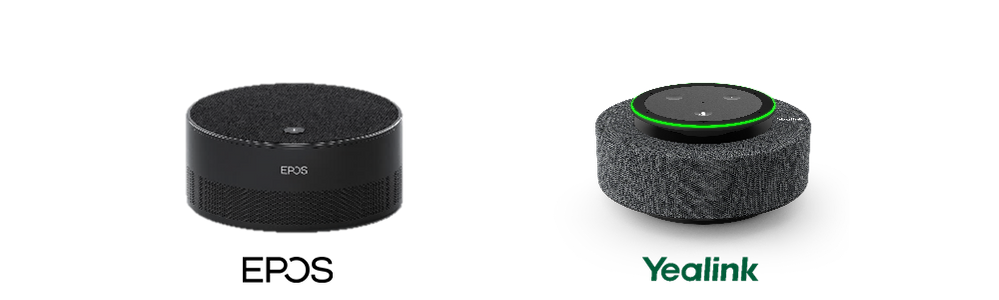
The first two partners to launch intelligent speakers are EPOS with Capture 5 and Yealink with MS Speech, they will both require a Microsoft Teams Rooms Standard or Premium license to be enabled. EPOS Capture 5 and Yealink M Speech intelligent speakers can be purchased individually and in bundles to work with Microsoft Teams Rooms on Windows products.
Yealink offers a Microsoft Teams Room on Windows bundle with (MVC 320 or MVC 640) and MS Speech Intelligent Speaker. EPOS and Lenovo have partnered to offer a Microsoft Teams Room on Windows bundle with Lenovo ThinkSmart Hub Gen 2 and EPOS Capture 5.
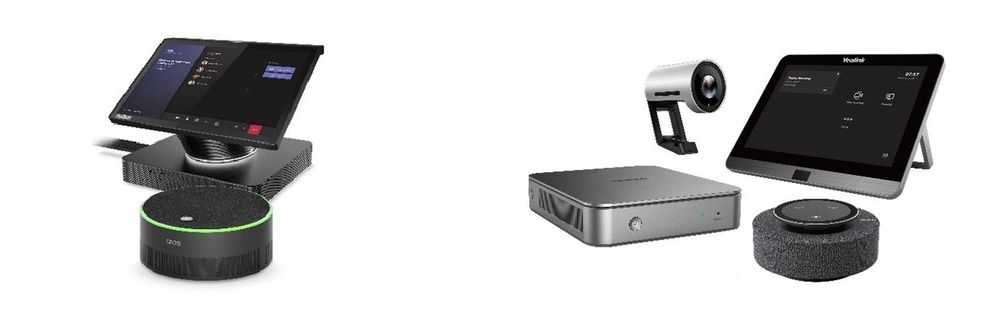 Lenovo ThinkSmart Hub Gen 2 bundle(left) and Yealink MVC 320 bundle (right)
Intelligent speakers people identification is available in preview and will be available with a Teams Rooms Standard or Premium license. Future licensing requirements for people identification in transcription are subject to change. The Teams intelligent speaker is available in English in the United States, future regions to come.


Recent Comments