by Contributed | Aug 31, 2021 | Technology
This article is contributed. See the original author and article here.
Update: Tuesday, 31 August 2021 17:19 UTC
We continue to investigate issues within Application Insights. Root cause is not fully understood at this time. Some customers continue to experience Application Insights telemetry data latency and/or data gaps. We are working to establish the start time for the issue, initial findings indicate that the problem began at August 31, 17:12 UTC. We currently have no estimate for resolution.
- Next Update: Before 08/31 18:30 UTC
-Jack Cantwell
by Scott Muniz | Aug 31, 2021 | Security, Technology
This article is contributed. See the original author and article here.
Immediate Actions You Can Take Now to Protect Against Ransomware
• Make an offline backup of your data.
• Do not click on suspicious links.
• If you use RDP, secure and monitor it.
• Update your OS and software.
• Use strong passwords.
• Use multi-factor authentication.
The Federal Bureau of Investigation (FBI) and the Cybersecurity and Infrastructure Security Agency (CISA) have observed an increase in highly impactful ransomware attacks occurring on holidays and weekends—when offices are normally closed—in the United States, as recently as the Fourth of July holiday in 2021. The FBI and CISA do not currently have any specific threat reporting indicating a cyberattack will occur over the upcoming Labor Day holiday. However, the FBI and CISA are sharing the below information to provide awareness to be especially diligent in your network defense practices in the run up to holidays and weekends, based on recent actor tactics, techniques, and procedures (TTPs) and cyberattacks over holidays and weekends during the past few months. The FBI and CISA encourage all entities to examine their current cybersecurity posture and implement the recommended best practices and mitigations to manage the risk posed by all cyber threats, including ransomware.
Click here for a PDF copy of this report.
Threat Overview
Recent Holiday Targeting
Cyber actors have conducted increasingly impactful attacks against U.S. entities on or around holiday weekends over the last several months. The FBI and CISA do not currently have specific information regarding cyber threats coinciding with upcoming holidays and weekends. Cyber criminals, however, may view holidays and weekends—especially holiday weekends—as attractive timeframes in which to target potential victims, including small and large businesses. In some cases, this tactic provides a head start for malicious actors conducting network exploitation and follow-on propagation of ransomware, as network defenders and IT support of victim organizations are at limited capacity for an extended time.
- In May 2021, leading into Mother’s Day weekend, malicious cyber actors deployed DarkSide ransomware against the IT network of a U.S.-based critical infrastructure entity in the Energy Sector, resulting in a week-long suspension of operations. After DarkSide actors gained access to the victim’s network, they deployed ransomware to encrypt victim data and—as a secondary form of extortion—exfiltrated the data before threatening to publish it to further pressure victims into paying the ransom demand.
- In May 2021, over the Memorial Day weekend, a critical infrastructure entity in the Food and Agricultural Sector suffered a Sodinokibi/REvil ransomware attack affecting U.S. and Australian meat production facilities, resulting in a complete production stoppage.
- In July 2021, during the Fourth of July holiday weekend, Sodinokibi/REvil ransomware actors attacked a U.S.-based critical infrastructure entity in the IT Sector and implementations of their remote monitoring and management tool, affecting hundreds of organizations—including multiple managed service providers and their customers.
Ransomware Trends
The FBI’s Internet Crime Complaint Center (IC3), which provides the public with a trustworthy source for reporting information on cyber incidents, received 791,790 complaints for all types of internet crime—a record number—from the American public in 2020, with reported losses exceeding $4.1 billion. This represents a 69 percent increase in total complaints from 2019. The number of ransomware incidents also continues to rise, with 2,474 incidents reported in 2020, representing a 20 percent increase in the number of incidents, and a 225 percent increase in ransom demands. From January to July 31, 2021, the IC3 has received 2,084 ransomware complaints with over $16.8M in losses, a 62 percent increase in reporting and 20 percent increase in reported losses compared to the same time frame in 2020.
The following ransomware variants have been the most frequently reported to FBI in attacks over the last month.
- Conti
- PYSA
- LockBit
- RansomEXX/Defray777
- Zeppelin
- Crysis/Dharma/Phobos
The destructive impact of ransomware continues to evolve beyond encryption of IT assets. Cyber criminals have increasingly targeted large, lucrative organizations and providers of critical services with the expectation of higher value ransoms and increased likelihood of payments. Cyber criminals have also increasingly coupled initial encryption of data with a secondary form of extortion, in which they threaten to publicly name affected victims and release sensitive or proprietary data exfiltrated before encryption, to further encourage payment of ransom. (See CISA’s Fact Sheet: Protecting Sensitive and Personal Information from Ransomware-Caused Data Breaches.) Malicious actors have also added tactics, such as encrypting or deleting system backups—making restoration and recovery more difficult or infeasible for impacted organizations.
Although cyber criminals use a variety of techniques to infect victims with ransomware, the two most prevalent initial access vectors are phishing and brute forcing unsecured remote desktop protocol (RDP) endpoints. Additional common means of initial infection include deployment of precursor or dropper malware; exploitation of software or operating system vulnerabilities; exploitation of managed service providers with access to customer networks; and the use of valid, stolen credentials, such as those purchased on the dark web. Precursor malware enables cyber actors to conduct reconnaissance on victim networks, steal credentials, escalate privileges, exfiltrate information, move laterally on the victim network, and obfuscate command-and-control communications. Cyber actors use this access to:
- Evaluate a victim’s ability to pay a ransom.
- Evaluate a victim’s incentive to pay a ransom to:
- Regain access to their data and/or
- Avoid having their sensitive or proprietary data publicly leaked.
- Gather information for follow-on attacks before deploying ransomware on the victim network.
Threat Hunting
The FBI and CISA suggest organizations engage in preemptive threat hunting on their networks. Threat hunting is a proactive strategy to search for signs of threat actor activity to prevent attacks before they occur or to minimize damage in the event of a successful attack. Threat actors can be present on a victim network long before they lock down a system, alerting the victim to the ransomware attack. Threat actors often search through a network to find and compromise the most critical or lucrative targets. Many will exfiltrate large amounts of data. Threat hunting encompasses the following elements of understanding the IT environment by developing a baseline through a behavior-based analytics approach, evaluating data logs, and installing automated alerting systems.
- Understand the IT environment’s routine activity and architecture by establishing a baseline. By implementing a behavior-based analytics approach, an organization can better assess user, endpoint, and network activity patterns. This approach can help an organization remain alert on deviations from normal activity and detect anomalies. Understanding when users log in to the network—and from what location—can assist in identifying anomalies. Understanding the baseline environment—including the normal internal and external traffic—can also help in detecting anomalies. Suspicious traffic patterns are usually the first indicators of a network incident but cannot be detected without establishing a baseline for the corporate network.
- Review data logs. Understand what standard performance looks like in comparison to suspicious or anomalous activity. Things to look for include:
- Numerous failed file modifications,
- Increased CPU and disk activity,
- Inability to access certain files, and
- Unusual network communications.
- Employ intrusion prevention systems and automated security alerting systems—such as security information event management software, intrusion detection systems, and endpoint detection and response.
- Deploy honeytokens and alert on their usage to detect lateral movement.
Indicators of suspicious activity that threat hunters should look for include:
- Unusual inbound and outbound network traffic,
- Compromise of administrator privileges or escalation of the permissions on an account,
- Theft of login and password credentials,
- Substantial increase in database read volume,
- Geographical irregularities in access and log in patterns,
- Attempted user activity during anomalous logon times,
- Attempts to access folders on a server that are not linked to the HTML within the pages of the web server, and
- Baseline deviations in the type of outbound encrypted traffic since advanced persistent threat actors frequently encrypt exfiltration.
See the joint advisory from Australia, Canada, New Zealand, the United Kingdom, and the United States on Technical Approaches to Uncovering and Remediating Malicious Activity for additional guidance on hunting or investigating a network, and for common mistakes in incident handling. Also review the Ransomware Response Checklist in the CISA-MS-ISAC Joint Ransomware Guide.
Cyber Hygiene Services
CISA offers a range of no-cost cyber hygiene services—including vulnerability scanning and ransomware readiness assessments—to help critical infrastructure organizations assess, identify, and reduce their exposure to cyber threats. By taking advantage of these services, organizations of any size will receive recommendations on ways to reduce their risk and mitigate attack vectors.
Ransomware Best Practices
The FBI and CISA strongly discourage paying a ransom to criminal actors. Payment does not guarantee files will be recovered, nor does it ensure protection from future breaches. Payment may also embolden adversaries to target additional organizations, encourage other criminal actors to engage in the distribution of malware, and/or fund illicit activities. Regardless of whether you or your organization decide to pay the ransom, the FBI and CISA urge you to report ransomware incidents to CISA, a local FBI field office, or by filing a report with IC3 at IC3.gov. Doing so provides the U.S. Government with critical information needed to help victims, track ransomware attackers, hold attackers accountable under U.S. law, and share information to prevent future attacks.
Information Requested
Upon receiving an incident report, the FBI or CISA may seek forensic artifacts, to the extent that affected entities determine such information can be legally shared, including:
- Recovered executable file(s),
- Live memory (RAM) capture,
- Images of infected systems,
- Malware samples, and
- Ransom note.
Recommended Mitigations
The FBI and CISA highly recommend organizations continuously and actively monitor for ransomware threats over holidays and weekends.
Additionally, the FBI and CISA recommend identifying IT security employees to be available and “on call” during these times, in the event of a ransomware attack. The FBI and CISA also suggest applying the following network best practices to reduce the risk and impact of compromise.
Make an offline backup of your data.
- Make and maintain offline, encrypted backups of data and regularly test your backups. Backup procedures should be conducted on a regular basis. It is important that backups be maintained offline as many ransomware variants attempt to find and delete or encrypt accessible backups.
- Review your organization’s backup schedule to take into account the risk of a possible disruption to backup processes during weekends or holidays.
Do not click on suspicious links.
- Implement a user training program and phishing exercises to raise awareness among users about the risks involved in visiting malicious websites or opening malicious attachments and to reinforce the appropriate user response to phishing and spearphishing emails.
If you use RDP—or other potentially risky services—secure and monitor.
- Limit access to resources over internal networks, especially by restricting RDP and using virtual desktop infrastructure. After assessing risks, if RDP is deemed operationally necessary, restrict the originating sources and require MFA. If RDP must be available externally, it should be authenticated via VPN.
- Monitor remote access/RDP logs, enforce account lockouts after a specified number of attempts, log RDP login attempts, and disable unused remote access/RDP ports.
- Ensure devices are properly configured and that security features are enabled. Disable ports and protocols that are not being used for a business purpose (e.g., RDP Transmission Control Protocol Port 3389).
- Disable or block Server Message Block (SMB) protocol outbound and remove or disable outdated versions of SMB. Threat actors use SMB to propagate malware across organizations.
- Review the security posture of third-party vendors and those interconnected with your organization. Ensure all connections between third-party vendors and outside software or hardware are monitored and reviewed for suspicious activity.
- Implement listing policies for applications and remote access that only allow systems to execute known and permitted programs under an established security policy.
- Open document readers in protected viewing modes to help prevent active content from running.
Update your OS and software; scan for vulnerabilities.
- Upgrade software and operating systems that are no longer supported by vendors to currently supported versions. Regularly patch and update software to the latest available versions. Prioritize timely patching of internet-facing servers—as well as software processing internet data, such as web browsers, browser plugins, and document readers—for known vulnerabilities. Consider using a centralized patch management system; use a risk-based assessment strategy to determine which network assets and zones should participate in the patch management program.
- Automatically update antivirus and anti-malware solutions and conduct regular virus and malware scans.
- Conduct regular vulnerability scanning to identify and address vulnerabilities, especially those on internet-facing devices. (See the Cyber Hygiene Services section above for more information on CISA’s free services.)
Use strong passwords.
- Ensure strong passwords and challenge responses. Passwords should not be reused across multiple accounts or stored on the system where an adversary may have access.
Use multi-factor authentication.
- Require multi-factor authentication (MFA) for all services to the extent possible, particularly for remote access, virtual private networks, and accounts that access critical systems.
Secure your network(s): implement segmentation, filter traffic, and scan ports.
- Implement network segmentation with multiple layers, with the most critical communications occurring in the most secure and reliable layer.
- Filter network traffic to prohibit ingress and egress communications with known malicious IP addresses. Prevent users from accessing malicious websites by implementing URL blocklists and/or allowlists.
- Scan network for open and listening ports and close those that are unnecessary.
- For companies with employees working remotely, secure home networks—including computing, entertainment, and Internet of Things devices—to prevent a cyberattack; use separate devices for separate activities; and do not exchange home and work content.
Secure your user accounts.
- Regularly audit administrative user accounts and configure access controls under the principles of least privilege and separation of duties.
- Regularly audit logs to ensure new accounts are legitimate users.
Have an incident response plan.
- Create, maintain, and exercise a basic cyber incident response plan that:
- Includes procedures for response and notification in a ransomware incident and
- Plans for the possibility of critical systems being inaccessible for a period of time.
Note: for help with developing your plan, review available incident response guidance, such as the Public Power Cyber Incident Response Playbook and the Ransomware Response Checklist in the CISA-MS-ISAC Joint Ransomware Guide.
If your organization is impacted by a ransomware incident, the FBI and CISA recommend the following actions.
- Isolate the infected system. Remove the infected system from all networks, and disable the computer’s wireless, Bluetooth, and any other potential networking capabilities. Ensure all shared and networked drives are disconnected, whether wired or wireless.
- Turn off other computers and devices. Power off and segregate (i.e., remove from the network) the infected computer(s). Power off and segregate any other computers or devices that share a network with the infected computer(s) that have not been fully encrypted by ransomware. If possible, collect and secure all infected and potentially infected computers and devices in a central location, making sure to clearly label any computers that have been encrypted. Powering off and segregating infected computers from computers that have not been fully encrypted may allow for the recovery of partially encrypted files by specialists.
- Secure your backups. Ensure that your backup data is offline and secure. If possible, scan your backup data with an antivirus program to check that it is free of malware.
Additional Resources
For additional resources related to the prevention and mitigation of ransomware, go to https://www.stopransomware.gov as well as the CISA-Multi-State Information Sharing and Analysis Center (MS-ISAC) Joint Ransomware Guide. Stopransomware.gov is the U.S. Government’s new, official one-stop location for resources to tackle ransomware more effectively. Additional resources include:
by Scott Muniz | Aug 31, 2021 | Security, Technology
This article is contributed. See the original author and article here.
Today, the Federal Bureau of Investigation (FBI) and CISA released a Joint Cybersecurity Advisory (CSA) to urge organizations to ensure they protect themselves against ransomware attacks during holidays and weekends—when offices are normally closed.
Although FBI and CISA do not currently have any specific threat reporting indicating a cyberattack will occur over the upcoming Labor Day holiday, malicious cyber actors have launched serious ransomware attacks during other holidays and weekends in 2021. The Joint CSA identifies both immediate and longer term actions organizations can take to protect against the rise in ransomware, including:
CISA and the FBI encourage users to examine their current cybersecurity posture and implement the recommended mitigations in the Joint CSA to manage the risk posed by all cyber threats, including ransomware.
by Contributed | Aug 31, 2021 | Dynamics 365, Microsoft 365, Technology
This article is contributed. See the original author and article here.
Data is everywhere, data is decision making power
The emergence of data is changing the way organizations do business. From our mobile devices to our machinery, everyday activities and interactions create trillions of data points generated by inanimate objects. Unfortunately, data is often stored across disparate systems depriving organizations of access to valuable information and connected insights. To keep up with today’s fast-paced data hierarchy, organizations must rely on solutions that effectively integrate data to derive important business insights, empower frontline workers to make data-driven decisions, and streamline operational efficiency.
Break down information siloes with Microsoft Dynamics 365 Guides, HoloLens 2, and Power Apps
Infusing Power Apps with Dynamics 365 Guides and HoloLens 2 has enabled organizations to give their frontline workers step-by-step holographic instructions while also bringing critical, connected data into view. Using Power Apps, you can connect to your business data stored in on-premises data sources and rapidly build customizable workflows for your unique operational processes.
With Power Apps, you can embed your apps directly into Dynamics 365 Guides, displayed on HoloLens 2. Embedding Power Apps apps into Dynamics 365 Guides enables you to:
- Create and trigger automated workflows based on captured asset data to simplify business processes seamlessly.
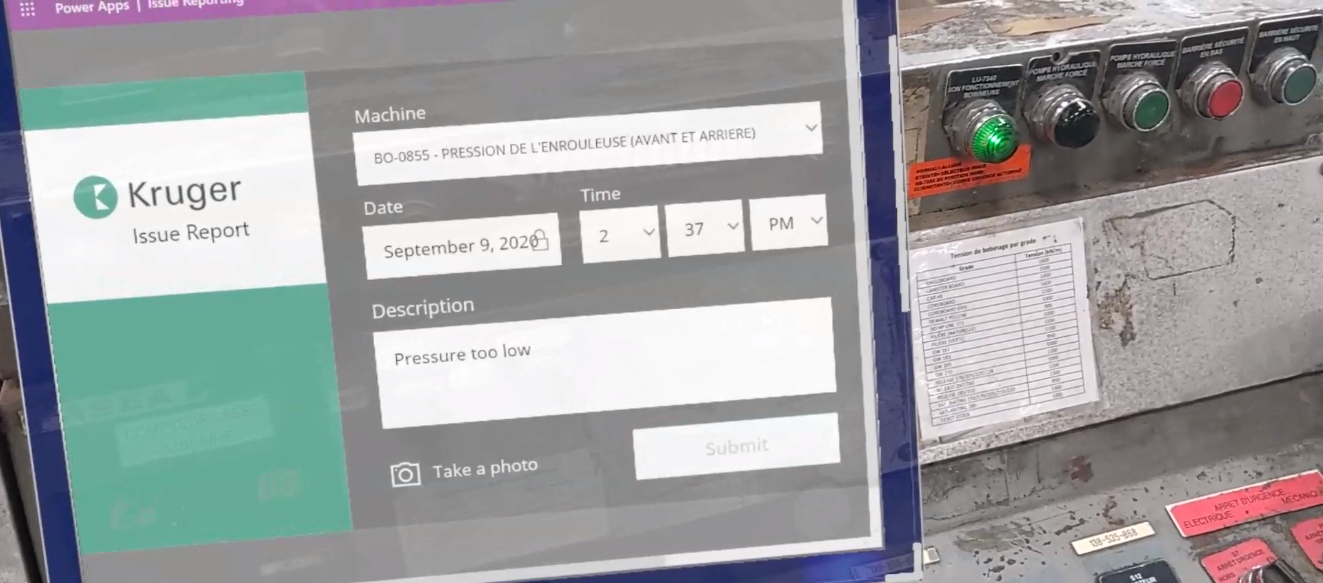
- Develop issue reports, incorporated into your existing workflow within Dynamics 365 Guides.
- Report issues directly within the workflow in a non-disruptive and efficient way.
- Understand historical data and relevant insights.
An example of Issue Reporting integrated into Dynamics 365 Guides using Power Apps
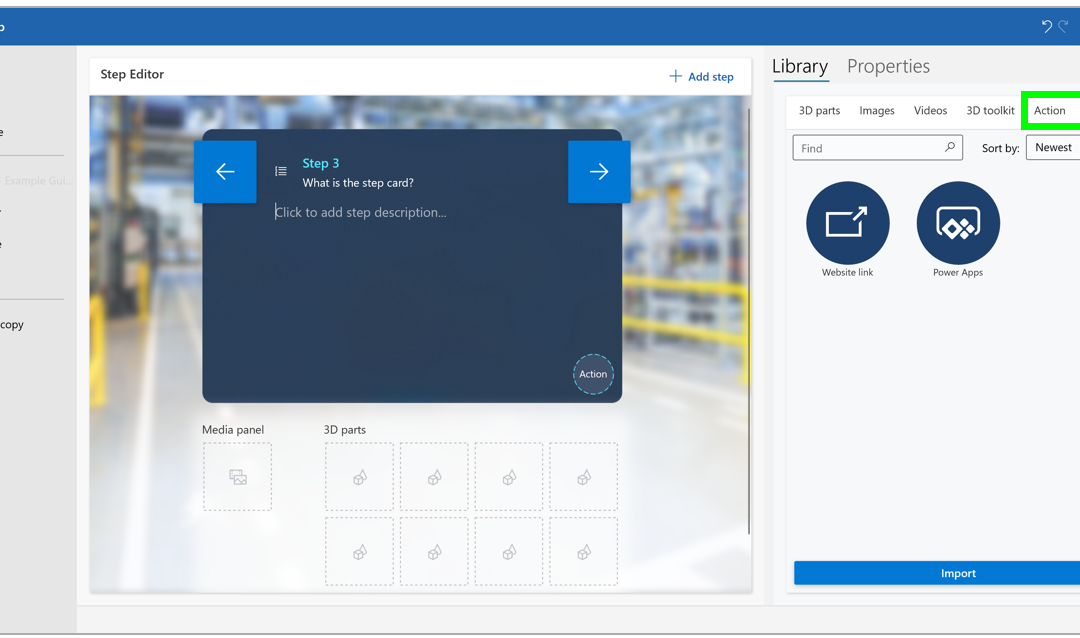
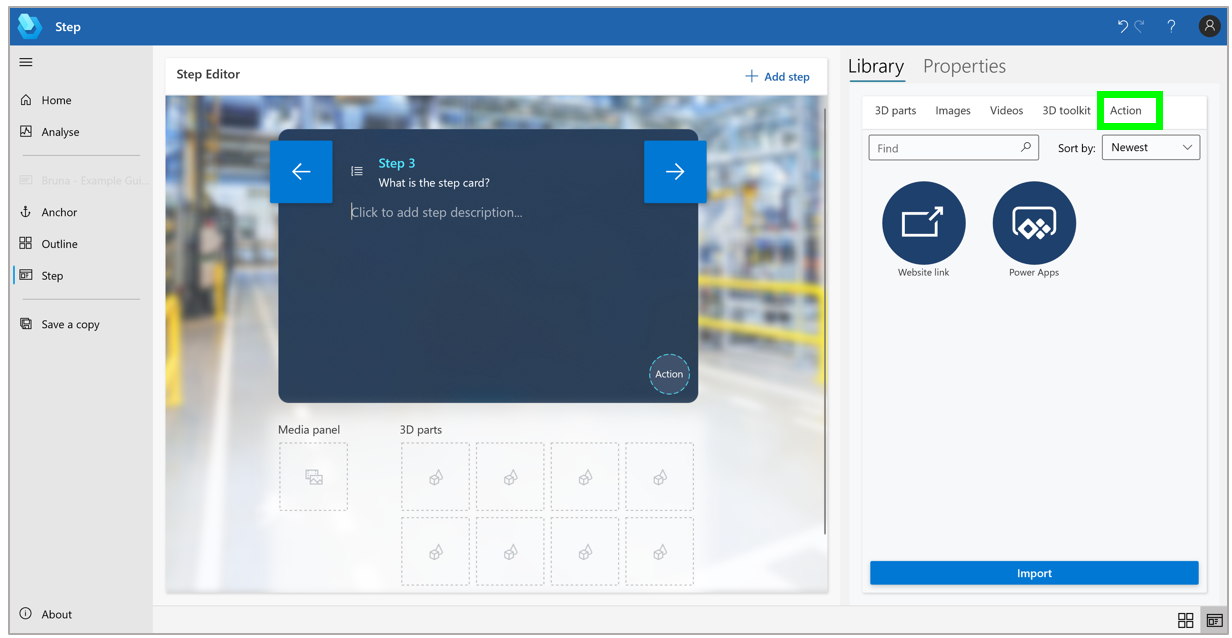
Additionally, using Dynamics 365 Guides PC authoring, you can add a website link or directly link to Power Apps apps in your guides, making the opportunities endless for content linking and quick access to resources such as reference manuals, interactive quizzes, or parts re-ordering systems, or an app that provides the latest status of IoT sensors. This feature enables authors to create a seamless workflow for operators so that there is no need to switch from the workflow to access outside documentation as the information is displayed seamlessly in the line of sight.
It doesn’t end there. By integrating Power Apps with Dynamics 365 Remote Assist, you can ensure your operators are connected to apps when performing tasks on the go. Simply connect to Power Apps via your Microsoft Edge browser to access Remote Assist Helper to manage your tasks, apps, and documentation with a remote expert.
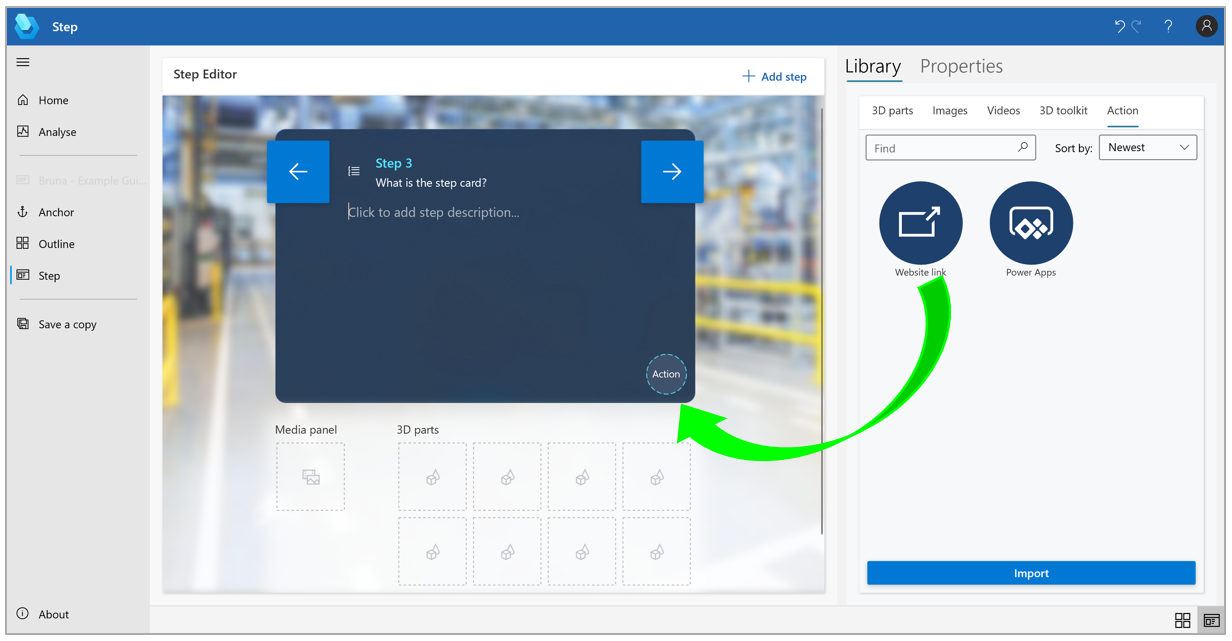
An example of adding in Website link using the Step Editor pane.
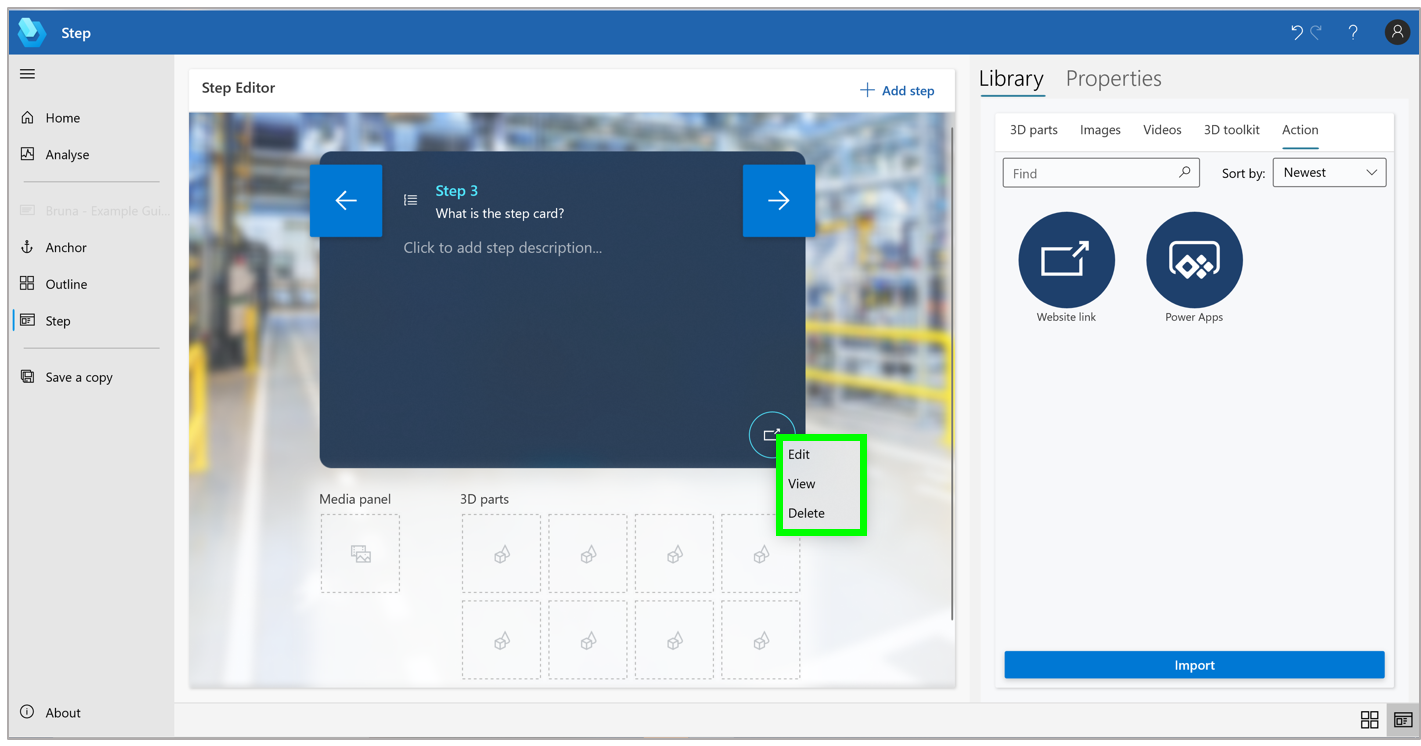
To view, edit, or delete the link, right-click the Website link button in the Step Editor pane and then select the appropriate command.
Auger Groupe Conseil uses Power Apps with Dynamics 365 Guides
Auger Groupe Conseil is a firm specializing in industrial process engineering, with a focus on helping organizations accomplish “Industry 4.0” procedural updates. On a recent client visit at Kruger Paper Inc., Auger Groupe Conseil recognized the opportunity to unify vast amounts of unused data stored across disparate sources with Power Apps with Dynamics 365 Guides.
Using the Power Apps connector in Dynamics 365 Guides, Auger Groupe Conseil was able to bring all of this unused data to their employees in real-time on the shop floor. With the Power Apps connector, the organization was able to take the Dynamics 365 Guides solution a step further by customizing workflows, submitting issue reports, and making optimal adjustments live in their real work environment. The customizable workflows let them create what they need within a workflow, for example, an alert or a report. Overall, this low-code, versatile solution has enabled their organization to effectively maximize their operations and employee performance.
“We realized that all these companies have an enormous amount of data sources and the best way to bring all this data to the employee is to use Power Apps in Guides. Power Apps allows you to customize any workflow.” Alan Marchand, IT Director at Auger Groupe Conseil, in charge of solutions architecture.

Get started
The post Power Apps and Dynamics 365 Guides brings data to frontline workers appeared first on Microsoft Dynamics 365 Blog.
Brought to you by Dr. Ware, Microsoft Office 365 Silver Partner, Charleston SC.

by Contributed | Aug 30, 2021 | Technology
This article is contributed. See the original author and article here.
This is the next installment of our blog series highlighting Microsoft Learn Student Ambassadors who achieved the Gold milestone and have recently graduated from university. Each blog in the series features a different student and highlights their accomplishments, their experience with the Student Ambassadors community, and what they’re up to now.
Today we’d like to introduce Nandita Gaur who is from India and recently graduated from ABES Engineering College with a degree in Computer Science and Engineering.
Responses have been edited for clarity and length.
When you joined the Student Ambassador community in 2019, did you have specific goals you wanted to reach, such as a particular skill or quality? What were they? Did you achieve them? How has the program impacted you in general?
Microsoft has always been my dream organization, so when I got to know about this amazing program by Microsoft for students, I had to join. Before joining the community, my goals were oriented towards my personal growth. I wanted to enhance my resume by learning new skills, meet new people around the globe working on various technologies, and meet people of Microsoft. Now that I have graduated from this program, I have grown so much as a person. I have achieved all my goals. In fact, a lot more than that. I am a lot more confident in public speaking skills as compared to before. I have learned about Cloud Computing, Machine Learning, and Artificial Intelligence, gained knowledge about various Microsoft products, and I have met various impactful personalities around the globe.
The Student Ambassadors community has impacted me so much. My mindset has changed. I have realized that emphasizing just only on the personal growth is not going to help you much in the life. It’s all about making an impact. It’s about how many people are going to get benefitted by the work you do.
What are the accomplishments that you’re the proudest of and why?
I have conducted many events, thus impacting a lot of people, but one thing that I am truly proud of is winning the Azure Developer Stories contest, a blogging contest held in April 2020 wherein we had to document a project based on Machine Learning. I didn’t really know Machine Learning before this contest, but since it was declared during lockdown, I had all the time to study. So I referred to Microsoft Learn and based on all the knowledge I gathered from it, I made a project on COVID-19 Analysis using Python. I just couldn’t believe it when the results were announced. I was declared winner among all the Student Ambassadors of India. This boosted my confidence a lot.
“Nothing is tough; all it takes is some dedication.”
I was too reluctant to start Machine Learning then because it covers a lot of mathematics, something which I tried to avoid for as long as possible. I couldn’t find good resources to study Machine Learning online, and this contest by the Student Ambassador community introduced me to a well-structured course on Microsoft Learn on Machine Learning. I had no reason to procrastinate. I had the all the resources. I had to start learning.
I am really proud of all the learning I have gathered about Machine Learning and fighting the habit of procrastination.
What do you have planned after graduation?
I will be working as a Support Engineer with the Microsoft India CE&S team on Dynamics 365. I also plan to keep mentoring the students of my college so that they can achieve more than they think they can.
If you could redo your time as a Student Ambassador, is there anything you would have done differently?
I could have made much more connections. Although I have made a lot of friends, I was reluctant in the beginning to talk to anyone. I didn’t prefer speaking much. If I had spoken more, then I would have probably got the chance to be a speaker at Microsoft Build or Ignite.
If you were to describe the community to a student who is interested in joining, what would you say about it to convince him or her to join?
It is a wonderful opportunity that grooms your personality and helps you evolve as a person. You get to meet talented people across the globe and learn various technologies with them and make strong connections that may help you in your career. You get to know what’s going inside Microsoft and about the Microsoft mission, its culture and values, and you build a close connection with Microsoft employees who mentor you in making projects, provide you valuable career tips, and also provide you with various speaking opportunities at international conferences. You will know what’s going around the world in the field of technology and have a clearer picture of how technology can be used to create an impact in this world.
What advice would you give to new Student Ambassadors?
Push aside your inhibitions and start talking around. Start discussions, involve yourself in conversations, and conduct useful events that may help the students of your local community at University.
Just organizing events is not helpful. You have to attend sessions too. All the speakers from Microsoft are immensely talented professionals who have interesting knowledge to offer that is going to help you at every point in your career. You have a lot to take and to offer. So take full advantage of the opportunities that the Student Ambassadors team is offering you.
Do you have a motto in life, a guiding principle that drives you?
During lockdown I was much too demotivated. There was a lot of negativity in the environment. To top it off, placement season for post-graduation job was overhead. I had lost my productivity because of all the chaos around and felt like I am making no progress in life. Luckily I landed on this song called “Hall of Fame” by an Irish band “The Script”. It is an inspirational song that says you can do anything you set your mind to as long as you believe in yourself and try. It motivated me to get up and start working, so I made this song my guiding principle.
What is one random fact few people know about you?
I am good at palmistry. My classmates in the high school consulted with me, showing their hands to me to know about their future, personality, and what could be done to improve it. Even teachers too! I enjoyed this fame but eventually realized that this does not help with anything except unnecessary worrying among the folks for their future. When I moved to college, I kept this skill as a secret. Actually, I have given up this job completely, so please don’t consult me for this (LOL).
Good luck to you in your journey, Nandita!
by Scott Muniz | Aug 30, 2021 | Security, Technology
This article is contributed. See the original author and article here.
Today, CISA added the use of single-factor authentication for remote or administrative access systems to our Bad Practices list of exceptionally risky cybersecurity practices. Single-factor authentication is a common low-security method of authentication. It only requires matching one factor—such as a password—to a username to gain access to a system.
Although these Bad Practices should be avoided by all organizations, they are especially dangerous in organizations that support Critical Infrastructure or National Critical Functions.
CISA encourages all organizations to review the Bad Practices webpage and to engage in the necessary actions and critical conversations to address Bad Practices. For guidance on setting up strong authentication, see the CISA Capacity Enhancement Guide: Implementing Strong Authentication.


Recent Comments