Dynamics 365 Sales helps teams better understand business relationships, take actions based on insights, and close opportunities faster. One of the many ways the app helps sales teams succeed is enabling them to build segments for use in assignment rules to ensure leads and opportunities are routed to the right sellers.
What is a segment?
A segment is a collection of leads and opportunities that are grouped together based on certain conditions, such as location, deal value, language, and product. You can create segments for both lead and opportunity entities. For details, see this article: Create and activate a segment.
You can use segments in assignment rules and sequences. With segments, you can choose the set of characteristics a lead or opportunity should have in order to get assigned to relevant sellers or to connect to a certain sequence, without the need to create the same conditions repeatedly.
When a new lead or opportunity is created in Dynamics 365 Sales and matches the conditions of a specified segment, it will automatically become a member of that segment, and will assign to sellers and connect to a sequence based on how you build your organization’s process automation.
Let’s take an example to understand how it works.
Define segment conditions
The following segment is defined with simple conditions, to catch all leads coming from the company’s website and that have an email address.
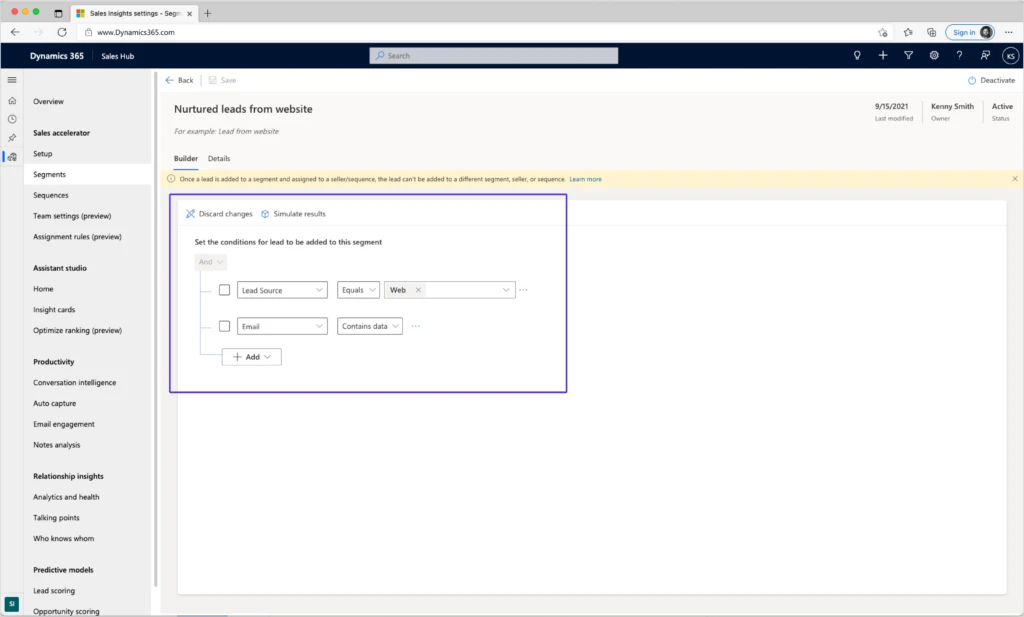
A segment can also include more complex parameters, using groups of AND/OR conditions or a link to a related entity. For example, you can create a segment that will capture all opportunities that are interested in printers or monitors, and that are related to one of two relevant accounts.
Simulate segment members
You can simulate the results based on existing data in your system, to make sure the segment will catch the lead or opportunity with the desired characteristics. The simulation results are not actual members of that segment and are just an example of the types of leads the segment will capture when it is activated.
Important highlights and limitations
- A lead or opportunity will be evaluated for a segment when it is created, and again when it is being updated. For example, a lead can enter the system without a populated email address, but after going through a nurturing process, an email address will be added, and the lead will become a member of the “Nurtured leads from website” segment in the above example.
- Your segment must be activated to catch new leads or opportunities.
- A lead or opportunity can become a member of only one segment. If a lead matches the conditions of more than one segment, it will randomly become a member of one of them.
- When a lead is added to a segment and assigned to a seller or connected to a sequence, it can’t be added to a different segment, seller, or sequence.
How to use a segment in assignment rules
When creating assignment rules for a lead or opportunity, you can use a segment to define the type of record that will be assigned to sellers via each rule. You can create multiple rules based on the same segment and add specific conditions to each rule to match your business process.
In the following example, we can select the “Nurtured leads from website” segment. This means that all leads that will become members of that segment will be assigned to sellers by this rule’s conditions.
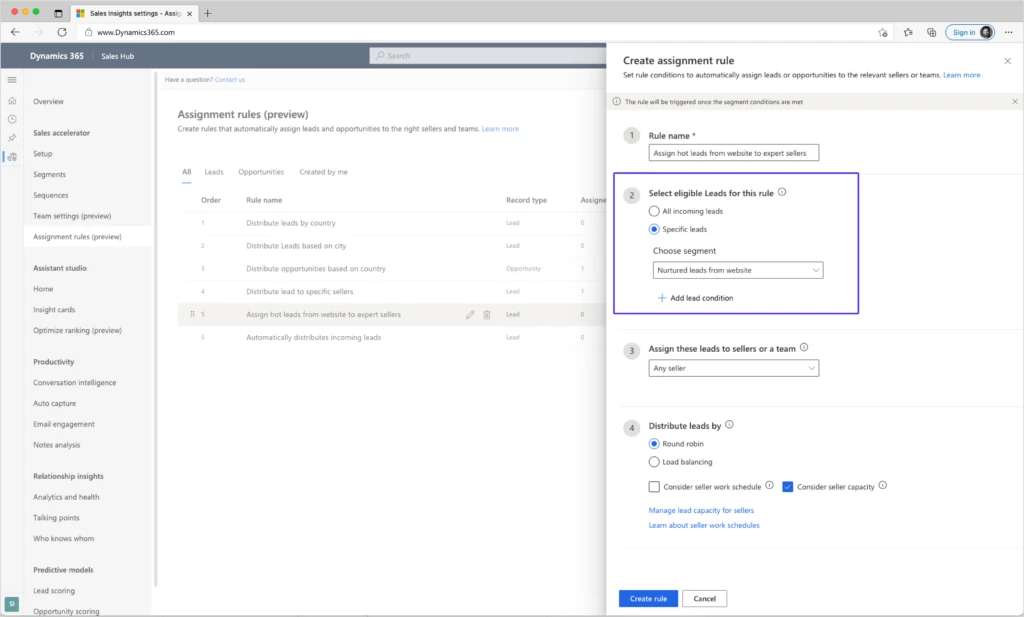
We can add another condition to that segment that will route the hot leads from the segment to the most experienced sellers.
For this scenario, we can create two rules: one rule to capture hot leads from the segment, and another rule to catch all remaining leads from the segment.
By placing the rule for assigning hot leads above the default rule, hot leads will be evaluated first and will be assigned to experienced sellers. The rest of the leads will be assigned by the default rule.
Next steps
For more information about segments, read the documentation:
The post Automatically route deals to the right sellers by using segments in assignment rules appeared first on Microsoft Dynamics 365 Blog.
Brought to you by Dr. Ware, Microsoft Office 365 Silver Partner, Charleston SC.



 ) or https:// means you’ve safely connected to the .gov website. Share sensitive information only on official, secure websites.
Recent Comments