This article is contributed. See the original author and article here.
On November 10, 2020, we announced the first preview of Az.Tools.Predictor, a PowerShell module suggesting the Azure cmdlet to use with parameters and suggested values.
Today, we are announcing the general availability of Az.Tools.Predictor.
How it all started
During a study about a new module for Azure, I was surprised to see how difficult it was for the participant to find the correct cmdlet to use. Later, I was summarizing the learnings of the study, and though it would be great if we could have a solution that could help people finding the right cmdlet to use.
At the same time, we were starting to work on Predictive IntelliSense in PowerShell and after a couple of meetings with Jason Helmick, it became clear that this would be a great mechanism to address the challenge I had seen few days before by providing, in the command line, suggestions about cmdlet to use.
We quickly thought that some form of AI could help providing accurate recommendations so we involved Roshanak, Yevhen and Maoliang from our data science team to work with us on how we could build an engine that would provide recommendations for PowerShell cmdlets based on the user’s context.
Behind the scenes
Once a functional prototype was built, we wanted to confirm its usability before considering any public previews. For our team usability is important, over time certain key combinations became a reflex and we knew that we had to fit in the existing memory muscle and become intuitive for PowerShell. For predictors to be successful, we organized several usability studies with prototypes of Az Predictors and addressed several improvements, like the color of the suggested text or the key combination to use to accept or navigate amongst predictions.
One of our initial prototypes was using the color scheme below, we wanted to have a clear color-based differentiation between typed characters and suggestions hoping this would help user navigate the suggestion. We worked with our design team to address the issue and evolve our design towards the current design.
We also evaluated if the information provided in the suggestions is helpful. Below is another of our early designs. By listening to our customers and observing how they are using the tool, we learned that showing cmdlets first then parameters and associated value samples was not as useful as showing the full line and not using more space in the terminal which is our current design.
During the last months we have done a few previews (read about preview 5) to stabilize the module as PowerShell and PS Readline which we depend on became stable. We have also improved our model based on the feedback we have collected and addressed issues reported.
Getting started
We would like to invite you to try the stable version of Az.Tools.Predictor. To get started, follows these steps:
Once enabled, the default view is the “inline view” as shown in the following screen capture:
This mode shows only one suggestion at a time. The suggestion can be accepted by pressing the right arrow or you can continue to type. The suggestion will dynamically adjust based on the text that you have typed. You can accept the suggestion at any time then come back and edit the command that is on your prompt.
List view mode
This is my favorite mode!
Switch to this view either by using the “F2” function key on your keyboard or run the following command:
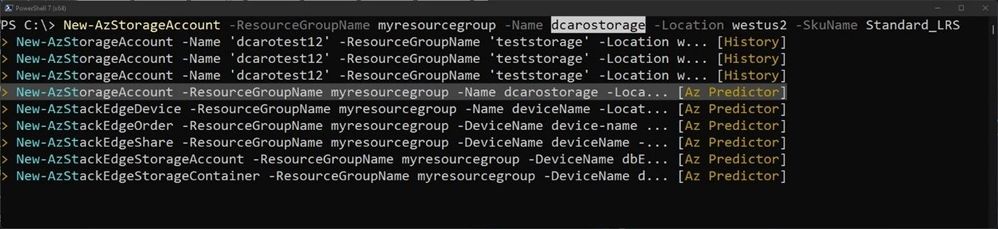
This mode shows from your current prompt a list of possible matches for the command that you are typing. It combines suggestions from your local history and from Az Predictor.
Select a suggestion and then navigate through the parameter values with “Alt + A” to quickly fill replace the proposed values with yours.
Next steps
This is just the beginning of our journey to improving the usability of Azure PowerShell!
We will be carefully listening to every feedback that you send us:
We will share soon more about how we plan to expand this experience to other environments.
Credits
“It takes a village to raise a child” Az.Tools.Predictor is the result of the close collaboration of several teams distributed across continents and time zones working hard during the pandemic.
This article is contributed. See the original author and article here.
We are excited to share two new investments in Microsoft Dynamics 365 supply chain portfolio that we are launching in preview. We had announced a partnership between FedEx and Microsoft, in January of 2022, to launch a cross-platform, logistics-as-a-service solution for brands. This partnership is now in preview. As e-commerce is exploding, businesses are challenged with growing their brand affinity while operating profitably to meet their consumer expectation like delivering orders in two days and offering a seamless returns experience. To achieve this, we are combining data insights from FedEx with order insights from Dynamics 365 Intelligent Order Management so that brands can optimize their transportation, and proactively overcome delays and disruptions enroute to deliver customer orders on time, in a cost-effective manner.
This embed requires accepting cookies from the embed’s site to view the embed. Activate the link to accept cookies and view the embedded content.
This partnership will also bring a powerful returns management experience to Dynamics 365, including hassle-free returns options at over 60,000 FedEx drop-off locations, convenient at-home pickups, printer-less QR return labels, and no-box returns. Ultimately, Microsoft and FedEx’s intelligence-driven logistics return services will empower brands with end-to-end visibility of customer returns while also allowing them to update consumers in real-time on the status of their return and refund generation.
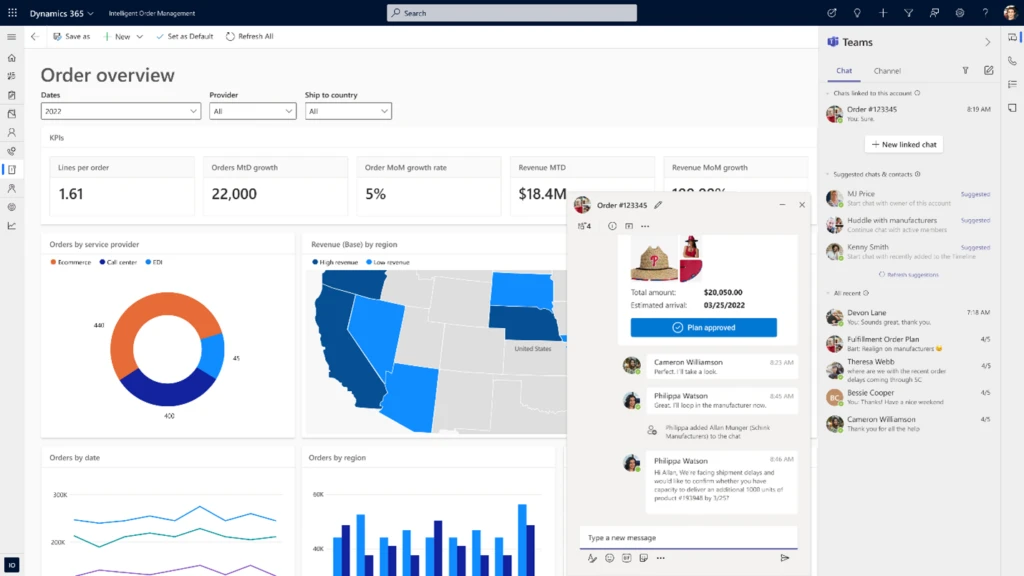
Next, we are also excited to announce that we will launch embedded Microsoft Teams collaboration within Dynamics 365 Intelligent Order Management in preview on May 15, 2022.
This enables hybrid supply chain teams to seamlessly connect over chat, share screens for discussion, post updates on issues in Teams. On top of improving communications, users will also be able to collaborate by sharing sales orders, return orders, and fulfillment order tracking data more effectively, all without exiting their flow of work within Dynamics 365 Intelligent Order Management. These capabilities help build a hyperconnected business that empowers people to collaborate as one business, everywhereso people can thrive wherever, and however, they work.
Digital transformation of supply chains
We recommend three initiatives to kick start the digital transformation of your supply chains for a resilient and sustainable futureenhancing supply chain visibility, improving collaborative capabilities for better decision making, and designing sustainable operations with a circular economy in mind. You can achieve this by surrounding your existing supply chain and ERP systems without replacing them. Let us dive deeper into these areas and get a sneak peek into how some of our customers are transforming their supply chains.
Enhancing supply chain visibility
It is easier said than done to get real-time supply chain data across the value chain. At Microsoft, we have been investing in bringing new capabilities within our Dynamics 365 Supply Chain portfolio to market over the last year to really help organizations enhance visibility into every aspect of their value chain.
With the latest enhancements to Inventory Visibility Add-in, a highly scalable microservice for Dynamics 365 Supply Chain Management, companies can pull inventory from multiple third-party systems, allowing them to create a single, global view of all inventories. By creating one pool of global inventory from which all orders can pull, companies can often increase inventory accuracy and thereby maximize sales opportunities. Plus, when coupled with the soft reservation capability, sales order fulfillment can avoid over-selling, effectively mitigating the risk of missed sales opportunities that may challenge some organizations.
Coca-Cola Beverages Africa (CCBA) is the number one Coca-Cola bottler in Africa and the eighth largest globally by revenue.
“CCBA is currently implementing a set of Dynamics products including Dynamics 365 Supply Chain Management with Inventory Visibility, Field Service, and Customer Engagement products. CCBA envisage using Inventory Visibility to provide critical parts availability to field service technicians and to validate in near real-time the sales demands generated from Dynamics Customer Engagement. It will also be a key component of CCBA’s integrated Advance Warehouse Management solution. Eventually, all the orders and inventory journals will be synced or directly created in Dynamics 365 Supply Chain Management for financial and logistics processing.”Elmar Els, Enterprise and Integration Architect, Coca-Cola Beverage Africa (CCBA).
Improve decision making with enhanced collaboration and a data-first approach
From a commissioned study conducted by Forrester Consulting on behalf of Microsoft in March 2022, we learned that over one-third of supply chain and operations leaders surveyed are taking steps to improve productivity through system and process improvements to mitigate future challenges.1 While it is imperative to generate insights from real-time supply chain data, the ability to act quickly on these insights is a whole different ball game. Organizations need to collaborate effectively across the different functions globally and with external suppliers and logistics partners to proactively overcome disruptions so that the orders can be delivered on time.
From the Forrester study, it’s clear that transformation is taking place across the entire customer journey, with nearly a third of businesses wanting to improve their operating model by making processes more streamlined across the board. To achieve their goals, companies require a tactical focus on being data-driven, improving the customer journey, and driving operational efficiency at scale.1
Peet’s Coffee is a California-based brand that delivers craft coffee and tea. They offer a variety of productsfrom a single cup to k-cups, capsules to whole beansfor sale in its stores, online, and in the supermarket.
Pre-2020, Peet’s Coffee ran the business on a dated and highly customized, on-premises system and Excel spreadsheets. The company had reached the point where the legacy system was near the end of its life and, after a rigorous software selection process, found Dynamics 365 to be the most comprehensive solution for a multi-channel organization with the best flexibility to adapt to the unique needs of coffee production.
“Dynamics 365 gives us the cloud-based architecture we require to support the growth requirements of the business. The combination of Dynamics 365, Power Platform, and Azure cloud services provides Peet’s with a scalable and supportable technology foundation for the future.”Allan Smith, Chief Information Officer, Peet’s Coffee.
By the early days of 2020, Peet’s Coffee had begun a digital transformation process by implementing Dynamics 365 Finance and Dynamics 365 Supply Chain Management. But what Peet’s Coffee couldn’t have planned for was the dramatic shift in demand that stay-at-home orders would create with the onset of the pandemic. Suddenly, Peet’s Coffee saw sales volume from its traditional channels, wholesale and coffee shops, plummet, while direct-to-consumer (DTC) and grocery channel sales surged 2x. Peet’s Coffee radically modified its implementation plan for Dynamics 365 to support immediate business needs. Ultimately, Peet’s Coffee adopted a new business model (DTC) and pivoted to supply grocery demand while successfully completing the implementation.
“with the pandemicit has been a heck of a year. I’m pleased with the investments we made. I’m pleased with the Blue Horseshoe relationship. I’m glad Dynamics 365 is live at Peet’s. But I wish we had done it earlier.”Eric Lauterbach, President, Peet’s Coffee.
Reverse supply chains and circular economies
One way that manufacturing organizations are improving sustainability is by standing up circular economies. Circular economy, or circularity, is rooted in reverse supply chain management, which deals with what happens after a product’s useful life.
Setting up these circular economy flows can be challenging without an agile and composable supply chain management application. The Microsoft Circular Center program uses Dynamics 365 Supply Chain Management and Microsoft Power Platform to facilitate the reuse and recycling of servers and hardware within our datacenters, which is part of our commitment to achieving zero-waste and carbon-negative operations by 2030. To date, the Circular Centers model has achieved 83 percent reuse and 17 percent recycling of critical parts while contributing to the reduction of carbon emissions by 145,000 metric tons CO2 equivalent.
“We were looking for a warehouse management system that would allow us to model all the product flows that we needed while also connecting to datacenters and other systems used to manage our cloud assets. Dynamics 365 had all these functionalities to build exactly what we needed.”Anand Narasimhan, General Manager of Cloud Supply Chain Sustainability, Microsoft.
Microsoft Dynamics 365 Supply Chain solutions enable organizations to create a digital supply chain that connects global teams, suppliers, and logistic partners for end-to-end visibility and frictionless collaboration. Our agile and composable Supply Chain solutions unify siloed data sources in real-time to detect opportunities, predict and overcome disruptions, and deliver sustainable competitive advantage. Reach out to learn more or get started with a free trial of Dynamics 365 Intelligent Order Management.
This embed requires accepting cookies from the embed’s site to view the embed. Activate the link to accept cookies and view the embedded content.
1- A commissioned study conducted by Forrester Consulting on behalf of Microsoft. March 2022.
Gartner does not endorse any vendor, product or service depicted in its research publications and does not advise technology users to select only those vendors with the highest ratings or other designation. Gartner research publications consist of the opinions of Gartner’s Research & Advisory organization and should not be construed as statements of fact. Gartner disclaims all warranties, expressed or implied, with respect to this research, including any warranties of merchantability or fitness for a particular purpose.
GARTNER and MAGIC QUADRANT are trademarks and service marks of Gartner, Inc. and/or its affiliates and are used herein with permission. All rights reserved.
This article is contributed. See the original author and article here.
Notification
This report is provided “as is” for informational purposes only. The Department of Homeland Security (DHS) does not provide any warranties of any kind regarding any information contained herein. The DHS does not endorse any commercial product or service referenced in this bulletin or otherwise.
This document is marked TLP:WHITE–Disclosure is not limited. Sources may use TLP:WHITE when information carries minimal or no foreseeable risk of misuse, in accordance with applicable rules and procedures for public release. Subject to standard copyright rules, TLP:WHITE information may be distributed without restriction. For more information on the Traffic Light Protocol (TLP), see http://www.cisa.gov/tlp.
Summary
Description
CISA received six files for analysis: five 32-bit Dynamic-link Library (DLL) files and one 32-bit executable file. These files have been identified as IsaacWiper and HermeticWizard. During analysis of HermeticWizard, another file was dropped and identified as HermeticWiper. The submitted files are designed to spread laterally through a network via Server Message Block (SMB) and Windows Management Instrumentation (WMI). These files attempt to overwrite the first 65536 bytes of data contained on the C: drive as well as any attached storage disks in order to render them useless to the victim user. The malware also creates a file and continuously writes to it until the disk runs out of free space and crashes. Upon reboot, the machine is no longer operable.
This application is a 32-bit DLL and has been identified as HermeticWizard. A filename is generated for the malware using the string ‘c%02X%02X%02X%02X%02X%02X’, which will create a random set of 12 characters, 6 hex bytes beginning with ‘c’. The purpose of the DLL is to spread to other machines over the SMB protocol to the Admin Share (IPC$). The malware attempts to authenticate through SMB using a set of hard-coded usernames and passwords.
–Begin Usernames– guest test admin user root administrator manager operator –End Usernames–
This is a 32-bit DLL file. This DLL spreads laterally through the network via the WMI protocol. The malware copies a file over to the target machine for execution. This copied filename is generated using the string ‘c%02X%02X%02X%02X%02X%02X’ which will create a random set of 12 characters, 6 hex bytes beginning with ‘c’. The copied file has been identified as HermeticWizard. The malware identifies a running process with a desired authority and uses the token for impersonation to create a new process and service to launch the copied file.
This is a 32-bit DLL and has been identified as HermeticWizard. The original filename for the DLL is Wizard.dll. It is designed to use the command-line parameters below for execution:
At runtime, it attempts to detect all active hosts on the victim’s network. It is capable of moving laterally across the network by actively scanning ranges of reachable IP version 4 addresses and ports. It is designed to create and connect to multiple name pipes.
Displayed below are the list of port numbers it attempts to connect to.
–Begin port numbers– 20 21 22 80 135 137 139 443 445 –End port numbers–
Once an active host (system) is found, it attempts to execute the command-line below to move to the reachable machine:
–Begin command– “C:WindowsSystem32rundll32.exe %current directory%<6 randomly generated alphanumerical characters>.ocx #1 -s <path to Wizard.dll> – i <reachable system IP address>” –End command–
It executes the file <6 randomly generated alphanumerical characters>.ocx binary to wipe the drive. This OLE Control Extension (OCX) file has been identified as HermeticWiper. The SHA256 of the OCX file is 0385eeab00e946a302b24a91dea4187c1210597b8e17cd9e2230450f5ece21da. Note: Analysis of this file is included in MAR-10375867.r1.v1.WHITE.
Screenshots
Figure 4 – This screenshot shows the functionalities used to perform local network enumeration.
Cleaner.dll is a 32-bit DLL which has been identified as a variant of the IsaacWiper. It attempts to overwrite the first 65536 bytes of data on the C: drive and on attached storage disks in order to render them useless to the victim user. The malware also overwrites the victim user’s files so they cannot be recovered. The data used to overwrite the disk drives and user files is random data that is generated via the Mersenne Twister algorithm.
Cleaner.dll also attempts to create a directory in the root directory of attached storage disks. The malware will then create a file within this newly created directory and attempt to fill it with random data, generated via the Mersenne Twister algorithm, in an effort to fill the drive up as another destructive method of rendering the storage device unusable to the victim user. The name of the folder created will begin with the letters “Tmd” and the remaining part of the folder name will be randomly generated alphanumerical characters. The filename created will begin with the letters “Tmf” and the remaining part of the filename will be randomly generated alphanumerical characters. Displayed below is the format of the file installed:
Analysis indicates that the application fails to execute if the above tmp file already exists on the victim’s machine.
Screenshots
Figure 5 – This screenshot illustrates the malware overwriting the first 65536 bytes of the C: drive, or attached storage disk, using random encrypted data generated via the Mersenne Twister algorithm.
Figure 6 – This screenshot illustrates a sample file created by the malware. This malware will write random encrypted data to this file until the C: drive and attached storage devices runs out of space. This is just one method the malware utilizes in an attempt to corrupt the victim user’s machine.
Cleaner.exe is a 32-bit executable file (EXE) which has been identified as another variant of the IsaacWiper. It can be executed immediately or has a sleep function for 15 minutes. When executed, it attempts to overwrite the first 65536 bytes of data contained on the C: drive and on attached storage disks in order to render them useless to the victim user. The malware also overwrites the victim user’s files so they cannot be recovered. The data used to overwrite the disk drives and user files is random data that is generated via the Mersenne Twister algorithm.
Cleaner.exe also attempts to create a directory in the root directory of attached storage disks. The malware will then create a file within this newly created directory and attempt to fill it with random data, generated via the Mersenne Twister algorithm, in an effort to fill the drive up as another destructive method of rendering the storage device unusable to the victim user. The name of the folder created will begin with the letters “Tmd” and the remaining part of the folder name will be randomly generated alphanumerical characters. The filename created will begin with the letters “Tmf” and the remaining part of the filename will be randomly generated alphanumerical characters. Displayed below is the format of the file installed:
Analysis indicates that the application fails to execute if the above tmp file already exists on the victim’s machine.
Screenshots
Figure 7 – This screenshot illustrates the malware overwriting the first 65536 bytes of the C: drive, or attached storage disk, using random encrypted data generated via the Mersenne Twister algorithm.
Figure 8 – This screenshot illustrates a sample file created by the malware. This malware will write random encrypted data to this file until the C: drive and attached storage devices runs out of space. This is just one method the malware utilizes in an attempt to corrupt the victim user’s machine.
Figure 9 – This screenshot show the executable’s sleep function.
This application is a 32-bit DLL which has been identified as another variant of the IsaacWiper. It attempts to overwrite the first 65536 bytes of data on the C: drive and on attached storage disks in order to render them useless to the victim user. The malware also overwrites the victim user’s files so they cannot be recovered. The data used to overwrite the disk drives and user files is random encrypted data that is generated via the Mersenne Twister algorithm.
The malware also attempts to create a directory in the root directory of attached storage disks. The malware will then create a file within this newly created directory and attempt to fill it with random encrypted data, generated via the Mersenne Twister algorithm, in an effort to fill the drive up as another destructive method of rendering the storage device unusable to the victim user. The name of the folder created will begin with the letters “Tmd” and the remaining part of the folder name will be random. The filename created will begin with the letters “Tmf” and the remaining part of the folder name will be random.
This malware creates a log file in the location C:ProgramDatalog.txt. This file logs the malware’s process of systematically corrupting the victim user storage disks. Illustrated below is sample data the malware recorded to its log file during runtime:
–Begin log.txt Data–
getting drives…
physical drives: — system physical drive 0: PhysicalDrive0
system physical drive — FAILED start erasing system logical drive C:
–End log.txt Data–
Screenshots
Figure 10 – This screenshot illustrates the malware logging the beginning of its attempt to corrupt the victim user’s storage device. This log data will be recorded within the log file named log.txt.
Figure 11 – This screenshot illustrates the malware overwriting the first 65536 bytes of an attached storage disk using random encrypted data generated via the Mersenne Twister algorithm.
Figure 12 – This screenshot illustrates a sample file created by the malware. This malware will write random encrypted data to this file until the C: drive and attached storage devices runs out of space. This is just one method the malware utilizes in an attempt to corrupt the victim user’s machine.
CISA recommends that users and administrators consider using the following best practices to strengthen the security posture of their organization’s systems. Any configuration changes should be reviewed by system owners and administrators prior to implementation to avoid unwanted impacts.
Maintain up-to-date antivirus signatures and engines.
Keep operating system patches up-to-date.
Disable File and Printer sharing services. If these services are required, use strong passwords or Active Directory authentication.
Restrict users’ ability (permissions) to install and run unwanted software applications. Do not add users to the local administrators group unless required.
Enforce a strong password policy and implement regular password changes.
Exercise caution when opening e-mail attachments even if the attachment is expected and the sender appears to be known.
Enable a personal firewall on agency workstations, configured to deny unsolicited connection requests.
Disable unnecessary services on agency workstations and servers.
Scan for and remove suspicious e-mail attachments; ensure the scanned attachment is its “true file type” (i.e., the extension matches the file header).
Monitor users’ web browsing habits; restrict access to sites with unfavorable content.
Exercise caution when using removable media (e.g., USB thumb drives, external drives, CDs, etc.).
Scan all software downloaded from the Internet prior to executing.
Maintain situational awareness of the latest threats and implement appropriate Access Control Lists (ACLs).
Additional information on malware incident prevention and handling can be found in National Institute of Standards and Technology (NIST) Special Publication 800-83, “Guide to Malware Incident Prevention & Handling for Desktops and Laptops”.
Contact Information
CISA continuously strives to improve its products and services. You can help by answering a very short series of questions about this product at the following URL: https://us-cert.cisa.gov/forms/feedback/
Document FAQ
What is a MIFR? A Malware Initial Findings Report (MIFR) is intended to provide organizations with malware analysis in a timely manner. In most instances this report will provide initial indicators for computer and network defense. To request additional analysis, please contact CISA and provide information regarding the level of desired analysis.
What is a MAR? A Malware Analysis Report (MAR) is intended to provide organizations with more detailed malware analysis acquired via manual reverse engineering. To request additional analysis, please contact CISA and provide information regarding the level of desired analysis.
Can I edit this document? This document is not to be edited in any way by recipients. All comments or questions related to this document should be directed to the CISA at 1-888-282-0870 or CISA Service Desk.
Can I submit malware to CISA? Malware samples can be submitted via three methods:
CISA encourages you to report any suspicious activity, including cybersecurity incidents, possible malicious code, software vulnerabilities, and phishing-related scams. Reporting forms can be found on CISA’s homepage at www.cisa.gov.
This article is contributed. See the original author and article here.
This month, we’re adding new capabilities to make everyone more comfortable in meetings, feel empowered in the diverse hybrid workplace, and be able to switch devices more easily.
This article is contributed. See the original author and article here.
Cisco has released security updates to address vulnerabilities in multiple Cisco products. An attacker could exploit some of these vulnerabilities to take control of an affected system.
This article is contributed. See the original author and article here.
Google has released Chrome version 101.0.4951.41 for Windows, Mac, and Linux. This version addresses vulnerabilities that an attacker could exploit to take control of an affected system.
CISA encourages users and administrators to review the Chrome Release Note and apply the necessary updates.







Recent Comments