Dependabot é um recurso que além de identificar vulnerabilidades nas dependências do seu código, ele pode te ajudar criando Pull Requests com a atualização da dependência com a versão já corrigida. Ele está disponível para todos os repositórios e recentemente foi liberada uma atualização que permite a atualização das dependências privadas do seu repositório.
Para isso ele conta com o GitHub Advisory Database uma lista de vulnerabilidades de segurança conhecidas, agrupadas em duas categorias:
GitHub-reviewed advisories – As vulnerabilidades que já foram identificadas e analisadas pelo GitHub, para essas são geradas notificações sempre que uma vulnerabilidade for identificada nas dependências do seu repositório, para isso, o alerta do Dependabot deve ser ativado.
Unreviewed advisories – As vulnerabilidades que estão listadas no feed do National Vulnerability Database, o Dependabot não gera alertas para essas vulnerabilidades, pois não houve verificação sobre a validade ou integridade por parte do GitHub.
O GitHub adiciona vulnerabilidades na lista do GitHub Advisory Database a partir das seguintes fontes:
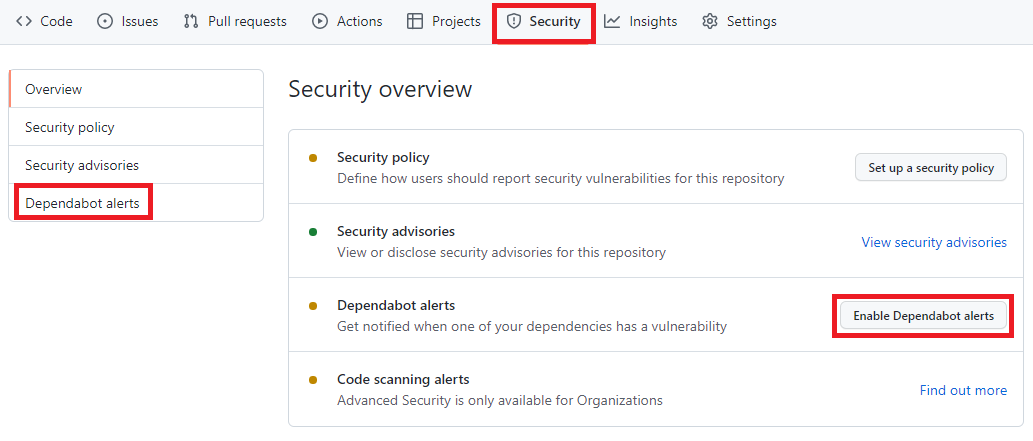
Para habilitar, você precisa acessar o menu Security -> Dependabot alerts e habilitar a opção Enable Dependabot alerts
Painel de Segurança do portal do GitHub, nela está destacado os seguintes termos: Security, Dependabot alerts, Enable Dependabot alerts
Com isso o Dependabot já passa a monitorar seu repositório em busca de vulnerabilidades nas dependências do seu repositório.
A partir de agora o Dependabot passará a gerar aletas sempre que:
Uma nova vulnerabilidade for adicionada no GitHub Advisory Database
O Gráfico dependência for atualizado. Exemplo um desenvolvedor faz um push de um commit que atualiza alguma dependência que esteja na lista do GitHub Advisory Database .
O que acontece depois de habilitar o Dependabot
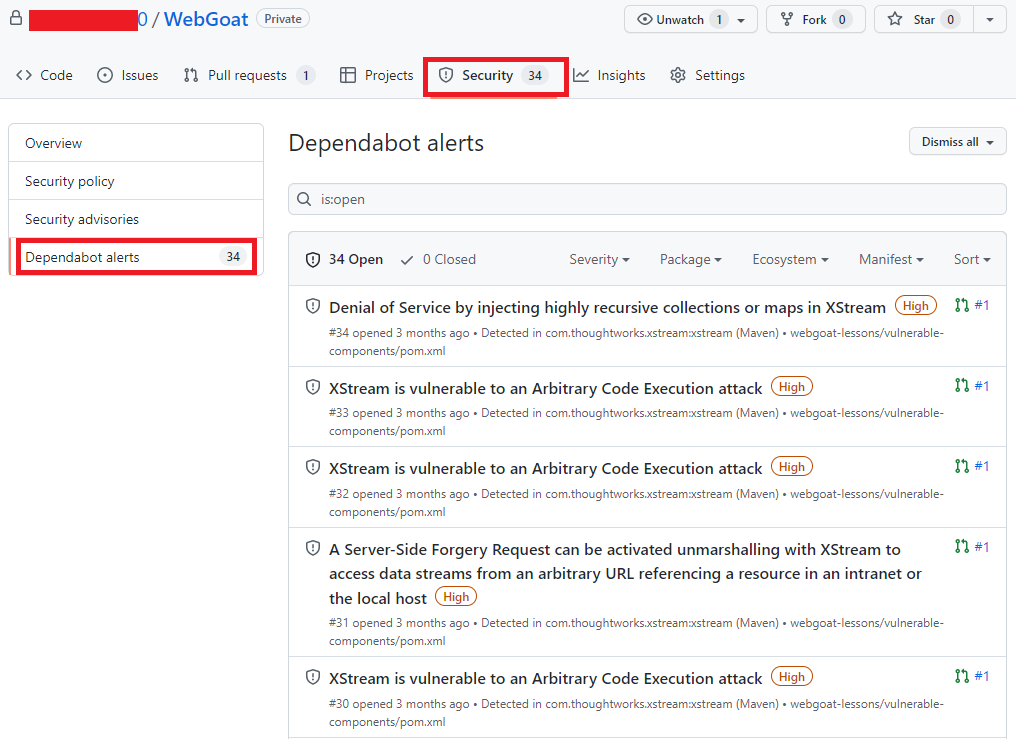
Acessando novamente o menu Security -> Dependabot alerts é possível visualizar se há algum alerta de vulnerabilidade. Você terá acesso a uma lista completa de todas as vulnerabilidades encontradas em seu repositório, podendo filtrar por Pacote, ecossistema ou manifesto, há a opção de ordenar por mais novo, mais antigo, gravidade, localidade do manifesto ou nome do pacote.
Alertas do portal do GitHub, agora com uma lista de vulnerabilidades e com os seguintes termos destacados: Security e Dependabot alerts
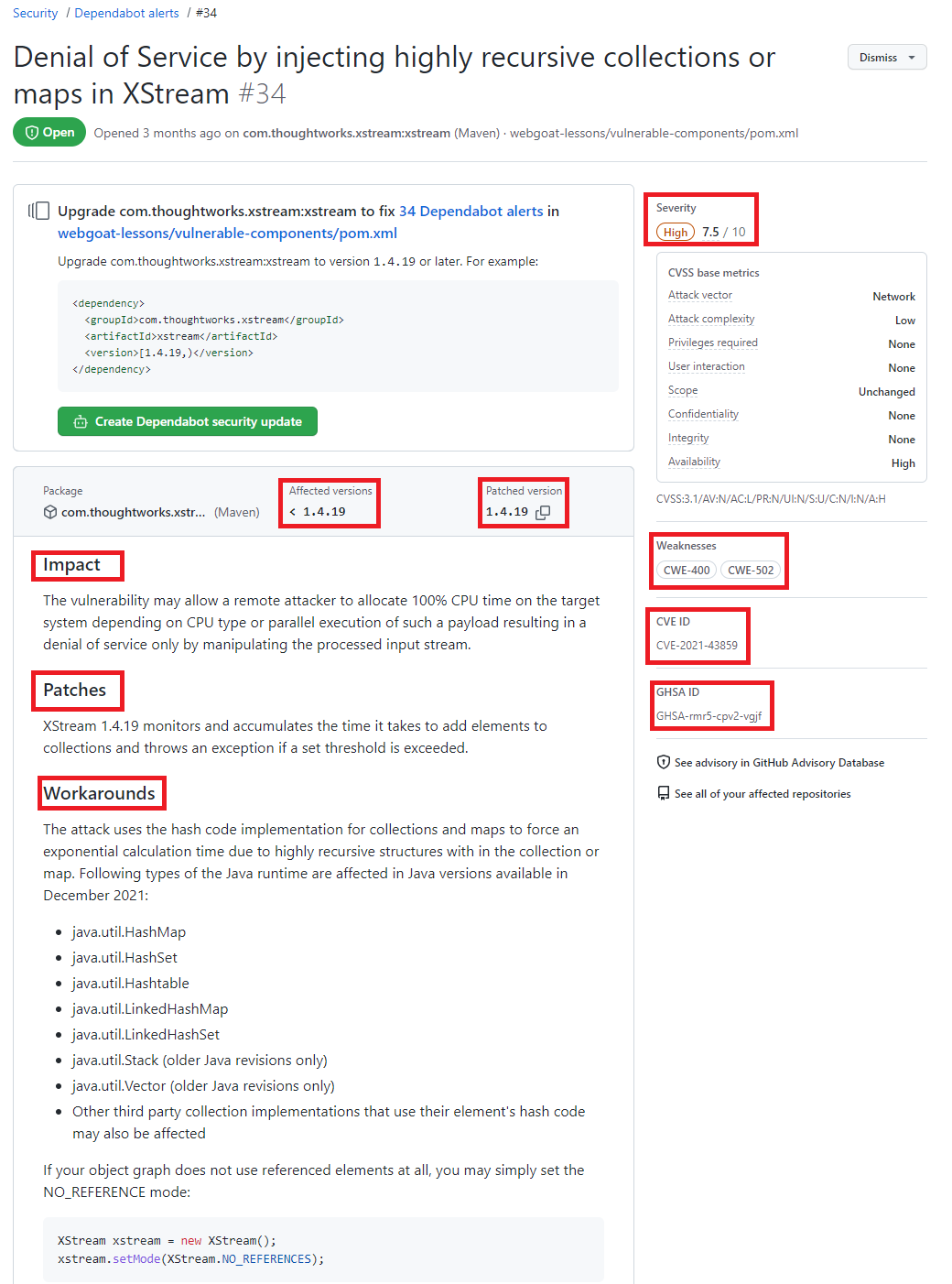
Clicando no alerta é possível obter mais informações sobre a vulnerabilidade, que pode incluir a descrição, nível de gravidade, nome do pacote afetado, ecossistema do pacote, as versões afetadas e as versões de patch, impacto e algumas informações opcionais como, por exemplo, referências, soluções alternativas e créditos. Além disso, um link para o registro CVE, onde você pode ler mais detalhes sobre a vulnerabilidade, suas pontuações CVSS e seu nível de gravidade qualitativa.
Detalhes de uma vulnerabilidade destacando as seguintes informações Severity, Affected versions, Patched version, impact, Patches, workarounds, weaknesses CVE ID e GHSA ID
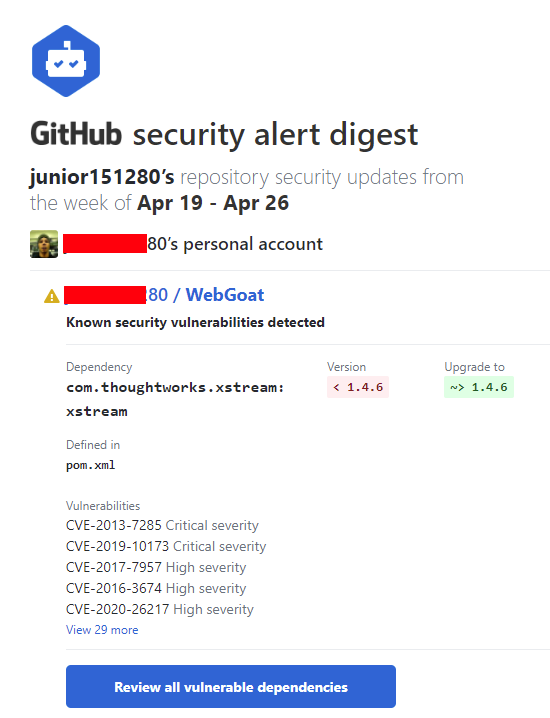
O dependabot também envia notificações para os mantenedores do repositório onde a vulnerabilidade foi encontrada. Por padrão o mantenedor receberá um e-mail com um breve relato sobre a descoberta.
E-mail enviado pelo Dependabot
Localize repositórios com vulnerabilidades
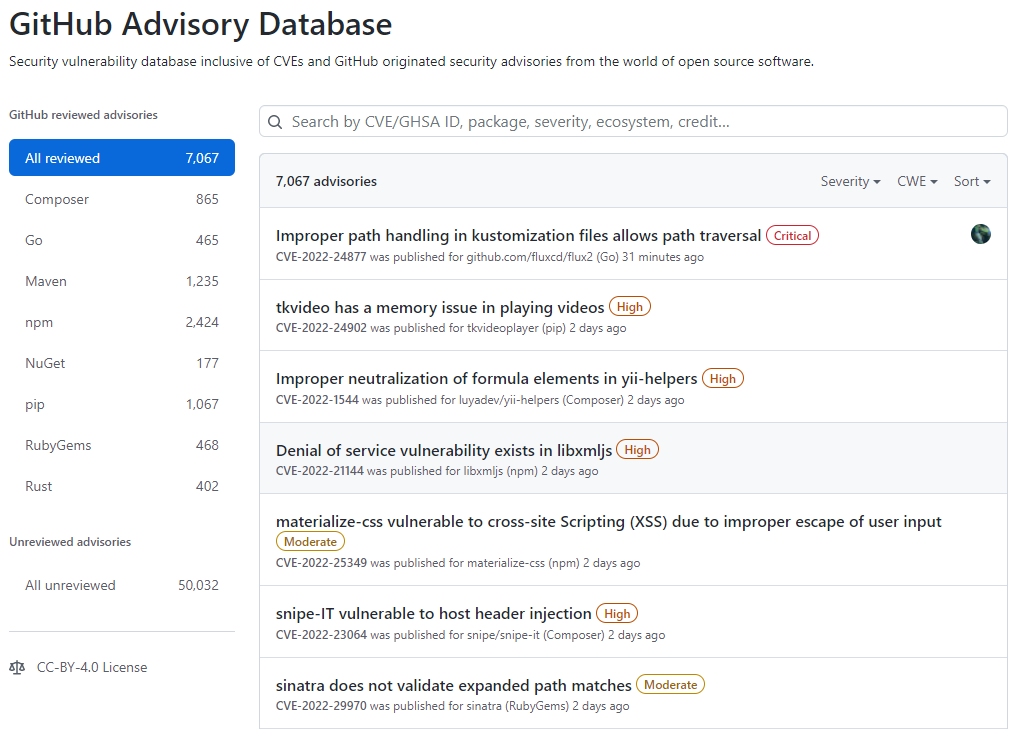
Acessando o GitHub Advisory Database é possível identificar quais repositórios possui dependências com vulnerabilidade, para isso acesse o GitHub Advisory Database clicando nesse link.
Tela inicial do GitHub Advisory Database
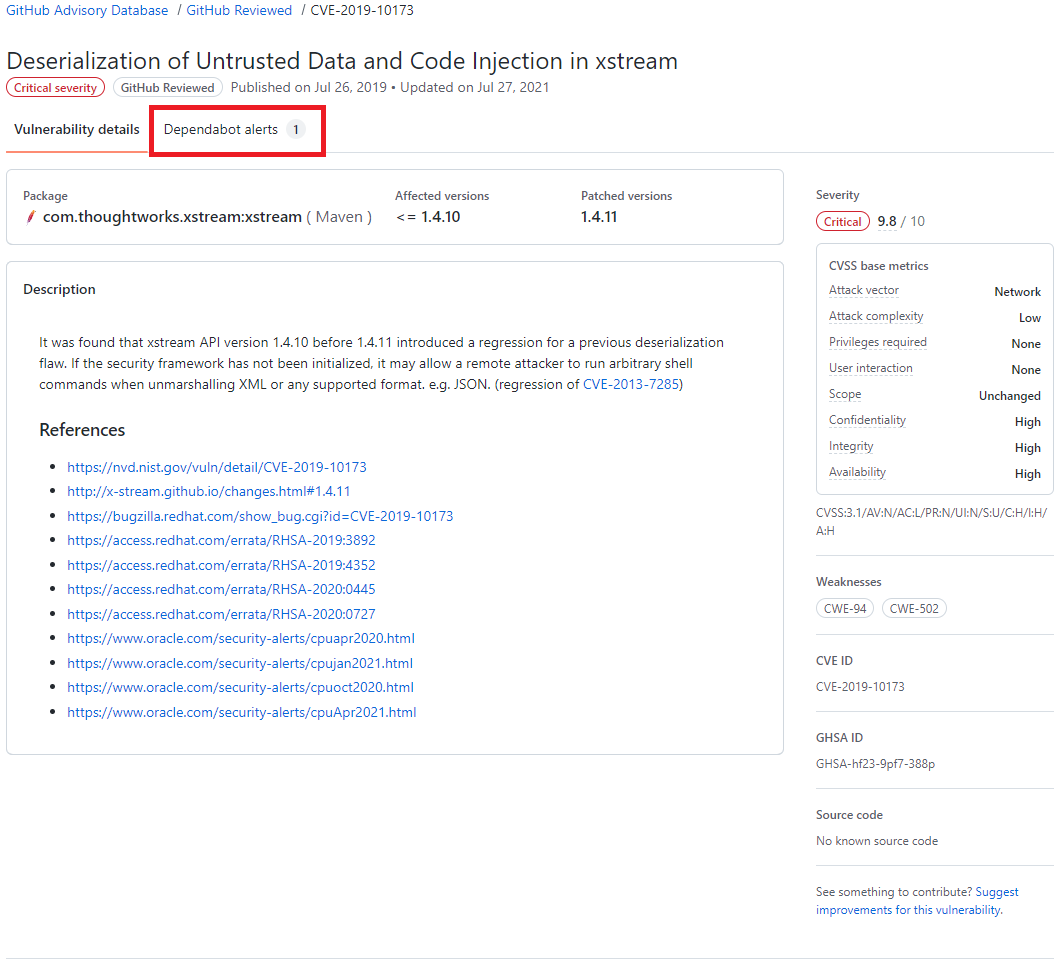
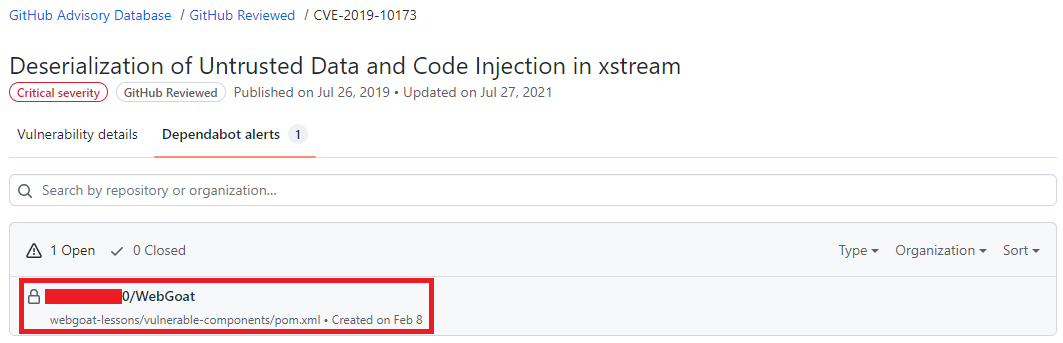
No GitHub Advisory Database é possível filtrar as vulnerabilidades por ecossistema, CVE/GHSA ID, nome do pacote, gravidade ou ordenar por mais novo, mais antigo, atualizado recentemente ou menos atualizado recentemente. Ao localizar a vulnerabilidade desejada é possível ver quais repositórios utiliza a dependência.
Resultado de pesquisa do GitHub Advisory Database, destacando o termo Dependabot alert
Resultado de pesquisa do GitHub Advisory Database mostrando quais repositórios há a dependência selecionada, o nome do repositório está destacado.
Atualize as dependências com ajuda do Dependabot
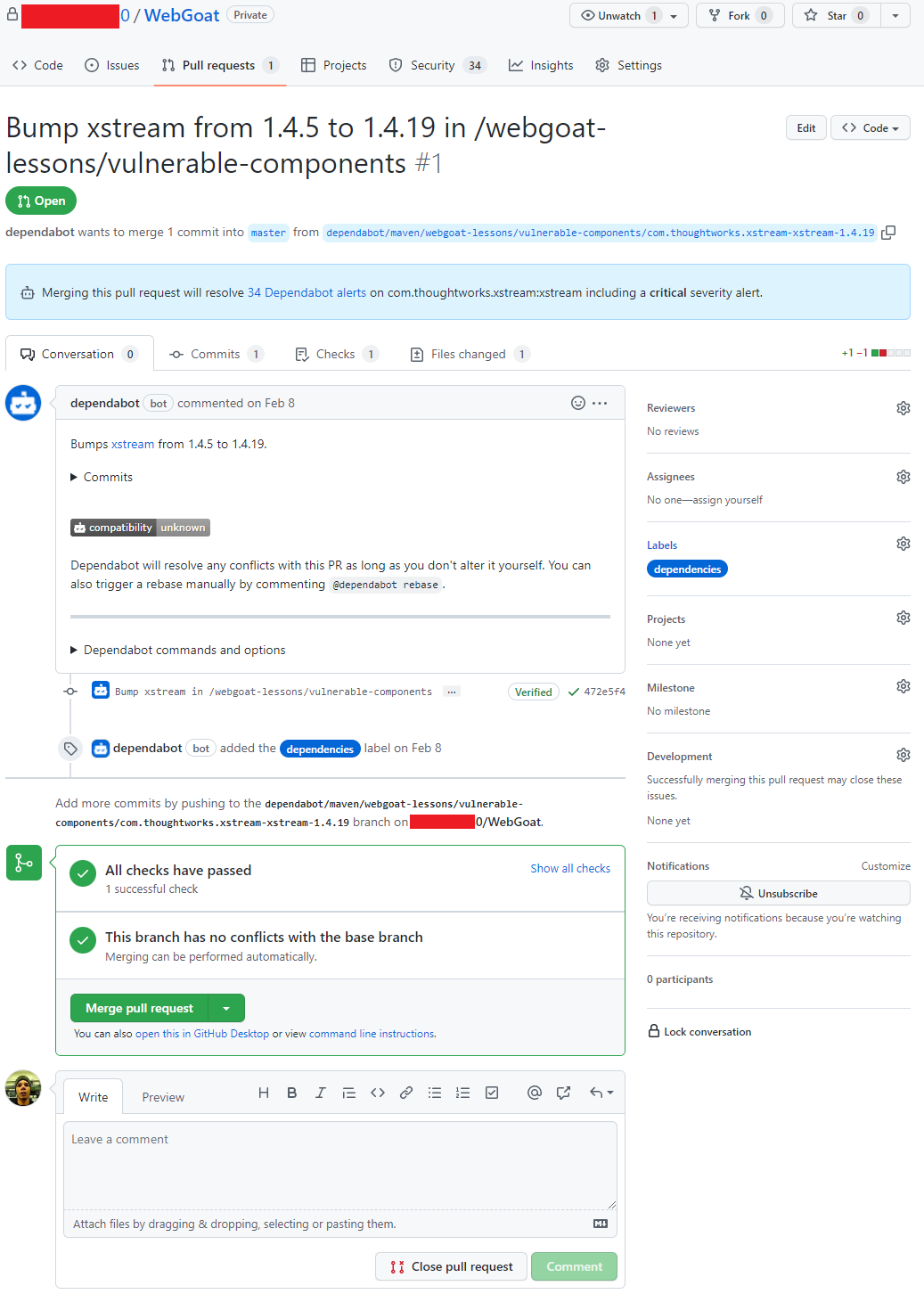
Após um alerta ser gerado, se já existir uma versão com a correção da vulnerabilidade o Dependabot abre um Pull Request com a ação corretiva, em alguns casos quando o as informações são suficientes uma pontuação de confiabilidade é gerada.
O Pull Request passa pelos mesmos testes que os demais Pull Requests gerados pelo time responsável pelo repositório, portanto fica na responsabilidade do mantenedor do repositório avaliar e se estiver tudo correto aprovar o Pull Request. A aprovação dos Pull Requests podem ser automatizada utilizando as Actions para saber mais sobre como automatizar o Dependabot com o GitHub Actions acesse esse link
Pull request aberto pelo Dependabot
Conclusão
O Dependabot é um recurso que não podemos deixar de habilitar em nossos repositórios, é grátis, faz boa parte do trabalho sozinho e nos ajuda a manter nosso código muito mais seguro.
This article is contributed. See the original author and article here.
This 7th of May, my colleague Paloma Garcia and I, delivered a session in Spanish “No encuentro donde esté el problema de la query” where we compare the performance in two different environments (production and staging) where our customer reported differences in execution time. In this article you could find out the link about the session recorded in Global Azure event
Abstract Spanish version
=======================
Muchas veces recibimos casos en soporte de Azure SQL Database donde nos indican que al ejecutar la query en la base de datos de producción tarda más que en la base de datos de preproducción con las mismas características de base de datos. En esta charla explicaremos una serie de pasos que seguimos para encontrar cuál es la razón de esta diferencia e intentaremos arreglar el entuerto.
Abstract English version
=======================
Many times, we received cases in Azure SQL Database support where customer noticed us that running a query on the production database takes longer than on the staging database with the same database characteristics.In this session we will explain a series of steps that we follow to find what is the reason for this difference and we will try to fix the mess.
This article is contributed. See the original author and article here.
Final Update: Saturday, 07 May 2022 06:09 UTC Customers with Application Insights components in Korea South during 05/07, 03:45 UTC through 05/07, 04:30 UTC may have experienced intermittent data gaps and incorrect alert activation.
Root Cause: We determined that one of our downstream services became unhealthy.
Incident Timeline: 45 minutes – 05/07, 03:45 UTC through 05/07, 04:30 UTC
We understand that customers rely on Application Insights as a critical service and apologize for any impact this incident caused.
-Deepika
Initial Update: Saturday, 07 May 2022 04:58 UTC Customers with Application Insights components in Korea South may experience intermittent data gaps and incorrect alert activation starting from 03:45 UTC.
Work Around: None
Next Update: Before 05/07 10:00 UTC
We are working hard to resolve this issue and apologize for any inconvenience. -Deepika
This article is contributed. See the original author and article here.
A comprehensive knowledge base that helps customer service reps and customers find answers to the most common issues quickly is key to improving agent productivity and increasing customer satisfaction. Dynamics 365 Customer Service 2022 release wave 1 introduces Dataverse search for Power Apps portals, an improved knowledge search experience in Customer Service workspace with admin configuration, and richer analytics for managers.
These improvements and new features help you make sure your agents are productive, customers are happy, and brand loyalty is improved.
Use Dataverse search for knowledge base searches in Power Pages
With Dataverse search, knowledge bases in portals can take advantage of the same search service that model-driven apps use. Deliver fast and comprehensive search results, sorted by relevance, with filters such as modified date, rating, and products, and the ability to enforce content access levels.
Improved knowledge search experience in Customer Service workspace with admin configuration
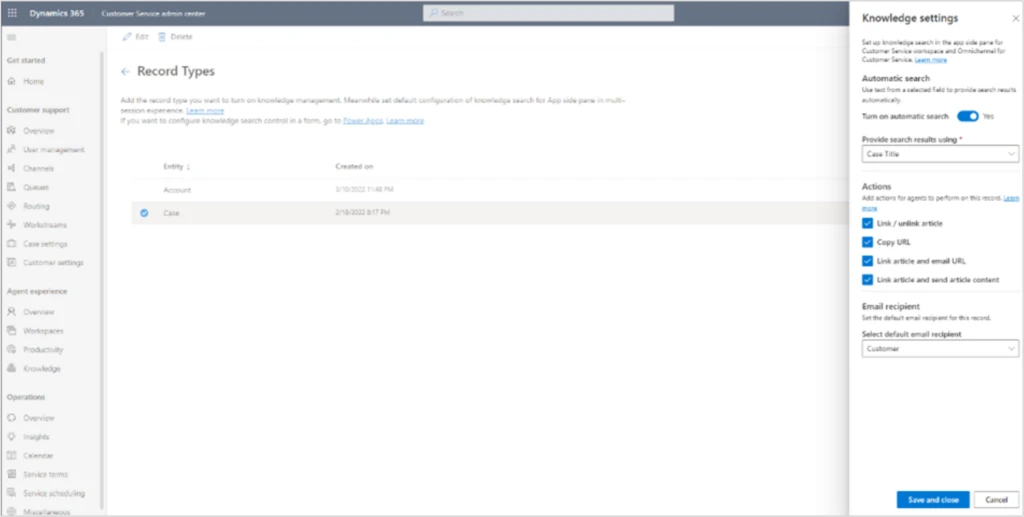
With this release, knowledge administrators have more power to configure the knowledge search control in the app side pane (formerly known as the productivity pane) in the Customer Service workspace.
Administrators can configure automatic search (using text from a selected field to provide search results automatically) and actions that agents can perform on a record:
Link and unlink the article and the record
Copy the article URL
Link the article to the record and then send the article URL in an email
Link the article to the record and then send the article content in an email
Set the default email recipient for the record when sending the article URL or content in an email
Get insights with rich article analytics
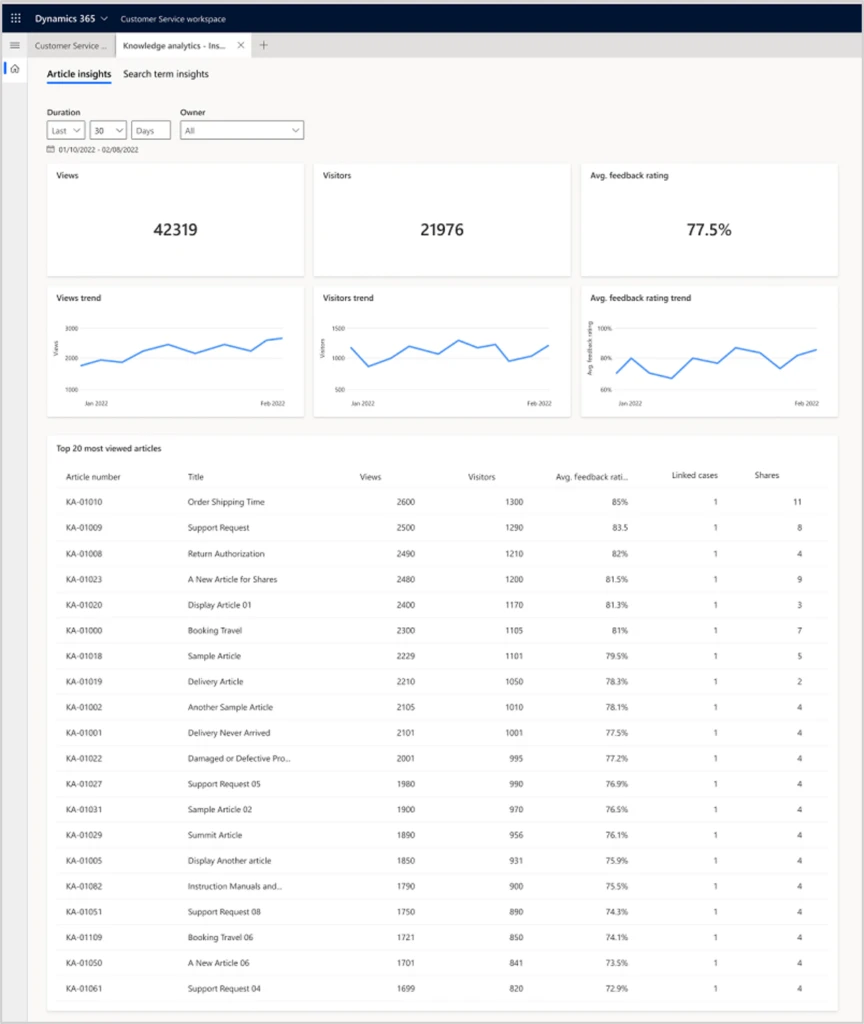
Knowledge managers and authors can get greater insights on the knowledge articles they create. Knowledge authors must keep their knowledge bases relevant, accurate, and easy to access from different channels. The built-in historical view of knowledge article usage and related metrics helps knowledge authors and managers understand the effectiveness of knowledge content and identify opportunities for improvement.
Analytics include detailed reports that provide historical trends for key metrics, such as:
Number of views
Number of visitors
Average feedback rating
Number of links to cases
Number of shares
Next steps
To learn more about knowledge management in Dynamics 365 Customer Service, read the documentation:
This article is contributed. See the original author and article here.
Last November, we announced the availability of a new JavaScript API in Excel. This new API allows developers to create their own custom data types containing images, entities, arrays, and formatted number values – backed by their own custom data sources, in addition to allowing for the creation of custom functions which can make use of these new Excel Data Types, both as inputs and outputs.
We were excited for the possibilities and the unique solutions that would be created using this new API.
Today, we’re even more excited to share with you some of the work CCP Games has been doing using the API, to bring their data right to your fingertips as Excel data types.
CCP Games, a Pearl Abyss company since 2019, was founded in 1997 in Reykjavik, Iceland. With the launch of EVE Online in May 2003, CCP Games established itself as one of the most innovative companies in interactive entertainment, winning numerous awards and receiving critical acclaim worldwide.
Eve Online is a space-based, persistent world massively multiplayer online role-playing game (MMORPG), wherein players can participate in a number of in-game professions and activities, including mining, piracy, manufacturing, trading, exploration, and combat. The game is renowned for its scale and complexity with regards to player interactions – in its single, shared game world, players engage in unscripted economic competition, warfare, and political schemes with other players.
EVE Online players frequently use Excel to work with in-game data to model and calculate everything from trading profit margins to battle strategy. It has even been fondly nicknamed “Spreadsheets in Space.” Now, by utilizing the new JavaScript API in Excel, CCP Games hopes to make this in-game data even easier for players to access, work with, and quickly refresh.
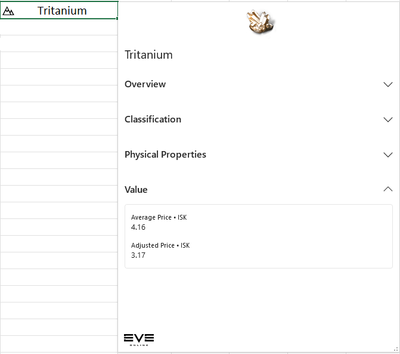
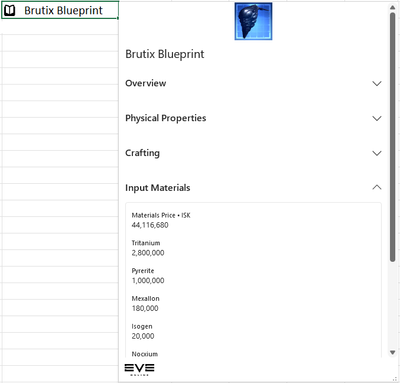
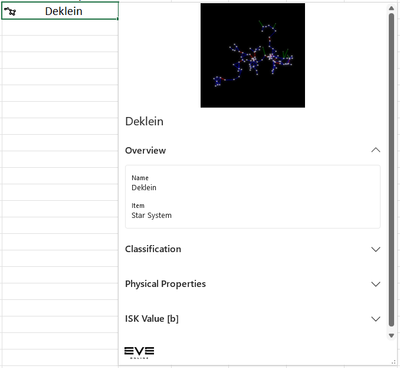
Here are some examples of the kinds of new Data Types we have been thinking about making available within the Eve Online add-in:
Data Type
Example
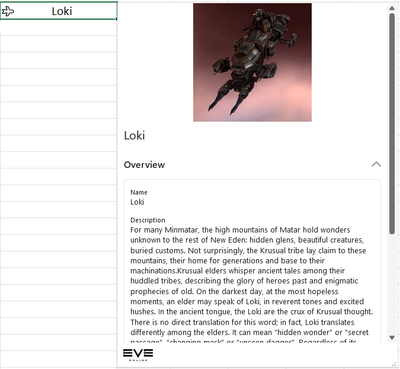
Ships – Ships are instrumental in the Eve Online universe. They can be used to travel, ferry materials and of course battle your opponents.
Materials – Materials are the backbone of any universe and Eve Online is no different. These data types contain pricing and other information to aid in market and building decision making.
Blueprints – Blueprints and materials are like bread and butter. These two things in concert allow players to create items in the universe. Plan out your resource gathering requirements for your next move
Star Systems – Eve Online has a vast array of Star Systems to explore in the universe. These data types aid in decision making on how to manipulate these systems best to the players advantage.
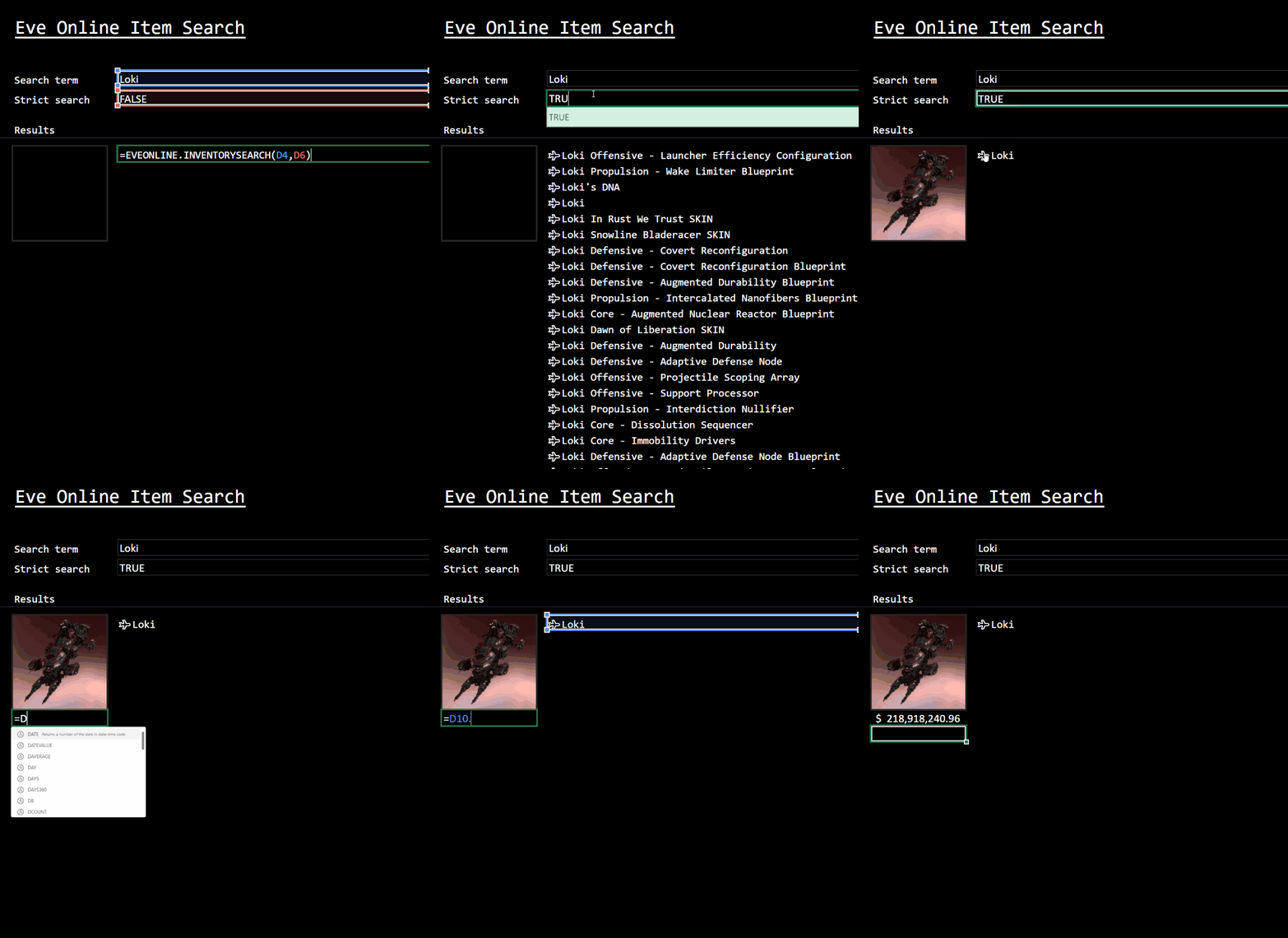
Eve Online Item Search
Custom Functions are also being thought about. In this example, it’s possible to easily get at the data players are looking for. This function searches the vast array of in-game items to return results quickly and efficiently.
This is just a glimpse of the vast set of data that makes up the Eve Online universe.
The hope is that with this add-in CCP Games can
Allow open and easy access for curious minds
Support small and mid-size player corporations with organizing activities that don’t have access to infrastructure
Facilitate advanced and hardcore gameplay and optimization strategies
We look forward to seeing this work evolve over the course of the project!
Learn More
You can learn more about CCP Games’ partnership with the Excel team at link coming soon, and we’re thrilled to be featured at EVE Fanfest 2022, May 6-7 in Reykjavik, Iceland.
To learn more about the data types JavaScript API in Excel, you can check out these resources:
This article is contributed. See the original author and article here.
With Azure, it is easy to scale-out applications. Just add more instances and you can handle even the most demanding workload. Scaling out databases has been historically more complex and challenging. Not anymore. With some “lateral thinking,” Azure SQL Database it is very easy to build an architecture that can scale out as much as needed, both from the application and the database perspective. In this episode of Data Exposed with Davide Mauri and Anna Hoffman let’s see how by using a tag-based routing technique and Azure SQL Database.

 Alertas do portal do GitHub, agora com uma lista de vulnerabilidades e com os seguintes termos destacados: Security e Dependabot alerts
 Detalhes de uma vulnerabilidade destacando as seguintes informações Severity, Affected versions, Patched version, impact, Patches, workarounds, weaknesses CVE ID e GHSA ID
 E-mail enviado pelo Dependabot
 Tela inicial do GitHub Advisory Database
 Resultado de pesquisa do GitHub Advisory Database, destacando o termo Dependabot alert
 Resultado de pesquisa do GitHub Advisory Database mostrando quais repositórios há a dependência selecionada, o nome do repositório está destacado.
 Pull request aberto pelo Dependabot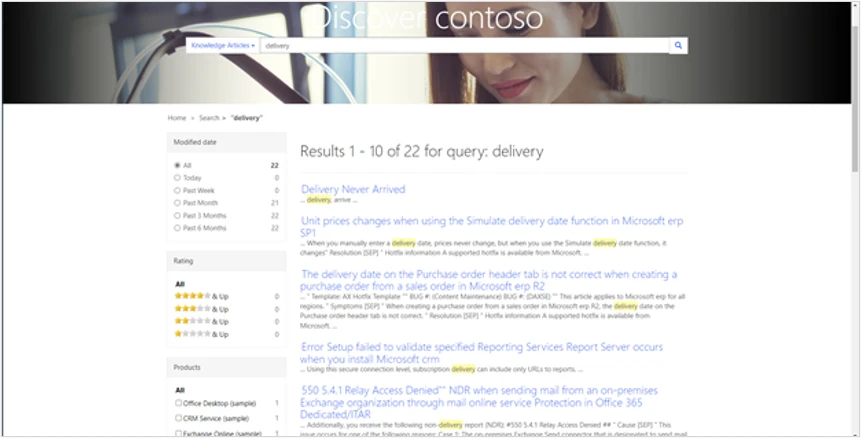

Recent Comments