This article is contributed. See the original author and article here.
According to Forrester Consulting, today’s enterprise resource planning systems (ERP) have entered a new era. In this view, ERPs have become increasingly experience-driven to reflect their critical role in digital business and are characterized by agility and AI-driven processes. Forrester calls this new breed of ERP digital operations platforms (DOP). Within the context of DOPs, we are pleased to share the results of a recently commissioned Total Economic Impact (TEI) study conducted by Forrester Consulting on behalf of Microsoft. The study examines the potential return on investment (ROI) that enterprises may realize by deploying Microsoft Dynamics 365 Finance.
Methodology and purpose
Forrester’s TEI study is a methodology developed specifically to assist companies with the complexities of procuring technology solutions. The TEI study also aids technology vendors in objectively evaluating and communicating their solutions’ value proposition. To these ends, the TEI study discussed here provides a framework for business decision-makers to assess the potential financial impact of implementing Dynamics 365 Finance.
Ultimately, the financial impact of the 2022 study is a projection for a composite organization developed by Forrester through real-world interviews of four businesses that currently use Dynamics 365 Finance. These businesses’ experiences and the interviews’ results are aggregated to create a composite organization. For this study, the composite organization is a retail and wholesale business with 50 retail locations, 100 wholesale customers, 2,000 employees, 120 finance team members, and annual revenue of $750 million.
Keep reading to learn the key challenges facing the composite organization and critical findings of the study.
Key challenges
The organizations interviewed for the TEI study shared several common challenges, including:
Legacy solutions with high maintenance costs.
Significant customization of solutions.
Lack of standardized financial processes.
Reliance on manual processes and tribal knowledge.
Lack of real-time visibility.
Ultimately, these challenges led the composite organization to search for and invest in a solution that could:
Deliver out-of-the-box core financial and accounting processes.
Empower financial teams with real-time visibility.
Enable the organization to scale in step with current business demands.
Key findings
Dynamics 365 Finance enables organizations to overcome the limitations of heavily customized legacy ERP solutions. In so doing, it frees finance professionals from the burden of manual and cumbersome processes. At the same time, it provides access to real-time insights and a level of platform flexibility that previous solutions lacked, allowing organizations to keep pace with the speed of digital business.
Forrester’s study revealed three quantifiable impact areas: productivity improvements of finance team members, IT staff productivity improvements, and legacy cost savings. Let’s examine each of these areas in more detail to see how Dynamics 365 Finance delivers value to enterprise finance.
Finance staff productivity improvements
Before implementing Dynamics 365 Finance, interviewees pointed out how legacy ERP actively constrained the organization by requiring manual report creation and distribution. This meant that not only did financial processes require more headcount to support, but also that once reports were distributed, the information was often stale. Plus, process standardization was practically impossible because these organizations also had significantly different processes and systems in use depending on the region, location, and type of location (retail, office, and more).
Deploying Dynamics 365 Finance allowed the organizations to standardize and streamline financial processes across locations. At the same time, by leveraging real-time information and automation, finance teams were able to repurpose some team members to support higher-value-added work and avoid adding additional headcount through external hires.
The three-year present value of productivity improvements in finance staff was $2.30 million.
IT staff productivity improvements
Similarly, there were also IT staff productivity improvements as the organizations migrated from legacy, on-premises ERP solutions to the cloud-based ERP architecture of Dynamics 365 Finance. In most cases, the legacy solutions were in place for over a decade, leading to several challenges. Most notably, the ERP solutions had become highly customized over the years and required significant resources to administer and maintain functionality. This problem was particularly challenging because team members with expertise and knowledge of the various customizations had moved on to other roles or organizations. The lack of continuity made further customizations even more difficult and time-consuming.
By standardizing with Dynamics 365 Finance, the composite organization considerably reduced IT administrator and developer hours by deploying a solution that provided greater functionality with fewer customizations and was easier to support overall.
The IT staff productivity improvements present value over three years was $402,870.
Legacy cost savings
Dynamics 365 Finance also allowed the organizations to realize savings by avoiding costs that would have been incurred with their legacy solutions. By preventing these legacy costs, the move to Dynamics 365 Finance reduced infrastructure expenditures, decommissioned redundant solutions across regions and lines of business, reduced financial auditing expenses, and lowered the cost to scale with demand. The avoidance of these legacy costs resulted in a projected present value savings of $3.52 million over three years.
Other benefits
Beyond the quantifiable benefits above, the organizations interviewed for the TEI study also unlocked other benefits, such as:
Real-time visibility and data which improved decision-making and agility.
Improved regulatory compliance.
Greater system availability.
Integration with the Microsoft ecosystem.
Better quality of life for finance employees.
Next steps
As we have seen here, Forrester’s TEI study uncovered three primary quantifiable impact areas and several soft benefits. Taken together, the study found that Dynamics 365 Finance delivered a total economic impact of $3.41 million in financial savings over three years. The total investment required was $2.8 million and provided an ROI of 122 percent.
To dig deeper into the results and to better understand what Dynamics 365 Finance can do for your business, check out our webinar covering a recent discussion of the TEI study with our guests, Forrester Senior Consultant Richard Cavallaro and Principal Analyst Leslie Joseph. You can also download and read the full study: The Total Economic Impact of Microsoft Dynamics 365 Finance.
This article is contributed. See the original author and article here.
Cisco has released security updates for vulnerabilities affecting ACI Multi-Site Orchestrator, FXOS, and NX-OS software. A remote attacker could exploit some of these vulnerabilities to take control of an affected system. For updates addressing lower severity vulnerabilities, see the Cisco Security Advisories page.
CISA encourages users and administrators to review the advisories for ACI Multi-Site Orchestrator, FXOS, and NX-OS and apply the necessary updates.
This article is contributed. See the original author and article here.
CISA has released 1 Industrial Control Systems (ICS) advisory on August 25, 2022. This advisory provides timely information about current security issues, vulnerabilities, and exploits surrounding ICS.
CISA encourages users and administrators to review the newly released ICS advisory for technical details and mitigations:
This article is contributed. See the original author and article here.
CISA has added ten new vulnerabilities to its Known Exploited Vulnerabilities Catalog, based on evidence of active exploitation. These types of vulnerabilities are a frequent attack vector for malicious cyber actors and pose significant risk to the federal enterprise. Note: to view the newly added vulnerabilities in the catalog, click on the arrow in the “Date Added to Catalog” column, which will sort by descending dates.
Although BOD 22-01 only applies to FCEB agencies, CISA strongly urges all organizations to reduce their exposure to cyberattacks by prioritizing timely remediation of Catalog vulnerabilities as part of their vulnerability management practice. CISA will continue to add vulnerabilities to the Catalog that meet the specified criteria.
This article is contributed. See the original author and article here.
To remain competitive and thrive, organizations must differentiate their brand through outstanding customer service experiences. As customer expectations and business needs continuously shift, enterprises need the agility to rapidly create, maintain, and optimize those experiences with the latest technologies, including sophisticated AI, without relying on external vendors.
What enterprises need are options that keep them in controla choice of no-code, low-code, and pro-code AI development tools that offer the freedom to quickly build the conversational AI applications they need. After the recent launch of the Microsoft Digital Contact Center Platform, organizations now have those options.
The right tools for the job
Some organizations want the flexibility and agility to build their own conversational solution in-house on an end-to-end software-as-a-service (SaaS) solution that is quick to deploy, monitor and tune; one that can easily be self-managed by their subject experts. For such organizations, Microsoft Power Virtual Agents and the underlying low-code Power Platform is the right choice. Power Virtual Agents solutions are used widely in many industriesfrom airlines to technology firmsand for a variety of use cases, from internal-facing help desk solutions to external-facing chatbots across multiple channels and languages.
Some examples of Power Virtual Agents users include:
A municipal government with 1.4 million citizens using Power Virtual Agents and Microsoft Teams to empower subject matter experts to easily address employee queries.
A sports and events organization using Dynamics 365 and Power Virtual Agents to scale their contact center with a 97 percent resolution rate.
A financial institution using Power Virtual Agents and Dynamics 365 to enable text and voice enabled bots to serve customers banking needs.
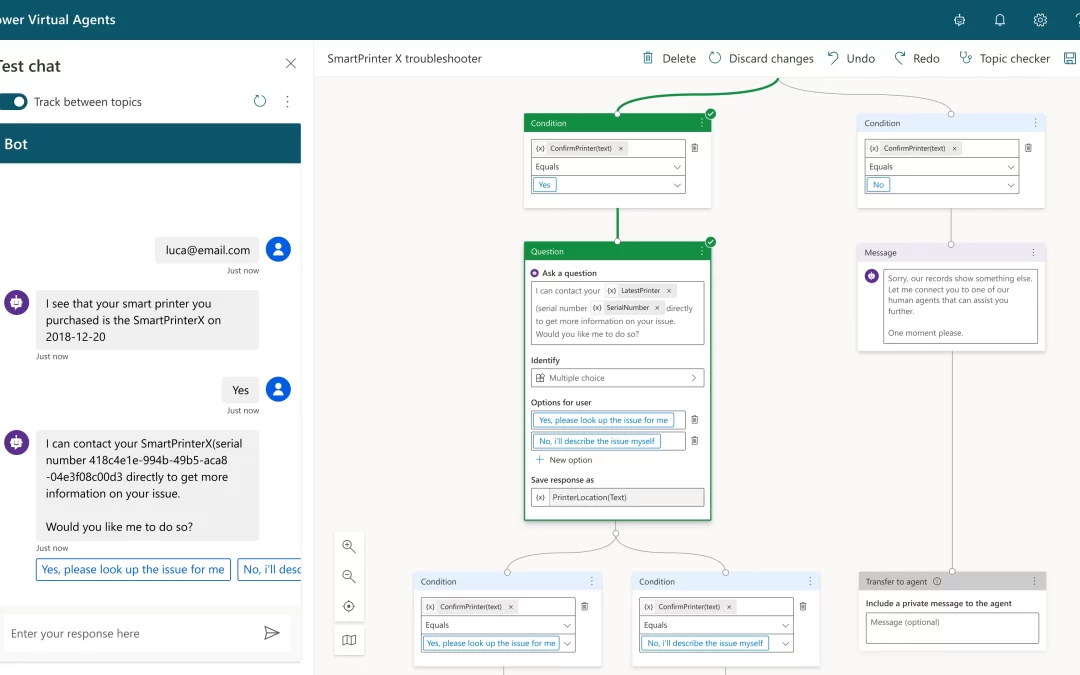
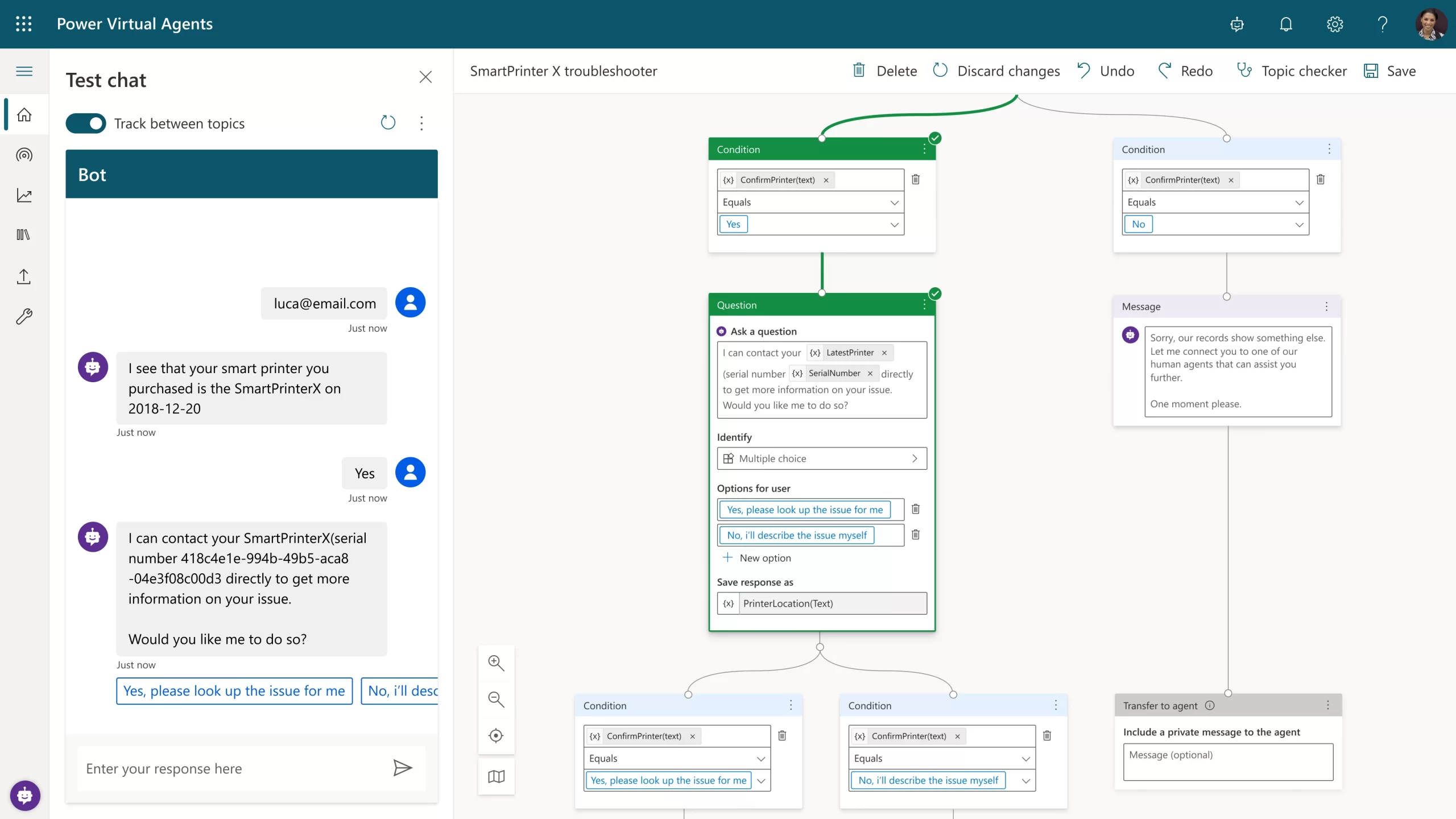
Figure 1: Power Virtual Agents intuitive graphical interface showing the conversational flow design and topic navigation.
For large enterprises that need a custom-built natural language model or those with sophisticated interactive voice response (IVR) omnichannel needs, Nuance Mix is the right choice. Such organizations can also call on Nuance Professional Services teams at any stage of their project, drawing on deep expertise in developing, deploying, tuning, and optimizing custom-built conversational AI applications. Omnichannel IVRs and chatbots built using Mix by Nuance Professional Services are widely used by large enterprises, including Fortune 100 companies, from large telcos to major retailers across the world in multiple languages.
Some examples of Nuance Mix users include:
A large airline putting Nuance Mix at the center of its virtual assistant (VA) and IVR omnichannel strategy to add transactional self-service functionalities
A 5G mobile network operator using Nuance Mix to create a customer care VA that enables its customers to resolve issues by simply speaking or typing.
A recognized leader in clinical communication and workflow solutions using Nuance Mix to enable care teams to communicate and collaborate in real-time.
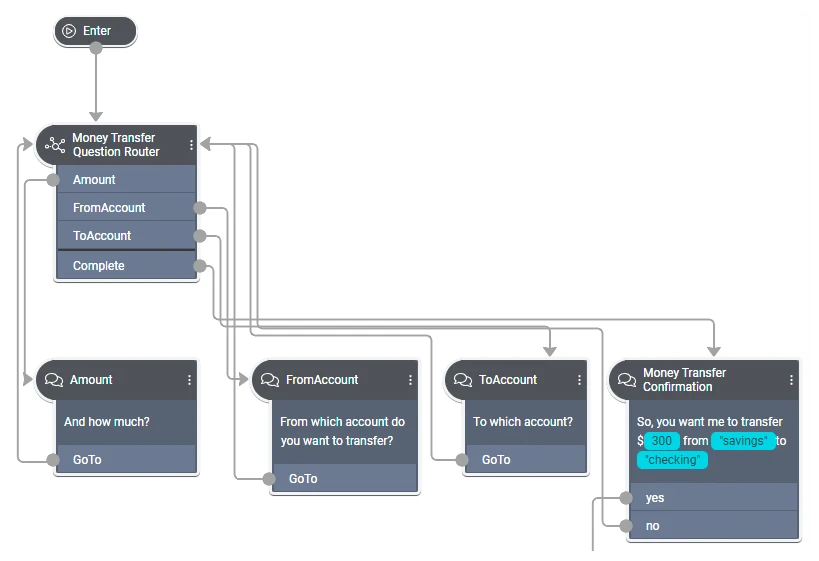
Figure 2: In Mix.dialog, call flow designers build on core components that can orchestrate mixed‑initiative dialogs.
Shaping the future of the contact center together
Regardless of which solution organizations begin with, the Digital Contact Center Platform will provide interoperability between them. As we continue to bring Nuance Mix and Power Virtual Agents closer together on the Digital Contact Center Platform, their strengths will make powerful conversational AI solutions even easier and faster to build. And as ever, our commitment to protecting your current investments is thanks to backward compatibility and a clear, disruption-free migration path to any future solutions.
This article is contributed. See the original author and article here.
The importance of fast database restore operations in any environment cannot be overstated – it is essentially time business cannot carry on; everything is offline.
There is a known DBA saying that “one should not have a backup strategy, but a recovery strategy”, which means that just taking backups isn’t enough, and that the restore process should also be regularly tested, so that you measure and know how much time it takes to restore a production database if and when the need arises.
Azure SQL Managed Instance allows customers not only to recover their databases from when FULL or DIFFERENTIAL backups were taken, but it also allows customers to recover their database to any given point in time by offering PITR – Point-In-Time Restore functionality. Besides being able to restore data from recent backups, Azure SQL Managed Instance also supports recovering databases from discrete, individual backups from long term retention (LTR) storage – which can be configured up to 10 years.
Once the restore process has been initiated, there is nothing that a customer can do to help it – as the process executes asynchronously and cannot be cancelled. While customers can scale up Azure SQL Managed Instance before a restore operation to increase backup restore speed, it’s only possible to do so before a planned restore, and not when there is a sudden and unexpected need. Otherwise, no matter how fast the scaling operation executes, it would still further delay the overall speed of the database restoration process.
Improving restore speed
There are multiple phases of the SQL MI database restore process, which, aside from the usual SQL Server restore operations, includes registering databases as an Azure asset for visibility & management within the Azure Portal. Additionally, the restore process forces a number of specific internal options, and some property changes such as forcing the switch to the FULL recovery model and forcing the database option PAGE_VERIFY to CHECKSUM, as well as eventually performing a full backup to start the log chain and provide full point-in-time- restore options through the combination of full and log database backups.
The restore operation on SQL MI also includes log truncation, and the execution time for the truncation has been vastly improved, which means that customers can expect their entire database restore process to become faster on both service tiers.
Service tiers differences
It is important to understand that faster means different speeds on different service tiers. This has to do with an additional necessary operation for the Business Critical service tier. As we have described the internal architecture in High Availability in Azure SQL MI: Business Critical service tier, the Business Critical Service tier runs on a synchronous Availability Group with 4 replicas, meaning the initial backup must be replicated to all the replicas in order to complete the setup. The current implementation of the restore process on the Business Critical service tier uses direct seeding of the Availability Group to distribute the newly restored database between replicas. As such, the restore operation will not complete until the backup has been restored to every replica, and a full backup can’t be taken until direct seeding to the secondary replicas finishes.
The following diagram shows a conceptual explanation of some of the most time-consuming execution phases of the database restore process on Azure SQL Managed Instance.
Although the boxes are similar sizes, they don’t represent the real amount of time spent on each of those specific functions. The real amount of time vastly differs based on the number of transaction log backups, the ratio of data compression, and, of course, the sheer speed of write and log operations that are available to the Azure SQL Managed Instance. Another important factor to consider are the operations executed against the Azure SQL Managed Instance during the database restore process – either directly by the user, or automatically by the engine – such as Tuple Mover in Columnstore Indexes, or even automated operations configured by the customer, such as index maintenance jobs.
Test setup & obtained results
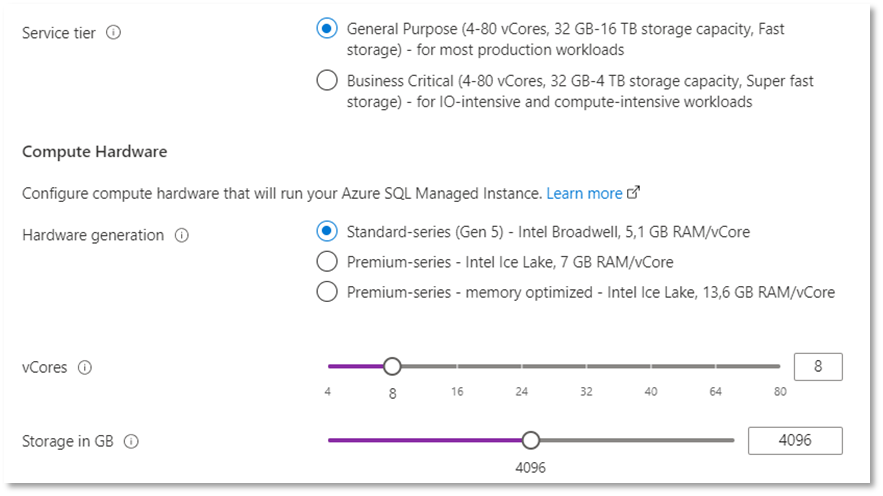
For the performance testing, we created two identical Azure SQL Managed Instances – one with the log truncation improvement included and activated, while the second one does not use the improvement. The two instances use the following hardware specifications:
Service tier: General Purpose
Hardware generation: Standard Series (Gen 5)
CPU vCores: 8
Storage: 4 TB
Region: East US 2
We have tested three databases, each one with a different size and a different fullness percentage, representing ranges from 60 GB up to 800 GB.
db1: size of 800GB
db2: size of 600GB
db3: size of 60GB
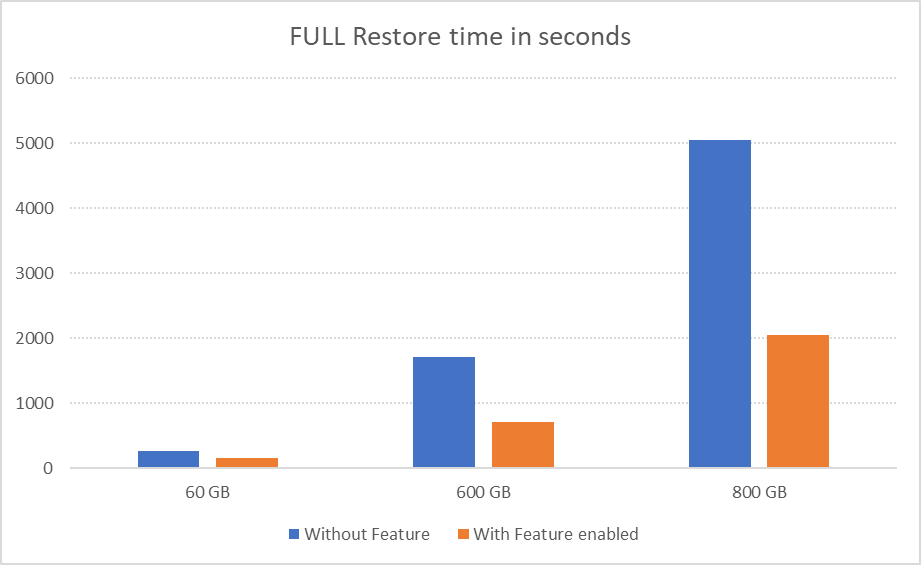
Here are the results, in seconds, for multiple restore tests for each of the databases presented both for the default Azure SQL Managed Instance and for the Azure SQL Managed Instance that has the feature enabled.
60 GB
600 GB
800 GB
Without Feature
266 s
1718 s
5048 s
With Feature enabled
155 s
704 s
2054 s
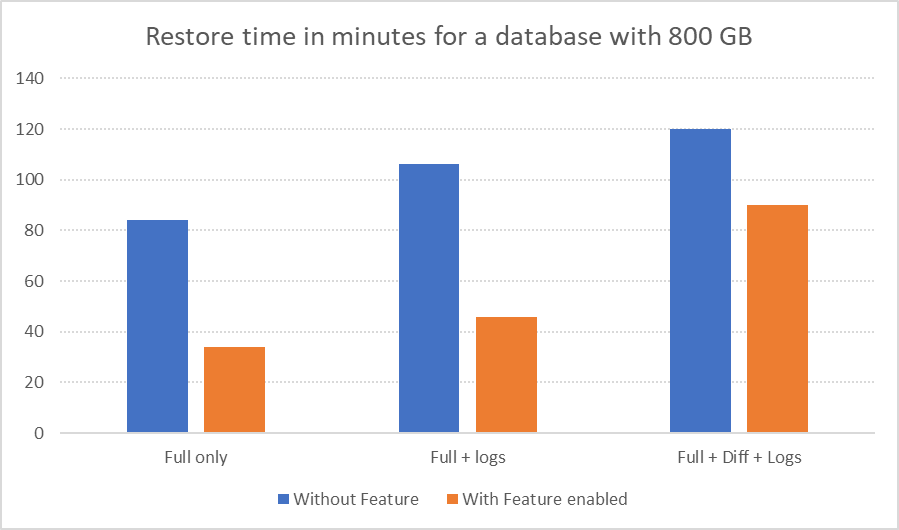
We went a step further, experimenting with the 800 GB database and tested different situations that included not just a fresh FULL backup but also such configurations as FULL backup with a number of Transaction Log backups, FULL and DIFFERENTIAL and Transaction Log backups. The observed results can be seen in the table below:
Full only
Full + logs
Full + Diff + Logs
Without Feature
84 min
106 min
120 min
With Feature enabled
34 min
46 min
90 min
Here are those results visualized for better understanding of the impact:
Benefit estimates
Exact benefits are very specific to the configuration and workload of each Azure SQL Managed Instance. On the General Purpose service tier, the exact size of database data and log files directly impacts the benefit, as it does with any kind of workload. If you are interested in more details, please consult our respective documentation article How-to improve data loading performance on SQL Managed Instance with General Purpose service tier. Additionally, customers should be mindful of the exact geographical region of their backup file locations, and the number of files, as a high number of transaction log files significantly impact restore times, as well as the number of differential backups, and their size.
For the databases smaller than 1 TB in the General Purpose service tier, we expect database restoration speed to increase from 20% to 70%. For databases that are greater than 1 TB, expect restoration speed improvements between 30% to 70%.
However, overall, customers on both service tiers should see a performance improvement to their database backup restoration process – but the improvement will vary for each case.
So, what is the catch, you might ask…? How can you get an Azure SQL Managed Instance with this feature? How can you enable faster restores?
The best news is that this feature is coming right now to all of our customers, and they won’t have to enable it, their restore operations will simply start working faster.




Recent Comments