This article is contributed. See the original author and article here.
By Hugo Affaticati, Technical Program Manager
Introduction
Azure is pleased to share results from our MLPerf Inference v2.1 submission. For this submission, we benchmarked our NC A100 v4-series, NDm A100 v4-series, and NVads A10 v5-series. They are powered by the latest NVIDIA A100 PCIe Tensor Core GPUs, NVIDIA A100 SXM Tensor Core GPUs and NVIDIA A10 Tensor Core GPUs respectively. These offerings are our flagship virtual machine (VM) types for AI inference and training and enable our customers to address their inferencing needs, ranging from 1/6 of a GPU to eight GPUs. These series are all available making AI inference accessible to all. We are excited to see what new breakthroughs our customers will make using these VMs.
In this document, we share outstanding AI benchmark results MLPerf Inference v2.1 and the best practices and configuration details you need to be able to replicate them. And as a result, not only do we show that Azure is committed to providing our customers with the latest GPU offerings, but that are also in line with on-premises performance and available on-demand in the cloud, and scales to adapt to all sizes of AI workloads and needs.
MLPerfTM from MLCommons®
MLCommons® is an open engineering consortium of AI leaders from academia, research labs, and industry where the mission is to “build fair and useful benchmarks” that provide unbiased evaluations of training and inference performance for hardware, software, and services—all conducted under prescribed conditions. MLPerf™ Inference benchmarks consist of real-world compute-intensive AI workloads to best simulate customer’s needs. MLPerf™ tests are transparent and objective, so technology decision makers can rely on the results to make informed buying decisions.
Highlights of Performance Results
The highlights of results obtained with MLPerf Inference v2.1 benchmarks exercise are shown below.
NC A100 v4-series achieved 54.2K+ samples/s for RNN-T offline scenario
NDm A100 v4-series achieved 26+ samples/s for 3D U-Net offline scenario
NVads A10 v5-series achieved 24.7K+ queries/s for ResNet50 server scenario
Once your machine is deployed and configured, create a folder for the scripts and get the scripts from MLPerf Inference v2.1 repository.
cd /mnt/resource_nvme
git clone https://github.com/mlcommons/inference_results_v2.1.git
cd inference_results_v2.1/closed/Azure
Create folders for the data and get the ResNet50 data:
export MLPERF_SCRATCH_PATH=/mnt/resource_nvme/scratch
mkdir -p $MLPERF_SCRATCH_PATH
mkdir $MLPERF_SCRATCH_PATH/data $MLPERF_SCRATCH_PATH/models $MLPERF_SCRATCH_PATH/preprocessed_data
cd $MLPERF_SCRATCH_PATH/data && mkdir imagenet && cd imagenet
In this imagenet folder download ImageNet Data available online and go back to the script.
cd /mnt/resource_nvme/inference_results_v2.1/closed/Azure
Get the rest of the datasets from inside the container:
make prebuild
make download_data BENCHMARKS=”resnet50 bert rnnt 3d-unet”
make download_model BENCHMARKS=”resnet50 bert rnnt 3d-unet”
make preprocess_data BENCHMARKS=”resnet50 bert rnnt 3d-unet”
make build
Run the benchmark
Finally, run the benchmark with the make run command, an example is given below. The value is only correct if the result is “VALID”, modify the value in the config files if the result is “INVALID”.
make run RUN_ARGS=”–benchmarks=bert –scenarios=offline –config_ver=default,high_accuracy,triton,high_accuracy_triton”
This article is contributed. See the original author and article here.
Cisco has released security updates to address vulnerabilities in multiple Cisco products. A remote attacker could exploit some of these vulnerabilities to take control of an affected system. For updates addressing lower severity vulnerabilities, see the Cisco Security Advisories page.
CISA encourages users and administrators to review the following advisories and apply the necessary updates:
This article is contributed. See the original author and article here.
CISA has added twelve new vulnerabilities to its Known Exploited Vulnerabilities Catalog, based on evidence of active exploitation. These types of vulnerabilities are a frequent attack vector for malicious cyber actors and pose significant risk to the federal enterprise. Note: to view the newly added vulnerabilities in the catalog, click on the arrow in the “Date Added to Catalog” column, which will sort by descending dates.
Although BOD 22-01 only applies to FCEB agencies, CISA strongly urges all organizations to reduce their exposure to cyberattacks by prioritizing timely remediation of Catalog vulnerabilities as part of their vulnerability management practice. CISA will continue to add vulnerabilities to the Catalog that meet the specified criteria.
This article is contributed. See the original author and article here.
Customers appreciate the quick access to help that self-service bots provide. They want to be empowered to research and solve issues on their own, which increases their brand loyalty. Knowledge management integration in Microsoft Power Virtual Agents enables customers to find answers from a knowledge base directly in a bot conversation, and still get help from a human agent when needed.
Your human agents benefit, too. They don’t need to spend time answering straightforward questions that customers would prefer to find answers to themselvesif they had an easy way to search. Your agents have more time to deal with complex issues that truly need human intervention.
Display Dynamics 365 knowledge articles in self-service bot conversations
With knowledge search integrated in Power Virtual Agents, self-service bots can display articles from a Dynamics 365 knowledge base in an adaptive card in the chat.
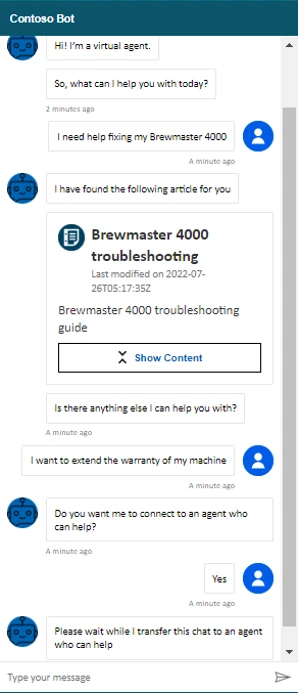
Let’s say Monique has an issue with a Brewmaster 4000 coffee machine. Preferring to look for information on her own, she goes to the Contoso Coffee website. After a proactive greeting from Contoso’s self-service bot, Monique describes her issue. The bot searches the Dynamics 365 knowledge base and returns an adaptive card that links to an article on how to troubleshoot Brewmaster 4000 coffee machines. Monique is satisfied with the information.
She also wants to extend the warranty on her machine. The bot offers to connect her to a human agent. Monique agrees, and the bot hands the conversation off to a live agent.
Configure your self-service bots to search Dynamics 365 knowledge articles
Before you can integrate knowledge management with your self-service bots, you need to satisfy some prerequisites:
You must have knowledge management configured in Dynamics 365 Customer Service.
Your environment must have Dataverse search enabled.
You must have knowledge base articles published to a Power Apps portal.
You must have a bot with at least one topic.
Broadly speaking, configuring the integration is a four-step process:
Set connection references for the “Search Dynamics 365 knowledge articles” flow.
Turn on the flow action in Power Virtual Agents.
Add the action to the topic.
Publish the bot.
Set connection references and turn on the search flow
Go to the Power Apps maker portal (https://make.powerapps.com) and select the notification to update connection references. If you don’t see the notification, you’ll need to ask your admin to set the connection references and turn on the flow for you.
Configure the references for the connections to Microsoft Dataverse and Content Conversion.
Next, turn on the “Search Dynamics 365 knowledge articles” flow. For the full procedure, go to Set connection references in the documentation.
Add the action to a topic in your self-service bots
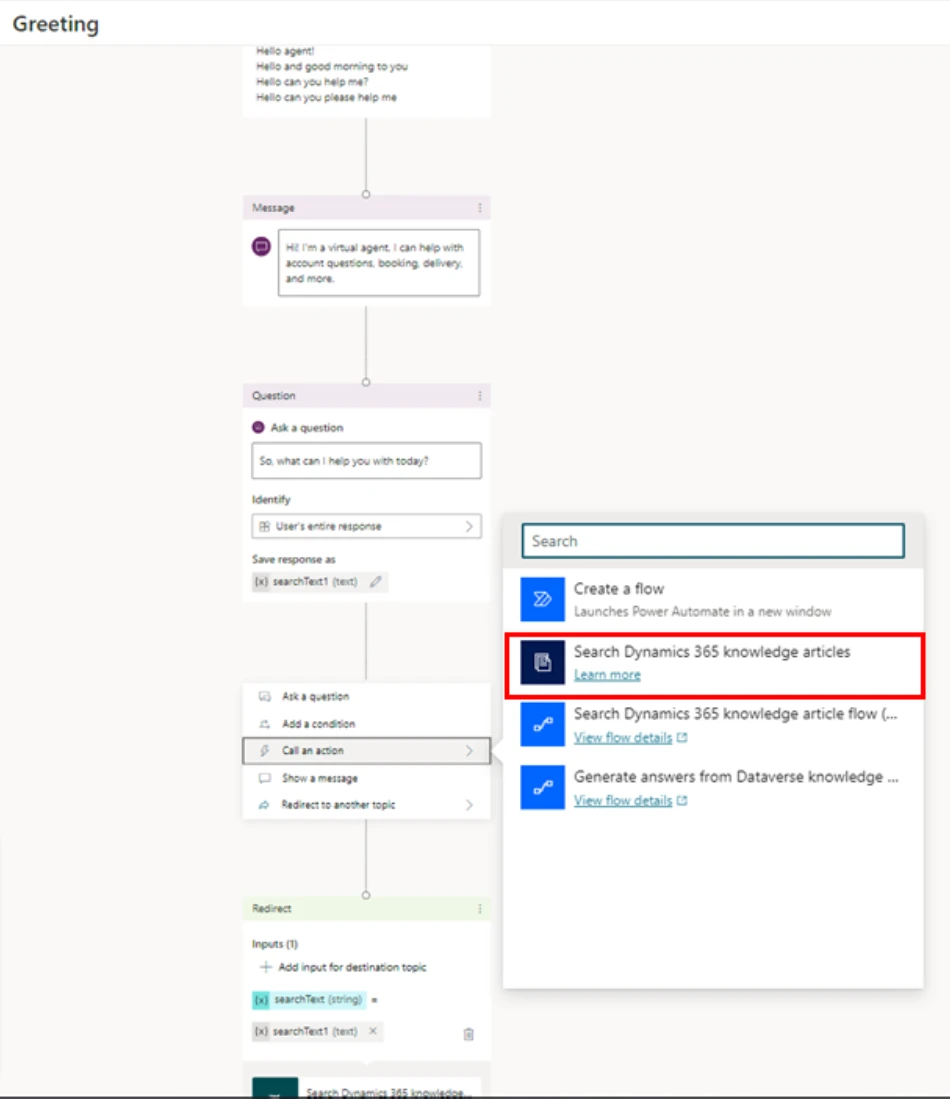
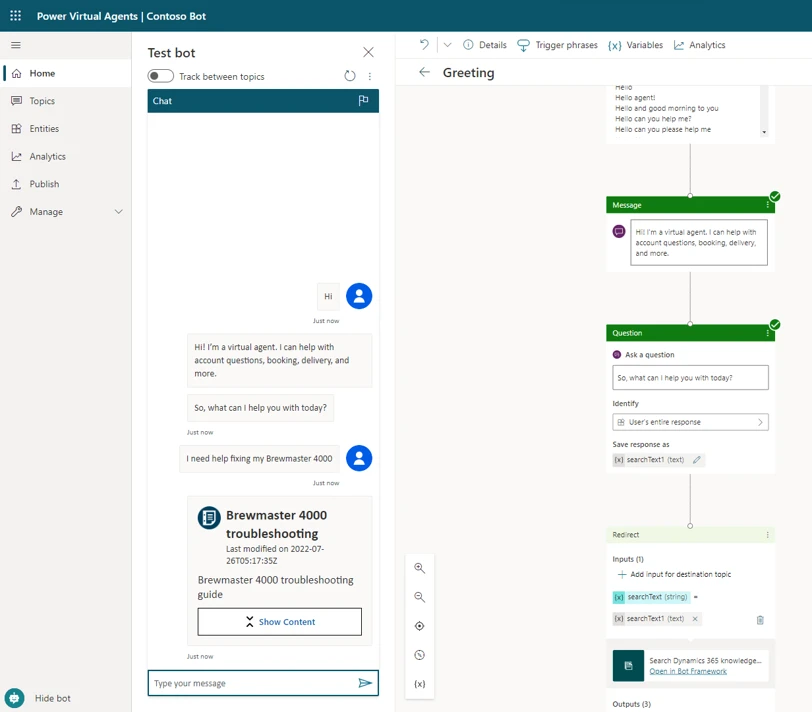
In the example below, we’re going to add the search flow action to the “Greeting” topic in our bot. The “Greeting” topic has preconfigured trigger phrases and a question. At the output of the question, we need to call the “Search Dynamics 365 knowledge articles” flow action, as shown in the following figure.
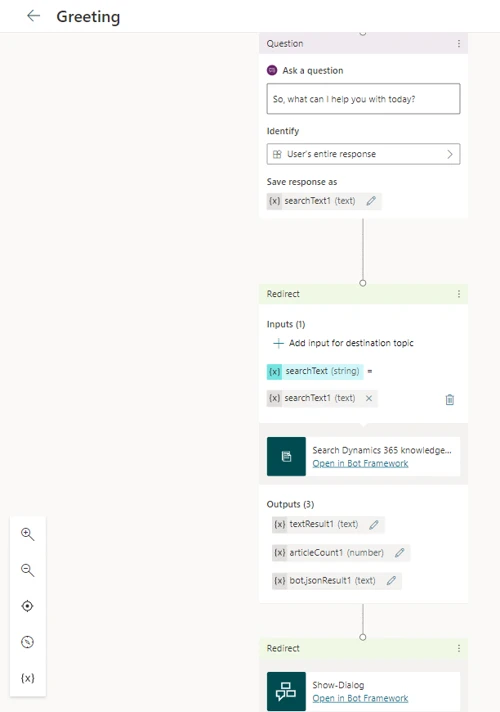
The customer’s response to the question is available in the variable “searchText1 (text),” which acts as an input to the action. The action’s outputthat is, the result of the knowledge base searchis stored in the variable “bot.jsonResult1 (text),” which is redirected to “Show Dialog” to present the output in an adaptive card.
Save the topic and publish the bot.
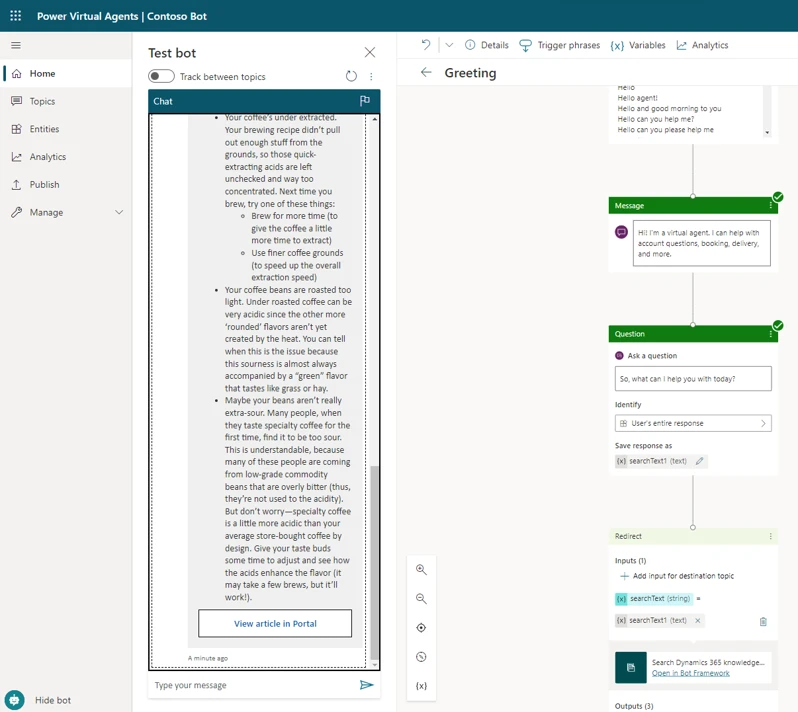
The following illustration shows the output from our example.
When the customer selects Show Content, the chat displays a summary of the knowledge article, along with a link to view it in the portal.
For more information about showing the results in an adaptive card, go to Render results in the documentation.
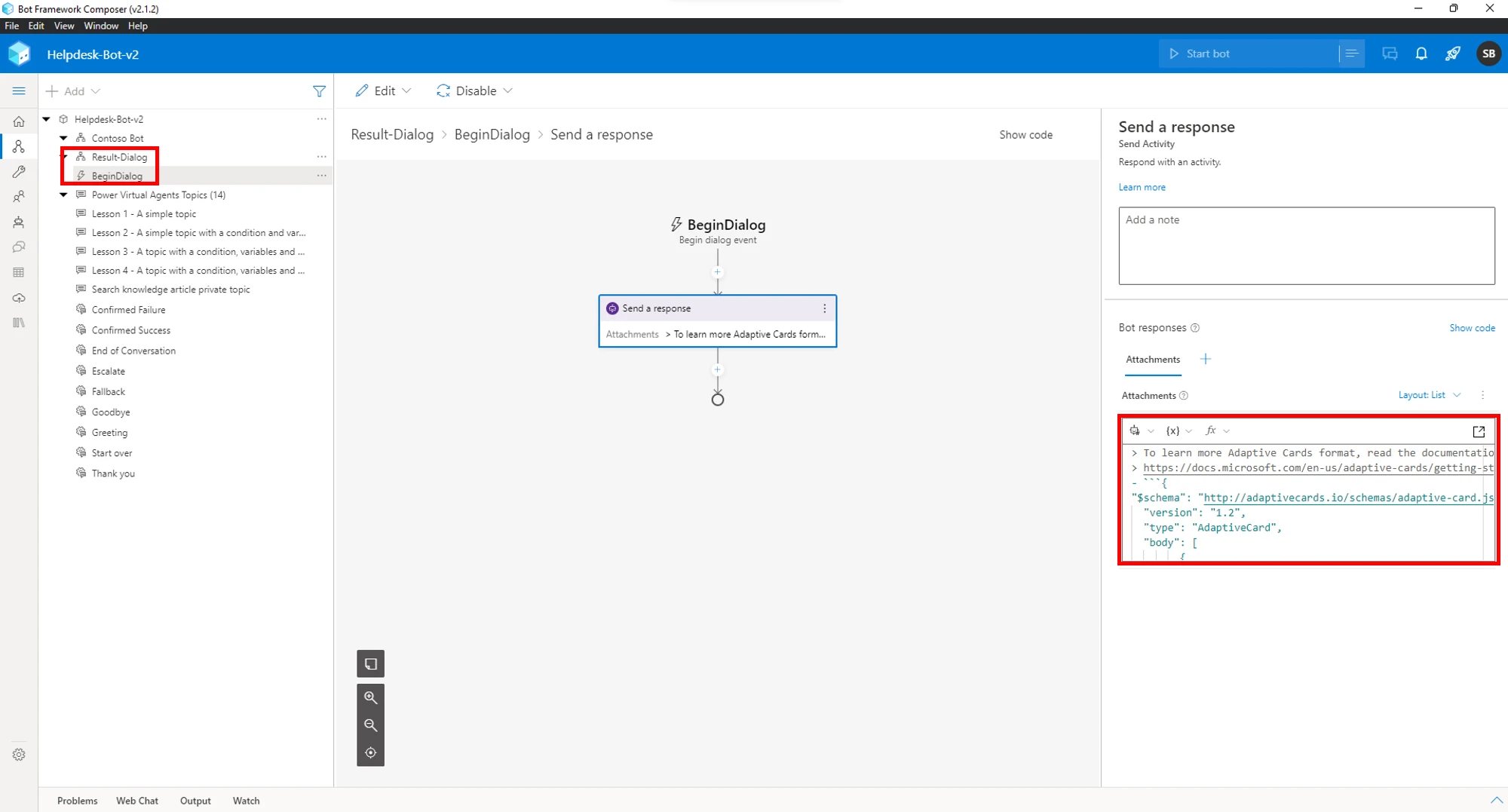
If the default adaptive card doesn’t meet your needs, the Bot Framework Composer provides an easy way to modify it. In the following picture, we’re using the Bot Framework Composer to tweak the output of “Show Dialog.”
Learn more
For more information about knowledge management in Dynamics 365 Customer Service and how to add it to your self-service bots, check out the documentation:
This article is contributed. See the original author and article here.
It’s been a while since our last MEC, and a lot has changed since then.
The MEC Technical Airlift is a free, digital event for IT professionals who work with Exchange Online and/or Exchange Server day-to-day, and ISVs and developers who make solutions that integrate with Exchange.
MEC will be THE place for the Exchange community to come together to explore new innovations and information. It features a variety of learning opportunities, deep technical breakout sessions, and time with members of our passionate engineering teams. You’ll also hear from some of the best-known names in Exchange around the world and get engaged in the community.
First and foremost, MEC is about fostering the Exchange community. MEC is the best place to engage directly with the engineering teams that build Exchange Online and Exchange Server and your peers in the community.
Security is of paramount importance to all organizations, and a big goal for MEC is to help customers secure their Exchange environment. The accelerated rate of digital transformation we have seen these past years presents both challenges and opportunities. Now more than ever it is critical to keep your infrastructure secure, including your Exchange infrastructure and data.
At MEC, we want to help all of you modernize your infrastructure. Whether you run Exchange in the cloud, on-premises, or both, we want to help you move forward successfully and at the same time get your feedback and input on how we can improve our products and services. Join us for two jam-packed days of all things Exchange.



 ) or https:// means you’ve safely connected to the .gov website. Share sensitive information only on official, secure websites.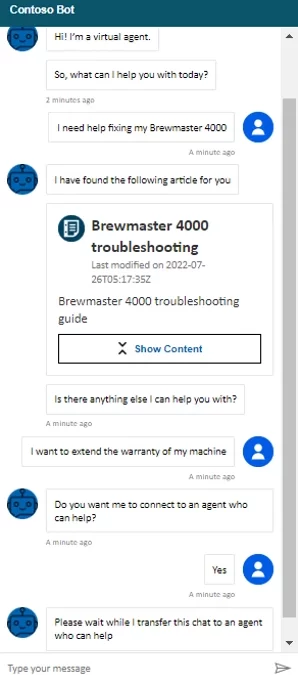


Recent Comments