This article is contributed. See the original author and article here.
The Samba Team has released security updates to address vulnerabilities in multiple versions of Samba. A remote attacker could exploit one of these vulnerabilities to take control of an affected system.
CISA encourages users and administrators to review the following Samba Security Announcements and apply the necessary updates and workarounds.
This article is contributed. See the original author and article here.
You’ve done all the work to build confidence in your data with great data quality, availability and reliability. But how do you know if your data has been tampered with or otherwise experienced an unplanned change? Now SQL Server and Azure SQL Database can answer that question for you. In this episode of Data Exposed: MVP Edition with Anna Hoffman and Karen Lopez, you’ll go through a couple of quick demos about Ledger Databases and Tables to see if you can trust your data.
This article is contributed. See the original author and article here.
Sensor Data Intelligence, a new feature of Microsoft Dynamics 365 Supply Chain Management, helps you drive business processes based on automated IoT (Internet of Things) signals from machines and equipment on the production floor. With Sensor Data Intelligence, you can:
Drive predictive maintenance with details collected from machines and equipment.
Use a simple onboarding wizard instead of manually installing and configuring components in Microsoft Dynamics Lifecycle Services (LCS).
Configure, scale, and extend the solution as business logic running on your own Azure subscription.
Sensor Data Intelligence supports a variety of automated IoT scenarios
Sensor Data Intelligence supports several specific business scenarios, each with its own set of configuration options:
Asset downtime: Accurately track the efficiency of machine assets by using sensor data to track machine downtime.
Asset maintenance: Minimize maintenance cost and extend asset life by improving maintenance plans based on sensor readings of critical control points.
Machine status: Ensure operation efficiency by using sensor readings to notify planners about machine outages and provide options for mitigating potential delays.
Product quality: Ensure the quality of product batches by comparing sensor readings for properties of each product batch, such as moisture, temperature, or custom-defined quality metrics. The system notifies operators when deviations occur.
Production delays: Use sensor readings to compare actual cycle time to planned cycle time, and notify supervisors when production isn’t on schedule.
Custom scenarios: The architecture of Sensor Data Intelligence allows you to customize the out-of-box scenarios and even create new automated IoT scenarios to meet your unique business needs.
Fit equipment with automatic sensors for real-time monitoring and decision-making
You can fit your organization’s assets with a variety of automated IoT sensors, each designed to provide information for a specific purpose. For example, you might fit a metal stamping machine with a sensor that counts each stroke. You could then configure your system to receive a signal from that counter and set a threshold (for example, 40,000 strokes) at which Supply Chain Management should automatically generate a maintenance work order.
Enjoy fast, wizard-based setup for automated IoT scenarios
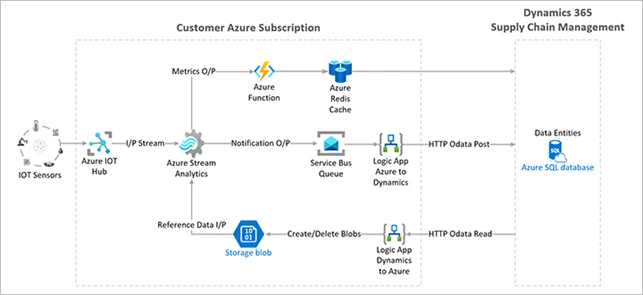
Sensor Data Intelligence is simple to onboard. Deploy a template of resources (including an Azure IoT hub and Azure stream analytics) by walking through a few steps in a wizard.
It’s just as fast and easy to add a new sensor to your system. Choose a scenario, identify the new sensor, and map it to the required system functionality.
Flexible and extendible Azure architecture lets you fine-tune the system
Because everything is deployed on your own Azure subscription, the solution is easy to scale and configure to your own requirements.
The following architectural diagram provides an overview of Sensor Data Intelligence and its components:
Learn more
Sensor Data Intelligence is a public preview feature of Dynamics 365 Supply Chain Management. For more information, check out the Dynamics 365 release plan and the documentation.
This article is contributed. See the original author and article here.
Sellers rely on email to reach out to contacts when working on deals. The new email address validation feature in Microsoft Dynamics 365 Sales flags email addresses in your customer relationship management (CRM) system that are in the wrong format or have an expired or fictitious domain. That lets your sellers connect with subscribers and boost their conversion rates without wasting time and energy trying to communicate with uninterested or non-existent customers.
Improve lead quality with email address validation
Email address validation in Dynamics 365 Sales finds and removes non-working email addresses in your CRM. This lets your sellers prioritize leads that have a valid email address for lower email bounce rates, improved engagement, and a better return on their time.
Email address validation looks for the following errors:
Incorrect syntax: An address that does not have both a username and an email domain
Disposable domain: An address that has a known disposable or temporary email domain
Test or spam address: An address that has known indicators of a test or spam address in the email header or metadata, IP address, HTML code, and email content and formatting
Expired address: An email account that has expired and can no longer receive or send email
Address with unregistered domain: A domain that does not appear in the domain registry
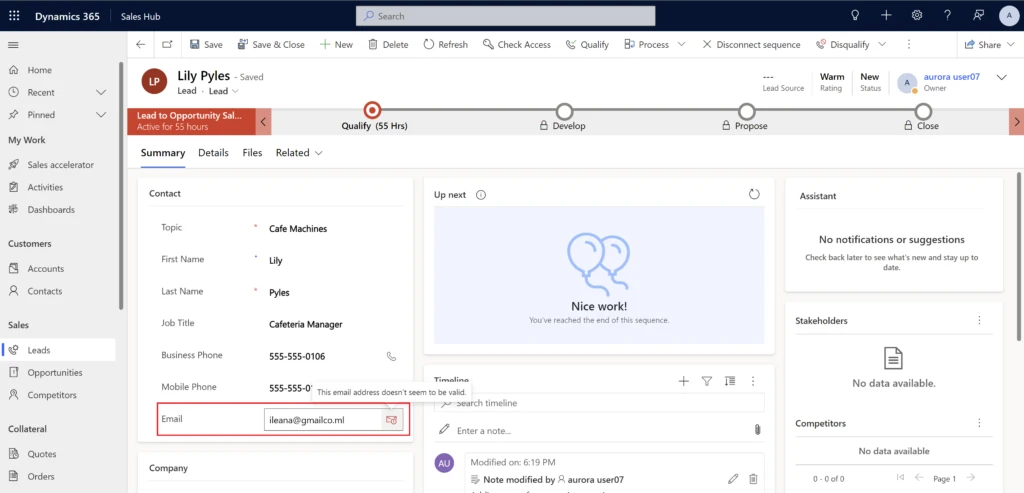
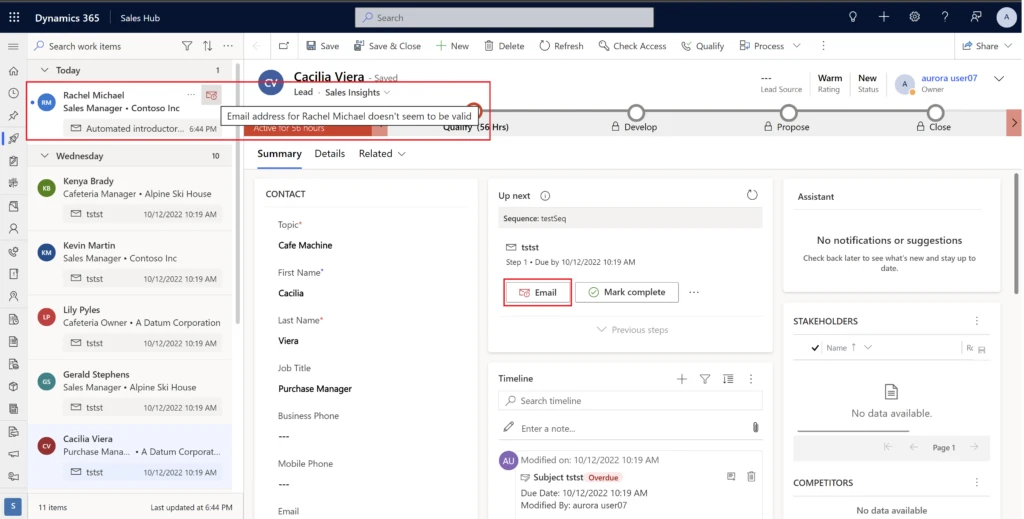
You can view flagged email addresses on primary entity and sales insights forms as well as on the Up next widget and work list items.
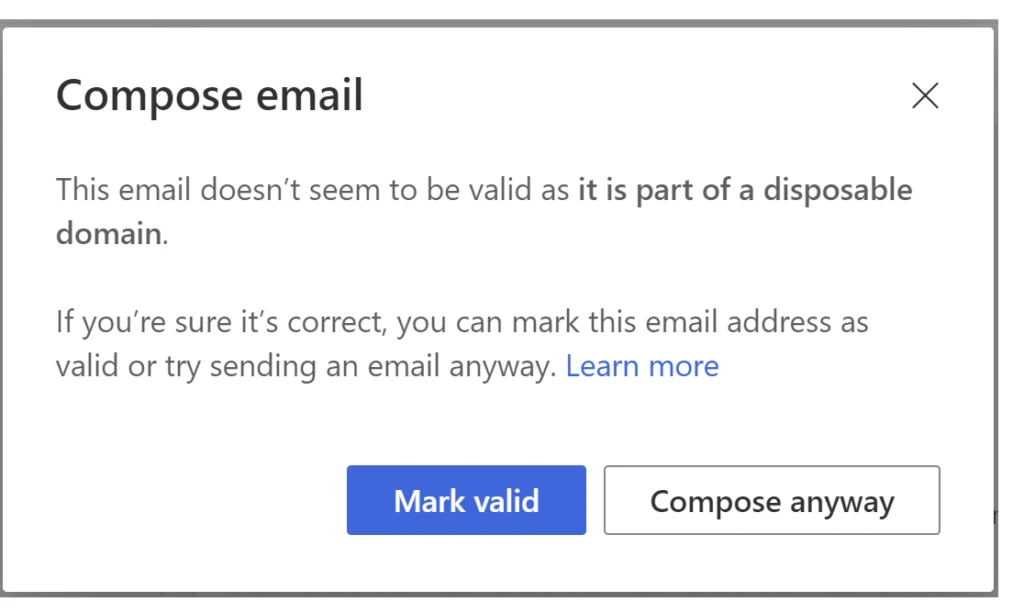
If you try to send an email to a flagged address, a notification gives you the reason the system marked the address as not valid.
If you know the email address is correct, select Mark valid. The system marks the address as valid and removes the alert.
If you don’t know the email address is correct but you still want to send the email, select Compose anyway.
More data hygiene improvements in Dynamics 365 Sales
In addition to email address validation, we have also implemented duplicate detection for leads. Dynamics 365 Sales uses AI and “fuzzy” matching algorithms to detect duplicate leads. By “fuzzy,” we mean that the system identifies as duplicates not only records that have exactly matching field values, but also records that have approximately matching field values. This helps sellers focus on the records that truly matter and clears out any “noise” that they would otherwise have to spend time manually reducing.
On top of that, we are continuously working on even more improvements to data hygiene in Dynamics 365 Sales to help your sellers be more focused and productive.
Next steps
Increasing your sales team’s productivity could be as simple as eliminating leads with incomplete, non-working, or spam email addressesand Dynamics 365 Sales makes it easy.
To get started with email address validation, read the documentation:



 ) or https:// means you’ve safely connected to the .gov website. Share sensitive information only on official, secure websites.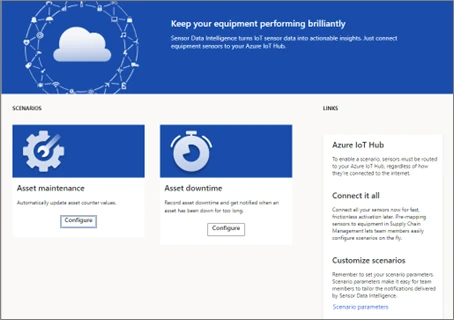

Recent Comments