
Azure Database for MySQL – Service update
This article is contributed. See the original author and article here.
The year 2020 has started eventfully, and it continues to present challenging times for people, businesses, and economies around the world. As our CEO Satya Nadella puts it, “We have seen two years of digital transformation in two months.” Azure Database for MySQL service is at the heart of this transformation, empowering online education, video streaming services, digital payment solutions, e-commerce platforms, gaming services, news portals, government and healthcare websites to support unprecedented growth at optimized cost. It’s immensely satisfying to see Azure Database for MySQL enable our customers to meet growing demands for their services during these critical times. Azure Database for MySQL service, with community version of MySQL, is powering mission critical services such as healthcare services for citizens of Denmark, digital payment application for citizens of Hong Kong, music and video streaming platforms for citizens of India, Korea, and Japan, online news websites, and mobile gaming services including our very own Minecraft Realms.
MySQL – Popular choice for Internet scale web or mobile applications
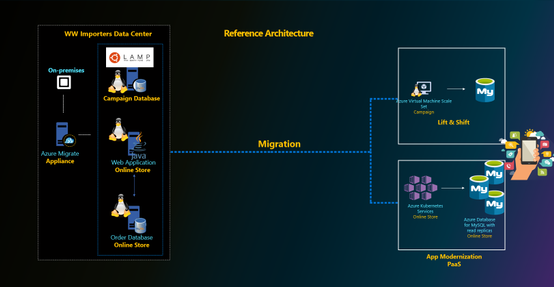
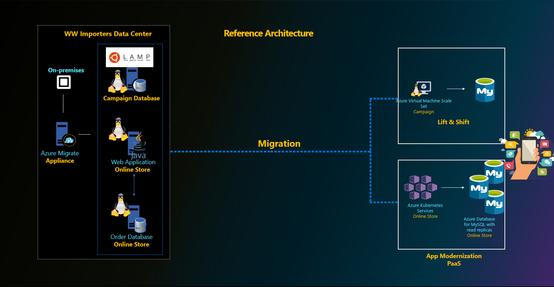
MySQL is a popular choice of database engine for designing internet scale consumer applications, which are highly transactional online applications with short chatty transactions against a relatively small database size. These applications are typically developed in Java or php and migrated to run on Azure virtual machine scale sets (VMSS) or Azure App Services or are containerized to run on Azure Kubernetes Service (AKS). The database is typically required to scale high volume of incoming transactions. Most of our customers leverage proxysql load balancer proxy and read replicas to scale out and meet the workload demands for their business. MySQL versions 5.7 and 8.0 continue to be popular choices among our customers for meeting their performance and scale goals.
What’s new in Azure Database for MySQL?
Over the last six months, we’ve focused on enhancing security and governance for customers, simplifying performance tuning, and reducing cost for our customers in addition to increasing the regional availability of our optimized large storage platform with 16-TB storage and 20K IOPs scale. This aligns with our promise of making Azure the most secure and trusted cloud for our customers. A complete list of all the features we’ve released is available via Azure updates, but I’ll summarize a few important updates below.
Enterprise Grade Security, Compliance & Governance
- Data encryption at rest using customer managed keys. Since we launched Azure Database for MySQL to public, all customer data is always encrypted at rest using service managed keys. The service is fully compliant with PCI DSS, HIPAA and FedRAMP certifications. With this release, we allow our customers to bring their own key for data encryption of their data at rest. This was one of the highly requested ask by our finance, healthcare industry and government customers to meet their compliance and regulatory requirements. Learn more about this feature here.
- Infrastructure double encryption. The feature provides an additional layer of protection for customers’ data at rest. Infrastructure double encryption uses the FIPS 140-2 validated cryptographic module, but with a different encryption algorithm. The key used in Infrastructure Double encryption is managed by the Azure Database for MySQL service. Infrastructure double encryption is not enabled by default since the additional layer of encryption can have a performance impact. Learn more about this feature here.
- Minimum TLS version enforcement ability. Azure Database for MySQL currently support TLS v1.0, 1.1 and 1.2. Our recommendation is to upgrade to TLS version v1.2 to enhance security, and with this feature, we allow customers to control and enforce the right behavior for their MySQL servers from the server side. Server administrators can simply go in the Azure portal and set the minimum TLS version on the server side to meet the compliance. Security administrators can define right policies at the subscription or organization level using Azure Policy to ensure the minimum TLS version for all the MySQL servers in the Azure subscription meets the compliance and regulatory requirements defined by the organization. Learn more about this feature here.

- Private Link for Azure Database for MySQL. Azure Private Link is the most secure way to isolate and connect to Azure Database for MySQL either within the same Azure region or across regions. Customers can also use this feature to disable public endpoints, which ensures that there aren’t any connections coming from public endpoints. Learn more about this feature .
- Azure Active Directory Authentication for Azure Database for MySQL. Azure Active Directory authentication allows customersdatabase by using identities defined in Azure AD and manage credentials in a central place. For consistent role management, database access can be managed by using Active Directory groups, as well as . Learn more about this feature here.
- Governance capability by enforcing Azure policies – All of the above security features are opt-in and driving the right security practices and behavior is a shared responsibility. To standardize and enforce these security controls at an organization level, customers can leverage Azure Policy. Azure Policy is an Azure service that is used to create, assign, and manage policies. These policies enforce different rules and effects on resources to ensure that they stay compliant with corporate standards and service level agreements. Azure Policy meets this need by evaluating resources for non-compliance with assigned policies, at the same time ensuring that all data stored by Azure Policy is encrypted at rest. We are glad to announce the integration of Azure Database for MySQL with Azure Policy to enforce these compliance requirements at scale.
We’ve created an Azure Policy GitHub repository that contains quick-start samples from the community. For more information about using these sample policies, see the article here.
Intelligent Performance
Besides the security controls, the engineering team focused on making life easier for devops team who are tasked to manage the performance of large fleet of servers. Intelligent performance is our differentiated feature which includes query store, query performance insight, and performance recommendations. Intelligent performance allows devops teams to better understand their workloads, visually inspect them and identify bottlenecks, and to see a list of recommendations for improving the performance of database workloads.
For some canonical workloads like WordPress, we are taking a step forward to allow users to configure an optimized performance configuration for their Azure Database for MySQL server using resource tags. To take advantage of this feature and drive performance optimizations for WordPress applications, users can simply set the following resource tag on Azure Database for MySQL server used for WordPress application at time of server creation. Learn more about this feature here.
- Name: AppProfile
- Value: WordPress
We are constantly using pattern analysis to programmatically analyze metrics telemetry of servers and provide targeted Advisor recommendation which can enable users to improve performance of their MySQL servers out of the box without any code changes. The recent recommendation which we added is to increase tmp_table_size and max_heap_table_size values for servers which are impacted by temp tables spills to storage. The increase in the server parameter values for those impacted servers can improve overall workload performance out of the box. For Azure Database for MySQL servers impacted by temp table spills to storage, customers will see the recommendation to increase the values in Advisor recommendation blade in the portal. Learn the latest about this feature here.
As scale demands of the workload increases, customers can leverage read replicas to scale-out and proxysql to transparently split the reads and writes from the application. In some scenarios, there may still be high amount of thread churn inside the server with short burst of highly concurrent transactions limiting the transaction throughput due to high cpu contention. To minimize this and improve the performance out of the box, we released thread pool feature which can be enabled using server parameters in Azure Database for MySQL service. Learn more about this feature here.
Cost Optimization
Reducing cost is top in the mind of customers and therefore, it is a top priority for us too. We released few features in this area to ensure customers are provisioning the right size for their workloads and benefit from capacity commitments. This is an active area of investment for us and we are committed to do more in this area so please stay tuned.
- Recommendation to optimize cloud spend – The Recommendations feature gives daily insights about the database server to help users optimize performance and cost. Azure Advisors is a personalized cloud consultant that helps users follow guidelines to optimize their Azure deployments. We started off with Performance based recommendations, but we have now expanded the portfolio to include cost optimization recommendations through right sizing and Reserved instance.
- 3 years RI expansion – We started off by providing 1-year RI announced in Microsoft Ignite 2019. However, learning from the feedback from customers we have quickly expanded the support for 3 years RI as well to let customer save cost for long term commitments. Learn more about reserved instances and its use here.
Large Storage with up to 16TB storage. With our new storage infrastructure that supports up to 16TB, we have done bunch of optimizations in the storage engine including switching to snapshot-based backups. The 16 TB storage also supports IOPs up to 20K IOPs for higher concurrent scaling. In a subset of Azure regions, all newly provisioned servers can support up to 16-TB storage and 20K IOPs. We are also working towards rolling out this storage infrastructure in remaining Azure regions which will be the default storage option going forward.
Getting Started with Azure Database for MySQL Service
Users new to Azure Database for MySQL can get started by leveraging the following QuickStart articles:
- Create an Azure Database for MySQL server using Azure Portal
- Create an Azure Database for MySQL using a simple Azure CLI command – az mysql up (preview)
- Create an Azure Database for MySQL using PowerShell
- Sample ARM templates to Create an Azure Database for MySQL server
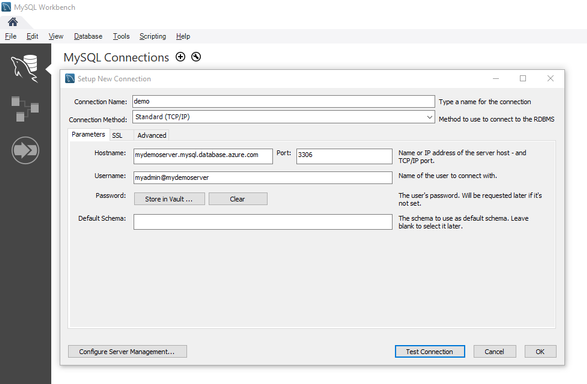
- Use MySQL Workbench to connect and query data
- Why is username@servername required to connect to Azure Database for MySQL?
The connection to Azure Database for MySQL requires users to specify the username in the format username@servername. For more information on this requirement, read more here.
Migrating to Azure Database for MySQL service
Customers looking to migrate their database to Azure Database for MySQL can use the
- Dump and Restore – For offline migrations where users can afford some downtime, leverage dump and restore using community tools like mysqldump/mydumper. Read more in our documentation. For migrating large databases, leverage the best practices shared by our field customer engineer working closely with some of our mission critical customers.
- Azure Database Migration Service – For seamless migrations to Azure Database for MySQL service with minimal downtime, customers use the Azure Database Migration Service. Learn more about this service in our documentation. The best practices for migrating MySQL databases using Azure Database Migration service can be found here.
- Data-in replication – For minimal downtime migrations, data-in replication which relies on binlog based replication can also be leveraged. Data-in replication is preferred for minimal downtime migrations by hands-on experts who are looking for more control over migration. You can read more in our documentation.
To migrate users from an existing environment to a Azure Database for MySQL server, leverage the script documented here.
Planned Maintenance Notification
If you want to get alerted for upcoming planned maintenance to your Azure Database for MySQL server, we recommend subscribing to planned maintenance notification. Learn more about this feature here.
Stay updated
To stay updated around the latest development with Azure Database for MySQL service, we recommend the following:
- Subscribe to Azure Updates
- Subscribe to our Techcommunity Blog
- Follow us on Twitter
Feedback
We are constantly looking at ways to improve our service and prioritize highly requested items. If you have any feedback, you can leverage the following forums:
- UserVoice
- Use Azure Portal to leave us your feedback

Questions
If our documentation fails to provide clarity, we encourage customers to contact us with questions.
Support
For support with an existing Azure Database for MySQL server, use the Azure portal to open a support request with us.




Recent Comments