Azure SQL Database: Improving Performance Tuning with Automatic Tuning | Data Exposed: MVP Edition
This article is contributed. See the original author and article here.

This article is contributed. See the original author and article here.
This article is contributed. See the original author and article here.
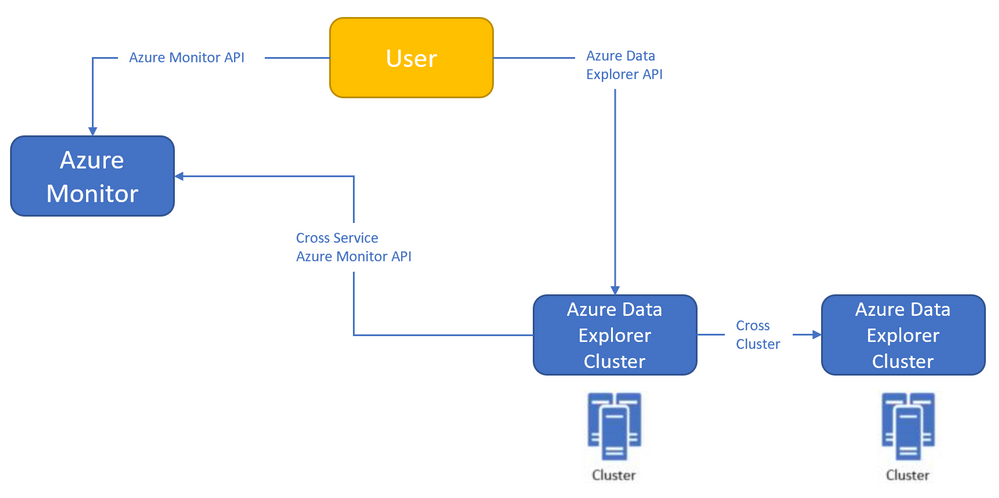
Azure Monitor<->Azure Data Explorer cross-service querying (join between LA/AI and ADX!)
This experience enables you to query Azure Data Explorer in Azure Log Analytics/Application Insights tools (See more info here),
and the ability to query Log Analytics/Application Insights from Azure Data Explorer tools to make cross resource queries. (See more info here.),
For example (querying Azure Data Explorer from Log Analytics):
Where the outer query is querying a table in the workspace, and then joining with another table in an Azure Data Explorer cluster (in this case, clustername=help, databasename=samples) by using a new “adx()” function, like how you can do the same to query another workspace from inside query text.
Both experiences are in Private Preview.
The ability to query Azure Monitor from Azure Data Explorer is open for everyone to use – no need to be allowlisted,
The ability to query Azure Data Explorer from Log Analytics/Application Insights requires to be allowlisted – We need the following to get you enrolled (you can send the info to me):
We started a private preview program, and we are happy to add early adopters to experience the new functionality.
Please note that the product is new with limited SLA, and we estimate that we will be able to move to pubic preview with production level SLA within ~2-4 months.
This article is contributed. See the original author and article here.
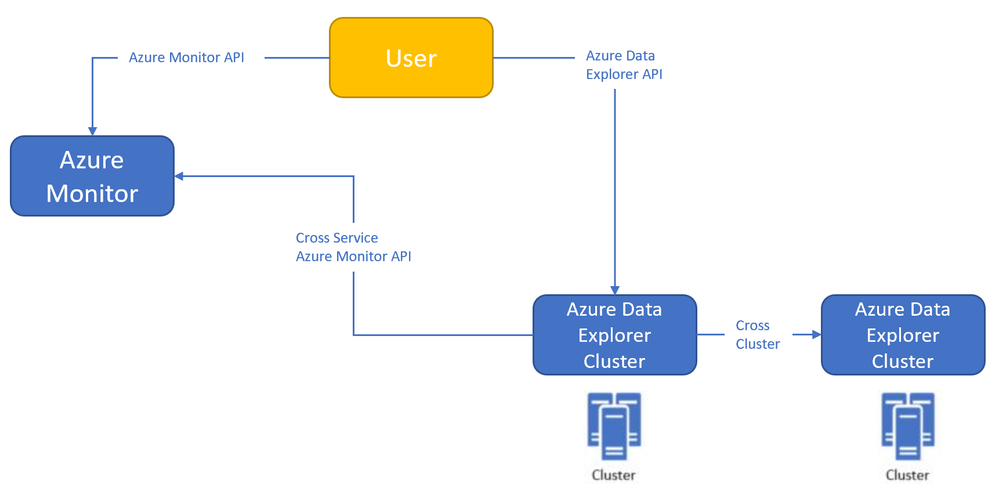
Azure Monitor<->Azure Data Explorer cross-service querying
This experience enables you to query Azure Data Explorer in Azure Log Analytics/Application Insights tools (See more info here),
and the ability to query Log Analytics/Application Insights from Azure Data Explorer tools to make cross resource queries. (See more info here.),
For example (querying Azure Data Explorer from Log Analytics):
Where the outer query is querying a table in the workspace, and then joining with another table in an Azure Data Explorer cluster (in this case, clustername=help, databasename=samples) by using a new “adx()” function, like how you can do the same to query another workspace from inside query text.
Both experiences are in Private Preview.
The ability to query Azure Monitor from Azure Data Explorer is open for everyone to use – no need to be allowlisted,
The ability to query Azure Data Explorer from Log Analytics/Application Insights requires to be allowlisted – We need the following to get you enrolled (you can send the info to me):
We started a private preview program, and we are happy to add early adopters to experience the new functionality.
Please note that the product is new with limited SLA, and we estimate that we will be able to move to pubic preview with production level SLA within ~2-4 months.
This article is contributed. See the original author and article here.
This article is contributed. See the original author and article here.
We saw several service request where our customer want to restore a backup taken in Azure SQL Managed Instance to SQL Server OnPremise and they are getting the following error: Msg 3169, Level 16, State 1, Line 1 The database was backed up on a server running version xx.xx.xxxx. That version is incompatible with this server, which is running version xx.xx.xxxx. Either restore the database on a server that supports the backup, or use a backup that is compatible with this server.
Msg 3013, Level 16, State 1, Line 1
RESTORE DATABASE is terminating abnormally.
That error came because Native COPY_ONLY backups taken from managed instance cannot be restored to SQL Server because managed instance has a higher database version compared to SQL Server. For more details, see Copy-only backup.
Due to this limitation, I would like to suggest to use bacpac method or if you need to have updated both environments at the same time use transactional replication.
This article is contributed. See the original author and article here.
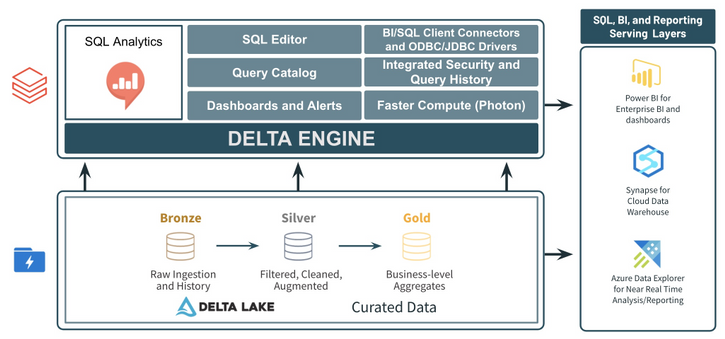
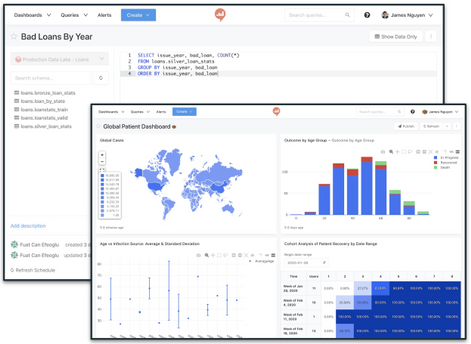
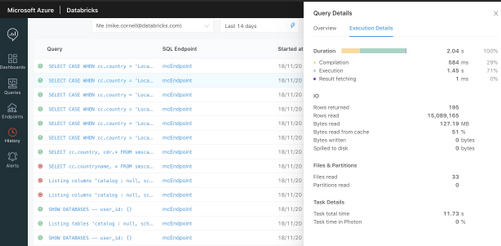
As customers continue to standardize on data lakes and the Lakehouse architecture, users expect to be able to query the data in their data lake using SQL. In fact, approximately 41% of all code executed on Azure Databricks is SQL. The SQL Analytics service in Azure Databricks was created to provide SQL users with a familiar SQL-editor experience as well as provide optimized BI connections for querying and analyzing data in the data lake.
Below are some of the key features in the SQL Analytics service in Azure Databricks:
For more information about the SQL Analytics service in Azure Databricks, check out the docs page and the Databricks launch blog. The SQL Analytics service is currently in Public Preview. Contact your Azure Databricks representative to request access. Get started with Azure Databricks by joining an Azure Databricks workshop.



Recent Comments