This article is contributed. See the original author and article here.
Introducing the first AI copilot experience for Dynamics 365 Commerce
For Merchandisers tasked with managing large product catalogs, the creation of high-quality “enriched” marketing content for their digital commerce channels can be a daunting and labor-intensive process. Especially if the Merchandiser is untrained in the creation of marketing copy. Yet it is incredibly important to have “enriched” content at the product level, where it can increase customer engagement, improve customer understanding, and drive natural search engine ranking, which all lead to higher conversion rates.
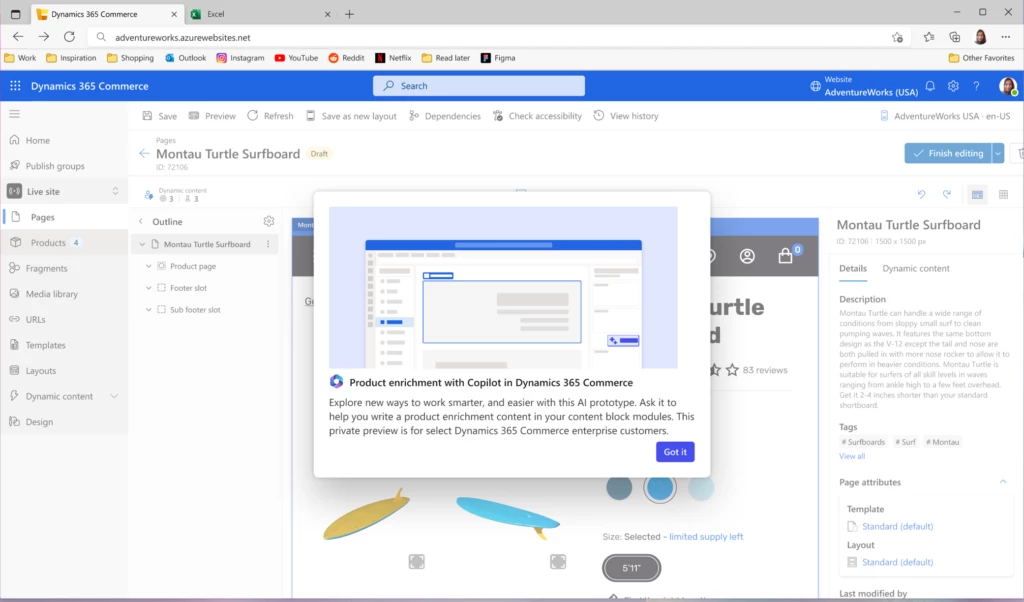
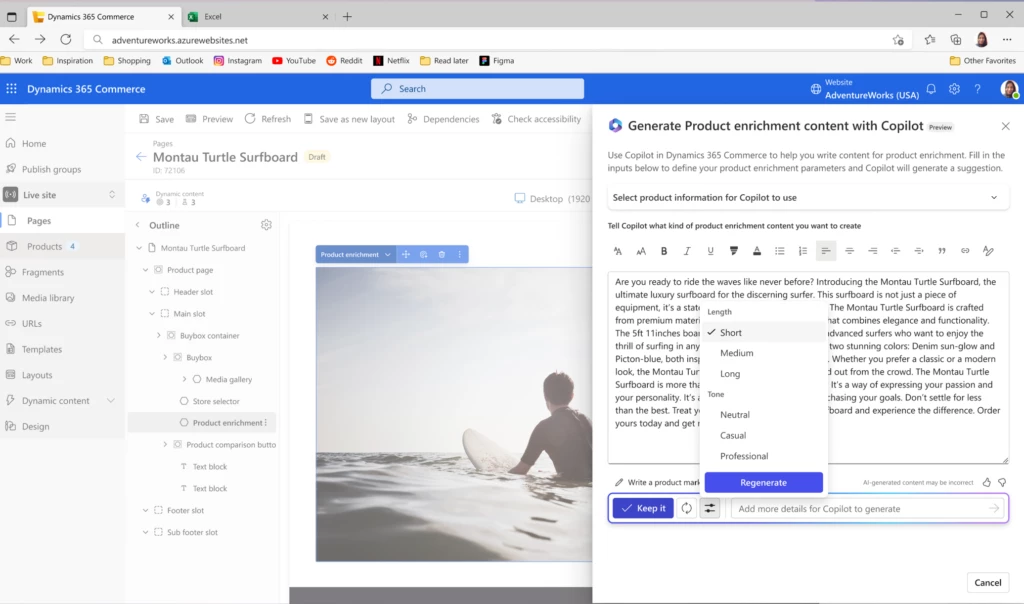
It is for this reason that Dynamics 365 Commerce is thrilled to announce the preview of ‘Commerce Copilot’, which provides a fast and efficient way of authoring product enrichment content for your B2B and B2C digital commerce websites.
Use Commerce Copilot to jump-start the creative process by first selecting a tone, configured by you, that aligns to your brand, like “adventurous”, “luxurious” or “bold”. Then select an audience choice from choices managed by you, like “sports enthusiast” or “college graduate”. Copilot will then use these prompts to craft compelling and engaging content that makes use of your existing product information like name, description, attributes, price and more!
You can further augment your newly enriched content with key product highlights or tune it to be optimized for search engines. But you always remain in control and have the ability to review and modify any content before it is published!
The Commerce Copilot for enriched product content is now available as a public preview for digital commerce customers based in United States. Additional market availability will be enabled soon.
This article is contributed. See the original author and article here.
AI is ready to support work—the question is: What will your business do with it?
Join us at the Microsoft Business Applications Launch Event on October 25 and explore how to create an AI-powered business that helps people and teams be more productive, solve problems quickly, and focus more energy on building revenue.
This will mark our tenth Business Applications Launch Event—a milestone in our commitment to business app innovation, our customers, and our partners. But we’re just getting started. To see what’s next—and what it means for your organization—you’ll hear directly from Microsoft leaders about their vision for AI, customer service, enterprise resource planning (ERP), and low-code solutions.
The latest AI in Microsoft Dynamics 365 Sales that provides relevant recommendations, summarizes data, retrieves information, and performs actions within the flow of work.
Advanced Copilot capabilities in Microsoft Dynamics 365 Customer Service that streamline agents’ workspaces, let them see transcripts of live chats and voice calls in their inboxes, and allow them to respond to customers quickly with the right information.
New Microsoft Sales Copilot features that help compose emails, update customer relationship management (CRM) records, recap meetings, and offer real-time tips to help sales teams close more deals.
Enhanced automation in Microsoft Dynamics 365 Finance to help handle accounts payable and bank statements, complex tax scenarios, and e-invoicing requirements in more markets.
New Copilot features in Dynamics 365 Customer Insights to help marketers quickly create memorable customer experiences using whole new levels of personalization for emails, images, and layouts.
Plus, learn about updates for Microsoft Dynamics 365 Supply Chain Management, Microsoft Dynamics 365 Commerce, and Microsoft Dynamics 365 Human Resources—all ready to help your employees be more productive, build customer loyalty, and drive meaningful growth. You’ll also hear from Charles Lamanna, Microsoft Corporate Vice President of Business Applications and Platforms, about what’s driving innovation today. Then catch some of the newest AI capabilities in action, with demos led by the people behind the 2023 release wave 2, offering expert guidance on how these updates will help you:
Improve insights, save time, and fuel creativity with the latest AI-powered solutions.
Empower your employees to focus on revenue-generating work and avoid repetitive tasks with automation.
Connect people, data, and processes across your organization using modern, AI-enhanced collaboration tools.
Insights on putting AI to work for you
The Business Applications Launch Event is more than our chance to showcase hundreds of new features and updates. It’s also a great opportunity for you to learn expert tips on how to apply these new technologies to some of your business’ biggest challenges. And if you have questions about new features, the role of AI at work, the evolution of copilots, or what’s ahead for business apps, get them answered by experts—we’ll be hosting a live Q&A chat at the end of the event, so be sure to stick around.
It’s been inspiring to see all the new features that the Dynamics 365 team has been working on, and we’re looking forward to celebrating 10 events’ worth of advancing business applications ahead.
This article is contributed. See the original author and article here.
This post was co-authored by Lax Gopisetty, Vice President, Global Practice Head, Microsoft Business Applications & Digital Workplace Services, Infosys Ltd.
In an age defined by single-click purchases, instant deliveries, and personalized experiences, customer expectations continue to rise, and frontline technicians are expected to meet these ever-changing demands. When customers face a problem, they want it fixed fast and right the first time. For many organizations, customer experience is both a challenge and an opportunity to differentiate from the competition.
It is no longer acceptable for technicians to operate on disparate technologies that individually are good enough to execute work orders, manage assets, and dispatch resources with real-time support. Timely resolution is key in field service, and arming frontline technicians with intuitive solutions that combine workflow automation, scheduling algorithms, and mobility can significantly enhance the customer experience. Tools that empower field technicians with timely inputs to focus on their core responsibilities and enable processes to track each work order closure, along with billing, are now becoming existential.
For example, solutions that unlock efficiencies for telecommunications providers with field service automation, empower medical device service technicians with improved downtime, maintain safe and highly automated facility management operations, and manage smart elevator service with Internet of Things (IoT)-driven field service are all recipes for greater customer satisfaction.
Dynamics 365 Field Service
Transform your service operations and deliver exceptional service.
Microsoft Dynamics 365 Field Service integration supports positive customer experiences
Dynamics 365 Field Service integrates with Outlook, Microsoft Teams, and Microsoft Viva Connections so that frontline workers and managers can create, view, and manage work orders within Outlook and Teams. This integration enhances collaboration between dispatchers, frontline technicians, and managers by enabling work order data to sync automatically between Dynamics 365 and Microsoft 365. Additionally, frontline technicians can quickly start their day with access to key workday information at a glance, with work orders visible as Tasks from the Viva Connections homepage in Teams. Dynamics 365 and Microsoft 365 empower technicians with the right information to resolve issues the first time, which adds a great deal to creating a positive customer experience.
For example, a leading energy supplier based out of the UK partnered with Infosys to establish itself as a leader in the energy-as-a-service market by offering best-in-class customer experience. The connected field service-based solution unified the capabilities of Dynamics 365 and Microsoft 365 to unlock a leaner and flexible business model that also enabled future scalability to ensure:
Better workforce management through flexible scheduling, route optimization, and quota management.
Field job execution via remote supervision, site awareness/recording, and offline mode.
Customer intimacy powered by service history management, technician visibility, voice of customer, and closed loop tracking.
Superior job outcomes powered by higher first-time resolution rates and reduced job aborts.
Connected field service helped redefine the leading energy supplier’s customer engagement model with a seamless work order management process. From streamlining work order creation, scheduling the best suited frontline technician, receiving remote expert assistance, and integrating asset management, Dynamics 365 enabled the customer to transform their field operations. Additional engagement highlights include:
Seamless migration from more than 20 legacy disparate business apps onto Dynamics 365.
Implemented core business functionalities with over 75 percent out-of-the-box feature fitment.
Six phased incremental rollouts to enable more than 1,500 field technicians and more than 600 internal users.
On track to reduce overall cost of IT operations by over 25 percent.
The leaner, AI-powered, and truly automated business, has unleashed novel revenue streams with infinite potential for the client:
Growth segment
Value delivered
Smart new connections
Manage the smart new connections—such as customer management (property developers), lead management, opportunity management, quote management, billing, consolidated billing, and disputes.
Smart field connections
Provide onsite service for smart field connections—work order management, skills management, scheduling management, capacity management, and resource management.
Electric vehicles (e-mobility)
Manage electric vehicle (EV) meter installation services—to manage the sales processes for business-to-business (B2B) customers, including installation.
This UK-based leading energy supplier is now well-positioned to drive its future growth. The organization is supported by a skilled and engaged workforce that works seamlessly with connected and leaner processes that together offer a sustainable competitive advantage.
Standardizing and automating processes through connected field service
Field Service continues to break ground into unexplored industries. Capabilities like GPS and routing, which enable timely visits and quicker resolution, are saving the day for thousands of field service professionals. They are now able to summarize completed tasks with inline Microsoft Power Apps component framework (PCF) capability.
Field service solutions must always be driven by an organization’s unique priorities, pain points, and process nuances. Partners like Infosys are co-innovating with clients to address these challenges with Microsoft Power Platform and its extensibility components. They are enabling nontechnical business users to build applications that cater to their unique requirements without the aid of IT experts.
The emergence of AI-embedded innovations like Copilot in Dynamics 365 Field Service will enhance service further. From creating work orders with the right information and assigning them to the right technicians, to equipping technicians with sufficient support to successfully complete jobs, Copilot will help streamline critical frontline tasks. These advanced functionalities will help companies genuinely standardize and automate field service processes.
Organizations competing in a market with high turnover are using mixed reality-based Microsoft Dynamics 365 Guides for remote support and collaboration. This results in accelerated training with context and seamless transfer of information, insights, and skills, which help in lowering overall costs.
Technology is key to building a scalable and efficient field service operation. However, a significant portion of success still rides on the technician who is delivering the service. So, it is imperative for service organizations to unify field operations, frontline technicians, and customers with connected digital platforms, to unlock value—because service is no longer a cost center for organizations.
Learn more about Dynamics 365 Field Service
Learn how Dynamics 365 Field Service can help you transform your service operations and deliver exceptional service. And read how Copilot in Dynamics 365 Field Service can accelerate service delivery, boost technician productivity, and streamline work order management with next-generation AI. Watch the video below to see it in action.
This article is contributed. See the original author and article here.
Field Service Mobile is a Dynamics Power Platform Model Driven Application. This offers several advantages to the mobile application, including re-use of forms and views and consistency of user experience while accessing on the web, mobile, or tablet.
The Power Platform also offers significant customization opportunities, both when customizing forms, adding business logic or integrations with other Power Platform capabilities like Power Automate, Canvas, or PCF Controls. These capabilities make the Field Service Mobile application uniquely positioned to streamline your workflows, improve data quality and enhance your user experience.
Customization Best Practices
Customizing the Field Service Mobile application is a balance of enabling an ideal workflow for your business and providing the best possible user experience for your Frontline Workers. This balance must consider data availability of the mobile workforce, along with application performance and the overall user experience.
In this blog post we’ll share some of the key best practices when evaluating and implementing customizations.
Use the default Field Service Mobile app module. The out-of-the-box Field Service Mobile app module has all the basic features and functionality your frontline workers require to get started with Field Service. Custom app modules can be used with the Field Service Mobile application but will not include some of the internal business logic such as Travel Calculations. Another advantage of using the default app module is that it will automatically receive product updates over time, while additional effort would be required to merge the same enhancements into a custom app module.
Avoid using HTML Web Resources. Web Resources have many limitations on a mobile application when working with offline mode. It is highly recommended to use PowerApps Component Framework (PCF) controls, which are a better option for a more consistent cross-platform experience without the same limitations.
Tip: If your situation necessitates the use of custom web resources, use code splitting and check code coverage in a browser to ensure only the minimum amount of code is loaded. Package shared code in their own shared web resource library instead of duplicating in each consuming resource.
Tip: If using Offline mode, be sure to test your customizations on the mobile device in Airplane mode and variable cellular network conditions.
Handle errors properly and present the right message to end users. When implementing customizations, it is very important to handle edge-cases and errors in a way that provides a positive experience for your end users. This is especially true for async calls and network errors, where the Frontline Worker may have different results depending on devices network state.
Use XRM Web APIs instead of XHR/Fetch calls directly to the server. XRM Web ApIs will route correctly to the local offline database or server based on offline configuration and network state of the app.
Making direct server calls from the mobile application is not recommended as they can be unreliable and fail unexpectedly with poor network conditions. By ensuring that all dependencies are in the offline data store by configuring the Mobile Offline profile with the correct data necessary for your user scenarios.
If server calls are necessary, build an appropriate user experience to handle cases when the call may fail, or response is slow to return from the server. Making the network calls trigger based on explicit user actions, with a interface giving visual cues that a network call is happening and a response will be needed, will provide a better experience for the Frontline Worker.
If using onload/onchange/command handlers and fetching data using XRM WebAPis, make sure you test the impact of those calls on application performance while in various network conditions.
Optimized resources for bandwidth. If adding custom JavaScript or images, be sure to optimize files which are downloaded to the device. We recommend to always trim and compress your JavaScript files and using SVG images instead of PNG to save bandwidth.
Declare solution dependencies between commands, web resources, and strings. Dependencies must be used to make a Web Resource available offline. For example, when an entity/form is enabled for offline usage, the JavaScript which is attached to the form for onload/onsave, would also be available offline. For other files such as localization XML files, they need to be added as a dependency to your JavaScript so these XML files will also be available offline. Learn more about web resource dependencies.
Be aware of timing issues or race conditions. This is especially relevant when dealing with async calls. Test by adding network latency and CPU throttling to ensure a positive experience in real-world conditions.
Use Business Rules as first choice over custom client-side JavaScript. Business rules provide a mechanism to implement business logic with some guardrails to avoid some of the complexity that comes with custom JavaScript code. Please be aware there are some limitations with business rules, such as cases when OnChange events are required. It is good to evaluate your business scenarios and choose the best path for your organization.
Tip: If using JavaScript-based business logic, make sure you fetch minimal data and avoid joins/sorting if not needed.
Leverage out of box controls. As much as possible use out of the box controls, such as the Booking Calendar Control, which will be easier to support and receive product enhancements over time.
When enabling offline mode, make sure forms and views are aligned with configuration of the mobile offline profile. The individual configuring the forms and views should work closely with the person who will configure the mobile offline profile to ensure tables which are enabled on views will be available while running in offline mode. Be sure to include error handling if there are instances when an entity will not be available while offline.
Leverage tools to debug customizations. Debugging is important when introducing JavaScript customizations to your experience. Debugging a mobile app has unique challenges versus a web browser. This is especially true with capabilities like Offline mode are enabled on the mobile app. To meet this need, leverage debugging tools shipped with the Android and Windows model driven apps. Detailed steps to debug are found in Power Apps documentation.
Customizing a model driven application can be a powerful way to enhance the user experience and functionality of your solution. However, it also requires careful planning and testing to ensure optimal performance, usability, and compatibility. In this blog post, we have shared some best practices and tips on how to customize your model driven application effectively. We hope you have found this information useful and that you will apply it to your own projects. Thank you for reading and happy customizing!
This article is contributed. See the original author and article here.
In the fast-paced world of customer service, efficient outbound calling communication is the cornerstone of success. Dynamics 365 Customer Service has long been a trusted platform for managing customer interactions. With the upcoming October release, we’ve listened to your feedback and delivered a significant enhancement that is set to transform outbound dialing.
Currently, modifying the dialed number proves to be cumbersome given the inability to edit a digit. Additionally, the absence of number validation increases the risk of agents dialing incorrect numbers. This is especially true in the event of missing country codes.
In the October release, you will find a more intuitive, streamlined, and efficient outbound dialing experience.
Editing flexibility
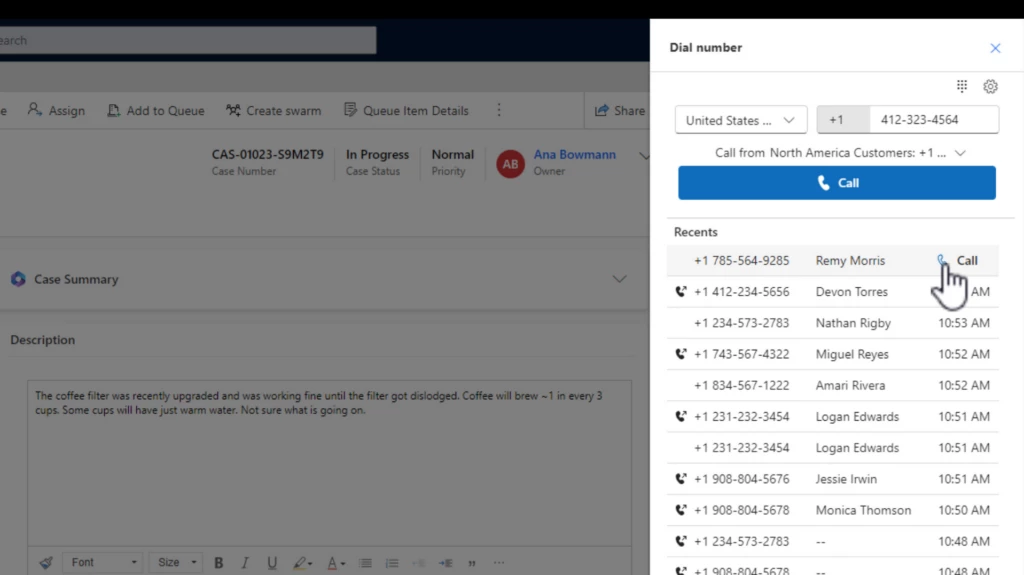
In the new outbound dialing experience, agents can continue to initiate calls from customer records. What’s changed? Now, modifying the dialed number is a breeze. The enhanced interface empowers agents to effortlessly edit the number before placing the call. This new experience also introduces auto-formatting, automatically structuring the number as agents type it. This functionality not only reduces errors but also highlights incomplete or invalid numbers. This newfound flexibility ensures accurate and effective outbound calling experiences.
Smart use of screen real estate
The improved interface is designed to optimize the available screen space. By default, the keypad is hidden, given most agents prefer to use the keyboard, which also allows for a clearer view of essential information. However, should agents need to utilize the keypad, it’s just a click away.
Recall recent numbers
Agents now have the power to swiftly call back recent numbers. With the ability to access the last 20 numbers dialed or received calls, agents can easily reconnect with customers. This feature is a time-saver and helps maintain a seamless communication flow.
Country and region support for outbound dialing
A significant advancement for administrators and agents alike is the support for specific countries and regions. Administrators can customize outbound profiles to allow calls only to selected countries or regions. This prevents accidental calls to unintended destinations, reinforcing precision in customer communication.
Intuitive profile selection and profile matching
Agents with multiple outbound profiles will appreciate the intuitive profile selection process. The dropdown menu displays the collective list of supported countries and regions from all profiles. Simplifying the process even further, agents need only enter the number they wish to dial. The system intelligently identifies the outbound profile supporting the dialed number’s country or region. This feature is coming as a fast follow in October.
The October release of Dynamics 365 Customer Service brings an outbound dialing experience with enhanced editing capabilities, smarter interface design, call history, number auto-formatting and validation, and refined country and region support. Agents can confidently and efficiently connect with customers, bolstering the delivery of exceptional customer service.
To preview this feature, administrators should update the Settings definition for Enhanced outbound dialer experience to set the environment value to Yes. To learn more, see Call a customer in the voice channel | Microsoft Learn.
This article is contributed. See the original author and article here.
We are re-imagining the way employees come together with Microsoft Mesh, a new three-dimensional (3D) immersive experience and, we are excited to announce Mesh public preview availability in October.






Recent Comments