This article is contributed. See the original author and article here.
In a 2023 commissioned Total Economic Impact™ study, Forrester Consulting found that Teams Premium helped organizations save time, improve security, and reduce costs—all contributing to a projected return on investment (ROI) of 108 to 360 percent over three years. Today, we’re excited to share new advanced collaboration capabilities that help you meet the challenges of the new way of work.
This article is contributed. See the original author and article here.
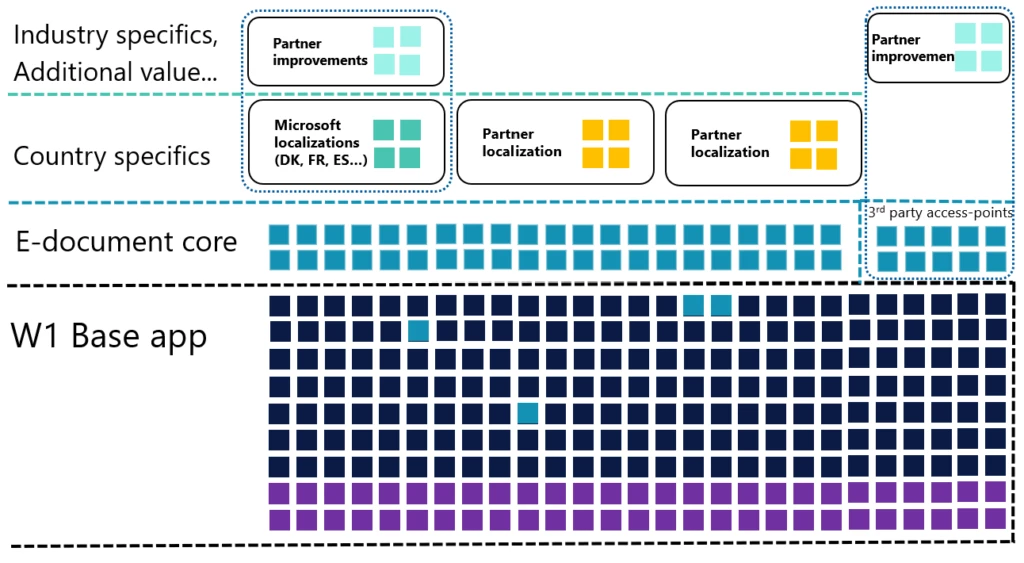
Business Central 2023 release wave 2 introduces a new global feature – Electronic Documents. Microsoft has crafted this as a foundational framework, providing a robust base for catering to localized requirements. This innovative approach allows Microsoft to efficiently deliver tailored localization apps for some countries. Furthermore, partners can leverage this model to craft their custom localizations. Given the unique e-document formats and distinct integration services prevalent in various countries, these localization apps are indispensable.
Why did Microsoft deliver it?
Before we delve into the world of E-Documents within Business Central, let’s acquaint you with an important new acronym – CTC, which stands for Continuous Transaction Control. This term signifies the imperative ‘real-time’ invoicing reporting and validation mandated by authorities. CTC encompasses a suite of digital control mechanisms to enhance tax collection and curb tax fraud. Electronic Invoicing stands as a key component of CTC, a model increasingly embraced by numerous countries.
We can easily conclude – this approach will become mandatory in many countries if it hasn’t already. The prospect of different solutions for each country poses challenges. Hence, we’ve developed one global extendable solution as an app, simplifying support for diverse countries.
Exploring the Scope of E-Invoicing Models
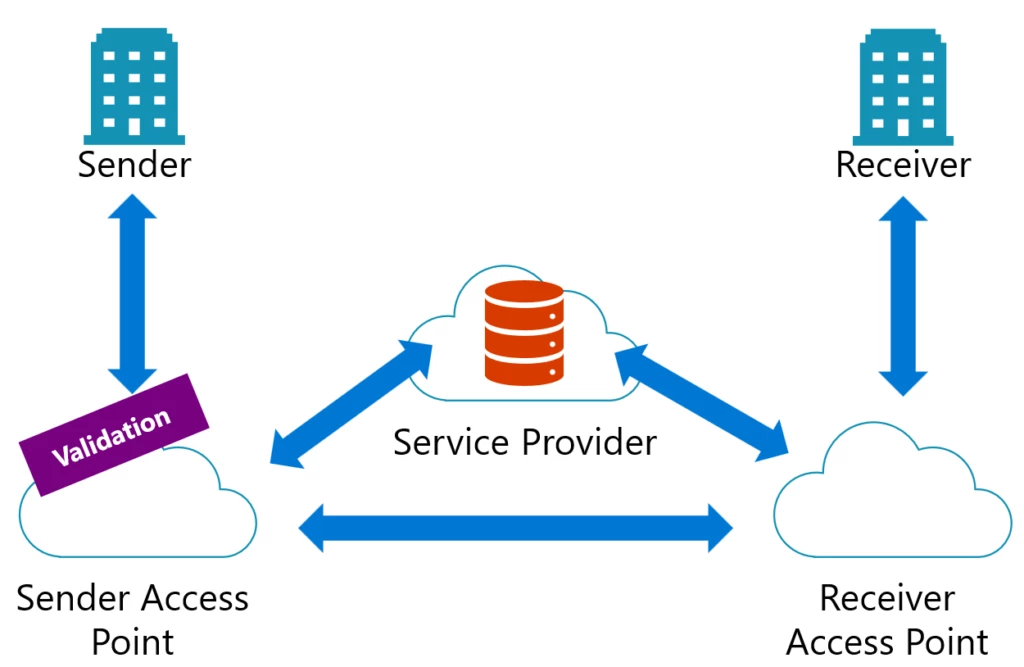
Understanding the landscape of E-invoicing can initially seem straightforward – creating an electronic file and transmitting it. However, the reality is more intricate. E-invoicing encompasses various models, including the 2-corner, 3-corner, and 4-corner frameworks. Each country retains autonomy to determine its preferred approach. Moreover, even in non-mandatory scenarios, businesses often opt for E-invoicing to streamline communication.
Our solution encompasses all the corner models mentioned here and facilitates additional messaging capabilities between access points, providing a comprehensive E-documents framework.
How do E-Documents Operate in Sales and Purchases?
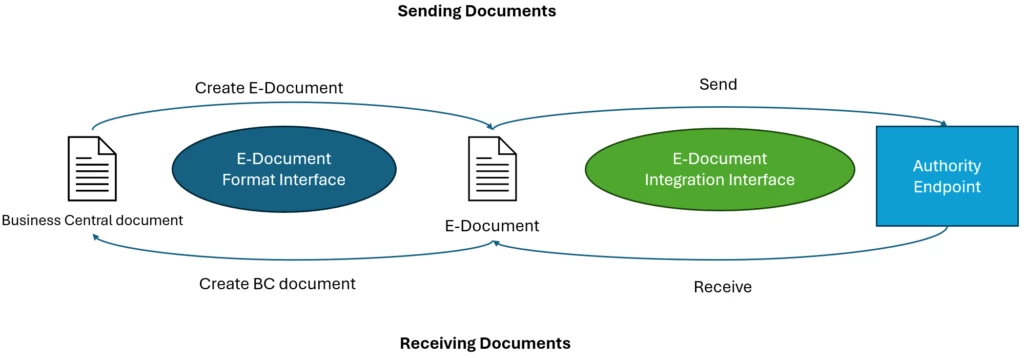
E-Documents in Business Central facilitate seamless interaction in both sales and purchase processes. It’s a two-way system, enabling the transmission of electronic sales documents to customers while also receiving electronic documents from vendors. These electronic documents have their own distinct lifecycles, which may not always align with invoice timelines. To accommodate this, we’ve introduced a new entity, the E-Document, linked with the original document in Business Central. This entity hosts a unique information set, including statuses, logs, and potential error notifications or warnings.
Once the system is configured, posting a sales document triggers the automatic creation of an E-Document. Depending on your setup, it’s promptly dispatched to the designated service. You gain complete visibility into its status and can take additional actions as needed.
In the case of incoming purchase electronic documents, you have the flexibility to upload them to Business Central manually. However, if your access-point provider provides a document delivery service, you can configure a Job Queue for automated downloads and E-Documents creation. Here’s the magic: if you’ve mapped vendors’ items with yours through item-references or G/L accounts and there are no errors, the system will effortlessly generate purchase invoices with all the essential details. Your task? Just review and post them.
How to Expand This Functionality?
This framework has been created to speed up your productivity when building electronic invoicing applications by taking care of all the infrastructure work, like subscribing to different posting routines, writing custom mapping logic, logging, error handling, and running jobs in the background.
The framework is designed to improve your productivity in developing electronic invoicing applications. It handles essential infrastructure tasks such as subscribing to various posting routines, custom mapping logic, managing logs, handling errors, and running background jobs. This empowers you to direct your attention towards the specific electronic invoicing logic, including:
Exporting/Importing documents from Business Central to the local format mandated by the authority.
Establishing seamless integration with the authority’s endpoint for sending and receiving electronic documents.
To create your local E-Document:
Create a new extension adding dependency to the E-Document Core application.
Implement a document interface based on the specification mandated by the local authority, using designated endpoints for the sales: Check, Create, and CreateBatch, and GetBasicInfo and PrepareDocument when you expect to receive documents.
Implement an integration interface to send/receive documents to the local authority automatically.
Enhance user experience by implementing a setup wizard that gathers all necessary configuration details and obtains customer consent for data transmission. This streamlined process ensures a smoother onboarding experience for users.
More details with examples how to extend existing E-Document Core application can be found here.
This article is contributed. See the original author and article here.
Digital contact centers need to create support cases automatically when they receive incoming emails, phone calls, and messages from customers. They rely on this automation to avoid manual efforts in creating cases so they can address customer issues promptly. The activity monitor view helps diagnose automatic case creation issues and ensures this automation runs smoothly.
Today, Dynamics 365 Customer Service offers automatic record creation rules for creating support cases automatically based on the conditions defined by administrators. However, an incoming work item may not automatically convert to a case for multiple reasons. The activity monitor tool helps administrators diagnose those issues and provides the reason a work item was not converted to a case. Once they know the reason, administrators also need the system to provide them with suggestions on how to resolve the issues. Recent enhancements to the activity monitor tool provide recommendations to administrators with steps to avoid future case creation issues by making changes to the rule configuration.
Now, administrators can view recommendations for each activity monitor event to see why case creation was skipped or failed and steps to resolve the issue. The activity monitor form for each event contains the resolution steps and direct links to the rule settings that they should change. This helps administrators diagnose and self-solve their issues quickly.
Navigate to the activity monitor
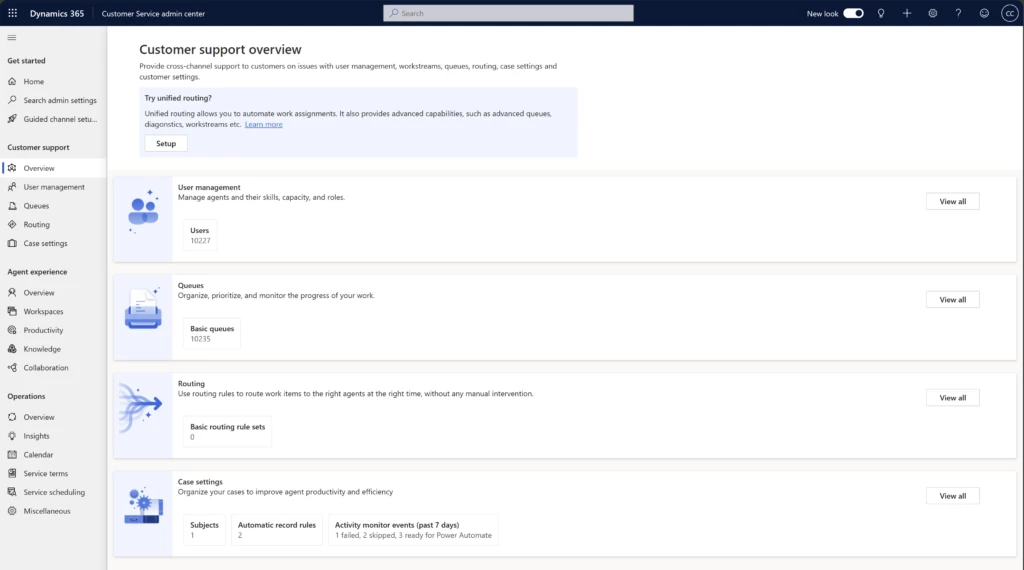
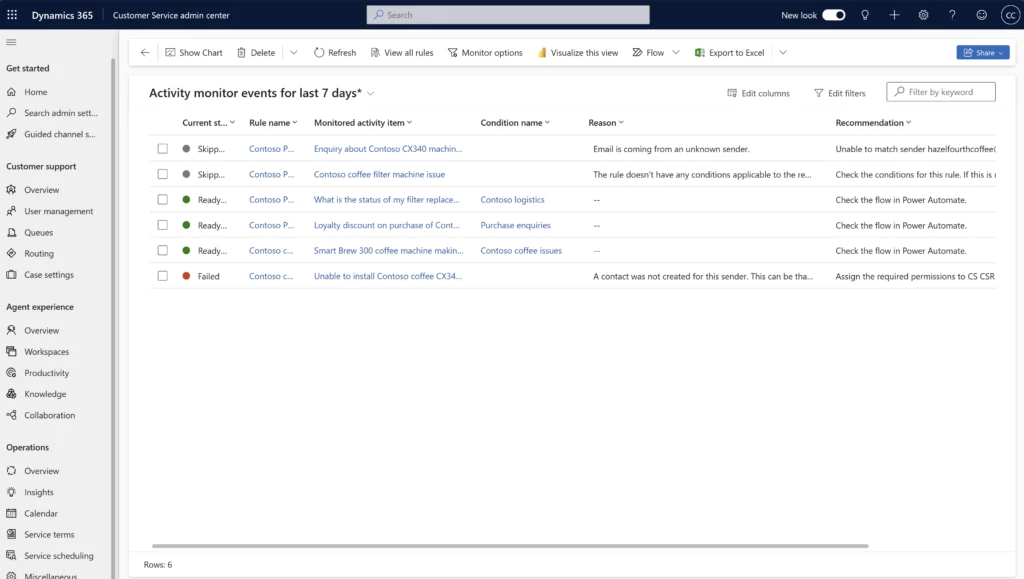
In the Customer Service admin center, administrators can view the status of events for the past 7 days. They can see skipped, failed, and successfully processed events by automatic record creation rules with the status as Ready for Power Automate.
From here, administrators can navigate to the Activity monitor events for last 7 days view. This provides a grid view of the events processed in the past 7 days. It provides details like current state, rule name, and condition. Additionally, it contains the reasons and recommendations to resolve the issues if the state was skipped or failed. Admins can also view the Recommendations column in the existing All activity monitor events view.
View the form for a specific activity
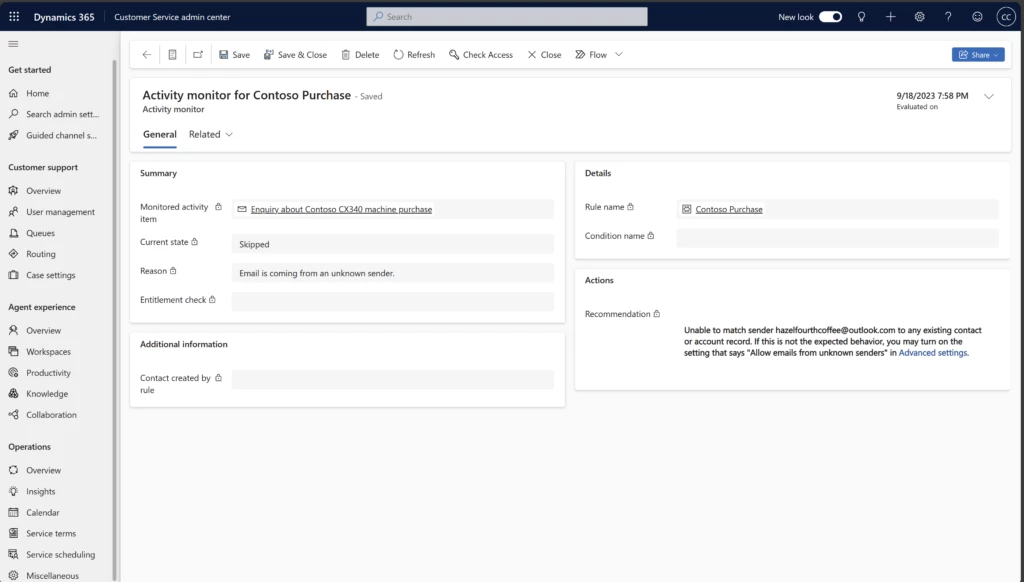
Administrators can double-click on any part of the event record to navigate to the Activity monitor form. The form shows the Actions section with the Recommendations field. This field explains why case creation was skipped or failed and the steps to take to resolve these issues. Some contain direct links to the Advanced settings of the relevant automatic record creation rule with suggestions for configuration changes. Administrators can directly navigate to these settings and make the required changes. Once they make the changes, any future work items that use automatic record creation rules will convert to cases. Note that the changes will not impact the work items sent to Dynamics before the admin changed the configuration.
This article is contributed. See the original author and article here.
The work hour calendar multiple recurrence feature is a new URS functionality that allows you to create and manage work hour calendars with more flexibility and efficiency. You can now define multiple recurrence patterns for your work hour calendar events, such as daily, weekly or monthly, and specify different start and end dates for each pattern. This way, you can easily accommodate different work schedules, holidays, and special events in your organization.
The new multiple recurrence feature in the upcoming V2 work hour calendar can help you to:
Add multiple recurrences within a single day, to represent different instances of recurring shift work e.g. morning, afternoon and evening shifts in a single day with different recurrences
Have overlapping recurrences within a week e.g. A recurrence for Mon and Wed, and a recurrence for Tues. Previously the Tuesday recurrence would have deleted the Mon and Wed entries; now they can coexist alongside each other.
Input work hour events in different timezones, which is helpful for workers who travel. Previously, the calendar supports only one timezone across all work hour calendar events.
What are work hour calendar events and why are they needed?
Work hour events define when a resource is available to perform work, and they exist as 2 types:
Occurrences (one-time events) are work hour events that happen only once on a specific date and time. Occurrences always take priority over Recurrences. E.g. team cohesion days, seminars or emergencies.
Recurrences (repeating events) are work hour events that repeat on a regular basis according to a pattern and frequency. E.g. rotational shift work, weekly cadences, monthly client visits
Occurrences and recurrences can be used today in URS to define different types of work hours, such as working hours, non-working hours, breaks and time off.
How did URS handle work hour events before (V1 work hour calendar)?
Before this update, only 1 recurrence event is supported per calendar day, for a given date span.
Scenario 1, Jane is a doctor who does shift work at various clinics:
The old work hour calendar does not support more than 1 work hour event per calendar day, so this scenario would not be supported
Scenario 2, John is a utilities engineer with different work hours on alternating days:
Recurrence 1: 8am-5pm UTC, repeats Mon, Wed and Fri
Recurrence 2: 6am-8pm UTC, repeats Tues and Thu
Adding both recurrences was not supported in the old work hour calendar; Recurrence 2 would have deleted the Mon, Wed and Fri entries from Recurrence 1 for a given date span.
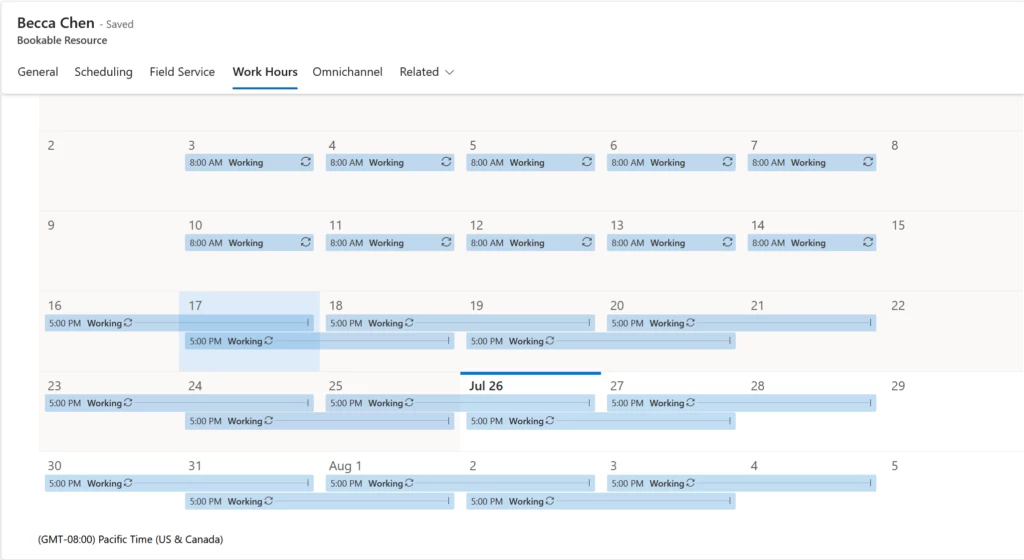
Scenario 3, Becca is a travelling salesperson who works in both Seattle and Singapore:
Recurrence 1 (work in Seattle): 8am-5pm PT, repeats all days of the week
Recurrence 2 (work in Singapore): 8am-5pm SGT, repeats all days of the week
Adding both recurrences of different timezones was not supported in the old work hour calendar.
How does URS handle work hour events now (V2 work hour calendar)?
The new V2 work hours calendar now follows the following logic:
Occurrences have a higher priority than Recurrence rules for a given calendar day. So if there were two rules (one occurrence and one recurrence) on the same day, the daily occurrence or time-off occurrence will take the priority over the weekly recurrence for the entire calendar day.(Unchanged from previous)
When there are multiple recurrences within the same date span:
If the times do not intersect, they will both remain on the calendar
If the times conflict, the rule that was most recently created/modified will be the one that is considered for the resource’s calendar. All other conflicting rules in the date span will be removed. In the event that some recurrences have conflicts on some dates but not on others, the rule will be spliced to retain the non-conflicting events, while removing the events on dates that do have conflicts.
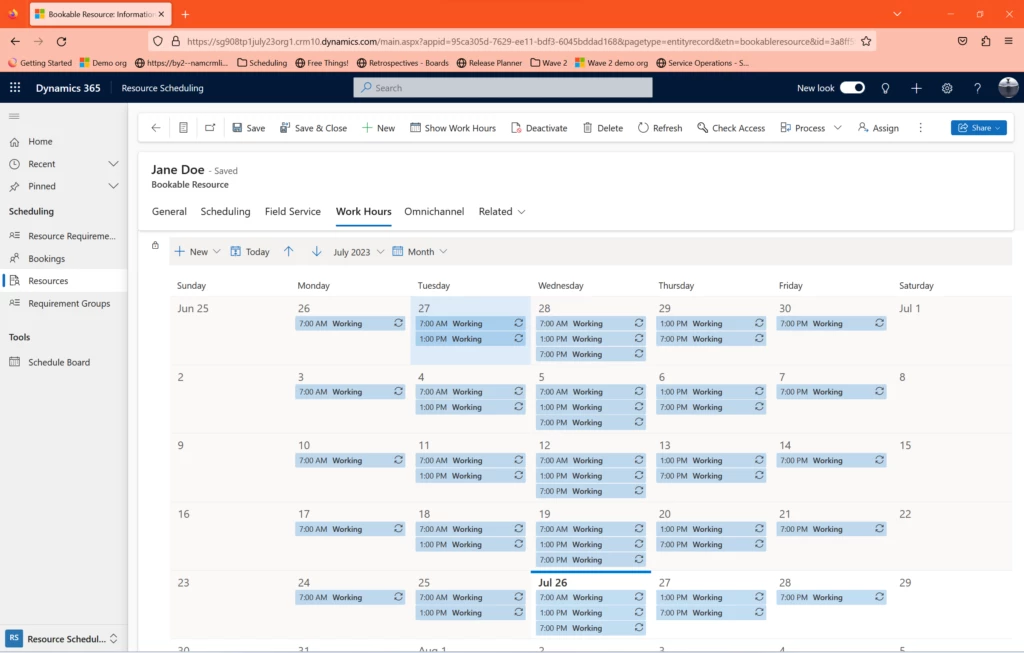
Scenario 1, Jane is a doctor who does shift work at various clinics:
Create Recurrence 1, Recurrence 2, then Recurrence 3 in succession. All will now show up on the calendar as seen below
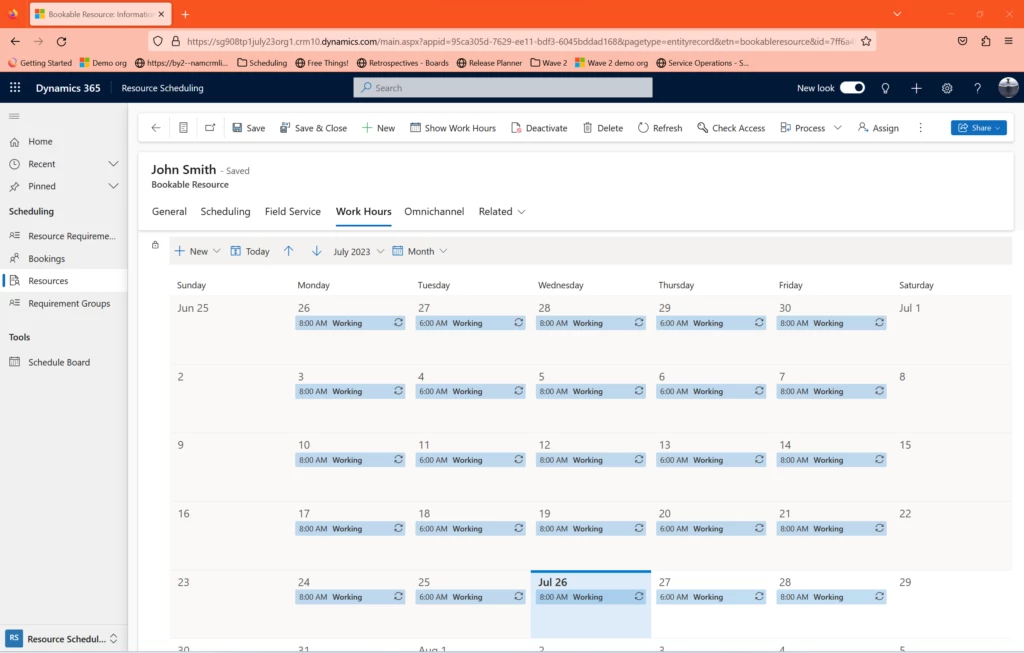
Scenario 2, John is a utilities engineer with different work hours on alternating days:
Recurrence 1: 8am-5pm UTC, repeats Mon, Wed and Fri
Recurrence 2: 6am-8pm UTC, repeats Tues and Thu
Create Recurrence 1, then create Recurrence 2 in succession. Both will now show up on the calendar as seen below:
Scenario 3, Becca is a travelling salesperson who works in both Seattle and Singapore:
Recurrence 1 (work in Seattle): 8am-5pm PT, repeats all days of the week
Recurrence 2 (work in Singapore): 8am-5pm SGT, repeats all days of the week
As seen above both Seattle and Singapore work hours are both easily expressed on the V2 work hours calendar. Note that the Singapore work hours are shifted to match the dispatcher’s Timezone i.e. Pacific Time – the timezone of the calendar itself is visible at the bottom left of the calendar, and the dispatcher can be altered this in <Personalization Settings>.
What else has changed/remains unchanged?
Previously in the V1 Work Hour Calendar, only 1 recurrence is allowed per calendar day, thus adding any new recurrences will completely override the work hour events for that calendar day.
With the V2 Work Hour Calendar, the previous work hour events will only be overridden if there is a direct conflict in time between the 2 recurrences.
For instance, Joel is an equipment technician with the following work hours:
Recurrence 1 (regular work hours): 9am-5pm PT, repeats all days of the week
Recurrence 2 (temporary work hours): 1-9pm PT, only from Jul 10-14
Create Recurrence 1, then create Recurrence 2 in succession. As seen below, Recurrence 2 overrides Recurrence 1 for the Jul 10-14 period because there is a direct conflict between the recurrences. All other work hour events remain.
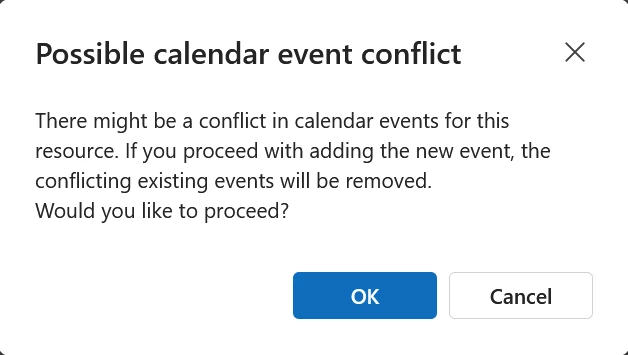
The following dialogue will now appear whenever a new work hour event is added, in order to remind users of this behavior:
Occurrences remain unchanged from the previous V1 calendar i.e. Occurrences always take priority over Recurrences and will override recurrences for the entire day.
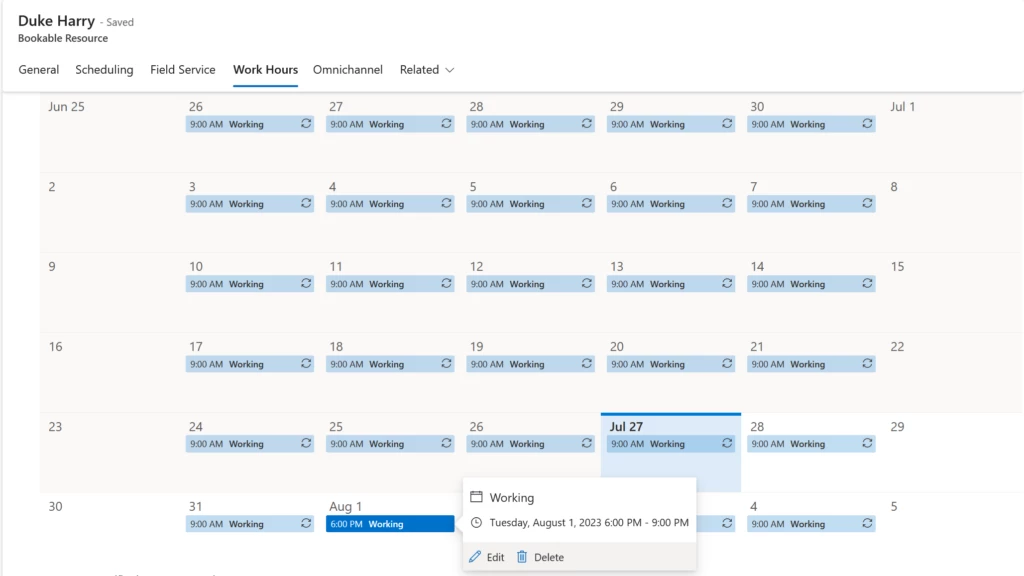
For instance, Duke is an equipment technician with the following work hours:
Recurrence 1 (regular work hours): 9am-5pm PT, repeats all days of the week
Occurrence 1 (team cohesion): 6-9pm PT, only on Aug 1
Create Recurrence 1, then create Occurrence 1 in succession. As seen below, Occurrence 1 completely overrides all other work hours events for the Aug 1 calendar day even if there is no direct collision between the Recurrence and the Occurrence.
When will the V2 Work Hour Calendar be available, and how can I get my hands on it?
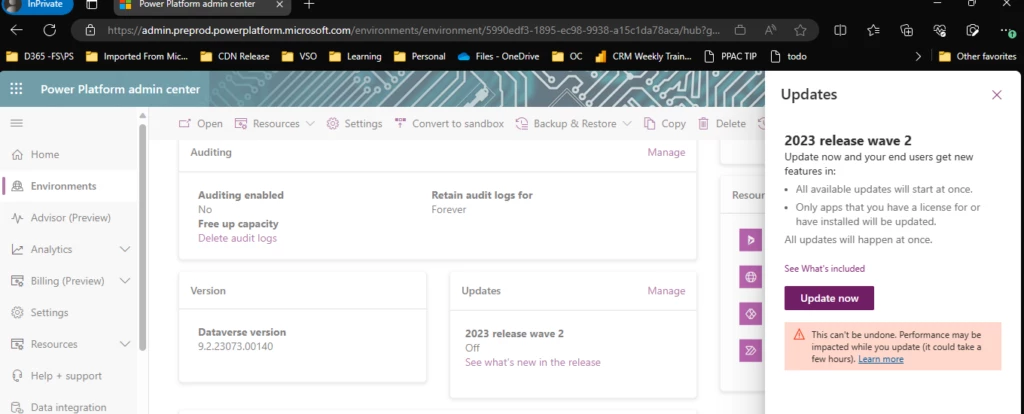
The V2 Work Hour Calendar will be available early-September 2023 in our Early Adoption Wave 2 update. You can opt in through Power Platform Admin Center, as seen below:
How can I find out more?
If you want to learn more about the new work hour calendar multiple recurrence feature, you can:
We hope you enjoy the new work hour calendar multiple recurrence feature and find it useful for your business needs. We appreciate your feedback and suggestions on how to improve our products and services. Thank you for choosing Dynamics 365!
This article is contributed. See the original author and article here.
We’re excited to announce a new AI-powered Skills in Viva service that will help organizations understand workforce skills and gaps, and deliver personalized skills-based experiences throughout Microsoft 365 and Viva applications for employees, business leaders, and HR.
This article is contributed. See the original author and article here.
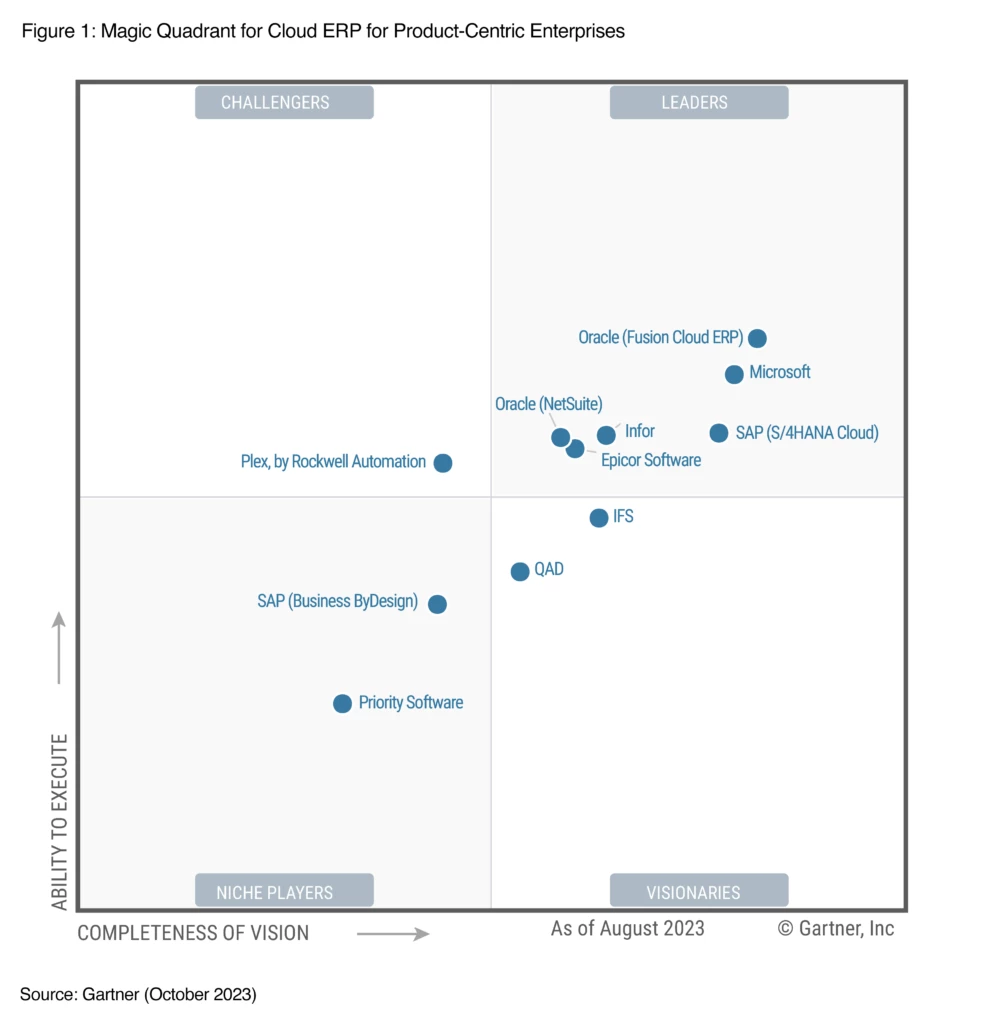
We are excited and honored that Gartner has recognized Microsoft as a Leader in their 2023 Magic Quadrant™ for Cloud ERP for Product-Centric Enterprises.* This evaluation of Microsoft was based on specific criteria that analyzed our overall Completeness of Vision and Ability to Execute. This is the third year in a row that we’ve been recognized as a Leader.
Agile enterprise resource planning (ERP) system for new ways of working
The way we do business has fundamentally changed. New business models are disrupting the way companies sell products and services, blurring industry lines and transforming customer experiences. ERP systems need to evolve from mere systems of transaction to systems of reasoning, offering their users prescriptive actions that they can take in their functional areas to accelerate growth.
Microsoft Dynamics 365 has already been helping thousands of organizations optimize finance and supply chains to create a connected enterprise by infusing automation and analytics powered by AI into the various ERP processes. Now, with Dynamics 365 Copilot in our ERP portfolio included in Microsoft Dynamics 365 Supply Chain Management, Microsoft Dynamics 365 Finance, and Microsoft Dynamics 365 Project Operations, we can enable every person in every organization to be more productive, collaborative, and deliver high-performance results.
For instance, with Copilot, organizations can supercharge productivity of procurement professionals and collections agents. Procurement professionals can efficiently handle purchase order changes at scale and assess the impact of changes downstream to production and distribution before making the right decision. Copilot enables quick collaboration with internal and external stakeholders that brings relevant information into Outlook and Microsoft Teams using natural language to meet customer and partner needs.
Collections managers with quick access to credit and payment history can prioritize and personalize customer communication and increase successful collection rates while proactively keeping customers in good standing. With Copilot, project managers can rapidly create new project plans for new engagements in minutes, automate status reports, identify risks, and suggest mitigation plans on a continuous basis, saving a significant amount of time, preventing project delays and budget overruns.
At Microsoft, we are fully committed to revolutionizing the future of ERP systems by harnessing the power of intelligent, composable technologies. The ERP portfolio from Dynamics 365, powered by generative AI technology, has the ability to speed time to insight, intelligently automate processes, and foster productivity ensuring that organizations can stay ahead of their competition in an increasingly complex business landscape.
Cloud-native ERP systems on a composable platform
One of the key strengths of Dynamics 365 Supply Chain Management and Dynamics 365 Finance is their extensibility. The ERP portfolio is built on a composable platform, making it easy to extend the solution with Microsoft Power Platform, providing low-code tools like Microsoft Power Apps and Microsoft Power Automate.
Where ERP customizations were once a heavy, time-consuming task, these tools empower businesses to customize their solutions and build apps with a modern user experience so that they can adapt to their bespoke industry specific needs and end users can work the way they want. Furthermore, companies and users can leverage prebuilt customizations and industry-specialized solutions from our ISV partner network to help speed development even further.
One of our customers, Nestlé, chose Dynamics 365 as the preferred platform for agile and speedy business system requests for mergers and acquisitions (M&A) activities. Nestlé needed business applications that would provide flexibility to adapt to different business models across geographies that could be reused multiple times. The company needed rich out-of-the-box features that could be extended with low-code/no-code capabilities. With Dynamics 365, Nestlé was able to create reusable strategies and blueprints for migrating business data and operations that would enable faster and more efficient acquisitions and divestitures easily with limited disruptions to customers and employees. This also helped them adhere to compliance, security, and data privacy regulations effectively. In just four short months after the project kicked off, Nestlé went live with Dynamics 365 Finance, Supply Chain Management, and Commerce.
AIM for the future with Microsoft today
In conclusion, running a business on Dynamics 365 offers numerous benefits for organizations. From seamless integration and enhanced productivity to real-time analysis and smart decision-making capabilities, Dynamics 365 empowers businesses to thrive in today’s dynamic market. Microsoft is committed to empowering customers to take advantage of AI capabilities in every line of business.
Organizations relying on on-premises applications will struggle to compete with peers embracing these AI-powered technologies in the cloud. It is paramount for companies to migrate their critical business processes to the cloud now. That is why we introduced AIM (Accelerate, Innovate, Move) earlier. AIM offers organizations a tailored path to move critical processes to the cloud with confidence. It provides qualified customers with access to a dedicated team of migration advisors, expert assessments, investment offers, tools, and migration support.
Magic Quadrant reports are a culmination of rigorous, fact-based research in specific markets, providing a wide-angle view of the relative positions of the providers in markets where growth is high and provider differentiation is distinct. Providers are positioned into four quadrants: Leaders, Challengers, Visionaries, and Niche Players. The research enables you to get the most from market analysis in alignment with your unique business and technology needs. View a complimentary copy of the Magic Quadrant report to learn more.
*Gartner is a registered trademark and service mark and Magic Quadrant is a registered trademark of Gartner, Inc. and/or its affiliates in the U.S. and internationally and are used herein with permission. All rights reserved. Gartner does not endorse any vendor, product or service depicted in its research publications, and does not advise technology users to select only those vendors with the highest ratings or other designation. Gartner research publications consist of the opinions of Gartner’s research organization and should not be construed as statements of fact. Gartner disclaims all warranties, expressed or implied, with respect to this research, including any warranties of merchantability or fitness for a particular purpose.
**This graphic was published by Gartner, Inc. as part of a larger research document and should be evaluated in the context of the entire document. The Gartner document is available upon request from Microsoft.
Source: Gartner, “Magic Quadrant for Cloud ERP for Product-Centric Enterprises,” Greg Leiter, Robert Anderson, Dixie John, Tomas Kienast, David Penny, September 26, 2023.




Recent Comments