Announcing new Dynamics 365 capabilities at Microsoft Ignite

Announcing new Dynamics 365 capabilities at Microsoft Ignite

This article is contributed. See the original author and article here.

2020 was a call to actionfor every business. As we all move forward, our vision is to help empower businesses with digital technology that unlocks the potential to be resilient and sustainable through the next decade and beyond.

This morning at Microsoft Ignite, we are announcing new Microsoft Dynamics 365 capabilities that will help businesses adapt and evolve to elevate customer experiences, including:

  • The April preview (for North America and EMEA) of real-time customer-led journey orchestration capabilities in Microsoft Dynamics 365 Marketing, more insights from ecosystem-wide data in Microsoft Dynamics 365 Customer Insights, and real-time survey capabilities in Microsoft Dynamics 365 Customer Voice to help organizations drive personalized interactions with customers.
  • The April preview of Microsoft Dynamics 365 Intelligent Order Management, a new application that enables organizations to orchestrate and automate order fulfillment intelligently with a range of order capture and fulfillment options.
  • A powerful and seamless integration of Microsoft Teams and Dynamics 365 that includes embedded Teamscollaboration experiences in Microsoft Dynamics 365 Sales, Microsoft Dynamics 365 Field Service, and Microsoft Dynamics 365 Customer Service; enhanced digital selling tools in Microsoft Dynamics 365 Sales; and the ability for individuals to set up, promote, and report on events hosted on Teams directly from Dynamics 365 Marketing.

Be sure to watch today’s featured Microsoft Ignite sessionElevating the end-to-end customer experience with Dynamics 365for a deep dive into these additional capabilities. Also, be sure to catch up on what’s next for Microsoft Power Platform and watch the featured session at Microsoft Ignite to learn how low-code Power Platform solutions that can work together with Dynamics 365 to drive innovation and customer excellence across the organization.

Driving personalized interactions across the customer journey

Customer expectations have changed significantly. Marketing needs to expand from segment-based campaigns to moment-based marketing, from megaphone messaging to personalizing a holistic customer journey for each individual. Updates to Dynamics 365 Marketing, Dynamics 365 Customer Insights, and Dynamics 365 Customer Voice help businesses reach this goal.

We are announcing real-time customer journey orchestration capabilities in Dynamics 365 Marketing slated for preview release as part of the April release wave 1 updates in EMEA and North America. Any team driving customer experiences can engage customers in real-time based on interactions across marketing, sales, commerce, and service to win customers and earn loyalty faster. The solution enables teams to personalize experiences with artificial intelligence (AI) across digital and physical touchpoints, and build customer trust with a unified, adaptable platform.

At Microsoft Ignite, we are announcing updates to Dynamics 365 Customer Insights that power even greater insights from ecosystem-wide data and direct activation on new destinations, including Microsoft Advertising and third-party services. Deep integration with Microsoft Azure Synapse Analytics empowers organizations to build custom AI models and improve relevancy with advanced segmentation and targeting.

Direct feedback is key to growth, whether gathering employee feedback to improve company culture or continuously tracking customers’ perception of your services and products. At Microsoft Ignite, we are also announcing real-time survey capabilities in Dynamics 365 Customer Voice, enabling organizations to be agile in their collection and analysis of direct customer feedback. In addition, within Dynamics 365 Marketing, people can now use customer journeys to create automated campaigns with workflows triggered by survey responses. For example, if a customer is displeased with a specific product feature or service, the response can notify an account manager for follow-up or send a coupon by email.

The United Nations Children’s Fund (UNICEF) works tirelessly in more than 190 countries and territories to save the lives, defend the rights, and help fulfill the potential of millions of children, from early childhood through to adolescence. Private donors and volunteers who contribute their resources, effort, and influence to support UNICEF are essential to the mission’s success. The contributions are collected by local UNICEF committees in 35 countries, such as UNICEF Netherlands. With Microsoft Dynamics 365 Customer Insights and customer journey orchestration in Dynamics 365 Marketing, UNICEF Netherlands can better engage donors and build lifetime loyalty by delivering real-time, meaningful, and personalized messages across the right touchpoints at the right time.

Together, these connected applications help companies elevate customer experiences across all touchpoints in a customer’s journey and build deeper customer relationships with more meaningful engagement across both digital and physical channels.

Read our deep dive feature story to learn how to start driving personalized interactions across the customer journey.

Building supply chain resilience, leading through change

All customers expect seamless omnichannel buying and after-purchase experiences with multiple fast delivery options. Companies need to centrally and intelligently manage the entire lifecycle of an order from intake to fulfillment so that they respond fast to constraints and disruptions and still deliver on the order promise. And they need to do so by integrating modern solutions into existing enterprise systems, improving time to value and reducing costs.

At Microsoft Ignite, we are announcing Microsoft Dynamics 365 Intelligent Order Management, an application that enables companies tointelligently orchestrate fulfillment and automate it with a user-friendly, easily configurable rule-based system using real time omnichannel inventory data, AI and machine learning. They can measure fulfillment effectiveness and model the order fulfillment journey using easy to use designer tools. Gone are the days of static rule hard-coded into systems.

Dynamics 365 Intelligent Order Management truly enables omnichannel order capture and fulfillment. The application helps organizations easily scale to support new order intake, fulfillment, and delivery partners with pre-built connectors. Companies can get up and running quickly as it integrates seamlessly with any enterprise resource planning (ERP), customer relationship management (CRM), warehouse management, fulfillment, and delivery systems and has no dependencies on other Dynamics 365 products.

Organizations likeBreville can use Dynamics 365 Intelligent Order Management to truly enable omnichannel order capture and fulfillment. The application will help companies easily scale to support an ever-changing business landscape of new order intake, fulfilment, and delivery partners with pre-built connectors– and easily extend into new business models. Companies can get up and running quickly, as it integrates seamlessly with any order or fulfillment channel: digital ordering channels (such as e-commerce or marketplaces or apps), traditional ordering channels (such as EDI), and various fulfillment and micro-fulfillment options.

Dynamics 365 Intelligent Order Management will be available in preview in April. Watch the on-demand session Intelligent fulfillment orchestration for optimized delivery at Microsoft Ignite and read our deep dive feature story to learn more.

Improve collaboration and engagement for enhanced customer experiences with Microsoft Teams and Dynamics 365

It’s no coincidence that businesses with a culture built around teamwork and collaboration are often highly agile, innovative, and in tune with customers. Time and again, we spot this trait at organizations that use both Dynamics 365 and Microsoft Teams together to access, share, and collaborate on information.

In a featured session at Microsoft Ignite, as well as in a deep dive feature story on this blog, we’re spotlighting additional capabilities to more seamlessly collaborate and connect on business priorities.

A more connected and engaging experience with Microsoft Teams and Dynamics 365 makes it simple to meet, chat, call and collaborate right from within your Dynamics 365 workspace. Similarly, while working in Teams, you can seamlessly access and share records, and information from Dynamics 365so everything you need to stay focused and productive is in context of the task at hand.

In addition, updates to specific Dynamics 365 applications enhance collaboration experiences tailored to the way people across departments and teams work together and engage customers.

Boost collaborative digital selling and engagement

Sales teams are rapidly shifting to digital selling, where sellers guide and collaborate with customers remotely. A new embedded Teams experience helps sellers leverage Teams chat directly in Dynamics 365 Salesfor real-time collaboration with the sales team. Sellers can see chats, channels and people related to a customer record, start a conversation without leaving Dynamics 365, and see suggested actions to help close deals.

We are also introducing bothan embedded Teams dialer experience for Dynamics 365 as well as an extensibleTeams meeting experiencevideo or audiothat seamlessly ties back to Dynamics 365 Sales.Conversation Intelligence in Dynamics 365 Sales automatically transcribes calls and analyzes content, sentiment, and behavioral style. In this release, we’ll introduce the ability to generate Teams calls right from within the sellers’ workflows, inside their CRM, with conversational KPIs and advanced business insights surfaced on top of those calls. These collaborative experiences help improve the way sellers connect with other sellers, prospects, and customers.

Today, sales teams can monitor career movements of contacts using LinkedIn Sales Navigator, and can connect sales records to Teams without Leaving Dynamics 365 Sales. Now there’s a new way for sellers to get even more value from LinkedIn Sales Solutions. When you integrate LinkedIn Sales Insights with Dynamics 365 Salesyou can automatically import the latest company profile datasuch as size and growth of specific departments and job titlesfrom LinkedIn Sales Insights into a matched account in Dynamics 365, to help keep your data up to date. This combination helps sales ops teams by providing more reliable, trusted data that’s updated in real time, so that sales ops can focus sellers on building relationships with accounts with the most opportunity.

Turn event attendees into loyal customers

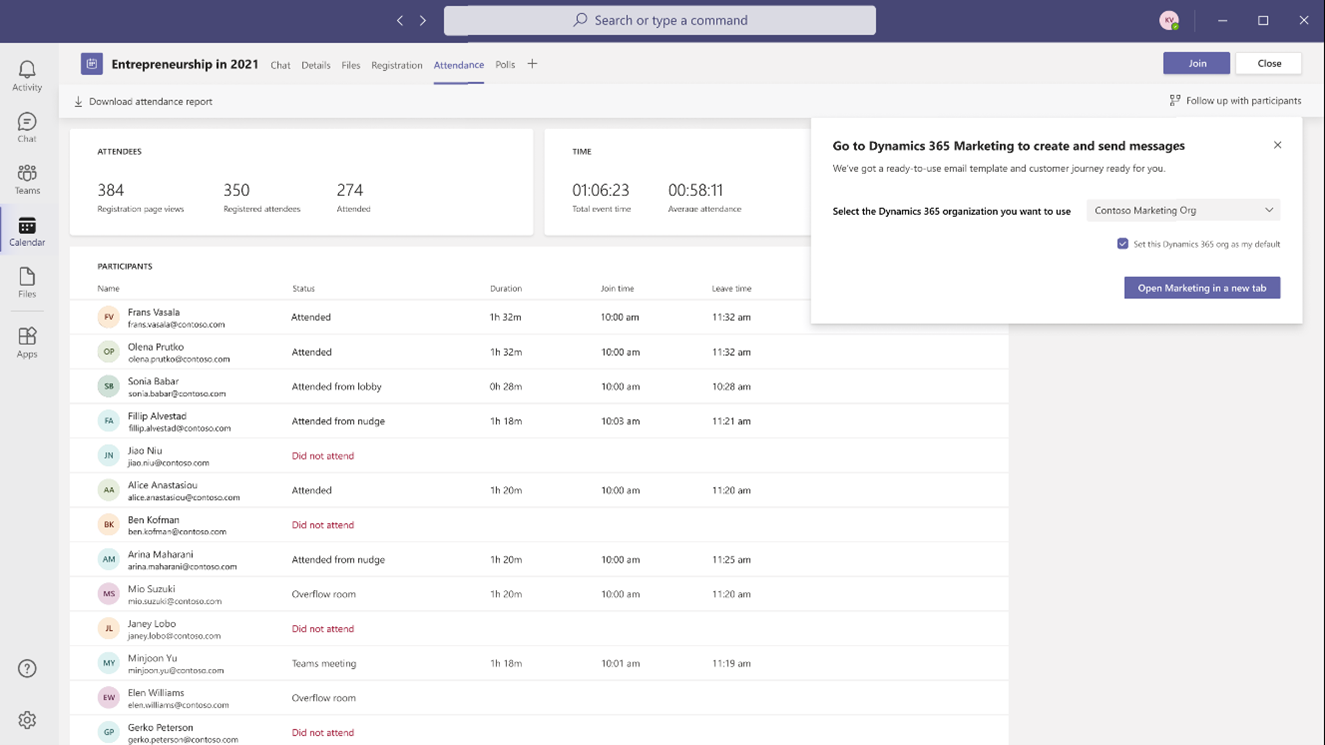
With Teams and Dynamics 365 Marketing, planning online events and nurturing your attendees is fast and easy. Today we’re announcing that customers can set up, promote, and report on events hosted on Microsoft Teams from within Dynamics 365 Marketing. In a few simple steps, they can export attendee data and view customer segments created in Dynamics 365 Marketing based on audience attendance. Customer journeys, including starter emails, are also automatically created to nurture attendees. Users can then further customize the content and experiences for attendees based on how they engage and orchestrate personalized customer journeys.

Also announced today, commercial Microsoft 365 E3 and E5 customers will soon get six months of Dynamics 365 Marketing at no additional cost. We’ll have more details on this offer to share soon, along with eligibility details, and we are excited to see you reap the benefits of these solutions together.

Resolve customer service issues collaboratively

As organizations leverage capabilities like Power Virtual Agents to enable customers with faster self-service, issues that get to agents are more complex. New intelligent routing and assignment capabilities leverage rule-based and machine learning classification to ensure incoming work items are routed to the best-suited agent or queue. However, sometimes customer service agents need deeper subject matter expertise from the broader organization.

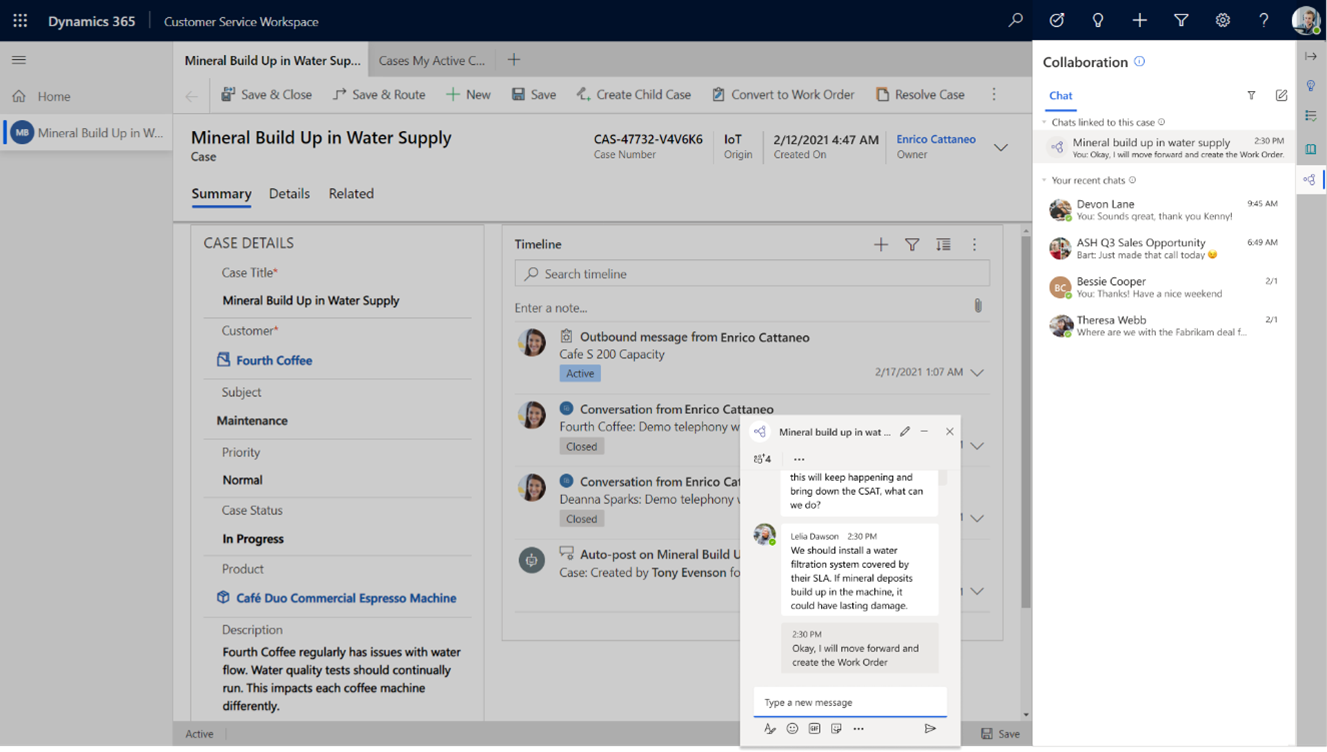
With Teams capabilities embedded in Microsoft Dynamics 365 Customer Service, customer service agents can easily find and collaborate with the right, available subject matter expert directly from the flow of their work to rapidly resolve customer issues. While working on a case, agents can access queue members and supervisors, discover agents who have resolved similar cases, or subject matter experts with relevant skills. Customer service-initiated chats are visually differentiated from other Teams chats for faster discoverability.

In addition, agents can link relevant chats to the underlying records socontext is never lost. These features coupled with a new administration experience streamlines the setup and configuration of the system, enabling the organization to get up and running quickly. We are excited about how these features will empower agents to deliver timelier and more empathetic customer experiences.

Enhance collaboration across field service

Microsoft Dynamics 365 Field Service, Microsoft Dynamics 365 Remote Assist, and Microsoft Teams enable field technicians to stay connected to work orders, information, and experts in real-time. For example, Dynamics 365 Remote Assist and Teams enables surgeons at hospitals within the Mount Sinai Health System in New York to advise counterparts 7,000 miles away at Kyabirwa Surgical Centre in Eastern Uganda.

Today we are announcing new customer engagement capabilities for Dynamics 365 Field Service (generally available on April 1, 2021) that enable end customers to find their technician and rate their visit. In parallel, we are also previewing self-service scheduling on April 1, 2021, which will be generally available later in the year.

Customers can schedule on their own time directly from their devices, providing a more personalized experience, reducing scheduling errors, and rescheduling events. This can help to reduce your organization’s back-office costs by reducing scheduling call volume, freeing up resources to focus on other tasks.

Automated service visit reminders will ensure customers are ready and available when the technician arrives, eliminating wasted trips due to customer unavailability. Real-time location tracking while the technician is on route helps your customers better plan their day around a service visit. Following a service visit, customers can submit direct feedback, helping to drive improvements within your field service technician workforce.

In addition, we will introduce streamlined onboarding experiences such as adding new users, accounts, and workers. This will greatly improve administrators’ ability to deliver faster time to value to their service organizations.

Collaborate across the organization

Learn more about collaboration and engagement capabilities heading to Dynamics 365, including how we’re enabling retail teams to showcase best practices, highlight urgent tasks, and build a stronger community among store locations; as well as how HR professionals can enable employees to view time-off balances and submit leave requests from within Microsoft Teams.

We will continue our investment in innovation to turn work the way it was, into work the way we want it to be: More efficient, more collaborative, more insightfuland ultimately, more productive. The Microsoft Cloud is built from the ground up to enable just this, and we can’t wait to see what you will do with it.

Catch the next wave of Business Applications updates

These solutions join hundreds of additional capabilities that will be released between April 2021 and September 2021. You’ll learn about many of these updates over the next few days at Microsoft Ignite, so be sure to check out the full line-up of Dynamics 365 sessions and connect with your global community in the Connection Zone. To get started, check out these featured sessions:

The post Announcing new Dynamics 365 capabilities at Microsoft Ignite appeared first on Microsoft Dynamics 365 Blog.

Brought to you by Dr. Ware, Microsoft Office 365 Silver Partner, Charleston SC.
Dynamics 365 and Microsoft Teams: extend collaboration across teams

Dynamics 365 and Microsoft Teams: extend collaboration across teams

This article is contributed. See the original author and article here.

Think about the time spent between the moment you open an email or chat, find, and reply with the requested information, and then get back into the flow of your work. Add up those minutes-long interruptions, and you begin to realize why we often can’t finish everything on our to-do lists.

We want to dramatically reduce those disruptions by bringing together business processes, information, communication, and collaboration, enabling an integrated workspace for teamwork. Not only does this save time and improve collaboration throughout the day but frees up time so you can stay focused on customers.

At Microsoft Ignite, we are announcing a breadth of more connected and engaging experiences between Microsoft Dynamics 365 and Microsoft Teams, bringing together the features you depend on into a unified digital workplace for collaboration across your entire organization. These new capabilities help everyone work together from anywhere in a more seamless and natural way, as well as better engage with customers for more personalized experiences.

We’re making it simple to meet, chat, call, and collaborate right from within your Dynamics 365 workspace. For example, as you browse a customer record, you can see related conversations and people, and then start or continue a chat without switching to Teams. Similarly, while working in Teams, you can seamlessly access and share business processes, records, and information from Dynamics 365so everything you need to stay focused and productive is in context to the task at hand.

Whether you work in sales or marketing, service, finance, commerce, or human resourcesany role that depends on teamworkthe unified collaboration features in Dynamics 365 applications and Teams will help you get daily activities done in a way that simply keeps everyone connected virtually in a natural way.

Let’s take a closer look at how our approach to unified collaboration makes an impact across the organization.

Sales: boost collaborative digital selling and engagement and transform customer interactions into revenue

Strong team collaboration and communication is essential in a sales organization, helping every seller identify, track, and share leads and opportunities. With Teams and Microsoft Dynamics 365 Sales, we are helping put collaboration in context and providing actionable next steps using AI-driven insights. This allows sellers to be more productive, work together better, and build stronger customer relationships.

Today we are announcing several new capabilities for Dynamics 365 Sales to boost collaboration across sales teams.

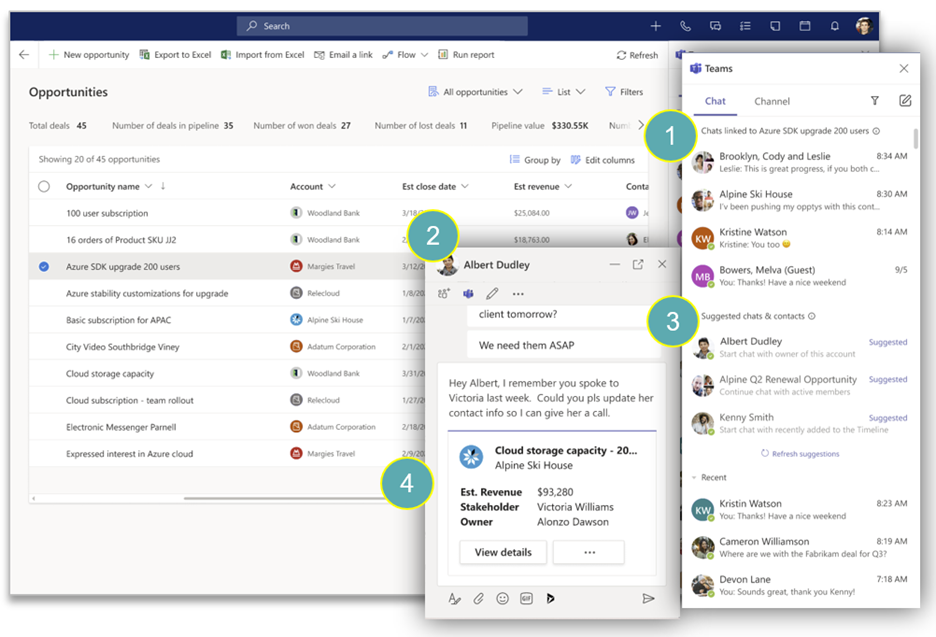
We are introducing an embedded Teams chat experience for Dynamics 365a side panel that shows recent and ongoing chats, channels, and people in Teams related to the customer record in view.

placeholder

As a seller browses customer records, the side panel displays (1) Teams chats and channels that mention the customer or account, as well as (2) suggested chats and contacts based on colleagues who are working on the account. Without switching to the Teams app, sellers can start or continue the conversation thanks to a (3) Teams chat experience which also (4) displays the customer record and quick actions to help avoid switching apps to find relevant information.

Recent years have witnessed a radical shift in buyer behavior that has led most businesses to alter traditional sales methods and adopt digital sales to stay relevant, maintain a competitive advantage, and cater to the buyer’s needs without losing the all-important personal touch. Voice and video now are important channels to ensure sellers keep connection and drive valuable conversations without missing any follow-ups.

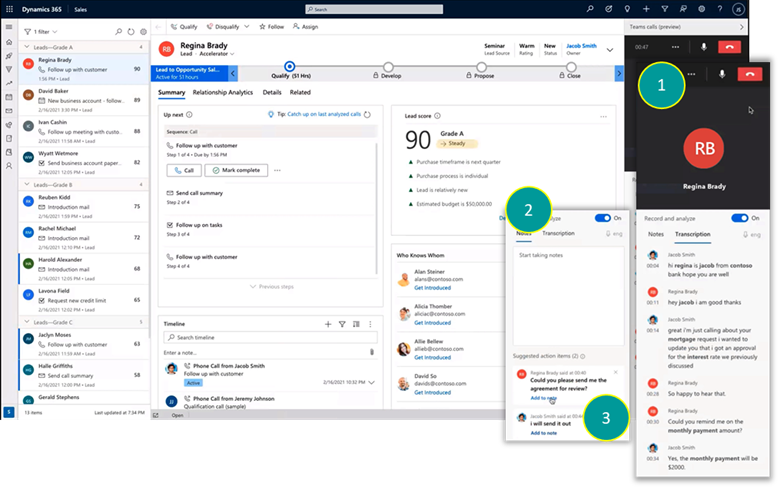
Today, we are introducing bothan embedded Teams dialer experience for Dynamics 365 as well as an extensible video or audio Teams meeting experience that seamlessly ties back to Dynamics 365 Sales.

placeholder

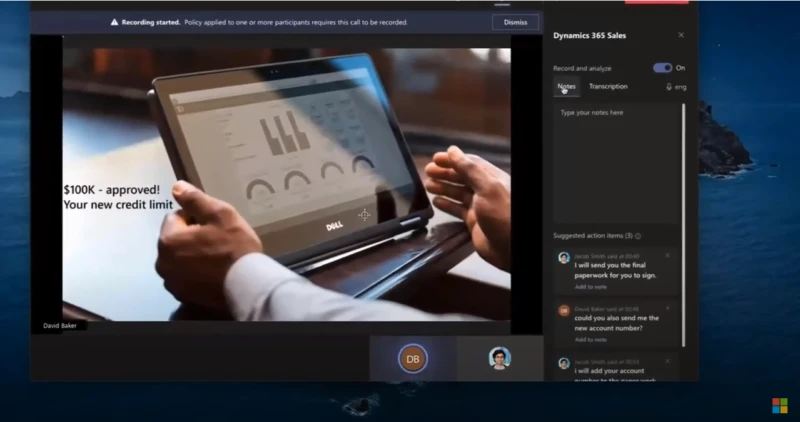
As a seller is presented with the next best customer to reach out to, they can click-to-calla side panel showing the teams dialer opens, including real-time business-critical insights such as transcript with important mentions highlighted (1), a place for note taking (2), and automatic detection of action items (3) sellers can ensure actions are captured ready for follow up.

placeholder

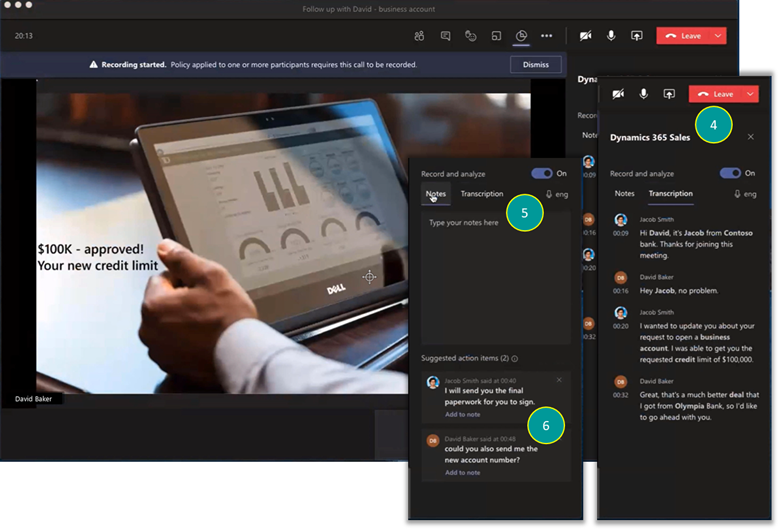
We also cater for Teams meetings that are scheduled and tracked by the seller. When they join the call from Outlook, Teams, or Dynamics 365 the familiar Teams client opens whereaside from the custom video, avatar, or shared contentthe seller will be presented with the same real-time insights as they did during the audio call, including the transcript with important mentions highlighted (4), a place for note-taking (5), and automatic detection of action items (6) sellers can ensure actions are captured ready for follow up.

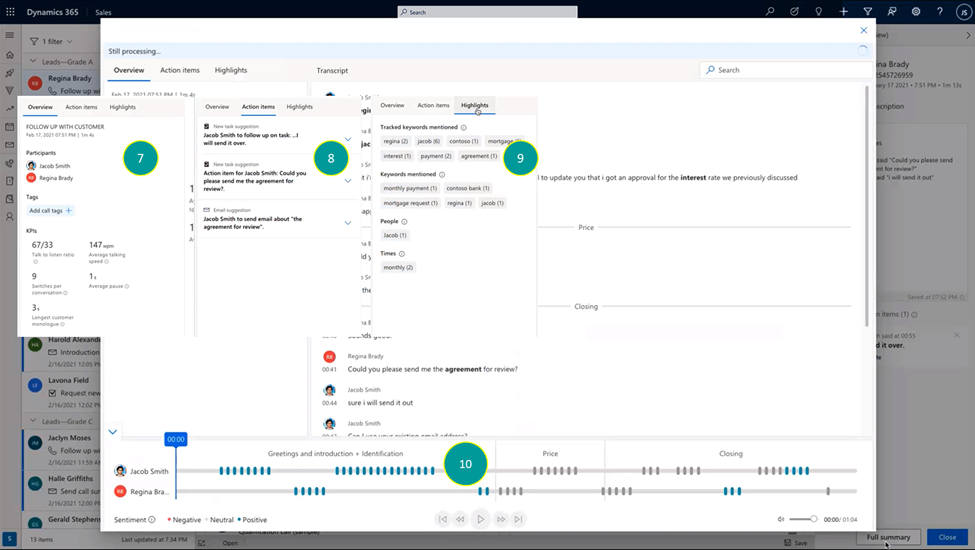
All insights are tied back to the relevant record in Dynamics 365 Sales CRM with zero effort on the seller’s side. Within seconds of completing the conversation, the summary page will be available; including conversational KPIs representing the seller’s behavior during the call (7), commitment and follow-ups made during the call (8), important mentions (9), and the full playback option alongside sentiment analysis and segmentation of the call to topics (10).

placeholder

These new team collaboration experiences are supported by multichannel engagement capabilities in Teams that help improve the way sellers connect with other sellers, prospects, and customers. The Dynamics 365 app for Mircosoft Teams enables sellers to engage with audio and video online meetings, and support for third-party outbound and inbound calling ensures advanced call control functionality is right where is should be: alongside the information that is fueling sellers’ conversations with the caller. Conversation intelligence automatically transcribes calls and analyzes content, sentiment, and behavioral styleinsights that can improve the way sellers engage with prospects and customers.

Learn how VITAS Healthcare, C.H. Robinson, Microsoft Inside Sales, and Grant Thornton transformed sales with Dynamics 365 Sales and Teams.

Marketing: turn event attendees into loyal customers

Virtual meetings and webinars are now a preferred way to connect and engage with audiences. With Teams and Microsoft Dynamics 365 Marketing, planning online events and nurturing your attendees is fast and easy.

Customers can set up, promote, and report on events hosted on Teams from within DynamHRics 365 Marketing. In a few simple steps, they can export attendee data and view customer segments created in Dynamics 365 Marketing based on audience attendance. Customer journeys, including starter emails, are also automatically created to nurture attendees. Users can then further customize the content and experiences for attendees based on how they engage and orchestrate personalized customer journeys.

Today we’re announcing that commercial Microsoft 365 E3 and E5 customers will soon get six months of Dynamics 365 Marketing at no additional cost. We’ll have more details on this offer to share soon, along with eligibility details, and we are excited to see you reap the benefits of these solutions together.

graphical user interface, application, Teams

Learn more about Dynamics 365 Marketing or visit our help documentation to get started. Also, discover how Project Management Institute Minnesota and Discoveries, Inc are using these event management capabilities in the real world to improve engagement with event attendees.

Customer service: resolve customer issues faster using the power of collaboration

As cases that reach your live agents become increasingly more complex, it’s more important than ever that your customer service tools are designed to make life as easy as possible for your agents to resolve customer issues. This includes how cases get assigned and how your agents collaborate with Subject Matter Experts (SMEs) within your organization. Key features such as unified routing and assignment capabilities leverage rule-based and machine learning classification to ensure incoming work items are routed to the best-suited agent or queue. But, there are still times when customer service agents need support from other colleagues to quickly address customer issues without having to escalate or transfer the case. With the new embedded Teams chat capability, directly accessible from the Dynamics 365 Customer Service agent desktop, agents can collaborate with SMEs to resolve cases faster and more effectively, ultimately improve the customer experience.

graphical user interface, text, application, email

The Teams chat feature enables agents to easily start conversations with SMEs and other peers, avoiding the disruption of switching apps, while maintaining a seamless flow of work. The enhanced collaboration feature reads the context of the customer record and suggests relevant collaboration contacts for the agent. Related Teams chats initiated from Customer Service are visually differentiated to enable faster discoverability. In addition, agents can link relevant Teams chats to the customer record so that the conversation, information,and context is immediately available.

Field service: enhance collaboration across field service

Microsoft Dynamics 365 Field Service, Microsoft Dynamics 365 Remote Assist, and Teams work together to enable field technicians to stay connected to work orders, information, and experts in real-time, even from some of the most remote job sites.

Technicians and field service agents can use the integrated Teams experience within Dynamics 365 Field Service to collaborate in real-time with experts on work orders, as well as use Dynamics 365 Virtual Agents for Customer Service to enhance their productivity as they complete service tasks. Technicians can access the content they need related to the task at handfrom customer records to schematicsfrom a mobile device or for a hands-free experience, a Microsoft HoloLens mixed reality headset.

The solution is enabling surgeons at hospitals within the Mount Sinai Health System in New York to advise counterparts 7,000 miles away at Kyabirwa Surgical Centre in Eastern Uganda. “Microsoft Teams, Dynamic 365 Remote Assist, and HoloLens 2 allow us to bring our knowledge into a community, share that knowledge, and make it part of that surgical community on a long-term basis,” explains Dr. Michael L. Marin, Chairman of the Department of Surgery and Surgeon-in-Chief at Mount Sinai. “It helps us create a sustainable program of surgical care.”

Retail: maximize retail collaboration and staff efficiency

On the retail frontlines, it’s critical to have the most current and accurate product and inventory information customers need in the moment. With Teams and Dynamics 365, retailers can provide the frontline with streamlined mobile tools to connect with peers and get near-instant access to information they need to deliver exceptional customer experiences.

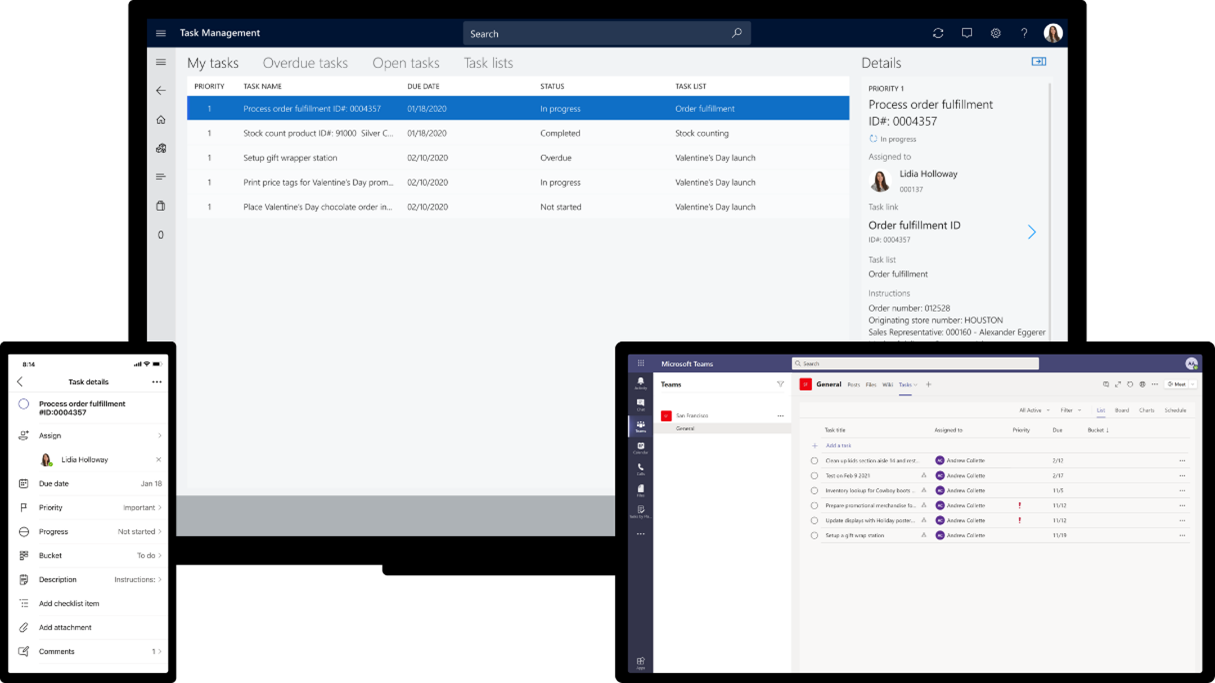
With Teams and Microsoft Dynamics 365 Commerce, we are also removing the barriers between the head office and individual stores by providing new task management functionality right within Teams. Task management functionality in Dynamics 365 Commerce allows managers and workers to create task lists, manage assignment criteria, and track task statuses integrated between Dynamics 365 Commerce back office, store commerce, and Teams applications.

Users can easily track task completion across all relevant stores, re-assign tasks, and give feedback and proof of execution where applicable.

graphical user interface, application

Learn more about Dynamics 365 Commerce and check out our task management capabilities.

Human Resources: simplify employee leave and absence management

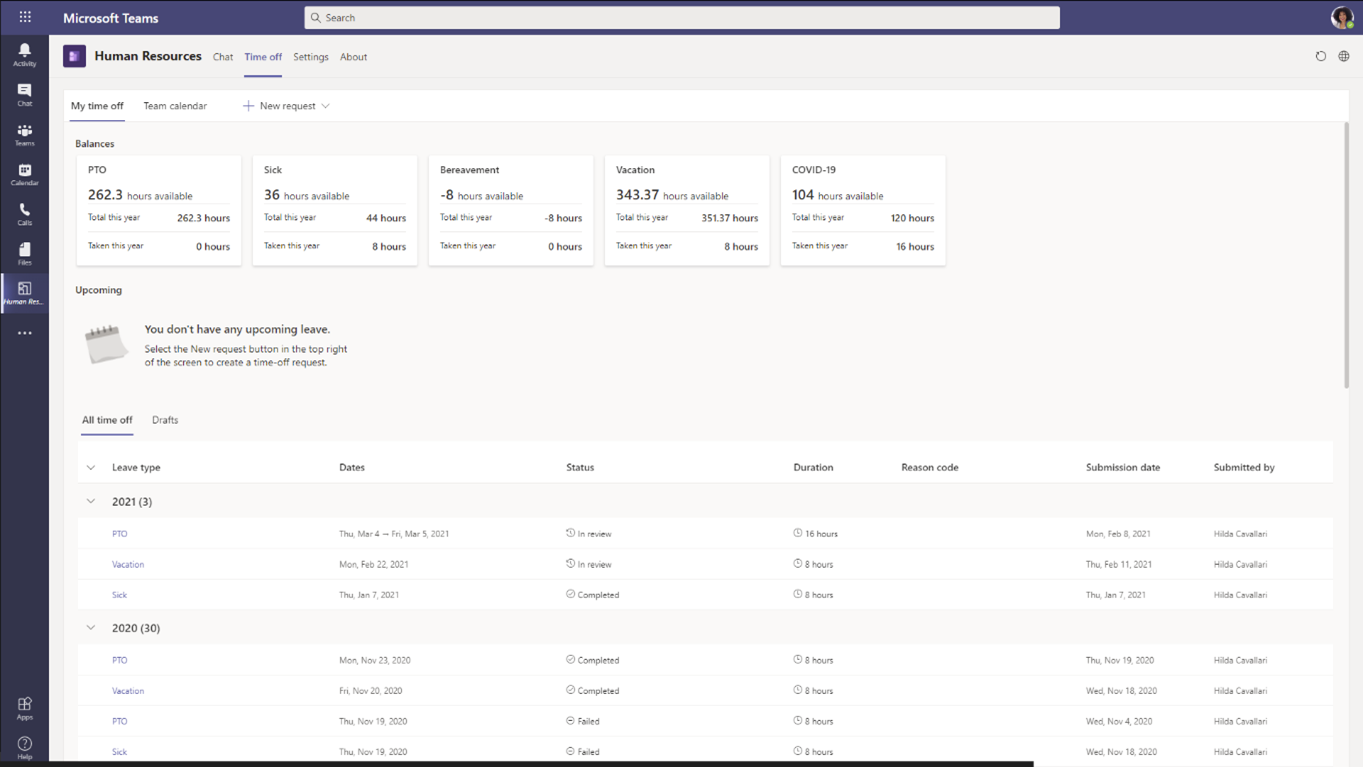
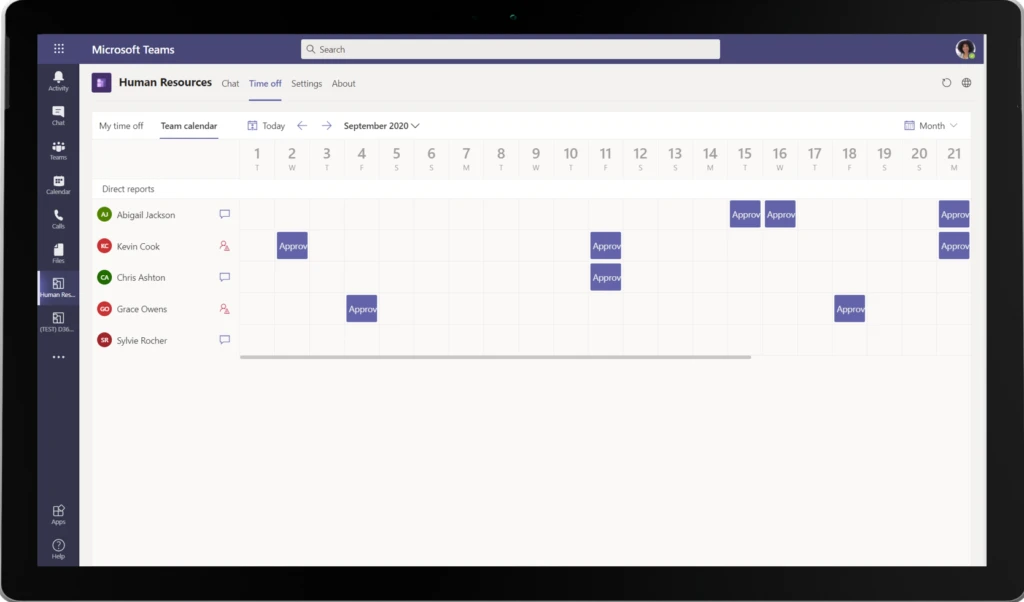
Microsoft Dynamics 365 Human Resources provides a comprehensive personnel management solution, including performance, leave and absence, and payroll integration. A new update, now generally available, enables employees to view time-off balances and submit leave requests from within Teams where they are already collaborating and getting their work done.

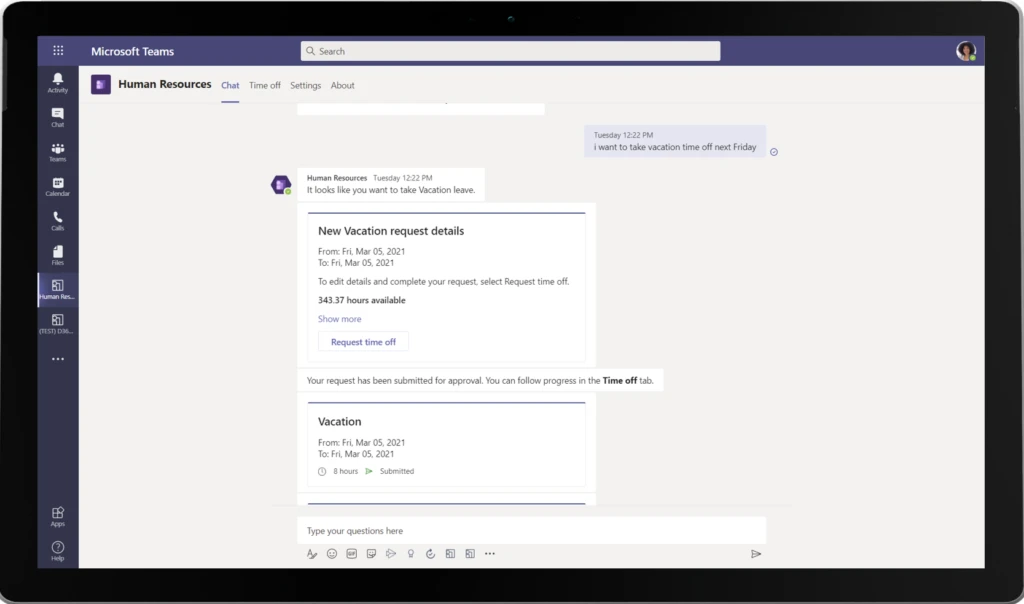
Employees simply type in keywords and a chatbot responds immediately to let them know leave balances or request time off. Managers can just as easily review and approve time-off requests with just a few clicks. By enabling employee and manager self-service, HR teams can stay focused on more strategic tasks while empowering employees to better manage their leave and absence benefits.

placeholder

Learn more about the employee leave and absence experience in Teams.

Boost collaboration for better customer experiences across the organization

These integrated collaboration capabilities are just the start. We continue our investment in innovation to transform work, so everyone can be more efficient, more collaborative, more insightful and ultimately, deliver the best customer experiences possible.

Learn more on the Microsoft Teams blog and explore all of the ways Dynamics 365 and Microsoft Teams help move projects forward and keep people connected with chat, suggested actions, and records in collaborative workspaces.

The post Dynamics 365 and Microsoft Teams: extend collaboration across teams appeared first on Microsoft Dynamics 365 Blog.

Brought to you by Dr. Ware, Microsoft Office 365 Silver Partner, Charleston SC.
Flexible work is here to stay: Microsoft 365 solutions for the hybrid work world

Flexible work is here to stay: Microsoft 365 solutions for the hybrid work world

This article is contributed. See the original author and article here.

At Ignite this week, we’re announcing many new features and capabilities to help everyone thrive in a new hybrid world of work.

The post Flexible work is here to stay: Microsoft 365 solutions for the hybrid work world appeared first on Microsoft 365 Blog.

Brought to you by Dr. Ware, Microsoft Office 365 Silver Partner, Charleston SC.

Adapt quickly and fulfill efficiently with Dynamics 365 Intelligent Order Management

Adapt quickly and fulfill efficiently with Dynamics 365 Intelligent Order Management

This article is contributed. See the original author and article here.

Digital commerce is reshaping every step in the supply chain. Consumers today expect seamless omnichannel buying and after-purchase experiences with multiple fast delivery options.

Many organizations, however, are struggling to modernize operations to keep up with the growth. In fact, a recent study* found that nearly 61 percent1 of companies expect over half of their sales to come from digital channels in the next couple of years.

At the same time, over 50 percent2 of the companies felt that their supply chains were unprepared to meet growing digital commerce needs. A lot of themexperienced delays due to longer fulfillment times and slower distribution due to the pandemic,and almost 37percent3ofcompanies felt that they lacked the supply chain technology they needed to meet the growing digital commerce needs. For 52 percent4 of these organizations, enabling cost-efficient fulfillment was a key priority.

Today we are introducing a new Dynamics 365 application that can accelerate omnichannel transformation across order and fulfillment. Dynamics 365 Intelligent Order Management adapts quickly and meets future order and fulfillment complexities while supporting contemporary methods like buying online for in-store or curbside pickup.

This purpose-driven supply chain solution allows organizations to centrally manage the entire lifecycle of an order from intake to fulfillment so that they can respond quickly to constraints and disruptions and still deliver on the order promiseunlocking the new ways to meet customer needs, be more responsive, and adapt new business models to stay profitable and relevant. Intelligent Order Management can integrate with existing enterprise systems, improving time to value and interoperability.

Let’s look at how our latest innovation enables businesses to achieve higher service levels while also driving efficiencies and savings across the supply chain.

graphical user interface, chart, bar chart

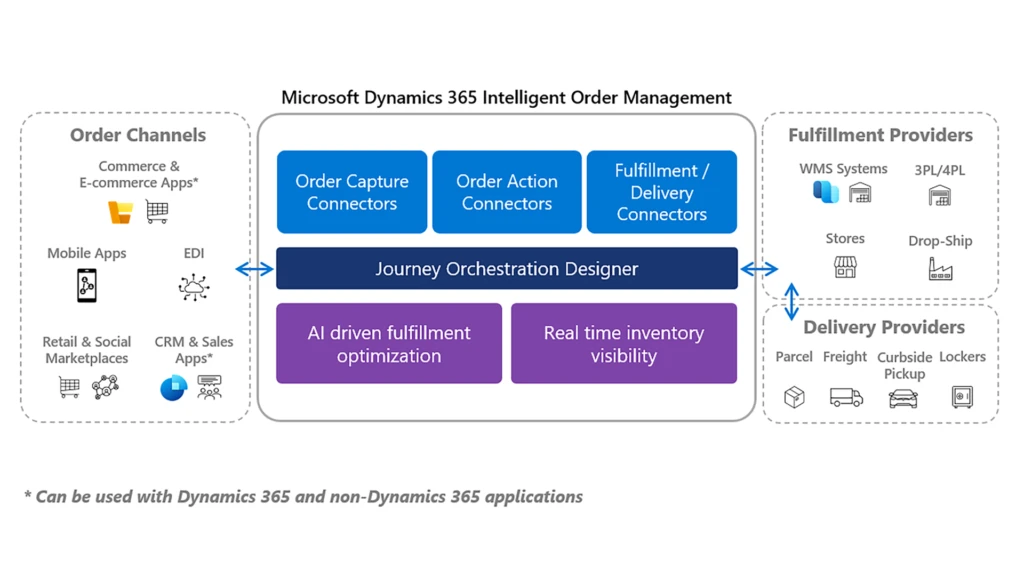
Dynamics 365 Intelligent Order Management is built on a modern open platform that can provide the flexibility companies need today to capture orders from any order source like online e-commerce, marketplace, mobile apps, or traditional sources like EDI and fulfill them from their own warehouse, 3PL, stores, or drop-ship with vendors or other delivery fulfillmentpartners.

graphical user interface, diagram

Order management is a mature space, and the current solutions in the market are extremely rigid. With Dynamics 365 Intelligent Order Management, companies can use out of the box pre-built connectors from an ecosystem of more than 200 Microsoft Power Platform connectors to add new order intake, fulfillment, and delivery method. It helps them easily scale during peak demand.

Deliver on your order promise

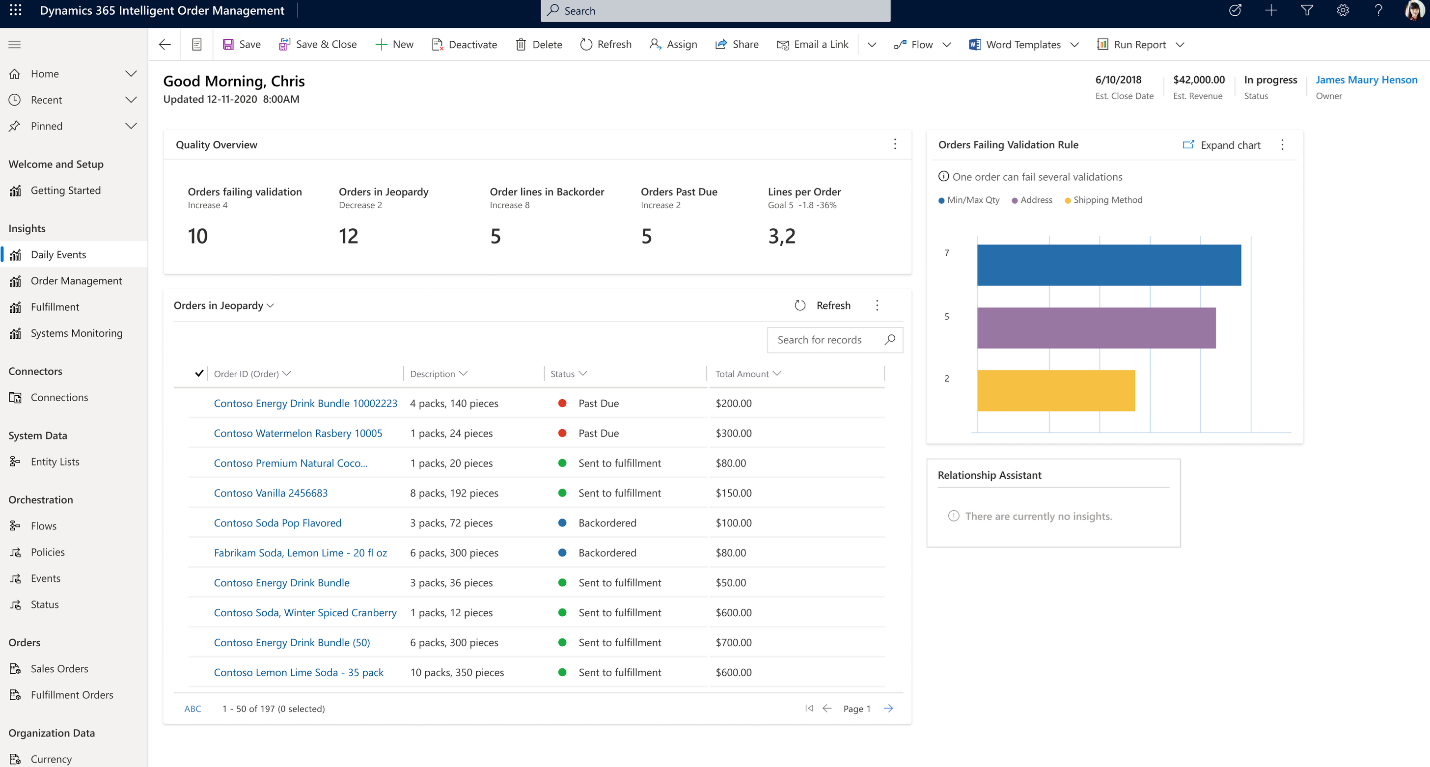
The solution leverages AI to give real-time recommendations for how to fulfill each order based on existing inventory and will provide information and insights into the implications of possible choices.

graphical user interface, application, table

This uses exception-based management so that while business users have complete visibility and access to adjust and change any order path, only those exceptions are raised for business decisions. With machine learning, the system learns how the business user reacts to each exception and learns to provide better recommendations next time.

Get real-time inventory visibility

One of the key differentiators of Dynamics 365 Intelligent Order Management is an integrated real-time inventory visibility service, a microservice built on Microsoft Dataverse that is highly scalable and extensible, providing a single, global view of the inventory positions across all legal entities.

placeholder

The fulfillment orchestration engine uses this real-time inventory data to optimize fulfillment and, in the process, ensure optimal stock levels across the channel to improve cash flow.

Manage the entire order lifecycle

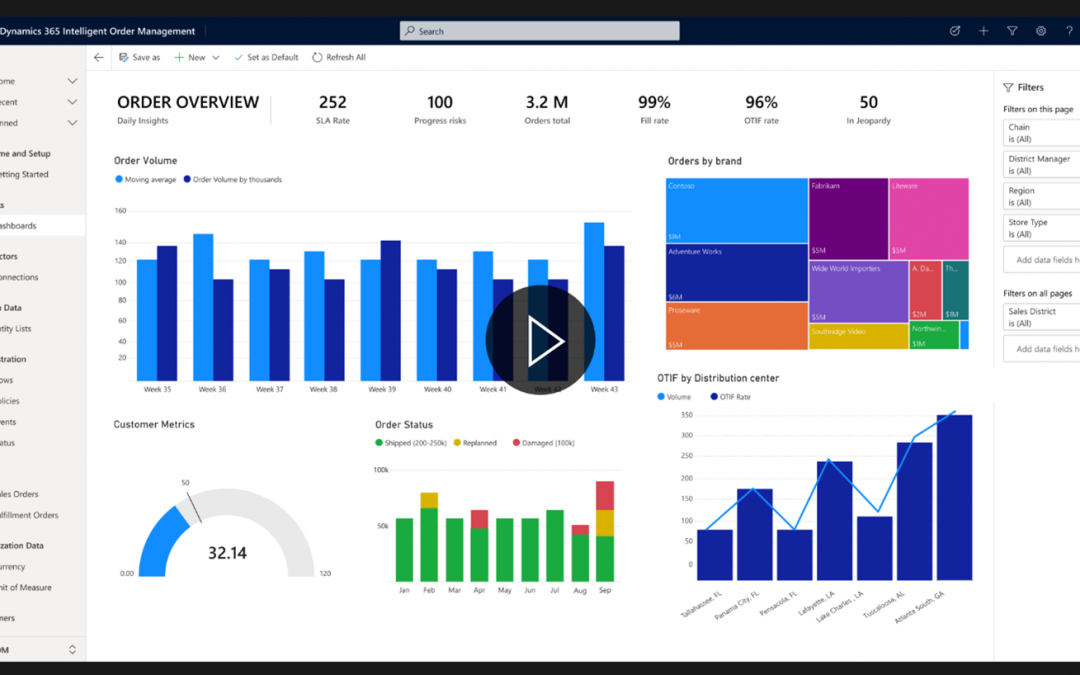
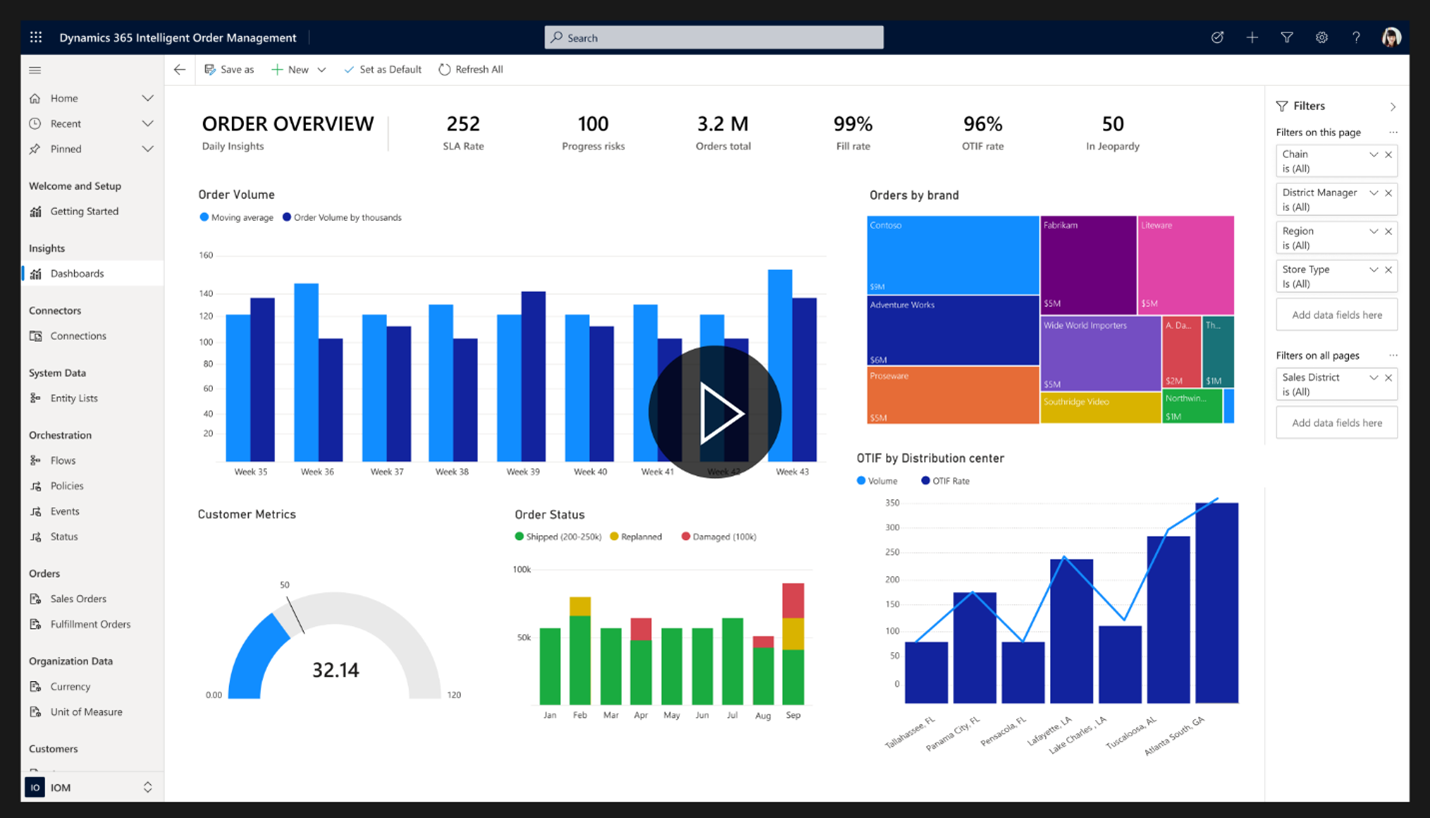
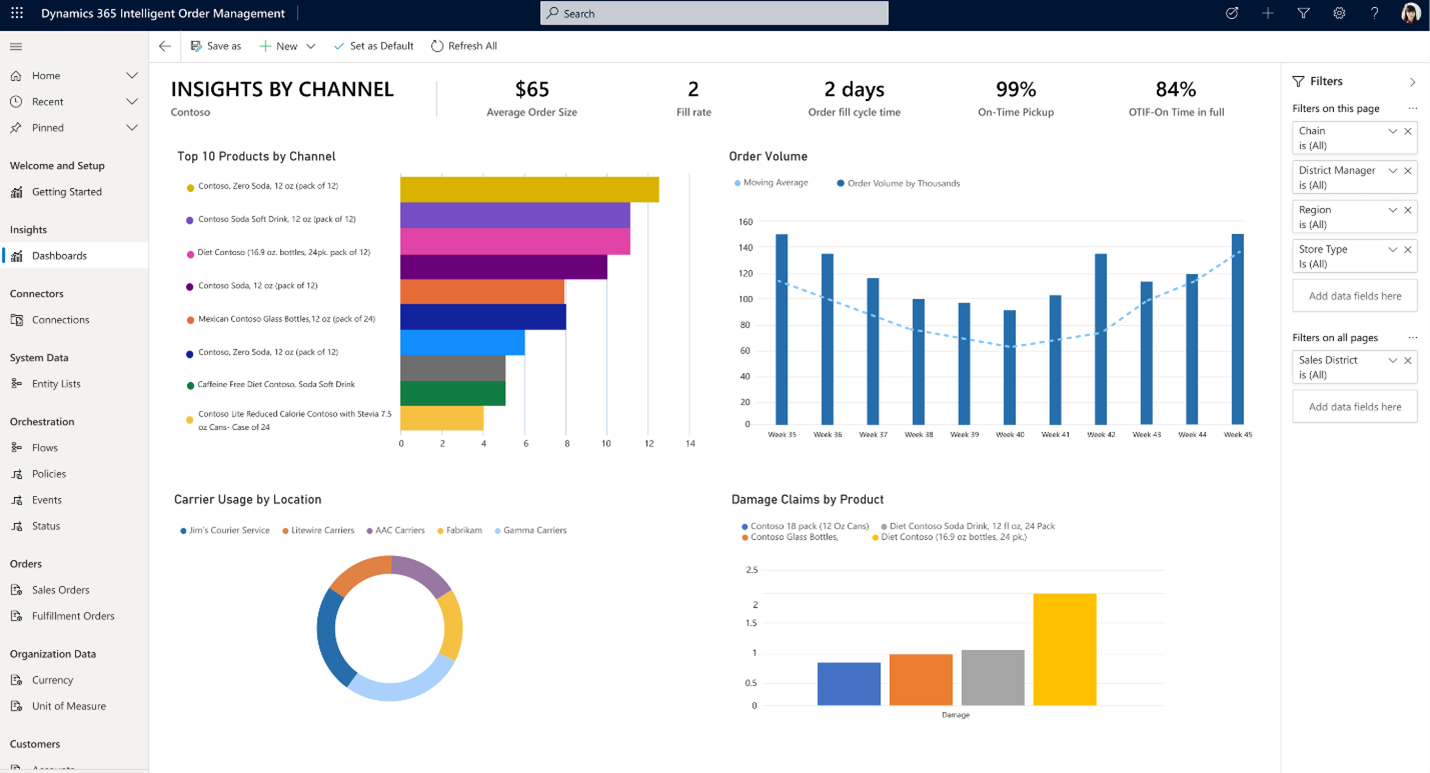
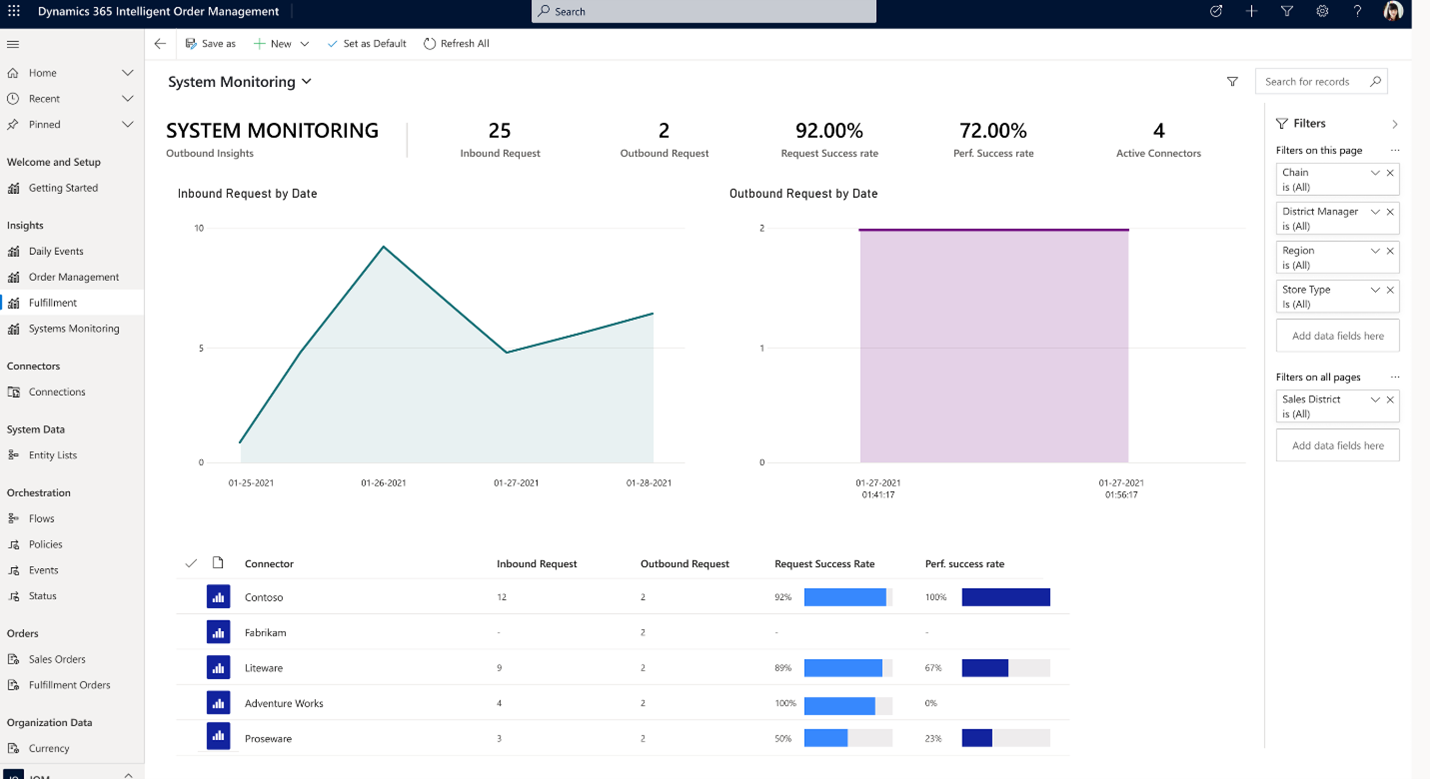
To deliver a true omnichannel experience, organizations must centrally manage the entire lifecycle of the product from capture to delivery. Dynamics 365 Intelligent Order Management provides real-time visibility into each step of the order journey. It provides fulfillment insights in real-time through customizable and integrated dashboards so that the supply chain team can take the right countermeasures to overcome constraints and continue to track and improve operational efficiency to deliver to the customer on time.

placeholder

Dynamics 365 Intelligent Order Management also breaks down silos so that the organizations get a single view of the order even if they use multiple systems across their subsidiaries and headquarters. The system also helps organizations streamline the return processes. Whether returns are collected at a retail store, fulfillment center, or service center, returns can be initiated through an app, online, or at the store.

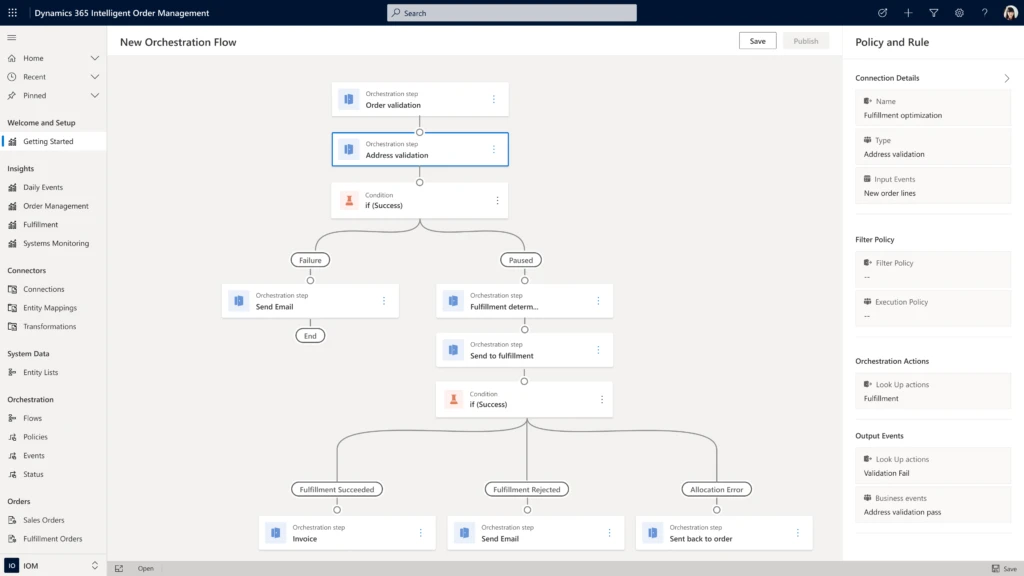
The other key differentiator is that this solution is truly built for the business user so that they don’t have to rely on IT every time order flows need to be changed. The supply chain team can leverage the embedded policy designer to design the rules to optimize their business processes.

graphical user interface, application

They can use the journey orchestration designer tools to model and automate the response to fulfillment constraints and leverage machine learning to influence the flow of the order to optimize it. Whenever an organization predicts or detects constraints in their fulfillment network, this helps them proactively overcome the bottlenecks and drive efficiencies across the supply chainall while meeting deliveries on time and in full.

Get up and running quickly

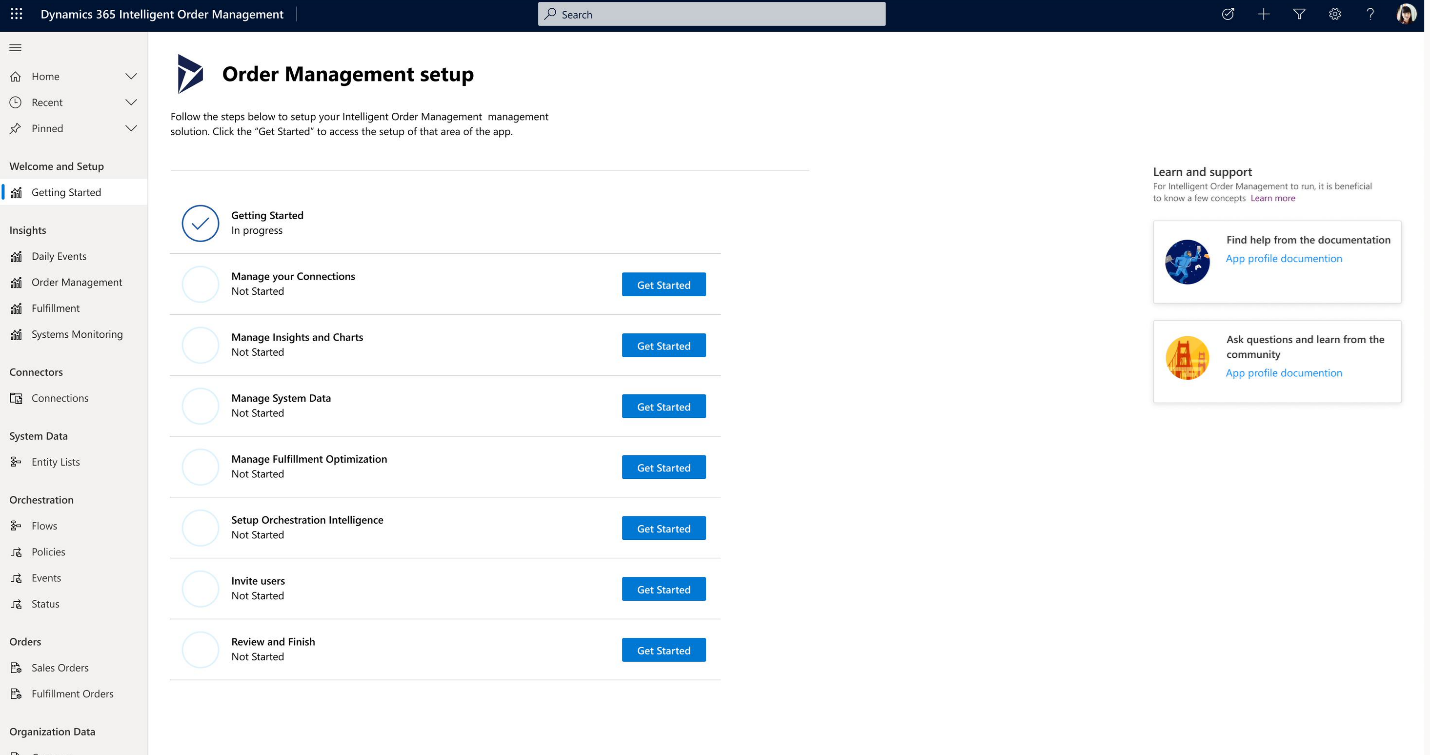
Lastly, the onboarding to Dynamics 365 Intelligent Order Management is done using a guided experience. Organizations today want to get up and running soon so that they can immediately start to drive efficiency in their fulfillment processes before rolling out worldwide. Dynamics 365 Intelligent Order Management is a software as a service (SaaS) running on the Microsoft cloud.

placeholder

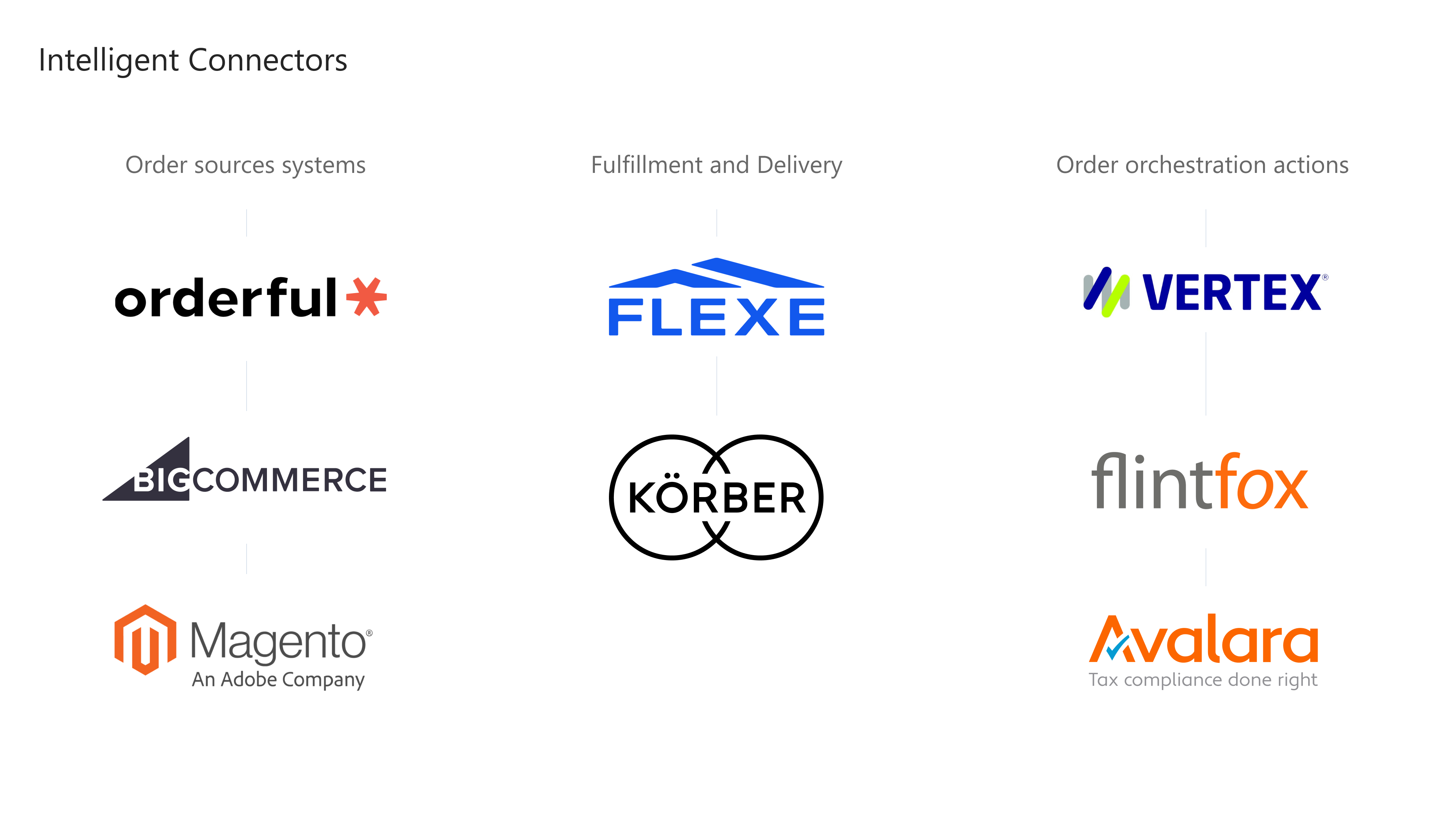
Organizations can scale during peak order volumes by supporting various order intake, fulfillment, and delivery partners using pre-built connectors. This order orchestration engine is built on Power Platform, which has more than 200 pre-built connectors, allowing any business user to instantly connect into this ecosystem. In addition, we will continue to expand the ecosystem of connectors by working with design partners like Orderful, BigCommerce, Magento,Flexe, HighJump,Vertext,Flintfox, etc. As we progress with the release we’ll announce further collaborations.

logo wall

It can easily integrate with your existing enterprise systems such as any ERP, CRM, or warehouse management and fulfillment system and seamlessly synchronize data using Dataverse. It has no dependency on other Dynamics 365 products, and it works seamlessly with both Dynamics 365 and non-Dynamics 365 business applications. It is truly going to enable customers to reimagine omnichannel fulfillment by making it automated, intelligent, and frictionless. This will be available in preview on April 30, 2021, and will be generally available on July 30, 2021.

“We are constantly expanding the number of ways by which customers can purchase our products as well as number of fulfillment options to meet their needs. With Dynamics 365 Intelligent Order Management, we can centrally orchestrate fulfillment and optimize the order journeys across all sources and scenarios. This will enable us to proactively respond to fulfillment risks and constraints while delivering on the order promise”Jeff Suellentrop, Vice President, Enterprise Architecture, Digital (DTC) and Programs, Breville

Learn more


1Base: 470 global decision makers of digital transformation strategies and operations as it relates to the retail experience for customers with channel engagement from online and offline

2,3,4Base: 624 global decision makers of digital transformation strategies and operations as it relates to the retail experience for their retail experience for customers

Source: A commissioned study conducted by Forrester Consulting on behalf of Microsoft, November 2020

All other trademarks are the property of their respective owners.

The post Adapt quickly and fulfill efficiently with Dynamics 365 Intelligent Order Management appeared first on Microsoft Dynamics 365 Blog.

Brought to you by Dr. Ware, Microsoft Office 365 Silver Partner, Charleston SC.
Manage time off requests with Human Resources app for Microsoft Teams

Manage time off requests with Human Resources app for Microsoft Teams

This article is contributed. See the original author and article here.

With more employees working remote, it is more important than ever to meet workers where they work. This includes making tasks related to human resources easier to track from home. This becomes even more important as more organizations use Microsoft Teams not only for collaboration but also to help improve employee experiences and productivity.

We’re announcing the Dynamics 365 Human Resources app for Microsoft Teams, which is now generally available. The app lets employees view their time-off balance and quickly submit time-off requests. They can also send their coworker’s information about upcoming time off in Microsoft Teams channels and chats outside the Human Resources app. This experience is seamless across devices.

This embed requires accepting cookies from the embed’s site to view the embed. Activate the link to accept cookies and view the embedded content.

This site uses cookies for analytics, personalized content and ads. By continuing to browse this site, you agree to this use.

Making a request to take a sick leave or vacation is as simple as chatting with a bot. The bot provides employees with the number of hours that they have available to take off. They can chat with the bot to submit a requestor can use the Time off tab to view existing requests, upcoming leave, and more. Employees can also submit partial day leave or submit leave requests that are comprised of different dates and leave types.

Leave request view


How it helps managers

The Human Resources app makes it easier for managers, like Jonathan Mayer of Spairliners, to stay in the loop. Spairliners was an early adopter of the Human Resources app Teams app. Jonathan said it has helped his company gain user acceptance while rolling out leave and absences to colleagues.

“The pandemic and generalization of home office had increased our usage of Teams. It is really nice and user friendly to be able to request leaves directly from Teams,” said Jonathan Mayer, who is head of Project Management, Process and IT at Spairliners. “As a manager, the workflow is also faster as you can accept or reject requests without opening another tool.”

Once requests are submitted, the manager (or the leave request approver depending on how the leave workflow is configured) is sent a Teams notification. The manager can quickly look at the leave details and also see the availability of other team members to ensure that there are no gaps in coverage if someone is away. They can approve or deny the leave request using the interactive bot messages.

Manger view for human resources app


Employees are notified via a Teams notification as soon as their leave requests are approved or denied. To ensure that their team members are aware of the upcoming leave request, employees can easily share the approved leave requests with a Teams channel or with other team members via a Teams message.

Next steps

We’re looking forward to hearing your feedback and how the app is helping your organization. Enable the Dynamics 365 Human Resources app for Microsoft Teams directly in the Microsoft Teams app store.

To learn more about these exciting new capabilities, see Human Resources app in Teams.


The post Manage time off requests with Human Resources app for Microsoft Teams appeared first on Microsoft Dynamics 365 Blog.

Brought to you by Dr. Ware, Microsoft Office 365 Silver Partner, Charleston SC.