Improve your presenting skills with additional platforms and new features for PowerPoint Presenter Coach

Improve your presenting skills with additional platforms and new features for PowerPoint Presenter Coach

This article is contributed. See the original author and article here.

PowerPoint Presenter Coach now available on all platforms We love hearing feedback from our customers, and we’re excited to announce that PowerPoint Presenter Coach is now available on all platforms. PowerPoint Presenter Coach was first introduced in PowerPoint for the web, and both students and professionals have been utilizing this feature to become more confident…

The post Improve your presenting skills with additional platforms and new features for PowerPoint Presenter Coach appeared first on Microsoft 365 Blog.

Brought to you by Dr. Ware, Microsoft Office 365 Silver Partner, Charleston SC.

Here’s a way to increase the accuracy of landed cost calculations

Here’s a way to increase the accuracy of landed cost calculations

This article is contributed. See the original author and article here.

As the supply chain evolves, logistics management has an even greater impact on the bottom line. Knowing the full price of an item once it arrives at your warehouse is crucial. Miscalculating landed cost through manual entry can result in lost profits for business owners. The Landed cost module in Supply Chain Management provides companies with an innovative way to track goods and determine the total charge in getting a shipment to its destination. With a single data entry, landed cost allows you to record end-to-end transportation fees quickly and accurately. Automating administrative tasks such as estimating landed costs and status tracking helps avoid financial missteps that can weaken product profitability. These enhanced features save time for staff and streamline production from the manufacturer to the warehouse. Landed cost often can account for up to 40 percent or more of the total cost of each imported freight item. First, there’s transport to the departure port, loading, sailing, customs clearance, and, finally, transport from the port of arrival. Then there are the delays, duties or other contingencies that will impact the landed price. Landed cost module functionality The Landed cost module in Supply Chain Management includes: Estimated landed cost visible at time of creation of voyage Receiving by container Status tracking at purchase order line level Landed cost apportioned to multiple purchase orders on one voyage Additional cost apportionment rules Preliminary posting of estimated costs that are reversed/adjusted as actual costs are received Automatic updates for FIFO, LIFO, weighted average, moving average, and standard costing Support of transfer orders Reduce guesswork Here are a few features that take the guesswork out of determining true costs of products and offer visibility for employees: Distribution of landed cost to items from voyage or containers. This is based on quantity, amount, percentage, weight, volume, volumetric calculation, or user-defined measure. Goods in transit accrual allows for full visibility of goods in transit for any tracked activity (for example: loading, customs, or clearance) and transport leg (for example: air, ocean, rail, or truck). Centralized shipping, which means voyages can contain products from multiple vendors, purchase orders, or legal entities in one or more containers/folios. Automated costs so that automated estimates of landed cost are used and then reversed out when actual landed cost invoices are processed. Import of business process compliance, which uses due dates to track invoices processed before or after receipt in the warehouse. Cost comparisons and reports to help you review costs by total voyage, container, purchase order, and line item by cost type code and category (such as FOB price, freight, accessed charges, duty, commissions, and brokerage fees). Voyage editor Every step of a voyage can be defined, including adding a purchase order to a container. Employees can also create a voyage with a purchase order from multiple entities.   Template shipping and costing Landed cost also supports the creation of a series of customized templates covering standard freight journeys. These templates make it easier for your employees to keep journeys on course by allowing them to accurately record fees both actual and accrued for each step. It also helps to ensure that freight voyages are in legal and regulatory compliance. Voyage tracking Landed cost includes functionality to record and track voyage in transit. All data is integrated across the Supply Chain Management application. First, an activity start date or end date such as the loading date is entered. That entry then triggers an update to the shipping status and the purchase order receipt or confirmed date. This functionality allows you to: Record lead times between multiple ports based on rules Assign a voyage status to the purchase order line or goods in transit Process invoices before receipting of goods Share containers and voyages across entities Place goods from multiple vendors, countries, or regions in the same container Next steps To learn more, read the documentation for the Landed cost module. To see for yourself how Dynamics 365 Supply Chain Management can help your operations, get started today with a free trial

The post Here’s a way to increase the accuracy of landed cost calculations appeared first on Microsoft Dynamics 365 Blog.

Brought to you by Dr. Ware, Microsoft Office 365 Silver Partner, Charleston SC.

Here’s a way to increase the accuracy of landed cost calculations

How Dynamics 365 Remote Assist enables shared surgery in underserved communities

This article is contributed. See the original author and article here.

Did you attend last week’s Microsoft Ignite and watch Satya’s keynote? If so, you might have learned about how Mount Sinai Hospital in New York is using Microsoft Dynamics 365 Remote Assist on Microsoft HoloLens 2 to conduct shared surgery with their surgical counterparts in Uganda. Mixed reality business applications like Dynamics 365 Remote Assist have already been successfully deployed in many industries including manufacturing, automotive, and education. However, its valuable use case in healthcare may be the most critical one yet, augmenting doctors’ abilities to collaborate hands-free with their remote counterparts in real-time with mixed reality and help save lives globally. Working together in real time, from miles away Today, more than 5 billion people worldwide do not have access to simple surgical operations. New York’s Mount Sinai Health System employs 38,000 people, including top specialists and surgeons who are determined to help tackle the global lack of access to surgical care. Using HoloLens 2 with Dynamics 365 Remote Assist and Microsoft Teams, Mount Sinai surgeons in New York connect with colleagues 7,000 miles away in Eastern Uganda, helping bring safe, affordable surgical care to remote areas. To date, this shared surgery method has helped treat more than 500 patients at the Kyabirwa Surgical Centre in Eastern Uganda with important surgical problems and helped diagnose and manage more than 3,000 patients. “Microsoft Teams, Dynamic 365 Remote Assist, and HoloLens 2 allow us to bring our knowledge into a community, share that knowledge, and make it part of that surgical community on a long-term basis. It helps us create a sustainable program of surgical care.”Dr. Michael L. Marin, Chairman of the Department of Surgery and Surgeon-in-Chief, Mount Sinai Health System What Mount Sinai Hospital says about mixed reality in healthcare “To date, we have had a 100 percent success rate. We haven’t had one failed surgery, and a lot of that’s due to the Microsoft technologies we’re using.”Anna Kalumuna, Director of Operations and Administration, Kyabirwa Surgical Centre “When the patient was taken into surgery, every decision from what type of incision to make to how to close the skin was discussed via our Teams and Remote Assist connection.”Dr. Michael L. Marin, Chairman of the Department of Surgery and Surgeon-in-Chief, Mount Sinai Health System “Communication is the lifeline of our shared surgery model. We use Microsoft technologies such as Teams, Dynamic 365 Remote Assist, and HoloLens to share surgery knowledge and expertise in an effective way.”Dr. Michael L. Marin, Chairman of the Department of Surgery and Surgeon-in-Chief, Mount Sinai Health System “The experience I’ve had as a practicing surgeon using this technology has been like having the eyes of a very senior surgeon who has seen a lot more than me. He is right here with me in the surgery room. He’s seeing the patients I am seeing. He’s seeing the pathology that I am seeing. This is an amazing resource for sharing knowledge.”Dr. Joseph Okello Damoi, Head Surgeon, Kyabirwa Surgical Centre Read the full story about how Mount Sinai and Ugandan surgeons work together in real time and bring life-saving expertise to rural communities. Learn more about mixed reality in healthcare Be sure to also read another healthcare story for Imperial College Healthcare NHS Trust which provides acute and specialist healthcare in northwest London for approximately 1.5 million people annually. Like Mount Sinai Hospital, the Imperial College Healthcare NHS Trust successfully deployed Dynamics 365 Remote Assist on HoloLens 2 to help doctors cope with the spike in COVID-19 patients during the global pandemic. Using mixed reality solutions enabled their doctors to minimize doctors’ exposure to infected patients, keeping physical contact to a minimum while still enabling the medical team to collaborate on patient care. Hands-free telemedicine is truly poised to be future of healthcare organizations worldwide. Discover how your organization can similarly leverage Dynamics 365 Remote Assist on HoloLens 2 to improve patient care, protect frontline workers’ safety and help provide critical medical expertise to underserved regions globally. Learn more about Dynamics 365 Remote Assist. Register to attend upcoming Dynamics 365 Remote Assist Microsoft Reactor sessions. Complete the Dynamics 365 Remote Assist Learning Path. Read Dynamics 365 Remote Assist customer stories. Listen to the Dynamics 365 Connected and Ready podcast episode on mixed reality, “Exploring anatomy in mixed reality, with Mark Griswold.”

The post How Dynamics 365 Remote Assist enables shared surgery in underserved communities appeared first on Microsoft Dynamics 365 Blog.

Brought to you by Dr. Ware, Microsoft Office 365 Silver Partner, Charleston SC.

Best practices for building an effective fraud scorecard

Best practices for building an effective fraud scorecard

This article is contributed. See the original author and article here.

One of the most important aspects of fraud prevention is to know where you stand in the fight against fraud. An effective fraud scorecard makes you aware of current trends, helps identify any evolving problem areas, and empowers you to make decisions as an organization. Striking the right balance is important. Too much detail can drop adoption or cause you to miss unforeseen issues due to information paralysis. Too few details won’t deliver actionable insights, rendering the scorecard ineffective.

One way to strike that balance is to design a layered scorecard that is crisp, insightful, and appealing to all audiences.

Define the goal of the scorecard

Before you get started, you should know the answers to these questions:

  • What is the scorecard supposed to say and to whom?
  • Is it meant for consumption by senior management?
  • Should it cater to analysts and fraud managers?
  • Should it provide the ability to do deep analysis and define rules?

When any new patterns are found during investigations, it’s tempting to add additional views to the existing scorecard. Over time, such additions will bloat the scorecard and deplete its overall effectiveness. Defining a goal in advance and sticking to it will help to ensure that the value of the fraud scorecard remains intact.

After the goal is defined, the layers for a fraud scorecard can be carved out. Typically, three layers work best to offer insights that cater to different levels of consumers.

First layer: Exec summary

The purpose of this layer is to show the business impact as a snapshot. A view that can be taken as-is into executive review slides. Include only a few uber-level metrics. Profit efficiency, which measures overall impact from fraud, non-fraud, and optimization, should be the main metric in this view. Customer impact metrics, such as escalations or false positives and a split of fraud detected by automated system versus human reviews, can also be included. Representing these metrics as snapshots for a specific time, month, or week, and color coding them to measure against target or change from a previous time period will emphasize the goal of this view.

Second layer: Contributors

This layer should show what the current trends are and what is contributing to any changes in uber-level metrics. This will be the key monitor for fraud managers and the starting point for analysts. A trended view of key metrics, such as fraud rate, split by chargeback and other sources, rejection rate, top rules that were executed, challenge rate, and refund rate can be included here. Representing these as trend charts, with the ability to look back a few months, will make these most insightful.
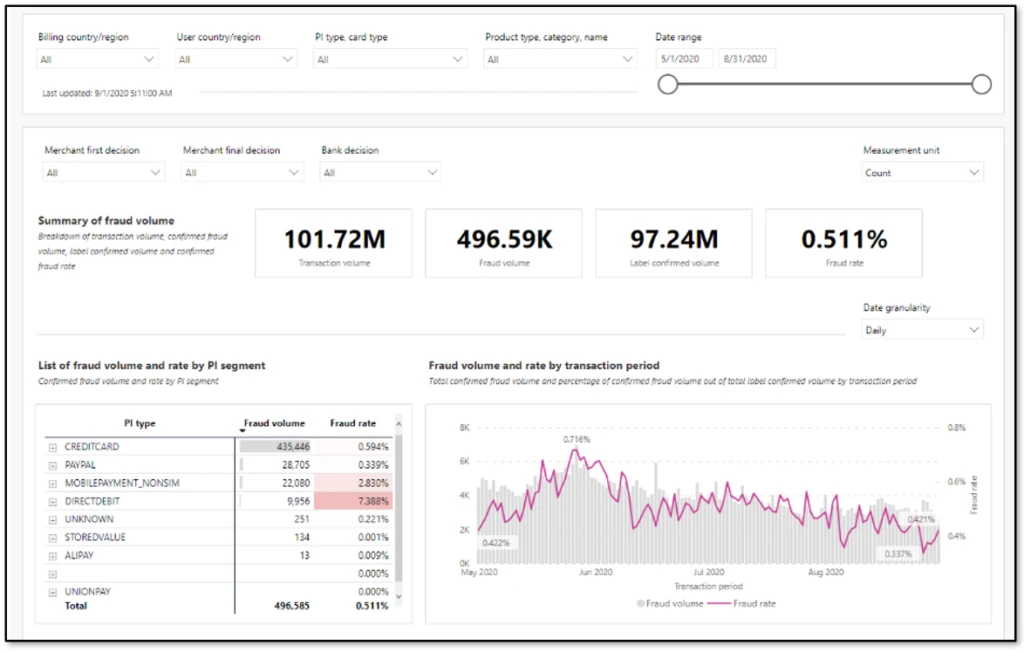
Contributors layer of a scorecard with region, payment type, product details as filters. Date range as slider. Summary boxes showing total volume and fraud. Table of payment instrument types. Time series chart with fraud volume and fraud rate.

Third layer: Drivers

This layer offers deep dive views on causation. Analysts can rely on this view to quickly identify drivers for any changing trends and react to evolving fraud patterns. Score distribution and respective fraud rates, segmentation slices such as geo-product-payment type can be included. If there are certain thresholds implemented to deter abuse, such as a maximum of five orders per month per user, then views can be added here to track users who are hovering just below the threshold.

Things to avoid in a fraud scorecard

It is important to not use a fraud scorecard as an investigative tool. A scorecard is meant to provide an aggregate view of where things stand, like the dashboard of a car. Investigations will require specific data at transaction level. Having the ability to slice data in multiple forms and link across transactions is quintessential for investigations. Trying to build one tool for both purposes can easily lead to large amounts of data, which slows down performance and dilutes value. Except for certain cases where you are using specialized Power BI and data exploratory tools, it’s always best to keep a fraud scorecard separate from investigative tools.

Next steps

If you’re already using Dynamics 365 Fraud Protection, use the account protection and purchase protection scorecards to gain business insights. Additionally, as described in our earlier post Do you monitor the pulse of your fraud protection operations?, you can also export transactional data into your existing workflows to augment your business-specific reports.

If you aren’t already using Dynamics 365 Fraud Protection, sign up for a live demo or a free trial to check out this and other capabilities that can help your business develop effective fraud protection strategies.

The post Best practices for building an effective fraud scorecard appeared first on Microsoft Dynamics 365 Blog.

Brought to you by Dr. Ware, Microsoft Office 365 Silver Partner, Charleston SC.

Smarter sales planning with LinkedIn Sales Insights for Dynamics 365 Sales

Smarter sales planning with LinkedIn Sales Insights for Dynamics 365 Sales

This article is contributed. See the original author and article here.

It comes as no surprise that today’s world is driving a seismic shift in B2B sales. Customers are rapidly adopting digital buying behavior, and sellers are feeling the pressure to reinvent themselves. Organizations must commit to empowering and enabling their sellers if they want to adapt to the new landscape and remain resilient in their markets. Companies that are successfully navigating selling today are doing two key things:

  • Working smarter: streamlining and scaling sales activities with powerful digital tools.
  • Being more strategic: leveraging sales operation roles to focus sales teams on the next critical steps to win accounts with the most opportunity.

While digital selling and optimized sales operations are important for helping sales teams orient their efforts in the post-pandemic marketplace, they are only as good as the data they rely on. New opportunities and new pockets of growth are missed if your data is stale or inaccurate. Compiling that data manually takes time, and trusted and reliable data can be hard to find.

Equipping sellers with reliable, actionable, and relevant real-time data is essential if sellers are going to embrace relationship selling and make the most of the time they have available with customers. Confidence in the “next best steps” and clear direction are what sellers need to turn an opportunity into a victory.

Dynamics 365 and LinkedIn Sales Solutions bring the human touch to digital experiences

Microsoft already brings Dynamics 365 Sales and LinkedIn Sales Navigatortogether, enabling sellers to deliver more personalized and meaningful engagement with customers. By providing a unified view of data, Dynamics 365 Sales and LinkedIn Sales Navigator work in tandem to:

  • Empower sellers to find key decision makers
  • Keep sellers connected to buyers
  • Reduce sales friction

Together, Dynamics 365 and LinkedIn Sales Solutions ensure sellers can build deep, trusted relationships with buyers, and deliver the authentic and personalized engagement that today’s buyers demand.

Introducing LinkedIn Sales Insights for Dynamics 365 Sales

In February, LinkedInannounced the general availability of LinkedIn Sales Insights, a new product in the LinkedIn Sales Solutions portfolio that is powered by over 740 million members on LinkedIn to help sales organizations identify and size potential opportunities, get a clearer view of the market, and plan more confidently. With this integration, customers who integrate Sales Insights into Dynamics 365 Sales can feel more confident about their sales planning in knowing that their CRM is powered by the reliable, trusted, and aggregated data produced by LinkedIn Sales Insights.

By bringing together aggregated data at scale with powerful tools that reveal actionable insights, teams are focused, productive, and successful. Intelligent automation that leverages the depth and accuracy of buyer records from LinkedIn helps sellers strategically engage, develop connections, and turn relationships into revenue. With LinkedIn Sales Insights for Dynamics 365, you can expect:

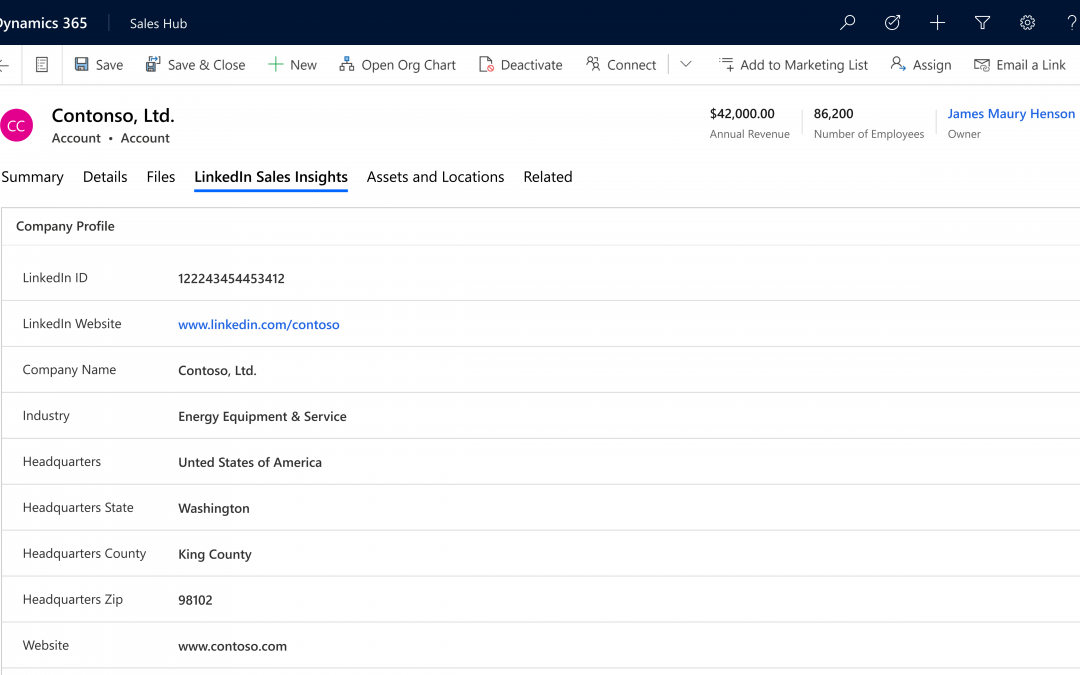
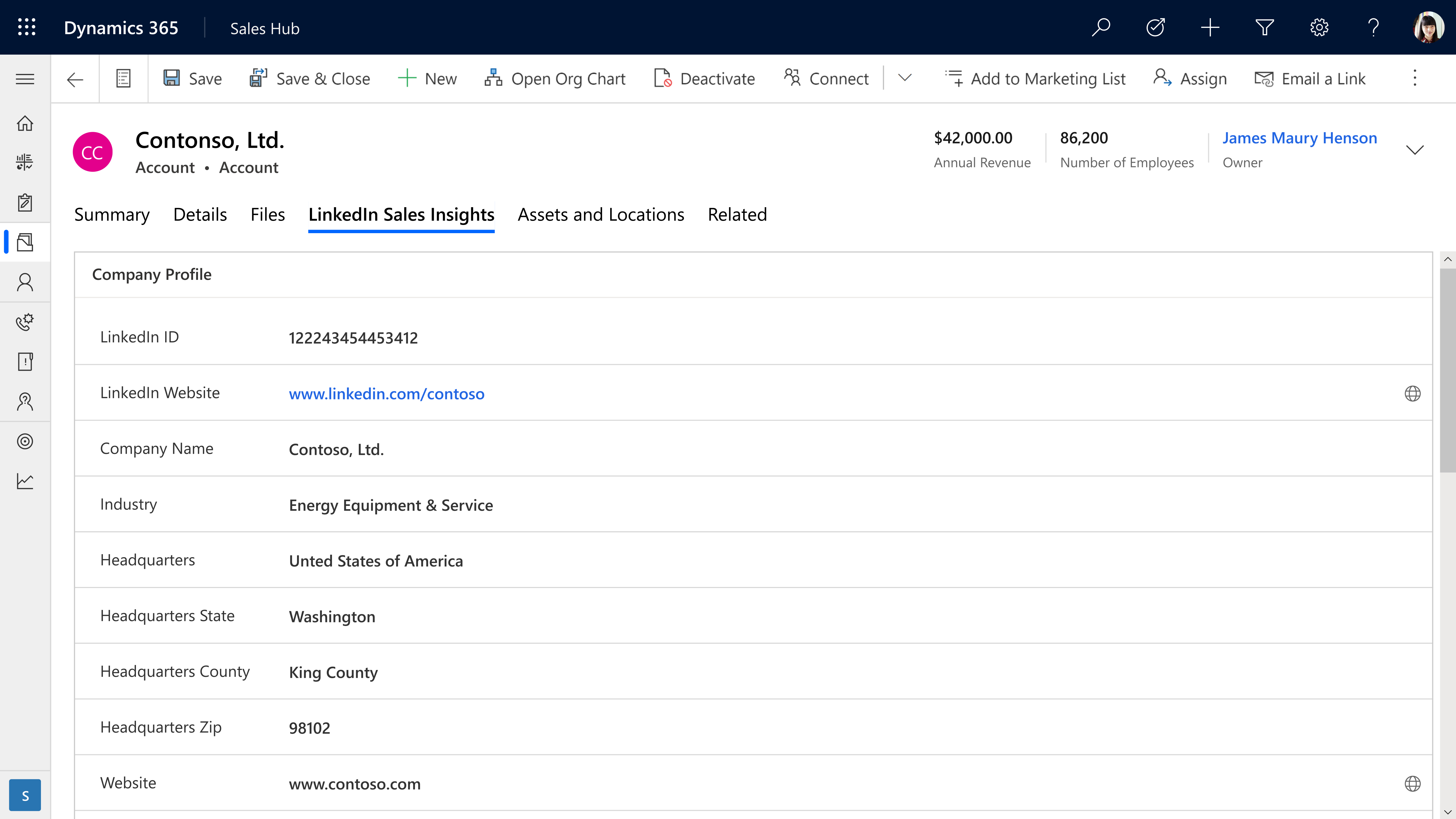
  • Account planning and prioritizationwith LinkedIn Sales Insights, company information can be brought into Dynamics 365 Sales to help more confidently plan and prioritize knowing the data powering your CRM is reliable.

With LinkedIn Sales Insights, company information can be brought into Dynamics 365 Sales

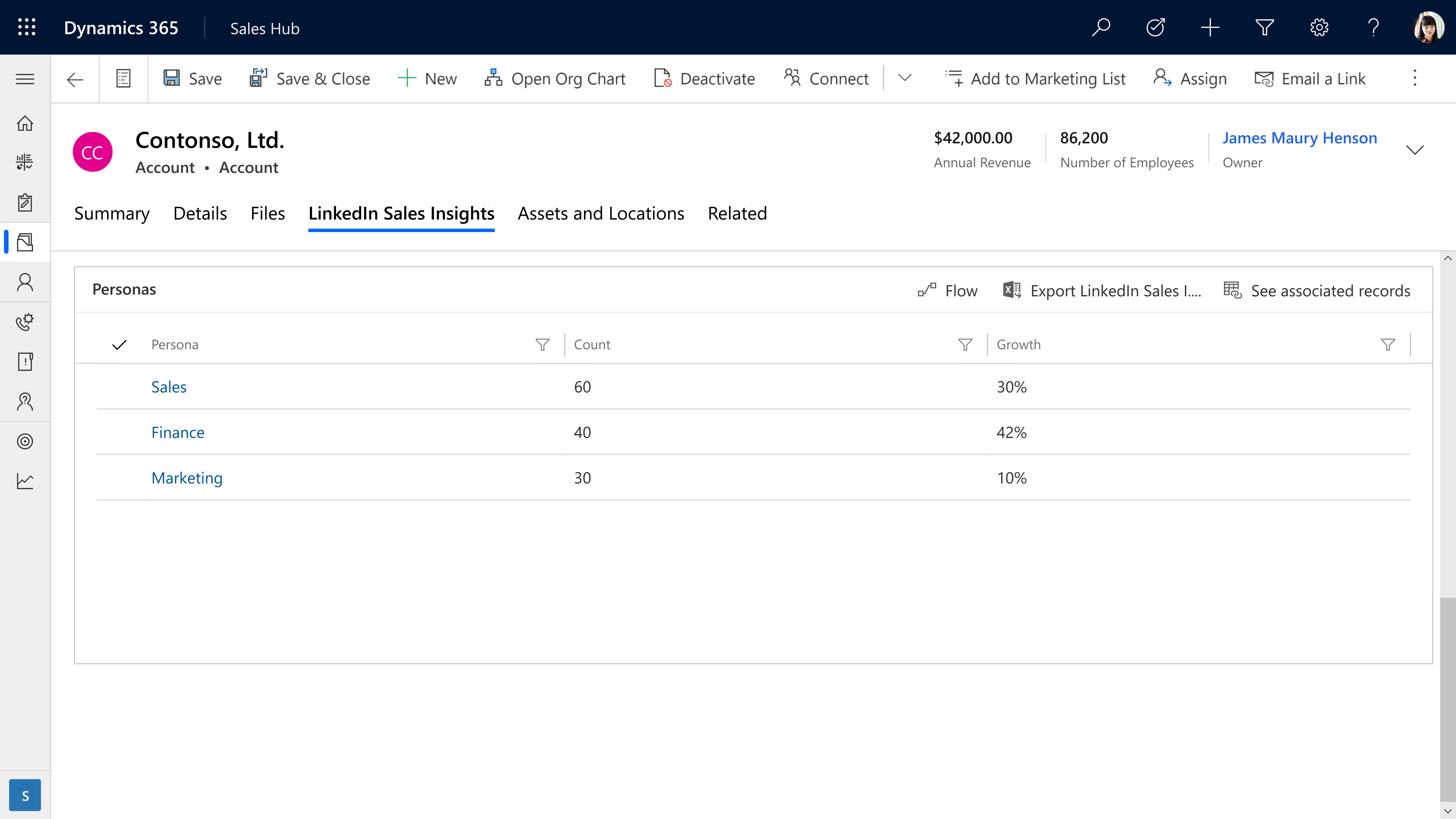
  • Harvesting opportunities within existing accounts is simpler and far easier with integrated tools that keep a pulse on key accounts.

Integrated tools monitor growth trends and develop company and role-based personas

  • Opportunities are more accurately evaluated by drilling down into size and growth of specific company departments, functions, and job titles to more accurately size opportunities.

Learn more

Together, LinkedIn Sales Solutions and Microsoft Dynamics 365 support stronger relationships and an increased pipeline by delivering the most current data with powerful intelligence and tools to make sales teams even more customer-centric.

LinkedIn Sales Insights can help your team harness the power of reliable data. Learn more about LinkedIn Sales Insights for Dynamics 365 and discover how it can help transform your sales planning.

Ready to empower your sales team? Read about LinkedIn Sales Insights integration with Dynamics 365 and view the installation guide for LinkedIn Sales Insights for Dynamics 365 Sales.

Want to learn more about Dynamics 365 Sales? Watch a demo or take a guided tour to see how Dynamics 365 Sales can empower your sellers with actionable insights.

The post Smarter sales planning with LinkedIn Sales Insights for Dynamics 365 Sales appeared first on Microsoft Dynamics 365 Blog.

Brought to you by Dr. Ware, Microsoft Office 365 Silver Partner, Charleston SC.

Improve your presenting skills with additional platforms and new features for PowerPoint Presenter Coach

How IT is transforming the employee experience at Microsoft

This article is contributed. See the original author and article here.

Millions of people rearranged their lives to work from home and on the frontlines in 2020. Among those millions were the thousands who work right here at Microsoft—and our challenges aren’t so different from yours. How do we stay connected, informed, and motivated as we transition to the new hybrid work reality? These learnings have…

The post How IT is transforming the employee experience at Microsoft appeared first on Microsoft 365 Blog.

Brought to you by Dr. Ware, Microsoft Office 365 Silver Partner, Charleston SC.