Accelerating business transformation with Dynamics 365 and Microsoft Power Platform

Accelerating business transformation with Dynamics 365 and Microsoft Power Platform

This article is contributed. See the original author and article here.

We have seen a breakthrough year for Microsoft Dynamics 365 and Microsoft Power Platform. Across industries and around the world, we’re seeing companies leveraging Dynamics 365 to create impact faster, break down barriers, adapt to a rapidly changing environment, and innovate across their business. Dynamics 365 continues to grow quickly, with 45 percent revenue growth in Q3.

And Microsoft Power Platform is becoming the next-generation business process automation and productivity suite for domain experts in all functions. Microsoft Power Platform is being used by nearly 16 million monthly active users, up 97 percent year over year, which highlights how anyone can automate a workflow, create an app, build a virtual agent, or analyze data. Just like Office revolutionized productivity gains for knowledge workers, Microsoft Power Platform will do the same for domain experts.

We’ve seen organizations demonstrate incredible agility in the face of rapid change, and we’ve seen how they can rise above to realize their full potential. But at the end of the day, organizations don’t rise to challenges people do. That’s why we’re investing heavily in the people who bring Dynamics 365 and Microsoft Power Platform to life for our customers.

Across our business, we’re looking for new team members who are passionate about enabling transformation for organizations in every industry and around the world. Visit our Business Applications careers site to learn how you can contribute to the transformation we’re seeing in the world today.

Rising to the challenge of a new reality

Over the past year, we have seen so many examples of agility, resilience, and innovation. At Microsoft Business Applications Summit earlier this month, we showcased a few of them along with new features and capabilities that are part of the 2021 release wave. Check out the event keynote, “Enabling innovation everywhere with Microsoft Business Applications”, for some highlights.

For example, beauty giant L’Oreal developed a new solution to install, upgrade, troubleshoot, and audit complex machinery even as global travel restrictions took effect, using Dynamics 365 Remote Assist and HoloLens 2. Not only does this solution put experts in the room without physically needing them on-site, but it will help them meet their long-term goals around sustainability and reducing their carbon footprint.

In retail, Patagonia used Dynamics 365 and Microsoft Teams to stay connected with customers and deliver a seamless customer experience even as they closed retail stores, and later, introduced new curbside pickup options. And consumer goods company Campari is unifying their fragmented data landscape with Dynamics 365 Customer Insights, allowing them to support end-to-end customer journeys across the organization, faster and smarter than ever.

We’re also seeing Microsoft Power Platform drive incredible results, with Walgreens Boots Alliance reducing in-store audit times by 75 percent by empowering frontline workers with Microsoft Teams and the Asset Protection mobile app, built with Power Apps. With Power Apps and the entire Microsoft Power Platform portfolio, Walgreens says they’ve reduced time to market for a new app by 50 to 80 percent putting useful solutions in the hands of employees quicker.

Be part of this growing business

We’re continuing to invest in Dynamics 365 and Microsoft Power Platform, with continual product innovation, new partner skilling and certification programs, a new Microsoft-empowered community experience, and of course, people.

The incredible momentum of this business means our team is growing, too. In markets around the world, we’re looking for people who want to make a difference and take their career to the next level by helping global organizations achieve their potential with Microsoft Dynamics 365 and Microsoft Power Platform. If you’re interested in joining our team, we’re hiring across a wealth of disciplines, from engineering to technical sales, in markets across the globe. Visit our website to explore career opportunities in business applications.

The post Accelerating business transformation with Dynamics 365 and Microsoft Power Platform appeared first on Microsoft Dynamics 365 Blog.

Brought to you by Dr. Ware, Microsoft Office 365 Silver Partner, Charleston SC.

Microsoft Teams now brings family and friends together to call, chat, and make plans

Microsoft Teams now brings family and friends together to call, chat, and make plans

This article is contributed. See the original author and article here.

For much of 2020 and 2021, people have endured missing their friends and loved ones. Yet while physical distance has separated us, we have also rediscovered the power and importance of being together. 2020 reminded us that success isn’t fully celebrated without the ones who helped. Holidays aren’t as memorable without connecting with friends and…

The post Microsoft Teams now brings family and friends together to call, chat, and make plans appeared first on Microsoft 365 Blog.

Brought to you by Dr. Ware, Microsoft Office 365 Silver Partner, Charleston SC.

Accelerating business transformation with Dynamics 365 and Microsoft Power Platform

Fraud trends part 4: balancing identity authentication with user experience

This article is contributed. See the original author and article here.

Identity authentication is a crucial part of any fraud protection and access management service. That is why Microsoft Dynamics 365 Fraud Protection and Microsoft Azure Active Directory work well together to provide customers a comprehensive authentication seamless access experience. In this blog of our fraud trend series, we explore how proper authentication prevents fraud and loss before it happens by blocking unauthorized or illegitimate access to the information and services provided. Check out our previous blogs in this series where we explore fraud in the food service industry, holiday fraud, and account takeover.

While most places still have some degree of lockdown in place, people must rely on online services more than ever before, from streaming and ordering takeout to mobile banking and remote connection. Today users have to manage more accounts than ever before. Each of these online services can be compromised and their identity stolen. While total combined fraud losses climbed to $56 billion in 2020, identity fraud scams accounted for $43 billion of that cost, according to Business Wire. Businesses need to have a way of protecting their users even when their identity has been compromised.

A good identity and access management (IAM) protects users, a great IAM does it without being seen. Customers today already must deal with too many MFA, 2FA, CAPTCHA, and other hurdles to prove their identity. While these are important tools to differentiate humans from bots, they can also be a pain to deal with. That is why leading IAM companies are working to stay ahead of the competition by enabling inclusive security with Azure Active Directory and Dynamics 365 Fraud Protection.

These capabilities will help you protect your users without burdening users

  • Device fingerprinting. Our first line of defense, before users attempt an account creation or login event. Using device telemetry and attributes from online actions we can identify the device that is being used to a high degree of accuracy. This information includes hardware information, browser information, geographic information, and the Internet Protocol (IP) address.
  • Risk assessment. Dynamics 365 Fraud Protection uses AI models to generate risk assessment scores for account creation and account login events. Merchants can apply this score in conjunction with the rules they’ve configured to approve, challenge, reject, or review these account creation and account login attempts based on custom business needs.
  • Bot detection. An advanced adaptive artificial intelligence (AI) quickly generates a score that is mapped to the probability that a bot is initiating the event. This helps detect automated attempts to use compromised credentials or brute force DDOS attacks.
  • Velocities. The frequency of events from a user or entity (such as a credit card) might indicate suspicious activity and potential fraud. For example, after fraudsters try a few individual orders, they often use a single credit card to quickly place many orders from a single IP address or device. They might also use many different credit cards to quickly place many orders. Velocity checks help you identify these types of event patterns. By defining velocities, you can watch incoming events for these types of patterns and use rules to define thresholds beyond which you want to treat the patterns as suspicious.
  • External calls. External calls let you ingest data from APIs outside Dynamics 365 Fraud Protection. This enables you to use your own or a partner’s authentication and verification service and use that data to make informed decisions in real time. For example, third-party address and phone verification services, or your own custom scoring models, might provide critical input that helps determine the risk level for some events.
  • Azure Active Directory External Identities. Your customers can use their preferred social, enterprise, or local account identities to get single sign-on access to your services. Customize your user experience with your brand so that it blends seamlessly with your web and mobile applications. Explore common use cases for External Identities.
  • Risk-based Authentication. Most users have a normal behavior that can be tracked. When they fall outside of this norm, it could be risky to allow them to successfully sign in. Instead, you may want to block that user or ask them to perform a multi-factor authentication. Azure Active Directory B2C risk-based authentication will only challenge login attempts that are over your risk threshold while allowing normal logins to proceed unhampered.

Next steps

Learn more about Dynamics 365 Fraud Protection and other capabilities including how purchase protection helps protect your revenue by improving the acceptance rate of e-commerce transactions and how loss prevention helps protect revenue by identifying anomalies on returns and discounts. Check out our e-book “Protecting Customers, Revenue, and Reputation from Online Fraud” for a more in-depth look at Dynamics 365 Fraud Protection.

The post Fraud trends part 4: balancing identity authentication with user experience appeared first on Microsoft Dynamics 365 Blog.

Brought to you by Dr. Ware, Microsoft Office 365 Silver Partner, Charleston SC.
Microsoft Teams now brings family and friends together to call, chat, and make plans

Introducing Webinars in Microsoft Teams: Easy, professional webinars to engage customers

This article is contributed. See the original author and article here.

Over the last year, we have found new ways to create engaging virtual experiences at work. We’ve transformed spaces in our homes to offices, developed new skillsets for remote collaboration, and in some cases, adopted new technology to get work done. I often hear from our customers about the burden of using different tools to…

The post Introducing Webinars in Microsoft Teams: Easy, professional webinars to engage customers appeared first on Microsoft 365 Blog.

Brought to you by Dr. Ware, Microsoft Office 365 Silver Partner, Charleston SC.

Microsoft Dynamics 365 Marketing customer journey orchestration preview now available

Microsoft Dynamics 365 Marketing customer journey orchestration preview now available

This article is contributed. See the original author and article here.

All businesses operate in a competitive environment and customer experience (CX) is top of mind as we rise to today’s challenges of finding ways to differentiate, delivering on business goals and meeting increasing customer demands. Customers expect great experiences from the companies they interact with and companies that deliver superior experiences build strong bonds with their customers and perform better.

Microsoft Dynamics 365 Marketing is the secret weapon that will help you elevate your CX game across every department of your company, whether it’s marketing being tasked with driving growth, or the sales department optimizing in-store and online sales, or the customer service department driving retention, upsell and personalized care. With AI-assistance, business users can build event-based journeys that reach customers across multiple touchpoints, growing relationships from prospects, through sales and support.

Today marks a monumental event for Dynamics 365 Marketing: the much-anticipated real-time customer journey orchestration features are making their preview debut! Rich new features empower customer experience focused organizations to:

  • Engage customers in real time.
    • With features such as event-based customer journeys, custom event triggers, and SMS and push notifications, organizations can design, predict, and deliver content across the right channels in the moment of interaction, enabling hyper-personalized customer experiences.
  • Win customers and earn loyalty faster.
    • Integrations with Dynamics 365 apps make real-time customer journeys a truly end-to-end experience.
  • Personalize customer experiences with AI.
    • Turn insights into relevant action with AI-driven recommendations for content, channels, segmentation, and analytics.
    • Customer Insights segment and profile integration allows organizations to build deep 1:1 personalization.
  • Grow with a unified, adaptable platform.
    • Easily customize and connect with tools you already use.
    • Efficiently manage compliance requirements and accessibility guidelines.

Some of Dynamics 365 Marketing’s standout features are listed below. To read about all of the new features, check out the real-time customer journey orchestration user guide or see a demo of the real-time marketing features in action from Microsoft Ignite 2021.

1. Real-time, event-based customer journey orchestration

Looking for a better way to engage your audience over pre-defined segment-based marketing campaigns? Look to moments-based interactions that allow you to react to customers’ actions in real time with highly personalized content for each individual customer. These moments-based customer-led journeys are easy to create with our new intuitive customer journey designer which is infused with AI-powered capabilities throughout. You can orchestrate holistic end-to-end experiences for your customers that engage other connected departments in your company such as customer service, sales, commerce systems, and more. What’s even better? You don’t need a team of data scientists or developers to implement these journeys let the app do the heavy lifting for you. Use point-and-click toolbox in the designer to create each step in the journey, and AI-guided features to create, test, and ensure your message is delivered in the right channel for each individual customer.

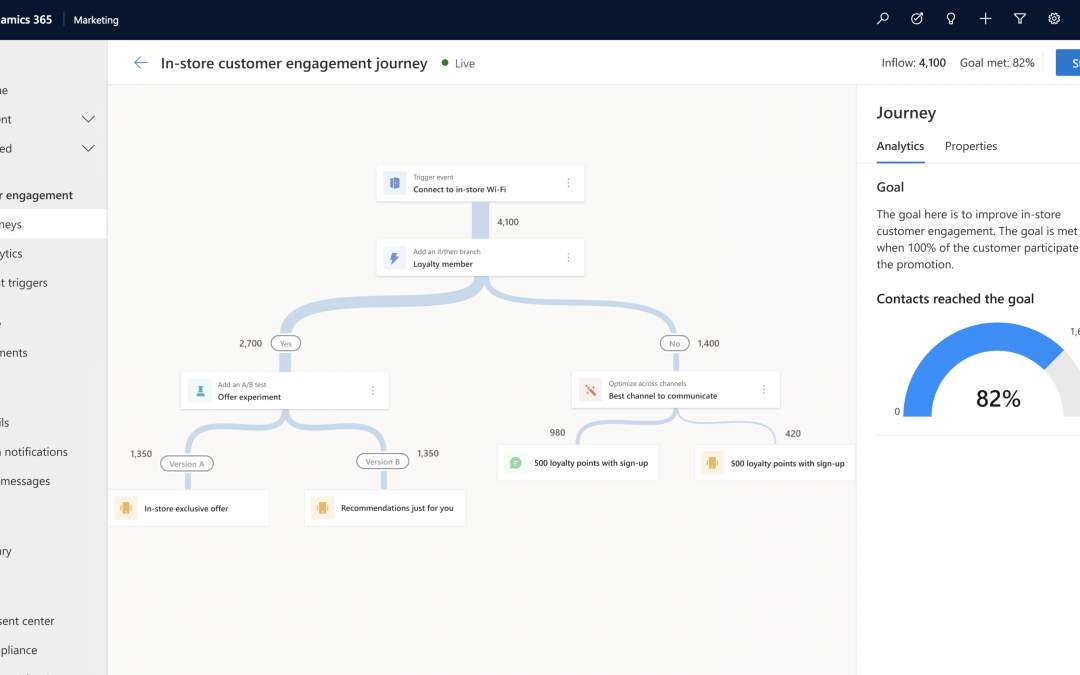
The new journey designer simplifies the creation of steps along a moments-based customer journey

2. Event catalog with built-in and custom events for triggering customer journeys

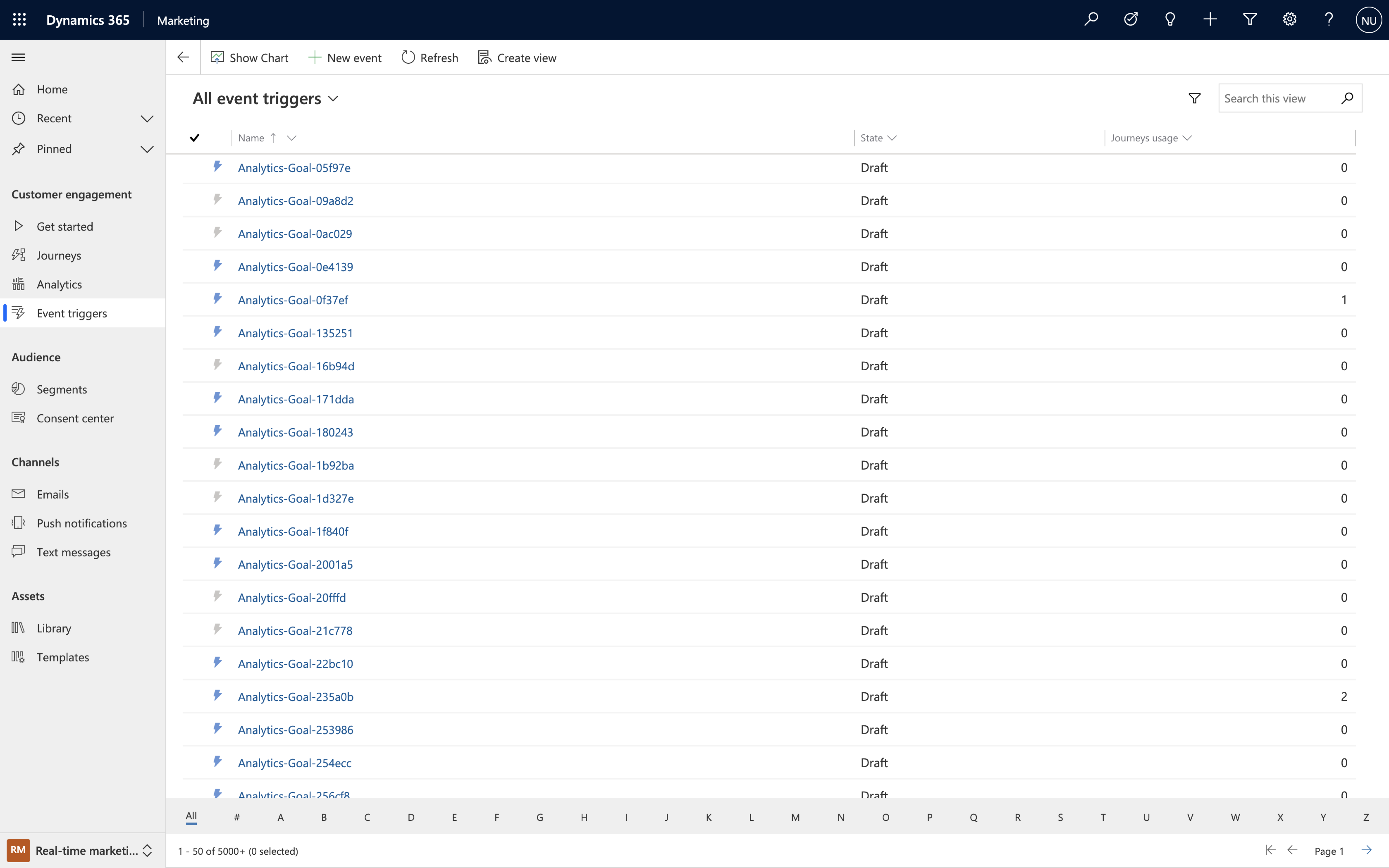
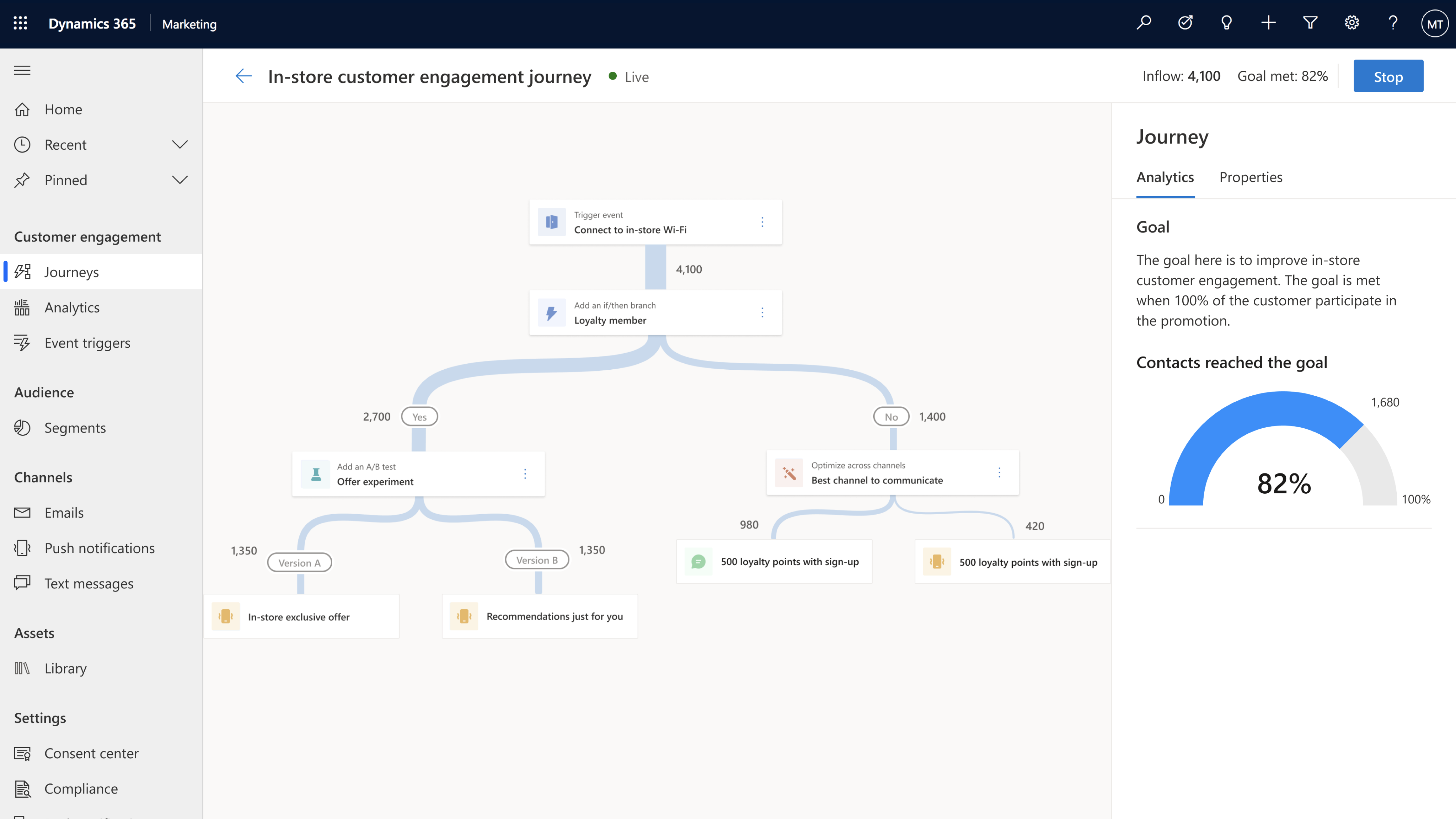
Journeys created with Dynamics 365 Marketing are customer led, they can start (or stop) when an event is triggered and can be executed in real time. “Events” are activities that your customer performs, including digital activities like interacting on your website, or physical ones like walking into a store and logging onto the Wi-Fi. Event triggers are the powerhouses behind the scenes that make it all happen, and you can create them quickly and easily by using built-in events from the intuitive event trigger catalog or creating custom events that are specific to your business.

By strategically using event triggers you can break down silos between business functions. Gone are the days of tone-deaf, disconnected communications from different departments, now you can deliver a congruous end-to-end experience for each of your customers.

The intuitive event trigger catalog with both built-in and custom events allows you to create event triggers quickly and easily.

3. Hyper-personalize customer journeys using data and insights from Dynamics 365 Customer Insights

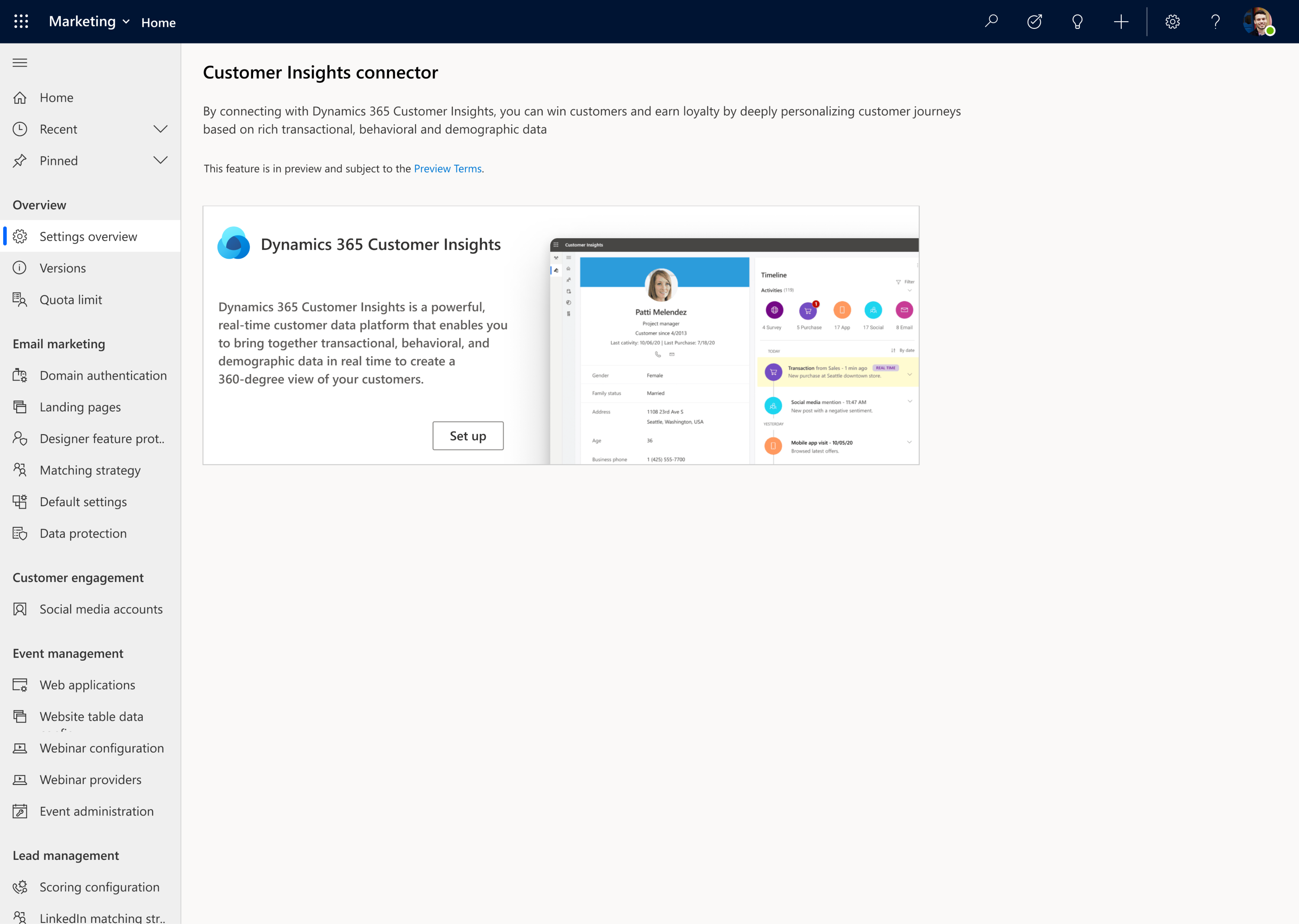
Dynamics 365 Marketing goes beyond a typical marketing automation tool by leveraging the power of data, turning that data into insights, and activating it. Microsoft’s customer data platform, Dynamics 365 Customer Insights, makes it easy to unify customer data, augment profiles and identify high-value customer segments. You can use this profile and segment data in Dynamics 365 Marketing to fine tune your targeting and further refine your journeys so that you can drive meaningful interactions by engaging customers in a personalized way.

From Dynamics 365 Marketing you can seamlessly connect with Dynamics Customer Insights and use that profile and segment data to fine tune your journeys.

4. Author personalized emails quickly and easily using the new email editor

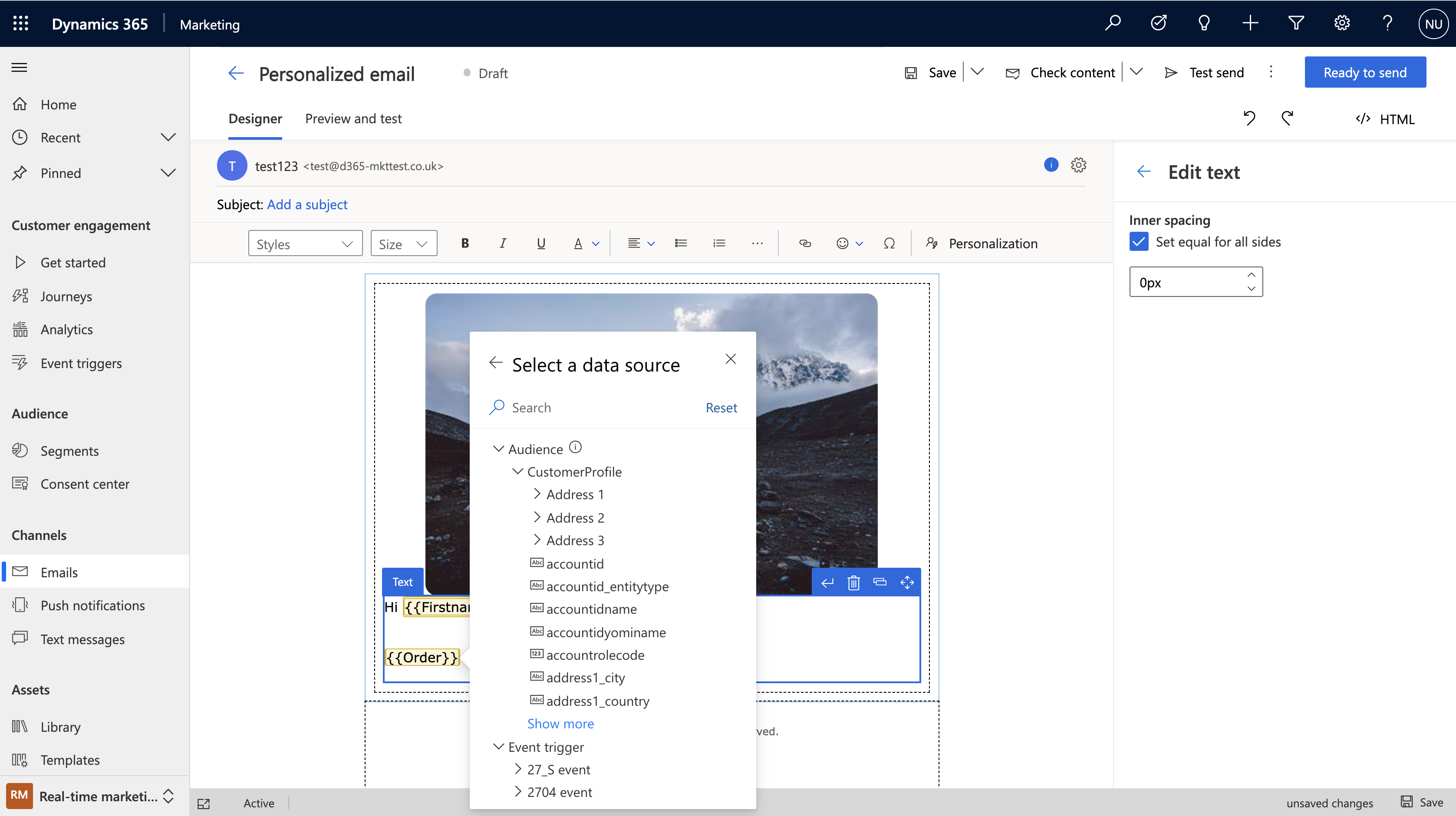
The completely new, intuitive, and reliable Dynamics 365 Marketing email editor helps you to produce relevant emails with efficiency and ease. The modern layout with the redesigned toolbox and property panes makes everything simpler to find. Personalization is also streamlined just click the “Personalization” button to navigate through all available data so you can customize your messages with speed and ease.

You can also take advantage of new AI-powered capabilities within the editor like AI-driven recommendations to help you to find the best media to complement the content in your messages. We make it easy to create professional emails with advanced dynamic content resulting in messages that better resonate with your customers.

With the click of the

5. Create and send personalized push notifications and SMS messages

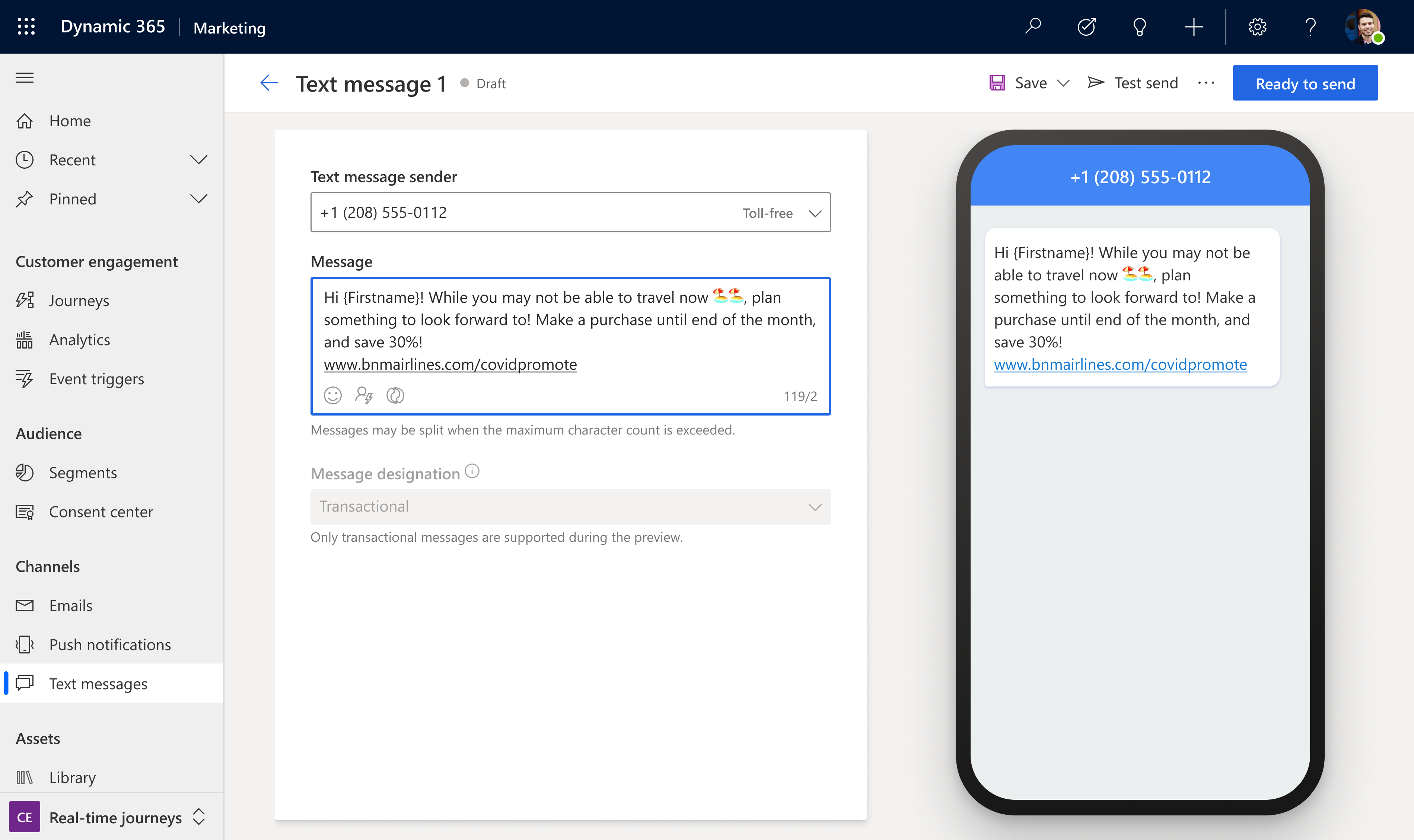
Because email is not the only channel to reach your customers, we have also streamlined personalization across SMS messages and push notifications and made both editors easy and intuitive to use so you can create beautiful, customized messages to keep your customers engaged throughout transactional communications, marketing campaigns, and customer service communications. Using these additional channels enables you to react to customer interactions across touchpoints.

Personalizing SMS messages is easy and intuitive so you can create beautiful, customized messages.

6. Search, manage, and tag your digital assets with a new centralized asset library

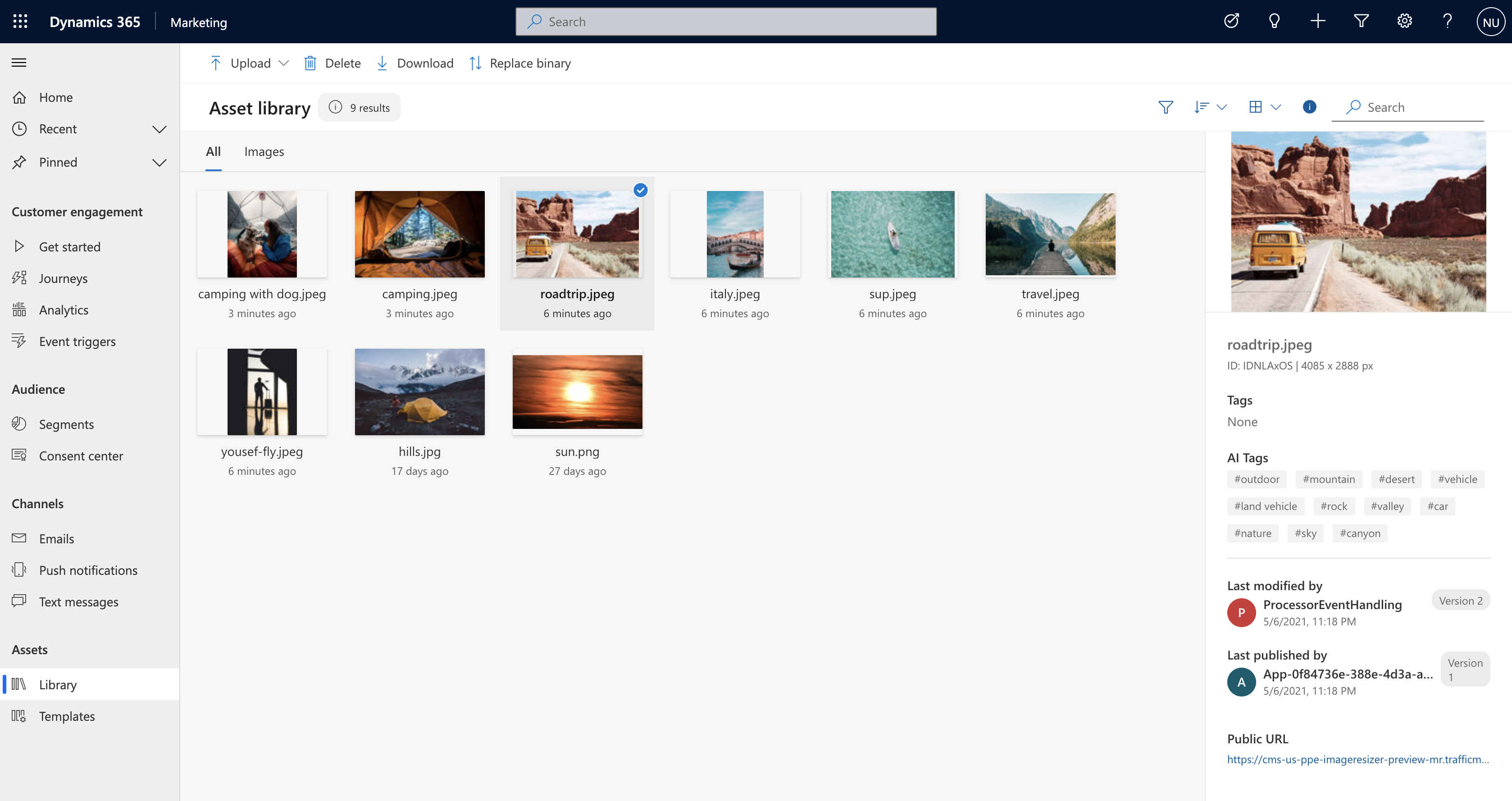
The new centralized asset library is the cherry on top of all channel content creation within Dynamics 365 Marketing. The new centralized library lets you upload files then AI automatically tags them for you. You can then search, update and add or delete images. No matter where you’re accessing the centralized library from, you’ll have access to the latest assets for your company helping you to build successful multitouch experiences for your customers.

The new centralized Asset library lets you upload files then AI automatically tags them for you

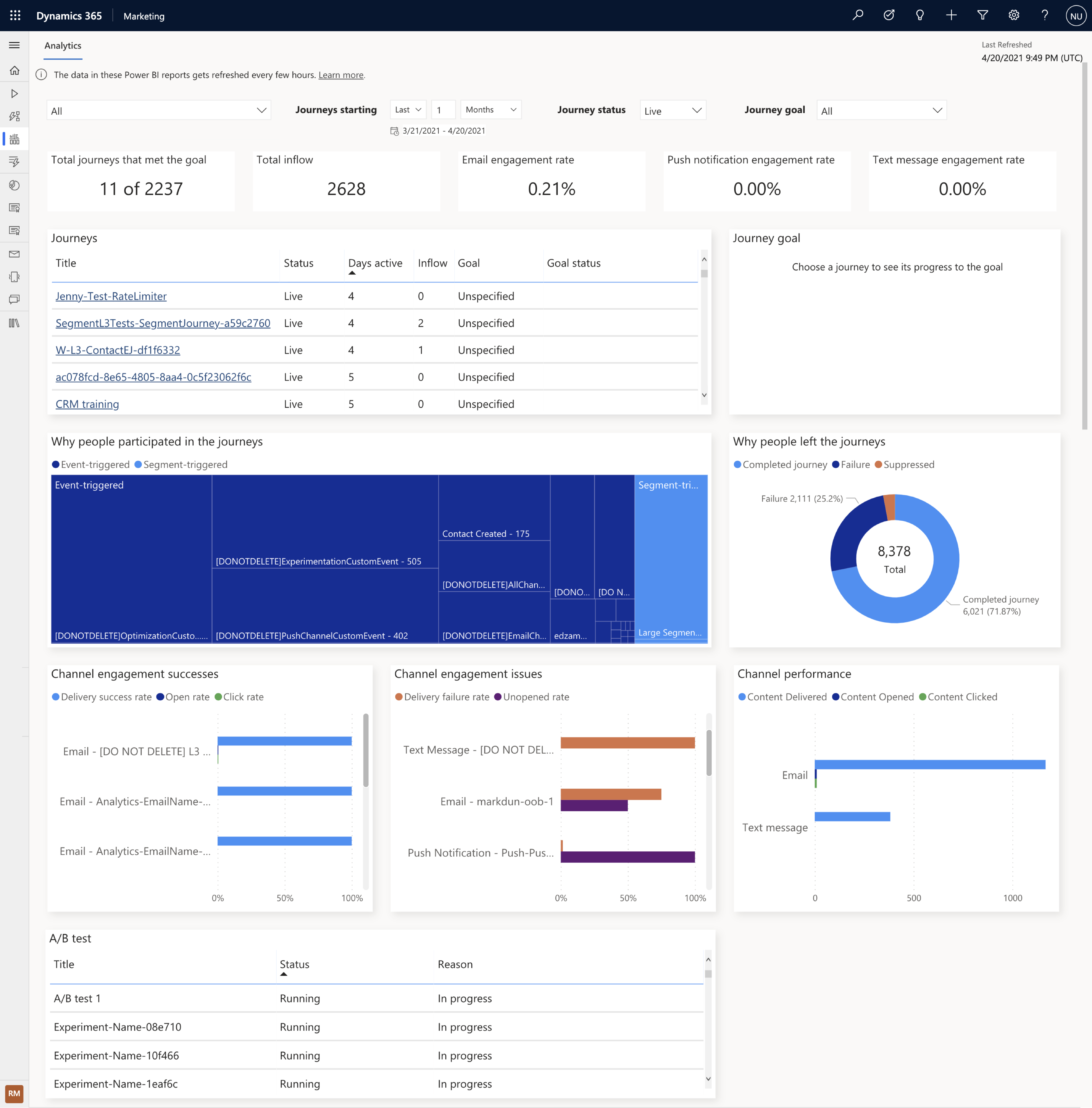
7. Improve journey effectiveness with a built-in cross-journey aggregate dashboard

At the end of the day, you want to know if your customer journey is meeting its objectives. Dynamics 365 Marketing not only helps you to easily set the business and user-behavior goals for your customer journeys, it tracks progress towards those goals and gives you a clear dashboard with the results so you can troubleshoot areas of friction or see what’s working so you can recreate that same approach in other journeys. The new built-in analytics dashboard also makes it easy to view results and act upon cross-journey insights to further optimize individual journeys.

The new built-in analytics dashboard makes it easy to view customer journey results and cross-journey insights.

These preview capabilities are now available to customers who have environments located in the U.S. datacenter, and will be available to customers with environments located in the Europe datacenter starting early next week. When you log into the product, a notification banner will let you know when the preview capabilities are available for you to install. You can install these from the settings area of your app. If you are not a Dynamics 365 Marketing customer yet, get started with a Dynamics 365 Marketing free trial to evaluate them.

We look forward to hearing from you about the release wave 1 updates for Dynamics 365 Marketing and stay tuned, we have a lot more coming!

The post Microsoft Dynamics 365 Marketing customer journey orchestration preview now available appeared first on Microsoft Dynamics 365 Blog.

Brought to you by Dr. Ware, Microsoft Office 365 Silver Partner, Charleston SC.
Improve on-the-job guidance with Dynamics 365 Guides and Azure Object Anchors

Improve on-the-job guidance with Dynamics 365 Guides and Azure Object Anchors

This article is contributed. See the original author and article here.

As the pace of manufacturing accelerates to meet demands across global customers, organizations are struggling to rapidly train and upskill workers on factory lines and the production floor. In fact, up to 2.4 million U.S. manufacturing jobs could remain unfilled between 2018 and 2028 due to this challenge.1

Today we’re introducing an exciting update to Microsoft Dynamics 365 Guides that promises to improve the way frontline workers access digital guidance in real-world scenarios, empowering them with hands-on opportunities to learn new and revised technical skills on-site. By engaging employees in hands-on, experiential learning, they are better able to retain and apply new skills to meet evolving job demands.

State of learning today

Traditional classroom training methods are not only expensive to implement and maintain but also are often ineffective. On average, employees only apply about 54 percent of new skills learned and business leaders are similarly disenfranchised.2 88 percent of human resource leaders are looking to invest in new technologies and 84 percent of business leaders want to rethink their workforce experience.3 At Microsoft, we see an opportunity to shift the way employees learn by providing organizations with the technology to attract, train, and maintain their workforce. Instead of static, hundred-page manuals that employees consume in a classroom, employees move towards immersive and collaborative experiences that are incorporated into daily workflows. With an estimated 97 million new jobs created by the year 2025, organizations need to provide employees with greater operational knowledge and a seamless, improved way to learn on the job.4 The question is, where do you get started?

On-the-job guidance with Dynamics 365 Guides and Azure Object Anchors

Dynamics 365 Guides is the mixed reality solution for organizations looking to accelerate upskilling and empower employees with transformational learning experiences. With Dynamics 365 Guides, employees can author step-by-step workflows with holograms on a head-mounted display to effectively imitate real-world scenarios.

Visual overlays and markers hover over the next step, using visual reinforcements to help improve muscle memory and reduce downtime.

1. Visual overlays and markers hover over the next step, using visual reinforcements to help improve muscle memory and reduce downtime.

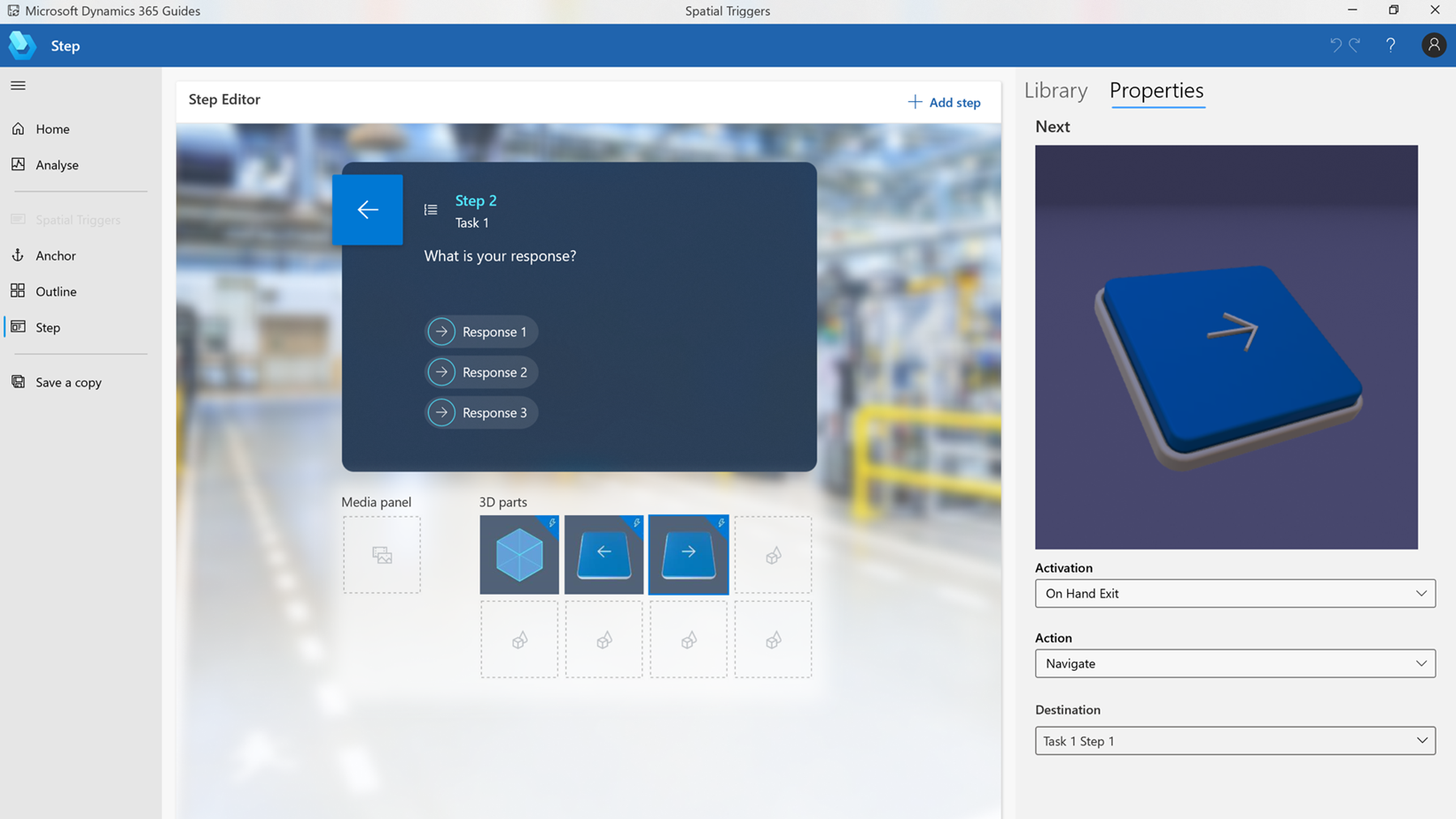
Non-linear guides can incorporate branching logic to account for skill level and workflow variability in which users can easily select the option best fits their skillset or situation.

2. Non-linear guides can incorporate branching logic to account for skill level and workflow variability in which users can easily select the option best fits their skillset or situation.

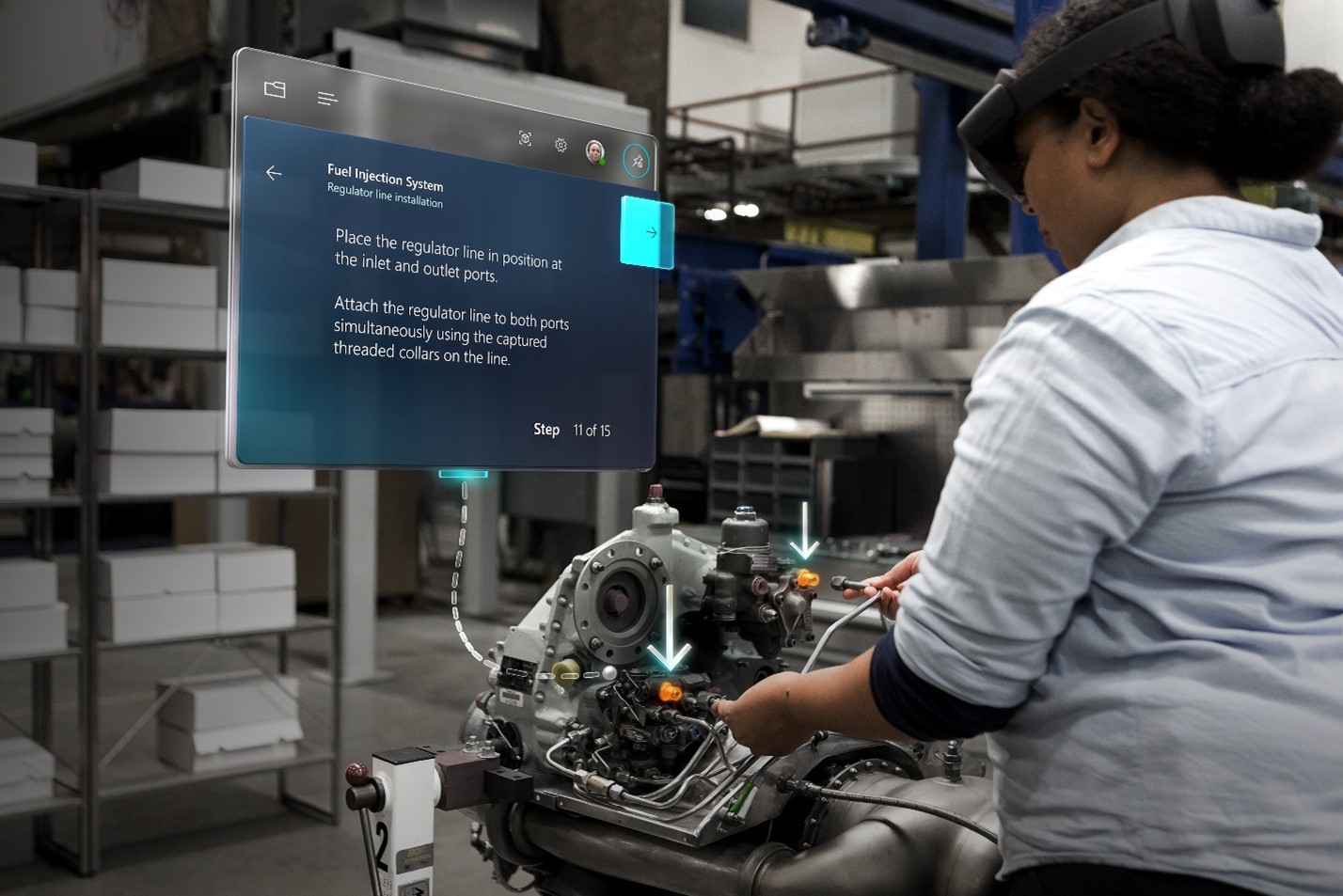
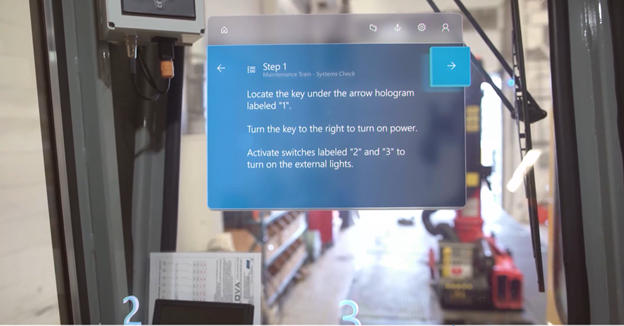
Operators can stay in the flow of work while following step-by-step instructions overlaid directly in front of them, empowering employees to learn on the job and reduce downtime spent in a classroom.

3. Operators can stay in the flow of work while following step-by-step instructions overlaid directly in front of them.

Yesterday at the Microsoft Business Applications Summit, we announced the latest development: Dynamics 365 Guides with Azure Object Anchors. Azure Object Anchors enable users to automatically align digital content with physical objects, eliminating the need for QR-code markers while improving alignment accuracy. Using Dynamics 365 Guides and Azure Object Anchors, operators can easily move from one workstream to the next as HoloLens’s spatial insight detects anchors and seamlessly launches overlaid digital content. Organizations can move from a manual process, often ripe with inaccuracies, to a walk-up and work experience that improves user learning and reduces errors.

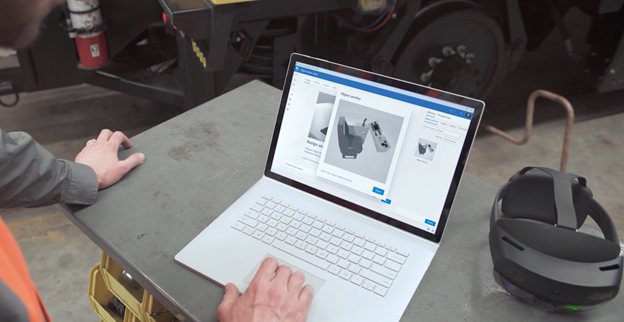
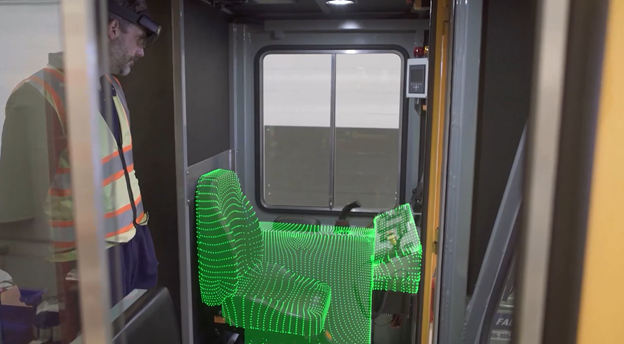
Author using the Guides PC authoring application to create an Object Anchor.An Object Anchor helps HoloLens identify the object in real-timeStep-by-step holographic instruction card is displayed directly over the object

Azure Object Anchors is a recent example of the innovation that stems directly from customer feedback, and we’ve seen it in use recently at Toyota Japan, where they used Azure Object Anchoring to place digital markers in their environment to improve process efficiencies. Without the need for physical markers, Toyota was able to incorporate Azure Object Anchors across dealerships to help technicians get up and running much faster. We are excited to bring this new capability to Dynamics 365 Guides to improve the workflow experience and unlock additional operational efficiencies.

Innovative solutions and technology are needed to address the growing skills gap faced by many industries. As organizations eschew the status quo and adopt experiential learning solutions, like Dynamics 365 Guides, they are better prepared to meet this challenge and empower their employees to learn on the job more effectively.

Learn more about Dynamics 365 Guides and Azure Object Anchors.


1Deloitte Insights and the Manufacturing Institute, 2018 Deloitte and the Manufacturing Institute Skills Gap and Future of Work Study, 2018

2Baker, Mary. “Stop Training Employees in Skills They’ll Never Use.” Smarter With Gartner, August 28, 2020.

3Deloitte Human Capital Trends 2019, “Leading the Social Enterprise: Reinvent with a Human Focus,” Deloitte, 2019.

4Russo, Amanda. “Recession and Automation Changes our Future of work, but there are Jobs Coming,” World Economic Forum, 2020.


The post Improve on-the-job guidance with Dynamics 365 Guides and Azure Object Anchors appeared first on Microsoft Dynamics 365 Blog.

Brought to you by Dr. Ware, Microsoft Office 365 Silver Partner, Charleston SC.