

5 trends transforming B2B buying and e-commerce

5 trends transforming B2B buying and e-commerce

This article is contributed. See the original author and article here.

Many of the forces driving rapid change in B2C commerce are now propelling transformation in the B2B space. Buyers of all types demand an easy, convenient online shopping experience, a requirement that has been accelerated by the pandemic and as Millennials take the decision-making reins.

Over time, the demand for an omnichannel, user-centric e-commerce experience will grow in every space, including B2B. The good news is that with B2B e-commerce for Microsoft Dynamics 365 Commerce, we’re delivering the same integrated, secure, and seamless experience for B2B e-commerce as we do for B2C companies. Plus, businesses who compete in both spaces can use the same holistic commerce solution in both scenarios.

1. B2B buying is moving online

When examining how the pandemic has accelerated e-commerce, it’s clear that this rapid transformation has touched every industry, every sector, and every business type. Online shopping hit new records before the pandemic and surged more than 209 percent in April 2020 alone, according to ACI.

In the B2B arena, more buyers are shopping online than ever before, too. According to McKinsey & Company, just 20 percent of B2B buyers say they hope to return to in-person sales. This proves to be especially true in sectors where field-sales have long dominated, including pharma and medical products. And this shift is not just for small purchases. B2B consumers are making large purchases online. The same McKinsey & Company research found that 70 percent of B2B decision-makers are open to making remote or self-service purchases over $50,000, and 27 percent would spend more than $500,000.

According to Digital Commerce 360, US B2B e-commerce sales increased by 11.8 percent to $2.19 trillion in 2020, up from $1.3 trillion in 2019. This market is near double the opportunity as B2C e-commerce, which was $861.12 billion in 2020, according to Digital Commerce 360.

Kent Water Sports have been actively working with Microsoft to bring Dynamics 365 Commerce to both consumers and business partners to improve buying experiences.

“Our customers are thrilled to see inventory levels and receive automatic shipping notifications from our system now that we’ve added the Dynamics 365 B2B e-commerce capabilities. Altogether, it’s a much better experience for our B2B customers. Rhett Thompson: IT Corporate Director” – Kent Water Sports

2. Supply chain agility is a necessity

The pandemic has highlighted just how critical supply chain agility is, as demonstrated by the headline-making supply chain shocks. In addition to the toilet paper shortages in the pandemic’s early days, other supply chains, such as medical supplies, silicone chips, appliances, and even bicycles, have buckled. A year later, supply chains have still not fully recovered.

According to a November 2020 commissioned study conducted by Forrester Consulting on behalf of Microsoft, supply chain agility is one of the three major areas that retailers and consumer packaged goods companies are focused on as part of a successful digital commerce strategy. These businesses are addressing agility by increasing visibility throughout their product’s journey and embracing technologies such as machine learning and AI to drive automation. Companies must be able to connect supply chain technology with their digital commerce systems to gain access to real-time inventory visibility and leverage AI to optimize fulfillment and ensure inventory availability at the right time and place.

3. User experience is at the forefront

In recent years, consumers have come to expect certain conveniences when shopping online that improve their experiences. From depositing checks through a smartphone app to sending money instantly without a fee to grocery delivery, companies have increasingly made our lives easier through integrated technologies and a focus on the customer experience. When shopping online, B2C consumers have come to expect easy-to-use digital storefronts, customizable products, package tracking, and simplified checkout and payment options.

As Millennials become more senior in business, they’re questioning why B2B should be any different, citing a disconnect between an archaic spreadsheet-driven B2B buying experience and how they conduct their personal online activities. Back in 2017, Forrester already noted that Millennials have taken over B2B buying power, with 73 percent of Millennials involved in B2B purchasing decisions. A more recent study by Demand Gen found that 44 percent of Millennial respondents indicating they are a primary decision-maker at their company for purchases of $10,000 or more.

Creating a seamless customer experience is a must for all businesses. B2B e-commerce is no exception and companies like Britax Rmer have been working with Dynamics 365 Commerce to provide more robust experiences and discoverability for retailers and streamline the customer’s buying journey.

This embed requires accepting cookies from the embed’s site to view the embed. Activate the link to accept cookies and view the embedded content.

This site uses cookies for analytics, personalized content and ads. By continuing to browse this site, you agree to this use.

4. Personalization requires integration

Personalization is a growing trend in B2C retail that is making its way to the B2B commerce space, too. B2B buyers are sophisticated. They’re the tech-savvy Millennials and buyers of all ages who are used to seeing personalized recommendations, purchase history for easier reordering, chat options for instant customer service, and more.

Delivering this personalization requires a more integrated customer experience, from in-person to online and back again, which relies upon unified data and greater transparency. In a special blog series for retailers, we discussed how to achieve visibility through Dynamics 365 Commerce in part two of the series. The takeaways from this series can be applied to B2B, too.

Although e-commerce is booming, it’s expected that in-person shopping for both B2C and B2B customers will rebound. Before the pandemic, Capgemini Research Institute found that 59 percent of consumers worldwide had high levels of interaction with brick-and-mortar stores. As things return to the new normal, a lower number, 39 percent, expect a high level of interaction with physical stores. B2B retailers need to deliver seamless omnichannel experiences that tie together online and offline interactions.

5. Security, privacy, and fraud prevention are critical

In our Forrester study, security and privacy were highlighted as the third critical component for successful digital commerce, while expanding e-commerce widens the scope of risks. In addition to protecting customer data, businesses must protect themselves from both fraud and security breaches. According to Retail TouchPoints, online fraud losses reached $40 billion globally in 2018. The study also showed that 52 percent of retail and CPG decision-makers consider the increasing level of sophistication of online threats or attacks as a major security challenge for digital commerce.

A robust system is required for combating fraud, which is why we’ve made it easy to integrate Microsoft Dynamics 365 Fraud Protection into Dynamics 365 Commerce. It provides tools and capabilities to decrease fraud and abuse, reduce operational expenses, and increase acceptance rates while safeguarding user accounts.

How to get started with B2B e-commerce for Dynamics 365 Commerce

We’ve created B2B e-commerce for Dynamics 365 Commerce to help you streamline and simplify self-service buying for your B2B customers. It provides a unified omnichannel solution that can meet organizational needs for both B2C and B2B e-commerce in a single platform. It also helps companies provide more personalized e-commerce experiences while ramping up security, privacy, fraud prevention.

Learn more about B2B e-commerce for Dynamics 365 Commerce today or contact us to join a demo or to speak with a specialist about Dynamics 365 Commerce.

The post 5 trends transforming B2B buying and e-commerce appeared first on Microsoft Dynamics 365 Blog.

Brought to you by Dr. Ware, Microsoft Office 365 Silver Partner, Charleston SC.
5 trends transforming B2B buying and e-commerce

Mixed reality meets lean management: how Dynamics 365 Remote Assist streamlines Microsoft datacenter operations

This article is contributed. See the original author and article here.

Did you know that mixed reality business applications like Microsoft Dynamics 365 Remote Assist on HoloLens 2 can help reduce waste from a lean management perspective? We invited Six Sigma Black Belt and Kaizen expert Laura Riley, Senior Business Program Manager from the Microsoft Cloud Operations and Innovations team to share her perspective on how using Dynamics 365 Remote Assist on HoloLens 2 in Microsoft’s datacenters has helped staff avoid unnecessary travel, boost uptime, and save costs all while reducing waste.

Q: Tell us a bit about how Microsoft first started using mixed reality for datacenter management and operations.

Laura Riley: The opportunity to tap into the power of mixed reality solutions in our datacenters really came about because of a combination of factors. These included:

  • The ongoing COVID-19 pandemic, shift to employees working from home, global lockdowns, and travel restrictions with countries shutting borders. The lockdown essentially forced a turbocharge of plans for the way we work.
  • Phenomenal demand for Microsoft cloud offerings as people relied on cloud computing to support remote work, school, and play.
  • Landlords, smart hands, and vendor travel restrictions
  • Complex New Edge Technologies being deployed to the field at a faster pace
  • Engineering teams could not travel onsite to do their routine inspections and checklists of our Critical Environment systems due to the travel lockdowns
  • Current methods of developing and delivering does not scale at the pace that we need them to in order to provide the user with a fully immersive learning experience
  • Limited human resources for travel, site Selection, commissioning, and final turn over to Operations
  • Audits within Microsoft (PCI, SOC, FedRamp, HKMA) required to progress during the COVID-19 pandemic. Auditors were required to perform audits remotely during the COVID-19 pandemic lockdown and required technology that would allow them to perform their activities to support not only our internal evidence but evidence for our customers to ensure we are operating within the secure guidelines for our datacenters.

Q: What did your team use Dynamics 365 Remote Assist on HoloLens 2 for?

Laura: We had several Dynamics 365 Remote Assist use cases within our organization. For starters, our team required an immediate shift as part of our COVID-19 pandemic response to meet the demand of our customers. The COVID-19 pandemic escalated the need to have hands on the ground to meet this demand. We first launched Dynamics 365 Remote Assist on HoloLens 2 in our Cloud Operations Supply Chain within the Global Regional areas to assist with performing critical activities that were either halted, stalled, or delayed due to restrictions with travel and having SMEs available to perform the work. Dynamics 365 Remote Assist and HoloLens 2 using Augmented Reality allowed for immediate ROI while improving the outcome.

From then on, we expanded our use case to include zero-waste inspections, and as well as a plethora of other activities including:

  • Remote Audits (PCI, FedRamp, SOC, HKMA, others)
  • Critical Environment Quality Inspections
  • Construction and Turn-Over to Operations Inspections
  • NPI New Product Introduction
  • Break-Fix
  • Deployments
  • EHS
  • GOLD and Learning & Development
  • Edge Sites
  • Factory Witness Testing
  • IT/CE Smart Hands

Q: So how did Dynamics 365 Remote Assist on HoloLens 2 help your team reduce waste from a lean management perspective?

Laura: The mixed reality solution enabled us to achieve a number of quantified benefits, including:

  • Increased efficiency, including improved first-time fix rates
  • Increased safety for employees
  • Reduce machine downtime
  • Minimize risk of downtime with proactive remote audits and inspections
  • Enhanced training and improved knowledge transfer between employees
  • Enable hands-free work especially for employees that need both hands free to work
  • Enable real-time, 3D annotation-supported collaboration among team members
  • Improve client-facing interactions
  • Drive better remote access processes
  • Minimize or in some cases even eliminate travel costs
  • Offer design-focused employees more tools to boost productivity
  • Boost knowledge transfer between seasoned and new employees
  • Providing interactive, 3D digital service instructions
  • Ability to display critical information, including service details, associated with a machine right in the context of our real-world environment
  • “I see what you see” live video-conferencing for effective communication
  • Ability to display interface options that are not accessible on the physical machine.
  • Faster Learning curve for trainees, again reducing time spent to onboard new employees

That said, the biggest waste reduction probably stems from time saved on non-value-adding activities via travel avoidance where possible. Using Dynamics 365 Remote Assist and HoloLens effectively reduced travel for our IT Program Managers performing Construction Inspections by 90 percent. Our team of Construction PMs now uses Dynamics 365 Remote Assist and HoloLens 2 instead of traveling to the sites, effectively performing remote inspections through the field technicians on the ground.

Below are the key benefits we were able to achieve with mixed reality:

  • Improved Collaboration: Field Technicians can now be instructed by Subject Matter Experts with visibility into their work via “see what I can see” and 3D annotation capabilities at the physical location without having to travel. Escalations and support calls become more effective and efficient as Engineering teams can now see what the field technicians are doing in real time, while instructing work activities.
  • Improved Work/Life Balance: Dynamics 365 Remote Assist gave the Auditors time back in their day to perform other critical activities time which would otherwise have had to be spent traveling around the globe. Performing compliance audits using Dynamics 365 Remote Assist was a game changer, per Lee Moscal, a Microsoft Auditor. It demonstrates our ability to save costs associated with travel and improve the auditor’s work/life balance. We perform approximately 75 audits per fiscal year with six auditors traveling to various locations across the Regions. The impact helped reduced travel nine times around the globe for six auditors traveling to those locations.
  • Sustainability and Carbon Negative Goals: Using Dynamics 365 Remote Assist for our Zero Waste Program helped improve sustainability due to reduced travel thus our carbon footprint. It also helped save time associated with performing those inspections. We were also able to improve the quality and reduce the time it took to obtain evidence reviews all while effectively cutting down on training required to perform these inspections.
  • Critical Environments Reduced Costs: There are many exciting opportunities to gain efficiencies in Commissioning using Dynamics 365 Remote Assist.
  • Improved Learning: Dynamics 365 Remote Assist enables trainers to provide visual and verbal step-by-step instructions remotely. Trainees can now carry out required tasks hands-free and independently with the support of mixed reality.

Learn more about Dynamics 365 Remote Assist on HoloLens 2

Read the full Microsoft Datacenter story, “Microsoft enhances datacenter audits, management with mixed reality using Dynamics 365 Remote Assist on HoloLens 2”.

Learn more about Dynamics 365 Remote Assist.

Learn more about the overview, features, and specs of Microsoft HoloLens 2.

The post Mixed reality meets lean management: how Dynamics 365 Remote Assist streamlines Microsoft datacenter operations appeared first on Microsoft Dynamics 365 Blog.

Brought to you by Dr. Ware, Microsoft Office 365 Silver Partner, Charleston SC.
5 trends transforming B2B buying and e-commerce

Your guide to Dynamics 365 and Power Platform at Microsoft Build

This article is contributed. See the original author and article here.

Microsoft Build is just around the corner! To help you make the most of the three-day digital event, we’ve rounded up some must-see sessions and speakersmore than two dozen technical sessions to help developers across roles and skill levels create amazing experiences with Microsoft Power Platform and Microsoft Dynamics 365.


The post Your guide to Dynamics 365 and Power Platform at Microsoft Build appeared first on Microsoft Dynamics 365 Blog.

Brought to you by Dr. Ware, Microsoft Office 365 Silver Partner, Charleston SC.
5 trends transforming B2B buying and e-commerce

Enable business resilience with cloud and edge scale units in Dynamics 365 Supply Chain Management

This article is contributed. See the original author and article here.

Today, companies operate facilities and warehouses in multiple locations, across regions, and across time zones to meet consumer demand in the best way possible. Warehouses and manufacturing facilities are spread out to match global operations with shipping needs.

Therefore, any supply chain solution that supports warehouse and manufacturing facilities needs to provide a high level of resilience that delivers reliability, availability, and scale.

Dynamics 365 Supply Chain Management meets these needs for your organization with cloud and edge scale units. Supply Chain Management is a tailored offering that helps businesses of all sizes build resilience.

The hybrid topology for Supply Chain Management using scale units became available for public preview in October 2020, and since then we have added numerous incremental enhancements to the platform and to the warehouse and manufacturing execution workloads for scale units. Now the scale unit platform with its first workload is generally available, and you can purchase the scale units add-in for Supply Chain Management environments in the cloud.

Warehouse execution workloads in cloud scale units generally available

The hybrid topology for Supply Chain Management includes the following elements:

  • A platform for a distributed hybrid topology, which is composed of a hub environment in the cloud and subordinate cloud scale unit environments that perform dedicated workload execution and increase your supply chain resilience.
  • The warehouse execution workload, which is the first distributed supply chain management workload in general availability.
  • The Scale Unit Manager portal, which helps businesses to configure their distributed topology using scale units and workloads.

The first release of the warehouse execution workload provides support for inbound operations, outbound operations, and internal warehouse movement. It utilizes the concept of warehouse orders, which have been added to enable the system to transfer warehouse work to scale units. For more information about the workload capabilities now generally available with version 10.0.17 of Supply Chain Management, see Warehouse management workloads for cloud and edge scale units.

Hybrid topology enhancements available for preview

In addition to the features for scale units, there are several preview features for building hybrid topologies.

Warehouse execution workload capabilities

Version 10.0.19 of Supply Chain Management is now in early access. It provides enhancements for warehouse workloads that have been requested by our customers.

In version 10.0.19, warehouse workload capabilities reach into the shipping processes and are now able to confirm shipments, send advance shipping notices (ASNs), and generate bill of lading on the scale unit.

One of the top demands of our customers is the ability to create provisional packing slips on the scale units, which would provide full end-to-end resiliency for outbound warehouse processes. For most of the standard operations, this will allow you to ship right from the scale unit, even if there is no active connection to your cloud hub. This is great if you run an edge scale unit at a remote facility where the external network is not always available.

In future releases, we want to extend the process responsibility of the warehouse execution workload even more and include parts of the planning phase for outbound processes like shipment creation and ship consolidation.

Manufacturing execution workload

The manufacturing workload continues in preview. In version 10.0.19, now in early access, we are introducing interactive enhancements for our customers validating the capabilities in preview.

In version 10.0.19, the manufacturing workload gains access to inventory information, which means that inventory relevant to the facility workloads is now available on the scale unit. This adds support for putaway work following manufacturing work and lets workers report as finished on the scale unit.

Future iterative enhancements will move raw material picking to the scale unit and extend the use of scale units to support more types of manufacturing processes, such as when production orders are not converted into jobs.

Edge scale units

With the release of version 10.0.19 for early access, we have opened the ability to set up edge scale units on local business data (LBD) deployments. You can now set up LBD deployments on your local hardware appliance and configure the environment as a scale unit on the edge, connected to your cloud hub.

We have released a new version of the infrastructure scripts that are used in LBD deployments and support the specific requirements for edge scale units.

During the preview phase, you will use the deployment tools provided on GitHub to experience edge scale units in a deployment of one-box development environments.

Next steps

To learn more about the distributed hybrid topology for Supply Chain Management and how you can increase the resilience of your supply chain management implementation, check out the documentation.


The post Enable business resilience with cloud and edge scale units in Dynamics 365 Supply Chain Management appeared first on Microsoft Dynamics 365 Blog.

Brought to you by Dr. Ware, Microsoft Office 365 Silver Partner, Charleston SC.
Microsoft Dynamics 365 Intelligent Order Management Preview now available

Microsoft Dynamics 365 Intelligent Order Management Preview now available

This article is contributed. See the original author and article here.

Today marks the preview release of Microsoft Dynamics 365 Intelligent Order Management, a new application that enables organizations to consistently deliver on order promises by proactively overcoming disruptions. Now, your organization can intelligently orchestrate fulfillment and automate it with a rule-based system that leverages real-time inventory and AI.

In addition, you can adapt quickly to meet future order volumes and fulfillment complexities by supporting new order intake, fulfillment, and delivery partners with pre-built connectors. With support for the latest fulfillment methods, like curbside pickup and Buy Online, Pick Up In-Store (BOPIS), you can constantly evolve order fulfillment to meet shopper’s preferences.

This embed requires accepting cookies from the embed’s site to view the embed. Activate the link to accept cookies and view the embedded content.

This site uses cookies for analytics, personalized content and ads. By continuing to browse this site, you agree to this use.

Leverage out-of-the-box connectors to intelligently scale, orchestrate, and fulfill orders

Digital commerce has fueled consumer expectations for true omnichannel experiences, with greater choice, speed, and flexibility in how people buy and receive purchases.

To help you adapt your operations to constantly deliver exceptional experiences, Dynamics 365 Intelligent Order Management offers the flexibility to integrate with existing order infrastructures, such as enterprise resource planning (ERP) and customer relationship management (CRM) systems, and external partner systems through microservice architecture and API integrations. More than 200 configurable, pre-built connectors seamlessly connect you to the solutions you need for omnichannel order intake, cross-channel order fulfillment and delivery, and rule-based order orchestration actions.

Powerful connections

Intelligent Order Management is a standalone SaaS solution with no dependencies on other Dynamics 365 applications. It has an open, modular, and interoperable architecture, so your business can leverage an expansive ecosystem of order source systems such as online e-commerce marketplaces, mobile apps, and social commerce alongside traditional ordering channels such as electronic data interchange (EDI) or brick and mortar POS.

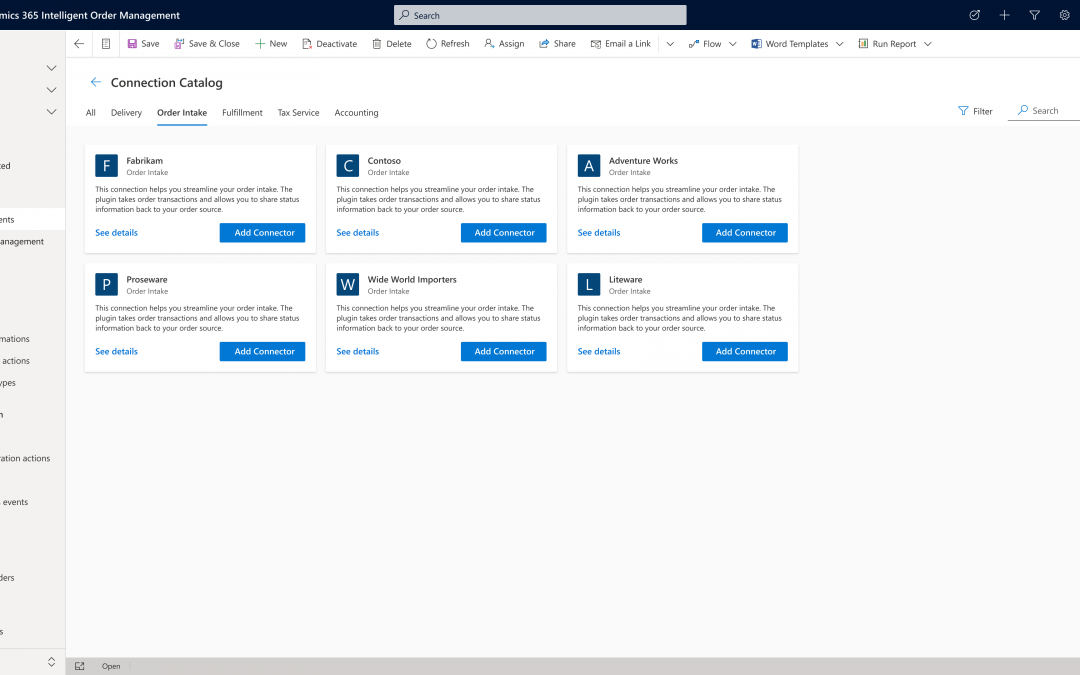
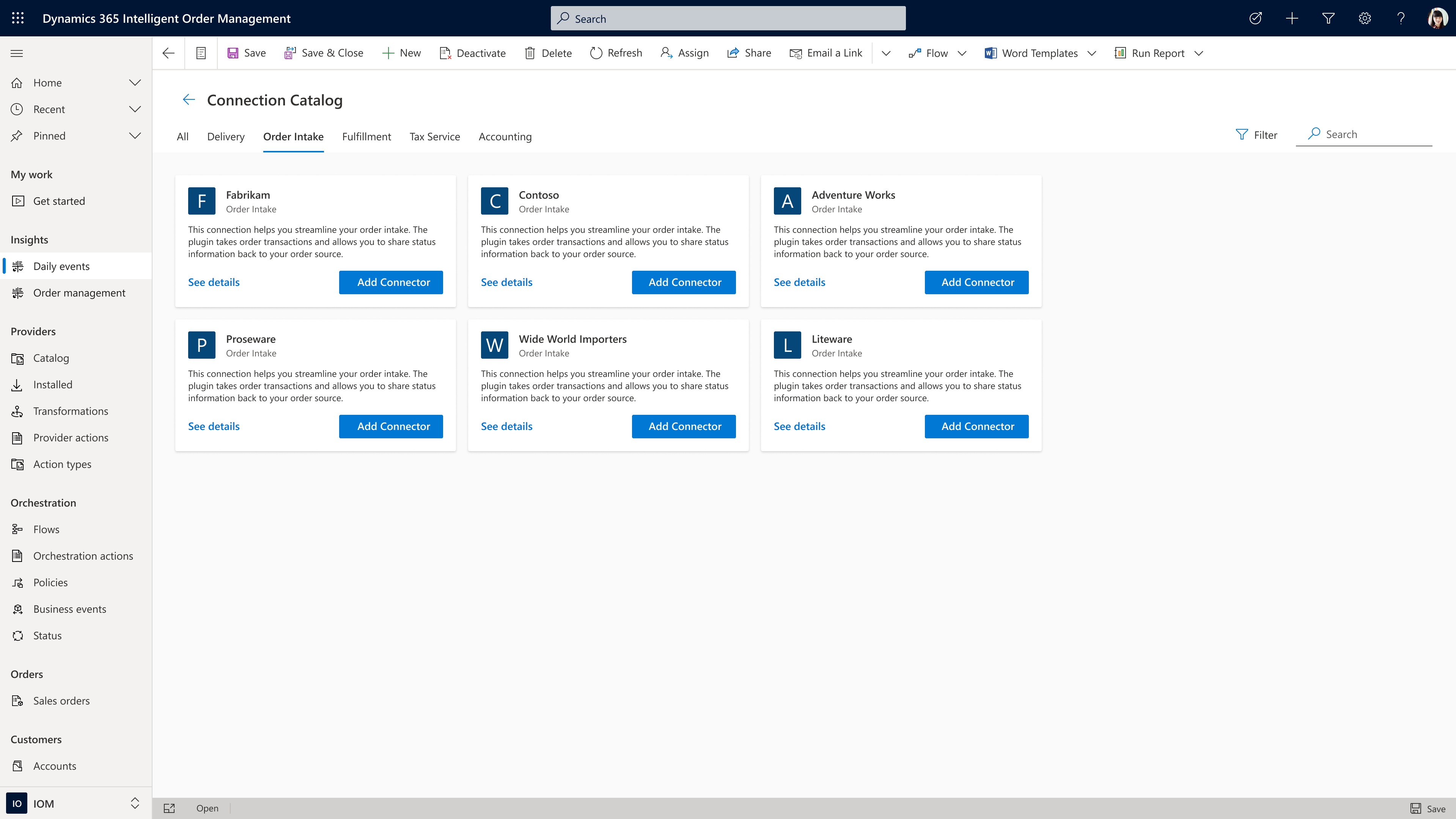
Many retailers, distributors, and manufacturers are working to overcome the challenges of adapting legacy order systems to new ways of operating. A significant benefit of Intelligent Order Management is that it enables business users to visually configure order intake from many of the most common sources by leveraging pre-built connectors in a low-code or no-code application, making rapid implementation and integration possible.

It is easy to choose a connector from the catalog.

Order source and orchestration

While Intelligent Order Management seamlessly integrates with other Dynamics 365 business applications, it also integrates with applications that you may already use or that you plan to adopt as you transform your business processes. Intelligent Order Management can easily pass through B2C order flows from third-party applications such as BigCommerce with minimal validation at order capture and B2B order flows from EDI intake applications such as Orderful using context-driven validation actions, such as requiring a credit check before passing an order on to fulfillment.

Let’s now look at some of the processes within order source and orchestration.

Automated payments

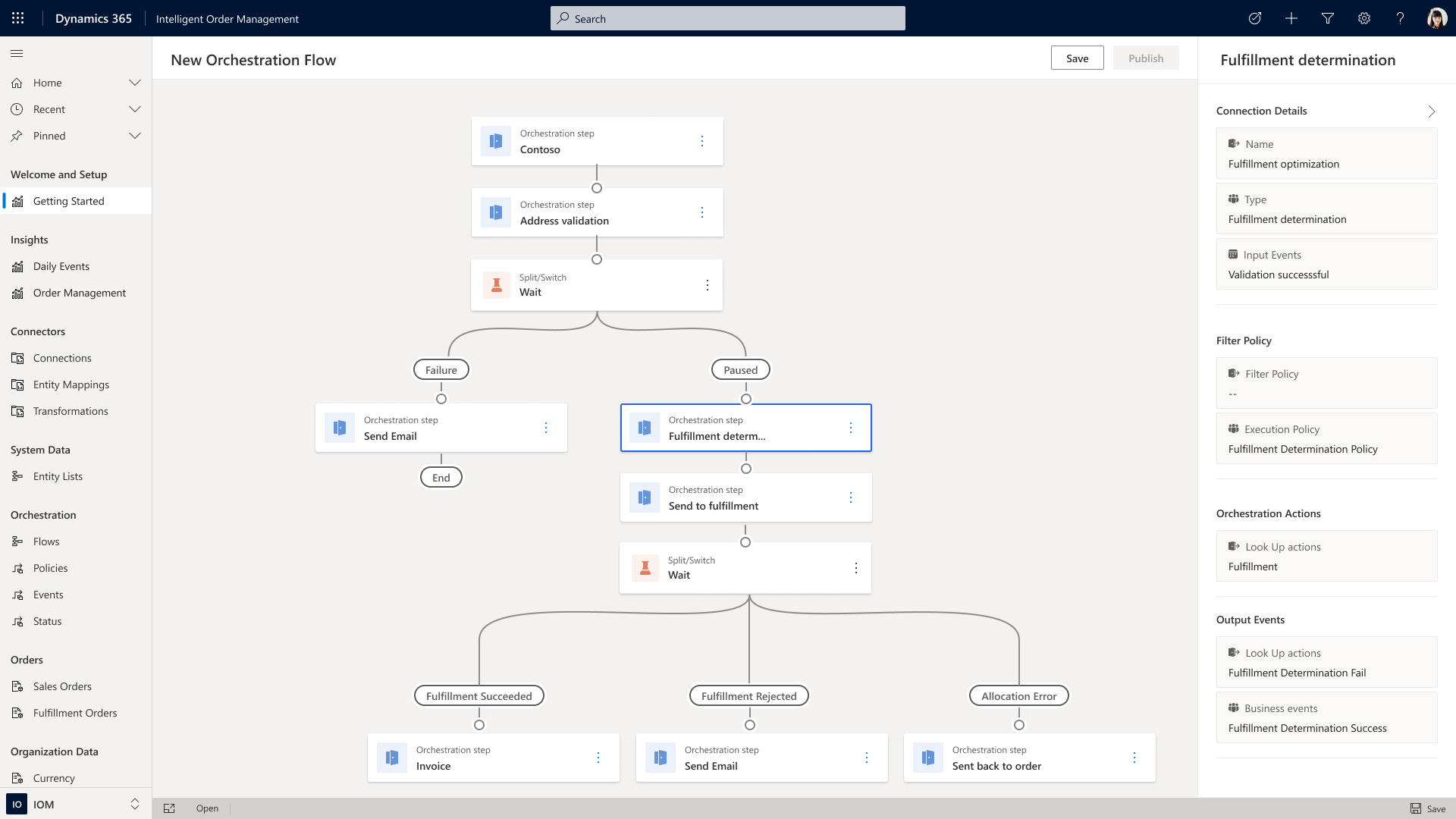
Payment integration is also possible, allowing you to take credit card payments at order intake, finalize payment later based on fulfillment status, or trigger an invoice to be sent to a business application when routing orders from on-account sales. These types of event-driven actions can be incorporated by using the built-in orchestration designer, which allows users to drag and compose order flows using an intuitive design interface.

Dynamic pricing

Regardless of the source, once the order is accepted and received by Intelligent Order Management, additional rule-based validations can be orchestrated depending on your business’s specific needs. Utilizing pre-built connectors to leading applications such as Flintfox, advanced pricing, rebate, and commissions management can be accomplished quickly and efficiently.

“Intelligent Order Management is partnering with service providers like Flintfox to provide real-time, accurate, and dynamic pricing. Utilizing the Flintfox RMx Pricing solution, all orders, regardless of source, or fulfillment, will always receive the right price, thereby reducing disputes, credits, and administration pain caused by pricing mistakes. The combination of Flintfox RMx with its advanced but easy-to-use, Pricing and Promotion Management solution, and Intelligent Order Management will further enable centralized management of pricing across omni-channels, regardless of the ultimate order source system or device.”

Tax compliance

Another critical part of order management is tax determination and compliance. Intelligent Order Management gives you the ability to connect to third-party tax engines to automate the calculation of tax rates and rules based on geolocation and product classification, file and remit tax payments to jurisdictions, automatically omit tax from exempt sales and manage exception documentation. Because you can select from several pre-built partner connectors, Intelligent Order Management provides your business with the means to quickly scale order tax compliance at a global level for sales tax, value-added tax, seller’s use tax, lodging and occupancy tax, and consumer use tax.

“Businesses today are facing intense competitive pressures to quickly evolve into omnichannel organizations, and driving efficiency in their order management processes is a key factor for maintaining smooth operations and ultimately achieving success with digital commerce,” said Sanjay Parthasarathy, Chief Product Officer at Avalara. “We’re excited to work with Microsoft in an enhanced partnership to co-develop solutions for their Dynamics 365 Intelligent Order Management application, providing our mutual customers with an industry-leading solution that solves for automated, friction-free order orchestration in the march to omnichannel success.”

Fulfillment and delivery

Intelligent Order Management also helps you direct orders to the correct node in your supply chain by combining orchestrated order flows with inventory and fulfillment systems. Pre-built connectors allow you to quickly add a range of logistic strategies to employ when working to satisfy your customer’s demand. For example, if you don’t want to use the real-time inventory visibility capability within Intelligent Order Management, you can create order process flows that validate delivery dates through your own in-house inventory application or using a pre-built connector to check that items are available to promise before accepting any order.

Sourcing and allocation

If the item isn’t in stock, Intelligent Order Management allows you to incorporate sourcing rules as a means of providing a flexible framework to automate decision-making on how to fulfill an order using make or buy. Similarly, if stock is limited, you may also use allocation rules to automate decision-making on which orders will be filled or to ring-fence inventory for specific channels or business goals.

Supply chain management

Another pre-built connector to consider is Dynamics 365 Supply Chain Management solution. Though Intelligent Order Management is a stand-alone solution that requires no additional Microsoft Dynamics 365 modules, there are several benefits to connecting to our Supply Chain Management Solution. The connection allows for deeper integration with both manufacturing, in the form of real-time production planning that allows for better synchronization of supply with order demand, and with distribution planning that utilizes an integrated warehouse management system.

Validation rules

Orders coming in from many different locations at scale may have inconsistent data due to limited validation in the source system. The use of condition-based rules, such as a minimum order quantity check, ensures that you accept only orders that comply with your requirements. After validation, Intelligent Order Management’s fulfillment optimization engine can evaluate the order for rules such as the least distance or least cost to find the best fulfillment node in your connected network.

An example of a rule based order orchestration process for an order

Freight rating and returns

You can also use the platform’s extension capabilities to connect your existing freight rating systems into an order orchestration process. Additionally, Intelligent Order Management can handle reverse logistics so that you can incorporate decision logic into return order flows that will facilitate and automate return orders to stores, fulfillment nodes, or to a service center. And because Intelligent Order Management has no limits on the number of fulfillment nodes you can add, the application is suitable for organizations of all sizes.

Reference API

Intelligent Order Management is designed to be independent of the business applications you are using while also allowing you to easily share data with other business applications. Our reference architecture will enable you to build the needed connection points from order source and orchestrations through to fulfillment and delivery. If we do not have a pre-built partner connector to an application you want to use, we have a reference API that can be used to connect to the system you require.

Take the next step

Learn more about how you can optimize fulfillment by watching the on-demand video, “Intelligent fulfillment orchestration for optimized delivery”, from our recent Microsoft Business Applications Summit event and sign up for a free trial of Microsoft Dynamics 365 Intelligent Order Management. Join the community to engage with our experts on Dynamics 365 Intelligent Order Management, and feel free to contact us at D365OMS@microsoft.com with questions or to learn more.

The post Microsoft Dynamics 365 Intelligent Order Management Preview now available appeared first on Microsoft Dynamics 365 Blog.

Brought to you by Dr. Ware, Microsoft Office 365 Silver Partner, Charleston SC.

Increase customer satisfaction and agent productivity with unified routing

Increase customer satisfaction and agent productivity with unified routing

This article is contributed. See the original author and article here.

Customer service managers are constantly searching for more efficient ways to streamline management of incoming service requests, and the backbone of any customer service center operation is routing and assigning cases efficiently. Connecting customers to the agent most qualified to resolve their issue is a foundational element of improving customer satisfaction.

Organizations typically use queue-based routing, directing customers to the relevant queue to resolve their request. A work item rarely arrives in the queue with all the information required to route it to the best-suited agent, which can result in misroutes and longer response and resolution times. To address this, an organization must create custom logic to update work items or manually add classification data to incoming cases.

With traditional queue-based routing, assigning cases requires organizations to create custom workflows that periodically move work from queues to their agents. Or some organizations have dedicated staff who try to manually distribute work across their agents equally and fairly. Both approaches require continuous queue supervision. Tracking the lifecycle of a work item through the system, either in custom workflows or manual human decisions, is inefficient and error prone.

The unified routing capability in Dynamics 365 Customer Service transforms routing and assignment for your organization by leveraging rules and machine learning models to automatically find the best-suited agent for new work items, and then prioritizing and assigning the work to your agents based on skills, current workloads, the type of customer, priority, urgency, and more.

Unified routing is truly omnichannel. It can route service requests on all channels, ensuring that work items are handled consistently and giving you a unified view of workforce utilization across multiple channels. Most importantly, it lets you continue to serve your customers wherever their preferred channels happen to be.

Work classification and assignment

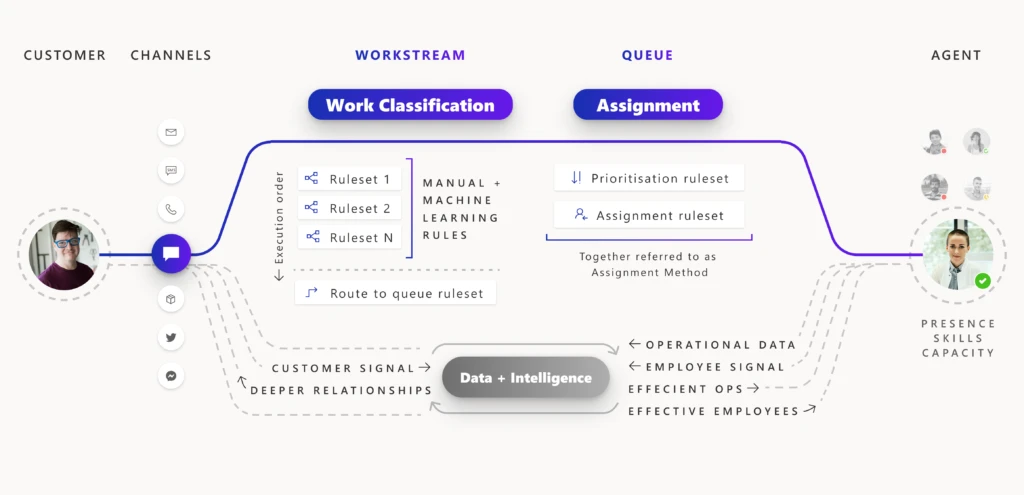
The unified routing capability reimagines the routing pipeline into two broad stages: classification and assignment. During the classification phase, organizations create rules and machine learning models to embellish incoming work items with details such as skills, issue severity, relevant support center location, and language. During the assignment phase, work items are prioritized and assigned to agents based on the nature of the work, stage of the customer journey, agent skills, and the current state of the agent workforce in terms of shift, availability, and workload.

For every work item that gets routed, the two stages are tracked in diagnostics, helping organizations minimize misroutes and achieve more efficient work distribution.

Unified routing flowchart

Six benefits of unified routing

1. Drive higher satisfaction by assigning customers to the appropriate agent.

One of the most common customer pain points is waiting for a long time to reach an agent, only to find out that the agent is unable to solve their issue, so they are transferred to a different agent. Unified routing evaluates the static characteristics of the workforce, such as skills and working hours, as well as the dynamic characteristics of real-time capacity, to assign incoming service requests from all channels to the best-suited agent. It achieves this goal by matching the aspects of incoming work (for example, answers to pre-chat questions, virtual agent interactions, customer journey context, or required skills) to the attributes of the agents (for example, their skills, proficiency, or location).

Read more about the assignment stage.

2. Achieve higher employee engagement with omnichannel work distribution.

Unified routing provides an automatic work distribution service, minimizing the need for constant queue supervision and manual work distribution. Agents today are expected to multitask (working with case records, email messages, chat, digital messages, or voice). Agents work on tasks and cases, respond to emails, engage with customers on chats and digital messages, and pick up phone calls. Unified routing provides real-time presence and enhanced capacity management for the work assigned to these “blended” agents on all channels. It ensures that the agents are not burdened with a workload beyond their capacity and working hours.

Read more about capacity management.

3. Boost contact center performance with skills-based routing.

Traditional queue-based routing solutions do not scale up to the needs of delivering personalized customer service for enterprises with diverse product lines and a global customer base. With skills-based routing, customer service managers can consolidate queues to minimize supervision. Work items are assigned to agents in the same queue based on their skills and proficiency. Connecting customers with agents who can solve specific issues boosts customer satisfaction and loyalty. Agents also benefit because they work on issues that they are skilled at resolving, and therefore they have higher engagement.

The efficiency of such a system depends upon how well the skills needed to fulfill the incoming service request are identified. With an intelligent skill finder, machine learning models identify the skills needed to fulfill incoming work items.

Read more about the intelligent skill finder and skills-based routing.

4. Attain higher service levels with work prioritization.

With unified routing, you can ensure that work is assigned in order of defined priorities. For example, you can author rules to prioritize service requests for premium customers.

Read more about work prioritization and how prioritization rulesets work.

5. Improve routing precision with multi-stage classification.

The customer of today interacts on multiple platforms. Service requests may originate from a social media post, a direct message, or an email. To ensure that the work is assigned to the most appropriate agent, work items must include the right details. Organizations can use unified routing to streamline the classification, such as identifying the incident category, calculating its severity and priority, identifying the best support center from the customer location, and identifying related records.

Read more about work classification rulesets.

6. Enhance operational efficiency with insights from unified routing diagnostics.

Unified routing provides detailed diagnostic traces for each work assignment. You can look at how a certain work item was classified, how it was routed to a certain queue, and how it was prioritized and assigned. You get insights into why certain work items are taking longer to assign or getting assigned incorrectly.

Read more about diagnostics for unified routing.

Next steps

With the 2021 release wave 1, take advantage of the benefits of unified routing in Dynamics 365 Customer Service. Check out the system requirements and availability in your region. Also, read more in the documentation:

This post is the first in a series of deep dives that will help you implement and use unified routing at your organization. Check back frequently for updates.

The post Increase customer satisfaction and agent productivity with unified routing appeared first on Microsoft Dynamics 365 Blog.

Brought to you by Dr. Ware, Microsoft Office 365 Silver Partner, Charleston SC.