This article is contributed. See the original author and article here.
To run a digital contact center effectively, supervisors need up-to-the-minute insights on all the activity between agents and customers. With new enhancements to Microsoft Dynamics 365 Customer Service, it’s easier than ever to find and customize the historical analytics you need to identify key areas for improvement. Last month, we released four new features that will change the way you view Customer Service data:
Unified reporting across Power Virtual Agents and Omnichannel
Bookmarks for frequently used reports
Contact center operations monitoring in near real-time (preview)
Data model customization (preview)
Unified reporting of customer service data across Power Virtual Agents and Omnichannel
As a contact center supervisor, you need to know how your customers are navigating the support funnel. This information helps you take corrective steps at each leg of the customer journey to increase customer satisfaction and reduce cost. When customer journey data is fragmented across different applications, it’s hard to understand what actions to take to improve.
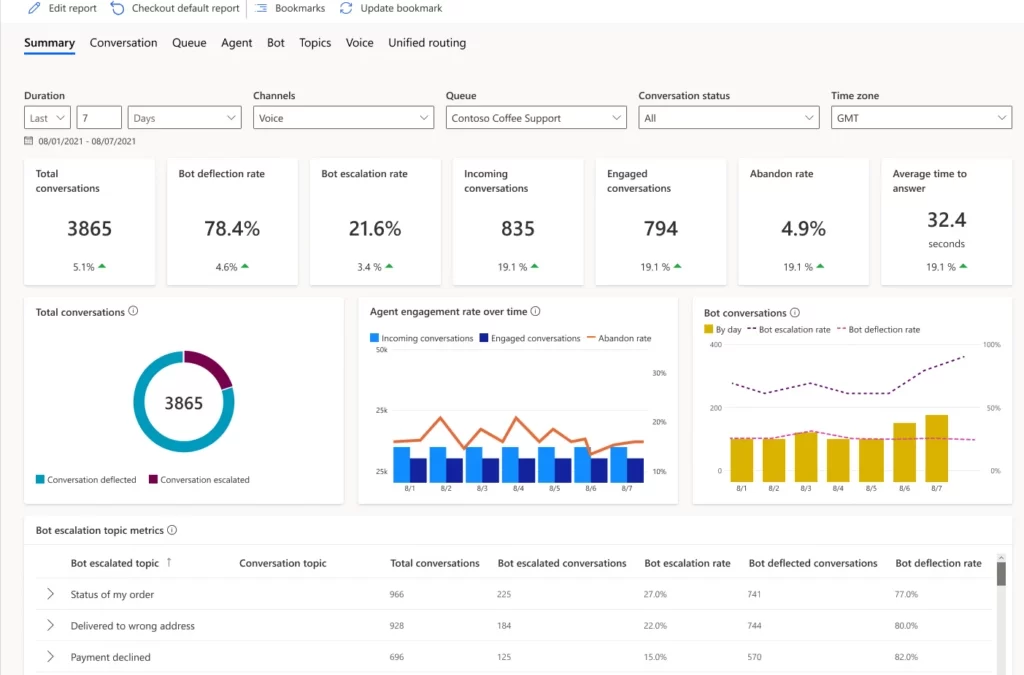
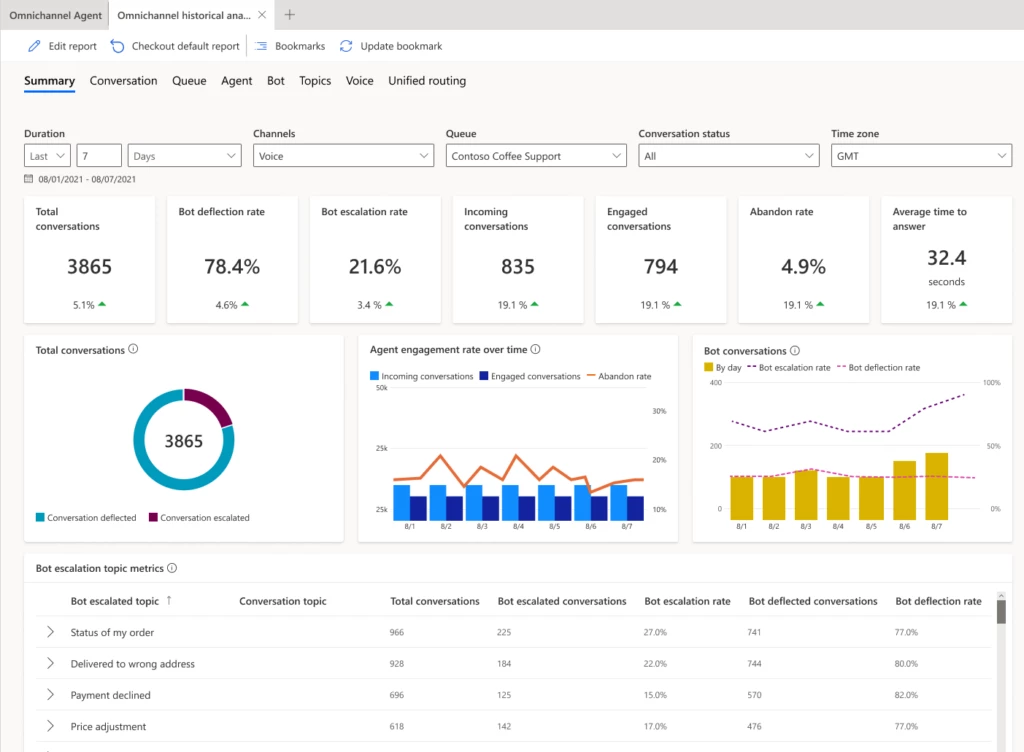
Dynamics 365 Customer Service now provides a unified report with Power Virtual Agents and Omnichannel analytics. You can easily monitor escalations from bots to human agents. These integrated insights help you more efficiently handle case volumes. Revise Power Virtual Agents bots based on the agent resolution steps of escalated conversations to increase the deflection rate.
The Omnichannel Summary dashboard provides integrated analytics. You’ll find key metrics across Power Virtual Agents and agent conversations across channels. Use the Omnichannel Bot dashboard to see detailed bot session-level metrics and identify why the conversation was escalated to a human agent.
You can also drill down into specific bot pages and view topic-specific metrics. Make changes to the bot to enhance its performance, including modifying the topic name and trigger phrases and adding more trigger phrases if needed.
Bookmarks for frequently used customer service data reports
Bookmark frequently used out-of-the-box historical analytics reports to personalize your workspace. You can set a default bookmark that will be loaded every time you start a new session. Navigate between bookmarks in the bookmarks side panel, update the corresponding report with filters, and delete bookmarks you no longer need.
Contact center operations monitoring in near real-time (preview)
One of the biggest challenges supervisors face is the constantly changing nature of the digital contact center. You must handle everything from spikes in incoming customer requests to new agent training to unexpected absences in your workforce. With near real-time visibility into your overall support organization, you can make quick decisions and allocate your agents appropriately.
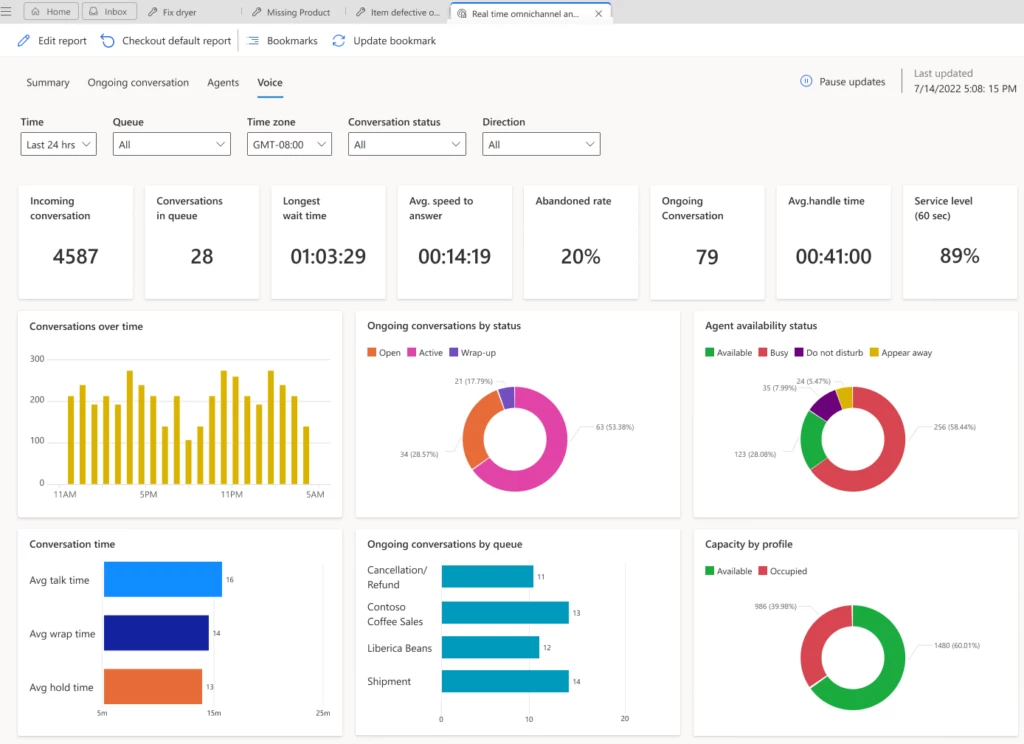
Using four new reports, you can monitor the volume of customer interactions, wait time, and other key metrics across multiple channels. Reports automatically refresh in real-time. However, you can pause the process to analyze the metrics and then resume automatic refresh when you’re finished. Near real-time analytics are in the following reports:
Summary report: View key performance indicators (KPIs) across the volume of customer interactions and service levels, along with the available capacity. You can filter metrics by time, channels, queue, time zone, or conversation status.
Ongoing conversation report: View a list of all current conversations along with the wait time and handle time, and drill down to the conversation form.
Agents report: View agent performance across all channels or a single channel. You can also see the current agent capacity and what each agent is working on, with detailed metrics for each agent.
Voice report: Shows key metrics across the voice channel, if the voice channel is configured in your Omnichannel environment. You can filter metrics by time, queue, time zone, conversation status, or direction.
Digital contact centers have diverse needs and goals, so they need metrics that are relevant to their industry and business. When out-of-the-box metrics don’t fit your unique business needs, you might build a separate analytics infrastructure to integrate and store your data. This leads to higher overhead and maintenance costs.
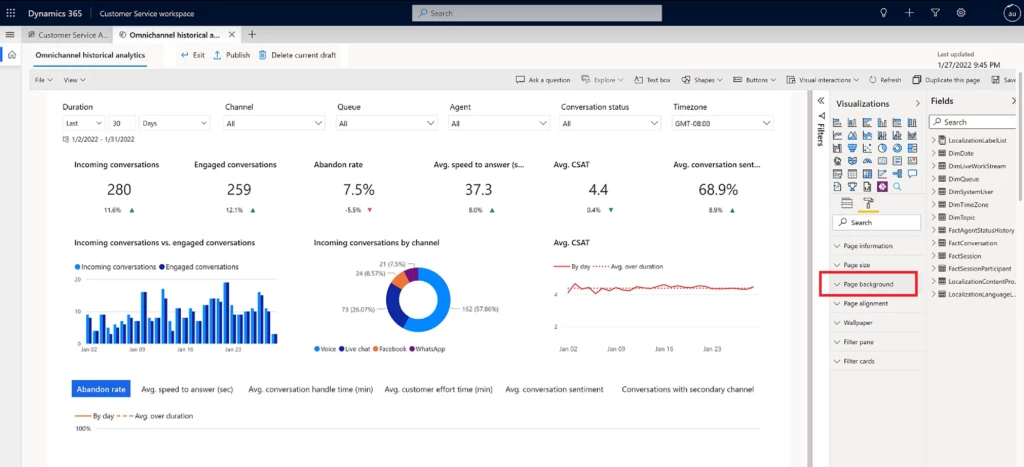
With data model customization, administrators can extend the out-of-the-box Customer Service Power BI data model. To track what matters most to your business, add new custom metrics, custom entities from Dataverse or any other data source, or integrate with an external data set. Customized reports can be embedded in the Customer Service workspace application.
Report authors can also customize fields containing measurements and attributes, and visualizations such as filters, page size, and page background.
By extending out-of-the-box analytics available natively in Dynamics 365 Customer Service, every organization can handle its unique business requirements in a fraction of the time instead of reengineering and maintaining costly data warehouses.
This article is contributed. See the original author and article here.
Organizations worldwide seek reliability in their supply chains to meet the demand of their customers. If there is anything that companies have learned from the years past, it’s to plan for the unexpected. Using history to make decisions for the future no longer works. Customer demand is constantly changing, whether it’s influenced by the economic climate or making environmentally conscious purchase decisions.
At the Microsoft Supply Chain Reimagined digital event, you heard how conversations about supply chains have been elevated to the board room as they are pivotal to gain a competitive advantage for any organization today. We heard from supply chain practitioners, both within Microsoft and from our customers, on the need to address the fragmented ecosystems of supply chain technologies. This is critical for enabling end-to-end visibility of supply chains in near real time. Without this visibility, customers are struggling to unify data to proactively predict and mitigate disruptions.
Earlier this week, we announced the Microsoft Supply Chain Platform to help address these challenges. An open, extensible, and adaptive platform enables companies to unify experiences across different planning and execution systems. At the core of the Supply Chain Platform is the Microsoft Supply Chain Center, which introduces a ready-made command center for users to manage disparate supply chain data. Microsoft Supply Chain Center is now available in preview.
Watch the video:
This embed requires accepting cookies from the embed’s site to view the embed. Activate the link to accept cookies and view the embedded content.
Most organizations rely on legacy systems and one-off “best-in-breed” applications to manage their supply chain rather than a single, integrated platform, which puts them at a competitive disadvantage.
Recent research from Harvard Business Review Analytic Services commissioned by Microsoft shows that 65 percent of executives cite lack of access to real-time supply chain data as a technological obstacle to their supply chain operationsand only 11 percent have a modern, integrated digital solution for their supply chain.*
We are helping companies address this challenge with the Supply Chain Center. Its data manager harmonizes data across existing and new enterprise resource planning (ERP) and supply chain systems in the company. For example, it can unify and harmonize data from Microsoft Dynamics 365, SAP, Oracle, Overhaul, C.H. Robinson, FedEx, FourKites, and many more. An open, flexible platform helps maximize their existing investments without needing to replace them. Now companies can have better data visibility in near real time across their entire supply chain to better assess risks.
This embed requires accepting cookies from the embed’s site to view the embed. Activate the link to accept cookies and view the embedded content.
Microsoft customers, like Kraft Heinz, joined the discussion during the Supply Chain Reimagined event to share how the Supply Chain Platform will empower them to gain reliability and scalability by identifying trends faster than ever before. Kraft Heinz can not only assess risks faster but also collaborate efficiently across its teams and suppliers to mitigate those risks proactively.
With Supply Chain Center, we want to make it easy for companies to adopt new supply chain solutions in an incremental manner to digitally transform different functional areas of their supply chain while ensuring that those new solutions adopted in the future are interoperable with their existing landscape to achieve faster time to value. It’s all about doing more with less.
Enhance supply chain visibility
Once companies overcome the challenge of data visibility, the Supply Chain Platform enables them to generate actionable insights from this unified data to predict stockouts or shipment delays and prevent overstocking. Companies can track orders all the way until they reach their end consumer and proactively mitigate any constraints along the way to meet customer commitments. This type of end-to-end visibility is only possible with a unified platform approach.
This embed requires accepting cookies from the embed’s site to view the embed. Activate the link to accept cookies and view the embedded content.
Customers like Daimler Truck North America manage hundreds of thousands of parts across their global supply chain. Using the AI-powered supply and demand insights capabilities of the Supply Chain Center, which harnesses data flowing from the rest of the platform, they predict any parts shortages in their supply chain ahead of time so that they can proactively mitigate them and deliver on their promises to their customers, dealerships, and partners.
Another customer, iFIT, leverages Supply Chain Center to generate intelligent insights that will enable it to place products closer to where its customer demand is rather than just relying on history. It was able to improve efficiency from 30 percent to 75 percent in its forward stocking inventory, which means it can fulfill customer demand in two days versus two weeks, resulting in more satisfied customers.
The research with Harvard Business Review Analytic Services also finds that nearly one third of the companies struggle with poor collaboration between internal supply chain teams and external partners.*
The best part about leveraging the Microsoft ecosystem is that the supply chain team can rapidly act on these recommendations by collaborating internally or with external suppliers with built-in Microsoft Teams capabilities right from within the Supply Chain Center without having to toggle between multiple systems.
Gain agility to meet market demands
The Supply Chain Platform helps companies adapt to changing business needs with ease. Companies like GN Group, which offers brands like Jabra and Resound, are using Microsoft Dynamics 365 Supply Chain Management, a market-leading solution of the Supply Chain Platform, to future-proof its business and gain the flexibility to adapt to changing needs. Other customers like ChemTreat, Inc. are able to improve proactive planning with Dynamics 365 to mitigate part shortages. With Dynamics 365, organizations can shorten delivery lead times by running material resource planning (MRP) frequently throughout the day in a matter of minutes, optimize inventory with a real-time view of inventory across channels, and fulfill order promises by reserving inventory for high priority orders.
Companies can gain flexible capacity by rapidly deploying pop-up warehouses with robotic automation to meet seasonal demand more effectively, and the warehouse employees can gain additional agility using the mobile warehouse app to execute the warehouse processes.
This embed requires accepting cookies from the embed’s site to view the embed. Activate the link to accept cookies and view the embedded content.
Companies like Barnas Hus, a leading children and baby product retail chain in Norway, worked with KPMG to implement the warehouse management capabilities of Dynamics 365 to power its new state-of-the-art warehouse that utilizes robotics to accurately pick, sustainably pack, and ship products to its stores, giving it the inventory visibility that it always needed.
Another customer, Peet’s Coffee, uses the advanced warehouse management capabilities of Dynamics 365 to serve multiple channels: direct-to-consumer, retail coffee bars, customer warehouses, e-commerce customers, and direct store delivery (DSD) warehouses. Dynamics 365 provides Peets Coffee the flexibility it needs to support a diverse range of channels.
Improve efficiency and productivity
For many manufacturers, the current state of their operations is disconnected and rigid. With the Supply Chain Platform, companies can take advantage of intelligent automation to reduce costs, maximize operating margins, and improve employee experiences. With Dynamics 365, companies can build connected and intelligent manufacturing processes with an intuitive, touch-friendly production floor execution interface. New process advisor capabilities in Microsoft Power Automate provide customers with deep insights to identify bottlenecks in processes to drive optimization and efficiencies with low-code automation.
The Supply Chain Platform has enabled customers like Jansen to extend Dynamics 365 with Power Apps and Power Automate to create bespoke processes on the production floor that get the right information to the right operator with the least amount of manual intervention. The power of unifying all data in Dynamics 365 has enabled production planners at Jansen to provide more efficient production sequences, minimizing materials and equipment changeovers so that they can meet customer orders on time by reducing time and enhancing operator productivity.
This embed requires accepting cookies from the embed’s site to view the embed. Activate the link to accept cookies and view the embedded content.
Organizations can further enhance the visibility on their production floor with native integration to any manufacturing execution system (MES) without replacing it. They can optimize the use of equipment and resources with AI-driven, capability-matching production scheduling.
Another customer, Alterra Mountain Company, has increased asset utilization and gained complete visibility into asset costs and conditions across its ski resorts in North America. It performs proactive maintenance to decrease unplanned asset downtime and downstream disruptions and optimize maintenance spend and spare parts inventory.
The research with Harvard Business Review Analytic Services also showed that more than 30 percent of the companies struggled with finding the right talent with supply chain skills and expertise.*
The Supply Chain Platform keeps frontline workers safer while accelerating upskilling, reducing errors, and increasing yield with step-by-step holographic work instructions. Use mixed reality and built-in Teams capabilities to collaborate in real-time with experts, improving productivity and reducing environmental impact from unnecessary travel.
Enhance security and sustainability
Organizations are encountering increased volumes and more sophisticated threats to their environments than ever before. Unmanaged Internet of Things (IoT), industrial control system (ICS), and operational technology (OT) devices are a force driving new advances in the industry but have also tripled the size of the attack surface area. Securing these devices is a mission-critical objective for any organization. The Microsoft Supply Chain Platform helps organizations create a secure supply chain by detecting and preventing any cyber threat by improving cyber security, physical management, and endpoint security across their entire supply chain network with multiple levels of security and continuous updates and patches.
The Supply Chain Platform also helps accelerate sustainability initiatives all the way from sustainable design, to sourcing, to manufacturing, and fulfillment. With Supply Chain Center order management capabilities, retailers can streamline returns sustainably with out-of-the-box connectors to FedEx. They can implement boxless returns with supporting carriers for less packaging waste and fewer consolidated trips instead of individual customer returns.
This embed requires accepting cookies from the embed’s site to view the embed. Activate the link to accept cookies and view the embedded content.
The rules-based fulfillment orchestration engine in Supply Chain Center enables organizations to fulfill orders sustainably while meeting their customer’s order promise. For instance, rules-based setup allows companies to balance miles travelled from fulfillment center to customers to minimize their emissions with service-level agreements (SLAs) to ensure on-time delivery.
Companies can establish ethical and sustainable sourcing practices with Dynamics 365. Sustainability scoreboards help them make data-driven decisions about supply chain changes to improve their metrics and further their sustainability goals.
Another way to operate sustainably is to drive circularity. Essentiallyinstead of throwing away goods at the end of their life, finding ways to reuse or recycle them to reduce carbon emissions. This could also be a new revenue stream for companies.
Our own Microsoft Circular Centers have a unique process to optimize warehouse routing and management systems to process decommissioned servers from Microsoft datacenters. By leveraging the low-code Microsoft Power Platform solutions, Dynamics 365 Supply Chain Management was extended to build a reverse logistics solution that helped reuse, resale, and recycle the decommissioned data center assets. This is helping to put Microsoft on the path to achieving its sustainability goals by 2030.
To further support organizations to achieve their sustainability goals, last month at Microsoft Ignite we introduced new capabilities in Sustainability Manager, a Microsoft Cloud for Sustainability solution that enables organizations to store and reduce indirect value chain emissions (also known as “Scope 3” emissionsthe supply chain of your suppliers), which account for a disproportionate share of most organizations’ carbon footprints. The solution includes prebuilt calculation methodologies for more than half of the 15 categories of Scope 3.
Partner to empower customers in supply chain transformation
With the Supply Chain Platform, partners can bring their industry and domain expertise to create integrated solutions leveraging Microsoft Supply Chain Center, Dynamics 365 Supply Chain Management, Microsoft Azure, Teams, and Microsoft Power Platform. We will continue to support our customers with a rich partner ecosystem, including advisors and implementers like Accenture, Avanade, EY, KPMG, PwC, and TCS. In addition, to help customers find the best solution for their supply chain needs, we’ll continue working with solution providers such as Blue Yonder, Cosmo Tech, Experlogix, Flintfox, inVia Robotics, K3, o9 Solutions, SAS, Sonata Software, To-Increase software, and many more.
This embed requires accepting cookies from the embed’s site to view the embed. Activate the link to accept cookies and view the embedded content.
This article is contributed. See the original author and article here.
Traditionally, warehouse workers pack items for shipment at a specific packing station, using a process that’s optimized to ship small and medium-sized parcels. To improve packing efficiency when working in larger areas and with larger items, the Warehouse Management mobile app in Microsoft Dynamics 365 Supply Chain Management now provides a mobile packing experience that gives workers the freedom to move around while performing packing activities.
Flexibility improves packing efficiency
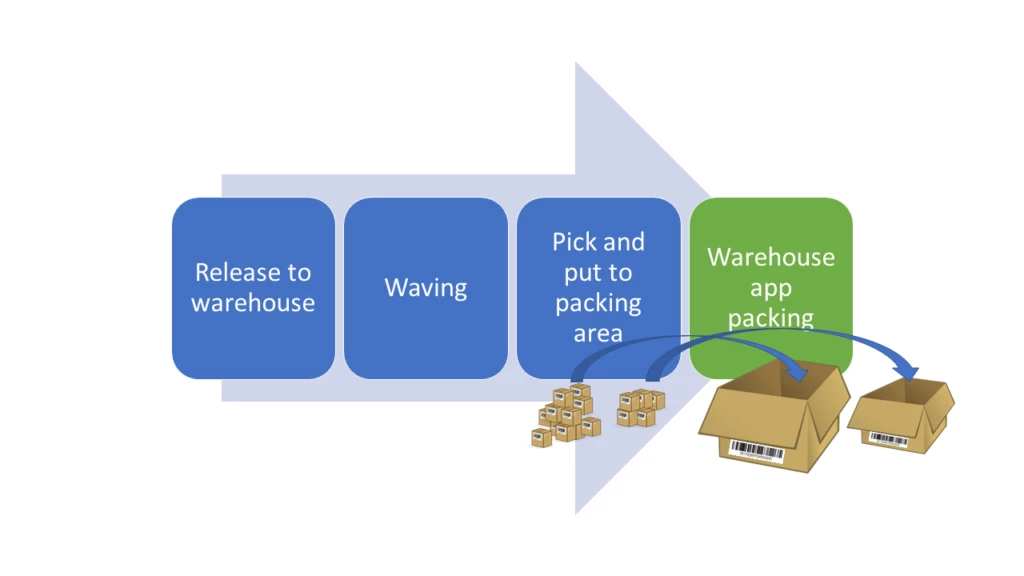
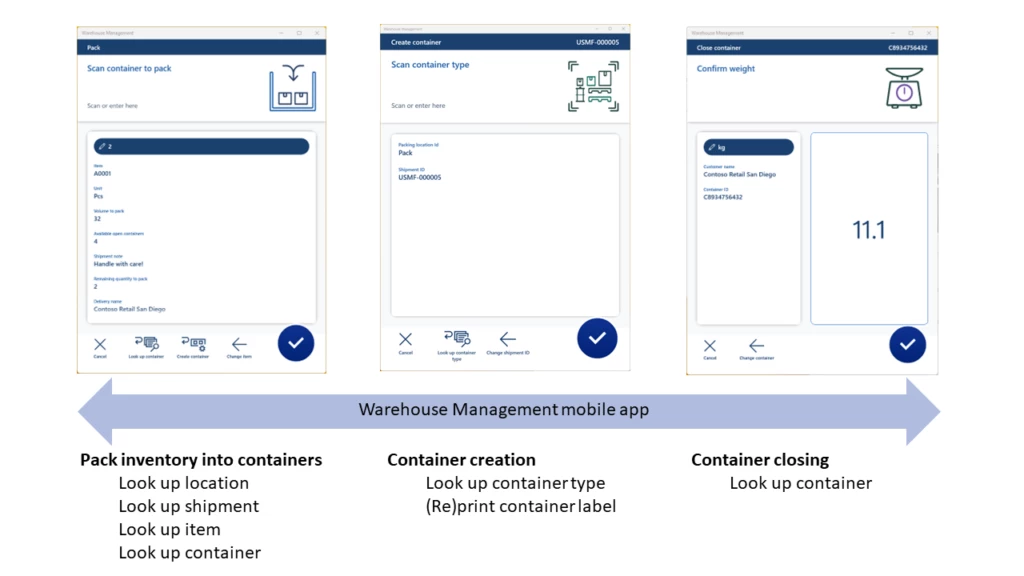
The packing flow in the Warehouse Management mobile app includes three main processes:
Identifying the items to pack
Creating and identifying the containers to pack the items into
Closing the containers to finalize the packing process
To provide for more flexibility, you can easily embed the container creation and closing processes in any packing operation step using a detour. The same applies to look-up requirements (for example, when not able to scan an item barcode label) by querying data using mobile app detours.
To improve packing efficiency even more, you can configure the packing process to automatically print a container label from the mobile app. Workers can apply the label to the container to ease the packing validation process when they are packing items into the container.
This article is contributed. See the original author and article here.
With Microsoft Dynamics 365 Customer Service 2022 release wave 2, we’ve supercharged the humble bookmark. Now you can save views as report bookmarks. Get back to your personalized, filtered reports faster than a speeding bullet, no cape needed.
Leap tall buildings in a single bound
You likely have at least one dashboard you visit regularly to monitor reports, charts, and other visual breakdowns of your Customer Service KPIs and insights. Chances are, you apply the same filters every time you visit.
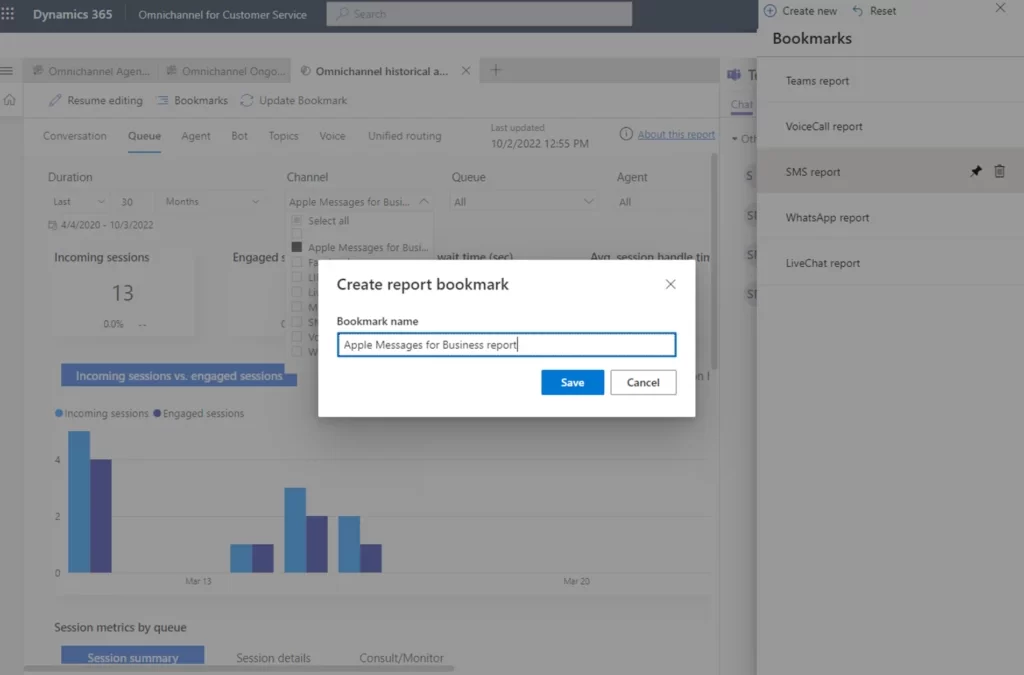
Stop wasting all that effort. Adjust the report filters as you likejust onceand save the filtered view as a named bookmark.
The next time you want to check that same view, let your report bookmark do the heavy lifting. With a single bounder, click, the dashboard opens just the way you want it to.
Manage your report bookmarks just as easily
After you’ve created some report bookmarks, you won’t need abilities far beyond those of mortal men to keep them up to date. Need to change a filter value or add a whole new filter? No problem. Adjust the report filters to your liking, then select Bookmarks > Update Bookmark. If you don’t want to keep the change, one click resets everything back to the way it was. It’s that easy. If you no longer need a bookmark, delete it.
It’s just as easy to switch between your saved views using the new Bookmarks panel. You can even set a report bookmark as your personal default view every time you visit.
Bookmarks are available in historical analytics reports and knowledge analytics reports.
We plan to add more features, like bookmark groups, the ability to create a slideshow out of your bookmarks, and more. Stay tuned for the next exciting chapter!
This article is contributed. See the original author and article here.
In today’s business environment, efficiency is paramount for seller productivity. Sales teams must achieve more with less. Sellers are looking for tools to reduce the time-stealing work that gets in the way of engaging with customers. They need to keep focused and move from one call to the next with ease. Now Microsoft Dynamics 365 Sales can help. We are delighted to announce the general availability of the embedded Teams phone dialer to support outbound and inbound calls. The new phone dialer even automates note capture, improving data quality and ensuring sellers don’t miss a follow-up action. Sellers can take this a step further with optional conversation intelligence to get AI-generated analytics, meeting summaries, and follow-up actions.
Seller productivity benefits from an embedded Teams dialer
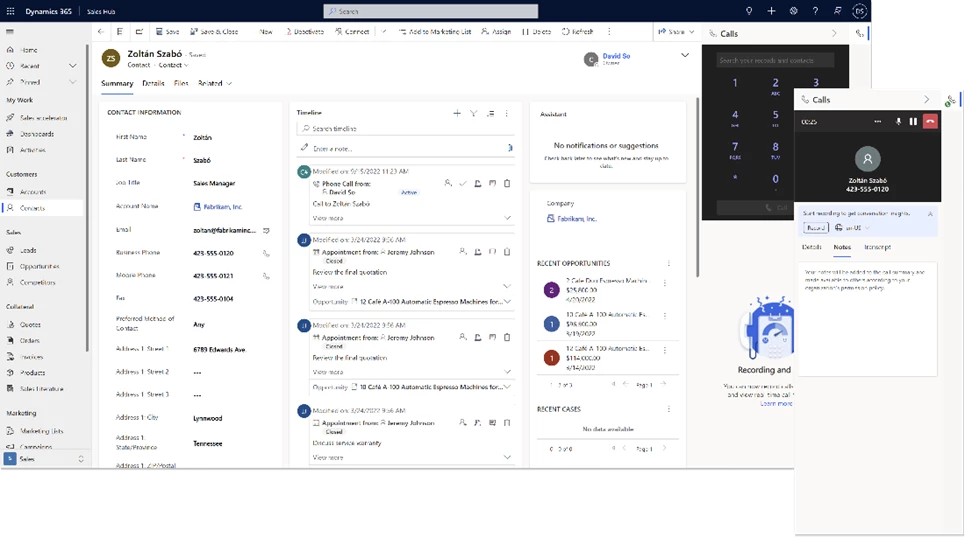
Sellers build customer relationships by capturing every nugget of insight they can from a call. With the embedded Teams dialer for Dynamics 365, sellers can make phone calls using the dial pad in the side panel or by selecting a phone number anywhere in Dynamics 365.
Digital selling teams using the sales accelerator can view all their upcoming actions and suggestions. Now they can easily call prospects from the same screen. Results are automatically tracked and summarized in the timeline, reducing the need for manual data input after each call.
The embedded dialing feature uses your organization’s existing Teams telephony service, supporting either a Teams call plan, direct routing, or operator connect.
Get real-time assistance from conversation intelligence
With Dynamics 365 AI-powered conversation intelligence, sellers get real-time assistance during sales calls. They can focus on building relationships and forget about forgetting. Sellers and managers can view aggregate statistics across the team. Reports highlight customer trends, help them understand the competition, and provide insights to coach sellers on best practices.
Let’s look at the capabilities and options available to help sellers stay focused on their best next actions.
Connect with customers right in Dynamics 365
With the Microsoft Teams dialer for Dynamics 365, sellers are more focused and efficient. Calling a customer is simple. Sellers can use any phone number recorded in Dynamics 365 to place a call. A built-in search tool makes finding contacts easier. Call activity is automatically logged with all essential details, sparing them tedious manual entry after the call and immediately increasing seller productivity.
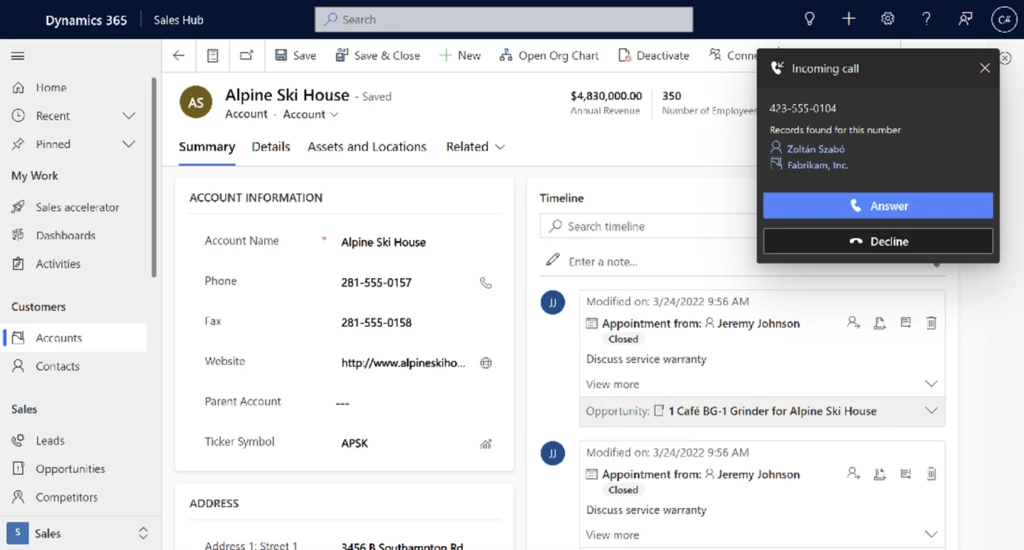
The embedded Teams dialer also supports incoming calls. When sellers receive a call, the dialer searches Dynamics 365 for a potential matching record. Sellers can quickly open the relevant record, review the information, and be ready to answer the call with maximum context. If the search returns multiple matches, sellers can review the options in the incoming call notification and select the right one. If there are no matches, sellers can manually associate the contact with a new record that’s created automatically.
On top of improving seller preparation before the call, we are also supporting sellers during their sales calls by including a built-in notepad in the embedded dialer. Sellers can take notes during their calls without having to navigate elsewhere. The notes are automatically saved to the phone call’s activity timeline.
Easily enable calls to boost your seller productivity
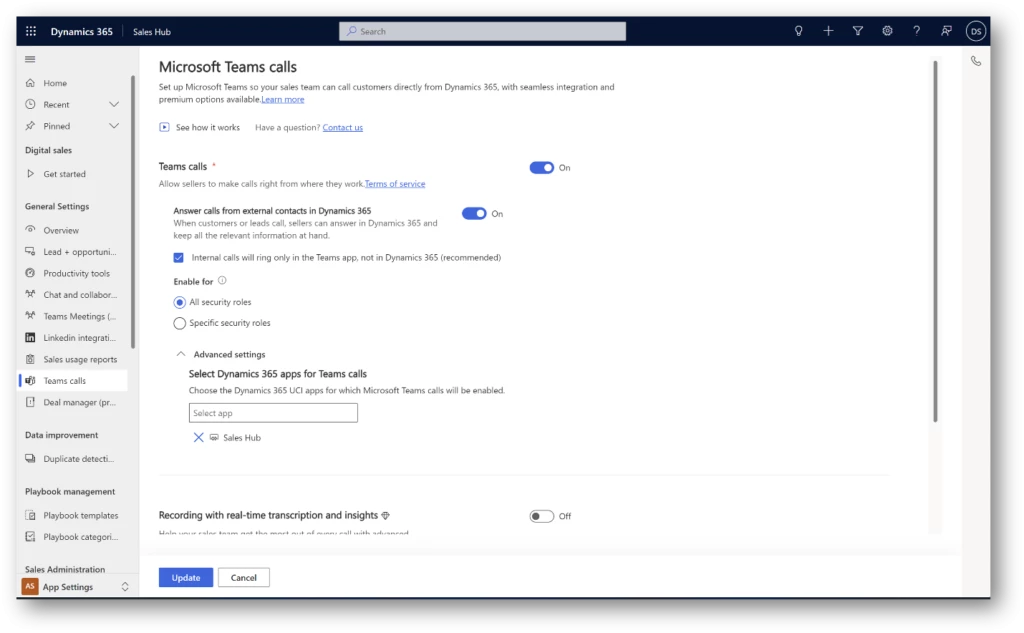
Setting up the dialer experience is easy. Settings control how you enable it, for what types of calls, where, and for which security roles. Configure what works best for your business needs.
For example, you can enable the dialer for outbound calls only or both inbound and outbound depending on your teams’ work habits. You can enable it for inbound calls from external numbers only to help your sellers focus on customer engagement when they are in the Dynamics 365 environment. By default, the dialer displays in the Sales Hub, our default sales experience optimized for sellers. However, the dialer also supports custom apps. You decide which security roles you’d like to enable the experience for, making sure access is available only to those who need it.
Supercharge seller productivity with conversation intelligence
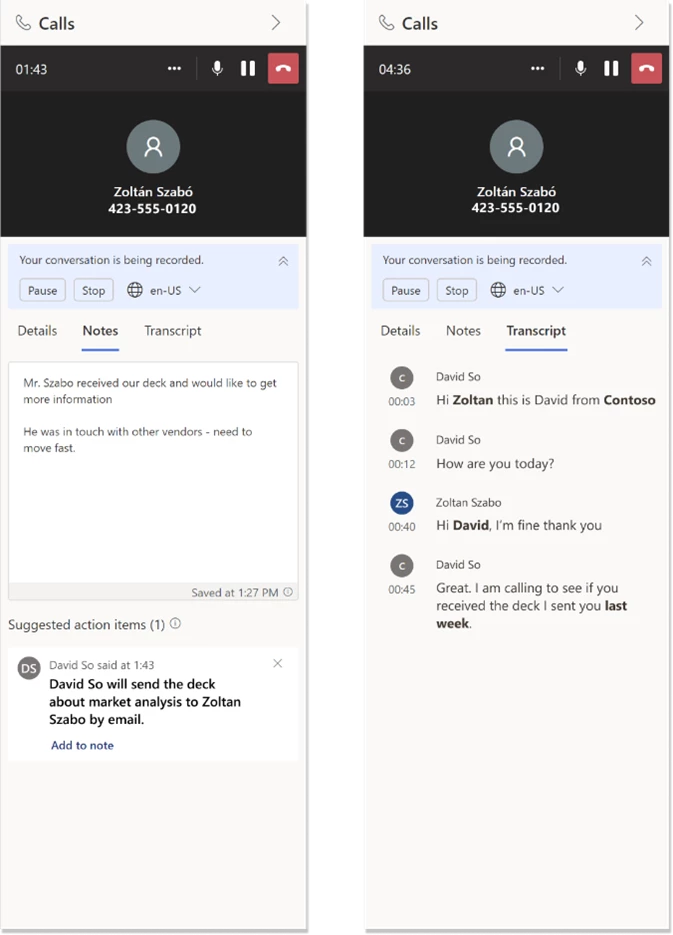
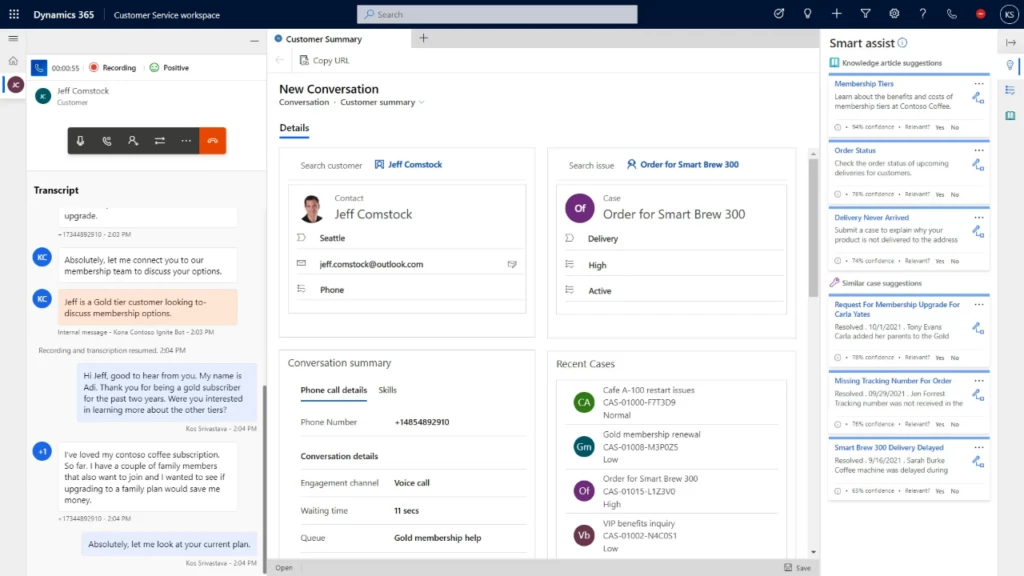
Seller productivity is at the core of a successful sales operation. With AI-powered conversation intelligence, sellers can focus on their conversations with customers, not on taking notes. With call recording enabled, conversation intelligence acts as an assistant right in the dialer’s side panel.
Sellers can view a real-time call transcription with business-critical insights such as key questions asked, detected action items, intelligent notes, and a call summary. The call summary provides a jump start to quality follow-up notes in the moment rather than piled up at the end of a week.
Managers have the tools they need to spot trends and better understand their customers and any patterns that need addressing.
Post-call analysis: Just a few seconds after a call ends, managers can access a rich call summary. The summary includes sentiment analysis, automatic call segmentation, call playback, and a transcript, where they can leave messages for their team members. Conversation intelligence also automatically tags calls, so managers know on which calls they should focus.
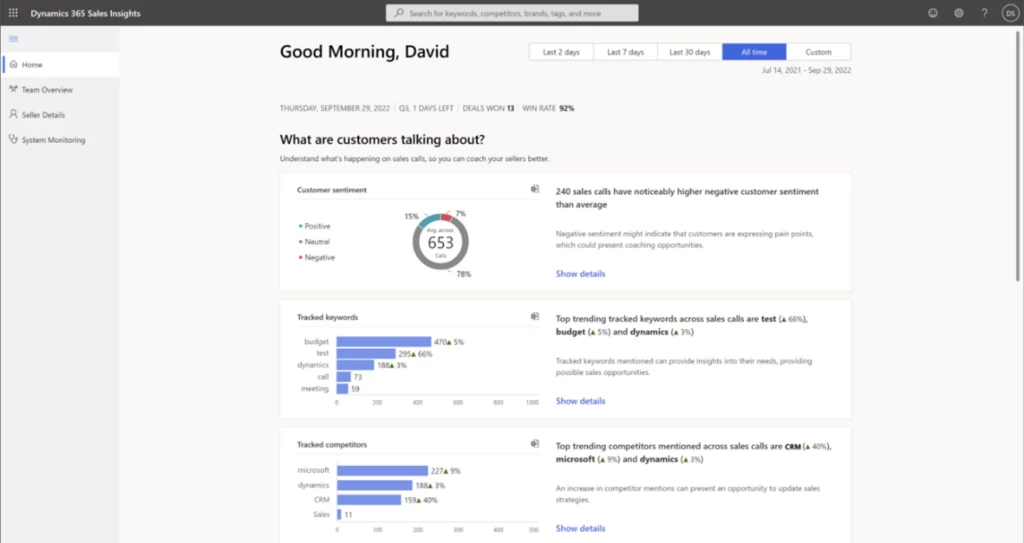
Better understand customers with advanced insights and interactions styles: Managers get a wide perspective of customers’ needs and interests in real time. They can use aggregated data to analyze market trends, rising competitors, and overall sentiment, and can dive into the details where needed.
Control conversation intelligence usage to support your sales team
We recognize that not all sales calls need to be treated equally. We made sure you can precisely control the usage of conversation intelligence capabilities across different locations and specialties.
For example, you can enable the capabilities based on security roles so that only the right people have access. Ensure compliance to any internal, external, or government policies by controlling:
whether calls are recorded
the way calls are recorded (manually or automatically)
who is being recorded (only sellers, or both sellers and customers)
where the analyzed data is stored
the data retention policy
You also control which languages are available for analysis. Decide the number of conversation intelligence processing hours available through the dialer experience to keep track of usage, spend, and adoption.
Help your sellers take back those lost hours of manual actions and keep on top of their growing customer relationships!
This article is contributed. See the original author and article here.
Since the November 2021 launch in select geographic regions of the native voice channel in Microsoft Dynamics 365 Customer Service, we have been expanding worldwide to satisfy growing customer demand. We are proud to announce that we now support local country regions as well. As of October 2022, the voice support channel is live in the United Kingdom.
Native voice support channel capabilities
The integrated voice channel allows customer service representatives to communicate with customers on the phone to resolve issues. The UK launch includes all the features that the voice channel in omnichannel Customer Service environments supports today.
Self-serve voice support channel with Power Virtual Agents
The UK general availability launch also integrates Power Virtual Agents. Subject matter experts can build conversational interactive voice response (IVR) bots in just a few clicks to help customers quickly self-serve, reducing contact center operation costs. Learn how to configure Power Virtual Agents bots for voice.
As the native voice channel in Dynamics 365 Customer Service continues to expand in regions, languages, and capabilities, subscribe to this blog for the latest updates. Set up your Omnichannel for Customer Service and install the voice channel today.



Recent Comments