![[Guest Blog] Beating The Wave and Advancing In The Midst of a Pandemic: An African (Nigeria) Story](https://www.drware.com/wp-content/uploads/2020/07/large-447)
by Scott Muniz | Jul 13, 2020 | Uncategorized
This article is contributed. See the original author and article here.
This article was written by Office Apps and Services MVP Oluwawumiju Oluwaseyi as part of the Humans of IT Guest Bloggers series. He shares about how users can leverage Microsoft solutions to develop community training and help spread coronavirus awareness in Nigeria.
I once read a quote online, from Xerox, which stated that the digital disruption was remaking the modern enterprise. Today, a radical rethinking of technology and processes is helping fuel unprecedented innovation and growth for organizations bold enough to break with the past.
Below are some of the key benefits of technology that have greatly helped many enterprises today:
- Boosting innovation: The ability to classify, search, analyze, and mine digital documents for business intelligence insights can help foster innovation and drive competitive advantage for companies
- Increased security: With technology, we can now secure critical data in ways that were not previously possible with legacy paper documents. Users can now apply policy-driven integrity, confidentiality, and compliance controls to digitize documents and safeguard their organization’s most critical and sensitive information.
- Enhance efficiency: Digitization lets you redefine workflows. Sharing, forwarding and collaborating with digital documents helps drive down costs, ramps up productivity, speeds up decision-making and changes the way business gets done.
Learning to be adaptable in the midst of a pandemic
The first case of COVID-19 in Lagos, Nigeria struck in March. This greatly rattled the country, causing the local government to seriously evaluate its strategy to combat the disease and resulted in swift action to lock down the state, and eventually the entire country. This is important, because the value of the society is usually based on its ability to mitigate and rise above setbacks – including a pandemic.
Technology helps keep us connected as humans
All around the world, we saw stories of how technology has not only helped people keep in contact with family, friends and loved ones via e-mail and free VoIP calls (Microsoft Teams included!), they were also able to continue to access and manage their finances through online banking apps, spreadsheets, track investments through online brokers, and even pursue new hobbies like genealogy or gardening with specialized software packages. Technology has also helped children have uninterrupted learning while quarantining and social distancing at home. Nigeria is no exception. However, without the right skills in the local community, the benefits of technology cannot be fully reaped.
Well, that is where our story begins. Reaching the grassroot communities and helping amplify the voices of everyday was what we set out to achieve. The Microsoft Certified Trainers (MCT) community leads in Lagos, Nigeria rallied together and committed to a 2-month intensive virtual training covering various aspects of different Microsoft products. We knew that this would be time-consuming and requiring extensive resources and courage, but we pushed on with the end goal to set a precedence that we can make our society better in spite of the barriers faced.
We primarily focused on the below key areas during this period, in a bid to cover as much ground as possible:
- Azure / Cloud Technology
- Microsoft 365
- Dynamics 365
- Power BI
- Power Platform
- Data and AI
- Programming – DevOps
- Security
We also enlisted the help of our Microsoft Student Partner Network (now known as the Microsoft Learn Student Ambassador program) in Nigeria to help further engage students in universities.
The team was just awesome! The team comprised of men and women including:
- Deji Afolarin, Ahmed Oyewole, Michael Olafusi and Ahmed Adewale / Power BI and Power Platform
- Toriola Olajumoke / M365
- Paul Oyemakinwa / Azure
- Hammad Abulazeez / Dynamics 365
- Foyin Olajide-Bello / Power Platform and Power Apps
- Olanna Ogbenna / Data & AI and Developers
- Lanre Macaulay / Security
One of our members, Kazeem Adegboyega even helped garner media attention to raise awareness of these technical training and education efforts by talking about the value of all the offerings on a University radio station. Dara Oladapo brought light to programming by running a series for developers on Twitter TV, finally, Olumide Ogundare also ran various trainings for students.
Here’s an example of an online webinar we conducted:
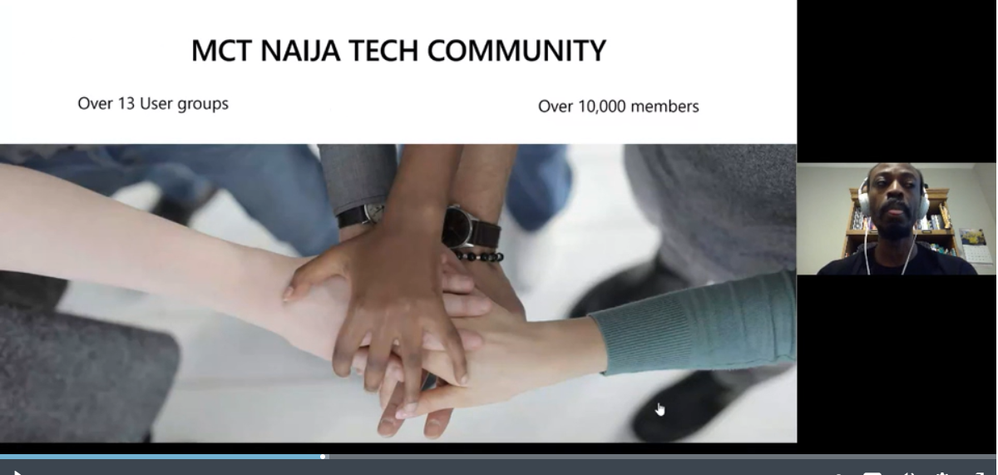
Watch the full video: https://mybuild.microsoft.com/sessions/cc4e4106-2a98-4f34-bf1d-cca3017eab86?source=sessions
Our goal was to:
- Empower people in the tech industry to be better problem solvers
- Realize that at every step of the way, we will encounter issues but the key is in how to overcome these issues and keep moving forward
Here are more examples of tech-focused User Groups in Nigeria, led by various local MCT leads:
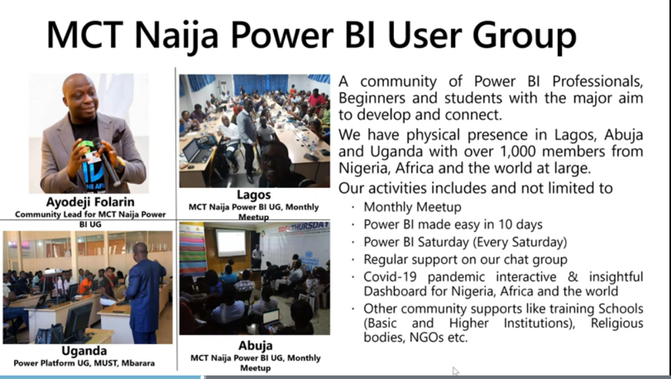
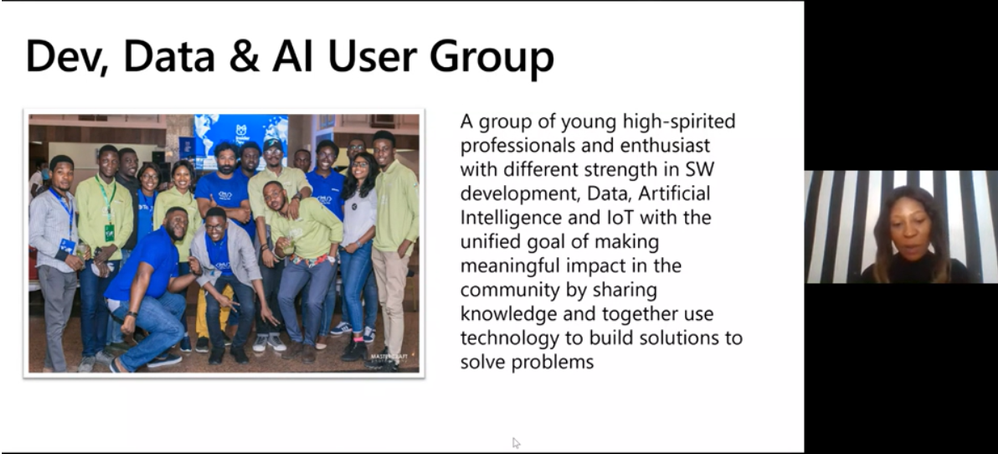
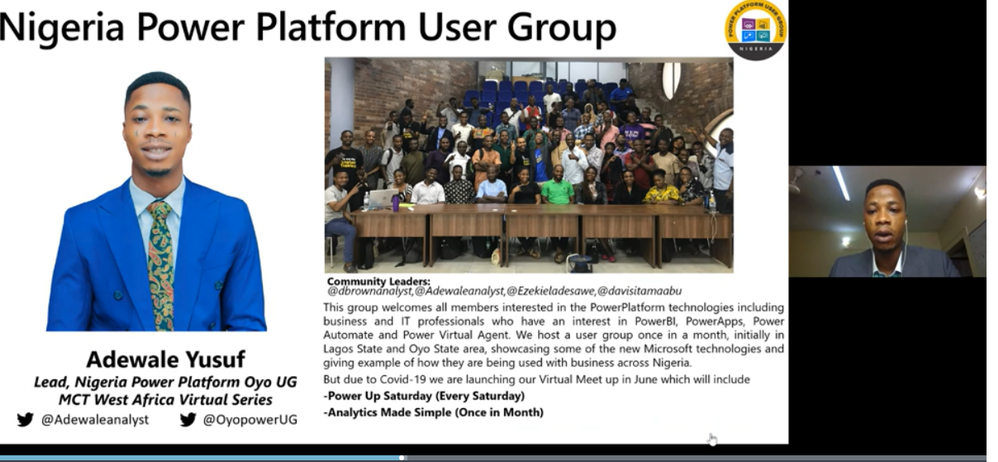
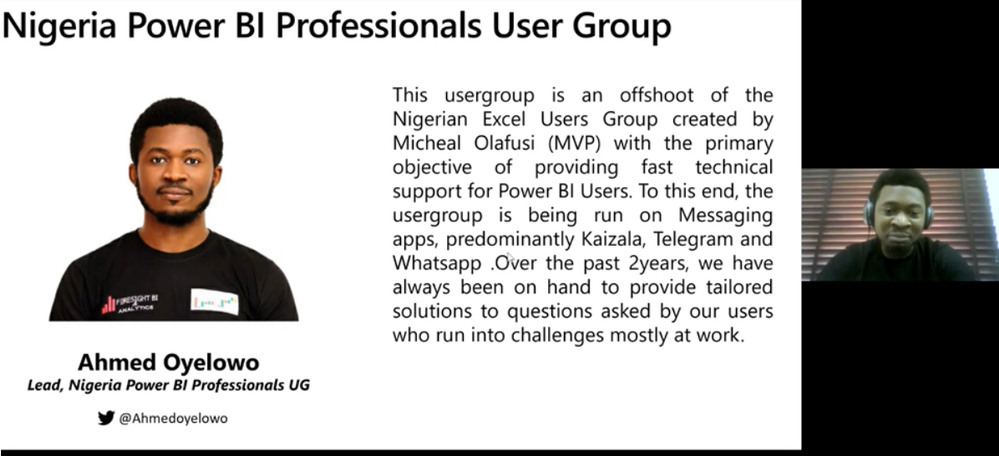
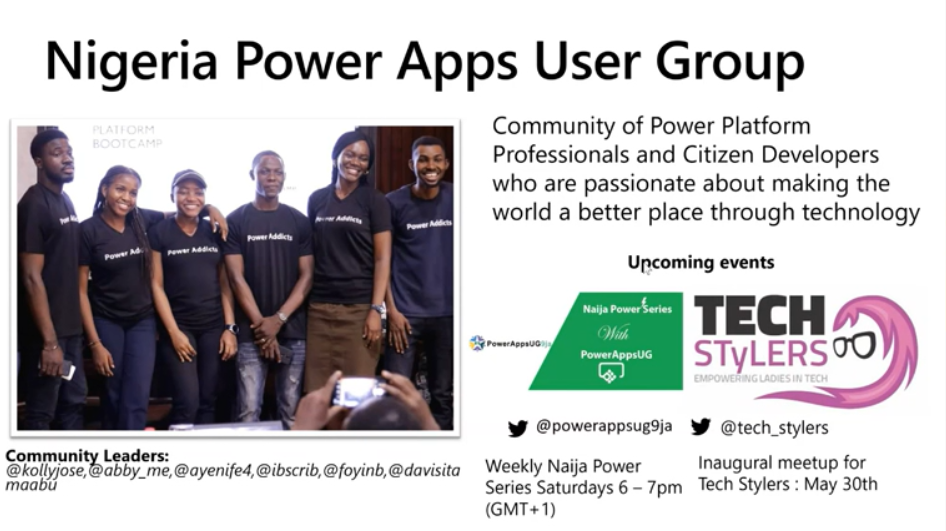
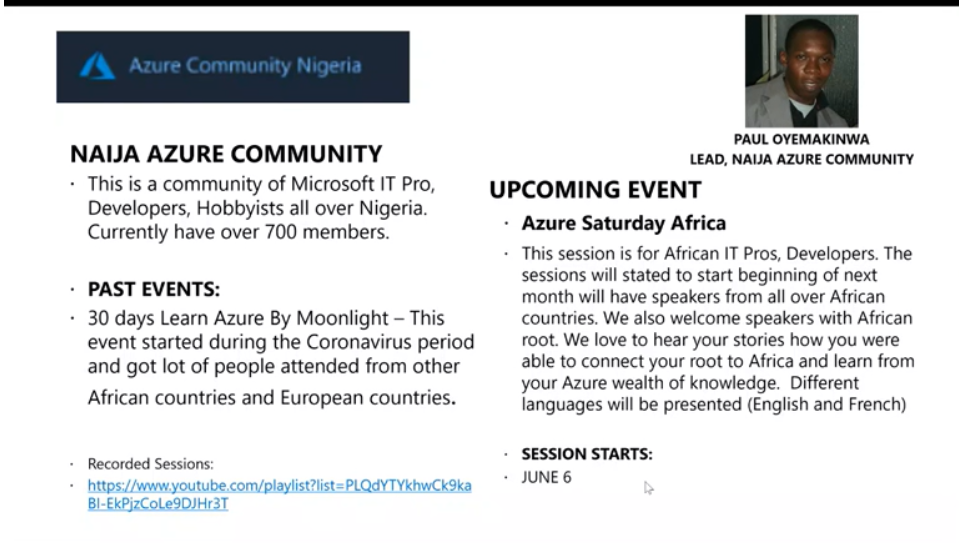
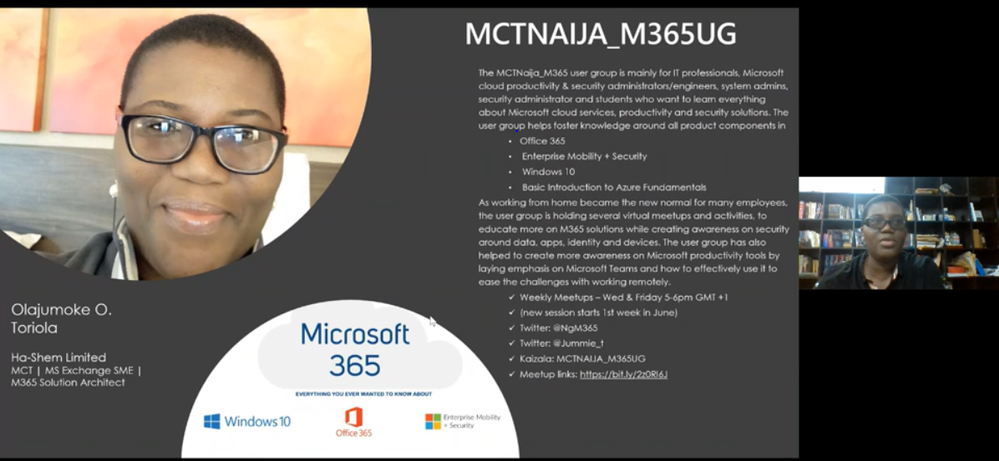
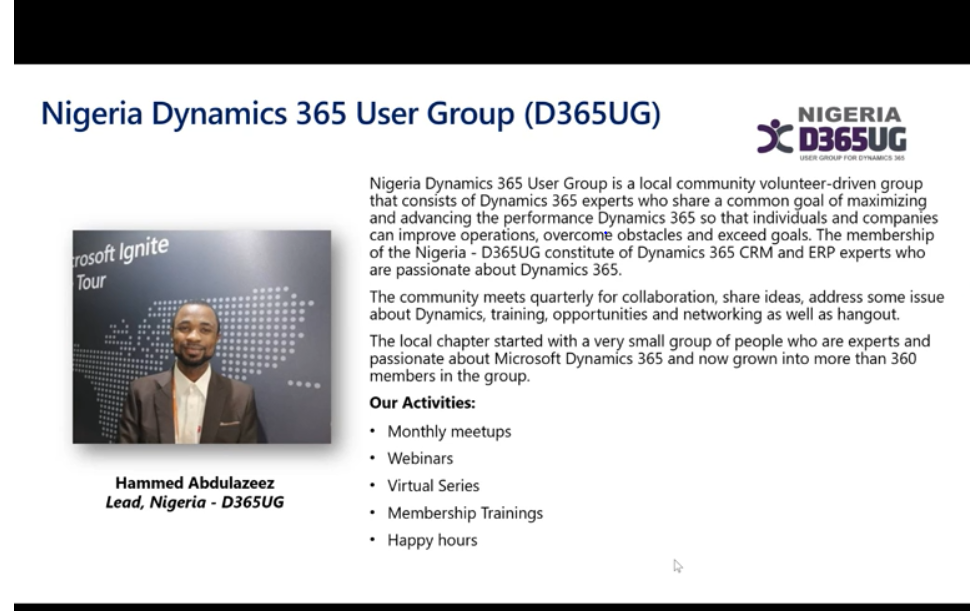
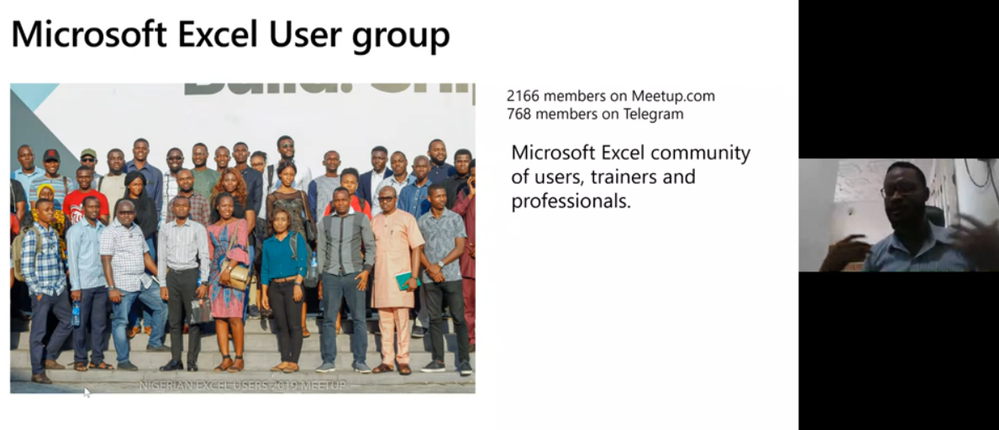
The final goal was to boost collaboration and innovation. We set out to help make technology be much less frustrating for users by helping them to grasp key concepts and understand it. After all, technology is way less frustrating if you understand how it works. Understanding tech can help people be independent and benefit from the advantage of having a much better choice of employers and get better jobs for themselves to provide for their families.
We also wanted to help develop better tech leaders with the emphasis of also giving back and helping others in their community. What good is technology if you don’t share the benefits of it?
Lastly, let’s not forget our younger generation (i.e future technologists) as well – our student community show a lot of promise and potential. They even built COVID-19 awareness bots! Truly, there is no limit to what we can achieve as a community.
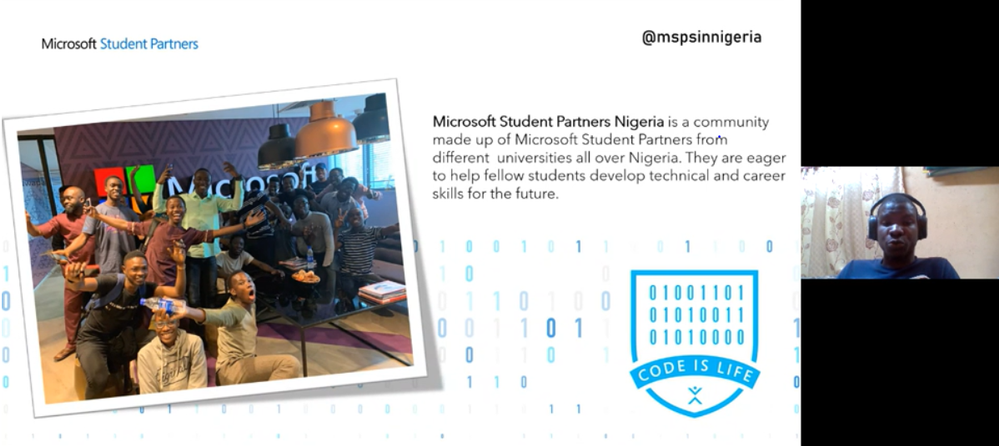
Here’s a short story from Olumide about the COVID-19 awareness bots:
We, the Microsoft Student Partners community in the University of Lagos, Nigeria noticed the following problems in our local community:
- A lot of people were ignorant of the symptoms and causes of COVID-19
- People are scared as they don’t even know if they have the virus or not and if they do, they don’t know what next steps to take
- People lack general awareness about how to prevent contracting the virus
- People needed some sort of assurance to stem deep fear and reduce public anxiety
So we came up with a chatbot hosted on web view and Facebook, built with Microsoft Bot Framework and LUIS. We hosted it on Microsoft Azure, and were able to gather data from the CDC (Centre for Disease Control). This bot will asks you a few questions about your symptoms, and tells you your likelihood of having the virus, precautions, and critical next steps including seeking professional medical help as needed.
Impact
- We had over 5,000 hits per day and got positive feedback as to how it was really helpful to users
- Users were educated on precautions to take via simple and intuitive user interfaces of the bot
- Users were relieved of the fear of the unknown as they now know their chances of having the virus based on their existing symptoms
- People with the virus now know the next steps to take, and how to take important precautions to protect others around them and prevent them from contracting the virus as well
The impact of COVID-19 was very challenging, but the role of technology at this time could not be overemphasized. Much of the world was caught by surprise when the virus struck, but we found the strength to pull things together to help encourage and bring sanity to our society. We are thankful to be healthy and alive, and will do what we can to leverage tech to also help keep others in our local community safe.
The lesson in all this is that if technology is leveraged well, it can create bonds, collaboration, and the ability to positively impact lives, bridge social divides and help create level-playing fields for people from all social backgrounds.
The sense of collaboration become very essential and needed in the digital space. The ability of the Microsoft team to meet expectations in this unplanned wave was laudable, showcasing the indomitable and resilient spirit of determination inherent in us Africans.
—
I hope this article inspired you. Trust me, you will never regret learning how to handle problems efficiently by applying problem-solving skills to build solutions. These are life skills that will stay with you forever. Not even a pandemic can stop the tremendous innovation and solution-building in Africa! Keep on using tech for good, and you will be surprised to find out how much positive impact you can have when you band together as a community.
#HumansofIT
#TechforGood
Connect with Oluwaseyi

Name: Oluwaseyi Oluwawumiju
Email: soluwawumiju@covenanttechs.com
Twitter: @soluwawumiju
LinkedIn: https://ng.linkedin.com/pub/seyi-oluwawumiju-mct-fiimafrica-itil/27/36a/129
Blog: https://seyioluwawumiju.wordpress.com/
About the Writer
Oluwawumiju Oluwaseyi is a Technical Consultant with Convenant Technologies and he also an MCT, MVP, and the MCT Regional Lead for Nigeria. Convenant Technologies is a Certified Partner with Microsoft in Lagos, Nigeria. You can also learn more about him via his MVP Profile.
by Scott Muniz | Jul 13, 2020 | Azure, Microsoft, Technology, Uncategorized
This article is contributed. See the original author and article here.
In our recently released AKS Engine on Azure Stack Hub pattern we’ve walked through the process of how to architect, design, and operate a highly available Kubernetes-based infrastructure on Azure Stack Hub. As production workloads are deployed, one of the topics that need to be clear and have operational procedures assigned, is the Patch and Update (PNU) process and the differences between Azure Kubernetes Service (AKS) clusters in Azure and AKS Engine based clusters on Azure Stack Hub. We have invited Heyko Oelrichs, who is a Microsoft Cloud Solution Architect, to explore these topics and help start the PnU strategy for the AKSe environments on Azure Stack Hub.
Before we start let’s introduce the relevant components:
- AKS Engine is the open-source tool (hosted on GitHub) that is also used in Azure (under the covers) to deploy managed AKS clusters and is available to provision unmanaged Infrastructure-as-a-Service (IaaS) based Kubernetes Clusters in Azure and Azure Stack Hub.
- Azure Stack Hub is an extension of Azure that provides Azure services in the customer’s or the service provider’s datacenter.
The PNU process of a managed AKS cluster in Azure is partially automated and consists of two main areas:
- Kubernetes version upgrades are triggered manually either through the Portal, Azure CLI or ARM. These upgrades contain, next to the Kubernetes version upgrade itself, upgrades of the underlaying base OS image if available. These upgrades typically cause the reboot of the cluster nodes.
Our recommendation is to regularly upgrade the Kubernetes version in your AKS cluster to stay supported and current on new features and bug fixes.
- Security updates for the base OS image are applied automatically to the underlaying cluster nodes. These updates can include OS security fixes or kernel updates. AKS does not automatically reboot these Linux nodes to complete the update process.
The PNU process on Azure Stack Hub is pretty much similar with a few small differences we want to highlight here. First thing to note is that Azure Stack Hub runs in a customer or service provider data center and is not managed or operated by Microsoft.
That also means that Kubernetes clusters deployed using AKS Engine on Azure Stack Hub are not managed by Microsoft. Neither the worker nodes nor the control plane. Microsoft provides the tool AKS Engine and the base OS images (via the Azure Stack Hub Marketplace) you can use to manage and upgrade your cluster.
On a high level, AKS Engine helps with the most important operations:
Important to note though is, that AKS Engine allows you to upgrade only clusters that were originally deployed using the tool, clusters that were created without and outside of AKS Engine cannot be maintained and upgraded using AKS Engine.
Upgrade to a newer Kubernetes version
The aks-engine upgrade command updates the Kubernetes version and the AKS Base Image. Every time that you run the upgrade command, for every node of the cluster, the AKS engine creates a new VM using the AKS Base Image associated to the version of aks-engine used.
The Azure Stack Hub Operator together with the Kubernetes Cluster administrator should make sure, prior to each upgrade:
- that no system updates or scheduled tasks are planned
- that the subscription has enough space for the entire process
- that you have a backup cluster and that it is operational
- that the required AKS Base image is available, the right AKS Engine version is used as well as that the target Kubernetes version is specified and supported
The aks-engine repository on GitHub contains a detailed description of the upgrade process.
Upgrade the base OS image only
There might be valid reasons, for example dependencies to specific Kubernetes API versions and others, to not upgrade to a newer Kubernetes version, while still upgrading to a newer release of the underlaying base OS image. Newer base OS images contain the latest OS security fixes and kernel updates. This base OS image only upgrade is possible by explicitly specifying the target version, see here.
The process is the same as for the Kubernetes version upgrade and also contains a reboot/recreation of the underlaying cluster nodes.
Applying security updates
The third area, that’s already baked into AKS Engine based Kubernetes clusters and does not need manual intervention is the process of how security updates are applied. This applies for example to Security updates that were released before a new base OS image is available in the Azure Stack Hub Marketplace or between two aks-engine upgrade runs, e.g. as part of a monthly maintenance task.
These Security updates are automatically installed using the Unattended Upgrade mechanism. Unattended Upgrade is a tool built into Debian, which is the foundation of Ubuntu which is the Linux distro used for AKS and AKS Engine based Kubernetes clusters. It’s enabled by default and installs security updates automatically, but does not reboot the Kubernetes cluster nodes.
Note: this automatic installation is done in connected environments, where the Azure Stack Hub workloads in user-subscriptions have access to the Internet. Disconnected environments need to follow a different approach.
Rebooting the nodes can be automated using the open-source KUbernetes REboot Daemon (kured) that watches for Linux nodes that require a reboot, then automatically handle the rescheduling of running pods and node reboot process.
Update types and components
|
Component(s)
|
Updates
|
Responsibility
|
|
Azure Stack Hub
|
Microsoft software updates can include the latest Windows Server security updates, non-security updates, and Azure Stack Hub feature updates.
OEM hardware vendor-provided updates can contain hardware-related firmware and driver update packages.
|
Azure Stack Hub Operator
Go to Azure Stack Hub servicing policy to learn more.
|
|
AKS Engine
|
AKS Engine updates typically contain support for newer Kubernetes versions, Azure and Azure Stack API updates and other improvements.
|
Kubernetes cluster operator
Visit the aks-engine releases and documentation on GitHub to learn more.
|
|
AKS Base Image
|
AKS Base Images are released on a regular basis and contain newer operating system versions, software components, security and kernel updates. These images are available through the Azure Stack Hub Marketplace.
|
Azure Stack Hub Operator + Kubernetes cluster operator
|
|
Kubernetes
|
Kubernetes releases minor versions roughly every three months. These releases include new features and improvements. Patch releases are more frequent and are only intended for critical bug fixes in a minor version. These patch releases include fixes for security vulnerabilities or major bugs impacting a large number of customers and products running in production based on Kubernetes.
|
Kubernetes cluster operator
Visit Supported Kubernetes versions in Azure Kubernetes Service (AKS) and Supported AKS Engine versions to learn more.
|
|
Linux (Ubuntu) and Windows Node Updates
|
Some Linux updates are automatically applied to Linux nodes (as described above). These updates include OS security fixes or kernel updates.
Windows Server nodes don’t receive daily updates. Instead an aks-engine upgrade deploys new nodes with the latest base Window Server image and patches.
|
Kubernetes cluster operator
Azure Stack Hub Operator (to provide new OS images)
|
Conclusion and Responsibilities
- New AKS Base OS Images are regularly released via the Azure Stack Hub Marketplace and have to be downloaded by the Azure Stack Operator.
- New AKS Base OS Images and Kubernetes versions are applied using aks-engine upgrade and include the recreation of the nodes – this does not affect the operation of the cluster or the user workloads
- Azure Stack Hub Operators play a crucial role in the overall upgrade process and should be consulted and involved in every upgrade process
- *very important* the Azure Stack Hub Operator should always consult the Release Notes that come with each update and inform the Kubernetes cluster administrator of any known issues.
- Kubernetes cluster operators have to be aware of the availability of new updates for Kubernetes and AKS Engine and to apply them accordingly.
- AKS Engine supports specific versions of Kubernetes and the AKS Base Image.
- Security updates and kernel fixes are applied automatically and do not automatically reboot the cluster nodes.
- Kubernetes cluster operators should implemented kured or other solutions to gracefully reboot cluster nodes with pending reboots to complete the update process
This article and especially the list of responsibilities and considerations above is intended to give you a starting point and an idea of how to structure and execute the PNU process for AKSe environments. The details of the PNU process and how they relate to the application architecture are the most critical pieces of a successful and reliable operation. Separating the layers (the Azure Stack Hub platform, the ASKe platform, the application and respective data itself) would help towards being prepared to support an outage at each layer – and having operations prepared for each of them as well as mitigation steps required, would help minimize the risk.
by Scott Muniz | Jul 13, 2020 | Uncategorized
This article is contributed. See the original author and article here.
Microsoft Defender ATP running on Windows 7 and Windows Server 2008R2 is moving to exclusively use SHA-2 signing, which will help drive greater security for our customers.
This change does not require any action unless you are running Microsoft Defender ATP on Windows 7 or Windows Server 2008 R2.
Customers that are running on these OS versions are required to take the following actions before August 17, 2020 or their agents will stop sending data to Microsoft Defender ATP:
- Install the SHA-2 signing Windows updates for your OS as described in 2019 SHA-2 Code Signing Support requirement for Windows and WSUS
- Update to the latest version of the Log Analytics Windows agent (Windows 64-bit agent or Windows 32-bit agent)
More information about SHA-2 signing enforcement is available in the documentation.
For further questions, please feel free to reach out Microsoft Defender ATP Support.
Thank you,
The Microsoft Defender ATP team
by Scott Muniz | Jul 13, 2020 | Uncategorized
This article is contributed. See the original author and article here.
Hello everyone, here is part 9 of a series focusing on Application Deployment in Configuration Manager. This series is recorded by @Steve Rachui, a Microsoft principal premier field engineer. These tutorials are from our library and uses Configuration Manager 2012 in the demos, however the concepts are still relevant for Configuration Manager current branch.
This session focuses on the client and walks through the detailed flow of events that take place when a sample package is installed. The package installation is tracked in the logs from acquisition during policy updated through full executions. In addition, relevant WMI namespaces are discussed.
Next in the series Steve focuses on application installation at the client.
Posts in the series
Go straight to the playlist
by Scott Muniz | Jul 13, 2020 | Azure, Microsoft, Technology, Uncategorized
This article is contributed. See the original author and article here.
When it comes to remote work, the employee experience and security are equally important. Individuals need convenient access to apps to remain productive. Companies need to protect the organization from adversaries that target remote workers. Getting the balance right can be tricky, especially for entities that run hybrid environments. By implementing Zscaler Private Access (ZPA) and integrating it with Azure Active Directory (Azure AD), Johnson Controls was able to improve both security and the remote worker experience. In today’s “Voice of the Customer” blog, Dimitar Zlatarev, Sr. Manager, IAM Team, Johnson Controls, explains how it works.
Building a seamless and secure work-from-home experience
By Dimitar Zlatarev, Sr. Manager, IAM Team, Johnson Controls
When COVID-19 began to spread, because of our commitment to employee safety, Johnson Controls transitioned all our office workers to remote work. This immediately increased demand on our VPN, overwhelming the solution. Connections speeds slowed, making it difficult for employees to conveniently access on-premises apps. Some workers couldn’t connect to the VPN at all. To address this challenge, we deployed an integration between Azure AD and ZPA. In this blog, I’ll describe how ZPA and Azure AD support our Zero Trust journey, the roll-out process, and how the solution has improved the work-from-home experience.
Enabling productive collaboration in a dynamic, global company
Johnson Controls offers the world’s largest portfolio of building products, technologies, software, and services. Through a full range of systems and digital solutions, we make buildings smarter, transforming the environments where people live, work, learn and play. To support 105,000 employees around the world, Johnson Controls runs a hybrid technology environment. A series of mergers and acquisitions has resulted in over 4,000 on-premises applications for business-critical work. Some of these apps, like SAP, include multiple instances. Our strategy is to find software-as-a-service (SaaS) replacements for most of our on-premises apps, but in the meantime, employees need secure access to them. Before coronavirus shifted how we work, the small percentage of remote workers used our VPN with few issues.
To centralize authentication to our cloud apps, we use Azure AD. The system for cross-domain identity management (SCIM) makes it easy to provision accounts, so that employees can use single sign-on (SSO) to access Office 365 and non-Microsoft SaaS apps, like Workday, from anywhere.
We deployed Azure AD Self-Served Password Reset (SSPR) early in 2019 to allow employees to reset their passwords without helpdesk support. With this deployment, we’ve reduced helpdesk costs for password resets, account lockouts by 35% within the first three months and 50% a year later.
Securing mobile workers with a Zero Trust strategy
When employees began working from home, there were no issues accessing our Azure AD connected resources, but our VPN solution was significantly stretched. As an example, it could only support about 2,500 sessions in the entire continent of Europe, yet Slovakia alone has 1,700 employees. To expand capacity, we needed new equipment, but we were concerned that upgrading the VPN would be expensive and take too long. Instead, we saw an opportunity to accelerate our Zero Trust security strategy by deploying ZPA and integrating it with Azure AD.
Zero Trust is a security strategy that assumes all access requests—even those from inside the network—cannot be automatically trusted. In this model, we need tools that verify users and devices every time they attempt to communicate with our resources. We use Azure AD to validate identities with controls such as multi-factor authentication (MFA). MFA requires that users provide two authentication factors, making it more difficult for bad actors to compromise an account. Azure AD Privileged Identity Management (PIM) is another service that we use to provide time-based and approval-based role activation to mitigate the risks of unnecessary access permission on highly sensitive resources.
ZPA is a cloud-based solution that connects users to apps via a secure segment between individual devices and apps. Because apps are never exposed to the internet, they are invisible to unauthorized users. ZPA also doesn’t rely on physical or virtual appliances, so it’s much easier to stand up.
Enrolling 50,000 users in 3 weeks
To minimize disruption, we decided to roll out ZPA in stages. We began by generating a list of critical roles, such as finance and procurement, that needed to be enabled as quickly as possible. We then prioritized the remaining roles. This turned out to be the hardest part of the process.
Setting up ZPA with Azure AD was simple. First, Azure AD App Gallery enabled us to easily register the ZPA app. Then we set up provisioning, targeted groups, and then populated the groups. Once the appropriate apps were set up, we piloted the solution with ten users. The next day we rolled out to 100 more. As we initiated the solution, we worked with the communications team to let employees know what was happening. We also monitored the process. If there were issues with an app, we delayed deployment to the people with relevant job profiles. Zscaler joined our daily meetings and stood by our side throughout the roll out. By the end of the first week we had enabled 7,000 people. We jumped to 25,000 by the second, and by the third week 50,000 people were enrolled in ZPA.
Simplifying remote work with SSO
One reason the process went so smoothly is because the ZPA Azure AD integration is much easier to use than the VPN solution. Users just need to connect to ZPA. There is no separate sign-in. When employees learned how convenient it was, they asked to be enabled.
With ZPA and Azure AD, we were quickly able to scale up remote work. Employees are more productive with a reliable connection and simplified sign-in. And we are further down the path in our Zero Trust security strategy.
Learn more
In response to COVID-19, organizations around the world have accelerated modernization plans and rapidly deployed products to make work from home easier and more secure. Microsoft partners, like Zscaler, have helped many organizations overcome the challenges of remote work in a hybrid environment with solutions that integrate with Azure AD.
Learn how to integrate ZPA with Azure AD
Top 5 ways you Azure AD can help you enable remote work
Developing applications for secure remote work with Azure AD
Microsoft’s COVID-19 response
by Scott Muniz | Jul 13, 2020 | Uncategorized
This article is contributed. See the original author and article here.
Have you ever misplaced something? Maybe it was your car keys, your favorite jewelry, or something else… The typical process you go through is probably something like this – you ask yourself the question, “where did I put my keys” and then walk backward from where you last went, which rooms you were last in…
That process is synonymous with a traditional search experience, a query and continuous refining of the query until you find what you were looking for – while this process may work for you on one occasion, it’s not consistent enough to be valuable in the future, and what if the keys you’re looking for, aren’t the ones you misplaced, but those of a roommate, partner, or someone else?
This is why search needs to evolve, to become more personal, more context aware, and more available so wherever you are, whatever it is, you can find it the first time, with minimal effort, and precision.
Microsoft Search is the evolution of search, smarter search to help you stay in touch with what’s important and trending around you in Microsoft 365 and your connected systems.
New Search Locations
Contextual Search in Microsoft Teams
Find information faster with contextual search in Microsoft Teams. Users will now have the ability to search for content in a specific channel or chat by pressing CTRL + F. Search results will only contain messages and files found in the selected chat or channel.
Learn more on searching for messages and more in Microsoft Teams at https://support.microsoft.com/en-us/office/search-for-messages-and-more-in-teams-4a351520-33f4-42ab-a5ee-5fc0ab88b263.
New Search Answers
Acronym search in SharePoint and Office.com
Did you know that 2-3% of search queries entered by employees are related to acronyms? The new Acronyms feature in Microsoft Search helps users navigate their company’s often-confusing alphabet soup.
Then, when users come across an acronym they may not recognize, a simple search in SharePoint, Office.com, or Bing will reveal common definitions from your organization’s unique definitions in addition to AI mined suggestions from files and conversations.
Learn more about creating and curating acronym answers at https://docs.microsoft.com/en-us/microsoftsearch/manage-acronyms.
Customization & Extensibility
Enrich Profile Cards in Office 365
The hundreds of millions of users of Microsoft 365 cloud services form part of the core of Microsoft Graph. The users’ data is carefully managed, protected, and with proper authorization, made available by Microsoft Graph services to drive productivity and creativity in businesses.
People are the heart and soul of intelligent insights in the Microsoft Graph, but more importantly of your company – but finding the right people at the right time isn’t always easy. Sometimes you’re looking for more than just a name and face, maybe it’s a skill, location, or something else.
Now via the Microsoft Graph you can add any of the existing or 15 custom attributes to an individual’s profile card.
Learn more about enriching Office 365 profile cards at https://techcommunity.microsoft.com/t5/microsoft-search-blog/add-additional-properties-to-the-profile-card-using-the-profile/ba-p/1496467.
PnP Modern Search
We’ve updated PnP Modern Search at https://github.com/microsoft-search/pnp-modern-search. Check out the latest release for more news about this update.
Connectors
Microsoft Search increases productivity and saves time finding information, whether at work, at home, or on the go. In the workplace, Microsoft Search reaches across all enterprise content and across all entry points with a consistent and familiar user experience.; however, search is most powerful when it brings together information and insights across data sources…
Last month we expanded availability Microsoft Graph connectors for Microsoft Search to Targeted Release – as we continue to enable organizations to connect their disparate systems to Microsoft Search through Microsoft and partner connectors, we’re looking for feedback on where we can improve and what connectors we should consider moving forward.
Salesforce Connector Preview Program
As we continue to develop native connectors for Microsoft Search, we’d like to invite you or your customers to participate in a private preview program for our upcoming Salesforce connector.
We’re excited to work with you to learn how you would use this connector and listen to your feedback. We’d love to have a range of customers and partners of different sizes and industries with a wide variety of business scenarios. Since we are still in very early stages, please use the form below to nominate your customer or organization for private preview inclusion and we will contact you if your organization is accepted.
Nominate your organization at https://techcommunity.microsoft.com/t5/microsoft-search-blog/nominate-your-organization-for-our-salesforce-connector-preview/ba-p/1513043.
Connect Feedback Survey
Are you using or planning to use content connectors to expand the types of content sources that appear in Microsoft Search results. If so, fill in this brief 10-question survey to tell us more about your interest in connectors – including building your own connectors.
Other Updates and Announcements
Recently, Microsoft commissioned Forrester Research to help quantify the benefits companies saw when they actively used and promoted using Microsoft Search through Bing. To do so, Forrester spoke with IT Pros at seven different organizations about how they functioned before and after using Bing as an entry point to the Microsoft Search experience.
Learn more about the TEI study and view the results at https://techcommunity.microsoft.com/t5/microsoft-search-blog/how-it-pros-saved-time-money-and-reduced-helpdesk-headaches-with/ba-p/1443490.
Keep up to date with the latest on Microsoft Search by following us on Twitter @MicrosoftSearch or at the Microsoft Search Resource Center on the TechCommunity.

by Scott Muniz | Jul 13, 2020 | Uncategorized
This article is contributed. See the original author and article here.
Do you want to become a ninja for Microsoft Defender ATP? We can help you get there! We collected content for two roles: “Security Operations (SecOps)” and “Security Administrator (SecAdmin)”. The content is structured into three different knowledge levels, with multiple modules: Fundamentals, Intermediate, and Expert. Some topics can be relevant for SecOps as well as for SecAdmins and are listed for both roles. We will keep updating this training on a regular basis and highlight new resources.
Table of Contents
Security Operations Fundamentals
Module 1. Technical overview
Module 2. Getting started
Module 3. Threat and vulnerability management
Module 4. Attack surface reduction
Module 5. Next generation protection
Module 6. Investigation – Incident
Module 7. Alert handling
Module 8. Automated investigation and remediation
Module 9. Microsoft Threat Experts
Module 10. Reporting
Module 11. Evaluation Lab
Security Operations Intermediate
Module 1. Architecture
Module 2. Threat and vulnerability management
Module 3. Next generation protection.
Module 4. Advanced hunting
Module 5. Automated investigation and remediation
Module 6. Threat analytics
Module 7. Unified indicators of compromise (IOCs)
Module 8. Evaluation lab
Module 9. Community (blogs, webinars, GitHub)
Security Operations Expert
Module 1. Responding to threats
Module 2. Alert handling
Module 3. Deep file analysis
Module 4. Advanced hunting
Module 5. Unified indicators of compromise IOCs
Module 6. Custom reporting
Module 7. Community (blogs, webinars, GitHub)
Security Administrator Fundamentals
Module 1. Architecture
Module 2. Onboarding
Module 3. Grant and control access
Module 4. Security configuration
Module 5. Reporting
Module 6. SIEM Integration
Security Administrator Intermediate
Module 1. Threat and vulnerability management (TVM)
Module 2. Attack surface reduction
Module 3. Next generation protection
Module 4. Advanced hunting
Module 5. Conditional access
Module 6. Microsoft Cloud App Security (MCAS)
Module 7. Community (blogs, webinars, GitHub)
Security Administrator Expert
Module 1. Custom reporting (PowerBI)
Module 2. Advanced hunting
Module 3. Custom Integrations, APIs
Learn about our partner integrations
Legend:
|
Product videos
|
 Webcast recordings Webcast recordings
|
 Tech Community Tech Community
|
|
 Docs on Microsoft Docs on Microsoft
|
 Blogs on Microsoft Blogs on Microsoft
|
 GitHub GitHub
|
|
⤴ External
|
 Interactive guides Interactive guides
|
|
Security Operations Fundamentals
Module 1. Technical overview
Module 2. Getting started
Module 3. Threat and vulnerability management
Module 4. Attack surface reduction
Module 5. Next generation protection
Module 6. Investigation – Incident
Module 7. Alert handling
Module 8. Automated investigation and remediation
Module 9. Microsoft Threat Experts
Module 10. Reporting
Module 11. Evaluation Lab
Security Operations Intermediate
Module 1.Architecture
Module 2. Threat and vulnerability management
Module 3. Next generation protection
Module 4. Advanced hunting
Module 5. Automated investigation and remediation
Module 6. Threat analytics
Module 7. Unified indicators of compromise (IOCs)
Module 8. Evaluation lab
Module 9. Community (blogs, webinars, GitHub)
Security Operations Expert
Module 1. Responding to threats
Module 2. Alert handling
Module 3. Deep file analysis
Module 4. Advanced hunting
Module 5. Unified indicators of compromise IOCs
Module 6. Custom reporting
Module 7. Community (blogs, webinars, GitHub)
Security Administrator Fundamentals
Module 1. Architecture
Module 2. Onboarding
Module 3. Grant and control access
Module 4. Security configuration
Module 5. Reporting
Module 6. SIEM Integration
Security Administrator Intermediate
Module 1. Threat and vulnerability management (TVM)
Module 2. Attack surface reduction
Module 3. Next generation protection
Module 4. Advanced hunting
Module 5. Conditional access
Module 6. Microsoft Cloud App Security (MCAS)
Module 7. Community (blogs, webinars, GitHub)
Security Administrator Expert
Module 1. Custom reporting (PowerBI)
Module 2. Advanced hunting
Module 3. Custom Integrations, APIs
Learn about our partner integrations
by Scott Muniz | Jul 13, 2020 | Uncategorized
This article is contributed. See the original author and article here.
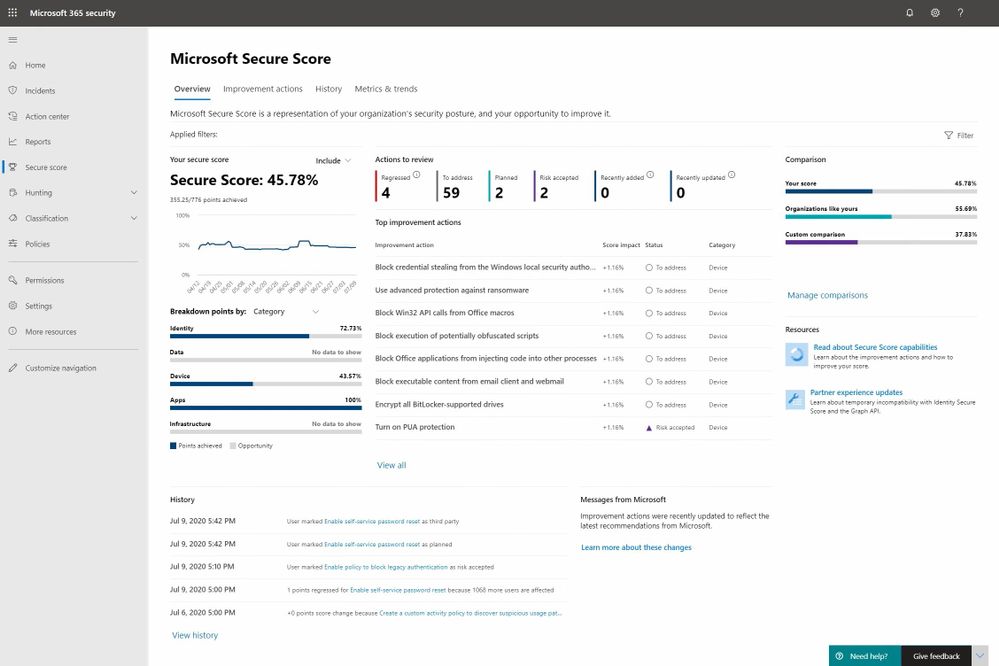
Earlier this year we blogged about the latest public preview of Microsoft Secure Score and today we’re pleased to announce that we‘ve completed our global roll out making it generally available to all of our customers.
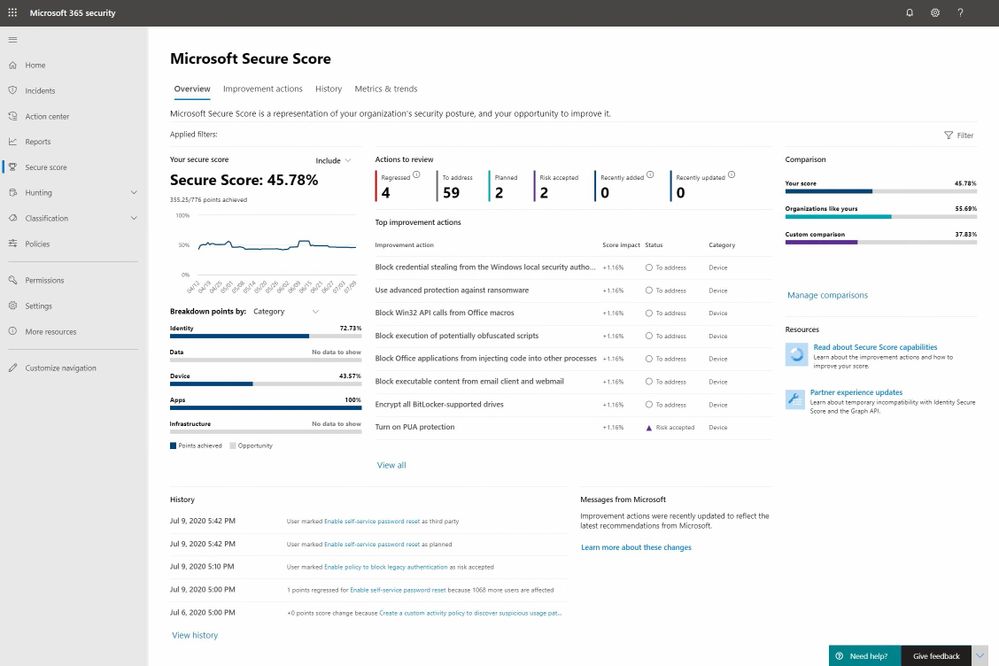
As mentioned in the last blog this a major release for us and it marks Microsoft Secure Score’s transition from simply being a gamified list of security recommendations to one that we think is on its way to becoming the go-to posture management app for security administrators. There’s lots of work left to do to achieve that aspiration, but we feel we’re well on our way.
With this release, we focused on the following areas:
- Improving the assessment and scoring models
- Adding planning, workflow and posture monitoring improvements
- Adding metrics and trend reports to drive meaningful planning and status discussions with leadership
Our previous blog provides all of the details on these investments and our brand new Mechanics video helps bring them to life so today’s blog is going to focus on some key changes and feedback that came out of the public preview program.
During the public preview we’ve seen strong usage growth and there has been no shortage of feedback along the way. Much of it helped us further refine the user experience and your ideas jammed the long-term roadmap with a lot of great ideas. With that said there are two areas of change that we think are important to mention as everyone transitions to the new release.
Improvement Action Changes
The area that we received the most feedback on was related to Improvement Actions. As a product team and a community we’ve had to work together to learn what constitutes an Improvement Action worth adding to the product and to be honest we (Microsoft) didn’t get it perfect in our previous releases. Here are some new principles you helped us define that will enable us to help ensure that only the right types of Improvement Action make it into the system:
- Status of Improvement Actions must be measurable through automation
- Improvement actions when implemented must render a measurable level of risk reduction
Without these principles Microsoft Secure Score only provides a directional view of your posture status rather than the precise measurement we had in mind.
The new principles correct this problem but there is a trade-off that had to be made which will impact a subset of the existing Improvement Actions. The trade-off is that Improvement Actions that violate these rules must now be removed from the product at least temporarily. There are two classes of Improvement Actions that are impacted by these new principles including:
Not Scored
Not scored improvement actions we’re those that lacked automation to determine control status. Improvement actions of this type have been removed until automation can be added at which point, they can return to the product.
Review
Review improvement actions were recommendations that suggest a security administrator review a report or something similar and then take the appropriate actions. Unfortunately, these actions couldn’t be monitored or measured. Like Not Scored Improvement Actions these will be removed until automation can be added.
In addition to these changes customers have informed us that some Improvement Actions where yielding inaccurate numbers in certain scenarios. To address this problem the engineering team expanded their testing coverage and a number of multi-factor authentication and other Improvement Actions have been fixed in response.
A complete list of the Improvement Actions that have been temporarily removed because of accuracy issues can be found at the following pages: Previous Version and Public Preview.
Security related scores in other Microsoft 365 and Azure Security products
Another point of recurring feedback is related to security scores showing up in various user experiences across Microsoft 365 and Azure. The thrust of the questions tends to be about whether they are aligned, are different, etc. Here is how to think about it.
The vision for Microsoft Secure Score is that it will be the centralized user experience for all security related points and Improvement Actions across Microsoft 365 and Azure workloads. Individual products can include a secure score experience scoped to their workload however they must align to the Microsoft Secure Score design patterns and branding. They must also forward their score and improvement action data to Microsoft Secure Score so that it can provide the end to end super set view for an organization’s security posture.
At the moment the Azure workloads are yet to start sending their data however as you’ll notice in the new Microsoft Secure Score experience everything is plumbed in for the day when that data starts to flow into the system. We are still in the process of determining a date for this and will keep you posted when it becomes more clear.
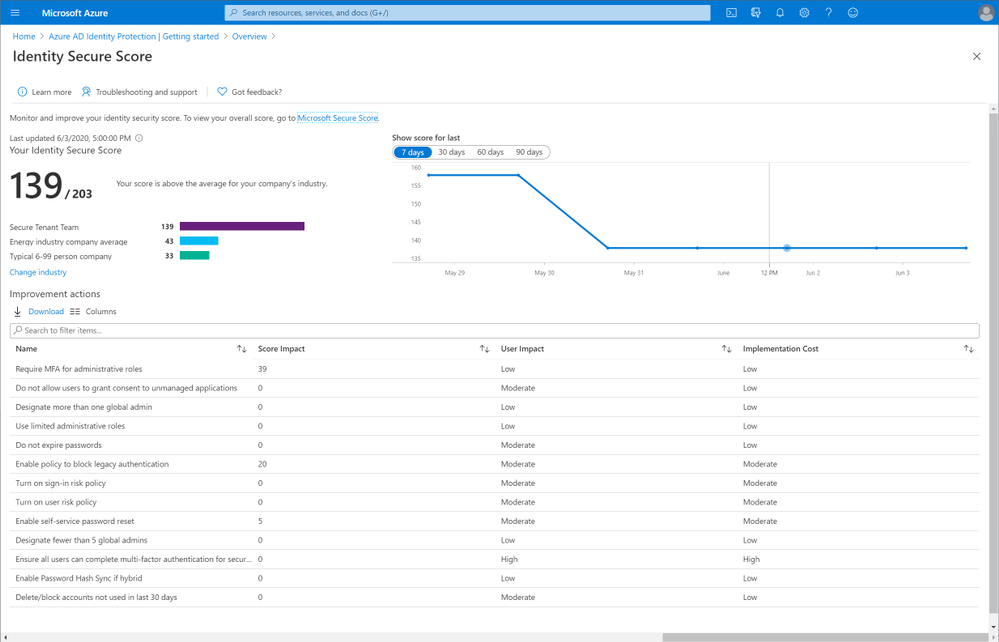
As mentioned a moment ago we have defined a common set of design patterns and branding for all products to align on however the transition to this new state across all of Microsoft 365 and Azure is a work in progress. For this reason, you may see secure score experiences like the following which are not yet aligned. The changes for this particular example are straight forward and you can anticipate Identity Secure Score will soon be rebranded to Microsoft Secure Score for Identity. At this time the score will be change from the # Points Achieved to the % Complete model that Microsoft Secure Score has just transitioned to.
That covers it for today. Thanks for your interest in Microsoft Secure Score and we hope you enjoy the new release. Please logon and take and look and if you have any questions or feedback feel free to leave them in the comments section below.
by Scott Muniz | Jul 13, 2020 | Azure, Microsoft, Technology, Uncategorized
This article is contributed. See the original author and article here.
This post was inspired by Azure/Azure-Api-Management-DevOps-Resource-Kit and targets the How-To process vs the semantics of the problem and the proposed solution, which are very well defined in the Resource Kit GitHub page as well as providing release builds and source code for the tools used throughout this guide.
In this scenario our Azure API Management service (APIM for short) has been deployed and in production for some time already, the API publishers and API developers all use the Azure Portal to operate the service and launch new APIs. Publishers and Developers have agreed that it is time to adopt a DevOps process to streamline the development, management, and environment promotion of their APIs.
This is a transformation journey, thus it is important to keep in mind that the current Prod APIM will still be Prod. Our journey will:
- Provision Dev environment
- Adopting a DevOps process
- For API publishers
- For API developers
- Going Prod with DevOps
Provision Dev environment
The Dev environment is created by taking a snapshot of Prod to achieve symmetric between the two environments. During this step the two instances are not synchronized, therefore, you can either abstain from making changes to Prod, or repeat the initial manual deployment of Dev.
We will:
- Use the extractor tool to capture the current Prod deployment,
- Check the Prod ARM templates into a new repository, and create a dev branch,
- Deploy dev branch to our Dev environment
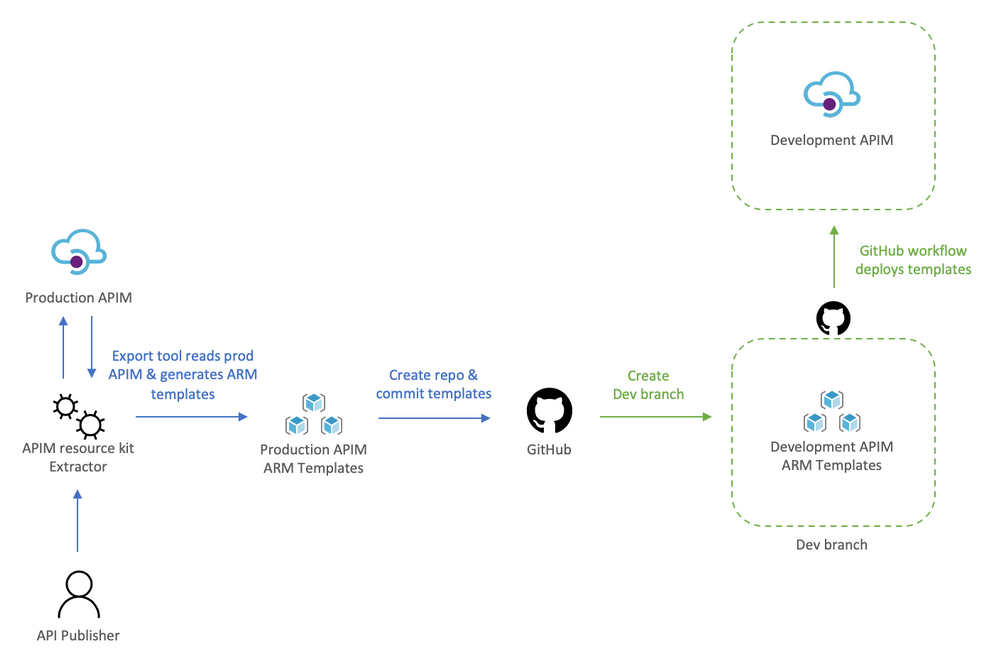
To help us visualize the process let’s take a look at the following diagram:
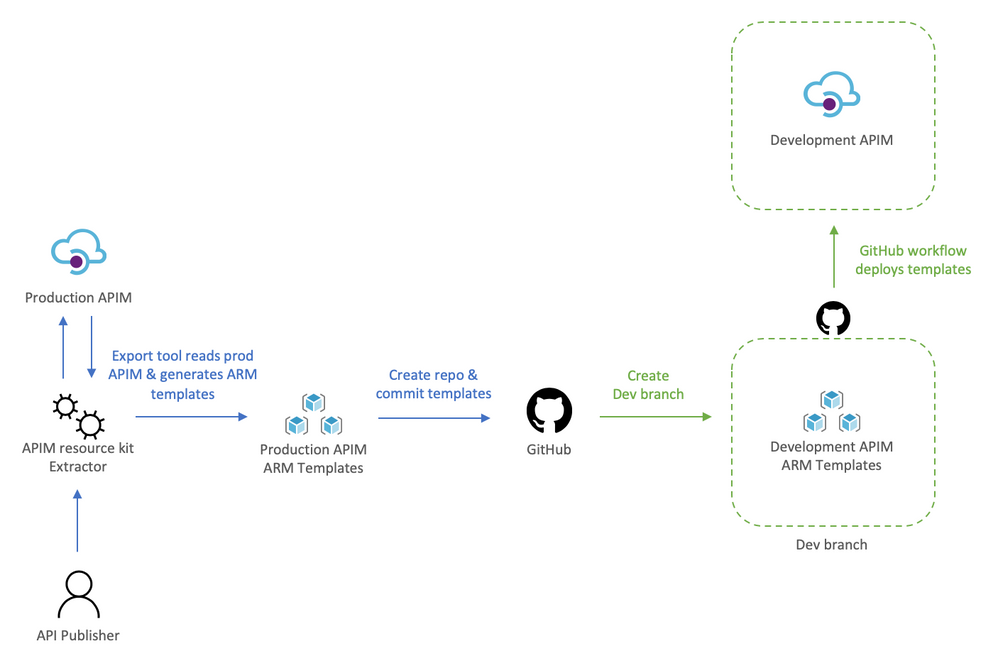
Using the extractor tool to capture Prod
Because we are in a transformation journey, we want the capture to entirely reflect Prod, thus the config used for the Extractor is set to use the production APIM as the source and the destination, this way the ARM templates generated are always production ready. Remember, we are creating development off production, we will override parameters at deployment time to target the Dev instance.
The config file defines how the Extractor will generate the templates, the following apimExtract.json will use the same instance as the source and target, split each API into its own entity, and parameterize most of the assets needed.
{
    "sourceApimName": "apim-contoso",
    "destinationApimName": "apim-contoso",
    "resourceGroup": "Prod-Serverless-App1",
    "fileFolder": "./contoso",
    "linkedTemplatesBaseUrl": "https://raw.githubusercontent.com/romerve/RvLabs/master/servless-devops/apim/contoso",
    "policyXMLBaseUrl": "https://raw.githubusercontent.com/romerve/RvLabs/master/servless-devops/apim/contoso/policies",
    "splitAPIs": "true",
    "paramServiceUrl": "true",
    "paramNamedValue": "true",
    "paramApiLoggerId": "true",
    "paramLogResourceId": "true"
}
Extract the current deployment of your environment:
apimtemplate extract --extractorConfig apimExtract.json
The initial extraction saves the ARM templates to contoso folder. This folder will only store files that have extracted and that are considered service level.
Once the extractor finishes generating the ARM templates, they need to be added to a repository. This will give us a master branch with production ready templates, which will later be automatically deployed via Pull Request ( PR ).
Checking ARM templates into the repository
Head over to Github and create a new repository. Prepare your folder hierarchy before adding, committing, and pushing the ARM templates.
At the root, we have two folders:
- contoso: which is the folder created by the extractor tool and contains the templates
- apis: this folder is not used now, but will be used later for all API development, and used by API developers
With the initial commit done, we are ready to create a the dev branch:
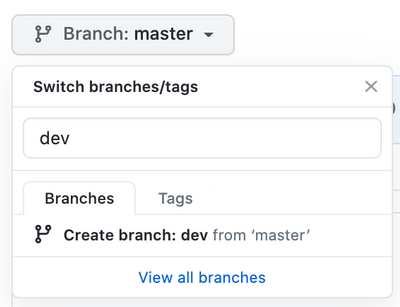
Checkpoint: by now you should have:
- ARM templates of Prod APIM instance
- A repository with Prod templates checked into master
- A new dev branch
Deploy dev branch to Dev APIM
I’ll be using GitHub Actions to automate deployments to Dev APIM and subsequently to Prod APIM.
The workflow Dev-Apim-Service.yaml has the following responsibilities:
- Set environmental variables at the job scope so they can be used across the entire workflow. Besides specifying the dev resources to target, we use a built in variable GITHUB_REF to build URLs used for dev deployments. Additionally, because service level changes and APIs can be develop at different rates, we use On.Push.Paths to specifically where service level templates are placed.
- Uses the Checkout Action and the Azure Login Action. The Azure Login action makes use of a service principal to login and run commands against your Azure subscription. To create and use a service principal, create a GitHub secret with the output of:
az ad sp create-for-rbac
--name "myApp" --role contributor
--scopes /subscriptions/{subscription-id}/resourceGroup/{resource-group}
--sdk-auth
# Replace {subscription-id}, {resource-group} with the subscription, resource group details of your APIM environments
- The las two actions: Deploy APIM Service and APIs, and Deploy APIs will use the Azure CLI to deploy the service template, and then each of the extracted APIs. Important to note that here even when we use the parameters file, we still override the service name and URLs so that the proper environment is used. The Deploy APIs step queries APIM using az rest to get a list of APIs to iterate over the APIs and deploy them.
At this point you should have a full CI/CD workflow that automatically deploys your Dev branch into your Dev APIM instance. Before continuing, this would be a good place to validate the Dev instance and ensure all is working as expected.
Adopting a DevOps process to manage, operate, and develop APIs in Azure API Management
Once the initial Dev APIM has been created it is important that the two personas: API publishers, and API developers incorporate new steps in their process. Typically, API publishers will use the Azure Portal to make changes, and API developers would be working with OpenAPI, but this could also cause configuration drift, and having the two instances running different APIs.
Therefore, API publishers and developer need to incorporate the Azure APIM Resource Kit in their process workflow. need use the Extractor tool as the last step in their process.
For API publishers
The following diagram illustrates how an API publisher would work with the Dev APIM.
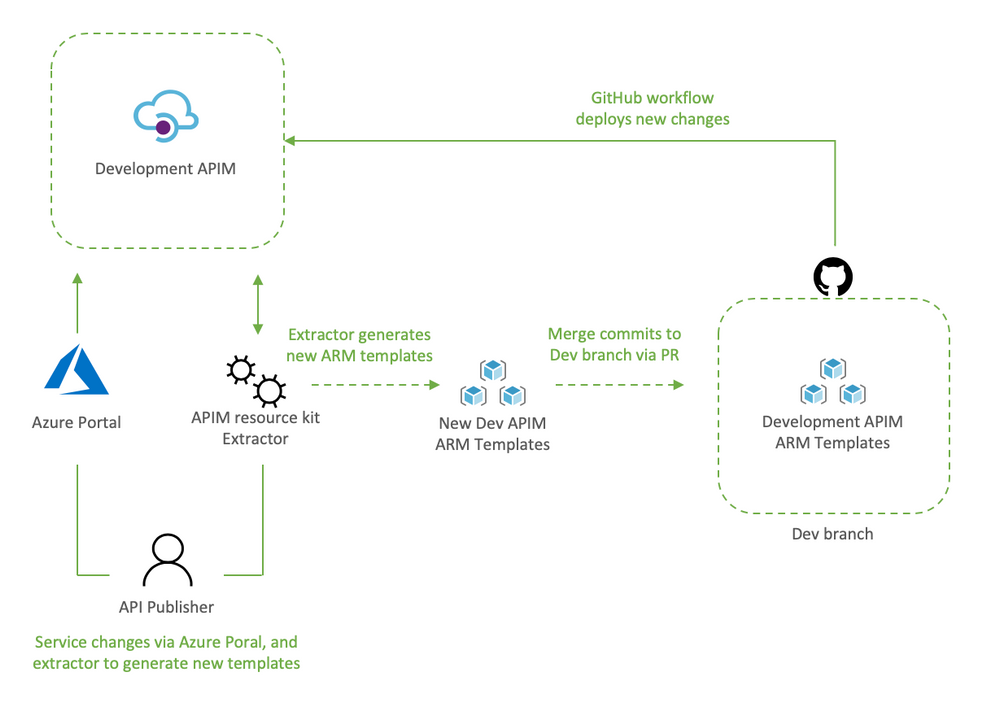
API publishers would:
- Clone the Dev branch to their local environment
- Make the desired changes to Dev APIM using the Azure Portal
- Capture the newly applied changes by running extrator tool (apimtemplate extract –extractorConfig apimExtract.json ) against the Dev APIM
- Add, and commit the new or updated templates into the locally cloned repo (git commit -a)
- Push the updated templates to automatically re-deploy the changes to Dev APIM (git push)
The reason the changes done via the portal are then re-applied to Dev APIM via Github Actions it’s validate that templated can be successfully deployed via code, and it allows for dev branch to be merged into master via PR.
Dev branch deployments is triggered by Dev-Apim-Service.yaml, which filters branch level events to only include changes done to contoso and overrides parameters to target Dev APIM.
For API developers
The diagram would show what a developer process would look like.
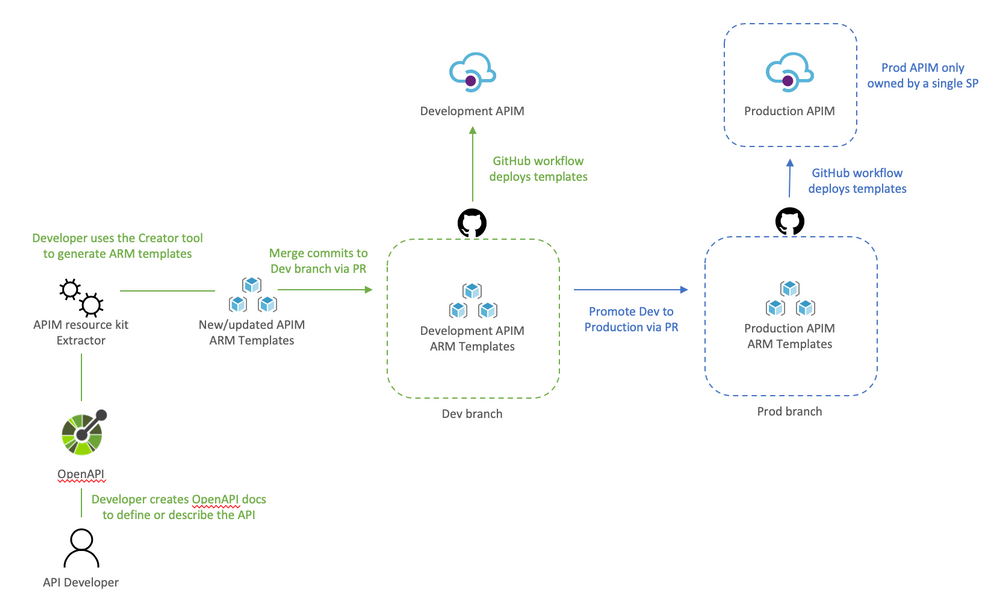
API developers would:
- Clone dev branch to their local environment
- Define or update API docs
- Use the creator tool to generate ARM templates (apimtemplate create –configFile ./apis/<API-FOLDER>/<API>.yml)
- Add, and commit new or updated templates into the locally cloned repo (git commit -a )
- Push the changes to trigger the Dev deployment (git push)
The reason the APIs are saved to apis instead of somewhere inside contoso folder it’s so that developing APIs does not trigger an APIM service deployment. And using a separate workflow Dev-Apim-Apis.yaml we can better control how the two are triggered and deployed.
Going Prod with DevOps
Once Dev APIM is validated and publishers and developers have incorporated the changes in their process, it is time to promote Dev to Prod. The promotion it’s done by creating a pull request from dev to master as illustrated below.
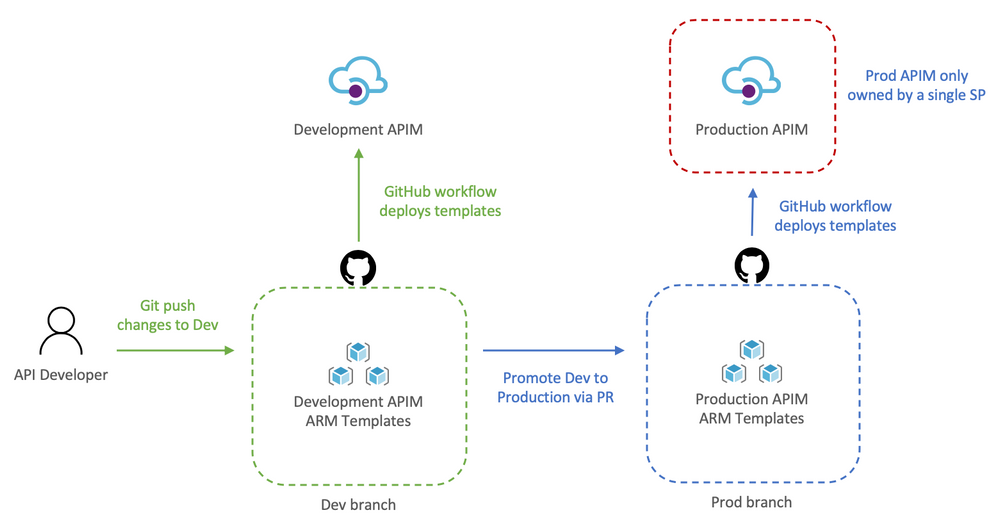
Let’s review how this works:
- API developer push changes to repo’s dev branch
- The push triggers the workflow to automatically deploy Dev APIM
- API developer creates a pull request
- The team reviews the PR and approves the PR to merge dev changes into master
- Merging into master triggers Github Actions to deploy to prod
Because the templates’ parameters files already target prod there is no need to override anything, therefore, the CD workflow simply deploys any templates it finds in contoso and apis.
Now that Dev and Prod are deploying successfully, we apply RBAC permissions to Prod just to make sure that no one can access the resource via the portal, cli, powershell, etc and make “unmannaged” changes. This can be done by:
- Launch the Azure Portal and select the Prod Resource Group
- Select Access Control (IAM)
- Remove any previously assigned roles
by Scott Muniz | Jul 13, 2020 | Azure, Microsoft, Technology, Uncategorized
This article is contributed. See the original author and article here.
Howdy folks,
Today we’re announcing the public preview of the ability to sign-in to Azure AD with email in addition to UPN (UserPrincipalName). In organizations where email and UPN are not the same, it can be confusing for users when they can’t use their familiar email address to sign-in. With this preview capability, you can enable your users to sign in with either their UPN or their email address, helping them avoid this confusion.
This feature can be enabled by setting the AlternateIdLogin attribute in the HomeRealmDiscoveryPolicy. Please use the instructions in our documentation to set this up in your organization.
Some customers are using capabilities in Azure Active Directory (Azure AD) Connect to achieve this today, but that requires them to set the email address as the UPN in Azure AD. With this preview capability, you can now use the same UPN across on-premises Active Directory and Azure AD to achieve the best compatibility across Office 365 and other workloads, while still allowing your users to sign in with either their UPN or email, further simplifying their experience.
We hope this change simplifies the sign-in experience for your end users.
As always, we’d love to hear any feedback or suggestions you may have. Please let us know what you think in the comments below or on the Azure AD feedback forum.
Stay safe and be well,
Alex Simons (@Alex_A_Simons)
Corporate VP of Program Management
Microsoft Identity Division



Recent Comments