by Scott Muniz | Jul 16, 2020 | Azure, Microsoft, Technology, Uncategorized
This article is contributed. See the original author and article here.
IoT is almost always associated with NoSQL database. This is quite understandable as its flexibility and specialization are great for ingesting IoT data. But what if that flexibility and performance are also available in Azure SQL? That would make Azure SQL a perfect target for IoT data as along flexibility and performance you have security, manageability, analytics, and scalability. In this episode, Davide Mauri discusses all this and more – and shows you why Azure SQL is a great option for IoT and HTAP.
Watch on Data Exposed
Additional Resources:
Azure IoT reference architecture
Streaming At Scale – Azure SQL
Ingesting 10K events/sec Video
JSON Performance in Azure SQL
View/share our latest episodes on Channel 9 and YouTube!
by Scott Muniz | Jul 16, 2020 | Uncategorized
This article is contributed. See the original author and article here.
Microsoft Threat Protection (MTP) is an integrated, cross-domain threat detection and response solution. It provides organizations with the ability to prevent, detect, investigate and remediate sophisticated cross-domain attacks within their Microsoft 365 environments.
To help you get started with MTP and take advantage of its capabilities we’ve compiled a series of short videos. These will walk through the key product features and show you how to apply them to your business today.
We’re constantly adding new capabilities to MTP so check back here regularly for new videos and instructional content. You can also follow us on Twitter.
Please share your feedback, or ask questions in the comments section below; let us know what other videos and topics you would like to see.
|
Overview
|
Getting started
|
|
Watch an all-up overview of Microsoft Threat Protection and learn about its capabilities
|
Check out how you can get started quickly and start benefiting from its capabilities
|
|
|
|
| |
|
Incident
|
Advanced hunting
|
|
Learn how alerts are being correlated into incidents and how to work with them
|
Get started with advanced hunting to hunt for threats across your MTP data
|
|
|
|
| |
|
Automated self-healing
|
|
|
This video helps you better understand how MTP automates remediation actions
|
|
|
|
|
by Scott Muniz | Jul 16, 2020 | Uncategorized
This article is contributed. See the original author and article here.
We commissioned Forrester Consulting to conduct a New Technology Total Economic Impact™ study of Microsoft Teams Platform and examine potential return on investment enterprises may realize by rolling out the Microsoft Teams platform. Forrester interviewed six customers and two partners across a range of industries and global geographies to determine how using Teams as a platform changed their organizations*.
Common pain points customers cited in their operations before adopting Microsoft Teams as a platform were:
- Organization struggled to drive adoption for productivity and data visualization tools already available to employees.
- Employees constantly switched between applications and tools throughout the day, losing time and momentum.
- Employees sometimes chose publicly available third-party communication applications, increasing risks for data security for the organizations.
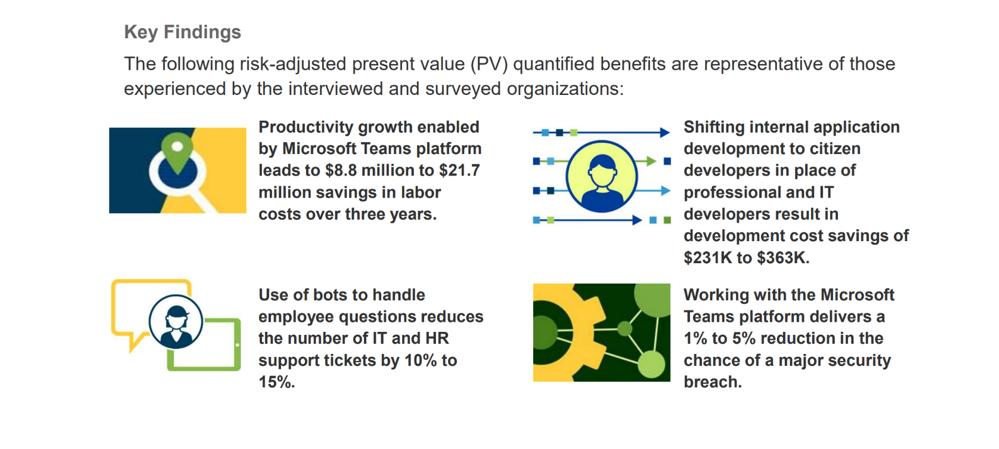
Using the Microsoft Teams platform as a hub for teamwork enabled organizations to reduce disruptions to employee productivity, helped IT and security teams strengthen protection against data leaks, and contributed to a culture of citizen developers that, in turn, accelerated business digitization and innovation. The study reflected a projected return on investment of 393% to 1,085% over 3 years and following key projected benefits.
Besides the directly quantifiable, below benefits were identified through the study.
- Increased employee engagement – Better aligned functionality in one consolidated, easy-to-use platform reduced the efforts for employees to accomplish their daily tasks, leading to a better EX.
- Improved insights to influence decision making – The Teams platform presents real-time data in an easy-to-digest format through integration with data visualization tools, enabling organizations to act on insights and accelerate decision making.
- Better business outcomes – Certain applications integrated into the Teams platform support business functions instead of back-end operations and open previously untapped revenue streams.
Additional uses and business opportunities found in the study included:
- Driving further employee adoption – Introducing new employee groups to the platform would inevitably lead to new use cases and better business outcomes.
- Nourishing citizen developers – A central collaboration environment for citizen developers across the organization will remove a bottleneck from innovation efforts.
- Expanding integrations – Integrating new tools and data sources into the Microsoft Teams platform and making them usable could have a big impact on utilizing the existing knowledge within each organization.
Download the June 2020 study, New Technology: The Projected Total Economic Impact Of The Microsoft Teams Platform today and learn more about the measurable impact Microsoft Teams as a platform can have for your organization.
* Based on the interviews, Forrester constructed a TEI framework, a composite company, and an associated ROI analysis that illustrates the areas financially affected. The composite organization is representative of the companies of the six customers that Forrester interviewed and is used to present the aggregate financial analysis. The composite organization is a global, multibillion-dollar company with a strong brand and a large customer base. Of the 30,000 employees spread across many business lines, 10% to 15% are active users of the Microsoft Teams platform. Active users rely on the platform to perform their daily tasks. The remaining employees are currently using Teams for communication purposes only.
by Scott Muniz | Jul 15, 2020 | Uncategorized
This article is contributed. See the original author and article here.
DirectML
DirectML is a high-performance, hardware-accelerated DirectX 12 library for machine learning. DirectML provides GPU acceleration for common machine learning tasks across a broad range of supported hardware and drivers, including all DirectX 12-capable GPUs from vendors such as AMD, Intel, NVIDIA, and Qualcomm.
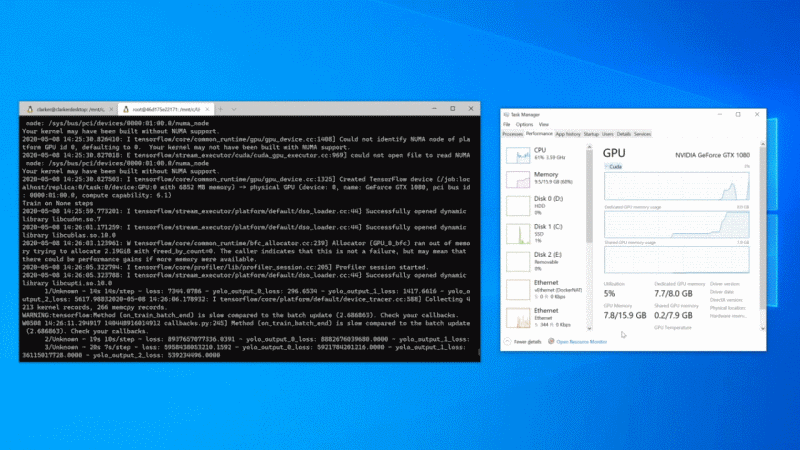
The preview of GPU compute is now available within WSL 2 to Windows Insiders (Build 20150 or higher)! This preview will initially support artificial intelligence (AI) and machine learning (ML) workflows, enabling professionals and students alike to run ML training workloads across the breadth of GPUs in the Windows ecosystem.
NVIDIA CUDA support
NVIDIA’s CUDA as the optimized path for GPU hardware acceleration is typically utilised to enable data scientists to use hardware-acceleration in their training scripts on NVIDIA GPUs.
NVIDIA CUDA support has been present on Windows for years. However, there is a variety of CUDA compute applications that only run in a native Linux environment. However there is now CUDA inside WSL 2. There is a preview of CUDA for WSL 2. This preview includes support for existing ML tools, libraries, and popular frameworks, including PyTorch and TensorFlow. As well as all the Docker and NVIDIA Container Toolkit support available in a native Linux environment, allowing containerized GPU workloads built to run on Linux to run as-is inside WSL 2.
See https://docs.microsoft.com/en-us/windows/win32/direct3d12/gpu-accelerated-training
Empowering educators and students through DirectML
The DirectML API enables accelerated inference for machine learning models on any DirectX 12 based GPU, and we are extending its capabilities to support training.
In addition, we intend to integrate DirectML with popular machine learning tools, libraries, and frameworks so that they can automatically use it as a hardware-acceleration backend on Windows.
DirectML works well in Windows or Windows Subsystem for Linux WSL. By doing so, our intent is to fully empower students to learn in the Windows or Linux environment that works for them, on the hardware they already have.
For more information, see Get Started with Windows ML.
ONNX Runtime on DirectML
ONNX Runtime is a cross-platform inferencing and training accelerator compatible with many popular ML/DNN frameworks, including PyTorch, TensorFlow/Keras, scikit-learn, and more.
DirectML is available as an optional execution provider for ONNX Runtime that provides hardware acceleration when running on Windows 10.
For more information about getting started, see Using the DirectML execution provider.
Tensorflow with DirectML
We have a preview package of TensorFlow with a DirectML backend. Students and beginners can start with the TensorFlow tutorial models or our examples to start building the foundation for their future. In line with this, we are also engaging with the TensorFlow community through their RFC process. We plan to open source our extension of the TensorFlow code base that works with DirectML.
For WSL See https://docs.microsoft.com/en-us/windows/win32/direct3d12/gpu-tensorflow-wsl
For Windows See https://docs.microsoft.com/en-us/windows/win32/direct3d12/gpu-tensorflow-windows
When used standalone, the DirectML API is a low-level DirectX 12 library and is suitable for high-performance, low-latency applications such as frameworks, games, and other real-time applications. The seamless interoperability of DirectML with Direct3D 12 as well as its low overhead and conformance across hardware makes DirectML ideal for accelerating machine learning when both high performance is desired, and the reliability and predictability of results across hardware is critical.
More information about DirectML can be found in Introduction to DirectML.
Your feedback
If you have feedback on the NVIDIA CUDA path for WSL, please share it via the Community Forum for CUDA on WSL. For feedback on the TensorFlow with DirectML package, please use the DirectML GitHub repo.
Getting started using GPU with WSL
In order to get your system setup please use our getting started documentation.
Keep upto date with announcement on WSL
To stay in the loop on our latest news and future updates, stay tuned to the Windows Command Line blog and follow @crahrig on Twitter!
by Scott Muniz | Jul 15, 2020 | Uncategorized
This article is contributed. See the original author and article here.
The latest version of the related article, Assess an enterprise and consolidate assessment reports with DMA, has been updated to include support for SQL Server 2019 and Azure SQL Managed Instance.
Please refer to the technical documentation for the step-by-step instructions associated with completing this task.
by Scott Muniz | Jul 15, 2020 | Azure, Microsoft, Technology, Uncategorized
This article is contributed. See the original author and article here.
Initial Update: Thursday, 16 July 2020 07:28 UTC
We are aware of issues within Azure Monitoring and are actively investigating. Some customers may be experiencing issues in viewing Alerts in the Azure portal on the alerts page however they will continue to receive the email for the triggered alerts.
- Work Around: None
- Next Update: Before 07/16 11:30 UTC
We are working hard to resolve this issue and apologize for any inconvenience.
-Anmol
by Scott Muniz | Jul 15, 2020 | Uncategorized
This article is contributed. See the original author and article here.
This blog describes enhancement in SQL 2019 for TDE enabled databases in which MaxTransferSize is no longer required.
Backup Compression and Transparent Data Encryption (TDE) have been two valuable features for customers using SQL Server. In version of SQL Server prior to SQL Server 2016 for TDE enabled databases – specifying WITH COMPRESSION had no effect on backup size.
Starting with SQL Server 2016, backup compression was enabled for TDE-enabled databases provided MAXTRANSFERSIZE > 64KB is specified along with compression. This in turn causes backup compression to kick in and improve overall backup performance by reducing the size and time it takes to complete the backup. For more details, you can read a blog post from our SQLCAT team on this improvement related to TDE and backup compression.
Starting with SQL Server 2019 CU5, setting MAXTRANSFERSIZE larger than 64KB is no longer required to enable the optimized compression algorithm for TDE enabled databases. In other words, if a backup command is specified WITH COMPRESSION or the backup compression default server configuration is set to 1, MAXTRANSFERSIZE will automatically be increased to 128 KB to enable optimum compression of TDE enabled database backup.
If an existing backup command is already making use of MAXTRANSFERSIZE > 64K along with compression, the provided value of MAXTRANSFERSIZE will be honored and backup compression for the TDE enabled database will continue to work.
For more info refer to:
Improvement: MAXTRANSFERSIZE no longer required to enable backup compression on TDE encrypted databases
https://support.microsoft.com/en-gb/help/4561915/improvement-maxtransfersize-no-longer-required-to-enable-backup-compre
by Scott Muniz | Jul 15, 2020 | Uncategorized
This article is contributed. See the original author and article here.
Learn how Teams integrates with your existing workflows and technologies to drive more productivity.
On Wednesday, July 29th from 12 Noon – 3 PM Eastern, you’ll hear from Microsoft Chief Nursing Information Officer Kathleen McGrow, as well as end-users in the health and life sciences sector about how Teams fits into their daily workflows. You’ll also learn how Pexip can help you join Teams meetings from legacy video systems, get a sneak peek of the new 85″ Surface Hub 2, and discover how Kinly can help optimize your Teams collaboration strategy.
Agenda
| 12:00 |
Keynote: How Teams fits into your healthcare setting (Microsoft)
|
| 12:30 |
Connecting legacy video systems with Teams (Pexip) |
| 1:00 |
Developing your Teams strategy (Kinly) |
| 1:30 |
Collaborating with Surface Hub 2 – (Microsoft) |
| 2:00 |
Customer Panel (Becton Dickinson, MVP Health Care) |
| 2:30 |
Open Q&A |
The Presenters
 |
Kathleen McGrow, DNP, Chief Nursing Information Officer & Industry Executive at Microsoft (LinkedIn)
|
 |
Frank Buchholz, Sr. Product Marketing Manager – Surface at Microsoft (LinkedIn)
|
 |
Olly Henderson Sales Director – Microsoft Lead US at Kinly (LinkedIn)
|
 |
Andrew Reitter, Sr Director of Business Development at Pexip (LinkedIn)
|
|
|
Anthony Kay, Telecommunications Engineer at Becton Dickinson (LinkedIn)
|
 |
David Swits, Sr Leader, Cloud & Infrastructure Services at MVP Health Care (LinkedIn)
|
 |
Jeremiah Brown, Leader, Cloud Services and Microsoft Technologies at MVP Health Care (LinkedIn)
|
We look forward to seeing you there!
by Scott Muniz | Jul 15, 2020 | Azure, Microsoft, Technology, Uncategorized
This article is contributed. See the original author and article here.
The Azure Sphere OS update 20.07 is now available for evaluation via the Retail Eval feed. The evaluation period provides 14 days for backwards compatibility testing. During this time, please verify that your applications and devices operate properly with this release before it’s deployed broadly via the Retail feed. The Retail feed will continue to deliver OS version 20.06 until we publish the 20.07 update in two weeks.
The evaluation release includes an OS update only; it does not include an updated SDK.
Areas of focus for compatibility testing with the 20.07 evaluation release should include:
- Apps/functionality utilizing real-time cores
- Apps/functionality using ADC and/or PWM
- Apps/functionality that use functions in the Azure IoT C SDK (include/azureiot)
For more information
For more information on Azure Sphere OS feeds and setting up an evaluation device group, see Azure Sphere OS feeds.
If you encounter problems
For self-help technical inquiries, please visit Microsoft Q&A or Stack Overflow. If you require technical support and have a support plan, please submit a support ticket in Microsoft Azure Support or work with your Microsoft Technical Account Manager. If you do not have a support plan and require technical support, please explore the Azure support plans.
![[Guest blog] My Journey with Helping Kids Love Technology](https://www.drware.com/wp-content/uploads/2020/07/large-523)
by Scott Muniz | Jul 15, 2020 | Uncategorized
This article is contributed. See the original author and article here.
This article was written by Data Platform MVP Indira Bandari in New Zealand. She shares about her experience teaching kids how to code.
In this article, I wanted to share my journey with helping kids get to know about and foster a love of technology.
How did it all start?
In June 2016, I signed up as a mentor for #JHACK NZ 2016, a Game Development Competition for kids in high school. JHACK, with the help of Microsoft ran their first workshop on June 26, 2016. Over 100 kids were trained for half a day on a game development software called Construct 2.
They were given 6 weeks to develop games and submit. All the mentors that signed up also were trained on Construct 2. When I was returning home from the training, it hit me. I had a realization. Why not also teach tech to some of the primary school kids that come to the Sunday school where I volunteer? That July came with new beginnings. I started with 12 kids between ages 9 to 12, teaching them the same software, Construct 2 for 6 straight weeks.
After 2 weeks of successfully running the course, I mentioned this to the Program Manager of #JHackNZ. It evolved even more. She encouraged me and said “Why don’t the kids submit some games for the competition?” Even better, I was able to use this resource to inspire the kids to build games. The result: 8 individual games and 1 group game were successfully submitted.
Come September, the students I taught joined the rest of the participants in the game competition. It was a full day of fun and activity for the kids with industry experts. 5 games were selected for individual category and 5 games were selected for group games category, followed by presentations to the audience about their creations.
We were thrilled to hear that 2 of our kids were finalists. Take a look at their presentations here: Season Run Star Gatherer.
So after their presentations in the final round, we were once again pleased to hear that these 2 games placed SECOND and THIRD in the individual category. I couldn’t believe this and this was a significant achievement for all of us. You can check the photos here.
 JHACK Winners
 Kids enjoying the JHACK competition finale
What did I learn from this?
- Each kid is different in terms of what they can achieve
- They are creative in their own unique way
- They enjoy creating games that are similar to the ones they play
- They tend to have fun and make life interesting
- When the presentation time came, they used all their imagination to weave stories around the games they have created to make it fun and interesting for the audience
So what came next?
After the success of the game development classes, I turned teaching kids tech into a yearly practice. And what better to teach them than what I have been doing for the last 15 years?
With that, I have been running a 12-14 week course on Databases and Data Visualizations every year since then. In the databases section of the class for the first 6 weeks, I teach them fundamentals of SQL using Microsoft SQL Server using SQL Server Management Studio. In the next 6-8 weeks, I take Data Visualization classes and teach them basics of Power BI.
Now, I conduct Power BI competitions for kids after the 12-14 weeks course. The kids select their own datasets from MakeoverMonday.com or kaggle.com based on their interests. If you want to learn more, find the details of this competition here.
So, what are these kids capable of?
Kids are extremely courageous when it comes to trying new initiatives. If they are given access to technology with proper guidance, you’ll be amazed at how they can come up with exceptionally creative solutions.
So far, I have trained 22 kids in Power BI and some of them have started using them in their schools. A couple of kids have participated in Hackathons such as Hackthecrisis NZ and Hackforgood. The exposure at such a young age prepared them for being brave in try new technologies, such as building websites, using PowerApps, Power Virtual Agents, qnamaker, Cognitive services etc. It also encourages them to become more involved at school or wherever they get the opportunity. It is so interesting to see these kids receive certificates in school that are related to technology. One of my students even started her own YouTube channel.
New initiative this year
Inspired by my own 5-year old kid, I have started teaching coding basics classes for 5 – 9 year olds. Thanks to code.org, I’ve been amazed to see these kids progress, even achieving tech certificates as as they move to higher levels.
 Coding classes for 5 to 9 year olds
What joy mentorship and teaching have brought me over the course of these past few years. I encourage everyone to find opportunities to use their technical expertise and mentor future technologists.
#HumansofIT
#TechforGood
#FutureTechnologists


Recent Comments