by Scott Muniz | Aug 6, 2020 | Alerts, Microsoft, Technology, Uncategorized
This article is contributed. See the original author and article here.
The year 2020 has started eventfully, and it continues to present challenging times for people, businesses, and economies around the world. As our CEO Satya Nadella puts it, “We have seen two years of digital transformation in two months.” Azure Database for MySQL service is at the heart of this transformation, empowering online education, video streaming services, digital payment solutions, e-commerce platforms, gaming services, news portals, government and healthcare websites to support unprecedented growth at optimized cost. It’s immensely satisfying to see Azure Database for MySQL enable our customers to meet growing demands for their services during these critical times. Azure Database for MySQL service, with community version of MySQL, is powering mission critical services such as healthcare services for citizens of Denmark, digital payment application for citizens of Hong Kong, music and video streaming platforms for citizens of India, Korea, and Japan, online news websites, and mobile gaming services including our very own Minecraft Realms.
MySQL – Popular choice for Internet scale web or mobile applications
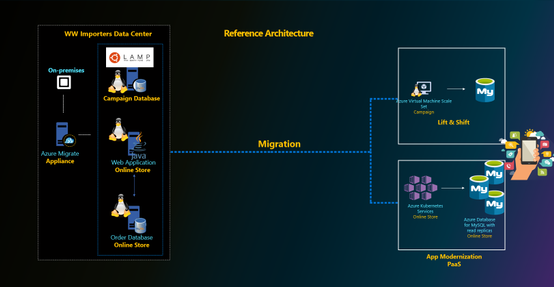
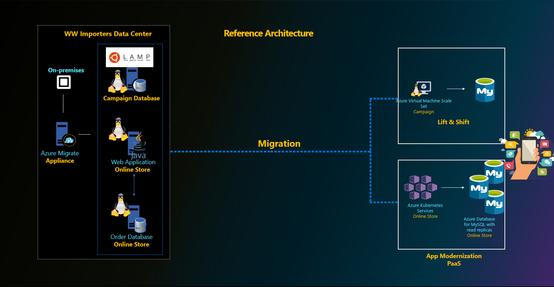
MySQL is a popular choice of database engine for designing internet scale consumer applications, which are highly transactional online applications with short chatty transactions against a relatively small database size. These applications are typically developed in Java or php and migrated to run on Azure virtual machine scale sets (VMSS) or Azure App Services or are containerized to run on Azure Kubernetes Service (AKS). The database is typically required to scale high volume of incoming transactions. Most of our customers leverage proxysql load balancer proxy and read replicas to scale out and meet the workload demands for their business. MySQL versions 5.7 and 8.0 continue to be popular choices among our customers for meeting their performance and scale goals.
What’s new in Azure Database for MySQL?
Over the last six months, we’ve focused on enhancing security and governance for customers, simplifying performance tuning, and reducing cost for our customers in addition to increasing the regional availability of our optimized large storage platform with 16-TB storage and 20K IOPs scale. This aligns with our promise of making Azure the most secure and trusted cloud for our customers. A complete list of all the features we’ve released is available via Azure updates, but I’ll summarize a few important updates below.
Enterprise Grade Security, Compliance & Governance
- Data encryption at rest using customer managed keys. Since we launched Azure Database for MySQL to public, all customer data is always encrypted at rest using service managed keys. The service is fully compliant with PCI DSS, HIPAA and FedRAMP certifications. With this release, we allow our customers to bring their own key for data encryption of their data at rest. This was one of the highly requested ask by our finance, healthcare industry and government customers to meet their compliance and regulatory requirements. Learn more about this feature here.
- Infrastructure double encryption. The feature provides an additional layer of protection for customers’ data at rest. Infrastructure double encryption uses the FIPS 140-2 validated cryptographic module, but with a different encryption algorithm. The key used in Infrastructure Double encryption is managed by the Azure Database for MySQL service. Infrastructure double encryption is not enabled by default since the additional layer of encryption can have a performance impact. Learn more about this feature here.
- Minimum TLS version enforcement ability. Azure Database for MySQL currently support TLS v1.0, 1.1 and 1.2. Our recommendation is to upgrade to TLS version v1.2 to enhance security, and with this feature, we allow customers to control and enforce the right behavior for their MySQL servers from the server side. Server administrators can simply go in the Azure portal and set the minimum TLS version on the server side to meet the compliance. Security administrators can define right policies at the subscription or organization level using Azure Policy to ensure the minimum TLS version for all the MySQL servers in the Azure subscription meets the compliance and regulatory requirements defined by the organization. Learn more about this feature here.

- Private Link for Azure Database for MySQL. Azure Private Link is the most secure way to isolate and connect to Azure Database for MySQL either within the same Azure region or across regions. Customers can also use this feature to disable public endpoints, which ensures that there aren’t any connections coming from public endpoints. Learn more about this feature .
- Azure Active Directory Authentication for Azure Database for MySQL. Azure Active Directory authentication allows customersdatabase by using identities defined in Azure AD and manage credentials in a central place. For consistent role management, database access can be managed by using Active Directory groups, as well as . Learn more about this feature here.
- Governance capability by enforcing Azure policies – All of the above security features are opt-in and driving the right security practices and behavior is a shared responsibility. To standardize and enforce these security controls at an organization level, customers can leverage Azure Policy. Azure Policy is an Azure service that is used to create, assign, and manage policies. These policies enforce different rules and effects on resources to ensure that they stay compliant with corporate standards and service level agreements. Azure Policy meets this need by evaluating resources for non-compliance with assigned policies, at the same time ensuring that all data stored by Azure Policy is encrypted at rest. We are glad to announce the integration of Azure Database for MySQL with Azure Policy to enforce these compliance requirements at scale.
We’ve created an Azure Policy GitHub repository that contains quick-start samples from the community. For more information about using these sample policies, see the article here.
Intelligent Performance
Besides the security controls, the engineering team focused on making life easier for devops team who are tasked to manage the performance of large fleet of servers. Intelligent performance is our differentiated feature which includes query store, query performance insight, and performance recommendations. Intelligent performance allows devops teams to better understand their workloads, visually inspect them and identify bottlenecks, and to see a list of recommendations for improving the performance of database workloads.
For some canonical workloads like WordPress, we are taking a step forward to allow users to configure an optimized performance configuration for their Azure Database for MySQL server using resource tags. To take advantage of this feature and drive performance optimizations for WordPress applications, users can simply set the following resource tag on Azure Database for MySQL server used for WordPress application at time of server creation. Learn more about this feature here.
- Name: AppProfile
- Value: WordPress
We are constantly using pattern analysis to programmatically analyze metrics telemetry of servers and provide targeted Advisor recommendation which can enable users to improve performance of their MySQL servers out of the box without any code changes. The recent recommendation which we added is to increase tmp_table_size and max_heap_table_size values for servers which are impacted by temp tables spills to storage. The increase in the server parameter values for those impacted servers can improve overall workload performance out of the box. For Azure Database for MySQL servers impacted by temp table spills to storage, customers will see the recommendation to increase the values in Advisor recommendation blade in the portal. Learn the latest about this feature here.
As scale demands of the workload increases, customers can leverage read replicas to scale-out and proxysql to transparently split the reads and writes from the application. In some scenarios, there may still be high amount of thread churn inside the server with short burst of highly concurrent transactions limiting the transaction throughput due to high cpu contention. To minimize this and improve the performance out of the box, we released thread pool feature which can be enabled using server parameters in Azure Database for MySQL service. Learn more about this feature here.
Cost Optimization
Reducing cost is top in the mind of customers and therefore, it is a top priority for us too. We released few features in this area to ensure customers are provisioning the right size for their workloads and benefit from capacity commitments. This is an active area of investment for us and we are committed to do more in this area so please stay tuned.
- Recommendation to optimize cloud spend – The Recommendations feature gives daily insights about the database server to help users optimize performance and cost. Azure Advisors is a personalized cloud consultant that helps users follow guidelines to optimize their Azure deployments. We started off with Performance based recommendations, but we have now expanded the portfolio to include cost optimization recommendations through right sizing and Reserved instance.
- 3 years RI expansion – We started off by providing 1-year RI announced in Microsoft Ignite 2019. However, learning from the feedback from customers we have quickly expanded the support for 3 years RI as well to let customer save cost for long term commitments. Learn more about reserved instances and its use here.
Large Storage with up to 16TB storage. With our new storage infrastructure that supports up to 16TB, we have done bunch of optimizations in the storage engine including switching to snapshot-based backups. The 16 TB storage also supports IOPs up to 20K IOPs for higher concurrent scaling. In a subset of Azure regions, all newly provisioned servers can support up to 16-TB storage and 20K IOPs. We are also working towards rolling out this storage infrastructure in remaining Azure regions which will be the default storage option going forward.
Getting Started with Azure Database for MySQL Service
Users new to Azure Database for MySQL can get started by leveraging the following QuickStart articles:
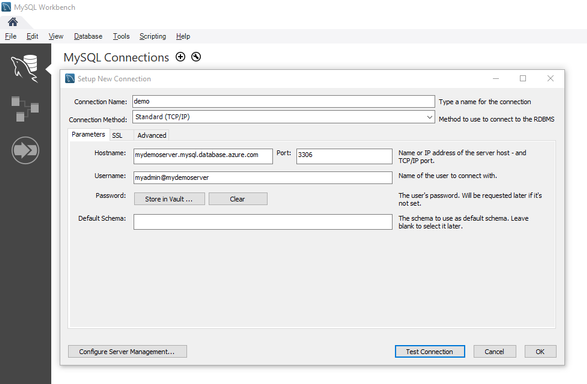
The connection to Azure Database for MySQL requires users to specify the username in the format username@servername. For more information on this requirement, read more here.
Migrating to Azure Database for MySQL service
Customers looking to migrate their database to Azure Database for MySQL can use the
- Dump and Restore – For offline migrations where users can afford some downtime, leverage dump and restore using community tools like mysqldump/mydumper. Read more in our documentation. For migrating large databases, leverage the best practices shared by our field customer engineer working closely with some of our mission critical customers.
- Azure Database Migration Service – For seamless migrations to Azure Database for MySQL service with minimal downtime, customers use the Azure Database Migration Service. Learn more about this service in our documentation. The best practices for migrating MySQL databases using Azure Database Migration service can be found here.
- Data-in replication – For minimal downtime migrations, data-in replication which relies on binlog based replication can also be leveraged. Data-in replication is preferred for minimal downtime migrations by hands-on experts who are looking for more control over migration. You can read more in our documentation.
To migrate users from an existing environment to a Azure Database for MySQL server, leverage the script documented here.
Planned Maintenance Notification
If you want to get alerted for upcoming planned maintenance to your Azure Database for MySQL server, we recommend subscribing to planned maintenance notification. Learn more about this feature here.
Stay updated
To stay updated around the latest development with Azure Database for MySQL service, we recommend the following:
Feedback
We are constantly looking at ways to improve our service and prioritize highly requested items. If you have any feedback, you can leverage the following forums:
- UserVoice
- Use Azure Portal to leave us your feedback

Questions
If our documentation fails to provide clarity, we encourage customers to contact us with questions.
Support
For support with an existing Azure Database for MySQL server, use the Azure portal to open a support request with us.
by Scott Muniz | Aug 6, 2020 | Alerts, Microsoft, Technology, Uncategorized
This article is contributed. See the original author and article here.
Final Update: Thursday, 06 August 2020 06:26 UTC
We’ve confirmed that all systems are back to normal with no customer impact as of 8/6, 06:03 UTC. Our logs show the incident started on 8/05, 21:41 UTC and that during the 8 hours 22 minutes that it took to resolve the issue, customers using the AUDIT_LOG_REST_API in the Australia Southeast Region could have experienced a delay with ingested data.
- Root Cause: The failure was due to a bad deployment.
- Incident Timeline: 8 Hours & 22 minutes – 8/05, 21:41 UTC through 8/06, 06:03 UTC
We understand that customers rely on Azure Log Analytics as a critical service and apologize for any impact this incident caused.
-Eric Singleton
by Scott Muniz | Aug 5, 2020 | Alerts, Microsoft, Technology, Uncategorized
This article is contributed. See the original author and article here.
Over the last few months I’ve been doing a “summer tour” of user groups and delivering a talk entitled “Start your datacentre transformation journey with Azure Migrate”, during my talk I mainly focus on customer journeys that are moving resources from on prem to the cloud. However, due to some questions I’ve had from the audience I want to change focus a little and share with you the ability to use Azure Migrate to help you if you are looking to move from another cloud provider to Azure.
The first step of any migration journey regardless of your starting point and destination is an assessment, gathering information about your current environment. I talked about it why I think it’s so important and what information you should be gathering in my Datacentre Migration Checklist blog post.
The Azure Migrate: Server Assessment Tool can help not only assess your VMware, and Hyper-V virtual servers, or physical servers but it can also assess those living in other clouds. And in this video I show you the process of assessing your AWS virtual machines with a view to moving them to Azure. You can watch the full video here or on Microsoft Channel 9.
You can find more information here:
I hope you enjoyed the video if you have any questions feel free to leave a comment.

by Scott Muniz | Aug 5, 2020 | Uncategorized
This article is contributed. See the original author and article here.

We want to hear from you and answer your questions around how we can help you, our customers, achieve CMMC compliance with your Microsoft Azure and Microsoft 365 subscriptions. We will be hosting an “Ask Microsoft Anything” (AMA) session on Tuesday, August 25th from 9:00 AM – 10:00 AM PST here, on the Tech Community. Save the date!
To join, simply, visit the Government AMA space on Tuesday, August 25th from 9:00 AM – 10:00 AM PST and click “Start a New Conversation” to post your question. This event is open to all Tech Community members and we’ll have members of the Microsoft product, engineering, legal and licensing teams standing by to provide answers.
***Please note : This AMA is only to answer questions in regards to achieving CMMC compliance with our Microsoft products, including Microsoft Azure and Microsoft 365.
by Scott Muniz | Aug 5, 2020 | Uncategorized
This article is contributed. See the original author and article here.
We are excited to announce a new and exciting update to Get & Transform Data capabilities in Excel – PDF data connector! This has been one of the top requests from you and we heard you. With the new From PDF connector you can connect to PDF files, and use the included data from the file, just like any other data source in Excel.
The new From PDF connector is available as part of an Office 365 subscription. If you are an Office 365 subscriber, find out how to get the latest updates.
The following sections describe how to connect to a PDF file, select data, and bring that data into Excel.
Connect to a PDF file
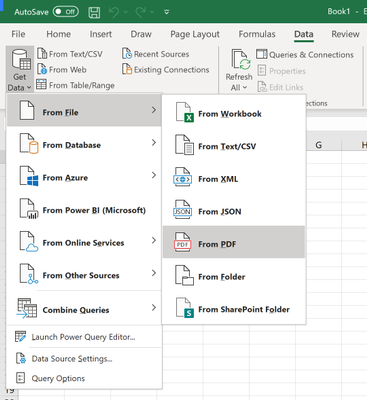
To connect to a PDF file, open the Get Data menu from the Data tab on the ribbon. Select From File and click From PDF.
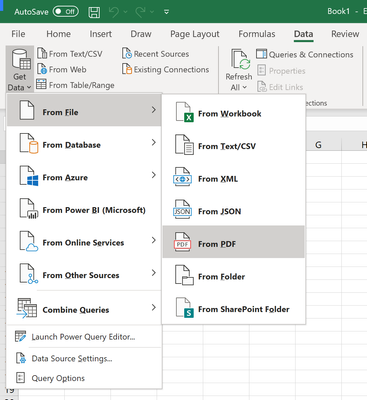
You are prompted to provide the location of the PDF file you want to use. Once you provide the file location and the PDF file loads, a Navigator window appears and displays the list of tables and pages in the document that you can import the data from.
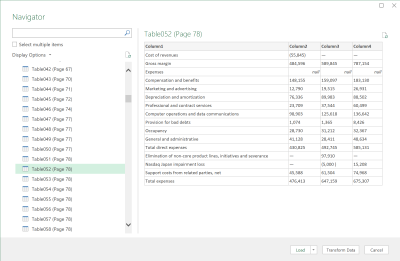
You can browse through the PDF document data and select one or multiple elements to import into Excel. When you are ready to import, select the Load button to bring the data into Excel, or Transform Data to clean your data and prepare it for analysis with Power Query Editor.
Advanced scenarios
In some cases, you may want to import a range of pages from a PDF document at once. For this, you can specify the Start page and End Page as optional parameters for your PDF connection in the underlying M formula from the Power Query Editor:
Pdf.Tables(File.Contents("C:Sample.pdf"), [StartPage=5, EndPage=10])
For more information, refer to the Pdf.Tables M function documentation.
We hope you will like this new addition to Excel and we’d love to hear what you think about it. Please click File > Feedback and let us know. We’re excited to hear from you!
Guy Hunkin
– Excel Team

by Scott Muniz | Aug 5, 2020 | Uncategorized
This article is contributed. See the original author and article here.
Excited about Microsoft Ignite 2020 this September? Read on to learn about our Humans of IT partnership with five Historically Black Colleges and Universities (HBCUs) in the Louisiana area, and the inspiring students that we are proud to call our Student Ambassadors!
Since 2018, the Humans of IT Community has been proud to support students in the local community where Microsoft Ignite is held in. For the past two years when Microsoft Ignite was held in Orlando, we partnered with Florida-based student ambassadors from the University of Florida, University of Central Florida and Valencia College. Watch our community partnership video to learn more at https://aka.ms/communitypartners.
Although this year our initial plans to be in-person in New Orleans did not materialize due to the global pandemic, we are thrilled to still be partnering with five Historically Black Colleges and Universities (HBCUs) in the greater Louisiana area! All of these students have been personally nominated by their faculty professors and College Deans at Grambling State University, Xavier University of Louisiana, Southern University Baton Rouge, Southern University New Orleans and Dillard University:
 Microsoft Ignite 2020 Humans of IT Student Ambassadors
To support their learning and help them gain valuable insights into the tech industry, each student will be paired with a tech mentor who is either a Humans of IT Community Ambassador, Humans of IT Student Advisor (past year student ambassadors who have returned to help mentor incoming cohorts) or Microsoft employee. They will also have full access to our extensive range of mentors worldwide via our Community Mentors app, which is free to use and open to public. The app is currently available on both iOS and Android, and we will also be launching a desktop version soon. If you are interested in becoming a mentor and helping others in tech, please download the app and set up your profile as well so that you will be discoverable as a mentor on the app.
Be sure to keep an eye out for Microsoft Ignite Humans of IT sessions featuring our student ambassadors, and guest articles on our community blog written by students to spotlight their personal tech journey stories, mentors, role models and more!
Please join me in giving our wonderful student ambassadors and budding future technologists a warm welcome to the Tech Community!
#HumansofIT
#StudentAmbassadors
#FutureTechnologists
by Scott Muniz | Aug 5, 2020 | Alerts, Microsoft, Technology, Uncategorized
This article is contributed. See the original author and article here.
With the significant trend of moving to the cloud, you need to understand how to set up your organization for success. That’s why Anna Hoffman, Data & Applied Scientist, and Bob Ward, Principal Architect, on the Azure Data team, created all-new content to help you understand the benefits of Azure SQL. In Gayle Sheppard’s latest blog, she shares how SQL Server professionals can become Azure SQL professionals with all new learning tools from Anna & Bob.
Read more
by Scott Muniz | Aug 5, 2020 | Uncategorized
This article is contributed. See the original author and article here.
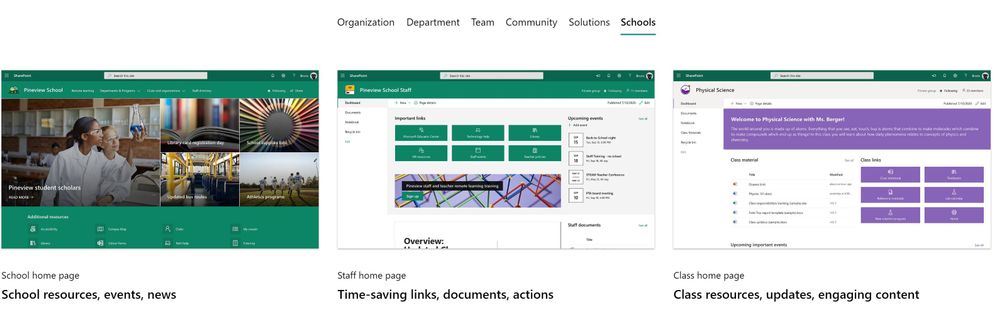
The SharePoint team is excited to launch site templates for schools and universities, available via the Microsoft Look Book. The templates bring together news, events, highlighted content, quick links and more. Each has been designed with a specific scope and audience for our Education customers:
- School home page: a central, institution-wide landing experience for students and staff with the latest school happenings and important resources.
- Staff home page: a dashboard for staff members with time-saving links, documents, and calls-to-action. This template is designed to be used with a Staff team or a Professional Learning Community (PLC) team in Microsoft Teams for Education.
- Class home page: a dashboard for a class with resources, updates, and learning content. This template is designed to be used with a Class team in Microsoft Teams for Education.
While planning and designing the templates, we listened to school leaders and educators all over the world. Armed with this feedback, we went to work to provide rich, effective site templates that help students and staff stay connected and up-to-date on school life and class work. Plus, the sites look great on any device by default, so students and educators can use them on desktop, tablet and mobile.
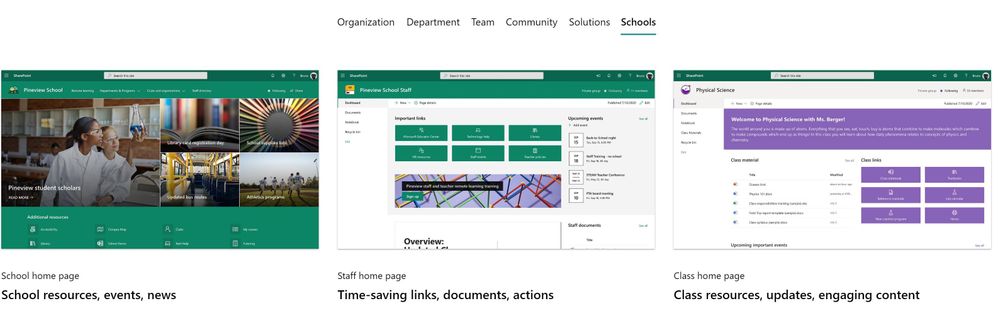 A brand new Schools category in the Microsoft look book, where you can find site templates for our Education customers
To help you get started quickly, we’ve provided step-by-step guidance on how to customize the templates to suit your needs, and how you can bring your home pages into Microsoft Teams for Education.
Staying engaged and on top of key information is critical for students and educators, especially when faced with the new challenges of hybrid learning. These site templates provide a straightforward path for everyone in your school community to access what they need. Here’s how each of these templates can benefit your school:
School home page
Dress it up in school spirit with your school colors, logo, motto, and values – this is the internal landing experience for your school. School leaders share schoolwide news, events, and resources, making it the single place where teachers and students can stay up-to-date on the latest happenings that affect their teaching and learning.
Learn more about more about the School home page template and how to make it your own.
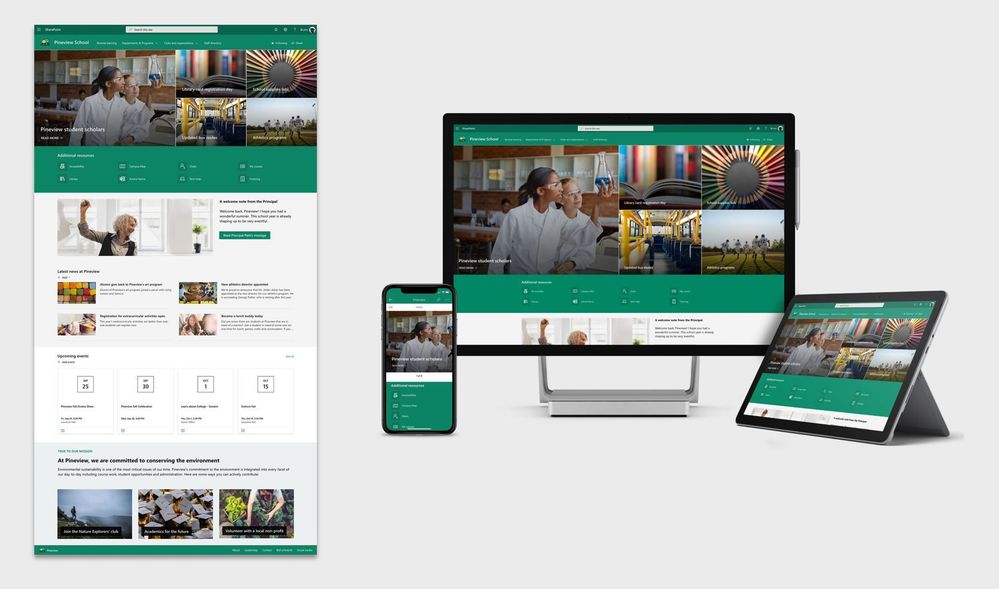 School home page template
Staff home page
Use this template as a dashboard for staff members – whether it’s schoolwide, a department working groups, or a PLC. This is where highlighted documents, tool links, and essential event info lives together, organized.
Bonus: This page can be added alongside your team meetings and discussions in Microsoft Teams. Pin it as a tab to your Staff or PLC team so staff members always knows where to get their updates.
Learn more about the Staff home page template and how to customize it just for you.
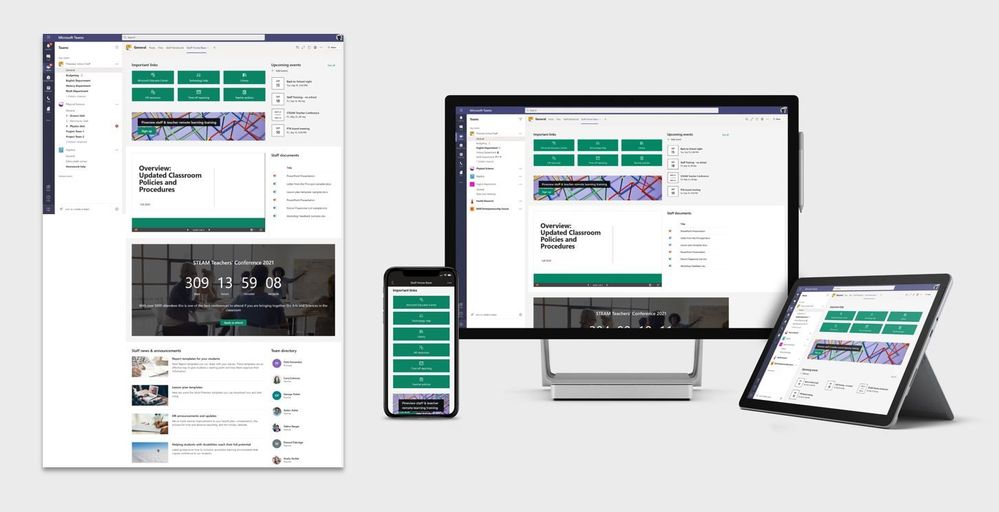 Staff home page template
Class home page
This template serves as a central dashboard for a class. Welcome students, highlight key information and learning resources, and get students what they need. You can even add your contact info and an introduction.
The Class home page template is intended to be used with a Class team in Microsoft Teams. Students get the combined functionality of the Class home page along with assignments and online meetings, without ever leaving Teams.
Learn more about all the elements in the Class home page template and how you can customize them.
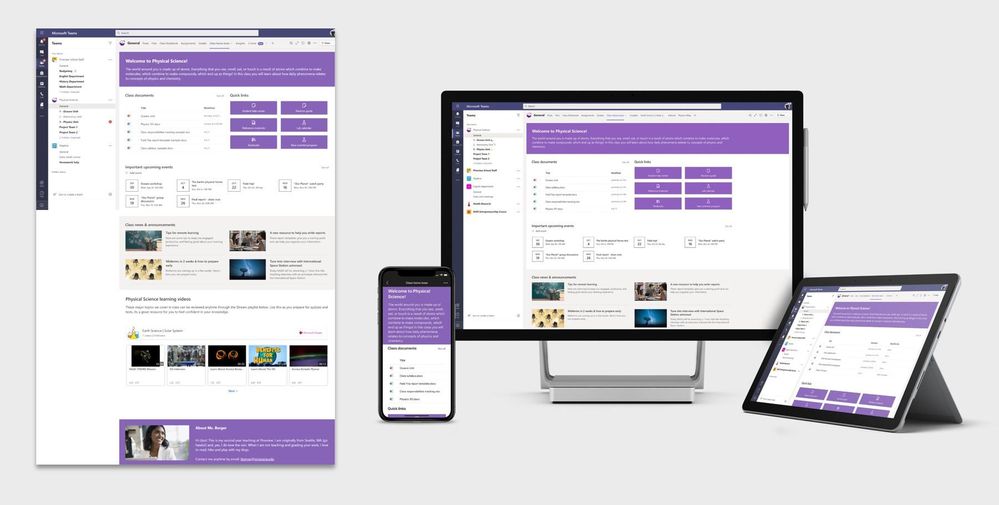 Class home page template
Summary of what’s included with each template:
- Home page layout and sample content.
- Branding elements, including a site theme.
- Documentation to help you get started and make your sites your own.
FAQ
1. What permissions do I need to add the templates from the Microsoft Look Book site?
- School home page: You need to have the permissions to create new SharePoint sites in your organization.
- Staff home page: You need to be an Owner of the Staff team or Professional Learning Community (PLC) team where you want to add this site template, or be a Global admin.
- Class home page: You need to be an Owner of the Class team where you want to add this site template, or be a Global admin. All teachers of a Class team are Owners by default.
2. How do I bring the sites into Microsoft Teams for Education?
- School home page: You can add the home page as a Website tab in teams of your choosing. Learn how.
- Staff team: You can add the home page as a SharePoint tab in the associated Staff or Professional Learning Community (PLC) team. Learn how.
- Class team: You can add the home page as a SharePoint tab in the associated Class team. Learn how.
3. Can you show me an example of how these site templates can be customized?
Yes. Here’s an example showing each of the three site templates customized for a higher education institution just by changing the theme, text, images, page layout, and linked content. With SharePoint, it is easily edit, add, move, or remove elements of the page to suit your needs. Try it today.
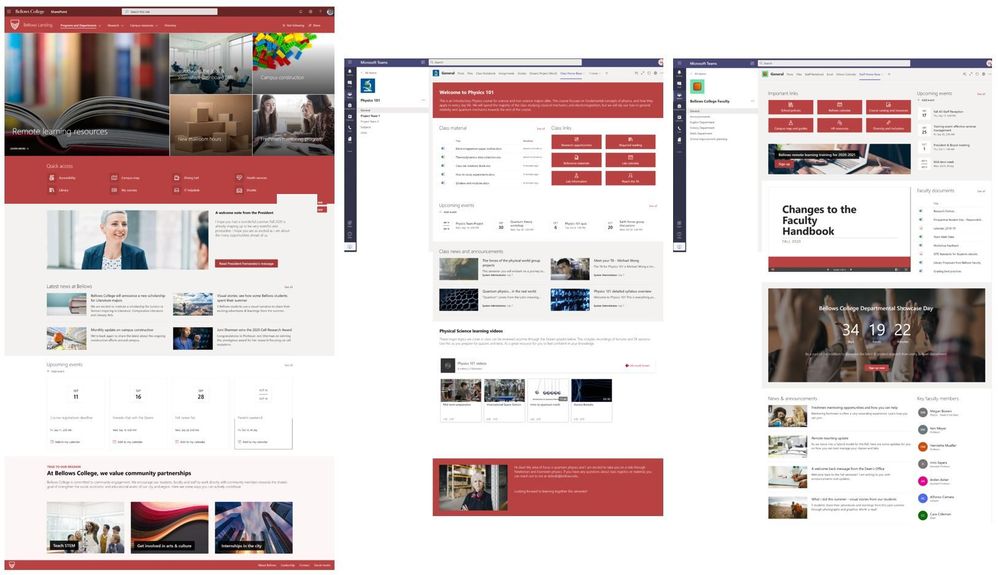 Example of how the templates can be customized
Related reads and resources
by Scott Muniz | Aug 5, 2020 | Uncategorized
This article is contributed. See the original author and article here.

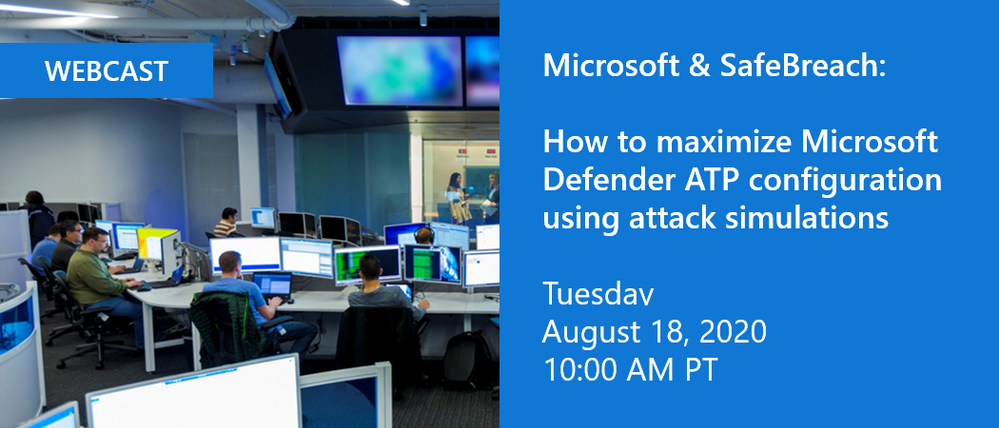
We’re excited to invite you to join us for a webinar in partnership with SafeBreach happening on Tuesday, August 18, 2020 at 10:00 am PT. Hadar Feldman, Sr. Program Manager at Microsoft and Valeriy Leykin, Product Manager at SafeBreach will provide an overview of the integration of SafeBreach’s breach and attack simulation capabilities with Microsoft Defender ATP evaluation lab.
The evaluation lab allows security teams to fully evaluate the effectiveness and configuration of their Microsoft Defender ATP solution right from within the Microsoft Defender Security Center. Adding in attack and breach simulations from SafeBreach enables customers to test their solution against real world attacks from prominent APT groups, helping them to identify weaknesses and be better prepared.
Visit the registration page to learn more and sign up today.
We look forward to seeing you there!

by Scott Muniz | Aug 5, 2020 | Alerts, Microsoft, Technology, Uncategorized
This article is contributed. See the original author and article here.
|
Microsoft partners like Barracuda and Buurst deliver transact-capable offers, which allow you to purchase directly from Azure Marketplace. Learn about these offers below:
 |
Barracuda CloudGen WAN Service: CloudGen WAN is based on the security technology of Barracuda CloudGen Firewall. CloudGen WAN integrates with Microsoft Azure Virtual WAN to provide a secure SD-WAN network with high-performance connectivity. Dynamically scale your SD-WAN network while providing next-generation firewalls with CloudGen WAN. |
 |
SoftNAS: As a virtual storage appliance with enterprise network-attached storage capabilities, SoftNAS from Buurst lowers cloud storage costs and handles demanding workloads with fully customizable options. SoftNAS allows customers to migrate data to the cloud with continuous sync, with speeds up to 200 percent faster than TCP/IP over high-latency networks. It’s available for a 30-day free trial.
|
|


Recent Comments