by Scott Muniz | Aug 10, 2020 | Azure, Microsoft, Technology, Uncategorized
This article is contributed. See the original author and article here.
Azure Active Directory B2C (Azure AD B2C) is a great way to enable secure authentication for your users across mobile and web — from basic sign-in and sign-out, to profile management and more.
While Azure AD B2C is designed to work well on any iOS or Android phone or tablet, integrating with any auth provider can be particularly tricky on a mobile device, particularly if you’re building a “hybrid” mobile app using something like Cordova or Capacitor. Issues like secure token storage, Man-In-The-Middle attacks, and timely security updates can be troublesome, and create risks if not handled properly.
That’s why the Ionic team designed Auth Connect. Ionic Auth Connect makes it easy to add secure authentication to any hybrid mobile app running on iOS, Android, or the web. Using a simple, powerful API, it handles logging in and/or registering a user with an authentication provider (such as Azure Active Directory) using industry-standard OAuth/OpenId Connect.
Getting Started
In this tutorial, we’ll add login/logout functionality to a basic Ionic app by integrating Ionic Auth Connect. There’s only a few steps required to implement Auth Connect with Azure AD B2C in an Ionic app: configure Azure AD B2C, install Auth Connect in an Ionic app, and configure Auth Connect to use Azure AD B2C.
To begin, clone this repository and follow along. The “start” folder contains the basic structure of the app that we’ll make changes to and the “completed” folder contains the finished app as a reference point if needed.
NOTE: An Ionic Native Enterprise Edition key is required in order to install and use the Ionic Auth Connect plugin. Ionic Native Enterprise features a library of Premier plugins and solutions that are fully supported and maintained by the Ionic team, with access to Ionic experts and a guaranteed response SLA to mission-critical app development. If you are interested in acquiring a key or learning more, please contact us here.
To see what Ionic Auth Connect looks like in action, view this short video.
After cloning the code, do the following:
1. Install the Ionic CLI:
npm install -g @ionic/cli
2. In a terminal, change directory into the “start” folder in the repository:
cd demo-authconnect-azureb2c/start
3. Run npm install. NOTE: This will fail if an Ionic Native key hasn’t been registered.
4. Run ionic serve to build and serve the app locally in a web browser.
The Reference App
The Ionic app is a modified version of a blank Angular starter project. It consists of two pages: the Home page displays the signed-in user’s details (which will be retrieved from Azure AD B2C) and the Login page protects the Home page from unauthorized access.
Azure Active Directory B2C Configuration
Before integrating Auth Connect into the Ionic app, you’ll need to get Azure Active Directory (AD) B2C up and running.
Note: For complete information on configuring Azure AD, consult the official B2C documentation which includes tutorials on creating a B2C tenant, registering applications, and more.
Create an Azure AD B2C Tenant
If you don’t have one, create a new B2C tenant.
Register an Application
Sign into the Azure Portal then navigate to the Azure AD B2C service page.
Begin by creating a new Application under Manage – App registrations – New registration.
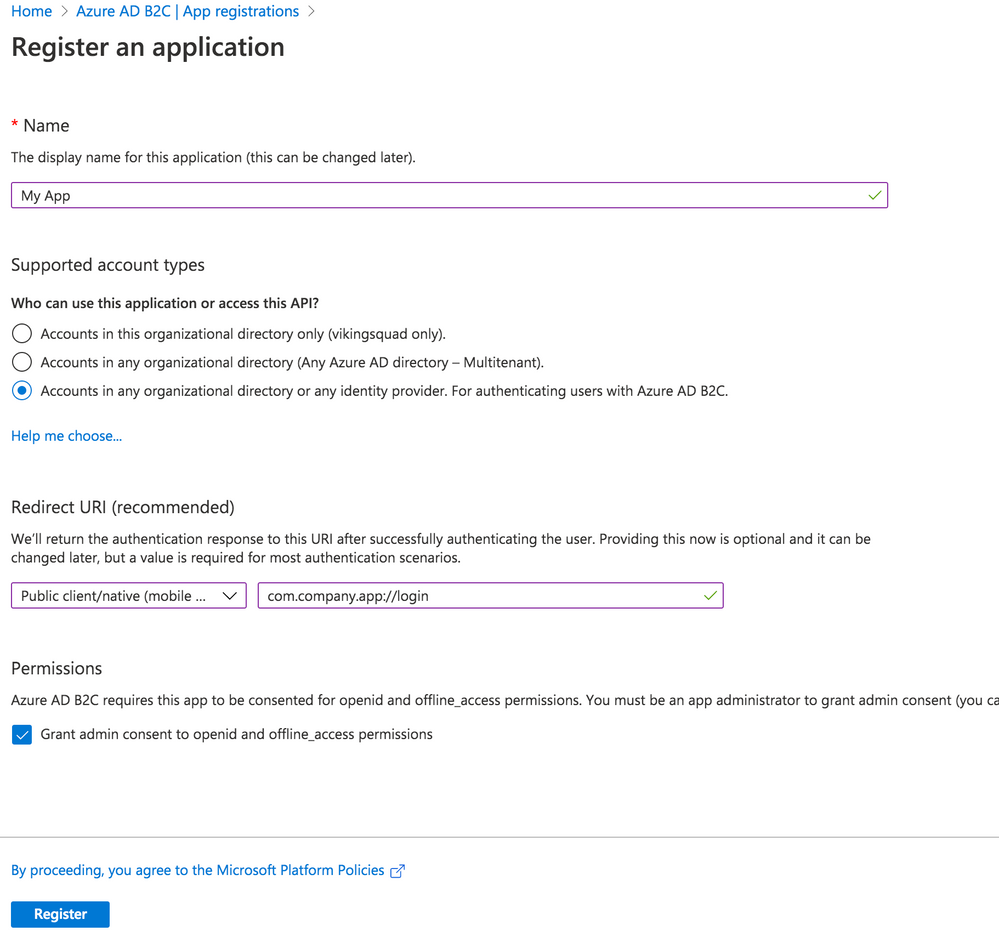
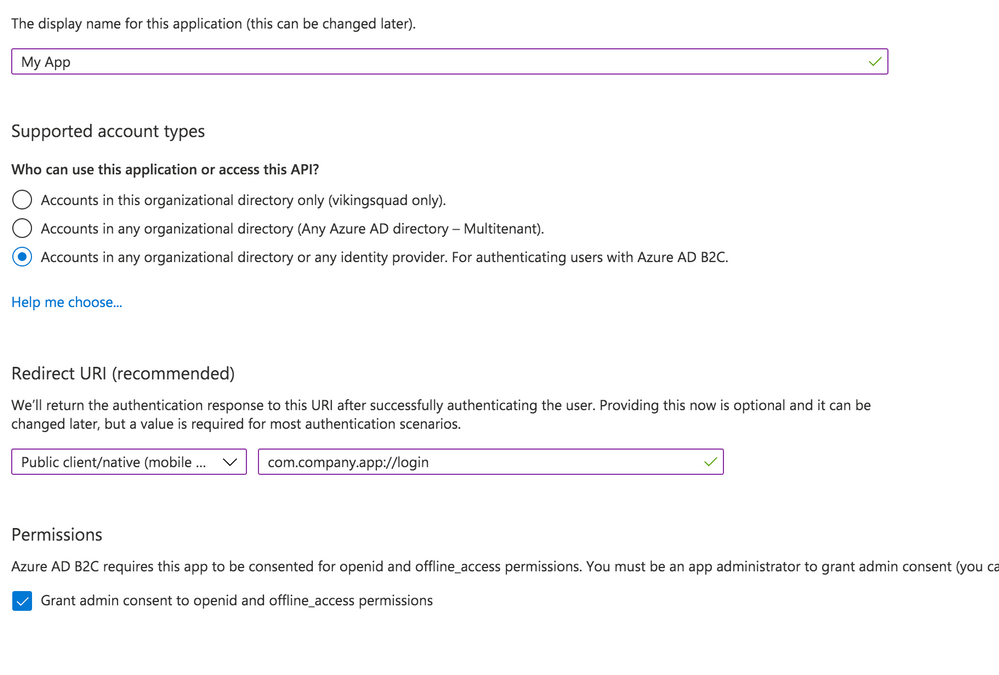
Give your app a new name, then select the Supported Account Types.
With that in hand, set the Redirect URI. Choose “Public client/native (mobile & desktop)” – we’ll add web support in a separate step. Then, fill in the text field value with your globally unique App Id, which is used both in the Azure configuration as well as the native mobile app’s configuration. Typically, this takes the form of company-AppName or reverse DNS style – com.company.app. Use the formula “uniqueId://page”. After the app user signs into Azure AD, this tells Auth Connect which page to redirect to in your app. While any page can be used, in this example we’ll use the Login page, such as com.company.app://login. Click the register button to create the app.
Add Web Platform
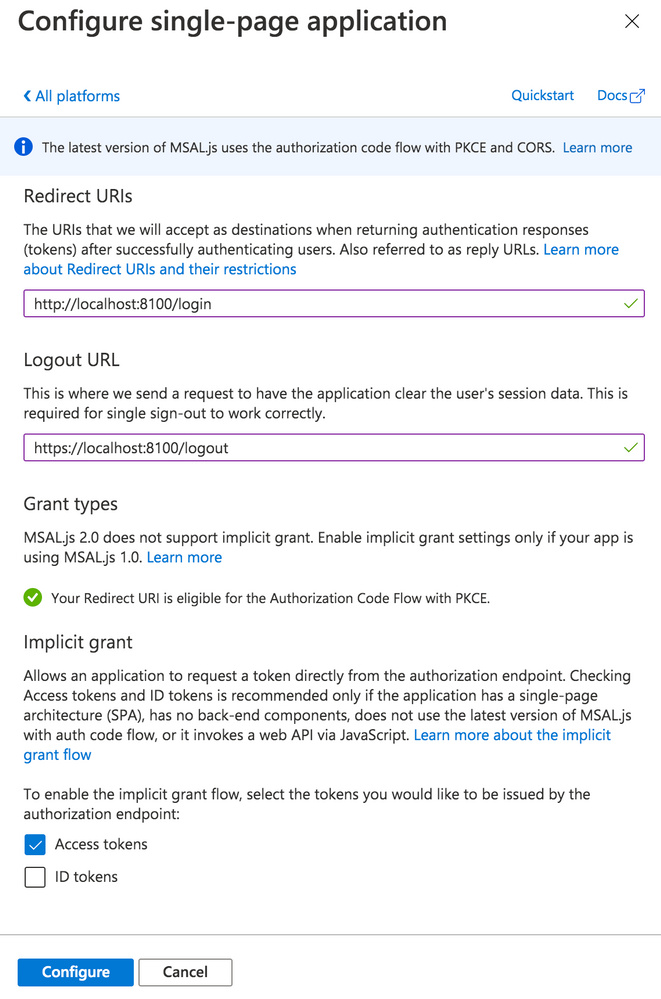
With the app created, navigate to Manage – Authentication. Click the “Add a Platform” button. Under Web applications, choose “single-page application.”
Under Redirect URIs, specify a web URL. In this example, for local testing, we’ll use http://localhost:8100/ along with the name of your app’s core login page (typically, login).
Next, under Logout URL, specify a web URL to redirect to once the user has logged out of your app. Again, for local testing, specify https://localhost:8100/ along with the name of the logout page (typically logout).
Finally, under Implicit Grant, toggle “Access tokens.” Click the Configure button to save.
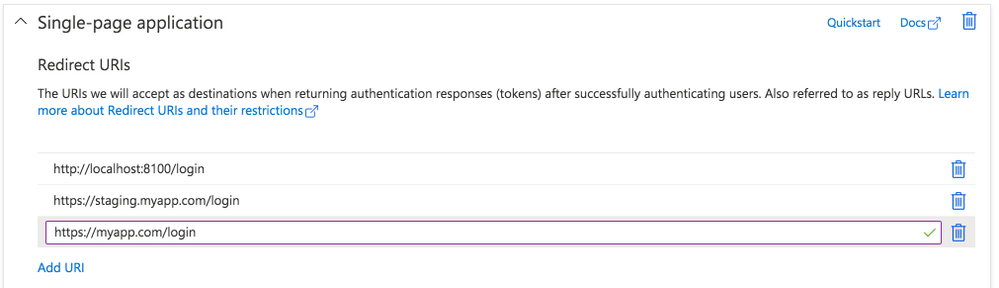
Back on the Authentication page, look under the Single-page application settings. Click the “Add URI” button to add additional Redirect URIs, including those for other environments like staging or production. Click Save when ready.
Expose an API
Navigate to the “Expose an API” page. Click “Add a scope”, then for the Scope name, provide a value such as “user_impersonation.” For the display name and description fields, add details describing that this is for authenticating your users. Set the state to enabled then click the “Add scope” button.
Configure API Permissions
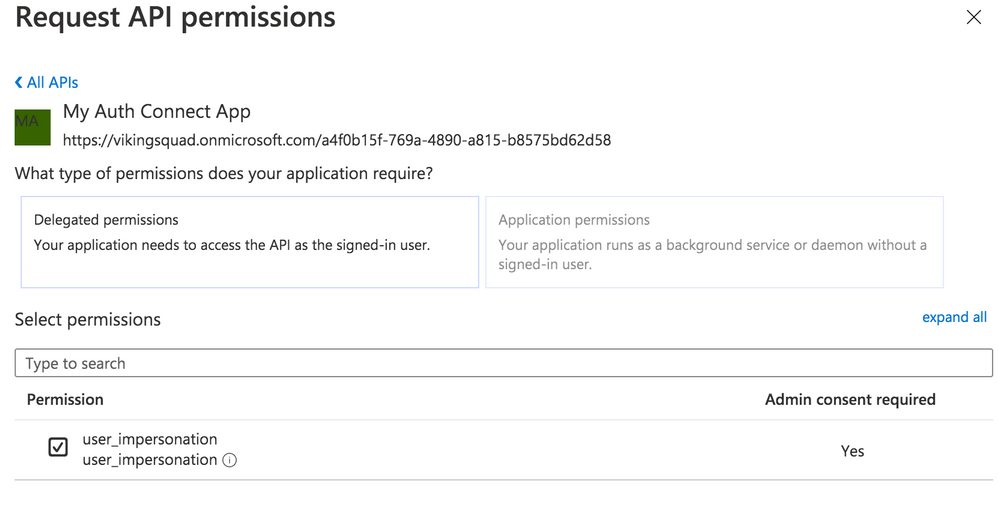
Next, we need to authorize our app so it can connect to Azure B2C and retrieve user profile information alongside login credentials. Navigate to the API Permissions page then click the “Add a permission” button. Under “Select an API”, choose “My APIs” then click the name of the B2C app we’re currently configuring. Next, select the “user_impersonation” permission (or whatever name you labeled it in the previous step) then click the “Add permissions” button.
Save the application, then click on the newly added permission row. Click the “Grant admin consent for [your organization name]” button then choose “Yes.”
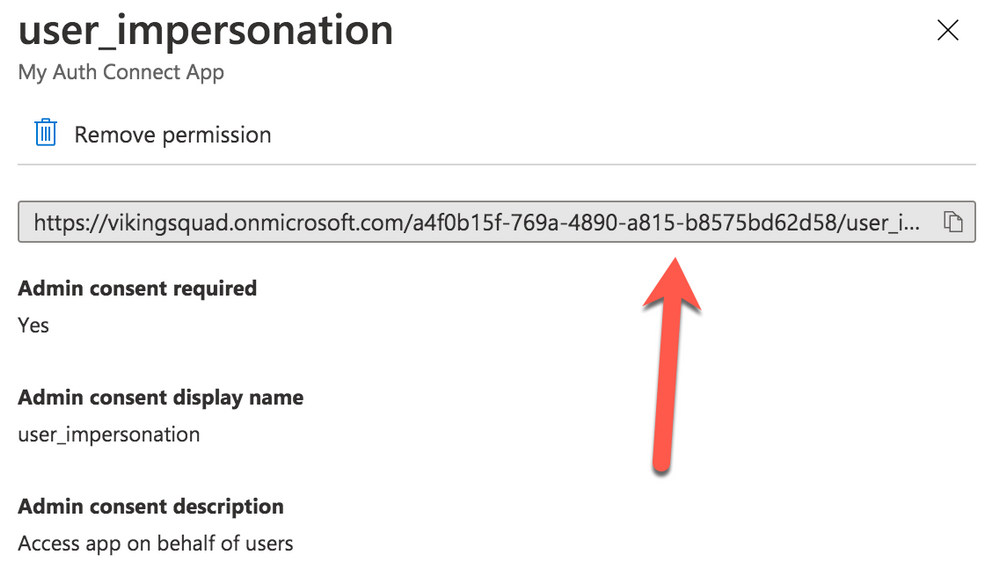
Click on the “user_impersonation” permission row again to open the modal window, then click to copy the link that is displayed. Note this URL, because it will be used as part of Auth Connect’s “scopes” property later.
Create User Flows (Policies)
Create at least one User Flow, the series of pages that define the entire authentication experience for your app. At a minimum, create a Sign up and sign in flow. Once the User Flow has been created, select it from the User Flow list, then click “Run user flow” from the Overview tab. Note the URL at the top of the page, used to configure Auth Connect’s Discovery URL property.
Azure AD B2C is now ready to use with Auth Connect.
Install Auth Connect
Auth Connect works on the web or on mobile. For deploying to mobile, we’ll use Capacitor, Ionic’s cross-platform native runtime for building native mobile and web apps, using JavaScript, HTML, and CSS, with one shared codebase. Learn more about the project and how to deploy this Ionic app to mobile here.
Adding Capacitor is easy:
ionic integrations enable capacitor
Run the following command to install the Auth Connect plugin. For the AUTH_URL_SCHEME variable, use the globally unique App Id (ex: com.company.app) you decided on when configuring the Azure AD app above.
npm install @ionic-enterprise/auth --variable AUTH_URL_SCHEME=com.company.app
npx cap sync
Configure Auth Connect
Configuring Auth Connect involves two steps: adding configuration details into the app from your Azure AD tenant and implementing login/logout functionality.
Azure Configuration Details
Since the Azure AD B2C app will support different values per environment (typically staging, QA, production, etc.) we can support that in the Ionic app using Angular’s environments. Open src/environments/environment.ts then add the following. We’ll begin with a web-based configuration since it’s easier to build and test locally in a browser:
import { IonicAuthOptions } from '@ionic-enterprise/auth';

export const azureWebConfig : IonicAuthOptions = {
  // the auth provider
  authConfig: 'azure',
  // The platform which we are running on
  platform: 'web',
  // client or application id for provider
  clientID: 'FILL_IN',
  // the discovery url for the provider
  // OpenID configuration
  discoveryUrl: 'FILL_IN',
  // the URI to redirect to after log in
  redirectUri: 'http://localhost:8100/login',
  // requested scopes from provider
  scope: 'openid offline_access email profile FILL_IN',
  // the URL to redirect to after log out
  logoutUrl: 'http://localhost:8100/login',
  // Show provider login in either current window or new tab
  implicitLogin: "CURRENT"
};
Some of these `IonicAuthOptions` values are unique and must be set based on the Azure AD app that we just created above:
* platform: Use “web” if running as a PWA or “capacitor” when the app is deployed as an iOS or Android app.
* clientID: Your app’s _Application (client) ID_, found on the Overview page. Example: cebbb0be-d578-4bbd-9712-4b0fe05c06aa
* redirectUri: The URI to redirect to after the user has logged in. Since we’re testing locally in a browser, use “http://localhost:8100/login” since this is what `ionic serve` runs on.
* logoutUrl: The URI to redirect to after the user has logged out. Again, use “http://localhost:8100/”.
The scope property is used to unlock access to protected resources, such as read/write permissions. There’s a variety of attributes available; an example looks like: “openid offline_access email profile”.
In addition to the values above, add the Full Scope Value link created earlier to the `scope` property. To find it in the Azure AD B2C portal, navigate to the “Expose an API” page then click on the Scope you defined earlier. In the modal window, copy the link that appears under “Scope name.” All together, it will look similar to this:
scope: 'openid offline_access email profile https://orgname.onmicrosoft.com/api/user_impersonation',
The discoveryUrl can be found by navigating to the main Azure AD B2C page -> Policies -> User flows -> [Select User Flow] -> Overview tab -> Run user flow button. The discovery link is at the top of the page and will look like the following format:
https://B2C-TENANT-NAME.b2clogin.com/B2C-TENANT-NAME.onmicrosoft.com/v2.0/.well-known/openid-configuration?p=POLICY-NAME
Where B2C-TENANT-NAME is your tenant name and the POLICY-NAME is the name of the User Flow created earlier.
The native mobile configuration is almost the same as the web. Make a copy of the web configuration then change the redirect and logout urls. Use the same AUTH_URL_SCHEME variable value (App Id) from when the Auth Connect plugin was installed. For example, “com.company.app://” plus the name of the Login page. Change the platform to “capacitor”:
export const azureNativeConfig : IonicAuthOptions = {
  platform: 'capacitor',
  redirectUrl: 'com.company.app://login',
  logoutUrl: 'com.company.app://logout'

  // snip - other variables
}
Create an Authentication Service for Login Functionality
With Azure AD environment configurations added to the Ionic app, we can now leverage them in an AuthenticationService class that encapsulates Azure AD and Ionic Auth Connect’s login functionality.
Generate this class using the ionic generate command:
ionic generate service services/authentication
Open up src/app/services/authentication.service.ts and import Auth Connect, RxJs (for tracking login status changes), and the Azure AD configuration objects we just created:
import { Injectable } from '@angular/core';
import { Platform } from '@ionic/angular';
import { IonicAuth } from '@ionic-enterprise/auth';
import { Subject, Observable } from 'rxjs';
import { azureNativeConfig, azureWebConfig } from '../../environments/environment';
Next, extend the IonicAuth class in order to gain access to Auth Connect’s functionality, and in the constructor, instantiate it with the proper Azure configuration object. Using Ionic’s Platform API, we can dynamically choose which configuration to use based on whether the app is running on the web or a mobile device.
export class AuthenticationService extends IonicAuth {
  constructor(platform: Platform) {
    // Determine whether to run on mobile or the web
    const selectedConfig = platform.is('hybrid') ? azureNativeConfig : azureWebConfig;
    super(selectedConfig);
}
Implementing login functionality is quite simple – we define our own login method then call Auth Connect’s login method.
async login(): Promise<void> {
  await super.login();
}
Upon successful login, Auth Connect calls the `onLoginSuccess` event, which we can override here to run any additional logic we need. In this case, we can emit an RxJs event when the login status changes (either logged in or logged out) then react accordingly (direct the user into the app or back to the Login page).
onLoginSuccess() {
    this._loginStatusChanged.next(true);
}
Define the status change observable right below the class definition:
 // Emit event when login status changes
  private _loginStatusChanged: Subject<boolean>;

  get loginStatusChanged(): Observable<boolean> {
    return this._loginStatusChanged.asObservable();
  }
To detect and act on the login status changing, head over to `app.component.ts` in `src/app`. Import the AuthenticationService class, then subscribe to the status change observable:
import { AuthenticationService } from './services/authentication.service';

// snip

constructor(

    private auth: AuthenticationService,
    private navController: NavController,
    private platform: Platform
  ) {

    this.initializeApp();

    this.auth.loginStatusChanged.subscribe(authenticated =>
         this.handleAuthChange(authenticated));
  }
Next, add a method that inspects the status of the login attempt. If successful, redirect the user to the Home page, otherwise, remain on the Login page:
private handleAuthChange(authenticated: boolean) {
    if (authenticated) {
      this.navController.navigateRoot(['home']);
    } else {
      this.navController.navigateRoot(['login']);
    }
  }
The last step is easy: leveraging the AuthenticationService from the Login page (`src/app/login/login.page.ts`). First, add a click handler to the Login button:
<ion-button (click)="login()" strong shape="round">
   Log in
</ion-button>
Next, add a new method to call the AuthenticationService’s login method:
async login() {
  await this.authService.login();
}
Just one last step required. When running as a web app, the user will be redirected to the Azure AD sign-in page. After successful sign-in, they’ll be sent back to the Ionic app and since this is a “fresh” load of the page, we need to pass the access token along to Auth Connect. To do so, pass the browser’s url to Auth Connect’s `handleCallback` function:
async ngOnInit() {
    if (window.location.hash) {
        await this.authService.handleCallback(window.location.href);
    }
}
Once handleCallback completes, Auth Connect will call `onLoginSuccess()` in the AuthenticationService class, which triggers the login status change event, ultimately permitting the user access to the Home page.
That’s it! Click the Login button in the browser, sign in using your Azure AD B2C credentials, then you should be redirected to the Home app.
View Azure AD User Details
Logging in is nice, but what if we took it one step further by displaying some of the Azure AD user’s profile details on the Home page?
Back over in the AuthenticationService, declare a new method to retrieve the user’s profile info from Azure. Access all information via Auth Connect’s `getIdToken` function:
async getUserInfo() {
    const idToken = await this.getIdToken();
    if (!idToken) {
      return;
    }

    let email = idToken.email;

    if (idToken.emails instanceof Array) {
      email = idToken.emails[0];
    }

    return {
      id: idToken.sub,
      email: email,
      firstName: idToken.given_name,
      lastName: idToken.family_name,
      picture: "assets/user-placeholder.jpg"
    };
  }
Next, over in the Home page (`src/app/home/home.page.ts`), make the call to `getUserInfo` when the page loads:
user: any;

constructor(private authService: AuthenticationService) { }

async ngOnInit() {
    this.user = await this.authService.getUserInfo();
}
To complete this, update the Home page’s HTML template so that it now displays the user’s profile info:
<ion-content>
  <div class="ion-padding">
    <div align="center" *ngIf="user">
      <ion-avatar>
        <img src="{{ user.picture }}">
      </ion-avatar>

      <p>{{ user.firstName}} {{ user.lastName }}</p>
      <p>{{ user.email }}</p>
    </div>

    <ion-button expand="block" (click)="logout();" style="margin-top: 50px">Log out</ion-button>
  </div>
</ion-content>
If you’re still running `ionic serve`, save all files, then the page should reload, displaying your Azure AD user profile details.
Implementing Log Out
The last step is to add logout functionality. Since we’re already in the Home page code, add a new function that calls Auth Connect’s `logout` function directly:
async logout() {
    await this.authService.logout();
  }
Back over in AuthenticationService, implement Auth Connect’s “onLogout” event, which fires once it has successfully logged out the current user. All the app needs to do is fire the login status changed event, passing “false” to indicate that the user is no longer logged in:
onLogout() {
    this._loginStatusChanged.next(false);
  }
Recall that this event will be caught over in `app.component.ts`, and since “authenticated” is now false, the user will be redirected to the Login page:
private handleAuthChange(authenticated: boolean) {
    if (authenticated) {
      this.navController.navigateRoot(['home']);
    } else {
      this.navController.navigateRoot(['login']);
    }
  }
Reload the page, click the Logout button, and you should be signed out then redirected to the Login page.
What’s Next?
In just a few steps, we added Azure AD B2C authentication to an Ionic app, with complete login and logout functionality. With Auth Connect now in place, there are many paths to go from here. You can further tweak the Azure AD user experience (such as customizing the user interface) or begin testing Auth Connect in a native app right away.
About Ionic Auth Connect
Auth Connect is built and maintained by the Ionic team. Ionic makes tools and services that empower web developers to deliver stunning native mobile and web applications, using the web tools, libraries, and frameworks that they know and love. Our cross-platform native runtime, Capacitor, provides a secure way to deliver web-based applications on a mobile device. When coupled with Ionic’s Auth Connect solution, implementing single sign-on in web applications is even easier.
Happy app building!
by Scott Muniz | Aug 10, 2020 | Uncategorized
This article is contributed. See the original author and article here.
Thanks to everyone who joined us throughout these epic four episodes of “Tracking the adversary”. We had lots of attendees and received overwhelming feedback!
Don’t worry if you missed any of the episodes. All webcasts have been recorded, so it’s not too late to become an expert in hunting for threats with advanced hunting in Microsoft Threat Protection.
You can watch all four episodes on demand:
|
Title
|
Description
|
Download MP4
|
Watch on YouTube
|
|
Episode 1: KQL fundamentals
|
In the first episode, we cover the basics of advanced hunting capabilities in Microsoft Threat Protection (MTP). Learn about available advanced hunting data and basic KQL syntax and operators.
|
MP4
|
YouTube
|
|
Episode 2: Joins
|
In episode 2, we continue learning about data in advanced hunting and how to join tables together. Learn about inner, outer, unique, and semi joins, as well as the nuances of the default Kusto innerunique join.
|
MP4
|
YouTube
|
|
Episode 3: Summarizing, pivoting, and visualizing data
|
Now that we’re able to filter, manipulate, and join data, it’s time to start summarizing, quantifying, pivoting, and visualizing. In this episode, we cover the summarize operator and some of the calculations you can perform while diving into additional tables in the advanced hunting schema. We turn our datasets into charts that can help improve analysis.
|
MP4
|
YouTube
|
|
Episode 4: Let’s hunt! Applying KQL to incident tracking
|
Time to track some attacker activity! In this episode, we use our improved understanding of KQL and advanced hunting in Microsoft Threat Protection to track an attack. Learn some of the tips and tricks used in the field to track attacker activity, including the ABCs of cybersecurity and how to apply them to incident response.
|
MP4
|
YouTube
|
This webcast series was presented by Michael Melone, Principal Program Manager at Microsoft and resident threat hunter. He started this webcast series with the basics of threat hunting and then continued with more sophisticated techniques in succeeding episode. Michael brings more than seven years of threat hunting experience from his time with Microsoft Detection and Response Team (DART), where he responded to targeted attack incidents and helped our customers become cyber-resilient.
Throughout the series, he was joined by Tali Ash, the feature Program Manager for advanced hunting, who answered all your chat questions and presented some cool additional capabilities in the last episode.
If you have any questions about advanced hunting or if there are specific scenarios or techniques you would like us to demonstrate in future webinars, please don’t hesitate to bring them up here in our Tech Community.
Also, sharing is caring! Now that you’ve become a hunting ninja, please share your hunting queries with the community at https://aka.ms/hunting-queries.
For more information about existing and future webcasts, visit: https://aka.ms/securitywebinars
Heike

by Scott Muniz | Aug 10, 2020 | Uncategorized
This article is contributed. See the original author and article here.
|
Previously, I’ve talked about Microsoft’s commitment to the United Nations’ Sustainable Development Goals for 2030. This campaign launched on International Women’s Day this year and aims to showcase how Microsoft is taking action and contributing to the UN’s Sustainable Development Goals for 2030. With National Nonprofit Day approaching on August 17, I wanted to reflect on how Microsoft, through our marketplace, aligns with SDG 16: Peace, Justice, and Strong Institutions.
Why peace, justice, and strong institutions matter
SDG 16 is about promoting peaceful and inclusive societies for sustainable development. It’s about providing access to justice for all and building effective, accountable, and inclusive institutions at all levels. Now in particular, this goal feels elevated in importance.
COVID-19 has put additional stresses on our economic environment, leaving many unemployed, homeless, and/or struggling to make ends meet. We’ve seen some really innovative ways partners in our ecosystem have aimed to bridge the inequality gaps that have widened in this pandemic. In May, Charlotte Yarkoni (CVP, Commerce + Ecosystems) wrote about how Microsoft and our partners are responding to the pandemic. For a summary of solutions and offers to help available in our commercial marketplace, see here.
Recent rise in the Black Lives Matter dialogue has elevated awareness of many of the inequities faced by black people and people of color around the world. Undoubtedly, beyond governmental and legal response, technology can play a vital role in supporting organizations to bridge societal inequities. What has become even more evident is the crucial role that nonprofit organizations play during these times.
The importance of nonprofits
The nonprofit sector is where change is directed at reducing inequities in society. It touches on many issues, including economic development, mobility, all forms of inequities, and effective governance. Nonprofits aim to actively serve the global public good.
Microsoft is committed to supporting the nonprofit sector. We have shown this commitment through our Tech for Social Impact program, which helps nonprofits create an even bigger impact through our technologies. Additionally, in May, we announced a partnership between our Microsoft for Startups team and Dream Legacy Foundation. Through this partnership, Microsoft for Startups and Dream Legacy Foundation have been working together to help accelerate, develop, and build strong foundations for underrepresented communities dealing with inequity: LGBTQA2S+, indigenous communities, people of color, people with disabilities, female-identified founders, newcomers, and refugees.
How Microsoft’s commercial marketplace contributes
Microsoft helps bring relevant technology solutions and services to our customers via our commercial marketplace. With over 20,000 offers from our partner ecosystem, you can find many solutions that help us collectively work toward building effective, accountable, and inclusive institutions at all levels. In alignment with National Nonprofit Day, over the coming weeks you’ll notice relevant solutions featured in our commercial marketplace homepages – both Microsoft AppSource and Azure Marketplace. Below is a snapshot of a few of these creative solutions.
 |
Alphavima created a nonprofit management system, GiveLife, that provides a 360-degree view for managing donors, volunteer interactions, memberships, and campaigns, making it a go-to platform for better business operations.
|
 |
AppFusions’ AlohaCloud is a modern scalable community, networking, and collaboration platform that enables organizations to bring internal and external constituents into unlimited purposeful and integrated digital experiences, workplaces, communities, and networks to drive growth.
|
 |
Assura Software Ltd.’s one-platform approach to managing multiple business processes, unifying data, and streamlining workflows provides a consistent user experience. For government agencies and nonprofits, Assura is accessible, with intuitive workflow design and flexible mobile capabilities, ensuring that everyone can participate and go beyond mere compliance.
|
 |
Avanade’s Grant Making Solution offers comprehensive end-to-end grant management over the grant lifecycle, allowing grant makers to save time by making processes effective and transparent. The solution leverages the Microsoft Dynamics 365 Nonprofit Accelerator and the Common Data Model for Nonprofits, which is developed in collaboration with nonprofits, partners, industry experts, and open initiatives to ensure interoperability and accelerate impact to the nonprofit sector.
|
 |
BetterUnite created a comprehensive fundraising solution for nonprofits that’s built on the Microsoft Dynamics 365 Nonprofit Accelerator. The BetterUnite Enterprise solution provides virtual event tools; live and silent auction support; text-to-give, online, and peer-to-peer fundraising tools; and volunteer management on a single platform.
|
 |
carefolk’s sureMission is an out-of-the-box social network and community support platform that a nonprofit can quickly brand and launch without having to assume the risk and cost of a technical build.
|
 |
Cyclotron‘s TeamsHub for nonprofits offer is built upon Cyclotron’s highly successful accelerated Microsoft Teams adoption program for Make-A-Wish, which needed a rapid implementation of Teams during the COVID-19 outbreak to support national fundraising efforts. Leveraging TeamsHub as the integrated adoption platform for end-user training and self-help on Teams, Cyclotron is able to accelerate Teams training and adoption.
|
 |
MISSION CRM provides a complete donor management and fundraising system built on the Common Data Model for Nonprofits.
|
 |
QUANTIQ CareTEQ delivers fundraising and donor management capabilities that enable nonprofits to minimize overhead and operating expenses, maximizing throughput of funding and streamlining service delivery to clients.
|
 |
RedBit has helped Second Harvest meet the increased need to feed people during the COVID-19 pandemic. Using Microsoft Azure, RedBit upgraded the platform to accommodate large-scale donors and ramp up for new donors. RedBit works closely with organizations to plan transformation strategies that take advantage of Azure and cloud technologies.
|
 |
RedMane Technology LLC created mCase, a solution based on Microsoft Azure that makes case management tasks faster and more efficient. Organizations can support clients in the office or use mobile devices and the web to quickly complete tasks such as intakes, assessments, and outcome measurement while keeping sensitive information secure.
|
 |
Tangicloud Technologies has created Tangicloud Fundamentals to provide true fund accounting for nonprofits and governments with advanced allocations and electronic approvals.
|
 |
Wipfli has a special assessment to help nonprofits explore how Microsoft Dynamics 365 can meet their business needs to effectively develop relationships, manage and service participant and volunteer networks, plan events, and track donations and grants.
|
You can learn more about our technology and resources for nonprofits on our Microsoft nonprofits website.
|
by Scott Muniz | Aug 10, 2020 | Uncategorized
This article is contributed. See the original author and article here.
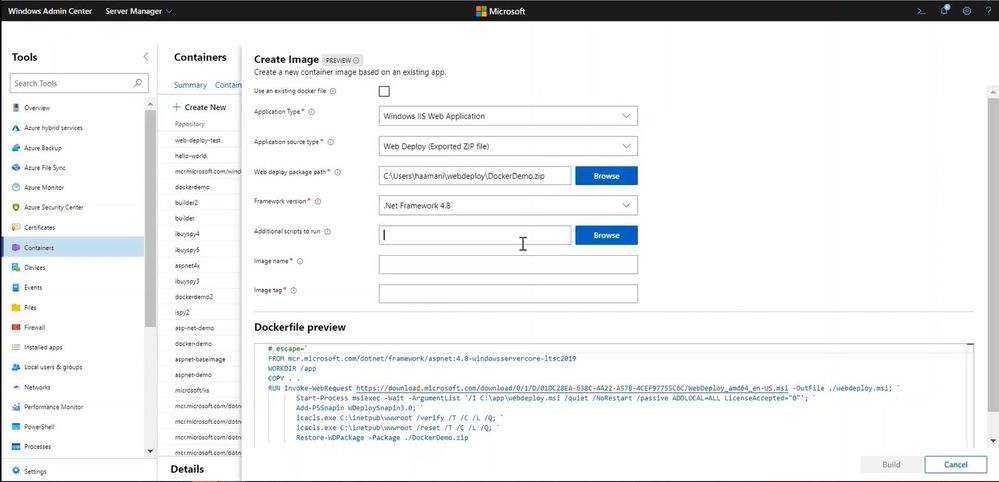
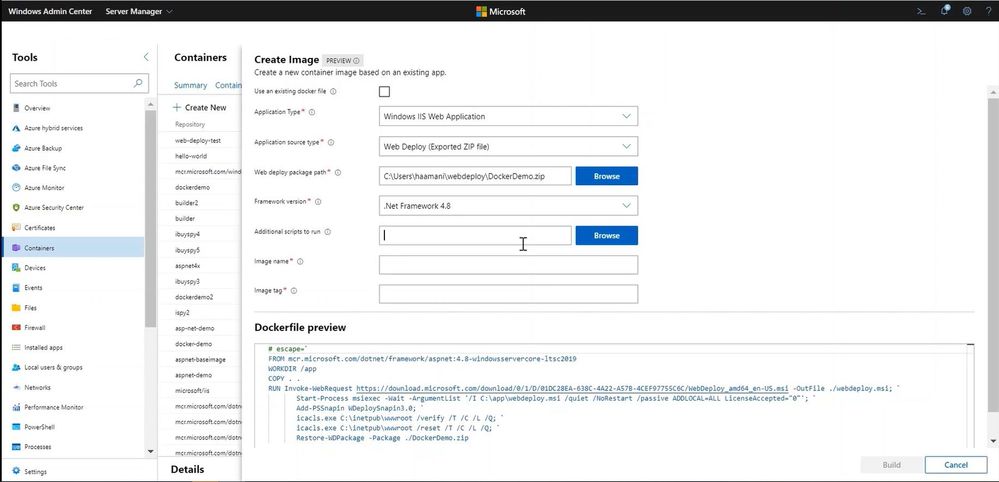
Last month we announced a collection of updates to our containers extension tool in Windows Admin Center. These updates drew a lot of excitement and feedback from users, including requests for new ways to containerize web applications that are already deployed on Windows Server IIS servers into a Windows Container.
With this new preview release, we have included new functionality for users to build new Windows container images from WebDeploy files. WebDeploy is a Microsoft officially supported tool that simplifies the migration, management, and deployment of IIS applications. With WebDeploy, a user can extract a running IIS application into a package through IIS Manager or PowerShell and use the containers extension to create a new container image from this package. Existing documentation on how to extract an application is available on Microsoft Docs.
How to get the new functionality
The new functionality is being made available for Windows Admin Center under a new Insiders extension feed. If you don’t have Windows Admin Center installed, you can download it from here. While the new feed is for Insiders, you do not need the Insiders build of Windows Admin Center.
After installing Windows Admin Center, you can add the new Insiders feed by going to Settings>Extensions>Feeds and add the new feed “https://aka.ms/wac-insiders-feed”:
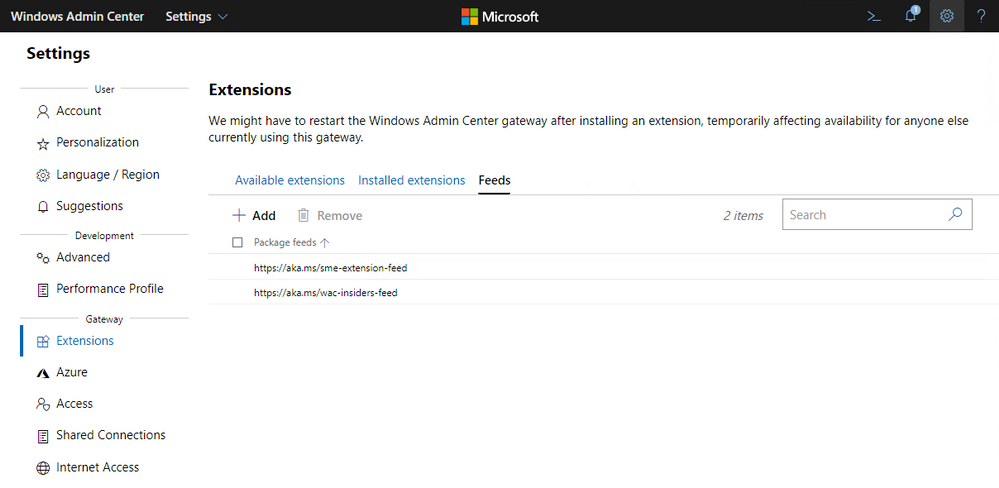
Once you have added the new feed, you will be able to see the updated Containers extension available under Available extensions. You can now go ahead and install the extension to enable the new functionality.
Notice that the Containers extension will only show up under Server Manager and if you are targeting an existing container host. For more information on how to install Docker on Windows Server, check out our documentation.
Let us know what you think
This new functionality was built based on your feedback from our last update. Thank you for engaging with us, and we hope to continue to provide useful tools for your work with Windows containers. You can continue to share your feedback either here in the comments, suggest a new feature via User Voice, or start a conversation via Tech Community.
by Scott Muniz | Aug 10, 2020 | Uncategorized
This article is contributed. See the original author and article here.
eDiscovery
1. Can you collect 1:1 chats?
All Teams 1:1 or group (1:N) chats reside in the respective users’ Exchange Online mailboxes. Files that a user attaches to a Chat conversation are stored in the OneDrive account of the user who shares the file. Therefore, you have to add the individual user mailboxes and OneDrive for Business accounts as content locations to search conversations and files in the Chat list.
2. Can you collect from users with on-premises mailboxes?
In an Exchange hybrid deployment, users with an on-premises mailbox might participate in conversations that are part of the Chat list in Teams. In this case, content from these conversations is also searchable because it’s saved to a cloud-based storage area (called a cloud-based mailbox for on-premises users) for users who have an on-premises mailbox. For more information, see Searching cloud-based mailboxes for on-premises users in Office 365.
3. Can you collect messages from individual Channels within a Team?
Conversations that are part of a Teams channel are stored in the mailbox that’s associated with the team. Individual messages are archived to the Team mailbox as standalone messages, with the Channel name and Thread ID listed in the Subject line.
Similarly, files that team members share in a channel are stored on the team’s SharePoint site. Therefore, you have to add the team mailbox and SharePoint site as a content location to search conversations and files in a channel.
Microsoft Teams data will appear as IM or Conversations in the core eDiscovery export.
4. Are historical Teams memberships considered when performing a search?
Utilize the unified audit log to find when a user was added or removed from a team. This is on our roadmap for integration in AeD.
Activities: Added Member, Removed Members
5. When Teams meetings are recorded, the content is stored in Stream. Is stream discoverable? Can it be disabled?
The meeting recordings are stored in Microsoft Stream, which is Office 365 Tier-C compliant. To support e-Discovery requests for compliance admins who are interested in meeting or call recordings for Microsoft Streams, the recording completed message is available in the compliance content search functionality for Microsoft Teams. Compliance admins can look for the keyword “recording” in the subject line of the item in compliance content search preview and discover meeting and call recordings in the organization. A prerequisite for them to view all recordings is that they will need to be set up in Microsoft Stream with admin access. Learn more about assigning admin permissions in Stream.
The Stream content is not currently discoverable using the eDiscovery search tools in O365. Both discovery and retention of Stream is on our roadmap.
If you wish to block a user from recording a Microsoft Teams Meeting, you must grant a TeamsMeetingPolicy that has AllowCloudRecording set to $False.
6. Are reactions (likes, heart, laugh, etc.) discoverable?
No. This is currently on the roadmap.
7. Are emojis, memes and gifs discoverable?
While you cannot query these specifically, they will return within the conversation reconstruction.
8. Can you collect messages from Private Channels?
Yes. Records for messages sent in a private channel are delivered to the mailbox of all private channel members, rather than to a group mailbox. The titles of the records are formatted to indicate which private channel they were sent from.
Because each private channel has its own SharePoint site collection that’s separate from the parent team site, files in a private channel are managed independently of the parent team.
More information
9. Can we collect guest-to-guest chats?
Presently, for a scenario where only guests are participating in 1:1 or 1:N chat, we don’t support eDiscovery of those chat messages.
10. Can you collect/retain VMs?
Yes. Voicemail messages are delivered to users’ Exchange mailbox via SMTP routed through Exchange Online Protection. To enable successful delivery of these messages, please be sure that Exchange Connectors are configured correctly between your Exchange servers and Exchange Online Protection; Use Connectors to Configure Mail Flow.
11. How does the conversation thread in AED handle Channel chats?
Each message in a Channel will have its own ConversationID. Replies to Channel chats are threaded with the same ConversationID.
Retention
1. Do eDiscovery case hold policies support Teams?
Yes. Please use the chart found here to understand what needs to be placed on Legal Hold based on data requirements.
In Feb 2020, we turned on legal hold or case hold on private channels (private channel chats are stored in user mailboxes, normal channel chats are stored in that Teams’ group mailboxes). If there is already a legal hold in place for a user mailbox, the hold policy will now automatically apply to private channel messages stored in that mailbox. There is no further action needed for an admin to turn this on. Legal hold of files shared in private channels is also supported.
2. Do Retention policies support Teams?
By default, Teams chat, channel and files are retained forever. You can set up a Teams retention policy for chat and channel messages to decide proactively whether to retain the messages, delete the messages, or retain and then delete.
Remember that in Teams, files that users share in 1:1 or 1:N chats are stored in the OneDrive for Business account of the user who shared the file. Files that team members upload to a channel conversation are stored in the team’s SharePoint site. Therefore, to retain or delete files in Teams, create retention policies that apply to OneDrive for Business and SharePoint Online.
Please note that Retention policies do not yet support the retention of Private Channel messages. Since files shared in channels or chats are stored in SharePoint Online, retention of these shared files IS supported.
The eDiscovery case hold policies currently support the retention of Private Channel messages.
More information
Thanks!
@Stefanie_Bier on behalf of the MIP and Compliance CXE team

by Scott Muniz | Aug 10, 2020 | Alerts, Microsoft, Technology, Uncategorized
This article is contributed. See the original author and article here.
|
We continue to expand the Azure Marketplace ecosystem. For this volume, 90 new offers successfully met the onboarding criteria and went live. See details of the new offers below:
|
Applications
|
 |
Akenza Core- IoT made simple: Akenza Core on Microsoft Azure is an easy-to-use enterprise IoT system designed to help companies and cities build real-time connected solutions and add any type of device or technology to it.
|
 |
Aparavi, The Platform: Aparavi is a cloud-based data intelligence and automation platform that empowers organizations to find, control, and unlock the value of their data. Built on Microsoft Azure, Aparavi ensures secure access for analytics, machine learning, and collaboration.
|
 |
Astronomer: Astronomer enables users to easily spin up, deploy code to, and configure isolated Apache Airflow environments on Microsoft Azure Kubernetes Service clusters. It includes a full Prometheus and Grafana monitoring stack, user permission control, and a flexible logging system for full-text log search.
|
 |
Atgenomix SeqsLab: Atgenomix SeqsLab creates and manages elastic Spark clusters and a parallel file system, installs container-based pipelines, and schedules tasks to execute on CPU/GPU cores. Researchers can use it as a bio-IT platform service to build DNA/RNA workflows where large-scale execution is required.
|
 |
Barracuda CloudGen WAN Service: Barracuda CloudGen WAN is a cloud-delivered service combining the benefits of next-generation firewalls, secure SD-WAN, cloud integration, and automation to deliver a practical Secure Access Service Edge (SASE) solution on Microsoft Azure.
|
 |
Better Platform: Better is an open electronic health record (EHR) data platform designed to store, manage, query, retrieve, and exchange structured EHR data. Retrieve relevant patient information in the right place at the right time to promote safe and efficient care.
|
 |
Bitdefender GravityZone Elite – BYOL: Bitdefender’s GravityZone Elite detects and prevents sophisticated cyber threats with a proven layered approach and next-gen, non-signature technologies that stop techniques such as ransomware, zero-day malware, fileless attacks, script-based attacks, targeted attacks, and grayware.
|
 |
braincure: Available only in Japanese, the braincure smartphone application on Microsoft Azure is designed to promote improved health and wellness among the elderly.
|
 |
CLEVAS: CLEVAS is a video sharing platform that allows users to add comments to, rate, share, and analyze educational videos. It supports learning activities such as university lectures, medical practices, corporate education, and training seminars. This app is available only in Japanese.
|
 |
Dataguise for Azure Marketplace: Dataguise monitors access to elements containing raw, sensitive data; provides thorough identity inventory and classification of sensitive data; and delivers back-end automation of data subject requests for privacy standards such as PII, PCI, HIPAA, CCPA, and GDPR.
|
 |
DxEnterprise for Availability Groups (AGs): DxEnterprise for Availability Groups (AGs) enables SQL Server AGs to be made highly available within and between Windows and Linux nodes and across any type of infrastructure – all without relying on other cumbersome, restrictive cluster orchestration technologies.
|
 |
Expert Integrator for Power Platform: Expert Integrator for Power Platform integrates and rationalizes Salesforce data and presents it in an industry-specific format in Microsoft Power Platform, enabling rapid low-code/no-code development, app coexistence, and integration with Dynamics 365 and other Microsoft services.
|
 |
FileCloud on Red Hat Linux: CodeLathe’s FileCloud on Red Hat Linux allows businesses to host their own branded file-sharing, sync, and backup solution on Microsoft Azure for employees, partners, and customers. It provides secure, high-performance backup across all platforms and devices with unlimited file versioning.
|
 |
FlexProtect for Apps: Imperva’s FlexProtect application security is a SaaS solution that provides multi-layered defenses to protect Microsoft Azure-hosted workloads and applications from attacks while ensuring an optimal user experience.
|
 |
Fortinet FortiGate Next-Generation Firewall: Fortinet FortiGate firewall technology delivers complete content and network protection by combining stateful inspection with a comprehensive suite of powerful security features. Identify and mitigate the latest complex security threats with FortiGate on Microsoft Azure.
|
 |
Fortinet FortiWeb Web Application Firewall WAF VM: Fortinet FortiWeb web application firewalls provide advanced features and AI-based machine learning detection engines that defend web applications from vulnerability exploits, bots, malware uploads, denial-of-service attacks, advanced persistent threats, and zero-day attacks.
|
 |
Harbor Adapter Trivy Container Image: Harbor Adapter for Trivy translates the Harbor API into Trivy API calls and allows Harbor to provide vulnerability reports on images through Trivy. Bitnami packages applications following industry standards and continuously monitors all components and libraries for vulnerabilities.
|
 |
Hexplora Healthcare Analytics: Hexplora’s cloud-based Healthcare Analytics solution on Microsoft Azure is made for small-to-midsize risk-bearing healthcare entities entering value-based contracts. It provides insights that can help healthcare organizations reduce costs and improve quality.
|
 |
Horizon: SecuriThings’ Horizon is an IoTOps software-only solution that brings IT standards to the realm of IoT by providing risk detection, predictive maintenance, and automated operations. Protect IoT devices while maximizing operational efficiency in one unified view.
|
 |
Identity and Data Governance for Multi-cloud: The Dig platform from Sonrai Security delivers a complete risk model of all identity and data relationships in public clouds, including activity and movement across cloud accounts, cloud providers, and third-party data stores.
|
 |
IIS on Windows Server 2016: This image from Skylark Cloud includes Internet Information Services (IIS) and Windows Server 2016. IIS is a flexible and secure web server for hosting anything on the web, from streaming media to web applications. IIS features scalable and open architecture that is ready to handle the most demanding tasks.
|
 |
IIS on Windows Server 2019: This image from Skylark Cloud includes Internet Information Services (IIS) and Windows Server 2019. IIS is a flexible and secure web server for hosting anything on the web, from streaming media to web applications. IIS features scalable and open architecture that is ready to handle the most demanding tasks.
|
 |
Innovaccer’s COVID-19 Management system: Innovaccer’s COVID-19 Management System enables practices to more easily and efficiently manage and screen high volumes of patients. Innovaccer features a robust set of security policies, procedures, and controls to ensure full compliance with HIPAA requirements.
|
 |
JRuby Container Image: JRuby is a Java implementation of the Ruby programming language that provides core built-in classes and syntax for Ruby. Bitnami packages applications following industry standards and continuously monitors all components and libraries for vulnerabilities and application updates.
|
 |
Kong Helm Chart: Kong is an open-source microservice API gateway and platform designed for managing microservice requests to high-availability, fault-tolerant, and distributed systems. Bitnami ensures its Helm charts are secure, up to date, and packaged using industry best practices.
|
 |
LTI Security in a Box: LTI’s Security in a Box solution provides a comprehensive security stack to support simple to complex operating environments and requirements, simplified security choices with easy cloud adoption, a zero-trust security framework based on NIST standards, and more.
|
 |
Maintenance Management Solution for Solar Plants: Designed for solar operators and maintenance providers, this SharePoint maintenance management solution from WIZSP offers a flexible work environment that allows workers to collaborate seamlessly from anywhere on any device.
|
 |
MATLAB Production Server (PAYG): MATLAB Production Server is an application server for integrating MATLAB analytics into web, database, and production enterprise applications running on dedicated servers or on Microsoft Azure.
|
 |
Matomo with Windows Server 2016: This image from Skylark Cloud includes Matomo, formerly Piwik, and Windows Server 2016. Matomo is a free and easy-to-use open-source web analytics application offering complete data ownership, user privacy protection, GDPR compliance, and more.
|
 |
Matomo with Windows Server 2019: This image from Skylark Cloud includes Matomo, formerly Piwik, and Windows Server 2019. Matomo is a free and easy-to-use open-source web analytics application offering complete data ownership, user privacy protection, GDPR compliance, and more.
|
 |
ModernFlow: ModernFlow is an integrated process automation solution that uses Microsoft Azure and Office 365 to automate, streamline, and optimize business processes to help reduce costs, add control, and improve productivity.
|
 |
Nuventive COVID-19 Response Hub: Nuventive’s COVID-19 Response Hub is a quick-start cloud solution with a framework to bring your institution’s COVID-19 plan to life. Survey faculty and staff on their welfare with results linked to your plan in Nuventive.
|
 |
OneCore Smart Calculation Engine: OneCore Smart Calculation Engine allows organizations to replace different calculation engines with one central solution. This change supports a “one truth” vision where all calculations in ERP, CRM, and purpose-built systems use the same calculation mechanisms to calculate financial products.
|
 |
Personalization Platform: CloudEngage helps you give your customers personalized, relevant, and intuitive experiences when they visit your website. CloudEngage works seamlessly with any CMS or commerce system to help increase your web and mobile conversion rates.
|
 |
Photron-Mobile Video Creator: Photron-Mobile Video Creator is an iPhone/iPad video production and editing application that organizations use to document and share technology transfer, video manuals, work procedures, safety education, internal communications, and more. This app is available only in Japanese.
|
 |
phpPgAdmin Container Image: phpPgAdmin is a free software tool written in PHP for handling PostgreSQL database administration over the web. Bitnami packages applications following industry standards and continuously monitors all components and libraries for vulnerabilities and application updates.
|
 |
Platform Security (CA): New Signature’s Platform Security managed service complements and integrates with your IT services, enabling your team to focus on providing great user support and working on initiatives that deliver significant business value.
|
 |
Prometheus RSocket Proxy Container Image: Prometheus RSocket Proxy is a collection of resources used to get application metrics into Prometheus using a bidirectional, persistent remote procedure call (RPC) without ingress.
|
 |
QuickStart: QuickStart is a cloud readiness platform that uses AI, adaptive learning, and multimodality delivery to personalize employee learning and engagement. QuickStart also accelerates Microsoft Azure or multi-cloud enablement and certification.
|
 |
ResFrac Hydraulic Fracturing Reservoir Simulator: ResFrac is an integrated hydraulic fracturing and reservoir simulator that can model the well lifecycle from treatment through production. The three-dimensional compositional simulator seamlessly couples hydraulic fracturing, wellbore, geomechanical, and reservoir simulation.
|
 |
Riversand PIM-MDM for Manufacturing & CPG: Riversand’s Master Data Experience Platform for manufacturing and consumer packaged goods addresses the master data-related challenges typically encountered when organizations digitize the information value chain and enhance their omnichannel product experience for customers.
|
 |
School Day Wellbeing for Individual Schools: School Day supports students’ well-being in real time by delivering anonymous well-being data that supports decision-making in schools and empowers the school community to focus on learning.
|
 |
ScrumGenius – Automate daily standups: ScrumGenius automates team status meetings to help managers track the progress, goals, and performance of their employees. It integrates with third-party tools such as Jira, GitHub, and Microsoft Azure DevOps Services to display team activity along with each member’s status updates.
|
 |
SharpCloud Subscriptions: SharpCloud connects people, data, and processes to create dynamic threads across a business, revealing valuable insights that can be analyzed in real time. Collaborate around data-driven stories that offer a clear view of key metrics, time, relationships, and costs across projects and portfolios.
|
 |
Spring Cloud Data Flow Container Image: Spring Cloud Data Flow is a microservices-based toolkit for building streaming and batch data processing pipelines in Cloud Foundry and Kubernetes. Bitnami packages applications following industry standards and monitors components and libraries for vulnerabilities and application updates.
|
 |
Spring Cloud Data Flow Shell Container Image: Spring Cloud Data Flow Shell is a tool for interacting with the Spring Cloud Data Flow server. Bitnami packages applications following industry standards and continuously monitors all components and libraries for vulnerabilities and application updates.
|
 |
Spring Cloud Skipper Container Image: This package manager installs, upgrades, and rolls back Spring Boot applications on multiple cloud platforms. Bitnami packages applications following industry standards and continuously monitors all components and libraries for vulnerabilities and application updates.
|
 |
Spring Cloud Skipper Shell Container Image: Spring Cloud Skipper Shell is a tool for interacting with the Spring Cloud Data Skipper server. Bitnami packages applications following industry standards and continuously monitors all components and libraries for vulnerabilities and application updates.
|
 |
Sukra Industrial Platform: Based on flexible microservices, sukra.io is a fully customizable, enterprise-grade IoT platform that scales with the needs of any business and supports advanced deployment models for multi-cloud IoT solutions.
|
 |
TwinWorX – Centralized Monitoring and Control of Facilities: TwinWorX is a scalable and secure platform that integrates and normalizes all telemetry data into a single platform, resulting in increased operational visibility while providing real-time and historical data for visualization, reporting, analytics, optimization, and more.
|
 |
Visual Diagnostics: Vastmindz uses AI, computer vision, and signal processing technology to turn any device with an embedded camera into a non-invasive diagnostic tool that displays information about an individual’s heart rate, respiration rate, oxygen saturation levels, stress levels, and more.
|
 |
WAULT: The WAULT platform provides secure and verifiable data exchange between users and companies involved in business transactions without compromising privacy or data control. It’s ideal for storing and sharing verified documents that you don’t want changed.
|
 |
WAULT Portal for Businesses and Individuals: This is the trial version of the WAULT platform from Wymsical Inc. WAULT provides secure and verifiable data exchange between users and companies involved in business transactions without compromising privacy or data control.
|
 |
WordPress with Windows Server 2016: This image from Skylark Cloud includes WordPress and Windows Server 2016. WordPress is a free and open-source content management system used for websites, blogs, and applications.
|
 |
WordPress with Windows Server 2019: This image from Skylark Cloud includes WordPress and Windows Server 2019. WordPress is a free and open-source content management system used for websites, blogs, and applications.
|
Consulting services
|
 |
Application Modernization Using Containers- 4wk Imp: Hexaware will use its Amaze cloud modernization service to replatform your monolithic application to containerized macroservices or microservices with reduced total cost of ownership. Hexaware’s offering supports Java and .Net applications.
|
 |
AZ-900 Microsoft Azure Fundamentals: 2-Day Workshop: This workshop from Qualitia Energy is suitable for IT personnel who are just beginning to work with Microsoft Azure. Attendees will get hands-on experience to prepare for Exam AZ-900: Microsoft Azure Fundamentals.
|
 |
Azure Episerver Rapid Deploy: 2-Wk Implementation: Kin + Carta’s consultants will work alongside your internal team to rapidly launch and configure your Microsoft Azure environment and deploy Episerver so you can benefit from enhanced agility, elastic scale, and ease of management.
|
 |
Azure Infrastructure Migration: 2-week Assessment: Let Wintellect work with you to migrate your on-premises applications, servers, and databases to Microsoft Azure. In this engagement, Wintellect will review your environment and estimate migration costs.
|
 |
Azure Innovation Design Think: 2-day workshop: In this workshop, Dimension Data’s team will identify key opportunities to drive revenue, improve customer retention, and gain competitive business insight through analytics on Microsoft Azure.
|
 |
Azure Migration Consultant – 4 Week Implementation: Inde will use a practical approach based on the Microsoft Cloud Adoption Framework for Azure to discover your requirements, create a safe landing zone, and move your workload to Azure.
|
 |
Azure Transition Framework: 1 day workshop: Moving to Microsoft Azure requires a clear strategic route. In this workshop, Solvinity B.V. will map out that route with its cloud transition framework. This offer is available only in Dutch.
|
 |
Citrix on Azure: 3-Day Readiness Assessment: Are you ready to take advantage of Microsoft Azure for Citrix workloads? Third Octet’s assessment will evaluate your Citrix digital workspace strategy and present you with a high-level summary of findings, cost estimations, and guidelines for the transformation ahead.
|
 |
Cloud Data Warehouse: Free 1 Day Workshop: A key element of any data strategy on Microsoft Azure is a modern data warehouse. This workshop from Agile Solutions will consider your business requirements and infrastructure, charting a clear path to migrate or rebuild your data warehouse on Azure.
|
 |
Cloud Security Assessment: Two Week Assessment: In this assessment, Logicalis will examine your company’s Microsoft Azure environment, comparing it against best practices for security, performance, agility, scale, and cost. Logicalis will then offer prioritized remediation steps.
|
 |
Cloud-native 5-Wk App Modernization Implementation: In this implementation, Cloud Services LLC will help chief information officers and chief technology officers modernize their business’s legacy applications by migrating them to Microsoft Azure.
|
 |
Code First in Azure: 3-Week Proof of Concept: Tallan’s offer is designed to help organizations accelerate a technology decision for new application development projects built on Microsoft Azure, and it caters to organizations that need to deliver apps and services in a short time frame.
|
 |
Data & AI: 4 Week Proof-of-Concept: Optimus Information will use the Microsoft Cloud Adoption Framework for Azure to jump-start your data and AI journey. Optimus Information will build data pipelines and analytics pipelines for use with Azure, along with reports or dashboards using Microsoft Power BI.
|
 |
Data Strategy on Azure: 4 week Implementation: In this engagement, Agile Solutions will review your strategic vision, underlying data availability, architecture, and data management maturity to help you align your data strategy to your business needs.
|
 |
Data Strategy: 2 Week Assessment: Tallan will assess your organization’s data strategy to modernize your data management landscape. Tallan’s experts will provide recommendations for Microsoft Azure and will discuss Azure readiness.
|
 |
E2E Managed Network Solutions: Tech Mahindra’s E2E managed services provide a transformation model and approach with key Azure technologies, including IaaS and networking, to help users easily enable services in a hybrid, multi-vendor environment. |
 |
Endpoint Manager Workshop: This workshop from Move AS will teach you how to deploy and implement Microsoft Endpoint Manager in your environment. Endpoint Manager combines several Microsoft services, including Intune, Desktop Analytics, and Windows Autopilot, to keep data secure. |
 |
Free 1 Day Supplier 360 Workshop- Contact Us Offer: In this workshop, Agile Solutions will identify business use cases, infrastructure requirements, Microsoft Azure architecture, and delivery structure for a fully customized Supplier 360 data management solution.
|
 |
Free 8 hours Cloud One Day Workshop: On behalf of Zenith & Company, CLOUDZEN will deliver a free workshop for organizations interested in migrating to Microsoft Azure and needing to make a formal case to senior management. The workshop will present a roadmap to Azure through an understanding of its architecture.
|
 |
GDPR Compliant Cloud Solutions: Learn about GDPR compliance and how to attain it in this workshop from Move AS. The workshop is a good foundation for implementing Microsoft Azure Information Protection and data loss prevention. |
 |
Knowledge Mining: 2-Month Proof of Concept: Companies hold large amounts of data, yet much of it isn’t easily searchable or stored in a structured way. Predica’s proof of concept will use Microsoft Azure AI speech, vision, and language services to transform your company’s raw, unstructured information into searchable content.
|
 |
Manufacturing IoT: 3-Week Proof of Concept (PoC): CloudPro APS’ Microsoft Azure IoT Hub experts will help you plan for an implementation of Azure IoT to gain production insights. The solution will span calibrated telemetry sensors, endpoint devices like mobile phones, and web-based dashboards.
|
 |
Master Data Management: Free 1 Day Workshop: This workshop from Agile Solutions will identify business use cases, infrastructure requirements, Microsoft Azure architecture, and delivery structure for a master data management solution that utilizes Azure Storage and Azure SQL Database.
|
 |
Migrate Dynamics GP to Azure – 2 Hour Briefing: In this briefing, Incremental Group will discuss the process of migrating your on-premises Microsoft Dynamics GP system to Microsoft Azure. Incremental Group’s cloud experts will address any questions you have.
|
 |
Migration Service: 4-Wk Implementation: With information from Microsoft Azure Service Map, which groups applications by risk and complexity, Logicalis will migrate your environment to Azure. Environments will be migrated on an application, database, server, or workload basis, depending on the requirements gathered.
|
 |
Network Transformation Strategy: 4-Wk Assessment: In this assessment, Tech Mahindra will evaluate the customer’s virtual or physical infrastructure, determine the customer’s challenges and desired future state, and identify potential solution strategies to meet the customer’s growth objectives.
|
 |
Oakwood Cloud Ascent Suite: 4-Week Assessment: Oakwood will use its Cloud Ascent Suite to evaluate your use of Microsoft Azure services with the goal of discovering optimization and cost-saving opportunities. Cloud Ascent Suite accelerates Azure migrations by providing in-depth planning and robust price comparison tools.
|
|
SAP Cloud Readiness 10-Day Assessment: Tech Mahindra will analyze the customer’s SAP environment and assess its cloud readiness. Tech Mahindra aims to eliminate any surprises about product compatibility or migration strategy that may surface when a customer embarks on a cloud transformation journey.
|
 |
SAP on Azure – 2 weeks Assessment: In this engagement, Span d.o.o. will conduct a comprehensive assessment of your SAP landscape and provide recommendations for system architecture that will result in a modernized and cost-optimized environment on Microsoft Azure.
|
 |
SAP on Azure Landscape Review Workshop: 1 Day: This workshop from Dimension Data will guide technology managers and executives through approaches for migrating their SAP estate to Microsoft Azure. The workshop will consider potential pitfalls and conduct a landscape review to establish a business case for migration.
|
 |
Velocity Discovery Workshop Standard – 4 Hours: Sol-Tec’s workshop will help you understand the different offerings of Microsoft Azure and how Azure can support and transform your business. You’ll leave prepared for your cloud journey, with clear steps to follow.
|
 |
Velocity Landing Zone – 2 Hour Evaluation Workshop: In this free consultation, Sol-Tec’s Microsoft Azure architects and delivery consultants will help you understand how Sol-Tec can design and deploy your Azure landing zone.
|
 |
Virtual Workplace: 2-Days Implementation: Experts from Matrix3D will move your IT infrastructure to Microsoft Azure with a practical approach designed for small businesses. Enable your employees to collaborate regardless of their work location.
|
 |
Windows Autopilot: In this engagement, Move AS will deliver a proof of concept of Windows Autopilot, a Microsoft product used to set up and pre-configure new devices. Move AS will map the technical components within Windows AutoPilot, configure a Windows AutoPilot profile, and give a brief demo. |
 |
Your Clean Code MVP: 10-week implementation: Through an architecture workshop and the principles of clean code development, generic.de will use your product vision to create a sustainable prototype on Microsoft Azure. This offer is available only in German.
|
|
by Scott Muniz | Aug 10, 2020 | Uncategorized
This article is contributed. See the original author and article here.
As hopefully many of you already know Exchange Server 2016 enters the Extended Support phase of its product lifecycle on October 14th 2020. That’s just a few short months away.
During Extended Support, products receive only updates defined as Critical consistent with the Security Update Guide. For Exchange Server 2016, critical updates will also include any required product updates due to time zone definition changes. With the transition of Exchange Server 2016 to Extended Support, the quarterly release schedule of cumulative updates (CU) will end. The last planned CU for Exchange Server 2016, CU19, will be released in December 2020.
There is one more consideration for this change that we want to address here today, and that is the ongoing use of Exchange Server 2016 for recipient management for hybrid organizations that have moved all their mailboxes to the cloud.
As you probably also know we have historically provided a free license for these ‘management’ servers if their only use is to properly manage Exchange attributes when recipient objects are mastered on-premises. You also know that we never provided this free license type for Exchange Server 2019.
We want to assure you that we are still committed to delivering a solution that will allow these lingering servers to be removed, but it will not arrive before Exchange Server 2016 enters Extended Support.
For this reason, we want to make our recommendation for this scenario clear. Our broad recommendation is to keep Exchange Server 2016 in production use until such point as we release a solution that allows those servers to be removed. As explained earlier, Extended Support still provides security and time zone updates and so keeping them in production and ensuring they are properly patched does not increase your risk profile in any way.
If you can’t move your mailboxes to the cloud and you plan on keeping mailboxes on-premises, then you really should be moving to Exchange Server 2019, and using that for both mailboxes and hybrid connectivity. That way you get full support including non-critical bug fixes and get ongoing product improvements.
When we have a solution available to allow any management-only servers to be removed, it may require an update to Exchange Server 2016, and in that case we may release a future CU or patch. Currently there is no plan to release future updates for Exchange 2016, but we want to assure our customers that if we need to do this to support the removal of these ‘management only’ servers, we will.
Microsoft encourages Exchange Server 2016 customers to adopt CU19 as soon as possible to ensure uninterrupted delivery of any future security related fixes. After December 15, 2020, only CU19 or its successors will receive critical updates. During the Extended Support phase, only the latest CU is eligible to receive critical updates once the standard 3 month transition period of the prior CU has lapsed.
Critical updates will continue to be made available via Windows Update and the Microsoft Download Center. Additional lifecycle information for all Microsoft products is available on support.microsoft.com.
We hope this update was informative and we look forward to hearing your feedback and answering any questions you may still have.
The Exchange Team
by Scott Muniz | Aug 10, 2020 | Uncategorized
This article is contributed. See the original author and article here.
In the previous chapter of this series, we started our investigation from an incident involving a particular mailbox that received phishing email. We saw how we can use go hunt and the in-portal schema reference to quickly pivot and deepen our investigation, utilizing query-based advanced hunting capabilities.
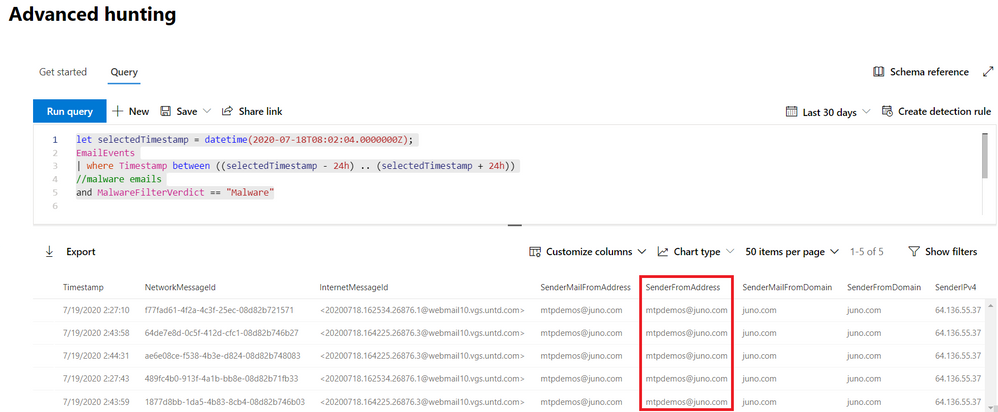
However, phishing isn’t the only threat impacting email—let’s look into how emails with malware are affecting our environment. Our initial mailbox asset, bamorel@mtpdemos.net, did not receive malware, but maybe other mailboxes in the organization did? Let’s check by modifying our first go hunt query to extend our search beyond the original mailbox.
let selectedTimestamp = datetime(2020-07-18T08:02:04.0000000Z);
EmailEvents
| where Timestamp between ((selectedTimestamp - 24h) .. (selectedTimestamp + 24h))
//malware emails
and MalwareFilterVerdict == "Malware"
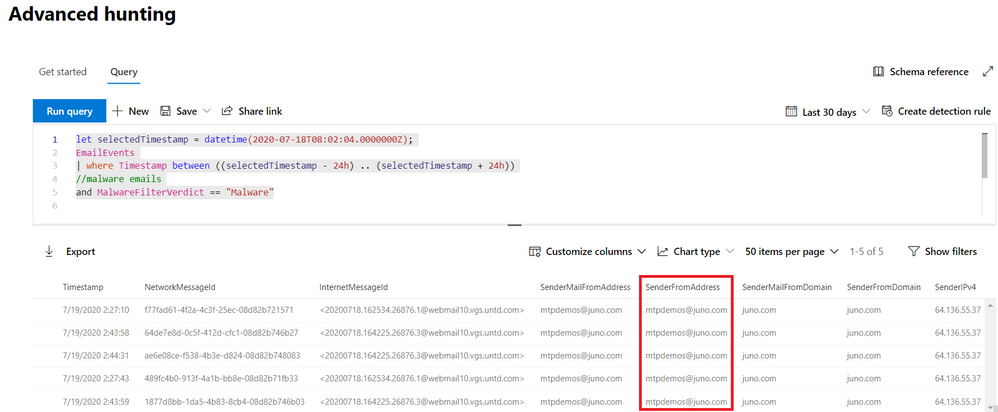
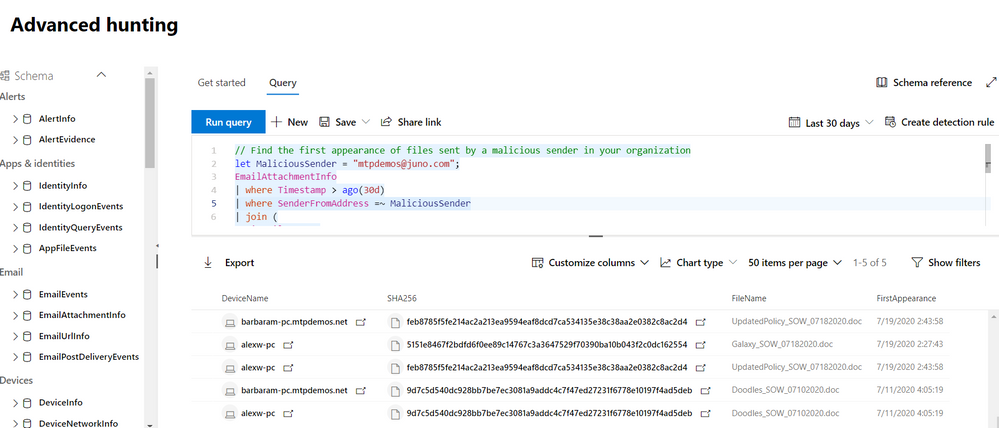
We find a bunch of malware emails, all of them from the same sender mtpdemos@juno.com. Let’s hunt for all the attachments coming from this sender, and see if someone downloaded them to their devices.
let MaliciousSender = "mtpdemos@juno.com";
EmailAttachmentInfo
| where Timestamp > ago(30d)
| where SenderFromAddress =~ MaliciousSender
| join (
DeviceFileEvents
| where Timestamp > ago(30d)
) on SHA256
| summarize FirstAppearance = min(Timestamp) by DeviceName, SHA256, FileName
Get enriched file intel
Unfortunately, there were users that downloaded the malicious files. To quickly learn more about the files, we can use the FileProfile() function to pull in meta data from the Microsoft file reputation database:
// Get more details about the malicious files using the FileProfile() enrichment function
let MaliciousSender = "mtpdemos@juno.com";
EmailAttachmentInfo
| where Timestamp > ago(30d)
| where SenderFromAddress =~ MaliciousSender
| join (DeviceFileEvents
| where Timestamp > ago(30d)) on SHA256
| distinct SHA1| invoke FileProfile()
| project SHA1, SHA256 , FileSize , GlobalFirstSeen , GlobalLastSeen , GlobalPrevalence , IsExecutable
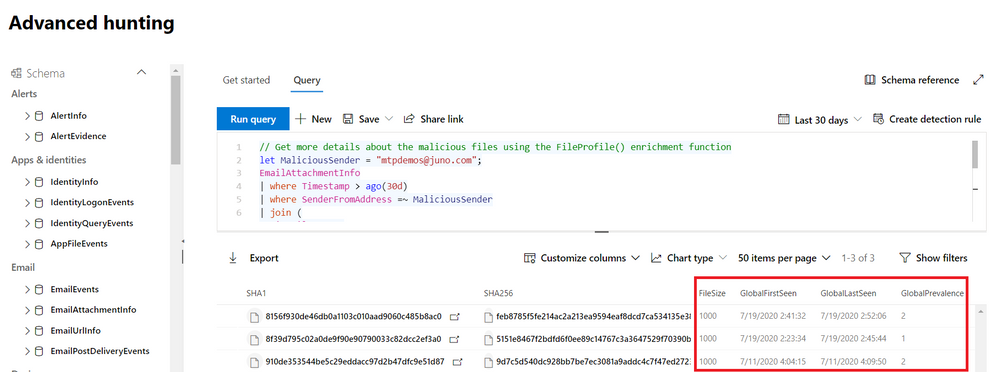
By invoking the FileProfile() function, we can derive additional insights from enriched information in the form of additional file hashes, size, prevalence, first and last seen, signer info, and various other attributes. For example, we can identify files that are rare or files that are very new, potentially requiring closer inspection.
Learn more about the FileProfile() function
Take action as part of the hunt
Once we’ve done sufficient investigation to verify that the files are malicious and the devices that contain them have been adversely impacted, our next step would be to ensure we respond quickly enough to minimize the impact of the malicious files. We can actually do this from the query results by selecting the records and then selecting Take actions.
let MaliciousSender = "mtpdemos@juno.com";
EmailAttachmentInfo
| where Timestamp > ago(30d)
| where SenderFromAddress =~ MaliciousSender
| join (
DeviceFileEvents
| where Timestamp > ago(30d)
) on SHA256
| summarize FirstAppearance = min(Timestamp) by DeviceName, DeviceId, SHA256, FileName
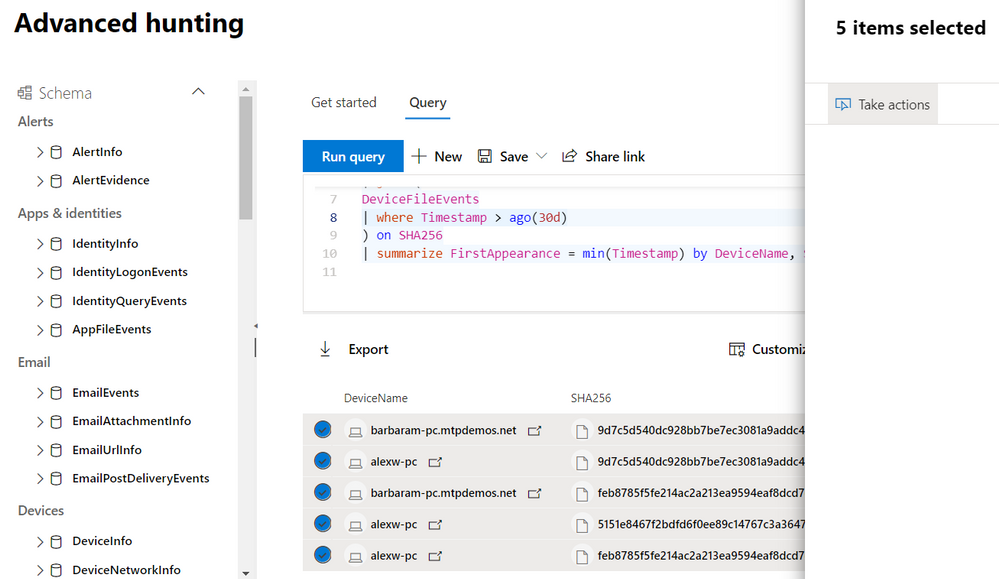
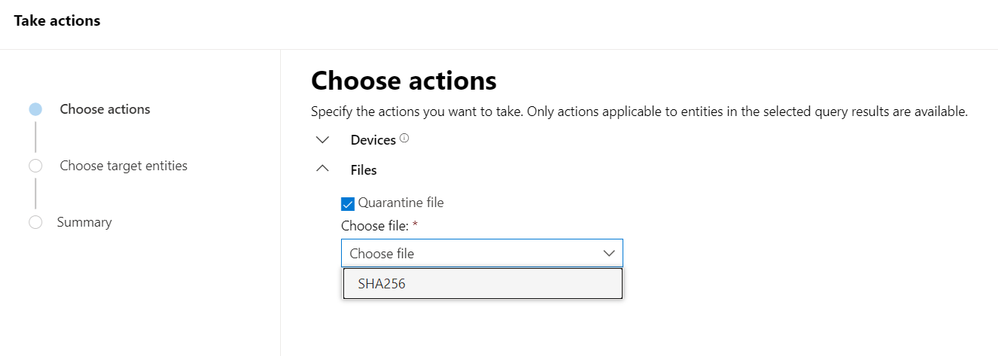
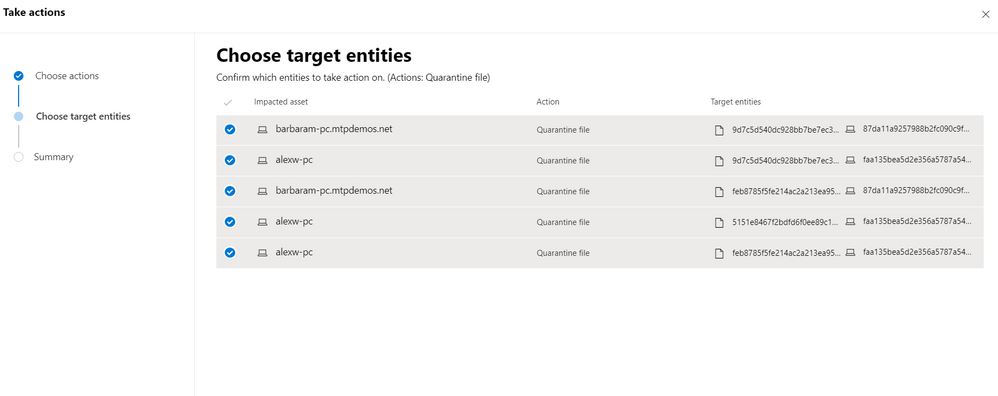
This feature lets you select particular entities to address in the selected records as well as the type of actions to take. When you proceed, the necessary actions are taken automatically and swiftly on available devices.
Key takeaways
We started our investigation from a single mailbox that was connected to an incident. Using advanced hunting, we gathered more data about the affected asset, explored other activities that might be related to asset, expand our investigation to cover other threat types, pulled in more threat intel, and took actions quickly.
During this investigation, we learned:
- How easy it is to pivot from an incident investigation into advanced hunting using go hunt
- How we can conveniently find what we need in the schema using the in-portal reference
- How quickly we can enrich an investigation using functions like FileProfile()
- How we can remediate threats directly from our hunting results by selecting Take actions
To learn more about advanced hunting in Microsoft Threat Protection and these new enhancements, go to the following links:
by Scott Muniz | Aug 10, 2020 | Alerts, Microsoft, Technology, Uncategorized
This article is contributed. See the original author and article here.
What is the built-in vulnerability assessment tool in Azure Security Center?
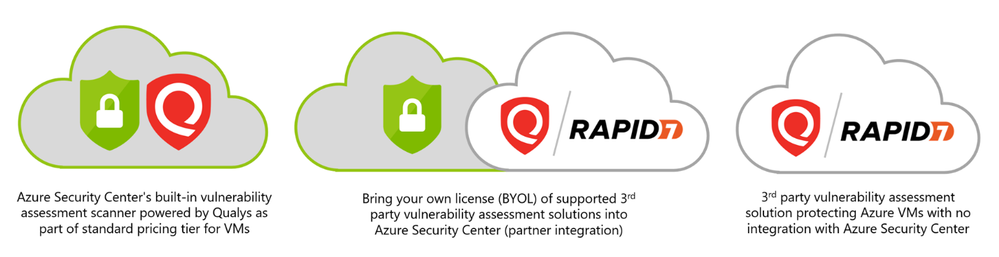
If you’re using Security Center’s standard tier for VMs, you can quickly deploy a vulnerability assessment solution powered by Qualys with no additional configuration or extra costs.
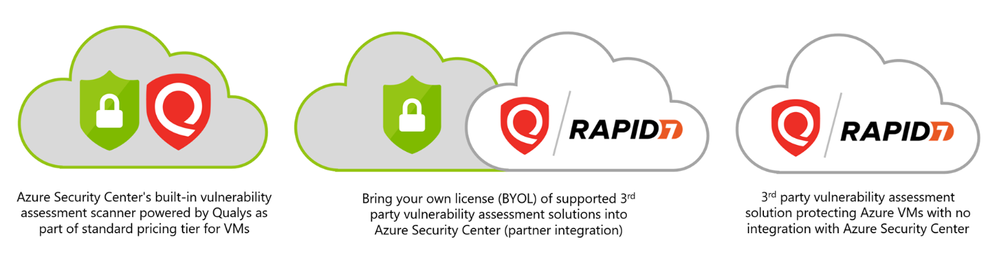
Qualys’s scanner is the leading tool for identifying vulnerabilities in your Azure virtual machines. Once this integration is enabled, Qualys continually assesses all the installed applications on a virtual machine to find vulnerabilities and presents its findings in the Security Center console. This offering is available to all commercial Azure customers that have enabled Azure Security Center standard pricing tier for VMs. In this post, I will focus on vulnerability scanning of virtual machines, although standard tier also offers scanning for both containers and container registries – learn more here.
How does the integration work?
Our integrated vulnerability scanner is based on 5 different stages: from discovery to findings.
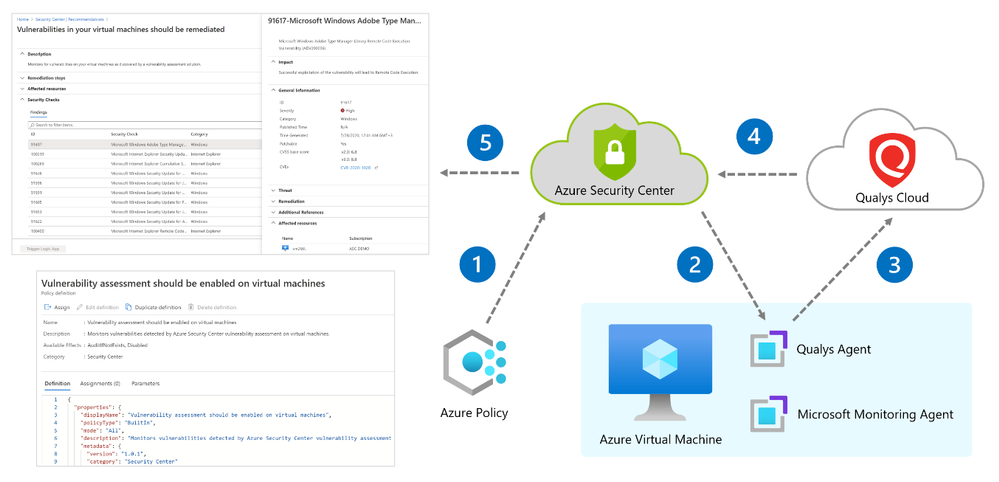
[1] Discovery – To make this integration work, a policy named “vulnerability assessment should be enabled on virtual machines” which is part of the “ASC default” initiative must be enabled. Upon Azure Policy evaluation, we get the compliance data to identify potential and supported virtual machines which don’t have a vulnerability assessment solution deployed. Based on the result, we propagate the data into the recommendation so you can see all relevant virtual machines. Based on compliance data, we categorize the virtual machines as one of the following:
- “healthy” – VMs that have the extension installed and report data.
- “unhealthy” – VMs which could support the extension, but which currently don’t have it.
- “not applicable” – Where the OS type/image is not supported (for example, a virtual machine running Network Virtual Appliance (NVA), Databricks/AKS instances or Classic VMs).
[2] Deployment – This is the step where you can enable the integrated ASC vulnerability scanner by deploying the extension on your selected virtual machine/s either by using ASC console and quick fix button, or by using an automated method (see a reference below for deployment at scale).
Prerequisites for deploying the extension:
- Running VM with a supported operating system version as mentioned here.
- Azure VM agent installed and in healthy state.
- Log Analytics agent installed (formerly known as the Microsoft Monitoring Agent).
- To install using the quick fix option, you’ll need write permissions for any VM on which you want to deploy the extension. Like any other extension, this one runs on top of the Azure Virtual Machine agent.
Once all prerequisites are met, you should use our newly and consolidated recommendation “A vulnerability assessment solution should be enabled on your virtual machines”. In this recommendation, you can choose to deploy ASC integrated vulnerability scanner or 3rd party scanner (BYOL).
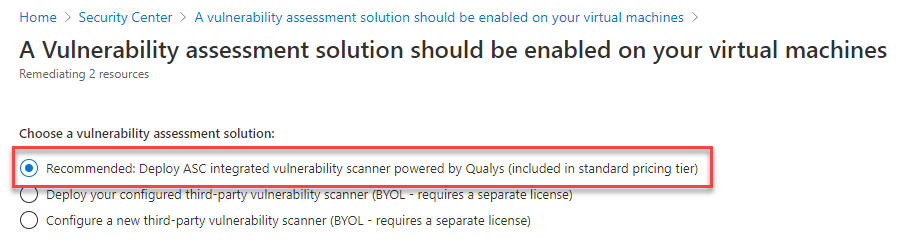
This recommendation installs the extension on unhealthy machines. Review the heathy and not applicable lists too.
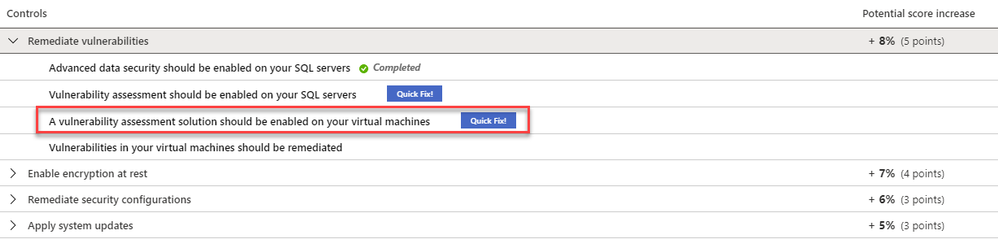
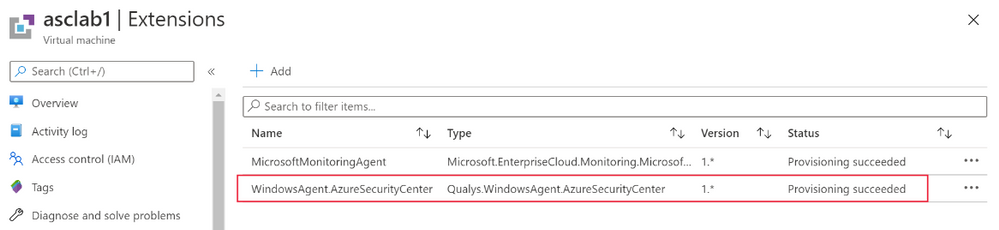
Once the extension is deployed, you can see if it exists, by navigating to the VM page of the Azure portal, and selecting “extensions”:
- On Windows, the extension is called “WindowsAgent.AzureSecurityCenter” and the provider name is “Qualys”
- On Linux, the extension is called LinuxAgent.AzureSecurityCenter and the provider name is “Qualys”
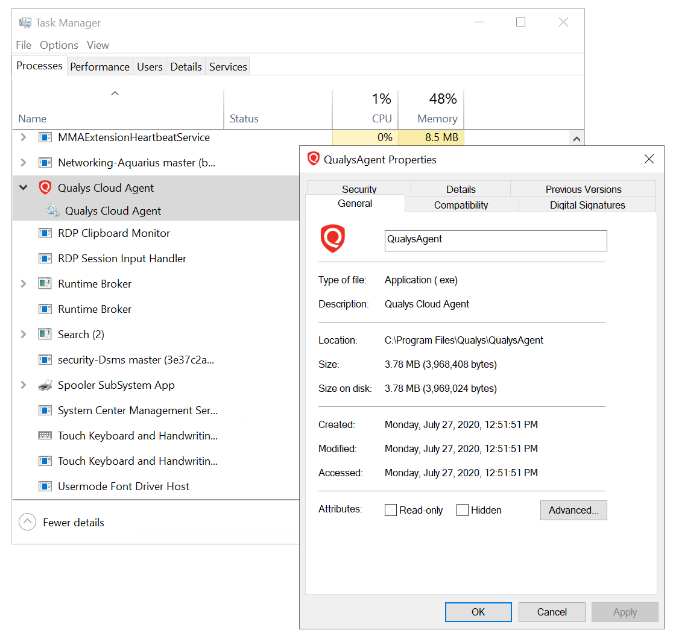
Like the Log Analytics agent itself and all other Azure extensions, minor updates of the vulnerability scanner may automatically happen in the background; the VA agent is self-healing and self-updating to counter common issues. All agents and extensions are tested extensively before being automatically deployed. On a virtual machine (on Windows for example), you will see a process QualysAgent.exe and service “Qualys Cloud Agent” running:
When deploying a vulnerability assessment solution, Security Center previously performed a validation check before deploying. The check was to confirm a marketplace SKU of the destination virtual machine.
Recently, the check was removed and you can now deploy vulnerability assessment tools to ‘custom’ Windows and Linux machines. Custom images are ones that you’ve modified from the marketplace defaults.
[3] Scan – The gathered data collected by the agent includes many things for the baseline snapshot like network posture, operating system version, open ports, installed software, registry info, what patches are installed, environment variables, and metadata associated with files. The agent stores a snapshot on the agent host to quickly determine differences to the host metadata it collects. Such scans occur every 4 hours and are performed per VM, where artifacts are collected and sent for analysis to the Qualys Cloud service in the defined region. For virtual machines created within European regions, the gathered information is sent securely to Qualys Cloud Service in the Netherlands. For all non-EU resources, data is sent for processing in the Qualys Cloud Service in the US.
The sent artifacts are considered as metadata and the same as the ones collected by Qualys’ standalone cloud agent – Microsoft doesn’t share customer details or any sensitive data with Qualys.
[4] Analysis – Qualys analyzes the metadata, registry keys, and other information and builds the findings per VM. Findings are sent to Azure Security Center matching customer’s ID and are removed from the Qualys Cloud.
[5] Findings – You can monitor vulnerabilities on your virtual machines as discovered by the ASC vulnerability scanner using a recommendation named “Vulnerabilities in virtual machines should be remediated” found under the recommendations list. This recommendation is divided to the affected resources and security checks (also known as nested recommendations or sub-assessments).
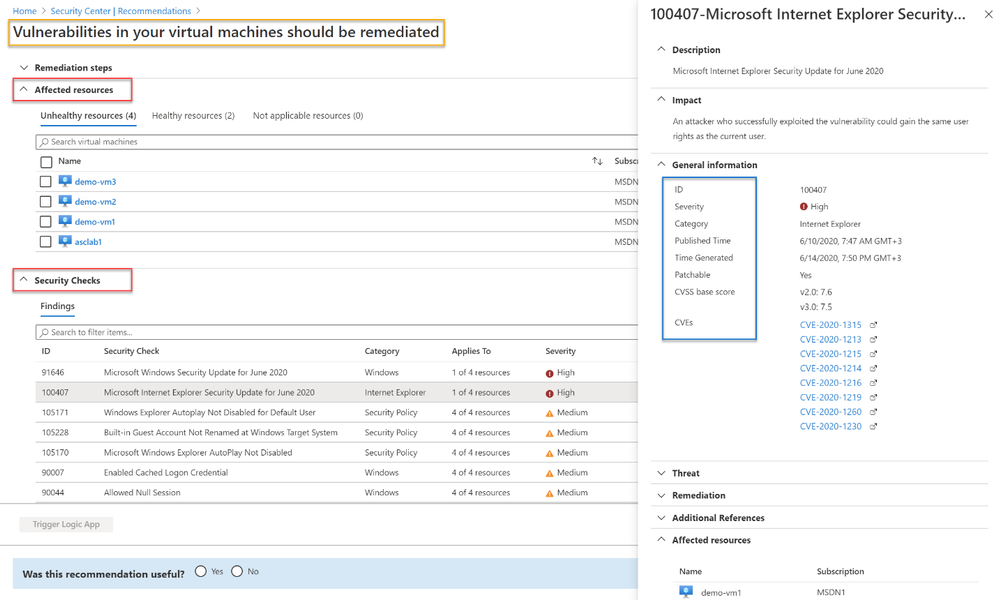
On the affected resources section, you will find virtual machines categorized as unhealthy, healthy, and not applicable. The section named “Security Checks” shows the vulnerabilities found on the unhealthy resource. Findings are categorized by severity (high, medium, and low). Below, you can see the matching between ASC severity on the left and Qualys’ severities on the right:
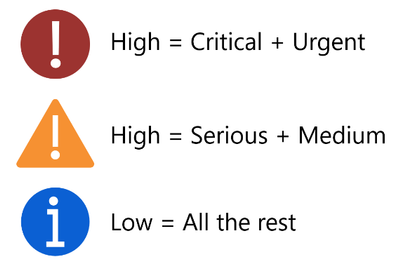
If you are looking for a specific vulnerability, you can use the search field to filter the items based on ID or security check title. Selecting a security check, will open a window containing the vulnerability name, description, the impact on your resources, severity, if this could be resolved by applying patch, the CVSS base score (when the highest is the most severe one), relevant CVEs. Then, you will also find the threat, remediation steps, additional references (if applicable) and the affected resource. Once you remediate the vulnerability on the affected resource, it will be removed from the recommendation page.
Deployment at scale
If you have large number of virtual machines and would like to automate deployment at scale of the ASC integrated scanner, we’ve got you covered! There are several ways to accomplish such deployment based on your business requirements. Some customers prefer to automate deployment by executing an ARM template, others prefer automation using Azure Automation or Azure Logic Apps and others by using Azure Policy for both automation and compliance. For all these scenarios and even beyond, we encourage you to visit our ASC GitHub community repository. There, you can find scripts, automations and other useful resources you can leverage throughout your ASC deployment. Some of the methods will deploy the extension on new machines, others cover existing ones as well. There are other scenarios where customers prefer to make API calls to trigger an installation. This is also possible by executing a PUT call to one of our REST APIs, passing the resource ID to the URL. You can also decide to combine multiple approaches.
Troubleshooting
Below you will find a checklist for your initial troubleshooting if you experience issues related to the ASC vulnerability scanner:
- Are you running a supported OS version? Use the following list to quickly identify if your VMs are running a supported operating system version.
- Is the extension successfully deployed? Monitor VA extension health across subscriptions using Azure Resource Graph (ARG). ARG becomes handy if you want to validate the extension status across subscriptions is heathy for both Linux and Windows machines. Use the following query:
where type == "microsoft.compute/virtualmachines/extensions"
| where name matches regex "AzureSecurityCenter"
| extend ExtensionStatus = tostring(properties.provisioningState),
        ExtensionVersion = properties.typeHandlerVersion,
        ResourceId = id,
        ExtensionName = name,
        Region = location,
        ResourceGroup = resourceGroup
| project ResourceId, ExtensionName, Region, ResourceGroup, ExtensionStatus, ExtensionVersion

Results can be exported into CSV or used to build an Azure Monitor workbook.
- Is the service running? On Windows VMs, make sure “Qualys Cloud Agent” is running. On Linux, run the command sudo service qualys-cloud-agent
- Unable to communicate with Qualys? To communicate with the Qualys Cloud, the agent host should reach the service platform over HTTPS port 443 for the following IP addresses:
- 64.39.104.113
- 154.59.121.74
Check network access and ensure to accept the platform URL listed.
- Looking for logs? Both agent and extension logs can be used during troubleshooting. However, Windows and Linux logs can be found in different places. Here are the paths:
Windows:
- Qualys extension:
- C:Qualys.WindowsAgent.AzureSecurityCenter
- C:WindowsAzureLogsPluginsQualys.WindowsAgent.AzureSecurityCenter
- Qualys agent:
- %ProgramData%QualysQualysAgent
Linux:
- Qualys extension:
- /var/log/azure/Qualys.LinuxAgent.AzureSecurityCenter
- Qualys agent:
- /var/log/qualys/qualys-cloud-agent.log
Advanced scenarios
Qualys assessment and sub-assessments (security checks) are stored and available for query in Azure Resource Graph (ARG) as well as through the API. A great example for that is available in this blog post. Moreover, you can also build and customize your own dashboards using Azure Monitor workbooks and create such dashboard for more insights. You can easily deploy a Qualys dashboard leveraging ARG queries and workbooks which is available . Soon, you will be able to use Continuous Export feature to send nested recommendations for Qualys into Event Hub or Log Analytics workspaces.
On the roadmap
- Availability for non-Azure virtual machines
- Support for proxy configuration
- Filtering vulnerability assessment findings by different criteria (e.g. exclude all low severity findings / exclude non-patchable findings / excluded by CVE / and more)
- More items are work in progress.
Frequently asked questions
Question: Does the built-in integration support both Azure VMs and non-Azure VMs?
Answer: Our current integration only supports Azure VMs. As mentioned in the roadmap section, we do have plans to support non-Azure virtual machines in the future.
Question: Does the built-in vulnerability assessment as part of standard pricing tier also integrate into the Qualys Dashboard offering?
Answer: Vulnerability assessments performed by our built-in integration is only available through Azure portal and Azure Resource Graph.
Question: Is it possible to initiate a manual/on-demand scan?
Answer: Scan on Demand is a single use execution that is initiated manually on the VM itself, using locally or remotely executed scripts or GPO, or from software distribution tools at the end of a patch deployment job. To do so, the following command will trigger an on-demand metadata sync:
REG ADD HKLMSOFTWAREQualysQualysAgentScanOnDemandVulnerability /v "ScanOnDemand" /t REG_DWORD /d "1" /f
Question: I purchased a separate Qualys/Rapid 7 license, which recommendation should I use?
Answer: We provide additional method for customers who have purchased VA scanner separately and do not use the integrated solution. To enable 3rd-party integration, use “A vulnerability assessment solution should be enabled on your virtual machines” – this recommendation appears for both standard and free tiers. Then, select “Configure a new third-party vulnerability scanner (BYOL – requires a separate license)”. For this kind of integration, you’ll need to purchase a license for your chosen solution separately. Supported solutions report vulnerability data to the partner’s management platform. In turn, that platform provides vulnerability and health monitoring data back to Security Center.
Question: Can I combine two Qualys installation approaches so that the same VM has both the integrated scanner and the BYOL agent installed?
Answer: No, this is not supported. You can’t combine additional deployment approaches of VA while using the built-in VA capabilities provided by ASC.
In the next blog posts, we will discuss on how you can leverage integration for container and container registry images. Stay tuned!
Reviewers:
- Melvyn Mildiner – Senior Content Developer
- Ben Kliger – Senior PM Manager
- Aviv Mor – Senior Program Manager
- Nomi Gorovoy – Software Engineer
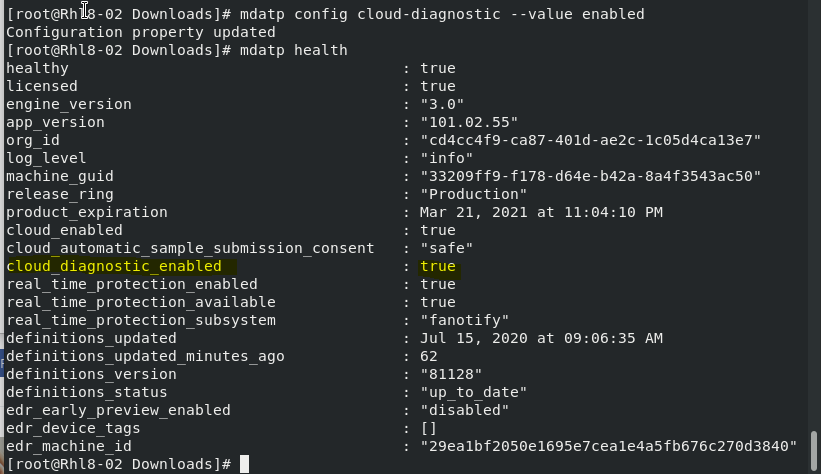
by Scott Muniz | Aug 10, 2020 | Uncategorized
This article is contributed. See the original author and article here.
LINUX Microsoft Defender ATP
CONFIGURATION OPERATION COMMANDs
Hello Blog Readers,
I summarize the Linux Configuration and Operation Command in this cheatsheet for the convenient use. Enjoy Linux ATP run!
_________________________________________________________
Linux ATP Commands
|
Group
|
Scenario
|
Command
|
|
Configuration
|
Turn on/off real-time protection
|
mdatp config real-time-protection –value [enabled|disabled]
|
|
Configuration
|
Turn on/off cloud protection
|
mdatp config cloud –value [enabled|disabled]
|
|
Configuration
|
Turn on/off product diagnostics
|
mdatp config cloud-diagnostic –value [enabled|disabled]
|
|
Configuration
|
Turn on/off automatic sample submission
|
mdatp config cloud-automatic-sample-submission –value [enabled|disabled]
|
|
Configuration
|
Turn on/off AV passive mode
|
mdatp config passive-mode [enabled|disabled]
|
|
Configuration
|
Add/remove an antivirus exclusion for a file extension
|
mdatp exclusion extension [add|remove] –name [extension]
|
|
Configuration
|
Add/remove an antivirus exclusion for a file
|
mdatp exclusion file [add|remove] –path [path-to-file]
|
|
Configuration
|
Add/remove an antivirus exclusion for a directory
|
mdatp exclusion folder [add|remove] –path [path-to-directory]
|
|
Configuration
|
Add/remove an antivirus exclusion for a process
|
mdatp exclusion process [add|remove] –path [path-to-process]
mdatp exclusion process [add|remove] –name [process-name]
|
|
Configuration
|
List all antivirus exclusions
|
mdatp exclusion list
|
|
Configuration
|
Turn on PUA (Potentially Unwanted Applications) protection
|
mdatp threat policy set –type potentially_unwanted_application –action block
|
|
Configuration
|
Turn off PUA protection
|
mdatp threat policy set –type potentially_unwanted_application –action off
|
|
Configuration
|
Turn on audit mode for PUA protection
|
mdatp threat policy set –type potentially_unwanted_application –action audit
|
|
Diagnostics
|
Change the log level
|
mdatp log level set –level verbose [error|warning|info|verbose]
|
|
Diagnostics
|
Generate diagnostic logs
|
mdatp diagnostic create
|
|
Health
|
Check the product’s health
|
mdatp health
|
|
Protection
|
Scan a path
|
mdatp scan custom –path [path]
|
|
Protection
|
Do a quick scan
|
mdatp scan quick
|
|
Protection
|
Do a full scan
|
mdatp scan full
|
|
Protection
|
Cancel an ongoing on-demand scan
|
mdatp scan cancel
|
|
Protection
|
Request a security intelligence update
|
mdatp definitions update
|
|
Protection history
|
Print the full protection history
|
mdatp threat list
|
|
Protection history
|
Get threat details
|
mdatp threat get –id [threat-id]
|
|
Quarantine management
|
List all quarantined files
|
mdatp threat quarantine list
|
|
Quarantine management
|
Remove all files from the quarantine
|
mdatp threat quarantine remove-all
|
|
Quarantine management
|
Add a file detected as a threat to the quarantine
|
mdatp threat quarantine add –id [threat-id]
|
|
Quarantine management
|
Remove a file detected as a threat from the quarantine
|
mdatp threat quarantine add –id [threat-id]
|
|
Quarantine management
|
Restore a file from the quarantine
|
mdatp threat quarantine add –id [threat-id]
|
Examples:
- Enable ATP Diagnostric
mdatp config cloud-diagnostic –value enabled
Checking ATP Configuration Settings:
mdatp health
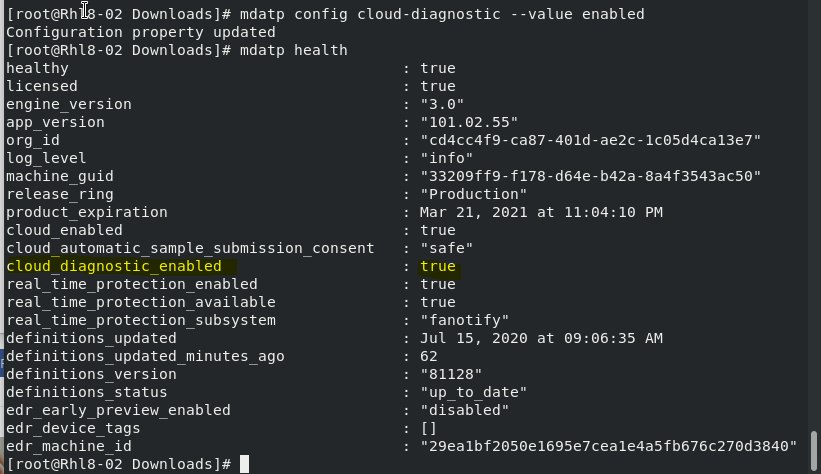
- Checking ATP Virus History
mdatp threat list

- To view the Quarantine list and remove the non-threat file based on threat ID


- To Audit PUA (Potentially Unwanted Applications)
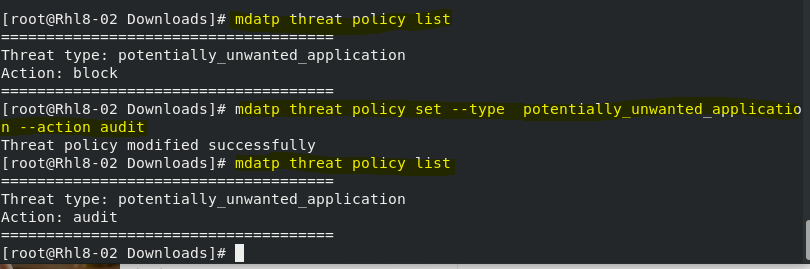
- To update ATP Definition

More info:
https://docs.microsoft.com/en-us/windows/security/threat-protection/microsoft-defender-atp/linux-resources
I hope the command list are helpful.
Disclaimer
The sample scripts are not supported under any Microsoft standard support program or service. The sample scripts are provided AS IS without warranty of any kind. Microsoft further disclaims all implied warranties including, without limitation, any implied warranties of merchantability or of fitness for a particular purpose. The entire risk arising out of the use or performance of the sample scripts and documentation remains with you. In no event shall Microsoft, its authors, or anyone else involved in the creation, production, or delivery of the scripts be liable for any damages whatsoever (including, without limitation, damages for loss of business profits, business interruption, loss of business information, or other pecuniary loss) arising out of the use of or inability to use the sample scripts or documentation, even if Microsoft has been advised of the possibility of such damages.


Recent Comments