
by Scott Muniz | Aug 17, 2020 | Uncategorized
This article is contributed. See the original author and article here.
NaN stands for Not a Number. This scenario was a customer trying to insert a parquet file into SQL, but he was not able to do it.
That’s because of the following error in one column: Error converting values NaN or Infinity to type ‘FLOAT’. NaN and Infinity are not supported.
The example bellow is based on this piece of documentation:
https://docs.microsoft.com/en-us/azure/synapse-analytics/spark/synapse-spark-sql-pool-import-export
I added some customization and also I have some nice discussion with my colleague Diya Mothafar. So my colleague mentioned to do the same using Pandas which also valid. My demo will not use Pandas, but again it also does the job.
First open Synapse Studio -> Notebook ->PySpark

Fig 1 PySpark
%%pyspark
from pyspark.sql.functions import col, when

data_path = spark.read.load('abfss://filesystemdatalake@mystorage.dfs.core.windows.net/test/filetest.snappy.parquet', format='parquet')

#here we handle the NaN values
data_path = data_path.replace(float('nan'), None)

data_path.createOrReplaceTempView("pysparkdftemptable")
Add a Scala cell into the Notebook. Note the table will be created with the JOB you do not need to create in advanced.
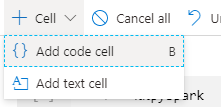
Fig 2 Add Cell
%%spark
val scala_df = spark.sqlContext.sql ("select * from pysparkdftemptable")
//scala_df.show(100)
scala_df.write.sqlanalytics("YourDatabaseName.dbo.PySparkTable", Constants.INTERNAL)
Your new cell should look like this
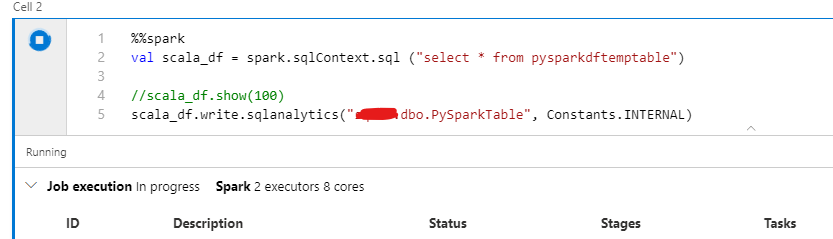
Fig 3 Cell
Once the Job is complete. You can check the results by opening SSMS and querying the table.
That is it!
Liliam
Uk Engineer
![[Guest Blog] My Journey from Pre-veterinary Medicine to Computer Information Systems](https://www.drware.com/wp-content/uploads/2020/08/medium-70)
by Scott Muniz | Aug 17, 2020 | Uncategorized
This article is contributed. See the original author and article here.
This article was written by Microsoft Ignite 2020 Humans of IT student ambassador Danielle Riles, a Computer Information Systems senior from Grambling State University. Danielle shares about ways you can start a new road and create new goals for yourself whenever you feel like you have reached the end of the road? After all, change is inevitable but we must be willing to accept it.
My dream since fifth grade was to become a successful veterinarian. When I initially started my college career, I studied pre-veterinary medicine at Louisiana Tech University. I planned on furthering my education and attending veterinary medicine school at Louisiana State University because of their amazing veterinary program. Upon arrival to Louisiana Tech University, I was both excited for my new journey and determined to “beat the odds” and successfully graduate.
However, after participating in my first two quarters, I discovered my course of study was not at all what I imagined. I imagined studying pre-veterinary would cover aquatic animals, wild animals, domestic animals, and zoology. My dream was to work at a zoo. My professor informed me that from freshman year until senior year we would instead cover poultry science, equine science, beef production, agriculture, and the growth of crops. After my professor informed me that the pre-veterinary program only covered farm animals, I started to reconsider my decision. I realized I was unhappy and undecided about further studying pre-veterinary medicine at Louisiana Tech. I realized that the field was either not right for me, or the environment of the institution wasn’t.
After the first year I had to make a decision. My decision was to stop school all together by taking a break or to start over. In 2017, after Winter quarter, I decided to sit out of college. I put all my focus into my job at Citi Trends, a fashion retail company. In Fall 2018, I returned to school because I had a mission to accomplish. I choose to start over at the Grambling State University (GCU). When I started at GSU, I was hesitant to immediately declare a major because of my previous negative experience.
While in high school, I was a part of a program called New Tech @ Ruston. Being a part of this program ultimately led to my love for computers. New Tech’s focus was computer-group based learning. At the start of freshman year, we learned how to build and organize websites, make movies, design brochures, flyers and most importantly, learn how to use and understand our laptops. I was never into computers before entering the program but when I left, I became deeply interested in the field of technology. I thank New Tech for giving me the background in technology which led to me finally declaring my Computer Science major at Grambling State University.

(New Tech @ Ruston Student Advisory Board at El Dorado High School.)
I am now a Computer Information System Major and have big plans for the future, even though I may not know all of them yet. After I had chosen to pursue a major in Computer Information System, my next goal was to get my priorities in line. I knew I needed to focus because I had not been as tech savvy as I was after graduating high school in 2016. I started to get involved and attended all of the job fairs to see what was out there in the world of technology. By the grace of God, and one special Grambling Alumni who is my forever-mentor Mr. Kevin Griffen, I landed an internship with a cybersecurity company. After my internship ended, I not only had experience with programming with languages like C++ and Java, but I was also skilled in field of cyber security. With the skills I am building, I hope to someday become a software developer or an information analyst. If I were to continue my career in cybersecurity, I would like to learn more about artificial intelligence as well.
While my professional career is just getting started, I am pleased to say I can see the growth in myself as this is a field I am truly confident and passionate about. I actually enjoy attending classes and learning new skills that I know for sure will benefit me in the future. As a Microsoft Humans of IT Student Ambassador, I hope to not only learn from my mentor Mr. Marc, but also to learn from the many bright students from various HBCUs about their own experiences in the working environment. While it can be a wild journey navigating through life and starting a professional career after college, having these connections with other students and industry professionals is setting me on a path to success that I am eager to explore.
Always remember – anything is possible when you set goals for yourself and accomplish them!

#HumansofIT
#StudentAmbassador
#GreatThingsAreComing
by Scott Muniz | Aug 17, 2020 | Azure, Microsoft, Technology, Uncategorized
This article is contributed. See the original author and article here.
Initial Update: Monday, 17 August 2020 16:58 UTC
We are aware of issues within Metric Alerts and are actively investigating. Some customers may experience latency in seeing confirmation of fired alerts in the Azure portal. The alerts will fire as normal, but there may be a latency of up to 3 hours in presentation of the alert in the portal.
- Next Update: Before 08/17 19:00 UTC
We are working hard to resolve this issue and apologize for any inconvenience.
-Jeff
by Scott Muniz | Aug 17, 2020 | Azure, Microsoft, Technology, Uncategorized
This article is contributed. See the original author and article here.
|
We continue to expand the Azure Marketplace ecosystem. For this volume, 89 new offers successfully met the onboarding criteria and went live. See details of the new offers below:
|
Applications
|
 |
360Learning: 360Learning is a collaborative learning platform that enables peer learning for top-performing teams, whether they are onboarding new employees, training sales teams to use a new product, or developing the next generation of leaders.
|
 |
Almanac: Almanac harnesses the power of AI to analyze billions of data points to understand how consumers behave offline. This analysis is then distilled to create simple, meaningful insights that help retailers via performance, customer, and predictive analytics.
|
 |
Ambra Health: Ambra Health’s SaaS application serves as the backbone of innovation for care networks, enabling the development of new patient services, creating revenue streams, and eliminating costly technical barriers that hamper business performance, diagnostic breakthroughs, and better patient care.
|
 |
Archivist Security Twin Platform – Get it Now: Jitsuin’s Archivist Security Twin platform delivers the transparency, collaboration, and automation you need to move fast and fix connected things while driving digital transformation. Reveal, reduce, and report risks in IoT while building trust with secure distributed ledgers.
|
 |
Bottomline Healthcare Privacy and Data Security: Bottomline privacy and data security for healthcare provides the next layer of defense against data leakage, theft, employee snooping, and exposure of health records. It enhances the control you have over HIPAA compliance by reducing the risk of human failure to adhere to policies and procedures.
|
 |
Bottomline Secure Payments: Bottomline Secure Payments protects payments across a variety of applications, channels, and payment types. Whether protecting one business-critical application, channel, and payment type or a variety of them, the highly flexible and extensible platform safeguards against payment fraud.
|
 |
Capgemini IOP: Capgemini IOP (intelligent operations platform) enables manufacturers to extend their traditional manufacturing execution systems with agile, flexible, and scalable data management and analytics capabilities.
|
 |
Carestation Insights: Carestation Insights is a suite of analytics apps powered by the Aisys CS anesthesia delivery system. Carestation Insights facilitates more than 300 data points from the anesthesia machine to the cloud, including measured and set ventilation and gas values, alarms, machine status, and error codes.
|
 |
Case Management System Framework for Courts: Alfasoft srl’s integrated case management system (ICMS) helps justice-sector institutions modernize case record management, speed up case processing, and expand citizen access to justice while fostering public trust.
|
 |
CAT Check And Trace: Available only in German, CAT Check and Trace helps protect your products against counterfeiting. The solution consists of unique labels that cannot be copied or altered and a modern IT back end, including a mobile app, cloud storage, and blockchain technology.
|
 |
CIS Debian Linux 10 Benchmark L1: This image of CIS Debian Linux 10 is pre-configured by the Center for Internet Security to the recommendations in the associated CIS benchmark. CIS benchmarks are vendor-agnostic, consensus-based security configuration guides.
|
 |
CIS Red Hat Enterprise Linux 7 STIG Benchmark: This image of Red Hat Enterprise Linux 7 is pre-configured by Center for Internet Security to the recommendations in the associated CIS benchmark and STIG. CIS benchmarks are vendor-agnostic, consensus-based security configuration guides.
|
 |
CoronaPass: CoronaPass enables organizations to create different types of passes demonstrating that an individual is free to leave home or enter a building. Support policy implementation and manage risk based on health data with CoronaPass.
|
 |
Crisis Control: Crisis Control introduces the power of data science to crisis management, presenting data in relation to time, space, and correlation. It empowers crisis management organizations to learn from history, respond to developing incidents, and predict future behavior.
|
 |
Customer 360 Analytics: Customer 360 Analytics uses Microsoft Azure Machine Learning on the Microsoft Dynamics 365 Customer Insights platform. The integrated solution is ideal for companies that want to manage their customer experience and build data-driven strategies with a customer-centric approach.
|
 |
Dash Enterprise: Plotly’s Dash Enterprise helps businesses operationalize data science, artificial intelligence, and machine learning models at scale. It’s customizable and lightweight, and it helps organizations deliver on enterprise machine learning and reduce costs with advanced analytics.
|
 |
Data Preparer: Data Preparer significantly reduces the costs associated with exploring, repairing, transforming, and combining data into curated datasets that are fit for your analytics, data science, and business intelligence cases. Describe what you want and let the system do the hard work for you.
|
 |
DF_Power BI Dashboard: Datafortune Software Solutions’ data visualization solution uses Microsoft Power BI to offer dashboards, reports, and datasets, giving every user a personalized view of the business metrics that matter most.
|
 |
Doit: Doit is a white-label omnichannel platform for managing bank customers. The platform is mobile-centric, easy to use, and designed to enhance the experience of home banking users. This app is available only in Spanish.
|
 |
Dr.Sum: Dr.Sum speeds up analysis and decision-making with its unique high-speed database engine. Available only in Japanese, Dr.Sum offers a variety of aggregation environments tailored to your needs.
|
 |
Elfsquad CPQ: Elfsquad empowers organizations to automate preproduction processes to meet increasing customer demands. It reduces the complexity of creating modular products, such as machines, coach builds, and complete production lines.
|
 |
Finxact Core-as-a-Service: Finxact Core-as-a-Service is a cloud-native core banking platform developed using a Go runtime to deploy and maintain containerized applications at massive, on-demand scale. It’s delivered as a SaaS solution with redundancy across multiple Microsoft Azure availability zones.
|
 |
Flowlity: Flowlity, a SaaS planning solution, improves inventory management by acting as an intelligent and trusted third party. It imports data from an organization’s ERP system and its suppliers and customers, analyzes the data, and then sends recommendations on the exact level of stock to have.
|
 |
G1ANT Robotic Process Automation: G1ANT is a robotic process automation platform that combines advanced extensibility, high performance, and world-class support. Build highly efficient, automated end-to-end business processes that can handle the mundane operations in everyday work.
|
 |
Genetec Access Control as a Service (ClearID): Genetec ClearID enforces your security policies while improving the flow of people within your organization. Standardize and automate your policies for increased efficiency with ClearID, a self-service physical identity and access management (PIAM) system.
|
 |
Halza App: Halza is a social medical app that allows patients to store, track, and share their medical information with family, friends, and doctors. Available in 26 languages, Halza is easy to deploy as a cloud-based patient management platform or integrated with clinic management and hospital information systems.
|
 |
i-Boards: Designed to fully replace paper boards and cork boards with interactive electronic boards, iBoards helps organizations reduce paper waste and the time spent maintaining classic message boards. This app is available only in Czech.
|
 |
iLink Smartwork Analytics Solution: iLink Systems’ Smart Works Analytics solution offers insight into employee productivity, classifies workflows, and provides detailed trends for companies with a remote workforce. Smart Works Analytics integrates seamlessly with HCM platforms and uses Microsoft Power BI to generate robust dashboards.
|
 |
iSpring Learn LMS SaaS offer for Government: Available in 11 languages, iSpring Learn is a cloud-based e-learning platform that enables users to create and deliver corporate training and education online to meet the growing need for continuing education and training (CET) courses.
|
 |
iZooto – Owned Audience Marketing Platform: Datability Technologies’ iZooto is an owned audience marketing platform that helps publishers build and engage their audience using web push notifications. Engage your audience in real time, reach a high click-through rate, and drive repeat traffic to your site with iZooto.
|
 |
Martello iQ: Martello iQ brings together metrics and events from Microsoft Azure, Azure Monitor, and Microsoft 365, along with data from monitoring, IT service management (ITSM), and business applications, into actionable dashboards.
|
 |
Metallic Office 365 Backup & Recovery: Metallic Office 365 Backup & Recovery delivers proven data protection with the simplicity of SaaS. With unlimited Microsoft Azure storage and unlimited data retention included, Metallic SaaS offers comprehensive coverage to complement your existing Microsoft investment.
|
 |
Microsoft Teams Channel Management by SphereShield: SphereShield from AGAT Software enhances project management in Microsoft Teams by adding archive, export, and move functionality for Teams channels. |
 |
MotionBoard: MotionBoard is a business intelligence dashboard that automates easy-to-identify aggregation tasks, visualizes common metrics across an organization, and drives action. This app is available only in Japanese.
|
 |
N5 commercial platform: The N5 commercial platform for financial services is an intelligent CRM ecosystem with which financial institutions can optimize customer engagement strategies to increase loyalty while saving time and money. This app is available in English and Spanish.
|
 |
Ondato Live Video Identity Verification: Ondato’s real-time video customer verification solution enables organizations to remotely verify a customer’s identity while complying with personal data protection laws. It’s particularly useful for organizations that require identity verification to serve their customers.
|
 |
Photovoltaics in Power BI: Photovoltaics in Power BI records data for reporting, invoicing, and analysis to help plant operators make efficient local use of electricity. Available only in Slovak, this app visualizes data in different formats with adjustable time intervals and granularity of data.
|
 |
QuickStart: QuickStart is a cloud-readiness platform that uses artificial intelligence, adaptive learning, and multimodality delivery to personalize learning and employee engagement to accelerate Azure or multi-cloud enablement and certification.
|
 |
ReachFive Customer Identity & Access Management: ReachFive is a customer identity and access management platform that safely connects people, companies, and applications anytime, anywhere. The platform’s capabilities work together seamlessly to manage the full customer identity lifecycle.
|
 |
Redstor Backup and Archiving inc. Microsoft 365: Redstor’s policy-driven, cloud-based data management solution enables you to back up, recover, archive, and search all data, including data in Microsoft 365 applications, through one control center. Improve recovery times and compliance obligations while reducing management overhead.
|
 |
Remote monitoring of crops (FIDES): The FIDES platform brings security to agribusiness by enabling you to monitor crops anywhere in the world, simply and in real time. Available only in Portuguese, FIDES uses a collection of diverse data, including satellite images, government and private databases, and climate and field data.
|
 |
SAS 9: SAS 9 combines proven tools that enable users to access nearly any data source, analyze it, and transform it into meaningful, valuable visualizations that help decision makers gain a quick understanding of critical issues.
|
 |
SAS Grid: SAS Grid Manager makes it easy to cost-effectively accommodate compute-intensive applications and a growing number of users across your available hardware resources while ensuring continuous high availability for your analytics applications.
|
 |
Skyline Sales Multiplier: Skyline Sales Multiplier combines actionable, real-time sales intelligence with a fully customized strategy to drive exponential growth. It instantly adapts to market conditions, giving your team a complete and intuitive ecosystem of triggers, actions, and automation.
|
 |
Smart Data Center Analytics: Micro Focus’ Smart Data Center Analytics provides insight into what exists in your datacenter and how it’s interconnected via a data-driven, intelligence-based approach. Understand the relationships between end users, apps, and infrastructure services with Smart Data Center Analytics.
|
 |
SoftEther – Free VPN Server on Ubuntu 18.04 LTS: This image offered by Tidal Media contains SoftEther on Ubuntu 18.04 LTS. SoftEther is an open-source VPN solution that offers both a secure VPN protocol and a versatile VPN server. The cross-platform compatible server offers strong encryption while providing fast speeds.
|
 |
SVF: SVF enables users to create any form, including complex and graphical forms unique to Japan, without programming knowledge. This app is available only in Japanese.
|
 |
Telenet Tinx Smart Cities: Telenet Tinx Smart Cities is a scalable open platform for smart cities that want to realize their full potential by building innovative solutions to improve decision-making and citizen well-being.
|
 |
Theta Lake Recording for Teams Audio & Video: Theta Lake provides an AI-based compliance and risk management suite for recording, retention, deep supervision, and risk detection for Microsoft Teams audio and video meetings. Theta Lake helps firms scale security and regulatory compliance across video, voice, chat, and more.
|
 |
ThoughtWire Digital Twin and Smart Building Suite: ThoughtWire’s digital twin platform and software suite puts the power of a smart building in the hands of building managers and tenants. Bring your built environment to life with ThoughtWire.
|
 |
VeriChannel as a Service: VeriChannel as a Service allows banks to enable meaningful mobile banking experiences and generate new revenue channels. Launch your digital bank on mobile in less than 90 days and offer your customers value-added services that are available anytime.
|
 |
Verint Financial Compliance Capture for Teams: Verint Capture is a secure recording solution that helps banks, healthcare institutions, and other regulated organizations manage the complexities of regulatory compliance across the communication modes used in Microsoft Teams meetings.
|
 |
Volterra VoltMesh and VoltStack Node Free Plan: VoltMesh is an app-to-app network and security service that connects and secures apps across multiple clouds and edge sites. VoltStack automates the deployment, security, and operations of distributed apps and infrastructure. These services make up Volterra’s distributed cloud platform.
|
 |
Volterra VoltStack Combo Node: VoltStack automates the deployment, security, and operations of distributed apps and infrastructure across multiple clouds or edge sites. Voltstack is part of Volterra’s distributed cloud platform.
|
 |
xLM iLink Continuous Validation Solution: A joint effort between iLink Systems and xLM, this continuous validation solution delivers GxP compliance on Microsoft Azure. This enables life science customers to confirm that any software service that impacts a drug product or patient safety is duly validated.
|
 |
Xtract – Insurance and Motor Claims SaaS: Xtract aggregates telematics, weather information, maps, and other connected-car data to quickly assess the liability associated with a motor vehicle crash. This helps insurers handle claims. |
Consulting services
|
 |
3-Day Agile Azure Cloud PoC: Accelerate time to value with Celerity’s Agile Cloud Framework. This proof of concept is ideal for companies planning to migrate a workload to Microsoft Azure, and it provides clear steps to extend a datacenter and move workloads.
|
 |
AddPro Azure Management: AddPro can manage Microsoft Azure services for you. Delegated access will be used to set up, configure, monitor, and operate Azure Kubernetes Service, Azure Sentinel, business continuity and disaster recovery, and more. |
 |
Azure Cloud: 2 Week Assessment: Using the Microsoft Cloud Adoption Framework for Azure, Navisite’s dedicated cloud specialists will assess your needs and develop a plan to streamline your Azure migration, reduce project risk, and deliver better results.
|
 |
Azure Design & Deployment: 3-Week Implementation: In this engagement, Logicalis will provide best-practice foundations to rapidly deploy Microsoft Azure with guardrails that secure the environment for your business-critical workloads.
|
 |
Azure Environment Assessment 2 week Duration: In this assessment, Logicalis will audit your organization’s environment on Microsoft Azure with a focus on security, performance, availability, resilience, and cost optimization.
|
 |
Azure Essentials: 1-Day Workshop: Intended for companies considering a Microsoft Azure migration, Var Group’s workshop will provide an overview of Azure, its technical characteristics, and its benefits. This service is available in Italian.
|
 |
Azure Managed Services For AspNet Zero: WAi Technologies will reduce your maintenance and help you achieve higher productivity through its managed services for ASP.NET Zero apps running on Microsoft Azure. ASP.NET Zero is a starting point for new web apps, and it saves users time with prebuilt pages and infrastructure. |
 |
Azure Migration: 7 Day Implementation: Are you looking to migrate your servers to Microsoft Azure? Denny Cherry & Associates Consulting (DCAC) has access to a Microsoft program that will allow DCAC to migrate your systems to Azure at no cost to your company for the consulting services.
|
 |
Azure Readiness: 1-Week Assessment: This assessment from Agile Cloud Solutions will measure your readiness for a migration to Microsoft Azure, and it will provide an estimate of the savings you can realize by moving your workloads to Azure.
|
 |
Azure Well-Architected Framework: 3-Day Assessment: BJSS Limited’s assessment, based on the Microsoft Cloud Adoption Framework for Azure, will quickly validate your architecture against best practices so you can maintain secure, reliable, high-performing, and cost-optimized applications on Azure.
|
 |
baas-consulting-solution: If you’d like to use blockchain to create a new service or to enhance your systems, ALIS can help. ALIS provides consulting services that enable clients to use blockchain via Microsoft Azure Blockchain Service. This offer is available only in Japanese. |
 |
Cloud Consulting – 2 Weeks Assessment: In this assessment, Mindtree will determine your business drivers, analyze your application and infrastructure portfolio, and provide you with a detailed plan for migration to Microsoft Azure.
|
 |
Cloud Migration 1 week Assessment: MAQ Software will examine your system architecture, business practices, and data requirements to see what your organization needs in order to migrate to Microsoft Azure.
|
 |
Cloud Readiness Assessment: 2-Week Assessment: Logicalis will analyze the client’s IT assets and workloads to determine the expected costs and effort involved in a migration to Microsoft Azure. Logicalis aims to reduce cloud and IT operating costs.
|
 |
Cloud Security Assessment: 2-Week Assessment: In this assessment, Logicalis will rapidly compare your Microsoft Azure environment against best practices for security, performance, agility, scale, and cost. Logicalis will then provide prioritized remediation steps.
|
 |
Customer360 – 2 weeks assessment: Mindtree’s assessment will enable your organization to achieve a 360-degree view of your customers so you can personalize their experiences, improve cross-channel engagement, and increase marketing effectiveness.
|
 |
Data Warehouse & Analytics 1 WK Proof of Concept: In this proof of concept, IFI Techsolutions will set up extract, transform, and load (ETL) pipelines in your Microsoft Azure environment using Azure Databricks or Azure Data Factory. This will allow you to improve decision-making with data analytics.
|
 |
DevOps Assessment: 1-Month assessment: Polar Squad’s senior consultants will research and document your DevOps-related practices and tools to determine what’s working well, what might be missing, and what your employees see as the main blockers and pain points in their daily work.
|
 |
Free AWS/GCP to Azure: 10-Day Implementation: The Henson Group is offering free migrations to Microsoft Azure from Amazon Web Services or Google Cloud Platform. There’s no limit on the size of the environment, and engineers can start within five business days.
|
 |
Free Azure Migration: 10-Day Implementation: The Henson Group offers free lift-and-shift migrations from on-premises environments, colocation facilities, Amazon Web Services, Oracle Cloud, or Google Cloud Platform to Microsoft Azure. There’s no limit on the size of the environment.
|
 |
HIPAA on Azure: 1-Hr. Free Briefing: In this free briefing, Logicworks’ Microsoft Azure solution architects will give advice to help you implement networking, access, and governance controls and architect for HIPAA and HITRUST compliance.
|
 |
Insight As A Service – 2 Weeks assessment: Mindtree will identify an analytics use case for hypothesis validation and use its Decision Moments platform and your company’s organizational and external data to test and validate it.
|
 |
Intune as a Service: Let SCHIFFL manage your Microsoft Intune environment for you. SCHIFFL will enforce your company’s compliance, security, and access requirements. This service is available in German and English. |
 |
Migrate ETL pipelines to Azure cloud – 4 weeks POC: In this proof of concept, Tiger Analytics will design and develop an extract, transform, and load (ETL) pipeline using Microsoft Azure components such as Azure Data Factory, Azure Databricks, Azure Logic Apps, and Azure Active Directory.
|
 |
Migration Service: 4-Week Implementation: Logicalis will use information gathered with the Microsoft Azure Monitor Service Map solution to group applications by risk and complexity, then migrate the customer’s environments on an application, database, server, or workload basis, depending on the requirements.
|
 |
Modern App With Kubernetes 1 Week Assessment: IFI Techsolutions will assess your application stack and walk you through the process of converting your apps into microservices and hosting them on Microsoft Azure Kubernetes Service.
|
 |
MS Power BI Design Workshop: At the end of this workshop, ClayOPS will provide you with a Microsoft Power BI wireframe design that aligns to key stakeholders’ requirements, concisely reflects information, and drives business conversations.
|
 |
Oracle Migration: 1 Week Implementation: Let Navisite move your Oracle databases to Microsoft Azure. Navisite will assess database workload requirements, plan the workloads to migrate, transform workloads not compatible with modern data platforms, and perform the migration, remediating applications where needed.
|
 |
Oracle to Azure TCO Assessment: 1 week engagement: With Navisite’s refactoring expertise, you can easily move from Oracle databases and apps to Microsoft Azure. Navisite will combine automated tools with manual support and oversight to ensure that database schemas are an exact match and that your apps are properly re-coded.
|
 |
PCI on Azure: 1-Hr. Free Briefing: Microsoft Azure solutions architects from Logicworks will hear about your project and give you advice on building a PCI-compliant Azure environment. Logicworks has consulted with hundreds of retailers, financial services, and fintech organizations about PCI-DSS.
|
 |
Production Ready Cloud Platform: 3-Week Imp: If your organization has limited Microsoft Azure expertise in-house but wants to quickly migrate to the cloud, Logicalis can help by implementing the Logicalis Production Ready Cloud Platform, a pre-configured secure landing zone on Azure.
|
 |
SpaceHub Quickstart WVD: 10 days assessment: Using Microsoft Azure and Windows Virtual Desktop, PQR will quickly install a full virtual workplace for your employees. This offer is available in the Netherlands.
|
 |
Text Analytics Engine: 2-Wk Proof of Concept (POC): In this proof of concept, MAQ Software will help you understand your text data and define end-to-end pipelines and data flows on Microsoft Azure. MAQ Software’s team will use a machine learning model to generate insights, make process execution automatic, and reduce the effects of bias. |
|

by Scott Muniz | Aug 17, 2020 | Uncategorized
This article is contributed. See the original author and article here.
Community is a big part of Microsoft Ignite – and we seek your help to create a great interactive experience that could drive hundreds of thousands of community members to connect and create bridges in ways we never have before.
We will be hosting Table Topics, a set of moderated threaded conversations here in the Tech Community in the following topic categories:
- Application Development
- Azure
- Business Applications
- Career Development
- Community Best Practices and Community Leadership
- Data and AI
- Enabling Remote Work
- Industry
- Learning
- Microsoft 365
- Power Platform
- Security
These Table Topics are Tech Community conversations happening throughout the event, across all timezones, and likely to continue after the event. This will be a great way for the entire planet to connect over these topics (some great ones were proposed on Twitter here). Because this is part of the Tech Community, we will be able to support multiple languages in the online discussion: Brazilian Portuguese, Simplified Chinese, English, French, German, Japanese, Korean and Spanish. We are currently working on a way that the conversations will show up in the MyIgnite experience.
How we see this working – an example for illustration purposes.
We can have multiple threaded conversations for each Table Topic, for example for Enabling Remote Work:
- “Staying connected while working remotely or adjusting your management styles for working remotely.” Moderators: Tom Arbuthnot, Cathrine Wilhelmsen
- “Tips to ensure #worklifebalance while working remote” Moderator: Dux Raymond Sy, Laura Rogers
- “Lessons learned while remote working and home schooling” Moderator: Darrell Webster, Helen Blunden
Will there be an opportunity to speak?
Yes! For each Table Topic, there will be 3x Teams Meetings scheduled covering the three timezones (Americas, APAC, WE/EMEA) aka ‘Table Talks’. Table Talks will be conducted in English. They will be recorded and posted in MyIgnite.
Example of the Table Talks MCs
- Enabling Remote Work – Americas Table Talk MCs: e.g. Dux Raymond Sy, Laura Rogers
- Enabling Remote Work – APAC Table Talk TZ MCs: e.g. Darrell Webster, Helen Blunden
- Enabling Remote Work – WE/EMEA Table Talk MCs: e.g. Tom Arbuthnot, Cathrine Wilhelmsen
We plan to have have a full Table Topic agenda if we have a good list of topics per category and at least 3 unique moderators per timezone for each topic.
The beauty of this is – you don’t have to navigate through crowds to get from Hall A to Hall Z, you can have your own personal beverage of choice to power through the rapid-fire questions, and you can do this all in your pajama pants!
Want to get involved?
Giving you an opportunity to submit your Table Topics before the form goes live tomorrow at 9AM! I will be asking for an open call for Table Topics via this form. Submissions close September 24 6PM Pacific Time (UTC-8).

Workflow for Table Topic submissions and selection.
Unfortunately, there will be no Community Call for Content this year. This is the primary source of community-generated interaction at Microsoft Ignite.
Call for Moderators form – Submit your Table Topics here!
We invite you to start submitting today, and to get them in before submissions close 6pm Aug 24th Pacific Time.
If you have any questions, please direct them to @Anna Chu and @Allie Wieczorek!
by Scott Muniz | Aug 17, 2020 | Uncategorized
This article is contributed. See the original author and article here.
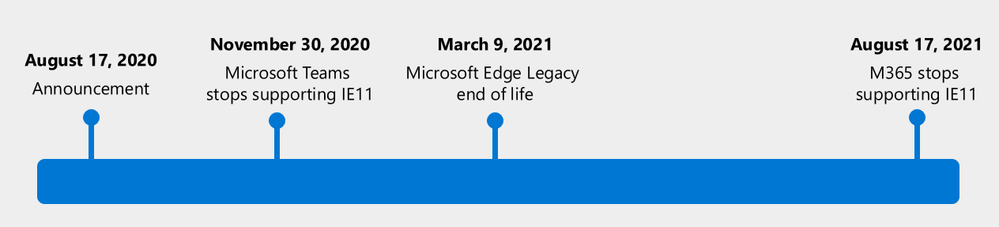
Today, we’re announcing that Microsoft 365 apps and services will no longer support Internet Explorer 11 (IE 11) by this time next year.
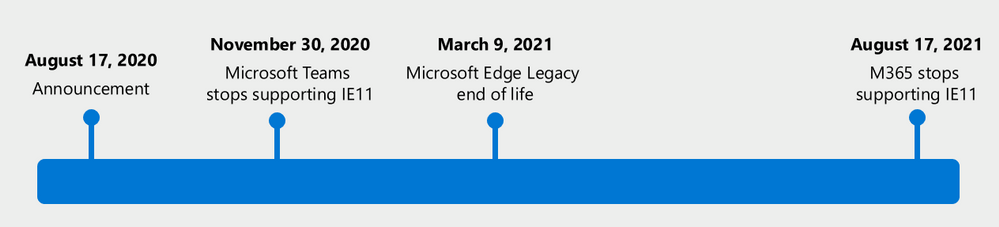
- Beginning November 30, 2020, the Microsoft Teams web app will no longer support IE 11.
- Beginning August 17, 2021, the remaining Microsoft 365 apps and services will no longer support IE 11.
This means that after the above dates, customers will have a degraded experience or will be unable to connect to Microsoft 365 apps and services on IE 11. For degraded experiences, new Microsoft 365 features will not be available or certain features may cease to work when accessing the app or service via IE 11. While we know this change will be difficult for some customers, we believe that customers will get the most out of Microsoft 365 when using the new Microsoft Edge. We are committed to helping make this transition as smooth as possible.
Customers have been using IE 11 since 2013 when the online environment was much less sophisticated than the landscape today. Since then, open web standards and newer browsers—like the new Microsoft Edge—have enabled better, more innovative online experiences. We believe that Microsoft 365 subscribers, in both consumer and commercial contexts, will be well served with this change through faster and more responsive web access to greater sets of features in everyday toolsets like Outlook, Teams, SharePoint, and more.
Respecting investments in IE 11 web apps
We understand the need to “do more with less” in the new business environment. By the dates listed above, customers should no longer access Microsoft 365 apps and services using IE 11, but we want to be clear that IE 11 isn’t going away1 and that our customers’ own legacy IE 11 apps and investments will continue to work. Customers have made business-critical investments in IE 11 legacy apps and we respect that those apps are still functioning.
In this moment of bridging between modern and legacy apps, many customers may feel there is no choice but to rely on a two-browser workaround of using IE 11 alongside a modern browser. However, with the new Microsoft Edge and Internet Explorer mode, customers don’t need an awkward workaround of one browser for some apps and another for other apps. They can standardize on one browser and seamlessly experience the best of the modern web in one tab while accessing a business-critical legacy IE 11 app in another tab – all housed within the new Microsoft Edge.
With native integration in Microsoft management, security, and productivity tools, we recommend the new Microsoft Edge to address our customers’ compatibility and secure remote work needs. Microsoft Edge has SmartScreen built-in and has the highest-rated phishing and malware protection as measured by two independent studies. We will also support our customers’ transition to the new Microsoft Edge with app and site compatibility assistance. As part of the App Assure promise, we have Microsoft engineers ready to help customers in case they run into compatibility issues. For more information, see the ‘Help is available’ section below.
Note: Using Internet Explorer mode in the new Microsoft Edge will not help to extend IE 11 access to Microsoft 365 apps and services beyond the dates listed above. Microsoft 365 apps and services will stop supporting IE 11 on the dates listed.
Microsoft Edge Legacy makes way for the new Microsoft Edge
Nearly two years ago, we started working on the new Microsoft Edge, listening to our customers’ needs for world-class compatibility (including legacy app support), security, privacy, easy and unified manageability, and productivity. The result is a whole new Microsoft Edge from the inside out: a browser built on the Chromium open source engine with the latest in Microsoft enterprise capabilities. Since its release in January, millions of users have upgraded their home and work browsers to the new Microsoft Edge. Additionally, new devices and future Windows feature updates (starting with Windows 10, version 20H2) will contain the new Microsoft Edge.
Now that we’ve shipped the new Microsoft Edge, and upgraded most of our Windows 10 customers to the new browser, we’re ending support for the Microsoft Edge Legacy desktop app on March 9, 2021.
- After March 9, 2021, the Microsoft Edge Legacy desktop app will not receive new security updates.
The new Microsoft Edge is our best expression of a modern browser—we’re excited for customers to experience it. Apps and sites created for Microsoft Edge Legacy will continue to work in the new Microsoft Edge, but if a compatibility issue does arise, we have our App Assure promise to provide support. For more information, see the section below.
Help is available
For customers using IE 11 to access Microsoft 365 apps and services, or using Microsoft Edge Legacy as their preferred browser, we recommend the new Microsoft Edge and offer a range of support options to help transition.
To begin, we recommend that customers first read this detailed article about how to plan for deployment. The article guides customers through key questions and offers a path forward for major steps in the transition to the new Microsoft Edge.
Next, customers should determine what type of support they are looking for, if any.
Customers with Microsoft Unified Support can reach out to that support service for help transitioning to the new Microsoft Edge.
For customers who would like guidance on how to plan, deploy, or adopt the new Microsoft Edge, there’s FastTrack. FastTrack is available at no additional charge to customers with 150 or more paid seats of Windows 10 Enterprise. To get started, submit a Request for Assistance through the FastTrack site.
And for those customers who prefer to get started on their own, we have self-guided deployment and configuration materials, complete with a series from Microsoft Mechanics, ready on our Docs site.
Finally, it is natural for customers to be concerned about compatibility when it comes to business-critical apps and sites. This is why we offer compatibility “peace of mind” with App Assure. The App Assure promise is this: if customers’ web apps and sites work on IE 11, supported versions of Google Chrome, or any version of Microsoft Edge (including Microsoft Edge Legacy), those web apps and sites should work on the new Microsoft Edge. If not, they can contact App Assure for remediation support here or by email (ACHELP@microsoft.com). Assistance is provided in Traditional Chinese and Simplified Chinese (support specialists speak Mandarin only), English, French, German, Italian, Japanese, Korean, Portuguese (Brazil), and Spanish.
Higher performance, simpler security on a single browser standard
At a time when IT professionals are being asked to do more with less on an unprecedented level, we want to make it simple for our customers to balance productivity, security, privacy, and cost.
To learn more about the new Microsoft Edge, customers can check out our website and the How to Get Started End User Guide.
We’re grateful for the trust you have placed in Microsoft through the years. We’re here to help and can’t wait for you to experience Microsoft 365 on the new Microsoft Edge.
1 Internet Explorer 11 is a component of the Windows operating system and follows the Lifecycle Policy for the product on which it is installed.
by Scott Muniz | Aug 17, 2020 | Uncategorized
This article is contributed. See the original author and article here.
SCOM performance has been one of the top user voice items over the years. It directly impacts the way our customers interact with SCOM including web console and operations console.
This blog aims to highlight specific user scenarios which we’ve addressed in SCOM 2019 release and also the ones we intend to address in subsequent SCOM releases. Such user scenarios have been highlighted by our customers which is reflected in the SCOM performance issues that our customer support team resolves frequently.
In SCOM 2019, here are some of the scenarios that have been fixed:
1. Windows computer view in SCOM console:
A few of our customers gave us the feedback that opening the Windows computer view in the SCOM console took an unreasonable amount of time. As an example, one of our customers with 1600+ windows computers reported this issue. About 1400 servers and 50 clients (engineers) were affected because of this issue. While on an average, it took about 8-10 minutes for this view to load, in the extreme cases it took more than 20 minutes.
Given our customers are dependent on SCOM to provide timely information including but not limited to alerts, health and performance metrics of their applications and workloads, the performance of SCOM console is critical for customers’ monitoring experience. To decrease the load time for this view, we optimized the SQL query relevant to this view.
2. Changing the settings of a User Role
One of our customer had an environment with a lot of user roles, views, classes and relationship types in the database. The customer reached out to System Center team and explained that on an average, changing the settings of a user role, for instance, providing or revoking permissions on specific views or dashboards to a specific user role, took about 30minutes.
Further research suggested that many other SCOM customers with similar environment also experience similar problem. In fact, many customers concurred that changing setting of, say, 15-20 user roles took an entire day that impacted their productivity and ability to use SCOM console effectively. At a high level, the SQL queries that fetched relevant data and eventually helped change the settings of a user role was optimized. This optimization led to significant improvements in the load time for our customers.
3. Grooming of Maintenance Mode Staging Table
Our customer support team received a case from our customer that SCOM Operations Manager Datawarehouse grooming (emptying) of maintenance mode staging table was not occurring. This essentially meant that the table grew every day into millions of rows which eventually filled up the database that could potentially lead to additional cost to the customer to spin up a new database.
Furthermore, the increase in utilization of database is usually correlated with decrease in performance of SCOM console. To fix this issue we added an index to the maintenance mode stable table. This ensured that proper grooming of the table happened.
4. SDK service not starting and severe perf degradation leading to SCOM console not loading
While the technical details of the above mentioned issues are beyond the scope of this blog, suffice to say that a couple of SQL queries running in the backend were causing the above mentioned issues. In fact, a few our customers mentioned that they faced severe performance degradation since they upgraded from SCOM 1807 to 2019. The SCOM console took a long time to load and when it did even the basic tasks such as adding a management server to management group couldn’t be completed. To fix this issue, we optimized the SQL queries relevant to these issues which lead to significant performance improvement.
5. Reliability and performance improvement in XPlat agent
Prior to 2019, monitoring data related to health and performance were fetched through requests running in the same thread in the back end. Due to this design, any flaws in the perf channel affected the heartbeat requests and vice versa. This often led to system going into greyed out state.
In 2019, we isolated heartbeat threads from performance data related threads which meant that any malfunctioning in performance providers would not affect heartbeat request, thereby improving reliability of SCOM.
We also introduced filters in XPlat MPs to help customers in customizing their discovery and monitoring scope to entities of interest. With this filter, customers can define OMI queries to limit their workloads. For instance, in the SuSE platform there is a file system called “RaiserFS” which is not supported in core XPlat MPs, yet this file system was discovered with inappropriate performance data. Similarly, in case of hypervisor and container environments, large set of logical entities are created which should not monitored. This happens because of generic nature of XPlat agent which discovers all these entities. With the introduction of filters in Xplat MPs, discover and monitoring of all such entities can be fine-tuned further to improve performance and scale of XPlat agent.
If you have faced above mentioned issues in your SCOM environment, please let us know your current experience. Many of our customers are still using SCOM 2012 and SCOM 2016. Given that we will continue to make significant investment into improving SCOM performance in 2020, we strongly recommend that you upgrade your environment to the SCOM 2019 Update Rollup 1 to get better performance.
Lastly, in 2020, we’re planning to invest into improving performance of SCOM consoles for other top user scenarios such as alert, health and performance views.
by Scott Muniz | Aug 17, 2020 | Uncategorized
This article is contributed. See the original author and article here.
Final Update: Monday, 17 August 2020 11:51 UTC
We’ve confirmed that all systems are back to normal with no customer impact as of 08/17, 11:15 UTC. Our logs show the incident started on 08/17, 07:50 UTC and that during the 3 hours and 25 minutes that it took to resolve the issue customers using Activity Log Alerts in Azure China experienced issues with delayed alerts up to 2 hours and 50 minutes. Alerts would have eventually fired.
-
Root Cause: The failure was due to issues with one of the backend services.
-
Incident Timeline: 3 Hours & 25 minutes – 08/17, 07:50 UTC through 08/17, 11:15 UTC
We understand that customers rely on Activity Log Alerts as a critical service and apologize for any impact this incident caused.
-Jayadev
by Scott Muniz | Aug 17, 2020 | Azure, Microsoft, Technology, Uncategorized
This article is contributed. See the original author and article here.
Azure Synapse Analytics is a limitless data analytics service that enables you to analyze data on Azure Data Lake storage. It provides managed Apache Spark and T-SQL engines (provisioned and serverless) for analyzing data.
In this article, you will see how you can create a table that references data on external Azure Data Lake storage in order to enable the client applications such as Power BI to create reports on Data Lake information. The data set is placed on Azure storage and formatted as parquet, but client applications can access these data as any other table without need to know where is stored actual data.
Prerequisite
To try this sample, you need to have Azure Synapse Analytics workspace. If you don’t have one you can easily deploy it using Azure portal or this Deployment template. Workspace automatically deploys one serverless Synapse SQL endpoint that is everything we need for this kind of analysis. With the workspace you are also getting easy-to-use Web UI called Synapse Studio that enables you to start analyzing the files directly from your browser.
NOTE: You need Synapse SQL serverless (on-demand) query endpoint to execute the code in this article.
COVID data set
In this sample is used the latest available public data on geographic distribution of COVID-19 cases worldwide from the European Center for Disease Prevention and Control (ECDC). Each row/entry contains the number of new cases reported per day and per country. For more information about this dataset, see here. Data set is updated on daily basis and placed as a part of Azure Open Dataset.
Configuring data sources and formats
As a first step you need to configure data source and specify file format of remotely stored files.
CREATE EXTERNAL DATA SOURCE ecdc_cases WITH (
    LOCATION = 'https://pandemicdatalake.blob.core.windows.net/public/curated/covid-19/ecdc_cases/'
);

CREATE EXTERNAL FILE FORMAT ParquetFormat WITH (  FORMAT_TYPE = PARQUET );
First statement creates data source that references ECDC COVID data set, while the second specifies parquet file format.
Exploring file schema
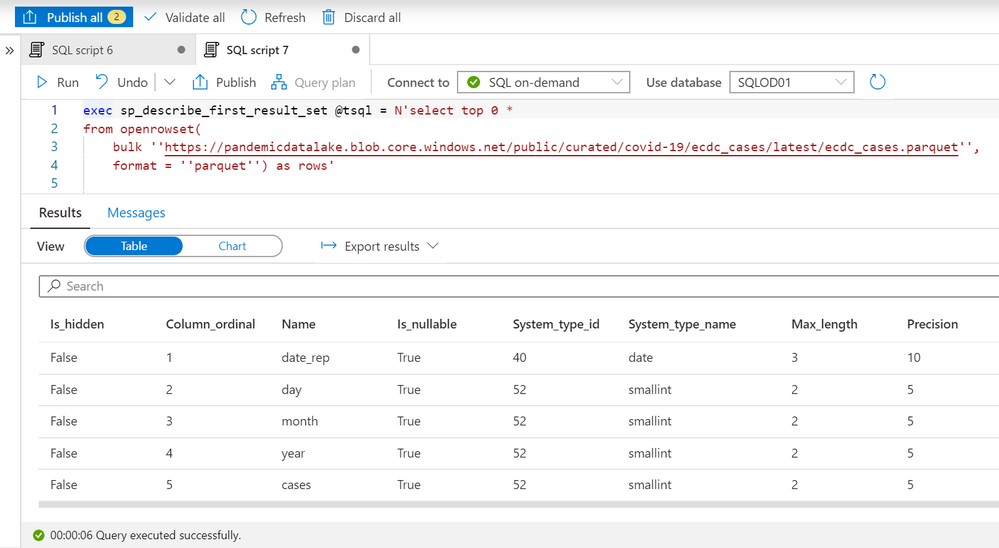
Now you need to determine what are the columns in the external files and what are their types. In the previous article you might have seen that OPENROWSET function enables you to quickly explore data in the files placed on Azure storage. We can also use sp_describe_first_result_set function to identify the schema that will be used for the table by providing the OPENROWSET data exploration query to this procedure:

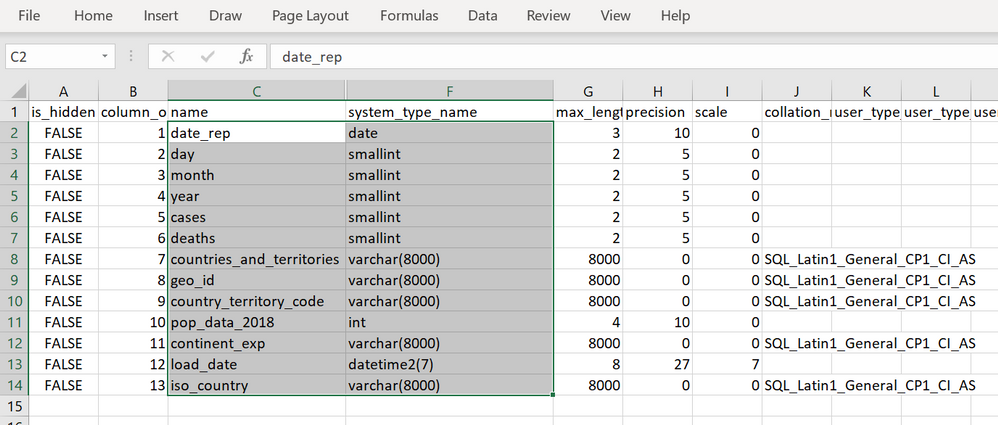
The most important columns are name and system_type_name that we can use to create schema of external table that references this file. The easiest way to use these information to create a table is to export data in Excel, hide the columns between name and system_type_name and copy the values:
Creating an external table
Now we have all elements required to create a table. I will create one schema (this is optional but recommended), paste the results that I copied from Excel, and reference data_source/file_format that I created in the previous step:
create schema ecdc

go

create external table ecdc.cases (
    date_rep        date,
    day    smallint,
    month             smallint,
    year  smallint,
    cases smallint,
    deaths            smallint,
    countries_and_territories       varchar(8000),
    geo_id             varchar(8000),
    country_territory_code           varchar(8000),
    pop_data_2018           int,
    continent_exp             varchar(8000),
    load_date      datetime2(7),
    iso_country   varchar(8000)
) with (
    data_source= ecdc_cases,
    location = 'latest/ecdc_cases.parquet',
    file_format = ParquetFormat
);
The only additional information that I need to provide is the location of the files that this external table references.
IMPORTANT: You need to run this statement in some database other than master! Master database don’t allow you to create objects (schemas, tables).
Now, we can read the content of external files using this table:
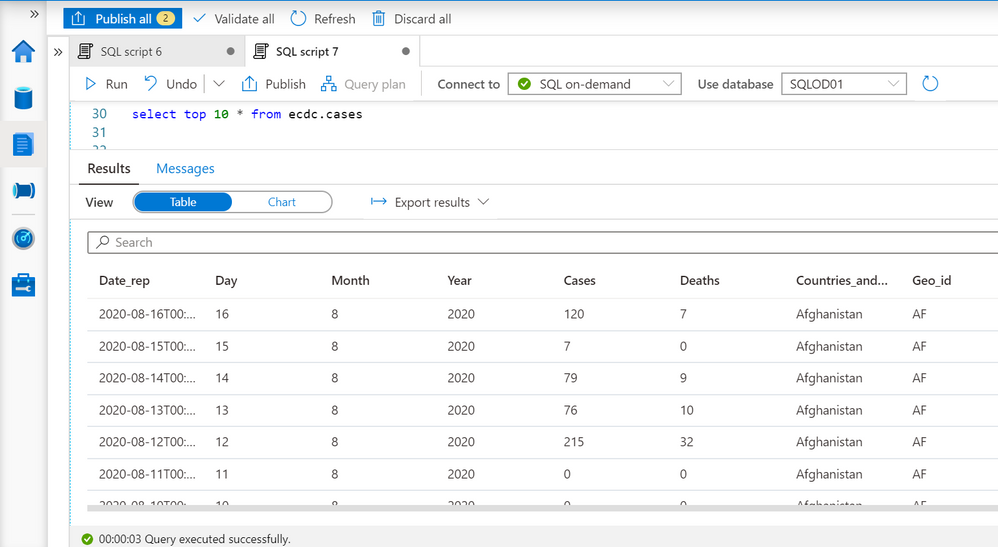
The query is executed via Synapse Studio, but I can use any other tool like PowerBI, Excel, SSMS, ADS to query my external table.
Conclusion
External tables in Azure Synapse SQL query engine represent logical relational adapter created on top of externally stored files that can be used by any application that use TSQL to query data. This way you can build a Logical Data Warehouse on top of your data stored in Azure Data Lake without need to load data in standard relational table. Azure Synapse SQL Logical Data Warehouse enables you to represent external data sources as standard tables and let you analytic/reporting applications access any data without need to know where the data is place and hot to parse the data structure.
You can find more details about the external tables in Azure Synapse documentation.
by Scott Muniz | Aug 17, 2020 | Uncategorized
This article is contributed. See the original author and article here.
Hi, Jonas here!
Or as we say in the north of Germany: “Moin Moin!”
I am a Customer Engineer based in Germany and a while back I was asked about the software inventory (SINV) throttling process and if it can be adjusted to perform a little faster without any noticeable impact to the user experience.
Yes, I know, not the newest ConfigMgr/MECM feature and if you had the same question in the past, you might find several resources talking about disabling the throttling mechanism completely, so my first answer to the above question was: “No, not possible!”.
But the customer let not go and asked about a timeout value he found in the InventoryAgent.log and if at least that could be adjusted to improve the process.
So, I started digging and this blog post is the summary of my findings.
TL;DR
Software Inventory (SINV) can be slow on some machines and might not finish at all, because of the internal throttling behavior of SINV, which was implemented to keep the system as responsive as possible for the user using the system.
The throttling mechanism can be adjusted to fit the needs of your environment and this blog post is intended to point you in the right direction.
You will find a link to a git repository at the bottom with some resources I am explaining in the “PowerShell to the help” section.
If you do not intent to change anything about SINV or not using it at all, you will at least learn how throttling the SINV process works ;)
How the ConfigMgr Client is throttling SINV:
Software Inventory is using three different tasks to perform the software inventory scan.
One task to look for files, one task to grab files if activated in client settings and one task to put the data in WMI.
Each task has its own throttling profile which is stored in the default client policy.
A profile ID for such task like “{C0ED66AD-8194-49fd-9826-D0DD38AB7DAA}” is what you normally see in the InventoryAgent.log during SINV scans.
Each profile has several different throttling thresholds which all define when throttling should be activated or deactivated.
The three WMI instances look like this:
(with the default values)
Task profile 1:
instance of CCM_Service_ResourceProfileInformation
{
// File System Collection Task – processing SINV WMI instances
ProfileID = “{C0ED66AD-8194-49fd-9826-D0DD38AB7DAA}”;
// BatchSize not used
ControlUsage = true;
OnAC_PercentageOfTimeoutToWait = 50;
OnAC_EvaluationPeriodLengthSec = 60;
OnAC_IdlePeriodLengthSec = 120;
OnAC_MinIdleDiskPercentage = 0;
OnAC_ConsiderUserInputAsActivity = true;
OnBattery_BehaviorType = 1;
OnLowBattery_BehaviorType = 0;
};
Task profile 2:
instance of CCM_Service_ResourceProfileInformation
{
// File Collection Task – processing FILECOLL WMI instances
ProfileID = “{CE22C5BA-165D-4b93-BC73-926CE1BD9279}”;
// BatchSize not used
ControlUsage = true;
OnAC_PercentageOfTimeoutToWait = 50;
OnAC_EvaluationPeriodLengthSec = 60;
OnAC_IdlePeriodLengthSec = 120;
OnAC_MinIdleDiskPercentage = 0;
OnAC_ConsiderUserInputAsActivity = true;
OnBattery_BehaviorType = 1;
OnLowBattery_BehaviorType = 0;
};
Task profile 3:
instance of CCM_Service_ResourceProfileInformation
{
// File System Query Task – actual filesystem crawl for SINV/FILECOLL
ProfileID = “{58E2FE09-07BB-4adb-8A93-E49C5BF2301F}”;
ControlUsage = true;
BatchSize = 100;
OnAC_PercentageOfTimeoutToWait = 50;
OnAC_EvaluationPeriodLengthSec = 60;
OnAC_IdlePeriodLengthSec = 120;
OnAC_MinIdleDiskPercentage = 30;
OnAC_ConsiderUserInputAsActivity = true;
OnBattery_BehaviorType = 1;
OnLowBattery_BehaviorType = 0;
};
Where to find the task profiles:
Each task profile can be found in the default client policy and the class “CCM_Service_ResourceProfileInformation”.
The default SINV profile policies will be imported during ConfigMgr Client installation and they are not part of the policies from your Site.
Default class location:
ROOTccmPolicyDefaultMachineRequestedConfig:CCM_Service_ResourceProfileInformation
Actual settings location:
ROOTccmPolicyMachineActualConfig:CCM_Service_ResourceProfileInformation
What all those settings mean:
I did several tests with each setting and ask several colleagues but wasn’t able to find a clear description of each setting. So, the list is the result of my testing process and might not be 100% accurate. Please keep that in mind if you want to try out some settings for yourself.
|
Setting
|
Description
|
|
ControlUsage = true
|
True = throttling active
False = throttling disabled
That’s what you normally find online as a solution to speed up slow software inventory processing. But without throttling, the user might experience a terribly slow machine.
|
|
BatchSize = 100
|
Size of operations per Interaction.
Does not seem to have an effect if the disk is not idle and throttling is active.
|
|
OnAC_PercentageOfTimeoutToWait = 50
|
From what I saw during my tests it looks like this value is the percentage of the overall timeout per task. If the percentage is reached, the system seems to check if throttling is still need or needs to be applied.
In the InventoryAgent.log you see entries similar to this:
Timeout for: C0ED66AD-8194-49fd-9826-D0DD38AB7DAA = 7200 sec
Timeout for: 58E2FE09-07BB-4adb-8A93-E49C5BF2301F = 1440 sec
So, 50% of 7200 seconds is 3600 seconds after which the throttling would be evaluated again. But I am not 100% sure about that.
|
|
OnAC_IdlePeriodLengthSec = 120
|
Seconds the disk needs to be at 30% usage before throttling will be cancelled and SINV runs at full speed again.
The 30% value comes from the „OnAC_MinIdleDiskPercentage = 30“ setting. (See next row)
|
|
OnAC_MinIdleDiskPercentage = 30
|
See description in row above.
|
|
OnAC_ConsiderUserInputAsActivity = true
|
True means, if the user is working on the system software inventory should be throttled. If set to false user input will not be evaluated and software inventory will not be throttled based on that.
|
|
OnBattery_BehaviorType = 1
|
IMPORTANT:
This value needs to be the same for all three task profiles otherwise software inventory might not work.
I am not 100% sure, but it looks like a value of 1 means that the system will use the same throttling behavior if the system runs on battery as if it would be running on AC.
|
|
OnLowBattery_BehaviorType = 0
|
IMPORTANT:
This value needs to be the same for all three task profiles otherwise software inventory might not work.
I am not 100% sure, but it looks like a value of 0 means that the system will not scan at all on low battery.
|
|
Settings without values
|
There are more settings in each task profile, but those are not set, and I haven’t tested anything with them.
List of settings without values:
OnBattery_ConsiderUserInputAsActivity
OnBattery_EvaluationPeriodLengthSec
OnBattery_IdlePeriodLengthSec
OnBattery_MinIdleDiskPercentage
OnBattery_PercentageOfTimeoutToWait
OnLowBattery_BehaviorType
OnLowBattery_ConsiderUserInputAsActivity
OnLowBattery_EvaluationPeriodLengthSec
OnLowBattery_IdlePeriodLengthSec
OnLowBattery_MinIdleDiskPercentage
OnLowBattery_PercentageOfTimeoutToWait
|
Test setup:
After several tests I found the task: „File System Query Task – actual filesystem crawl for SINV/FILECOLL“ with ProfileID “{58E2FE09-07BB-4adb-8A93-E49C5BF2301F}” to be the one with the most impact on overall speed and focused my testing on that task.
My goal was to find the most promising values to get an idea how to use those in a production environment.
I created two folders, one with 50 and one with 180 exe files in it and used those in my software inventory client setting.
(But you might need much more files and folders to see an effect during you tests. Ideally use a system with slow SINV processing described in section “How to find the correct values for your environment”.
I then changed different values for that profile and tested how long the scan process takes. Since I was only testing with such small number of files, I did not saw any decrease on machine performance, but If you like to test that for yourself, you might need to monitor system performance to avoid slowing the system down.
Since that’s the whole point of throttling, to keep the system as performant as possible to not annoy the user working on that machine during a SINV scan.
Values I used and test results:
(See description of settings in list above)
|
Setting
|
Overall
scan time
|
Description
|
|
Default (no changes)
|
~500-600 seconds
|
Both folders were scanned in about 500-600 seconds. The folder with just 50 files was scanned in just 3 seconds and the rest of the time was used for the second folder with 180 files.
The overall time can be even longer if DiskUsage is above the threshold (see table above) and throttling is used more often.
|
|
ControlUsage = false
|
~4 seconds
|
With throttling disabled both folders have been scanned in around 4 seconds.
Which is nice, but the machine might be not as responsive as the user working with it would like it to be.
|
|
BatchSize = 200
(default = 100)
|
~4 seconds
|
Both folders were scanned in about 4 seconds and the reason seems to be the lower file count than the batch size of 200.
Software inventory will keep the throttling (on or off) for each batch. So
The overall time can be much longer if DiskUsage is above the threshold (see table above).
|
|
OnAC_ConsiderUserInputAsActivity = FALSE
(default = true)
|
~200 seconds
|
If user input is ignored, the scan will still be throttled, but it is much faster than with the default settings.
The overall time can be much longer if DiskUsage is above the threshold (see table above).
|
|
OnAC_ConsiderUserInputAsActivity = FALSE
(default = true)
OnAC_PercentageOfTimeoutToWait = 4
(default = 50)
|
~65 seconds
|
If user input is ignored and the percentage of the timeout is set to a small value, the overall process is much faster.,
The overall time can be much longer if DiskUsage is above the threshold (see table above).
|
|
OnAC_IdlePeriodLengthSec = 100
(default = 120)
|
~6 – 300 seconds
|
If we decrease the IdlePeriodLengthSec and let the DiskUsage be checked more frequently, the overall speed can be vary between 6 and 300 seconds depending on the actual DiskUsage value at the moment of measurement.
|
How to find the correct values for your environment:
Before changing any setting described above, you should definitely review your client settings and all the paths you set for SINV. Because I have seen how several customers have scanned paths that are not needed or the collected data was not used at all. So, disabling SINV or a simple exclusion of some path can be enough.
For example, if you are scanning a path for a well-known managed application, you might have data about the app already, either via hardware inventory or via application deployment status and another dataset via SINV might not be needed.
Simply place a file called: “Skpswi.dat” (with no content in it) in the folder you want to exclude.
You should also check all systems with missing or old SINV data for errors before changing the throttling profiles and maybe making things worse.
Use the following collection query to find systems with old (30 days) or no SINV data for further analysis:
|
select SMS_R_SYSTEM.ResourceID, SMS_R_SYSTEM.ResourceType, SMS_R_SYSTEM.Name, SMS_R_SYSTEM.SMSUniqueIdentifier,SMS_R_SYSTEM.ResourceDomainORWorkgroup, SMS_R_SYSTEM.Client from SMS_R_System where SMS_R_SYSTEM.ResourceID not in (select SMS_G_System_LastSoftwareScan.ResourceID from SMS_G_System_LastSoftwareScan where SMS_G_System_LastSoftwareScan.LastScanDate >= DateAdd(dd,-30,GetDate()))
|
If you still need to speed up the SINV process, you should pick some systems you can test on (ideally from the collection query above) and test with the following settings by using the “Set-SINVThrottlingPolicy.ps1” script you will find in the repository below.
- OnAC_ConsiderUserInputAsActivity
- OnAC_PercentageOfTimeoutToWait
- OnAC_IdlePeriodLengthSec
Test different values for the settings to find the optimal configuration and to find a good balance between speed and usability of the system so that you receive no complaints about system performance during SINV scans from your end users.
PowerShell to the help:
The following repository: LINK contains five files to help you with testing and to implement the solution as a ConfigMgr baseline if you like.
IMPORTANT: The provided values in the script might not be the best choice for your environment and are only meant as an example!
File #1: Set-SINVThrottlingPolicy.ps1
The script is intended to run as part of a ConfigMgr compliance setting and is designed as a detection or remediation script depending on the value of the “$Remediate” variable.
For testing purposes simply run the script locally on the system in PowerShell ISE opened as an admin.
You only need to adjust the following section to your needs:
|
#region variables
[bool]$Remediate = $false
#endregion
#region CUSTOM Settings Profile {58E2FE09-07BB-4adb-8A93-E49C5BF2301F} for file system query task – actual filesystem crawl for SINV/FILECOLL
# Custom settings
[hashtable]$SINVCUSTOMProfileSettings = [ordered]@{
BatchSize = 100;
OnAC_PercentageOfTimeoutToWait = 10;
OnAC_EvaluationPeriodLengthSec = 20;
OnAC_IdlePeriodLengthSec = 30;
OnAC_MinIdleDiskPercentage = 30;
OnAC_ConsiderUserInputAsActivity = $false;
}
#endregion
|
Change the values of $SINVCUSTOMProfileSettings to the values you prefer (see description in section: “Values I used and test results”) and set the $remediate variable as needed.
$Remediate = $false
The script will not set the custom policy and will simply output true or false if the desired settings are set or not. (can be used as detection script in a ConfigMgr compliance item)
$Remediate = $true
The script will set the custom policy if it does not exist or will change the values an existing policy to what you have defined in $SINVCUSTOMProfileSettings.
(can be used as remediation script in a ConfigMgr compliance item)
File #2: Delete-SINVThrottlingPolicy.ps1
The script will either detect the custom SINV policy or delete the policy depending on the value of the variable $Remediate and the script is also designed to run as a ConfigMgr compliance item.
File #3: CI-SetSINVThrottlingPolicy.cab
File #4: CI-DeleteSINVThrottlingPolicy.cab
Both files contain one compliance item which can be imported into ConfigMgr and which then can be used in a compliance baseline to check, set or delete the policy on multiple machines.
They contain the scripts described above.
File #5: SINV-Throttling-Profile.filterset
One of my favorite troubleshooting tools is the: “Support Center for Configuration Manager” which is part of the ConfigMgr installation since version 1810.
The documentation can be found here: LINK
I added a “filterset” file: “SINV-Throttling-Profile.filterset” to the repository which can be imported into “Support Center Log File Viewer“, to then filter SINV related events and to make testing the throttling settings much easier.
Open “InventoryAgent.log“, “FileSystemFile.log” and “PolicyAgentProvider.log”
at once with “Support Center Log File Viewer” and import the filterset file in the “Advanced filter” menu via “Load filters”. You are now able to validate the changes made by the script above by triggering software inventory from the ConfigMgr client applet.
Any change on the policy with the script or via the configuration items should be visible in “PolicyAgentProvider.log” with the following log entry:
— [1] __InstanceModificationEvent settings change on object CCM_Service_ResourceProfileInformation.ProfileID=”{58E2FE09-07BB-4adb-8A93-E49C5BF2301F}”.
Conclusion:
It is possible to speed up the SINV process in ConfigMgr without disabling SINV throttling completely but cleaning up the SINV client settings should be the first priority.
Good testing with the tools I provided is also a necessary step to not make the problem worse.
Have fun with the solution and let me know what you think about it.
Best regards
Jonas Ohmsen
Microsoft Germany
Disclaimer:
This posting is provided “AS IS” with no warranties, and confers no rights
Resources:
Download the whole solution or clone the repository here:
https://github.com/jonasatgit/scriptrepo/tree/master/SINV
Support Center for Configuration Manager:
https://docs.microsoft.com/en-us/mem/configmgr/core/support/support-center


Recent Comments